I currently use a VM running Ubuntu 16.04 to build PX4. But I always planned to get rid of it.
I'm sure a more native Windows support makes a ton of sense to be supported for community and commercial users/developers. It should be easy to use which means something like a one click setup.exe or even better in my opinion unpack the portable zip and run solution.
My current state is (and I invested a bulk of time already into it):
- Original Toolchain I first tested the toolchain offered on https://dev.px4.io/en/setup/dev_env_windows.html which is by the way also still used partly by ardupilot I think. It used to work (quite a long time ago) and is to my knowledge broken for any build newer than 1 year ago.
- New MinGW Toolchain I took the above toolchain which is based on MinGW apart and built my own one which works for any ARM target builds. It has very similar compnents like the "original" Toolchain but everything sorted in a nice folder structure, path assembled by a batch file, all software updated to the newest version I found working and all of it is portable in a (~3GB) folder. I wrote documentation for it and can share it with anyone interested without support.
- Cygwin SITL Support Toolchain I realized the SITL build is far from working in the MinGW environment because there is no support for all the necessary POSIX features of all the main_app thread handling. So I switched to Cygwin to enable that. Just last weekend I managed to build SITL and jMAVsim on cygwin using some uncontnrtributable hacks (see https://github.com/PX4/Firmware/compare/master...MaEtUgR:cygwin-test). I still need to renice these hacks with useful defines.
- Cygwin ARM build support I wanted to build PX4 for ARM in the same cygwin environment but unfortunately the GCC ARM compiler available on https://launchpad.net/gcc-arm-embedded is not compatible with cygwin paths so I'm trying to find a workaround like e.g. https://bugs.launchpad.net/gcc-arm-embedded/+bug/1282943
So bare with me until I have something publishable... any help is appreciated.
I'm writing this issue because I can see all these Windows related issues poping up saying the "original" Toolchain does not work. Likely because it's offered in the dev guide here: https://dev.px4.io/en/setup/dev_env.html with a clear message that it's currently not officially supported.
References: #8239 , #6332 , #6668 , #6698
FYI @dagar @zjjyyang @QingZe0101 @potato77 @mhkabir @zimoqingfeng @newmsg @LorenzMeier
EDIT: Here's the pr with Cygwin SITL and ARM NuttX building: https://github.com/PX4/Firmware/pull/8407
EDIT2: Follow the thread until the end, I made a working Cygwin based toolchain for SITL jMAVsim and ARM builds with an easy to use installer now. Currently I'm documenting and it is already available for testing.
 MaEtUgR
All 62 comments
Whichever way we go it needs CI support to continue working. Appveyor has MinGW, MSYS, Cygwin preinstalled. https://www.appveyor.com/docs/build-environment/
At a certain point it might be worth considering porting enough of the platform layer to std c++11 (threading mostly) and building with visual studio. Development on windows can actually be pretty good with the right tools.
 dagar
on 26 Nov 2017
dagar
on 26 Nov 2017
FWIW I tried the @MaEtUgR MinGW solution and it worked great out of the box. I particularly liked that it is fully independent of the rest of my windows installation and didn't do anything to screw up my path. BUT I still use the VM solution because:
- 3GB is a huge amount to download
- No simulator
- Using Bash on Windows allows me to build ROM without that huge memory cost. Only limit was again no simulator and automatic build+upload failed.
- To some extent it is a "big black box". Wasn't clear how it could be kept updated, maintained and extended by the team.
I think simulator is required. I like the idea of porting more to std C++11. System should have turnkey installation. DroneCore should integrate seamlessly.
 hamishwillee
on 26 Nov 2017
hamishwillee
on 26 Nov 2017
@hamishwillee Thanks for your testing.
- your VM took more than 3GB to download
- Simulator is on the way (like I wrote) and this is the reson why I'm currently working in am VM as well
- Never tried but I personally don't like the idea so I will only start to use it as soon as someone else prepares the initial barrier or convinces me. Main issue I see is support for graphics (it's totally ** according to my research).
- Compared to the "original" toolchain I at least documented. Basically every folder in the "Toolchain" only consisted of original binaries directly downloaded from the site which was documented including the version. Also for the Cygwin toolchain it currently looks like there is a lot less external sources needed because the package manager already provides a lot of basic tools. So maintenance should get a lot easier. Also as soon as I can use it for my daily work I will test and maintain all the time.
I fully agree about porting to the standard, that would be the real solution. But this will not be a small project, don't underestimate the complexity and time it will take. Which means I will continue with my attempts nevertheless because they currently look promising to me.
MaEtUgR
on 27 Nov 2017
@MaEtUgR All sounds good to me. If you get a simulator running on Windows with everything else, in a system that can be updated/improved by others, you will become my most popular person (at least for a week or two) :-)
support for graphics (it's totally ** according to my research).
Yes, mine too.
hamishwillee
on 28 Nov 2017
@MaEtUgR , I would like to try your 'New MinGW Toolchain' solution. Please let me know how to get started.
 AbhishekGS
on 29 Nov 2017
AbhishekGS
on 29 Nov 2017
@AbhishekGS I uploaded it sometime before, I'll look for it and send you the link but you should know that it only ever compiled ARM targets and is not officially supported at all.
MaEtUgR
on 29 Nov 2017
Update: Cygwin SITL jMAVsim build https://github.com/PX4/Firmware/pull/8407
MaEtUgR
on 4 Dec 2017
Yet another option to consider. https://blogs.msdn.microsoft.com/vcblog/2017/04/11/linux-development-with-c-in-visual-studio/
Visual studio is the "front end" editor, debugger, etc, and can build on a remote backend. That could be linux via windows bash, docker, VM, or actual machine.
I have no hands on experience with this yet, but I believe it's likely to be the best of both worlds.
dagar
on 4 Dec 2017
Could be wrong, but I don't see the "building" part as the challenge - after all you can build on bash for windows. The problem is getting Simulation working (effectively) on windows - not sure this solves that.
hamishwillee
on 5 Dec 2017
That's certainly a big part of it, but my feeling is that enabling effective development on Windows is going to need more than that. Like leveraging some of the strengths of working on Windows, rather than being confined to a slow somewhat crippled box (cygwin).
Otherwise why don't we just figure out a Linux virtualization solution with good 3D (for gazebo) and ship a giant preconfigured Ubuntu VM?
dagar
on 5 Dec 2017
You say slow and crippled, but the simulator is running about 1/2 again better FPS in cygwin than I was getting on VM. More important, it has not gone into the fails I get on VM (yet), probably due to some sorts of timing issues. If this can do gazebo/ARM it is already more effective for me than the VM.
NOw I agree that a real native build would be nice, but I'd take this today and that another day.
hamishwillee
on 5 Dec 2017
@hamishwillee I totally agree with you. The VM also has by far more disadvantages than a UNIX environment layer for me. That's why I'm actually doing this at all.
@dagar I'm already working in a "figured out giant Ubuntu VMWare solution with good 3D (for gazebo)" and I don't really like it, I would switch if there's any other possibility with less hard disk, RAM and graphics processing overhead. Additionally shipping it preconfigured would be a nightmare. We can still go "more native" after my attempts but it's already a big step to be able to actually work on Windows directly with simulation and ARM build.
MaEtUgR
on 5 Dec 2017

Good news: After investing some hours (to say the least) today debugging the cygwin toolchain build I finally have a succeeding ARM build (px4fmu-v2_default) with the following "code" changes:
https://github.com/PX4/Firmware/compare/master...MaEtUgR:cygwin-arm-test
and of course fiddling with the environment and changing the toolchain folder.
One bummer currently stays: I wasn't able to verify the upload working correctly. This is hopefully not a big problem because it works already natively with Python for Windows but the goal is to have it in the same environment such that make ... upload will do the job. I'm already on it.
Next step will again be to get it into a mergable state and preparing the Toolchain for upload.
MaEtUgR
on 8 Dec 2017
@dagar Information that might also be useful for Linux/Mac builds and general improvement:
- CMake 3.6.2 works fine but produces multiple deprecated warnings for some macros that are no longer encouraged to be used. I downgraded it in the Windows toolchain for now such that they don't show.
- ARM GCC 6-2017-q2-update (https://developer.arm.com/open-source/gnu-toolchain/gnu-rm/downloads) compiles but with warnings also in NuttX code (probably new case detection features) and the global
-Werrorcompile option brings them to error (I checked and it runs through without the flag). Downgraded to 5-2016-q3-update for the current Windows toolchain.
MaEtUgR
on 9 Dec 2017
I can get rid of the cmake deprecated warnings soon.
For the arm gcc version we should do a pass to get everyone in sync with the latest. https://github.com/PX4/containers/blob/master/docker/px4-dev/Dockerfile_nuttx#L28
dagar
on 9 Dec 2017
@MaEtUgR Great! Not being able to do upload is IMO a "minor bug". In terms of functionality, how far are you planning on going before we say this is good enough for a release? (IMO I've love gazebo support, but I'd rather have an interim release than wait months for it)
hamishwillee
on 11 Dec 2017
For the arm gcc version we should do a pass to get everyone in sync with the latest. https://github.com/PX4/containers/blob/master/docker/px4-dev/Dockerfile_nuttx#L28
@dagar can we include the devguide scripts in that. While we're at it would be good to put the toolchain somewhere less irritating for users than their home dir.
hamishwillee
on 11 Dec 2017
Is a difficult problem

 angelgph
on 1 Jan 2018
angelgph
on 1 Jan 2018
@hamishwillee Sorry for absence delay. I just updated and want to get this pr merged such that master compiles in the Cygwin toolchain (note that there is a ccache problem when using my last upload of the toolchain which can be temporarily resolved by removing ccache from the path). Then I do a toolchain release with documentation (including how to reproduce all of it) and we can build on top of that.
@angelgph This looks pretty clearly like a permission problem. Which means you either extract the entire toolchain to a different directory where permissions are given anyways (recommended) or you start to either run the environment with higher privileges (which I don't recommend as a solution but only for short term testing to make sure to find cause) or adjusting the folder permissions of the toolchain such that it works. I didn't have that before so I don't have any pre-baked guide, sorry.
MaEtUgR
on 4 Jan 2018
@hamishwillee Sorry for absence delay. I just updated and want to get this pr merged such that master compiles in the Cygwin toolchain (note that there is a ccache problem when using my last upload of the toolchain which can be temporarily resolved by removing ccache from the path). Then I do a toolchain release with documentation (including how to reproduce all of it) and we can build on top of that.
No worries! I agree with @dagar that we need this in CI first before we do documentation. I suspect it will break over time, and we will harden it.
hamishwillee
on 4 Jan 2018
@hamishwillee Apparently... It happened faster than I thought: https://github.com/PX4/Firmware/commit/1f63d85869b3495f3f66a3300b365c57469f1020 breaks the nuttx cygwin build again which was working perfectly fine when #8407 was merged. I didn't look into why yet however I had a look at how to set up Appveyor CI for the PX4 repo. It natively supports cygwin64, I just have to come up with a script setting up the necessary environment for the build. It seems that the basic slow plan is free for open-source projects so we can start with that and see if it proves useful.
Here is my first experiment (nothing special!): https://ci.appveyor.com/project/MaEtUgR/firmware
MaEtUgR
on 7 Jan 2018
That's mostly my fault. Let me know if you have some time this week and we can sync up to fix the Firmware build immediately, then look at Appveyor and possibly automating or sharing the PX4 Windows Toolchain update.
dagar
on 7 Jan 2018
@dagar Here is the newest version of the toolchain with the last commit on which the NuttX build is working checked out: https://drive.google.com/file/d/17yJFyC65v2gg3qaIYz4G6HxuSQWbAAlY/view?usp=sharing
MaEtUgR
on 8 Jan 2018
As an update: I spent some time to find out what the current problem for NuttX builds after https://github.com/PX4/Firmware/commit/1f63d85869b3495f3f66a3300b365c57469f1020 is:
NuttX/nuttx/arch/arm/src/chip is a symbolic link which can not be passed to the arm-g++ because it can not resolve symbolic cygwin links. Nutt himslef made the build of NuttX cygwin compatible with resolution and conversion of the paths in every boards makefile like https://github.com/PX4/Firmware/pull/8573/files#diff-c9f81246b834bc9ef86df645084114c5L51 but these were all "cleaned up" now.
Currently I'm trying to find where these include paths of /chip and so on are now generated to add back the conversion for which I created a cmake macro before anyways (see https://github.com/PX4/Firmware/pull/8407/commits/712d5a2a92a096ef31f8ba784beaa62fce0a7583#diff-c91593decbb466c77be595e5f4f4c876R44).
EDIT: found: https://github.com/PX4/Firmware/blob/master/platforms/nuttx/cmake/px4_impl_os.cmake#L180
EDIT2: dead end but I won't give up, thanks @dagar for the new hint
MaEtUgR
on 19 Jan 2018
The copydir helpers for windows can be restored here if needed. https://github.com/PX4/Firmware/blob/master/platforms/nuttx/nuttx-configs/Make.defs.in
It's missing the windows sections. https://github.com/PX4-NuttX/nuttx/blob/b18053574bf41712cef93e31bf178518f451a350/configs/stm32f4discovery/scripts/Make.defs#L42-L56
dagar
on 19 Jan 2018
Update: #8737 repaired the NuttX builds under cygwin. I'm looking at auto generating an msi installer file for deployement of the toolcahin. It will probably need another place to host than GDrive.
MaEtUgR
on 21 Jan 2018
I spent time on the installation this weekend and I can now automatically generate convenient .msi installer files to install the Toolchain using the WiX Toolset and a batch script. I'm currently looking at some details to allow smooth upgrading whenever a new version installer is executed before I release the first installer.
Any comments on where to host the file to link it in the guide?
MaEtUgR
on 29 Jan 2018
@dagar Do you have convenient storage for the new windows toolchain installer?
hamishwillee
on 30 Jan 2018
Thank you ver much!
angelgph
on 30 Jan 2018
@hamishwillee yes, we can host it on S3. The CI system (ci.px4.io) could be the one to assemble and post it.
dagar
on 6 Feb 2018
As an update: I worked really hard on this one. I have a folder (~49k files, 2.5GB, ~900MB compressed) which needs to be extracted and a script that clones the repo automatically. I have a WiX setup build script which harvests all the files automatically, generates a ~900MB msi windows installer. The installer has UI for switching directory, update to newer versions and so on.
But my current problem ist that after the folder gets extracted by the installer the build doesn't run anymore because the cygwin symlinks are broken. This drove me nuts already and I tried to solve it until 00:30 yesterday... The entire folder if checked by e.g. WinMerge or SyncBack or any other comparison softwares is reported to be exactly the same, still all the symlink files are somehow broken. And you can somehow see it from the windows explorer that they are not the same because one is a "file" and the other a "system file"...
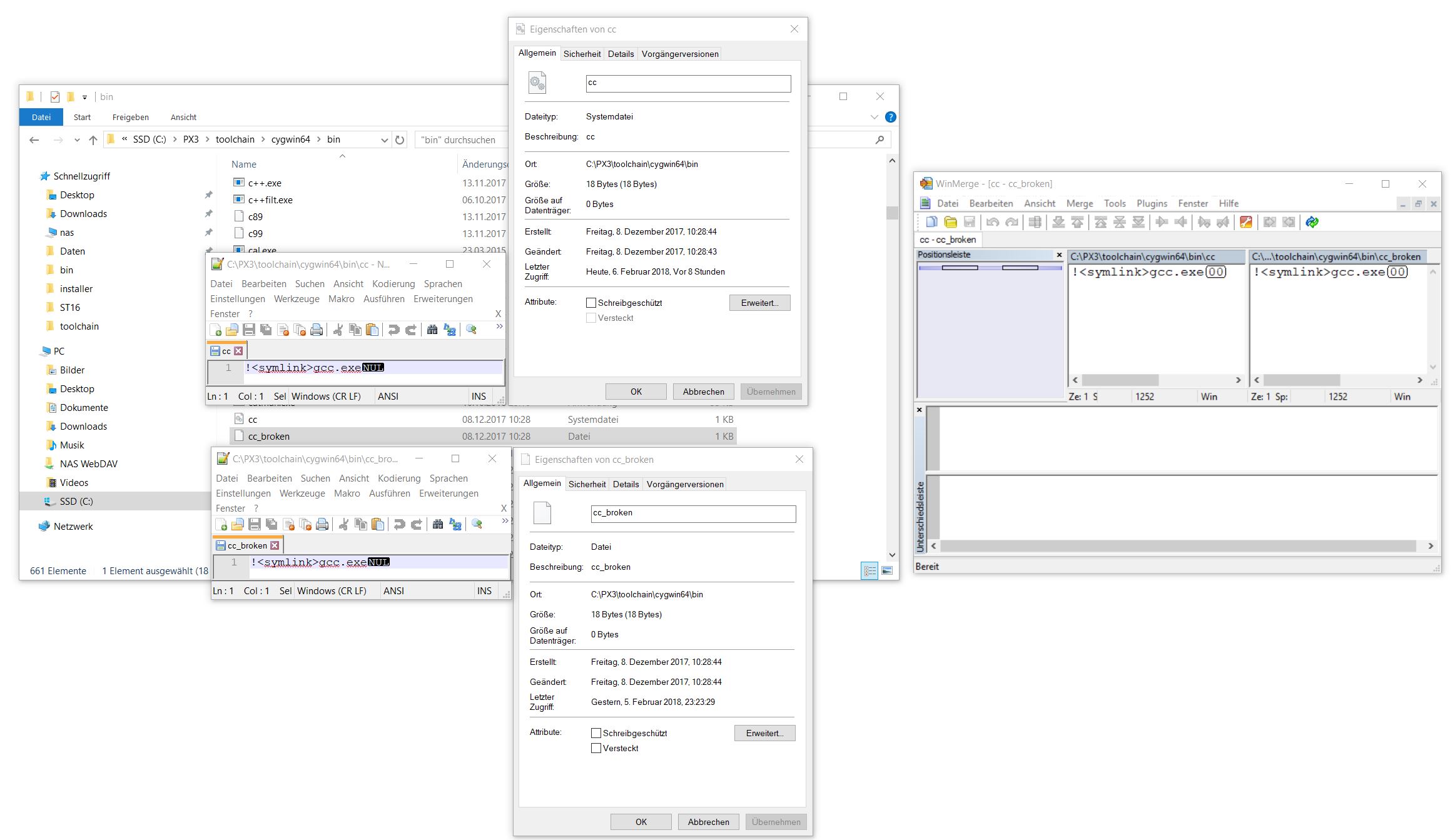
If anyone knows how to solve that I'd appreciate any help.
MaEtUgR
on 6 Feb 2018
@dagar Any ideas on why cygwin links broken in comment above .... https://github.com/PX4/Firmware/issues/8357#issuecomment-363491536
hamishwillee
on 8 Feb 2018
How did you compress it? Symlinks are weird in zip files, not to mention regular Windows.
dagar
on 8 Feb 2018
Thanks for your comments, I found a workaround for the symbolic links problem: https://stackoverflow.com/a/36816238/6326048
I basically backup all symlinks with a shellscript autoamtically ran before the installer is generated and restore them during installation. The clue is that in a cygwin produced tar archive the links "survive". I have the working scripts right now, just need to embed them directly into the installation procedure and test it again.
MaEtUgR
on 19 Feb 2018
Well done!
hamishwillee
on 23 Feb 2018
Finally I have a setup routine which I feel comfortable to share:
https://drive.google.com/open?id=1d0iSdjnCKC3N6s13WJyXvEppXQN2t6RI
There are known issues like:
- No desktop shortcuts yet
- When you uninstall your home folder with the code stays (which is intended) but also a temp folder by cygwin (not intended)
- NuttX upload to a vehicle still fails with current master (because of cygwin COM port renaming)
- The sky in the simulation is black with current master (unkown java texture loading problem)
- git gui has somehow a different configuration than the command-line git, it's only affecting git gui (git is from cygwin, git gui from git for windows)
But I don't want to keep you waiting. The simulation should be functional, NuttX builds work as well and the binary should be flashable using the uploader python script with normal python for windows. You can use QGroundControl for Windows to connect to the simulated drone.
MaEtUgR
on 23 Feb 2018
@dagar I developed the setup creation workflow in a way that the folder C:\PX4\ on my machine (or any windows based CI server) not only contains the readily usable toolchain but also the setup creator (WiX) plus scripts such that when you start a batch it produces the .msi setup file completely automatic. The created setup file then of course doesn't contain the setup generation stuff and the local home folder with custom configuration and repo anymore.
MaEtUgR
on 23 Feb 2018
@MaEtUgR @hamishwillee Hey, do you have any solved for this problem? I can't build with the function "make px4fmu-v2_default" I had same problem. Can you help me?
 gadavidd
on 10 Apr 2018
gadavidd
on 10 Apr 2018
I assume you are trying to build on windows? That toolchain is pretty much broken - recommend you build on Linux in a VM for now. @MaEtUgR is working on a Cygwin based replacement for Windows, which is nearly ready.
hamishwillee
on 11 Apr 2018
@hamishwillee Yes, Unfortunately! I have the same error 1. Can you build firmware with the bash? I will try to build gain with the GUI Bash for windows 8 this night, do you have any tip? I'm only trying to use pixhawk with matlab and then compile a code . Thanks for help
gadavidd
on 11 Apr 2018
Yes it is possible to build firmware with bash for windows - but you can't use the upload command to automatically upload to the vehicle.
The script to setup the environment linked here has not been tested for a long time: https://dev.px4.io/en/setup/dev_env_windows.html#bash-on-windows-new
I suspect it would fail because it uses and old version of the compiler.
Once again, the BEST approach is to use Linux in a virtual machine.
hamishwillee
on 11 Apr 2018
Yes, you are right! I could not execute the script as soon as I start the program date. I wanted to avoid working with VM even though I know little now, but I do not think I'll have any other choice. My error screen is similar to what you presented in another comment, I thought about installing Jinja2 and testing again.
I didn't understand one things, Do you only use VM to build, Then it will no more necessary
Here is the error 1:


It would be of interest if somehow you could only include a directory already built, maybe this problem will be solved
gadavidd
on 11 Apr 2018
@gadavidd Windows isn't really supported - though it will be in future.
Personally I use a VM for building - it is fine for that. The only problem with the VM is that if you start wanting to do simulation you will find gazebo problematically slow.
hamishwillee
on 11 Apr 2018
FYI, I tried the instructions in Ubuntu Bash for Windows as documented here: https://dev.px4.io/en/setup/dev_env_windows.html#bash-on-windows-new
They work for fmuv2 and fmu_v4 out of the box :-). Note, they ONLY build the file, they can't upload it. Also SIM isn't supported via the bash.
hamishwillee
on 11 Apr 2018
@gadavidd The px4fmu-v2_default target works fine for me with my cygwin based Windows toolchain 0.1.0 except that it currently produces binaries that exceed the flash size of the actual chip. Which is a problem of master currently exploring the limit and compiler version dependent optimization resulting in just exceeding and just not exceeding the maximum size. And the automatic upload doesn't work yet. px4fmu-v4_default builds fine.
I still have to post instructions in the developer guide with the new download link, how to use, how to reproduce and so on. I'll continue with my work on that subject.
To your error: if you installed cygwin and everything by yourself then jinja missing is only the first of a lot of problems you'll face. I suggest you either use my 0.1.0 installer (it doesn't screw your system and only changes the folder you install to) or wait until I wrote down everything to recreate the environment.
MaEtUgR
on 11 Apr 2018
Hey, before test in VM or cygwin I tried to install Jinja2 python, then This worked. But the process stops on that screen and does not show fault or error, just for lacking little. Did you guys have that problem, too? I tried the CTRL+C starts once again, but not solved. @MaEtUgR I will tried the install your project.
@hamishwillee I only avoid to use the VM, because I don't have any experience.

gadavidd
on 12 Apr 2018
@gadavidd FYI I have just verified updated bash on windows instructions that show it works for both building firmware and running jMAVSim
hamishwillee
on 13 Apr 2018
@gadavidd No I didn't have this before, the only thing I saw was cmake repeating over and over again but that was on linux and the fix if I remember correctly was make distclean.
MaEtUgR
on 16 Apr 2018
hey, thanks! @ it worked! Can you help one more thing? I only need a firmware Folder built with the command "make px4fmu-v2_default" for Windows. I only need it to finish my word, can you send for me?
gadavidd
on 19 Apr 2018
@MaEtUgR Just ran this again. Note that JMAVSim sky is black. Also that this uses an older compiler.
Any movement on this?
hamishwillee
on 1 May 2018
No sorry, I was busy with flying wings in the increasingly warm weather. I think documentation on what the toolchain consists of is most important for further collaboration, I should create a list of components as a draft first an then fill it up with step by step instructions. It will also make it easy for CI and creating new installations on a server with e.g. new compilers and fixed things.
@gadavidd I don't understand your request sorry.
MaEtUgR
on 2 May 2018
Thanks @MaEtUgR . I agree with your "next steps". You could test your new instructions in part by updating to the new compiler (this uses the old one).
I appreciate you have many demands on your time. Do you have any idea when you might start work on this again?
Not sure what we should call a good trigger for making this an "official" Windows toolchain. Probably
- [x] GCC up to date
- [ ] JMAVSim working completely
- [ ] Docs of where to download, how to install, features, known limitations
- [ ] A docker test?
hamishwillee
on 3 May 2018
@hamishwillee Ok, I try asap (start on friday) but cannot give guarantee, sorry for that.
Docs of where to download, how to install, features, known limitations
I think this point including documentation on how to manually reproduce the setup from scratch for interested toolchain developers to be able to contribute is the most important.
GCC up to date
There are two GCCs one for SITL and one for ARM targets. It should not be a hassle to update them.
JMAVSim working completely
The dark sky problem came with higher resolution textures (like in our VMs like you can probably remember). Reverting that change is a workaround which I already tested locally the only reason why it's not in the code is: Linux people want the higher resolution textures and I didn't find a way to check inside java for the conditions of the black sky. Debugging why higher resolution textures doesn't work on windows which it clearly should would take more time.
A docker test?
Not sure what you mean. If you mean CI to build on that toolchain it's a good idea but next step, probably takes too much time for me to wait for that point.
MaEtUgR
on 3 May 2018
@MaEtUgR Thanks.
You know your own priorities. If you can't start on any particular day that is fine. What I am hoping is to make sure that this doesn't fall of off your radar and that we have some sort of "ETA" to head towards.
i.e. not so much "start work on this today" as "work towards publishing this month".
Re GCC I am only concerned with the ARM version, because that has to be right for FMUv2 to fit on Pixhawk.
Re the black sky, there was the same problem in VMs - I don't know how they detect the environment, but their solution was to do so and serve the old textures. Can't we detect something similar?
Re docker test, yes, I mean CI that verifies that the output of the toolchain matches what we get out of Linux - ie binaries that can run on real hardware and passes the same tests. Whatever it takes to make sure that this system is as robust as the others :-)
hamishwillee
on 4 May 2018
Update: I continued my work on the Toolchain:
- I fixed code style checks (astyle script) to work correctly and colored outputs by the makefile: https://github.com/PX4/Firmware/pull/9441
- I made all the auto-completion on the console work for e.g. make targets and git commands/parameters (will be in the next Toolchain release 0.2)
- I fixed the ARM target upload from within the cygwin environment, e.g. the usual
make px4fmu-v4 uploadand./Tools/upload.sh build/px4fmu-v4_default/px4fmu-v4_default.px4work now: https://github.com/PX4/Firmware/pull/9442
Before I'll generate the next Toolchain release 0.2 I'll switch to the newest version ARM GCC like suggested by @hamishwillee and check if the px4fmu-v2 fits the flash memory like in the CI. Then I'll upload the new setup and start a documentation pr.
With these changes I think the Toolchain should be usable for normal work with SITL and ARM targets. I'll also switch completely to it for my work and hence test daily work usability.
MaEtUgR
on 8 May 2018
That's excellent @MaEtUgR ! In particular the upload support means that this exceeds the other "solutions". Your plan sounds good to me.
hamishwillee
on 9 May 2018
With the currently newest version GNU Tools for Arm Embedded Processors 7-2017-q4-major GCC 7.2.1 the px4fmu-v2 build went from region flash overflowed by 23180 bytes to succeeding. That was a very good suggestion. I'll build a new setup for the improved toolchain with version 0.2 now.
MaEtUgR
on 9 May 2018
With the currently newest version GNU Tools for Arm Embedded Processors 7-2017-q4-major GCC 7.2.1 the px4fmu-v2 build went from region flash overflowed by 23180 bytes to succeeding. That was a very good suggestion. I'll build a new setup for the improved toolchain with version 0.2 now.
Excellent! Compiler update is something we are likely to do regularly, so updating your howto steps from what you just did would be a good idea.
hamishwillee
on 10 May 2018
I started with documentation: https://github.com/PX4/Devguide/pull/522
@hamishwillee
so updating your howto steps from what you just did would be a good idea
👍 Work in progress, will soon be in the documentation.
@gadavidd
Please consider testing the Cygwin Toolchain 0.2 I built yesterday linked here.
It features the newest ARM GCC 7 and hence builds px4fmu-v2 fine now. Also it can directly upload to the target via USB when you use newest PX4 master branch after https://github.com/PX4/Firmware/pull/9442 was merged and type make px4fmu-v2_default upload while your pixhawk board is connected.
MaEtUgR
on 10 May 2018
New docs structure good :-). I'll do full review when you ready.
hamishwillee
on 11 May 2018
Update: Docs are finally in a useful state.
Preview: https://github.com/MaEtUgR/Devguide/blob/pr-revise-windows-add-cygwin/en/setup/dev_env_windows.md
Reviews appreciated: https://github.com/PX4/Devguide/pull/522
MaEtUgR
on 8 Jun 2018
Closing because we have support with the build working, toolchain installer, documentation (http://dev.px4.io/en/setup/dev_env_windows_cygwin.html) and CI (https://github.com/PX4/Firmware/pull/10051) now.
MaEtUgR
on 27 Jul 2018
Related issues
 FaboNo
·
5Comments
FaboNo
·
5Comments
 Stifael
·
3Comments
Stifael
·
3Comments
 julianoes
·
3Comments
julianoes
·
3Comments
 robin-shaun
·
4Comments
robin-shaun
·
4Comments
 kainism
·
4Comments
kainism
·
4Comments
Most helpful comment
Good news: After investing some hours (to say the least) today debugging the cygwin toolchain build I finally have a succeeding ARM build (
px4fmu-v2_default) with the following "code" changes:https://github.com/PX4/Firmware/compare/master...MaEtUgR:cygwin-arm-test
and of course fiddling with the environment and changing the toolchain folder.
One bummer currently stays: I wasn't able to verify the upload working correctly. This is hopefully not a big problem because it works already natively with Python for Windows but the goal is to have it in the same environment such that make ... upload will do the job. I'm already on it.
Next step will again be to get it into a mergable state and preparing the Toolchain for upload.