Pwnagotchi: [BUG] Error when running win_connection_share.ps1 script. "An event was unable to invoke any of the subscribers"
Describe the bug
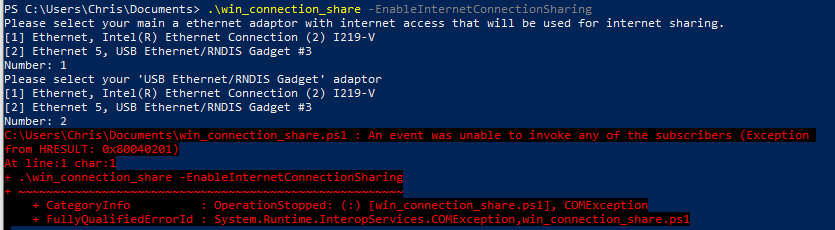
When attempting to run the win_connection_share.ps1 -EnableInternetConnectionSharing command, I get the following error:
C:\win_connection_share.ps1 : An event was unable to invoke any of the subscribers (Exception
from HRESULT: 0x80040201)
At line:1 char:1
+ .\win_connection_share -EnableInternetConnectionSharing
+ ~~~~~~~~~~~~~~~~~~~~~~~~~~~~~~~~~~~~~~~~~~~~~~~~~~~~~~~
    + CategoryInfo          : OperationStopped: (:) [win_connection_share.ps1], COMException
    + FullyQualifiedErrorId : System.Runtime.InteropServices.COMException,win_connection_share.ps1
To Reproduce
Steps to reproduce the behavior:
- Ensure pwnagotchi is available and alive. SSH into pwnagotchi on
10.0.0.2to ensure connectivity. - Download
win_connection_share.ps1fromscriptfolder within repo - Run
win_connection_share.ps1 -EnableInternetConnectionSharing.
Extra step: I've rebooted my computer to see if that would change any outcome.
Expected behavior
To enable internet connection sharing from my Windows host to my Pwnagotchi.
Screenshots
Environment (please complete the following information):
- Pwnagotchi version: v1.1.0RC0
- OS version: Windows 10
- Raspberry Pi Zero W
 w0ntonsoup
All 3 comments
I've found that Windows ICS (Internet Connection Sharing) was the culprit here. I restarted the ICS service by following these steps:
- Click Windows Start > Control Panel.
- Choose
Administrative Tools - Choose
Services - Scroll down the services window and look for
Internet Connection Sharing. - Right-click on the Internet Connection Sharing item, and then select
Restart
After these steps, run the script again with the -EnableInternetConnectionSharing flag and you should see that ICS is enabled.
w0ntonsoup
on 29 Oct 2019
I tried the issues suggested here, did not work. In the end, I found out that if you go to "network connections", rightclick on the connection (in my case the wireless one), Settings, Sharing, and then select the RNDIS network, then it will work.
 mrseeker
on 4 Nov 2019
mrseeker
on 4 Nov 2019
I found out that if you go to "network connections", rightclick on the connection (in my case the wireless one), Settings, Sharing, and then select the RNDIS network, then it will work. <
you save my day , thx alot.
 cestodd
on 20 Nov 2020
cestodd
on 20 Nov 2020
Related issues
 miotislucifugis
·
6Comments
miotislucifugis
·
6Comments
 dadav
·
4Comments
dadav
·
4Comments
 sayak-brm
·
3Comments
sayak-brm
·
3Comments
 elipsius
·
7Comments
elipsius
·
7Comments
 evilsocket
·
6Comments
evilsocket
·
6Comments
Most helpful comment
I tried the issues suggested here, did not work. In the end, I found out that if you go to "network connections", rightclick on the connection (in my case the wireless one), Settings, Sharing, and then select the RNDIS network, then it will work.