Pwnagotchi: [collect] bt-tether problems
I want a place where i can see what problems ppl. have with the bt-tether plugin. If you have a problem, please provide some informations.
At least you should tell us:
- the pwnagotchi release you are using
- the type of device you try to pair with
- the bt-tether settings you used (you can put XX for the last 2 mac parts)
- the error msg you get (if any)
cheers
 dadav
dadav
All 29 comments
Hello dadav,
I found this project some days ago and I love it istantly. Moreover I already have all the hardware to build up a pwnagotchi so I started mine.
Coming back in topic, I have tinkered a lot to make the BT working, so i share my experience here, maybe it could be useful!
Setup:
- pwnagotchi firmware: v1.0.1
- phone: iPhone
- iOS version: 13.1.3
- iPhone BT MAC addr: 40:9C:28:XX:XX:XX (from settings - general - info - bluetooth)
- bluetooth configuration in config.yml:
    bt-tether:
      enabled: true
      mac: '40:9C:28:XX:XX:XX'
      ip: '172.20.10.44'
      netmask: 24
      interval: 1
      share_internet: true
Step:
- created a new SD with 1.0.1 firmare and loaded the config.yml in the root partition
- boot the RPi0W using the DATA PORT
- Connected to the RPi0W with putty
- Paired the iPhone with the RPi0W with these steps:
sudo bluetoothctlscan on- put the iPhone in discovery mode (settings - bluetooth)
- wait until the RPi0W found the iPhone then
pair 40:9C:28:XX:XX:XX(BT mac address of the iPhone)- confirmed the pair process
trust 40:9C:28:XX:XX:XX(BT mac address of the iPhone)- stop the scanning process
scan off - exit form bluetoothctl
exit
- now in the BT paired device list of the iPhone I can see the RPi0W (the hostname)
- start the pwnagotchi in auto mode
sudo touch /root/.pwnagotchi-autosudo systemctl restart pwnagotchi
- in another console,
tail -f /var/log/pwnagotchi.log
- after a while, appear a message:
[ERROR] BT-TETHER: could not connect
- after a while, appear a message:
- in the BT paired device list of the iPhone, find the device named as the RPi0W (hostname) and touch it to connect (after that you should see "connect")
- in the tail console after a while,
[ERROR] BT-TETHER: bnep0 not foundand in the web interfaceBT ERR2
It seems that btnap is not installed!
Confirmed by ifconfig (bnep0 interface is missing)
install btnap
I put the pwnagotchi in MANU mode and shared the PC connection then
sudo git clone https://github.com/bablokb/pi-btnap.gitsudo ./pi-btnap/tools/install-btnap serversudo nano /etc/btnap.conf
- check/edit these parameters (you should modify only the
ADD_IFentry)
- check/edit these parameters (you should modify only the
      MODE="server"
      BR_DEV="br0"
      BR_IP="192.168.20.99/24"
      BR_GW="192.168.20.1"
      ADD_IF="lo"
      REMOTE_DEV=""
      DEBUG=""
- start btnap
sudo systemctl enable btnapsudo service btnap restart
- start the pwnagotchi in auto mode
sudo touch /root/.pwnagotchi-autosudo systemctl restart pwnagotchi
- wait a while...
Now the iterface (check withifconfig) is present and the RPi0W will connect to the iPhone (BT CON).
An icon should be present in the upper left corner of the iPhone screen and you can reach the web pages
   pwnagotchi.local:8080 <--- screen
   pwnagotchi.local      <--- bettercap
That's all. After a reboot it work just fine (you have to manually reconnect the phone with the pwnagotchi by touching it in the BT paired device list of the iPhone - it doesn't auto reconnect).
Stefano
 shurillu
on 24 Oct 2019
shurillu
on 24 Oct 2019
An update: if I enable the hotspot in the iPhone, it is not necessary to do the steps in the "Install btnap section" (but, of course you have to enable the hotspot and all the registered devices that use the hotspot connection will start to connect to the iPhone...)
Stefano
shurillu
on 24 Oct 2019
@shurillu Thx for your reply. The pi-btnap should not be needed, because the plugin should have the same functionality. I realized the plugin had problems, if the connection was established without the plugin. Thats why i refractured the code now. Maybe you have some time to test pr #389
dadav
on 25 Oct 2019
BT Tether working fine with my iPhone, i set the proper variables in config.yml as
main:
plugins:
bt-tether:
enabled: true
mac: DC:08:0F:57:0E:6F
ip: '172.20.10.14'
But, a route to the iPhone (being the gateway) is not set.
After issuing sudo route add default gw 172.20.10.1 bnep0it all starts working (internet access)
I have tried to create a file in /etc/network/interfaces.d/bt0-cfg with this content:
allow-hotplug bnep0
iface bnep0 inet static
address 172.20.10.14
netmask 255.255.255.240
network 172.20.10.0
broadcast 172.20.10.15
gateway 172.20.10.1
But, it doesnt apply on reboot.
 nieldk
on 27 Oct 2019
nieldk
on 27 Oct 2019
BT Tether working fine with my gpd pocket running ubuntu 19.10.
Make sure you are using blued backend. (at least I wasn't able to make it work under network-manager)
Allows access from laptop to pwnagotchi webui.
Allows access from pwnagotchi to internet.
config.yml
main:
plugins:
bt-tether:
enabled: true
mac: XX:XX:XX:XX:XX:XX
ip: '192.168.44.10'
On Linux all configurations are made via blueman-applet.
Adapters
Visibility Setting
- [x] Always visible
Local Services => Network
- [x] Network Access Point
NAP Settings
DHCP Server Type - [x] dnsmasq
192.168.44.1
PAN Support - [x] Blueman
DUN Support - [x] Blueman
It is now possible to access webui via ip or the configured hostname.
EDIT: add remark about bt backend
 pedrompcaetano
on 27 Oct 2019
pedrompcaetano
on 27 Oct 2019
BT Tether working fine with my gpd pocket running ubuntu 19.10.
Allows access from laptop to pwnagotchi webui.
Allows access from pwnagotchi to internet.config.yml
main:
plugins:
bt-tether:
enabled: true
mac: XX:XX:XX:XX:XX:XX
ip: '192.168.44.10'On Linux all configurations are made via blueman-applet.
Adapters
Visibility Setting* [x] Always visibleLocal Services => Network
* [x]  Network Access Point
  NAP Settings
  DHCP Server Type

* [x]  dnsmasq
  192.168.44.1
  PAN Support

* [x]  Blueman
  DUN Support

* [x]  Blueman
It is now possible to access webui via ip or the configured hostname.
While playing with this functionality bt suddenly stopped working.
After logging into the machine via usb ethernet the following error was in dmesg:
hw: rpi02
image version: 1.1.0rc0
[ 6380.194699] ------------[ cut here ]------------
[ 6380.194746] WARNING: CPU: 0 PID: 4616 at /opt/kernel-builder_repos/Re4son/re4son-raspberrypi-linux/all/fs/sysfs/group.c:255 sysfs_remove_group+0x98/0xa4
[ 6380.194753] sysfs group 'byte_queue_limits' not found for kobject 'tx-0'
[ 6380.194758] Modules linked in: algif_skcipher af_alg bnep hci_uart btbcm serdev bluetooth ecdh_generic fuse spidev brcmfmac brcmutil cfg80211 rfkill snd_bcm2835(C) raspberrypi_hwmon hwmon snd_pcm snd_timer snd i2c_bcm2835 bcm2835_codec(C) bcm2835_v4l2(C) v4l2_mem2mem bcm2835_mmal_vchiq(C) v4l2_common videobuf2_dma_contig videobuf2_vmalloc videobuf2_memops spi_bcm2835aux spi_bcm2835 videobuf2_v4l2 videobuf2_common videodev media vc_sm_cma(C) fixed uio_pdrv_genirq uio i2c_dev usb_f_ecm g_ether usb_f_rndis u_ether libcomposite dwc2 udc_core ip_tables x_tables ipv6
[ 6380.194935] CPU: 0 PID: 4616 Comm: kbnepd bnep0 Tainted: G C 4.19.66-Re4son+ #1
[ 6380.194940] Hardware name: BCM2835
[ 6380.194975] [
[ 6380.194998] [
[ 6380.195023] [
[ 6380.195039] [
[ 6380.195056] [
[ 6380.195075] [
[ 6380.195089] [
[ 6380.195112] [
[ 6380.195128] [
[ 6380.195142] [
[ 6380.195181] [
[ 6380.195231] [
[ 6380.195248] [
[ 6380.195256] Exception stack(0xd8c5dfb0 to 0xd8c5dff8)
[ 6380.195264] dfa0: 00000000 00000000 00000000 00000000
[ 6380.195275] dfc0: 00000000 00000000 00000000 00000000 00000000 00000000 00000000 00000000
[ 6380.195284] dfe0: 00000000 00000000 00000000 00000000 00000013 00000000
[ 6380.195291] ---[ end trace 7a55226884fc0f5a ]---
[ 6380.195392] ------------[ cut here ]------------
Many thanks
pedrompcaetano
on 27 Oct 2019
Installed 1.1.0RC0 today on Rpi3. It paired the first time, but now I'm unable to connect it to the phone.
[2019-10-28 16:18:15,753] [INFO] BT-TETHER: Search device ...
[2019-10-28 16:18:15,759] [DEBUG] BT-TETHER: Waiting for device
[2019-10-28 16:18:15,761] [DEBUG] BT-TETHER: Changing bluetooth device to True
[2019-10-28 16:18:15,790] [DEBUG] Set power of /org/bluez/hci0 (addr CC:AA:EB:32:12:11) to True
[2019-10-28 16:18:15,792] [DEBUG] BT-TETHER: Starting discovery ...
[2019-10-28 16:18:15,959] [DEBUG] BT-TETHER: Using remote device (addr: C0:D3:C0:E0:49:84): /org/bluez/hci0/dev_C0_D3_C0_E0_49_84
[2019-10-28 16:18:15,961] [DEBUG] BT-TETHER: Stoping Discovery ...
[2019-10-28 16:18:15,973] [DEBUG] BT-TETHER: Checking if device is paired
[2019-10-28 16:18:15,976] [DEBUG] BT-TETHER: Changing bluetooth device to True
[2019-10-28 16:18:16,012] [DEBUG] Set power of /org/bluez/hci0 (addr CC:AA:EB:32:12:11) to True
[2019-10-28 16:18:16,039] [DEBUG] BT-TETHER: Already paired.
[2019-10-28 16:18:16,041] [DEBUG] BT-TETHER: Check interface
[2019-10-28 16:18:16,047] [DEBUG] BT-TETHER: Try to connect to nap ...
[2019-10-28 16:18:16,050] [DEBUG] BT-TETHER: Trying to nap ...
[2019-10-28 16:18:16,055] [DEBUG] BT-TETHER: Connecting to profile ...
[2019-10-28 16:18:16,068] [DEBUG] BT-TETHER: Connecting to nap network ...
[2019-10-28 16:18:41,077] [INFO] BT-TETHER: Napping failed ...
and also
[2019-10-28 16:32:40,938] [ERROR] Bluetooth adapter not found
[2019-10-28 16:32:40,944] [INFO] BT-TETHER: Search device ...
[2019-10-28 16:32:41,005] [ERROR] Bluetooth adapter not found
[2019-10-28 16:32:41,017] [INFO] BT-TETHER: Could not find device.
But I'm now powering it using a powerbank, I fear the last messages could be due to that
 maxxer
on 28 Oct 2019
maxxer
on 28 Oct 2019
BT Tether working fine with my iPhone, i set the proper variables in config.yml as
main:
plugins:
bt-tether:
enabled: true
mac: DC:08:0F:57:0E:6F
ip: '172.20.10.14'
which iOS version/iphone do you use?
my 13.1.3 iphone gets detected as an input device 🤔
Oct 28 18:07:22 kernel: input: FF:XX:XX:XX:XX:FF as /devices/virtual/input/input1
Oct 28 18:07:22 systemd-logind[346]: Watching system buttons on /dev/input/event0 (FF:XX:XX:XX:XX:FF)
 benleb
on 28 Oct 2019
benleb
on 28 Oct 2019
BT Tether working fine with my iPhone, i set the proper variables in config.yml as
main:
plugins:
bt-tether:
enabled: true
mac: DC:08:0F:57:0E:6F
ip: '172.20.10.14'which iOS version/iphone do you use?
my 13.1.3 iphone gets detected as an input device thinking
Oct 28 18:07:22 kernel: input: FF:XX:XX:XX:XX:FF as /devices/virtual/input/input1
Oct 28 18:07:22 systemd-logind[346]: Watching system buttons on /dev/input/event0 (FF:XX:XX:XX:XX:FF)```
I am using iOS 13.2 beta on iPhone 8, and Pwnagotcho, compiled from this repository (1.1.0RC0)
nieldk
on 28 Oct 2019
I can confirm the issue reported by @maxxer on two PiZ which worked with 1.0.1 flawless.
I also saw that /sys/class/net/bnap0 does not exist in 1.1.0RC
 deveth0
on 29 Oct 2019
deveth0
on 29 Oct 2019
I can confirm the issue reported by @maxxer on two PiZ which worked with 1.0.1 flawless.
I also saw that/sys/class/net/bnap0does not exist in 1.1.0RC
Actually few hours ago I tried plugging the pi3 to a wall power and bt managed to connect, so I suspect it was due to low power. At first I also saw an error about bnep0 not existing but it was created later
maxxer
on 29 Oct 2019
I'm reading all your messages^^ Thx guys, you help alot! Keep comenting if you have new informations ;)
dadav
on 29 Oct 2019
I just tried to confirm the power issue, but even with a 2a wall plug I was not able to get Bluetooth running (device is simply missing)
deveth0
on 29 Oct 2019
I just tried to confirm the power issue, but even with a 2a wall plug I was not able to get Bluetooth running (device is simply missing)
delete the pi on your phone and on the pi itself via bluetoothctl and then remove and try again - that solves the "not found" thing for me sometimes
benleb
on 29 Oct 2019
I just tried to confirm the power issue, but even with a 2a wall plug I was not able to get Bluetooth running (device is simply missing)
delete the pi on your phone and on the pi itself via
bluetoothctland thenremoveand try again - that solves the "not found" thing for me sometimes
This is only a solution if the tethering does not work, in my case the device is simply missing and I have no clue why Oo
deveth0
on 30 Oct 2019
Just for the record I just upgraded by reflashing to 1.1.0 and bt didn't work at the beginning. After >25m runtime I got a pairing request on the phone and finally the unit connected. Even if I had bt tethering enabled on the phone I wasn't able to ping it, but then I disabled and enabled again bt and bt tethering on the phone and now network is back running
maxxer
on 30 Oct 2019
I also have it working with 1.1.0 now, no idea Oo
deveth0
on 31 Oct 2019
As a leading note I want to say that I'm really confused about the variants in the config-format (devices: or not) and to which version/patch level they apply. (release 1.1.1 vs 'bleeding edge', whatever that is and how to obtain). I assume that the 'old' format fits to the release patch level, kindly correct me if this is not correct.
While writing this entry I identified errors on my side and managed to get two steps forward, however, tethering still fails for my gotchi via my android mobile.
now the gotchi says BT: C but ping to 8.8.8.8 (or any other) still fails
the details:
this is a rpi0w waveshare v2 on pwnagotchi v1.1.1 (updated from the initial v1.1.0RC0)
I try to establish BT-Tethering with an android mobile phone (oneplus one, lineageOs 16.0-20191017-NIGHTLY-bacon)
mobile has Bluetooth Tethering enabled in system settings.
mobile discovered the rpi0w as a bt device.
logged into the gotchi from usb0 I started bluetoothctl and did all the steps, power on, scan on, pair phoneMac, trust phoneMac.
pairing worked, both devices reported the same security pairing code, ack.
bluetoothctl paired-devices shows the mobile:
bluetooth]# paired-devices
Device C0:EE:FB:XX:XX:XX feng
[bluetooth]# info C0:EE:FB:XX:XX:XX
Device C0:EE:FB:XX:XX:XX (public)
        Name: feng
        Alias: feng
        Class: 0x005a020c
        Icon: phone
        Paired: yes
        Trusted: yes
        Blocked: no
        Connected: no
        LegacyPairing: no
        UUID: OBEX Object Push          (00001105-0000-1000-8000-00805f9b34fb)
        UUID: Audio Source              (0000110a-0000-1000-8000-00805f9b34fb)
        UUID: A/V Remote Control Target (0000110c-0000-1000-8000-00805f9b34fb)
        UUID: A/V Remote Control        (0000110e-0000-1000-8000-00805f9b34fb)
        UUID: Headset AG                (00001112-0000-1000-8000-00805f9b34fb)
        UUID: PANU                      (00001115-0000-1000-8000-00805f9b34fb)
        UUID: NAP                       (00001116-0000-1000-8000-00805f9b34fb)
        UUID: Handsfree Audio Gateway   (0000111f-0000-1000-8000-00805f9b34fb)
        UUID: Phonebook Access Server   (0000112f-0000-1000-8000-00805f9b34fb)
        UUID: Message Access Server     (00001132-0000-1000-8000-00805f9b34fb)
        UUID: PnP Information           (00001200-0000-1000-8000-00805f9b34fb)
        UUID: Generic Access Profile    (00001800-0000-1000-8000-00805f9b34fb)
        UUID: Generic Attribute Profile (00001801-0000-1000-8000-00805f9b34fb)
        UUID: Vendor specific           (10000000-328e-0fbb-c642-1aa6699bdada)
        UUID: Vendor specific           (badbadba-dbad-badb-adba-badbadbadbad)
        Modalias: bluetooth:v00E0p1200d1436
note that Connected: no.
if I try to connect expressis verbis I get an error:
[bluetooth]# connect C0:EE:FB:XX:XX:XX
Attempting to connect to C0:EE:FB:XX:XX:XX
Failed to connect: org.bluez.Error.Failed
Trying to connect rom the mobile (click on the connect button) shows no effect whatsoever.
the config reads:
main:
    name: 'milanogotchi'
    lang: en
    whitelist:
        - 'orgon'
        - 'moira'
        - 'lorien'
        - 'fangorn'
    plugins:
        grid:
            enabled: true
            report: true
            exclude:
                - 6C:XX:XX:XX:2E:A9     # orgon
                - XX:27:EB:XX:XX:2A     # moira
                - C4:6E:1F:A6:54:36     # lorien
                - B8:XX:EB:XX:XX:A0     # fangorn
        bt-tether:
            enabled: true
            mac: 'co:ee:fb:XX:XX:XX'
            ip: '192.168.44:44'
            netmask: 24
            interval: 1
            share_internet: true
        auto-update:
            enabled: true
            interval: 1 # every 12 hours
            install: true # if false, it will only warn that updates are available, if true it will install them
        memtemp: # Display memory usage, cpu load and cpu temperature on screen
            enabled: true
            orientation: horizontal # horizontal/vertical
the gotchi shows BT: NF on the face.
While writing this entry I notice that the mac is in lowercase in config. I change it to UPPERCASE and restart.
Now the gotchi says BT: AE Address error, getting closer.
I change the ip entry to ip: '192.168.43:44' based on the observation that the mobile uses the ..43. subnet when opening a hotspot.
restart, and now the gotchi says BT: C
So I try to ping 8.8.8.8 from the shell into the gotchi and open a browser tab on the mobile with http://192.168.43.44
Both fail.
Routing and forwarding issue, I suppose.
```root@milanogotchi:/home/pi# route
Kernel IP routing table
Destination Gateway Genmask Flags Metric Ref Use Iface
default 10.0.0.1 0.0.0.0 UG 0 0 0 usb0
10.0.0.0 0.0.0.0 255.255.255.0 U 0 0 0 usb0
root@milanogotchi:/home/pi# ifconfig
bnep0: flags=4163
inet6 fe80::ba27:ebff:fe59:8fb1 prefixlen 64 scopeid 0x20
ether b8:27:eb:XX:XX:XX txqueuelen 1000 (Ethernet)
RX packets 5 bytes 469 (469.0 B)
RX errors 0 dropped 0 overruns 0 frame 0
TX packets 25 bytes 2557 (2.4 KiB)
TX errors 0 dropped 0 overruns 0 carrier 0 collisions 0
lo: flags=73
inet 127.0.0.1 netmask 255.0.0.0
inet6 ::1 prefixlen 128 scopeid 0x10
loop txqueuelen 1000 (Local Loopback)
RX packets 40860 bytes 38038622 (36.2 MiB)
RX errors 0 dropped 0 overruns 0 frame 0
TX packets 40860 bytes 38038622 (36.2 MiB)
TX errors 0 dropped 0 overruns 0 carrier 0 collisions 0
mon0: flags=4163
unspec B8-27-EB-CC-CC-CC-30-30-00-00-00-00-00-00-00-00 txqueuelen 1000 (UNSPEC)
RX packets 782906 bytes 92299807 (88.0 MiB)
RX errors 0 dropped 145 overruns 0 frame 0
TX packets 22532 bytes 16039123 (15.2 MiB)
TX errors 0 dropped 0 overruns 0 carrier 0 collisions 0
usb0: flags=4163
inet 10.0.0.2 netmask 255.255.255.0 broadcast 10.0.0.255
inet6 fe80::14db:c6ff:fe77:2a36 prefixlen 64 scopeid 0x20
ether 16:db:c6:77:2a:36 txqueuelen 1000 (Ethernet)
RX packets 35473 bytes 3374344 (3.2 MiB)
RX errors 0 dropped 0 overruns 0 frame 0
TX packets 37829 bytes 8743096 (8.3 MiB)
TX errors 0 dropped 0 overruns 0 carrier 0 collisions 0
```
(edited formatting and the silly typo at the IP which unfortunately didn't effect any changes on the gotchi. Thanks deveth0) (edit2: it just needed a bit of time and another reboot. now it works)
 planetar
on 4 Nov 2019
planetar
on 4 Nov 2019
bt-tether:
  enabled: true
  mac: 'co:ee:fb:XX:XX:XX'
  ip: '192.168.44:44'
  netmask: 24
  interval: 1
Give it a try and replace the : on your ip ;)
And if you use the formatting (triple ` before and after a block), your pasted code blocks might be easier to read
deveth0
on 4 Nov 2019
when i disconnect, from master:
Nov 04 15:51:08 alpha pwnagotchi-launcher[829]: [2019-11-04 15:51:08,519] [ERROR] error while running bt-tether.on_ui_update : org.freedesktop.DBus.Error.InvalidArgs: No such property 'Interface'
Nov 04 15:51:08 alpha pwnagotchi-launcher[829]: [2019-11-04 15:51:08,532] [ERROR] org.freedesktop.DBus.Error.InvalidArgs: No such property 'Interface'
Nov 04 15:51:08 alpha pwnagotchi-launcher[829]: Traceback (most recent call last):
Nov 04 15:51:08 alpha pwnagotchi-launcher[829]:   File "/usr/local/lib/python3.7/dist-packages/pwnagotchi/plugins/__init__.py", line 34, in one
Nov 04 15:51:08 alpha pwnagotchi-launcher[829]:     callback(*args, **kwargs)
Nov 04 15:51:08 alpha pwnagotchi-launcher[829]:   File "/usr/local/lib/python3.7/dist-packages/pwnagotchi/plugins/default/bt-tether.py", line 528, in on_ui_update
Nov 04 15:51:08 alpha pwnagotchi-launcher[829]:     logging.debug('BT-TETHER: Created interface (%s)', device.interface())
Nov 04 15:51:08 alpha pwnagotchi-launcher[829]:   File "/usr/local/lib/python3.7/dist-packages/pwnagotchi/plugins/default/bt-tether.py", line 414, in interface
Nov 04 15:51:08 alpha pwnagotchi-launcher[829]:     return BTNap.prop_get(self.network, 'Interface')
Nov 04 15:51:08 alpha pwnagotchi-launcher[829]:   File "/usr/local/lib/python3.7/dist-packages/pwnagotchi/plugins/default/bt-tether.py", line 65, in prop_get
Nov 04 15:51:08 alpha pwnagotchi-launcher[829]:     return obj.Get(iface, k, dbus_interface=BTNap.IFACE_PROPS)
Nov 04 15:51:08 alpha pwnagotchi-launcher[829]:   File "/usr/lib/python3/dist-packages/dbus/proxies.py", line 145, in __call__
Nov 04 15:51:08 alpha pwnagotchi-launcher[829]:     **keywords)
Nov 04 15:51:08 alpha pwnagotchi-launcher[829]:   File "/usr/lib/python3/dist-packages/dbus/connection.py", line 651, in call_blocking
Nov 04 15:51:08 alpha pwnagotchi-launcher[829]:     message, timeout)
Nov 04 15:51:08 alpha pwnagotchi-launcher[829]: dbus.exceptions.DBusException: org.freedesktop.DBus.Error.InvalidArgs: No such property 'Interface'
 evilsocket
on 4 Nov 2019
evilsocket
on 4 Nov 2019
Main problem: Can't access webui(name@local:8080) thru phone and I can't ssh thru phone.
Steps:
- flashed (
v1.2.1) a clean sd card. - powered gotchi on usb data without putting custom config.yml
- key successfully generated.
-configured static IP on pc (10.0.0.1 / 255.255.255.0 / DNS 8.8.8.8 and .4.4) - edited config.yml thru pc (ssh) (bt-tether settings below)
- restarted gotchi to auto (
sudo touch /root/.pwnagotchi-auto && sudo systemctl restart pwnagotchi) - phone bluetooth on and bluetooth tethering is ON.
- after few minutes phone notifies me for pairing -> pairing successful -> double checked on bluetoothctl paired-devices -> trust phoneMac (just to be sure).
- waveshare say
BT C tried on phone chrome web browser
192.168.44.1:8080,192.168.44.255:8080,coatl.local:8080,10.0.0.2:8080- can access
coatl.local:8080,10.0.0.2:8080thru pcthe pwnagotchi release you are using:
1.2.1- the type of device you try to pair with:
Xiaomi Pocophone MIUI 10.3.8 Global - the bt-tether settings you used (you can put XX for the last 2 mac parts):
bt-tether:
      enabled: true
      mac: 'A4:50:46:XX:XX:XX' #POCO
      ip: '192.168.44.1'
      netmask: 24
      interval: 1
      share_internet: true
ifconfig on pi
pi@coatl:/var/log $ ifconfig
bnep0: flags=4163<UP,BROADCAST,RUNNING,MULTICAST>  mtu 1500
        inet 192.168.44.1  netmask 255.255.255.0  broadcast 0.0.0.0
        inet6 fe80::ba27:ebff:fea5:881b  prefixlen 64  scopeid 0x20<link>
        ether b8:27:eb:xx:xx:xx  txqueuelen 1000  (Ethernet)
        RX packets 6  bytes 698 (698.0 B)
        RX errors 0  dropped 0  overruns 0  frame 0
        TX packets 1947  bytes 75172 (73.4 KiB)
        TX errors 0  dropped 0 overruns 0  carrier 0  collisions 0
ifconfig on phone
- the error msg you get (if any):
 PeachMangoes
on 6 Nov 2019
PeachMangoes
on 6 Nov 2019
try to not use the same ip for your pwnagotchi as your phone has. You currently use ip: '192.168.44.1' for both the pwnagotchi and phone. Just remove the ip from your config and try to access it using 192.168.44.44
deveth0
on 6 Nov 2019
try to not use the same ip for your pwnagotchi as your phone has. You currently use
ip: '192.168.44.1'for both the pwnagotchi and phone. Just remove the ip from your config and try to access it using192.168.44.44
thanks. changed it to *.44.45 O_O
and it worked perfectly.
cheers.
PeachMangoes
on 6 Nov 2019
Hi everyone, setting up a rpi0w headless, I'm having the same problem as @PeachMangoes with the exception that my config looks fine
bt-tether:
      enabled: true
      mac: 'XX:XX:XX:XX:XX:XX' #OnePlus5T
      ip: '192.168.40.44'
      netmask: 24
      interval: 1
      share_internet: true
was only able to connect to my phone after following @shurillu steps and installing btnap, at that time you could use ifconfig bt-nap on the phone and you could check that it was working and the ip assigned (I guess to the phone) was 192.168.40.142.
So tl;dr,
phone as not connecting to pwnagotchi
after installing
btnapfollowing shurillu post phone was able to connectfrom phone side connection looks ok
you can't ping the pwnagotchi from the phone or access the webui
Besides all that, the pwnagotchi is working as intended, you can plug it to a machine and SSH normally through 10.0.0.2 and also the webui works fine through 10.0.0.2:8080.
 diffficult
on 12 Dec 2019
diffficult
on 12 Dec 2019
Hi everyone, setting up a rpi0w headless, I'm having the same problem as @PeachMangoes with the exception that my config looks fine
bt-tether:
      enabled: true
      mac: 'XX:XX:XX:XX:XX:XX' #OnePlus5T
      ip: '192.168.40.44'
      netmask: 24
      interval: 1
      share_internet: true
was only able to connect to my phone after following @shurillu steps and installing
btnap, at that time you could useifconfig bt-napon the phone and you could check that it was working and the ip assigned (I guess to the phone) was192.168.40.142.So tl;dr,
* phone as not connecting to pwnagotchi

* after installing `btnap` following shurillu post phone was able to connect

* from phone side connection looks ok

* you can't ping the pwnagotchi from the phone or access the webui
Besides all that, the pwnagotchi is working as intended, you can plug it to a machine and SSH normally through
10.0.0.2and also the webui works fine through10.0.0.2:8080.
Try changing the ip to 192.168.44.45
dadav
on 13 Dec 2019
Hi everyone, setting up a rpi0w headless, I'm having the same problem as @PeachMangoes with the exception that my config looks fine
```bt-tether:
enabled: true
mac: 'XX:XX:XX:XX:XX:XX' #OnePlus5T
ip: '192.168.40.44'
netmask: 24
interval: 1
share_internet: truewas only able to connect to my phone after following @shurillu steps and installing `btnap`, at that time you could use `ifconfig bt-nap` on the phone and you could check that it was working and the ip assigned (I guess to the phone) was `192.168.40.142`. So tl;dr, ``` * phone as not connecting to pwnagotchi * after installing `btnap` following shurillu post phone was able to connect * from phone side connection looks ok * you can't ping the pwnagotchi from the phone or access the webuiBesides all that, the pwnagotchi is working as intended, you can plug it to a machine and SSH normally through
10.0.0.2and also the webui works fine through10.0.0.2:8080.Try changing the ip to
192.168.44.45
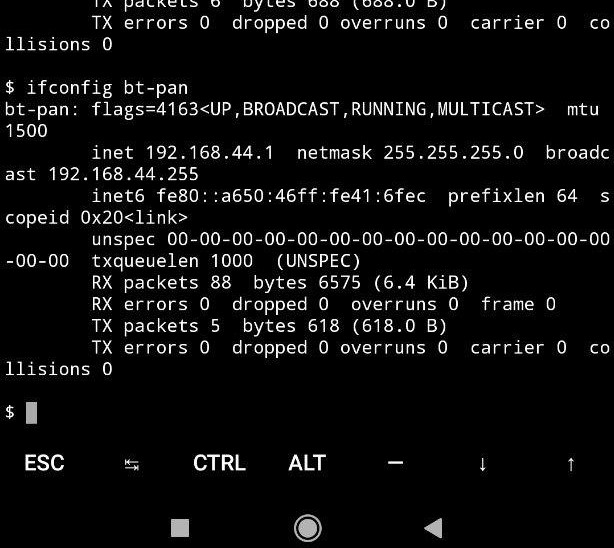
Sorry for the belated reply, eventually changed the ip range from 192.168.40.XXX to 192.168.20.XXX since I realized my phone was pretty much always getting 192.168.20.142. I gave the pwnagotchi the 192.168.20.99 through the config file, checked using ifconfig and you can see that br0 has the right ip (the one from the yml conf file). As today I can ping from the pwnagotchi my phone after connecting it through bluetooth but I cannot ping back from the phone or access the web interface.
Here's a screencap from my phone with the result from if-config bt-pan on termux.
As I said, this is the only thing that's giving me a headache,
diffficult
on 17 Feb 2020
Hello, I am having some problems with the bt-tether plugin.
Enabling bluetooth tethering on my phone and booting up the Pi, it gets connected to my phone after 2 minutes and I can access the webUI from my web browser (or even SHH into the pi), and it works fine.
After some time, I've seen it happening after around 40 minutes of uptime, the pi is unreachable via bluetooth. If I disable and then re-enable bluetooth and bluetooth tethering I can connect again and use webUI or SSH, but then after around 2 minutes the problem comes again, and the only way to make it work fine for another 40 minutes is to reboot it.
Another problem, although minor, is the fact that mobile data sharing via bluetooth (to make the pi connect to the internet) worked one time and only that time. It doesn't work anymore and the pi can't connect to the internet besides the internet sharing flag being enabled in the pwnagotchi config file.
I'm on the latest official image, v1.5.3, on a Pi3B, and connecting to my P9 Lite Mini (SLA-L02). The followings are my bt-tether config flags:
main.plugins.bt-tether.enabled = true
main.plugins.bt-tether.devices.android-phone.enabled = true
main.plugins.bt-tether.devices.android-phone.search_order = 1
main.plugins.bt-tether.devices.android-phone.mac = "1c:15:1f:6b:xx:xx"
main.plugins.bt-tether.devices.android-phone.ip = "192.168.44.44"
main.plugins.bt-tether.devices.android-phone.netmask = 24
main.plugins.bt-tether.devices.android-phone.interval = 1
main.plugins.bt-tether.devices.android-phone.scantime = 10
main.plugins.bt-tether.devices.android-phone.max_tries = 0
main.plugins.bt-tether.devices.android-phone.share_internet = true
main.plugins.bt-tether.devices.android-phone.priority = 1
If you need more information to understand or recreate the bug just let me know.
 andrigamerita
on 28 May 2020
andrigamerita
on 28 May 2020
I have the Issue, that I can pair to the pwnagotchi, and it works fine. But when I reboot the unit, I cant connect to it. In oorder to connect to it, I have to ssh into it, and remove the device. Then I can pair to the pwnagotchi from my phone. Is there a way to create a plugin that automatically removes all bluetooth devices? or maybe just runs: "sudo bluetoothctl remove (your BT MAC)"
 CyberFlo2005
on 10 Aug 2020
CyberFlo2005
on 10 Aug 2020
This worked for me:
sudo apt update --allow-releaseinfo-change
sudo apt update
sudo apt upgrade #my pwmagotchi crashed, but it still worked
sudo apt install pulseaudio-module-bluetooth
pulseaudio -k
pulseaudio -start
then I went to the bluetooth script inside init.d and added "pulseaudio --start" at the bottom
here is a alternative, that I didnt try but maybe this helps:
sudo pactl load-module module-bluetooth-discover
if that doesnt work, load these modules
module-bluetooth-policy
module-bluez5-device
module-bluez5-discover
To automate this procces, edit /etc/pulse/default.pa
CyberFlo2005
on 10 Aug 2020
Related issues
 myasn1k
·
7Comments
myasn1k
·
7Comments
 agent932
·
4Comments
agent932
·
4Comments
 sayak-brm
·
3Comments
evilsocket
·
6Comments
evilsocket
·
7Comments
sayak-brm
·
3Comments
evilsocket
·
6Comments
evilsocket
·
7Comments
Most helpful comment
Hello dadav,
I found this project some days ago and I love it istantly. Moreover I already have all the hardware to build up a pwnagotchi so I started mine.
Coming back in topic, I have tinkered a lot to make the BT working, so i share my experience here, maybe it could be useful!
Setup:
Step:
sudo bluetoothctlscan onpair 40:9C:28:XX:XX:XX(BT mac address of the iPhone)trust 40:9C:28:XX:XX:XX(BT mac address of the iPhone)scan offexitsudo touch /root/.pwnagotchi-autosudo systemctl restart pwnagotchitail -f /var/log/pwnagotchi.log[ERROR] BT-TETHER: could not connect[ERROR] BT-TETHER: bnep0 not foundand in the web interfaceBT ERR2It seems that btnap is not installed!
Confirmed by
ifconfig(bnep0 interface is missing)install btnap
I put the pwnagotchi in
MANUmode and shared the PC connection thensudo git clone https://github.com/bablokb/pi-btnap.gitsudo ./pi-btnap/tools/install-btnap serversudo nano /etc/btnap.confADD_IFentry)sudo systemctl enable btnapsudo service btnap restartsudo touch /root/.pwnagotchi-autosudo systemctl restart pwnagotchiNow the iterface (check with
ifconfig) is present and the RPi0W will connect to the iPhone (BT CON).An icon should be present in the upper left corner of the iPhone screen and you can reach the web pages
That's all. After a reboot it work just fine (you have to manually reconnect the phone with the pwnagotchi by touching it in the BT paired device list of the iPhone - it doesn't auto reconnect).
Stefano