Pwa-studio: Invariant failed errors on navigating to Venia frontend
Could not run develop/production instance of Venia. Got errors in browser console and blank page.
This issue is for the following packages:
- [x]
venia-concept - [ ]
pwa-buildpack - [ ]
peregrine - [ ]
pwa-devdocs - [ ]
upward-js - [ ]
upward-spec
This issue is a:
- [x] Bug
- [ ] Feature suggestion
- [ ] Documentation issue
- [ ] Other (Please Specify)
Environment
| Question | Answer |
| --------------------------- | :-----------: |
| Magento version | 2.3 (a local instance with Venia sample data, branch: 2.3) |
| Operating System + version | macOS High Sierra 10.13.3 |
| node.js version (node -v) | v8.11.3 |
| npm version (npm -v) | 5.6.0 |
Description
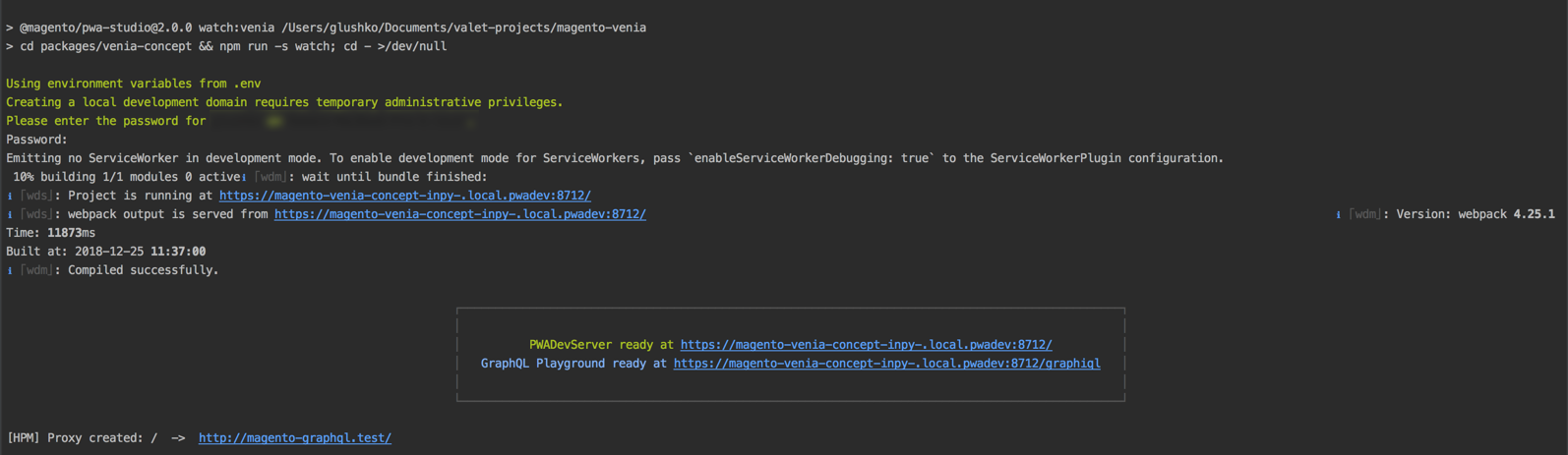
Going though Setup guide (https://magento-research.github.io/pwa-studio/venia-pwa-concept/setup/), I was able to run dev server:
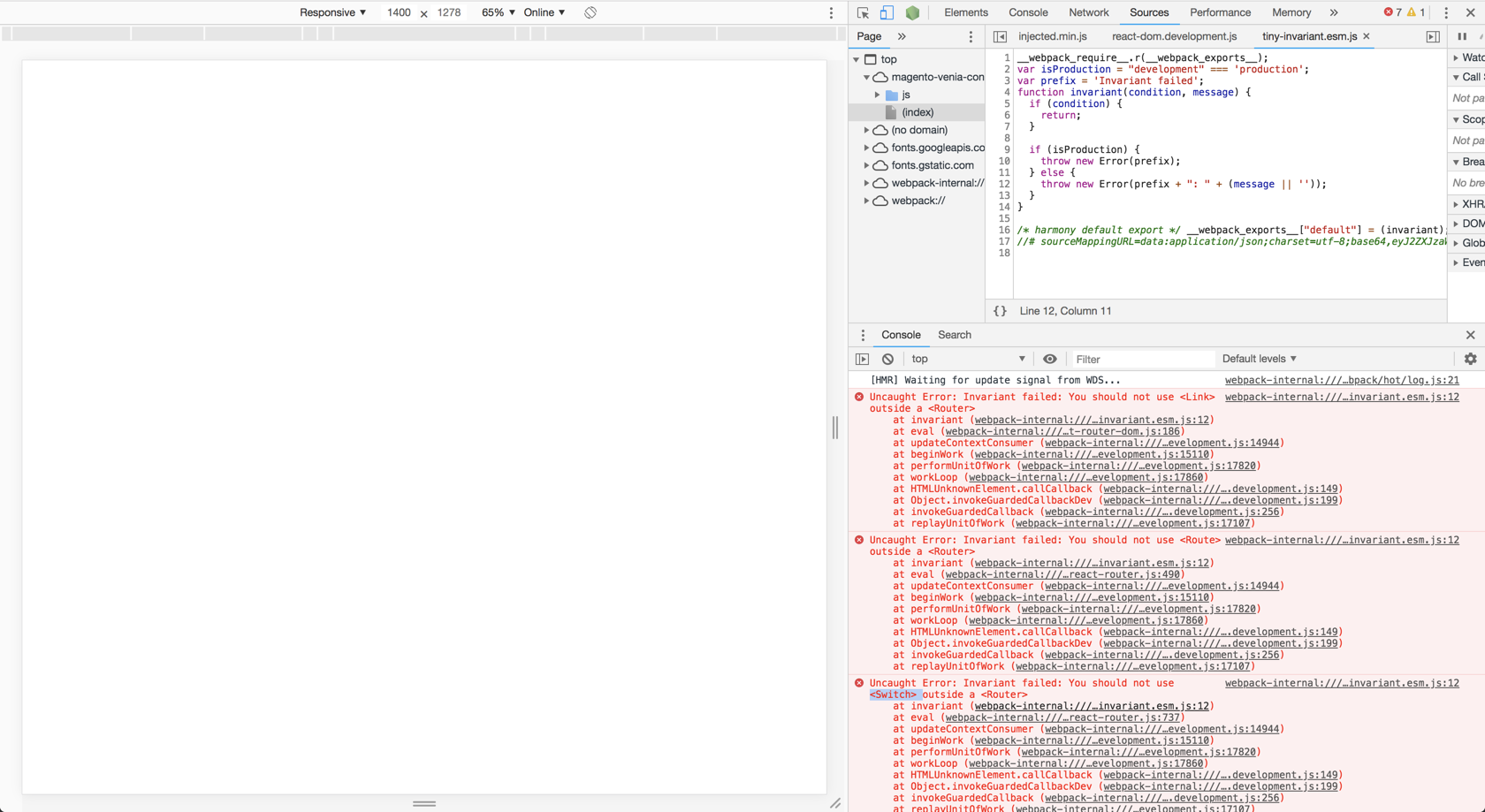
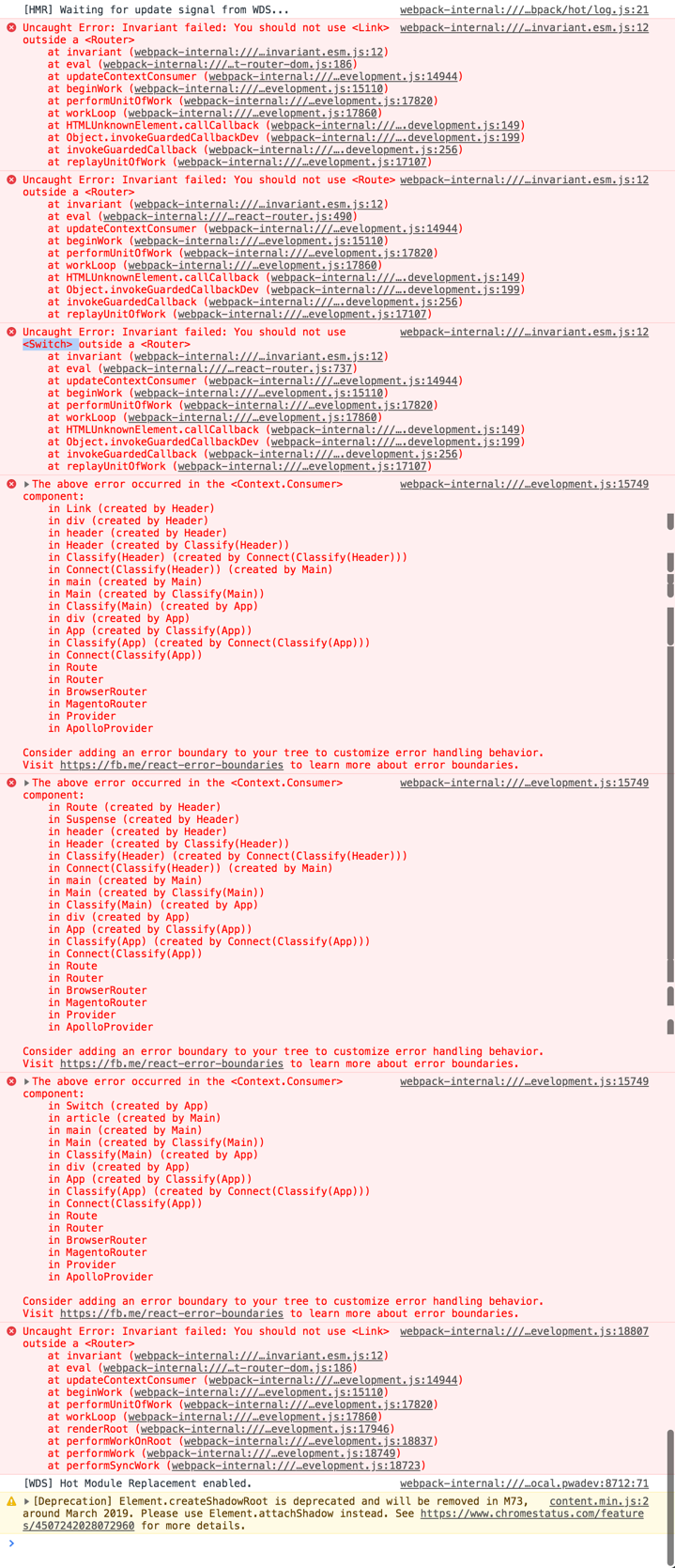
However, the frontend doesn't seems to be working. I got the following error list in browser console and blank page:
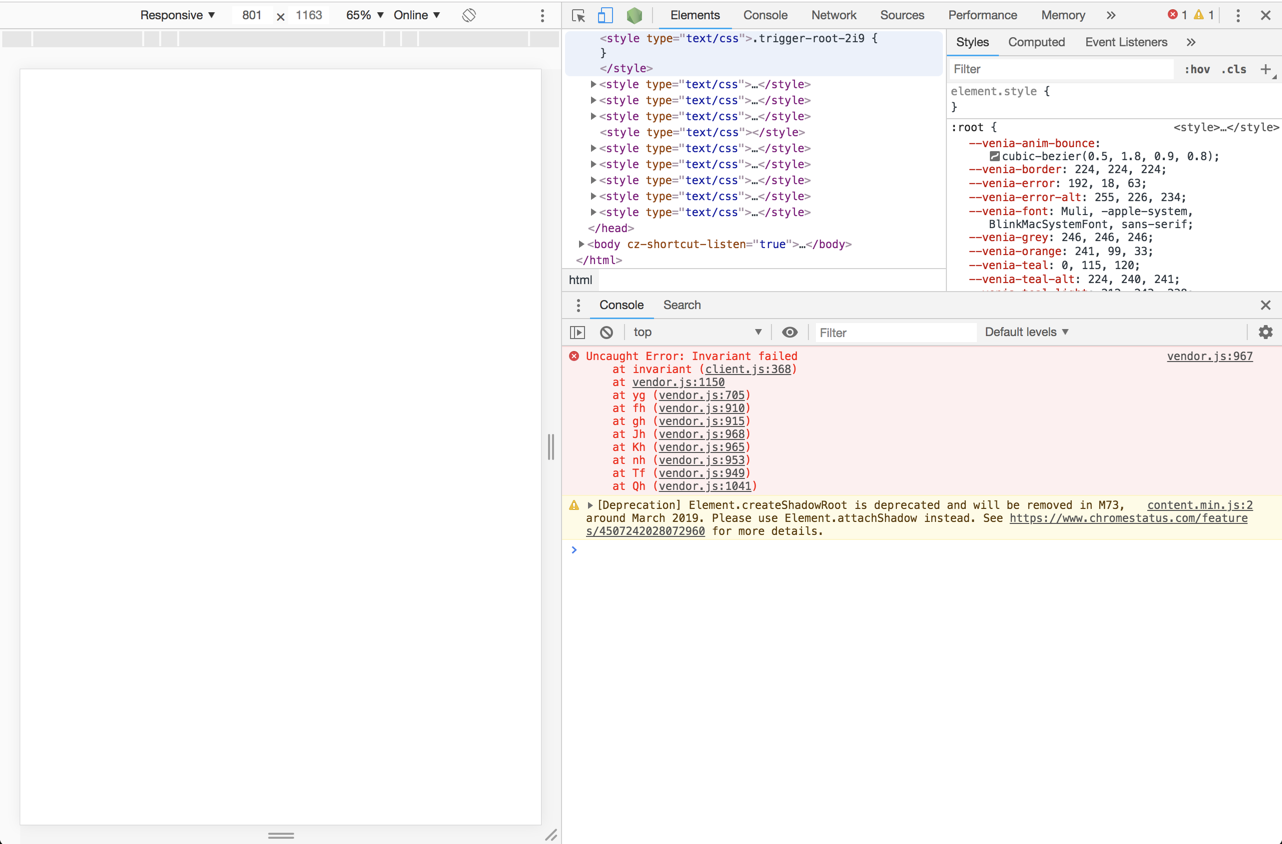
Almost the same result I got in production mode:
Expected result:
Venia is rendered and I can navigate among existing pages.
 roma-glushko
All 9 comments
Probably not the problem but just to make sure please update NodeJS to match the prerequisites as described in the docs NodeJS >=10.14.1 LTS
 Jordaneisenburger
on 8 Jan 2019
Jordaneisenburger
on 8 Jan 2019
Hi @Jordaneisenburger Thank you for replay!
I have upgraded my NodeJs and now I have these local configuration:
| Question | Answer |
| --------------------------- | :-----------: |
| Magento version | 2.3 (a local instance with Venia sample data, branch: 2.3) |
| Operating System + version | macOS High Sierra 10.13.3 |
| node.js version (node -v) | v11.6.0 |
| npm version (npm -v) | 6.5.0-next.0 |
| Valet+ | 1.0.23 |
Then I have rm -rfed my node_modules directories in the following directories:
- project root
- packages/venia-concept
After that I had a try to run npm install again.
Well, now the situation is different but I'm still not able to get Venia up and running 😞
I get these results:
npm installinproject root⚠️ - seems it is installed without issues but with package security violationnpm installinpackages/venia-concept🔴 - got this error message:npm ERR! Cannot read property 'match' of undefined, more info I get from log file:
0 info it worked if it ends with ok
1 verbose cli [ '/usr/local/bin/node', '/usr/local/bin/npm', 'install' ]
2 info using [email protected]
3 info using [email protected]
4 verbose npm-session 86e4240c0251e400
5 silly install runPreinstallTopLevelLifecycles
6 silly preinstall @magento/[email protected]
7 info lifecycle @magento/[email protected]~preinstall: @magento/[email protected]
8 silly install loadCurrentTree
9 silly install readLocalPackageData
10 timing stage:loadCurrentTree Completed in 3336ms
11 silly install loadIdealTree
12 silly install cloneCurrentTreeToIdealTree
13 timing stage:loadIdealTree:cloneCurrentTree Completed in 24ms
14 silly install loadShrinkwrap
15 timing stage:rollbackFailedOptional Completed in 1ms
16 timing stage:runTopLevelLifecycles Completed in 3793ms
17 silly saveTree @magento/[email protected]
17 silly saveTree ├── @magento/[email protected]
17 silly saveTree ├── @magento/[email protected]
17 silly saveTree └─┬ @magento/[email protected]
17 silly saveTree ├── @magento/[email protected]
17 silly saveTree └── @magento/[email protected]
18 verbose stack TypeError: Cannot read property 'match' of undefined
18 verbose stack at tarballToVersion (/usr/local/lib/node_modules/npm/lib/install/inflate-shrinkwrap.js:87:20)
18 verbose stack at inflatableChild (/usr/local/lib/node_modules/npm/lib/install/inflate-shrinkwrap.js:99:22)
18 verbose stack at BB.each (/usr/local/lib/node_modules/npm/lib/install/inflate-shrinkwrap.js:55:12)
18 verbose stack at tryCatcher (/usr/local/lib/node_modules/npm/node_modules/bluebird/js/release/util.js:16:23)
18 verbose stack at Object.gotValue (/usr/local/lib/node_modules/npm/node_modules/bluebird/js/release/reduce.js:155:18)
18 verbose stack at Object.gotAccum (/usr/local/lib/node_modules/npm/node_modules/bluebird/js/release/reduce.js:144:25)
18 verbose stack at Object.tryCatcher (/usr/local/lib/node_modules/npm/node_modules/bluebird/js/release/util.js:16:23)
18 verbose stack at Promise._settlePromiseFromHandler (/usr/local/lib/node_modules/npm/node_modules/bluebird/js/release/promise.js:512:31)
18 verbose stack at Promise._settlePromise (/usr/local/lib/node_modules/npm/node_modules/bluebird/js/release/promise.js:569:18)
18 verbose stack at Promise._settlePromiseCtx (/usr/local/lib/node_modules/npm/node_modules/bluebird/js/release/promise.js:606:10)
18 verbose stack at _drainQueueStep (/usr/local/lib/node_modules/npm/node_modules/bluebird/js/release/async.js:142:12)
18 verbose stack at _drainQueue (/usr/local/lib/node_modules/npm/node_modules/bluebird/js/release/async.js:131:9)
18 verbose stack at Async._drainQueues (/usr/local/lib/node_modules/npm/node_modules/bluebird/js/release/async.js:147:5)
18 verbose stack at Immediate.Async.drainQueues [as _onImmediate] (/usr/local/lib/node_modules/npm/node_modules/bluebird/js/release/async.js:17:14)
18 verbose stack at processImmediate (timers.js:632:19)
19 verbose cwd /Users/user/Documents/valet-projects/magento-venia/packages/venia-concept
20 verbose Darwin 17.4.0
21 verbose argv "/usr/local/bin/node" "/usr/local/bin/npm" "install"
22 verbose node v11.6.0
23 verbose npm v6.5.0-next.0
24 error Cannot read property 'match' of undefined
25 verbose exit [ 1, true ]
Any clue what could be wrong here?
Thanks!
roma-glushko
on 22 Jan 2019
@roma-glushko i assume you didn't run clean commands so pleas remove the project and start fresh
Jordaneisenburger
on 22 Jan 2019
@Jordaneisenburger Do you mean running npm run clean:all && npm run clean:dist from project root? I have ran these clean commands then then ran npm install in directories again. The same result was got 😞
roma-glushko
on 22 Jan 2019
@Jordaneisenburger wondering if you can run this pwa studio without such issues, then what is/was your nodejs/npm versions? I feel like this is a cause 🤔
roma-glushko
on 22 Jan 2019
@roma-glushko and you have a clean repo as in you didn't alter any code even the DEFAULT_BACK_URL ?
Jordaneisenburger
on 22 Jan 2019
@roma-glushko i haven't tried to install the latest version of pwa-studio yet. I've created this repo https://github.com/Jordaneisenburger/fallback-studio could you check to see if it makes any difference ?
Jordaneisenburger
on 22 Jan 2019
@Jordaneisenburger Wow, full reinstall of GIT repo helps here, finally 😮

Sorry that I did not get to solution with checking out your repo, I added this point to my to-do list to check what's going on there 🙌
Thank you very much for helping ❤️
roma-glushko
on 22 Jan 2019
No problem!
Jordaneisenburger
on 22 Jan 2019
Related issues
 revanth0212
·
6Comments
revanth0212
·
6Comments
 ericerway
·
6Comments
ericerway
·
6Comments
 larsroettig
·
6Comments
larsroettig
·
6Comments
 supernova-at
·
4Comments
supernova-at
·
4Comments
 dambrogia
·
7Comments
dambrogia
·
7Comments
Most helpful comment
No problem!