Pwa-module: Add to home screen is disable when add importScripts : nuxt.config.js
Version
Reproduction link
Steps to reproduce
When I add the following code in my nuxt.config.js file
workbox:{ importScripts: ['firebase-messaging-sw.js'] }
The " Add to home screen " dialog isn't showing in my PWA, when I delete this line all work fine...
Anyone have solution ?
What is expected ?
The " Add to home screen " dialog isn't showing in my PWA, when I delete this line all work fine..
What is actually happening?
When I add the following code in my nuxt.config.js file
workbox:{ importScripts: ['firebase-messaging-sw.js'] }
The " Add to home screen " dialog isn't showing in my PWA, when I delete this line all work fine...
Anyone have solution ?
 MSkred
All 20 comments
Hi. In your reproduce seems firebase is not included. Can you please enable it and check console for any errors?
 pi0
on 20 Jun 2019
pi0
on 20 Jun 2019
This I nuxt.config.js
export default {
mode: 'spa',
/*
** Headers of the page
*/
head: {
title: "mobilO !",
meta: [
{ charset: 'utf-8' },
{ name: 'viewport', content: 'width=device-width, initial-scale=1, maximum-scale=1.0, user-scalable=no', },
{ hid: 'description', name: 'description', content: "Application d'appelle de la navette Val-Benoît." }
],
link: [
{ rel: 'icon', type: 'image/x-icon', href: '/favicon.ico' }
]
},
manifest: {
name: 'mobilO !',
short_name: 'mobilO',
lang: 'fr',
gcm_sender_id: "XXXXXXXXXXX"
},
/*
** Customize the progress-bar color
*/
loading: { color: '#fff' },
/*
** Global CSS
*/
css: [
// un fichier SCSS dans le projet
'@/sass/styles.scss'
],
/*
** Plugins to load before mounting the App
*/
plugins: [
"~/plugins/moment.js",
"~/plugins/vue-touch.js"
],
/*
** Nuxt.js modules
*/
modules: [
// Doc: https://axios.nuxtjs.org/usage
'@nuxtjs/axios',
'@nuxtjs/pwa',
'nuxt-material-design-icons',
'vue-sweetalert2/nuxt',
'cookie-universal-nuxt'
],
workbox:{
importScripts: ['firebase-messaging-sw.js']
},
/*
** Axios module configuration
*/
axios: {
// See https://github.com/nuxt-community/axios-module#options
},
/*
** Build configuration
*/
build: {
/*
** You can extend webpack config here
*/
extend(config, ctx) {
}
},
env: {
auth: {
clientId: 'lgc-admin-html',
clientSecret: '77E3D87654B12EDC46CB4B918885B'
}
}
}
my firebase-messaging-sw.js
importScripts("https://www.gstatic.com/firebasejs/5.9.4/firebase-app.js");
importScripts("https://www.gstatic.com/firebasejs/5.9.4/firebase-messaging.js");
firebase.initializeApp({
// Project Settings => Add Firebase to your web app
messagingSenderId: "XXXXXXXXXXXXX"
});
if (firebase.messaging.isSupported()) {
const messaging = firebase.messaging()
messaging.setBackgroundMessageHandler(function(payload) {
const promiseChain = clients
.matchAll({
type: "window",
includeUncontrolled: true
})
.then(windowClients => {
for (let i = 0; i < windowClients.length; i++) {
const windowClient = windowClients[i];
windowClient.postMessage(payload);
}
})
.then(() => {
console.log('We are not on app background', payload)
return registration.showNotification(payload.notification.title)
});
return promiseChain;
});
}
self.addEventListener('notificationclick', function(event) {
});
And with this settings I have push but no "Add to home screen" dialog and if I delete the line with importScripts I have "Add to home screen" dialog but no push notification
MSkred
on 20 Jun 2019
Hi. In your reproduce seems firebase is not included. Can you please enable it and check console for any errors?
@pi0 You have any suggest ?
MSkred
on 24 Jun 2019
I would be happy to help, however current version has this error:
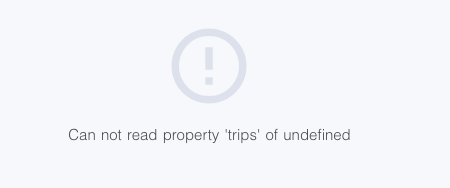
Also not reproducible as production sw.js seems not containing firebase so can't guess what's wrong.
pi0
on 24 Jun 2019
@pi0 I have not an error of this type. My project works fine I just not have dialog for add to Home screen when I import my firebase-messaging-sw.js
MSkred
on 24 Jun 2019
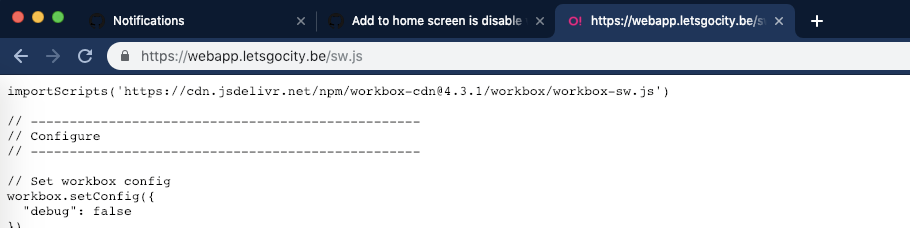 pi0
on 24 Jun 2019
pi0
on 24 Jun 2019
It's database error is fixed now.
And I've re deploy with my firebase sw
MSkred
on 24 Jun 2019
Strange indeed. We can try OneSignal workaround maybe it works. First, add these options:
{
  workbox: {
    swURL: 'firebase-messaging-sw.js'
  }
}
And on top of firebase-messaging-sw.js file, add importScripts('sw.js')
pi0
on 24 Jun 2019
Yeaaah I think all works fine ! I'm comeback to you tomorrow after more testing if it's not fixed but I think it's ok.
( other question :p ) It's possible to have multiple manifest.json
one for webapp.lgc.com/{uid}
an other for webapp.lgc.com/{otherUid}
etc ... etc...
MSkred
on 24 Jun 2019
I'm not sure supporting multiple manifest is supported by spec. What would be the use case?
pi0
on 24 Jun 2019
A page connected PWA for a lot of town of my country (belgium) it's managed by the town halls and the prerequisite is that each user can add to home screen the PWA for his city.
1st city webapp.lgc.com/{uid}
other city webapp.lgc.com/{uid-v2}
etc....
Than I think the solution it's the multiple manifest for update name, icon, description for SEO etc etc
Sorry for my english, thanks for your time
MSkred
on 24 Jun 2019
@pi0 Any idea ?
MSkred
on 28 Jun 2019
@MaximeScibetta I think we would need a dynamic way of generating manifest (per route) i'm working on a refactor for changing the way of manifest serving. Will try to see if we can also support it :)
pi0
on 28 Jun 2019
Great ! Thanks
MSkred
on 28 Jun 2019
@MaximeScibetta As I see, if I'm correct, you have PWA successfully running for your application. well I will be needing some help and guide from you and @pi0 ...
I have done all lighthouse optimizations but seem to be stucked on PWA module (workbox & oneSignal)
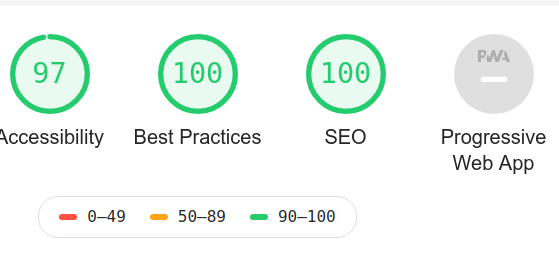
and the two main issues are:
- the generated "sw.js" in static folder doesn't get registered.
- One signal importScripts throws me console error as seen here:
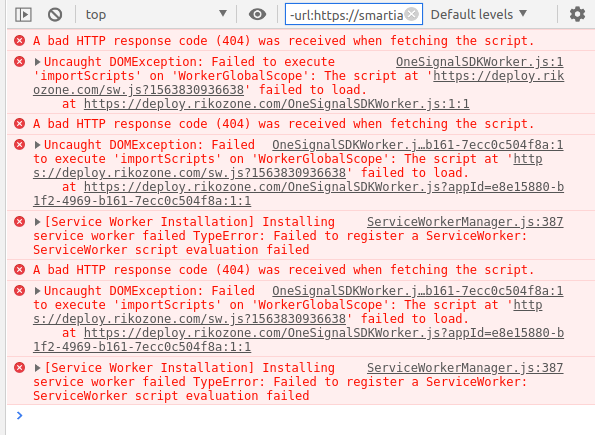
I happen to have missed these configurations somewhere.
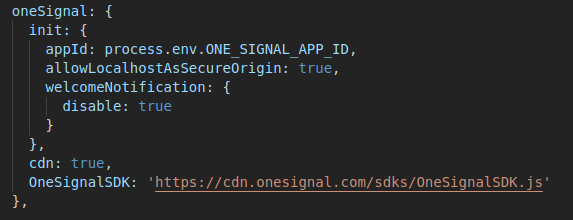
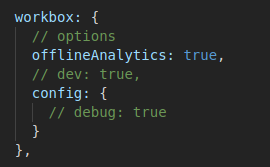
I have "OneSignalSDKWorker.js" in my static directory which imports "sw.js" but somehow I don't think it's doing it's job.

Please help with some guide so i know where I'm missing it.
Thanks
 rikoz
on 23 Jul 2019
rikoz
on 23 Jul 2019
Hi @rikoz, you're sure your sw.js is at the root of your project ?
When I navigate to https://deploy.rikozone.com/sw.js?1563830936638

MSkred
on 23 Jul 2019
it's in static folder
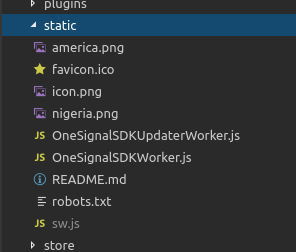
Do you make use of the oneSignal module?
Can I see your current nuxt.config.js for workbox?
Also why does importScripts give error? do i need to install a module?
rikoz
on 23 Jul 2019
And it's in your dist folder ?
No I use firebase
This is my workbox config
workbox: {
    swURL: 'firebase-messaging-sw.js'
  },
my firebase-messaging-sw.js
importScripts('sw.js');
importScripts("https://www.gstatic.com/firebasejs/5.9.4/firebase-app.js");
importScripts("https://www.gstatic.com/firebasejs/5.9.4/firebase-messaging.js");
firebase.initializeApp({
  messagingSenderId: "XXXXXXXXXXXX"
});

if (firebase.messaging.isSupported()) {
  const messaging = firebase.messaging()
  messaging.setBackgroundMessageHandler(function(payload) {
    console.log('[firebase-messaging-sw.js] Received background message ', payload);
    console.log('We are not on app background', payload)
    return registration.showNotification(payload.data.title, {
     body: payload.data.body,
     icon: `./chaudfontaine/icon.png`,
     badge: `./chaudfontaine/icon.png`,
     data: payload.data,
     image: `./chaudfontaine/ios-icon.png`,
   });
  });
  self.addEventListener('notificationclick', function(event) {
    console.log('[firebase-messaging-sw.js] Click on message ', event);
    clients.openWindow(event.notification.data.action);
    event.notification.close();
  });
}
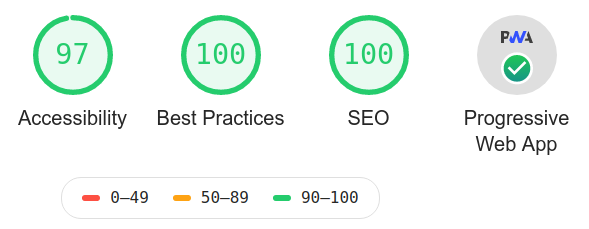
Thanks @MaximeScibetta @pi0 ... all working fine now
rikoz
on 24 Jul 2019
I @pi0, I've an other issue with @nuxt/pwa and workbox the dialog for " Add to home screen " is not showing when I've this code
   workbox: {
      cacheAssets: false, // for /*
      offline: false, // for /_nuxt/*
      swURL: 'firebase-messaging-sw.js',
      dev: false
    }
But if I commented this all work fine.
MSkred
on 15 Nov 2019
Related issues
 Guito
·
3Comments
Guito
·
3Comments
 aldarund
·
5Comments
aldarund
·
5Comments
 XanderLuciano
·
6Comments
XanderLuciano
·
6Comments
 sq-zhou
·
9Comments
sq-zhou
·
9Comments
 Shuunen
·
8Comments
Shuunen
·
8Comments
Most helpful comment
Strange indeed. We can try OneSignal workaround maybe it works. First, add these options:
And on top of
firebase-messaging-sw.jsfile, addimportScripts('sw.js')