Purgecss: Error: EACCES: permission denied (MacOS only)
Describe the bug
I made a PR for Aurelia CLI. This PR will add Tailwind CSS (with PurgeCSS) as a new option in CLI.
We encountered a problem in the process of completing it.
Unfortunately, I have no access to any Mac system so I have to quote.
ERROR in ./src/tailwind.css
Module build failed (from ./node_modules/postcss-loader/src/index.js):
Error: EACCES: permission denied, scandir '/Library/Application Support/Apple/AssetCache/Data'
    at Object.readdirSync (fs.js:779:3)
    at GlobSync._readdir (/Users/huocp/playground/hw/node_modules/glob/sync.js:288:41)
    at GlobSync._readdirInGlobStar (/Users/huocp/playground/hw/node_modules/glob/sync.js:267:20)
    at GlobSync._readdir (/Users/huocp/playground/hw/node_modules/glob/sync.js:276:17)
    at GlobSync._processReaddir (/Users/huocp/playground/hw/node_modules/glob/sync.js:137:22)
    at GlobSync._process (/Users/huocp/playground/hw/node_modules/glob/sync.js:132:10)
    at GlobSync._processGlobStar (/Users/huocp/playground/hw/node_modules/glob/sync.js:380:10)
    at GlobSync._process (/Users/huocp/playground/hw/node_modules/glob/sync.js:130:10)
    at GlobSync._processGlobStar (/Users/huocp/playground/hw/node_modules/glob/sync.js:383:10)
    at GlobSync._process (/Users/huocp/playground/hw/node_modules/glob/sync.js:130:10)
    at GlobSync._processGlobStar (/Users/huocp/playground/hw/node_modules/glob/sync.js:383:10)
    at GlobSync._process (/Users/huocp/playground/hw/node_modules/glob/sync.js:130:10)
    at GlobSync._processGlobStar (/Users/huocp/playground/hw/node_modules/glob/sync.js:383:10)
    at GlobSync._process (/Users/huocp/playground/hw/node_modules/glob/sync.js:130:10)
    at GlobSync._processGlobStar (/Users/huocp/playground/hw/node_modules/glob/sync.js:383:10)
    at GlobSync._process (/Users/huocp/playground/hw/node_modules/glob/sync.js:130:10)
 @ ./src/app.html
 @ ./src/app.js
 @ ./src/main.js
 @ ./node_modules/aurelia-webpack-plugin/runtime/empty-entry.js
 @ multi aurelia-webpack-plugin/runtime/empty-entry aurelia-webpack-plugin/runtime/pal-loader-entry aurelia-bootstrapper
Error: EPERM: operation not permitted, scandir '/Library/Application Support/com.apple.TCC'
We find out the problem is PurgeCSS, not TailwindCSS because when we disable PurgeCSS in configuration (production mode) everything works without error.
Please read this issue comment and the following posts for more information.

This issue does not exist in Windows 10 although we did not check it in Linux.
To Reproduce
Steps to reproduce the behavior:
- Clone my repository
- Use
npm install - Then use
au build --en prod(production mode)
Now you can see errors.
Expected behavior
Work without error on MacOS.
Desktop (please complete the following information):
- OS: MacOS
- Version of Purgecss latest
 HamedFathi
All 11 comments
Interesting, I don't remember having a problem installing PurgeCSS before. I'll check
 Ffloriel
on 1 Sep 2019
Ffloriel
on 1 Sep 2019
I don't see any errors when I followed your instructions. Is the issue still present to date? I noticed on the last comment on the Aurelia repo; it fails on Windows now.
Ffloriel
on 1 Sep 2019
@Ffloriel
I don't see any errors when I followed your instructions.
Unfortunately, I don't have any Apple device because of this issue I removed PurgeCSS from my PR :(
it fails on Windows now
It was a conflict between yarn and Travis windows. I removed yarn.lock from the PR. Everything works now.
HamedFathi
on 6 Sep 2019
Dear @Ffloriel ,
I have this problem
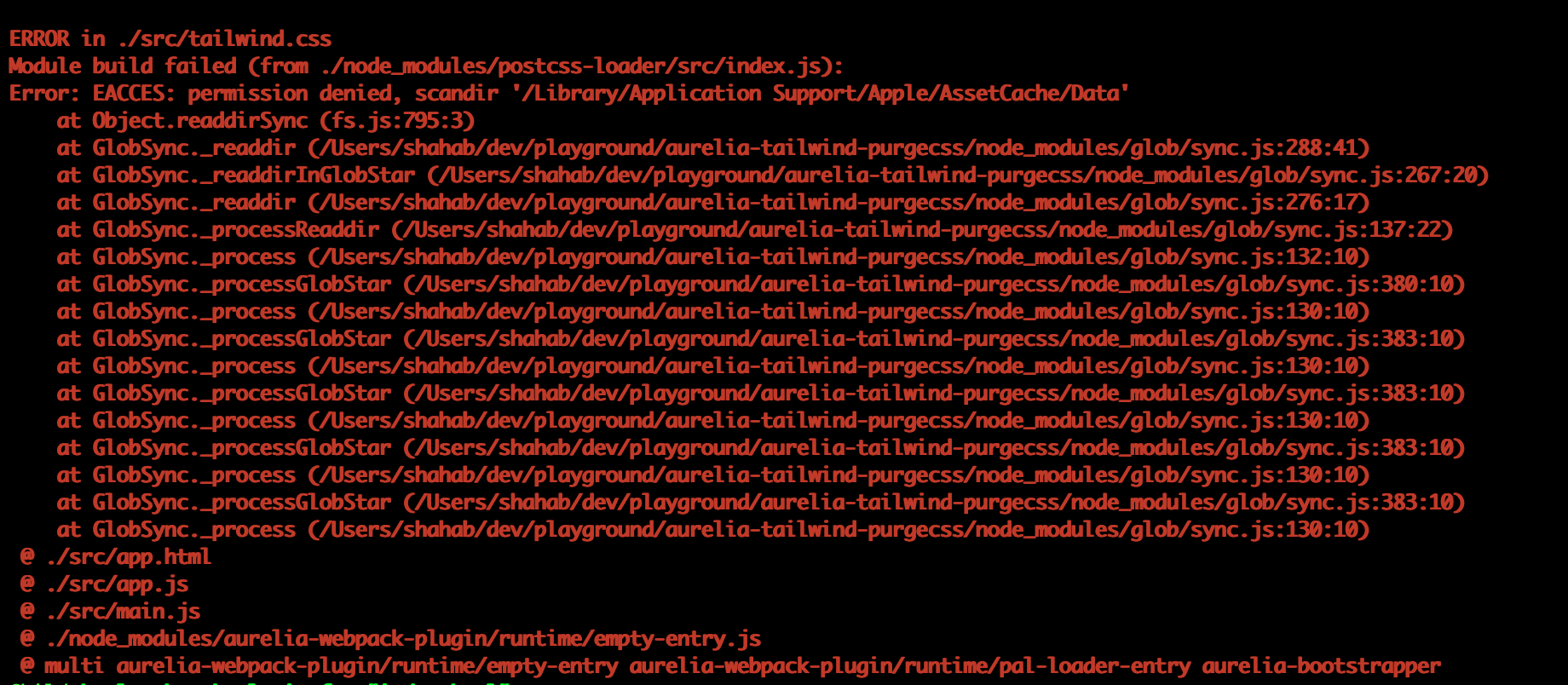
I am afraid the correct command for building in production mode is au build --env prod, I think there was a typo in the command
 shahabganji
on 6 Sep 2019
shahabganji
on 6 Sep 2019
@shahabganji
Thanks :)
@Ffloriel
Yes, The correct command for production mode is au build --env prod
Sorry, It should be env, not en.
HamedFathi
on 6 Sep 2019
@HamedFathi I'm running into a similar issue when attempting to build through Azure Pipelines. I noticed this issue is closed but can't see a resolution. Did you get to the bottom of this one in the end?
The issue started to appear after I added purgeCSS to my Aurelia build and disappeared when I removed it.
 freshcutdevelopment
on 22 Aug 2020
freshcutdevelopment
on 22 Aug 2020
@freshcutdevelopment There is no clue yet, because of my mistake (above comment and explanation) @Ffloriel closed the issue.
HamedFathi
on 23 Aug 2020
Ah ok thanks for confirming @HamedFathi 👍
freshcutdevelopment
on 23 Aug 2020
Took a bit of time but I think I found the issue.
            content: [
              path.resolve(srcDir, '/**/*.html')
            ],
If you console.log() the content, you will see it doesn't take into consideration the srcDir and end up being /**/*.html. Which means the glob will try to scan all the directories on your machine. And it will cause an access error.
You can solve this by changing the content to:
content: [
    `${srcDir}/**/*.html`
]
@Ffloriel
Thank you so much, unfortunately, I have no Apple device, I hope someone else in this issue helps me on this.
But your solution totally makes sense. Thanks for your time.
HamedFathi
on 25 Sep 2020
@HamedFathi
I tried your repository on my macbook, with the modification and the issue is solved
Ffloriel
on 26 Sep 2020
Related issues
 mikecousins
·
9Comments
mikecousins
·
9Comments
 XhmikosR
·
9Comments
XhmikosR
·
9Comments
 ZiggyV
·
4Comments
ZiggyV
·
4Comments
 TylerBarnes
·
5Comments
TylerBarnes
·
5Comments
 ctf0
·
4Comments
ctf0
·
4Comments