Pure: git info eventually stops being updated

General information
- Pure version: master (commit c985b19)
- ZSH version: 5.6.2
- Terminal program & version: iTerm 3.2.6
- Operating system: macOS 10.14.2
- ZSH framework: antibody
I have:
- [ ] Tested with another terminal program and can reproduce the issue:
- [ ] Followed the Integration instructions for my framework
Problem description
When I'm using a terminal panel for some time (hours or days), changing branches and etc, eventually, git info stops updating... it shows the old branch, for example, branch1, even though I keep changing branches. The arrows indicating push/pull also are not shown.
If I open another terminal panel/tab on the same folder, everything works as expected.
Reproduction steps
Don't know... :/
My .zshrc:
Not sure what's needed because I'm not sure what's causing it, but, pure-related, here it is:
PURE_CMD_MAX_EXEC_TIME=1
PURE_PROMPT_SYMBOL="λ"

source /Users/carlos/Library/Caches/antibody/https-COLON--SLASH--SLASH-github.com-SLASH-mafredri-SLASH-zsh-async/async.plugin.zsh
fpath+=( /Users/carlos/Library/Caches/antibody/https-COLON--SLASH--SLASH-github.com-SLASH-mafredri-SLASH-zsh-async )
source /Users/carlos/Library/Caches/antibody/https-COLON--SLASH--SLASH-github.com-SLASH-sindresorhus-SLASH-pure/pure.plugin.zsh
fpath+=( /Users/carlos/Library/Caches/antibody/https-COLON--SLASH--SLASH-github.com-SLASH-sindresorhus-SLASH-pure )
IssueHunt Summary
 mafredri has been rewarded.
Backers (Total: $80.00)
issuehunt ($80.00)
Submitted pull Requests
- #543 Respawn Pure async worker on crash
Tips
- Checkout the Issuehunt explorer to discover more funded issues.
- Need some help from other developers? Add your repositories on IssueHunt to raise funds.
 caarlos0
All 68 comments
Thanks for the report, I'll try to look into this later today. It's curious though, I have much the same setup, sans antibody. Can you list any other zsh plugins you might be using?
Also, what method of authentication do you use for Git? HTTPS? SSH? If SSH, do you use GPG, etc? Are you ever prompted for passwords in the terminal (or outside)?
If this happens to you again, the output from pstree -p $$ might help (brew install pstree).
And finally, if you don't mind, could you test out this PR https://github.com/sindresorhus/pure/pull/454?
The reason I suggest it is that if your issue is related to the zpty worker crashing, then the PR could help by allowing the worker to be restarted the next time you hit enter in the prompt.
 mafredri
on 20 Dec 2018
mafredri
on 20 Dec 2018
pstree -p $$
ohh forgot to do that :( will do next time it happens
Can you list any other zsh plugins you might be using?
sure thing: https://github.com/caarlos0/dotfiles/blob/master/antibody/bundles.txt
Also, what method of authentication do you use for Git? HTTPS? SSH? If SSH, do you use GPG, etc? Are you ever prompted for passwords in the terminal (or outside)?
SSH. I use GPG to sign commits, yes. No, never get prompted for passwords...
And finally, if you don't mind, could you test out this PR #454?
Sure thing! Will just wait for it to happen again to get the pstree output :)
caarlos0
on 20 Dec 2018
Happened again:
~/Code/goreleaser/goreleaser master*
λ pstree -p $$
-+= 00001 root /sbin/launchd
 \-+= 38530 carlos /Applications/iTerm.app/Contents/MacOS/iTerm2
   \-+= 59908 carlos /Applications/iTerm.app/Contents/MacOS/iTerm2 --server /usr/bin/login -fpl carlos /Applications/iTerm.app/Contents/MacOS/iTerm2 --launch_shell
     \-+= 59909 root /usr/bin/login -fpl carlos /Applications/iTerm.app/Contents/MacOS/iTerm2 --launch_shell
       \-+= 59910 carlos -zsh
         \-+= 71784 carlos pstree -p 59910
           \--- 71785 root ps -axwwo user,pid,ppid,pgid,command
Interesting, it indeed looks like the async worker (zpty) has died, for some reason :/.
I just realized, since you're using antibody, you might already have been running part of the #454 PR (e.g. the zsh-async update, or master branch) which would've killed the worker in case of an error. The second part of #454 would allow the worker to re-start on next prompt.
One thing that stands out from your bundles.txt is zsh-autosuggestions. It has caused me some problems in the past. It also uses zpty but creates / destroys its instance constantly (vs. long-running instance in zsh-async). If you can try to reproduce with it disabled, that would be good info as well.
I'll have to get back to you on this after the holidays, have a great one!
mafredri
on 23 Dec 2018
yeah, no worries!
Wish you great holidays! Thanks for the great work!
caarlos0
on 27 Dec 2018
I have the same issue here. May I ask any update on this?
 sandangel
on 5 Jan 2019
sandangel
on 5 Jan 2019
@sandangel still requires more info, I haven't been able to reproduce the issue, at least not reliably. It has stopped working for me on a few rare occasions as well but usually in combination with something else failing too (e.g. zsh-fast-syntax-highlighting which also is async).
It's tricky, so any information you can provide will be helpful.
mafredri
on 5 Jan 2019
Yeah, it rarely happens to me too and I had to kill the terminal. I don't know how to reproduce reliably too. Currently, I decided to move to alien-minimal, another prompt that uses zsh-async but was not happy with it like pure so I just come here to see if the issue was fixed.
sandangel
on 5 Jan 2019
Curious, did you use alien-minimal long enough that you should've experienced the issue, if it was present?
mafredri
on 5 Jan 2019
Also, another question: Are either of you working on a lot of things when it happens, with many terminals/tabs or processes open on the computer? One reason could be that resource limits are being hit preventing more processes from being spawned.
mafredri
on 5 Jan 2019
I have just started using alien-minimal today.
Are either of you working on a lot of things when it happens, with many terminals/tabs or processes open on the computer? One reason could be that resource limits are being hit preventing more processes from being spawned.
Yes, I have about 5 tmux pane with 3 to 4 windows each pane. I'm working on about 3 or 4 repos at the same time.
sandangel
on 5 Jan 2019
Also, another question: Are either of you working on a lot of things when it happens, with many terminals/tabs or processes open on the computer? One reason could be that resource limits are being hit preventing more processes from being spawned.
yes, always have like 3+ iTerm tabs with several panels in each one..
caarlos0
on 5 Jan 2019
I also run in the same issue regularly, I have to source my zsh config each time it happens.
Here is the list of plugins I use from oh-my-zsh:
plugins=(git tmux mvn tmuxinator docker osx kubectl go web-search zsh_reload z zsh-syntax-highlighting history-substring-search)
I usually have about 8 tmux windows.
 samuelmasuy
on 16 Jan 2019
samuelmasuy
on 16 Jan 2019
z zsh-syntax-highlighting history-substring-search
not sure if helps on anything, but we have those plugins in common...
caarlos0
on 16 Jan 2019
Hmm, I use / or have used all three myself (albeit my own fork of z with flock:ing and I've recently moved to zsh fast-syntax-highlighting) so not sure if there's any clue in those.
Could you try changing this line:
https://github.com/mafredri/zsh-async/blob/98d32afcce8e328be86f381c529e951943e57d19/async.zsh#L71
to:
exec 2>>/tmp/async-error.log
?
Let me know if any errors appear in the log when the problem occurs.
mafredri
on 21 Jan 2019
sure, done it... will observe and report whatever I find :)
caarlos0
on 21 Jan 2019
Just to add my two cents, I've been experiencing this for several months. I commented on a previous issue (https://github.com/sindresorhus/pure/issues/435#issuecomment-424410942), but my experience was actually unrelated to that issue. @mafredri asked me to open a new issue to troubleshoot, but I got busy/forgot! I do apologize. But _this_ time I'm sure my issue is the same as described here, ha.
I'm going to try changing the line above and see if I get any positive results. I won't forget to report back this time!
And if it's helpful, here's my setup for reference and a screenshot of the error happening (first the down arrow signifying upstream updates did not go away after a git pull, and changing out and back into the directory no longer shows it as a git repo/branch at all). Definitely see some plugins in common with the other users here.
- Pure version: 1.9.0
- NPM version: 6.6.0
- Git version: 2.20.1
- ZSH version: 5.6.2
- Terminal program & version: iTerm 3.2.6
- Operating system: macOS Sierra 10.14.2
- ZSH framework: oh-my-zsh (updated every week or two, or when prompted)
- oh-my-zsh pluings: git osx brew vagrant jump zsh-syntax-highlighting history-substring-search

 ttamnedlog
on 21 Jan 2019
ttamnedlog
on 21 Jan 2019
Just had the issue here again, /tmp/async-error.log was empty...
caarlos0
on 22 Jan 2019
Dang :/, thanks for testing though.
I'll try to get back to this after my vacation (gone for a week). In the meanwhile, @ttamnedlog how easily can you reproduce the issue?
I think this is going to be a hard one to debug without being able to reproduce it myself. Any chance this would be reproducible e.g. in a Docker container?
In the meantime, some more logging might help narrow this down:
https://github.com/sindresorhus/pure/blob/d5e14a3e0dd0a7179d06ca6499bdd8d79ac35e01/pure.zsh#L391
print "$0: $@" >> /tmp/pure.log
https://github.com/mafredri/zsh-async/blob/98d32afcce8e328be86f381c529e951943e57d19/async.zsh#L308
print "$0: $@" >> /tmp/async.log
I thought I would report this, even if it has only been a day that I have switched to fast-syntax-highlighting. But I was not able to reproduce the bug. For reference, the bug used to appear very often on my end (every 30 minutes or so).
fast-syntax-highlighting is actually a pretty decent alternative to zsh-syntax-highlighting 🙇
samuelmasuy
on 22 Jan 2019
I'll try to get back to this after my vacation (gone for a week). In the meanwhile, @ttamnedlog how easily can you reproduce the issue?
Not easily. Sadly, it's the same as described by @caarlos0. It happens seemingly randomly after hours of work. Some days it happens a few times a day, other days it doesn't happen at all. I'm sure my work habits vary from day to day but I can't pinpoint what I might have done on the days it occurs. A rough description of my work habits, in case you see anything helpful:
I don't use tmux on my machine (I do use it occasionally while in a remote terminal, but the remote doesn't have Pure anyway so none of that applies). I usually have two or three iTerm tabs open in different directories within a repo. And I often hop around to different repos. One tab is probably a task runner watching for file modifications and compiling assets. One tab is probably just the shell for system commands and certain git commands like switching branches and pushing and pulling. And one tab is usually in Vim. It's probably 50/50 whether or not I stage and commit from my iTerm tab at the shell or if I do it from within Vim using fugitive.
In the past, working this way, it wasn't abnormal for me to switch iTerm tabs and see that one Pure git status indicator was showing the wrong branch or status. That's not the issue being discussed here, just to clarify. I didn't consider that a bug; I wouldn't expect one iTerm tab to know what the other is doing anymore than I'm surprised when I trash a directory in Finder and then in iTerm try to cd .. out of it and can't, ha. Simply pressing return would refresh the shell prompt and the status indicator would be up-to-date and accurate.
The bug we're discussing here doesn't necessarily occur due to multiple tab tomfoolery. In the screenshot I posted, for example, that's not my repo, so I wasn't working in that directory or having multiple tabs of that directory open. I just hopped into the zsh-syntax-highlighting plugin directory, Pure async told me there were upstream changes, I run git pull, and async still says there are upstream changes. git status tells me everything's clean and up-to-date, but async is still inaccurate. I cd out of the repo and back in, to try and jog something loose perhaps, and now Pure async doesn't even see it as a repo anymore. Opening a new iTerm tab and going to this directory, everything works fine in the new tab.
Sorry this was so long! I hope it was helpful. I know this is difficult to nail down without some clearer steps to reproduce. Thanks for looking into it. I'll enable the additional logging you suggest and keep you posted!
ttamnedlog
on 22 Jan 2019
also had issue with zsh-syntax-highlighting and this problem.
 ezpuzz
on 29 Jan 2019
ezpuzz
on 29 Jan 2019
I replaced zsh-syntax-highlighting with fast-syntax-highlight, still got the issue, but it's less frequent I think
caarlos0
on 29 Jan 2019
I'm also running into this issue. Are there any steps I can follow to help you debug this?
 OliverJAsh
on 12 Feb 2019
OliverJAsh
on 12 Feb 2019
@OliverJAsh any information you can provide could be helpful. E.g what's been discussed here and reports of how often it happens, what you were doing at the time and if it's limited to some specific repo. Also versions of the software / operating system you are using (as above).
I haven't gotten around to try to debug this much further, it's tricky without a solid way to reproduce it. I wonder, is it only limited to macOS?
mafredri
on 12 Feb 2019
PS. Zsh 5.7.1 is out, does it also happen on it?
mafredri
on 12 Feb 2019
how often it happens
Maybe every 1/2 hours or so.
versions of the software / operating system
iTerm 3.2.6
Zsh 5.6.2
macOS 10.14.2
pure-prompt 1.8.0
I will try with the latest version of Zsh (5.7.1).
I've also just tried pure-prompt to 1.9.0 so I will see if that helps.
OliverJAsh
on 12 Feb 2019
alacritty 0.2.9
ZSH 5.7.1
pure-prompt 1.9.0 (manually pulled down 1.9.0 tag within the submodule)
ArchLinux
fzf 0.17.5 (in case it's related)
prezto
+autosuggestions
-syntax-highlighting (turned this off for a while to see if it would help. but it doesn't seem to)
What happens
When it happens, these effects are observed:
- branch information does not update. possibly the entirety of the first line of the prompt does not update
ctrl-cneeds to be hit twice in order to take effect
How often it happens
It happens very sporadically.
Sometimes it happens right when I open a new terminal and enter only a few commands.
Other times, it could be hours in between.
Thank you for the great work
This prompt is very nice and feels very snappy. Keep up the awesome work!
 wooken
on 13 Feb 2019
wooken
on 13 Feb 2019
@wooken thanks for the report!
ctrl-cneeds to be hit twice in order to take effect
This I believe could be related to autosuggestions. I've experienced it myself when using it. Here's my answer to cleaning up some of the zsh-asug behavior: modules/zsh-autosuggestions.zsh
- Stops zsh-asug from rewrapping all zle widgets on every prompt
- Disables async mode because the asug server (zpty worker) is re-created on every prompt (which can sometimes mess up other zpty workers, e.g. interfere with zsh-async)
If possible, I'd suggest that everyone here who uses zsh-autosuggestions and is experiencing the issue would try using the above method of loading it, see if it helps.
mafredri
on 13 Feb 2019
I believe I ran into this myself now, while running a build task many consecutive times on an old JS project that used gulp.
I tried removing the pure async worker and recreating it, but that didn't help which suggests Zsh is stuck somehow.
I noticed an interesting thing though, when I tab-complete (two times), a flood of async messages come through (all that were stuck), but it after that they're stuck again
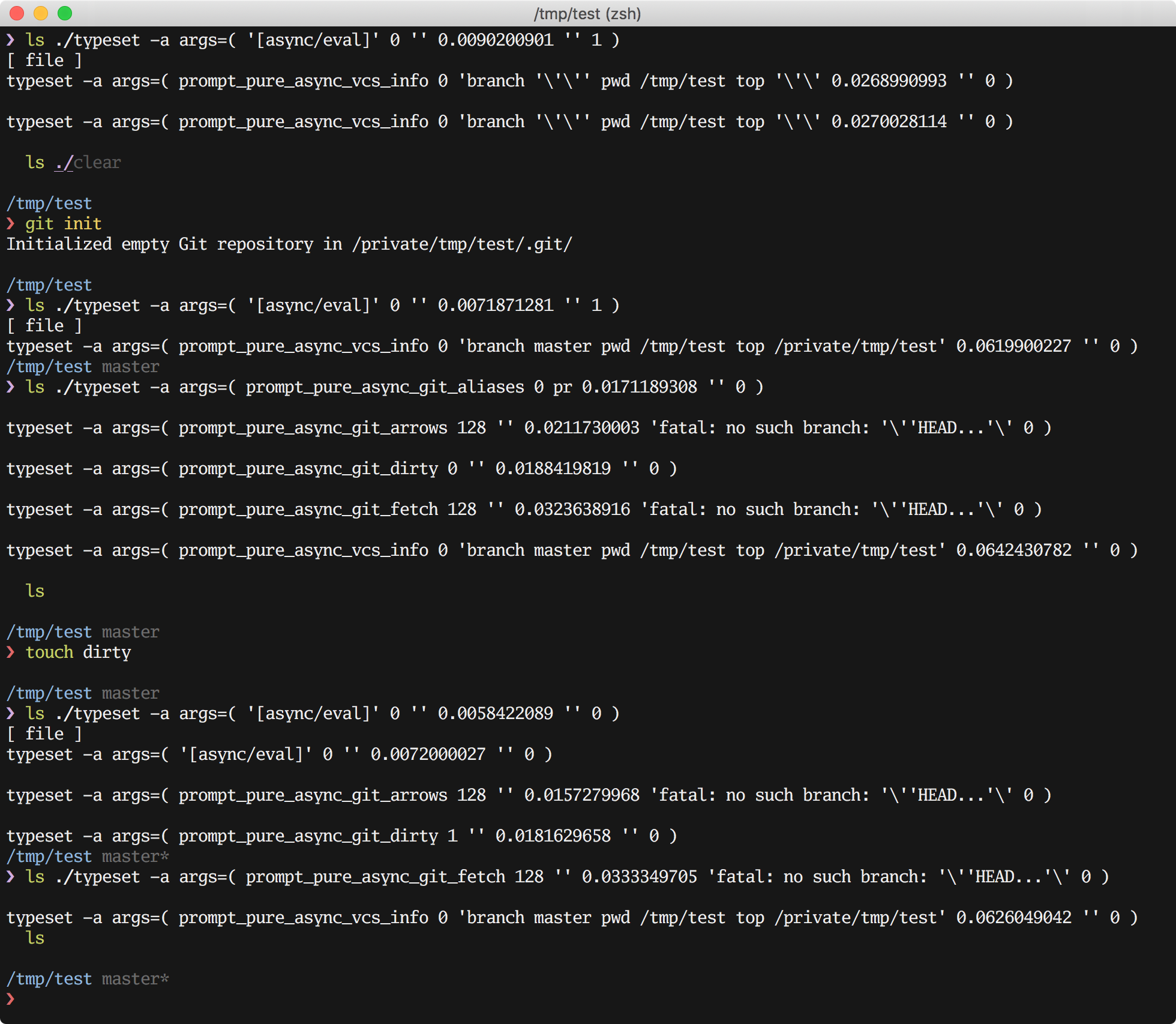
If you want to try this, you can add this to your .zshrc and run setcb when the issue arises:
prompt_pure_async_callback2() {
  local -a args=("$@")
  typeset -p args; print
  prompt_pure_async_callback "$@"
}

setcb() {
  ASYNC_CALLBACKS[prompt_pure]=prompt_pure_async_callback2
}
Ultimately we need to figure out what triggered it and what's keeping it stuck, though. Issue could be in Zsh internals / zpty.
For now, if you run into the issue, you can run exec zsh in your tab to replace the current shell with a new, working one.
I'd also be interested to know if anyone of you can reproduce the issue with 6203b39715580950e17767dd8b27954af2d08c31? It's just a hunch at this point but wondering if #430 might have made this issue appear.
mafredri
on 16 Feb 2019
I'd also be interested to know if anyone of you can reproduce the issue with 6203b39?
I'll run with it, just updated here:
~/Library/Caches/antibody/https-COLON--SLASH--SLASH-github.com-SLASH-sindresorhus-SLASH-pure
❯ grep '# The path has changed since the check started, abort.' pure.zsh
                # The path has changed since the check started, abort.
I'd also be interested to know if anyone of you can reproduce the issue with 6203b39?
still happens with the patch :(
caarlos0
on 18 Feb 2019
Alright, it finally just happened again for me. The fact I'm not in git every day makes the already intermittent occurrence of this problem all the harder for me to track down! I have _not_ updated pure since the new patch; I wanted to wait for it to happen again so I could produce the additional log files.
async-error.log is empty.
async.log (just has the following on 157 lines)
_async_zle_watcher: 11
````

`pure.log` has the following:
prompt_pure_async_callback: [async/eval] 0 0.0040020943 0
prompt_pure_async_callback: prompt_pure_async_vcs_info 0 branch '' pwd /Users/matt top '' 0.0226659775 0
prompt_pure_async_callback: [async/eval] 0 0.0045130253 0
prompt_pure_async_callback: prompt_pure_async_vcs_info 0 branch '' pwd /Users/matt top '' 0.0148818493 0
prompt_pure_async_callback: [async/eval] 0 0.0042359829 0
prompt_pure_async_callback: prompt_pure_async_vcs_info 0 branch '' pwd /Users/matt top '' 0.0154569149 0
prompt_pure_async_callback: [async/eval] 0 0.0041060448 0
prompt_pure_async_callback: prompt_pure_async_vcs_info 0 branch '' pwd /Users/matt top '' 0.0160820484 0
prompt_pure_async_callback: [async/eval] 0 0.0043370724 0
prompt_pure_async_callback: prompt_pure_async_vcs_info 0 branch '' pwd /Users/matt top '' 0.0151009560 0
prompt_pure_async_callback: [async/eval] 0 0.0049560070 0
prompt_pure_async_callback: prompt_pure_async_vcs_info 0 branch '' pwd /Users/matt/sites/mysite top '' 0.0159578323 0
prompt_pure_async_callback: [async/eval] 0 0.0053570271 0
prompt_pure_async_callback: prompt_pure_async_vcs_info 0 branch '' pwd /Users/matt/sites/mysite top '' 0.0157759190 0
prompt_pure_async_callback: [async/eval] 0 0.0050909519 0
prompt_pure_async_callback: prompt_pure_async_vcs_info 0 branch develop pwd /Users/matt/sites/mysite/site/web/app/themes/my-theme top /Users/matt/sites/mysite/site/web/app/themes/my-theme 0.0482249260 0
prompt_pure_async_callback: prompt_pure_async_git_aliases 0 0.0125789642 0
prompt_pure_async_callback: prompt_pure_async_git_arrows 128 0.0141990185 fatal: no upstream configured for branch 'develop' 0
prompt_pure_async_callback: prompt_pure_async_git_dirty 0 0.0296609402 0
prompt_pure_async_callback: prompt_pure_async_git_fetch 128 0.0401299000 fatal: no upstream configured for branch 'develop' 0
prompt_pure_async_callback: [async/eval] 0 0.0051641464 0
prompt_pure_async_callback: prompt_pure_async_git_arrows 128 0.0144629478 fatal: no upstream configured for branch 'develop' 0
prompt_pure_async_callback: prompt_pure_async_git_dirty 0 0.0216112137 0
prompt_pure_async_callback: prompt_pure_async_git_fetch 128 0.0362160206 fatal: no upstream configured for branch 'develop' 0
prompt_pure_async_callback: prompt_pure_async_vcs_info 0 branch develop pwd /Users/matt/sites/mysite/site/web/app/themes/my-theme top /Users/matt/sites/mysite/site/web/app/themes/my-theme 0.0533809662 0
prompt_pure_async_callback: [async/eval] 0 0.0050628185 0
prompt_pure_async_callback: prompt_pure_async_git_arrows 128 0.0165190697 fatal: no upstream configured for branch 'develop' 0
prompt_pure_async_callback: prompt_pure_async_git_dirty 0 0.0205159187 0
prompt_pure_async_callback: prompt_pure_async_git_fetch 128 0.0351898670 fatal: no upstream configured for branch 'develop' 0
prompt_pure_async_callback: prompt_pure_async_vcs_info 0 branch develop pwd /Users/matt/sites/mysite/site/web/app/themes/my-theme top /Users/matt/sites/mysite/site/web/app/themes/my-theme 0.0561311245 0
prompt_pure_async_callback: [async/eval] 0 0.0047299862 0
prompt_pure_async_callback: prompt_pure_async_git_arrows 128 0.0151770115 fatal: no upstream configured for branch 'develop' 0
prompt_pure_async_callback: prompt_pure_async_git_dirty 0 0.0230581760 0
prompt_pure_async_callback: prompt_pure_async_git_fetch 128 0.0349049568 fatal: no upstream configured for branch 'develop' 0
prompt_pure_async_callback: prompt_pure_async_vcs_info 0 branch develop pwd /Users/matt/sites/mysite/site/web/app/themes/my-theme top /Users/matt/sites/mysite/site/web/app/themes/my-theme 0.0501518250 0
prompt_pure_async_callback: [async/eval] 0 0.0046470165 0
prompt_pure_async_callback: prompt_pure_async_vcs_info 0 branch '' pwd /Users/matt/sites/mysite/site/web/app/themes top '' 0.0152831078 0
prompt_pure_async_callback: [async/eval] 0 0.0038309097 0
prompt_pure_async_callback: prompt_pure_async_vcs_info 0 branch '' pwd /Users/matt/sites/mysite/site/web/app/themes top '' 0.0153288841 0
prompt_pure_async_callback: [async/eval] 0 0.0048050880 0
prompt_pure_async_callback: prompt_pure_async_vcs_info 0 branch '' pwd /Users/matt/sites/mysite/site/web/app/themes top '' 0.0158801079 0
prompt_pure_async_callback: [async/eval] 0 0.0045320988 0
prompt_pure_async_callback: prompt_pure_async_vcs_info 0 branch '' pwd /Users/matt/sites/mysite/site/web/app/themes/my-theme-2 top '' 0.0160129070 0
prompt_pure_async_callback: [async/eval] 0 0.0055270195 0
prompt_pure_async_callback: prompt_pure_async_vcs_info 0 branch '' pwd /Users/matt/sites/mysite/site/web/app/themes/my-theme-2 top '' 0.0159299374 0
prompt_pure_async_callback: [async/eval] 0 0.0043280125 0
prompt_pure_async_callback: prompt_pure_async_vcs_info 0 branch master pwd /Users/matt/sites/mysite/site/web/app/themes/my-theme-2 top /Users/matt/sites/mysite/site/web/app/themes/my-theme-2 0.0427110195 0
prompt_pure_async_callback: prompt_pure_async_git_aliases 0 0.0105111599 0
prompt_pure_async_callback: prompt_pure_async_git_arrows 128 0.0104498863 fatal: no such branch: 'HEAD...' 0
prompt_pure_async_callback: prompt_pure_async_git_dirty 1 0.0175180435 0
prompt_pure_async_callback: prompt_pure_async_git_fetch 128 0.0302729607 fatal: no such branch: 'HEAD...' 0
prompt_pure_async_callback: [async/eval] 0 0.0048179626 0
prompt_pure_async_callback: prompt_pure_async_git_arrows 128 0.0136170387 fatal: no such branch: 'HEAD...' 0
prompt_pure_async_callback: prompt_pure_async_git_dirty 1 0.0203320980 0
prompt_pure_async_callback: prompt_pure_async_git_fetch 128 0.0348980427 fatal: no such branch: 'HEAD...' 0
prompt_pure_async_callback: prompt_pure_async_vcs_info 0 branch master pwd /Users/matt/sites/mysite/site/web/app/themes/my-theme-2 top /Users/matt/sites/mysite/site/web/app/themes/my-theme-2 0.0500729084 0
prompt_pure_async_callback: [async/eval] 0 0.0044279099 0
prompt_pure_async_callback: prompt_pure_async_git_arrows 128 0.0144159794 fatal: no upstream configured for branch 'master' 0
prompt_pure_async_callback: prompt_pure_async_git_dirty 0 0.0222940445 0
prompt_pure_async_callback: prompt_pure_async_git_fetch 128 0.0351929665 fatal: no upstream configured for branch 'master' 0
prompt_pure_async_callback: prompt_pure_async_vcs_info 0 branch master pwd /Users/matt/sites/mysite/site/web/app/themes/my-theme-2 top /Users/matt/sites/mysite/site/web/app/themes/my-theme-2 0.0578789711 0
prompt_pure_async_callback: [async/eval] 0 0.0052580833 0
prompt_pure_async_callback: prompt_pure_async_git_arrows 128 0.0133998394 fatal: no upstream configured for branch 'develop' 0
prompt_pure_async_callback: prompt_pure_async_git_dirty 0 0.0195980072 0
prompt_pure_async_callback: prompt_pure_async_git_fetch 128 0.0348651409 fatal: no upstream configured for branch 'develop' 0
prompt_pure_async_callback: prompt_pure_async_vcs_info 0 branch develop pwd /Users/matt/sites/mysite/site/web/app/themes/my-theme-2 top /Users/matt/sites/mysite/site/web/app/themes/my-theme-2 0.0546040535 0
prompt_pure_async_callback: [async/eval] 0 0.0047979355 0
prompt_pure_async_callback: prompt_pure_async_git_arrows 128 0.0148169994 fatal: no upstream configured for branch 'develop' 0
prompt_pure_async_callback: prompt_pure_async_git_dirty 0 0.0229518414 0
prompt_pure_async_callback: prompt_pure_async_git_fetch 128 0.0392210484 fatal: no upstream configured for branch 'develop' 0
prompt_pure_async_callback: prompt_pure_async_vcs_info 0 branch develop pwd /Users/matt/sites/mysite/site/web/app/themes/my-theme-2 top /Users/matt/sites/mysite/site/web/app/themes/my-theme-2 0.0544669628 0
prompt_pure_async_callback: [async/eval] 0 0.0053091049 0
prompt_pure_async_callback: prompt_pure_async_git_arrows 128 0.0133829117 fatal: no upstream configured for branch 'develop' 0
prompt_pure_async_callback: prompt_pure_async_git_dirty 0 0.0260369778 0
prompt_pure_async_callback: prompt_pure_async_git_fetch 128 0.0359511375 fatal: no upstream configured for branch 'develop' 0
prompt_pure_async_callback: prompt_pure_async_vcs_info 0 branch develop pwd /Users/matt/sites/mysite/site/web/app/themes/my-theme-2 top /Users/matt/sites/mysite/site/web/app/themes/my-theme-2 0.0576441288 0
prompt_pure_async_callback: [async/eval] 0 0.0050189495 0
prompt_pure_async_callback: prompt_pure_async_git_arrows 128 0.0150830746 fatal: no upstream configured for branch 'develop' 0
prompt_pure_async_callback: prompt_pure_async_git_dirty 0 0.0212769508 0
prompt_pure_async_callback: prompt_pure_async_git_fetch 128 0.0328409672 fatal: no upstream configured for branch 'develop' 0
prompt_pure_async_callback: prompt_pure_async_vcs_info 0 branch develop pwd /Users/matt/sites/mysite/site/web/app/themes/my-theme-2 top /Users/matt/sites/mysite/site/web/app/themes/my-theme-2 0.0549681187 0
prompt_pure_async_callback: [async/eval] 0 0.0050389767 0
prompt_pure_async_callback: prompt_pure_async_git_arrows 128 0.0172841549 fatal: no upstream configured for branch 'develop' 0
prompt_pure_async_callback: prompt_pure_async_git_dirty 0 0.0192959309 0
prompt_pure_async_callback: prompt_pure_async_git_fetch 128 0.0315549374 fatal: no upstream configured for branch 'develop' 0
prompt_pure_async_callback: prompt_pure_async_vcs_info 0 branch develop pwd /Users/matt/sites/mysite/site/web/app/themes/my-theme-2 top /Users/matt/sites/mysite/site/web/app/themes/my-theme-2 0.0529830456 0
prompt_pure_async_callback: [async/eval] 0 0.0052587986 0
prompt_pure_async_callback: prompt_pure_async_git_arrows 128 0.0129568577 fatal: no upstream configured for branch 'develop' 0
prompt_pure_async_callback: prompt_pure_async_git_dirty 0 0.0220568180 0
prompt_pure_async_callback: prompt_pure_async_git_fetch 128 0.0326838493 fatal: no upstream configured for branch 'develop' 0
prompt_pure_async_callback: prompt_pure_async_vcs_info 0 branch develop pwd /Users/matt/sites/mysite/site/web/app/themes/my-theme-2 top /Users/matt/sites/mysite/site/web/app/themes/my-theme-2 0.0526521206 0
prompt_pure_async_callback: [async/eval] 0 0.0041589737 0
prompt_pure_async_callback: prompt_pure_async_vcs_info 0 branch '' pwd /Users/matt top '' 0.0166888237 0
prompt_pure_async_callback: [async/eval] 0 0.0083308220 0
prompt_pure_async_callback: prompt_pure_async_vcs_info 0 branch '' pwd /tmp top '' 0.0165917873 0
prompt_pure_async_callback: [async/eval] 0 0.0052070618 0
prompt_pure_async_callback: prompt_pure_async_vcs_info 0 branch '' pwd /tmp top '' 0.0156338215 0
prompt_pure_async_callback: [async/eval] 0 0.0047760010 0
prompt_pure_async_callback: prompt_pure_async_vcs_info 0 branch '' pwd /tmp top '' 0.0170600414 0
prompt_pure_async_callback: [async/eval] 0 0.0061080456 0
prompt_pure_async_callback: prompt_pure_async_vcs_info 0 branch '' pwd /tmp top '' 0.0173799992 0
prompt_pure_async_callback: [async/eval] 0 0.0047488213 0
prompt_pure_async_callback: prompt_pure_async_vcs_info 0 branch '' pwd /tmp top '' 0.0154509544 0
prompt_pure_async_callback: [async/eval] 0 0.0048611164 0
prompt_pure_async_callback: prompt_pure_async_vcs_info 0 branch '' pwd /tmp top '' 0.0155098438 0
```
ttamnedlog
on 19 Feb 2019
Thanks for the report @ttamnedlog, unfortunately it looks pretty normal :/. Did the prompt stop working in /tmp or was it some directory after /tmp where it stopped working?
I made a new branch of zsh-async that tests an alternate approach to communicating with the zpty worker: https://github.com/mafredri/zsh-async/tree/insomnia-monster-mix
Please don't get your hopes up though. I'm blind-folded, spun around and trying to hit the piñata 😅...
mafredri
on 24 Feb 2019
Hey! @mafredri, thanks for your amazing work.
I've recently updated my system and pure stopped showing the the git info :disappointed:
In an attempt to restore it, I started downgrading the repository, and found out that version 1.5.2 did the work.
Here's more info about my setup:
alacritty 0.2.9
zsh 5.7.1
pure-prompt 1.9.0-47f9bfd (manually pulled down)
ArchLinux
zsh-autosuggestions v.0.5.0-70f36c0
fast-syntax-highhlighting v1.28-49d27fb
zsh-completions v0.30.0
By the way, in a desperate attempt, I tried using the geometry prompt, they are running on zsh-async v1.3.1. It also worked but I'm not into "one-liner" prompts.
Here are my dots if it helps to replicate the issue: https://github.com/mroutis/dotfiles/tree/master/zsh
 ghost
on 4 Mar 2019
ghost
on 4 Mar 2019
Was having the same problem, replaced zsh-syntax-highlighting with fast-syntax-highlight and so far seems more stable as well.
 onyxraven
on 5 Mar 2019
onyxraven
on 5 Mar 2019
First, thanks for this great prompt!
I recently changed computers and this started happening to me to.
Two things I changed up, signing commits with gpg (probably unrelated) and using antibody.
I never had this problem before even though I also always used zsh-syntax-highlighting together.
Is there any definite solution yet?
 codesuki
on 27 Mar 2019
codesuki
on 27 Mar 2019
I never had this problem before even though I also always used zsh-syntax-highlighting together.
I also use both GPG and antibody...
but I don't think any of them is the cause...
antibody in the end just generates a source path/to/pure.zsh 🤔
caarlos0
on 27 Mar 2019
Agree
codesuki
on 27 Mar 2019
Hmm, all of you who use GPG, what type of pinentry (if any) do you use? If using ncurses, you might be running into https://github.com/sindresorhus/pure/issues/366.
As a status update, I've pretty much run into a wall with this issue, but as I see it there are three avenues to pursue:
- Asking for help on the
zsh-users(or -workers) mailing list and see if they have any ideas for why this could be happening - Continue work on the
no-zpty-branch for zsh-async and turn it into a proper (alternative) backend - Allow Pure to run in synchronous mode (possibly also as an async backend)
Thoughts?
Regarding nr. 2: Feel free to try it out if you're interested, just keep in mind that it's very much a WIP, does not support "unique tasks" (e.g. ensure only one git fetch is running at a time) or killing tasks (e.g. when changing directory)
mafredri
on 27 Mar 2019
my gpg config is basically this: https://github.com/caarlos0/macos#5-setup-gpg-signing
caarlos0
on 27 Mar 2019
I have also started experiencing this issue. Here is the relevant part of my .zshrc
# config for .zshrc
source /Users/gturner/antigen.zsh

# Load the oh-my-zsh's library.
antigen use oh-my-zsh

# Bundles from the default repo (robbyrussell's oh-my-zsh).
antigen bundle git
antigen bundle heroku
antigen bundle pip
antigen bundle lein
antigen bundle command-not-found
antigen bundle mafredri/zsh-async
antigen bundle sindresorhus/pure

# Syntax highlighting bundle.
antigen bundle zsh-users/zsh-syntax-highlighting
antigen bundle zsh-users/zsh-history-substring-search

# Tell Antigen that you're done.
antigen apply
I recently switched to using fast-syntax-highlighting and the issue has not occured.
 tgturner
on 27 Mar 2019
tgturner
on 27 Mar 2019
@mafredri not sure if this answers your question but this is in my config
pinentry-program /usr/local/MacGPG2/libexec/pinentry-mac.app/Contents/MacOS/pinentry-mac
codesuki
on 8 Apr 2019
Hitting this problem intermittently the last few months too, and also a zsh-syntax-highlighting plugin user too - will try to switch to fast-syntax-highlighting and see how things go
 phantomwhale
on 30 Apr 2019
phantomwhale
on 30 Apr 2019
@issuehunt has funded $80.00 to this issue.
- Submit pull request via IssueHunt to receive this reward.
- Want to contribute? Chip in to this issue via IssueHunt.
- Checkout the IssueHunt Issue Explorer to see more funded issues.
- Need help from developers? Add your repository on IssueHunt to raise funds.
 IssueHuntBot
on 2 May 2019
IssueHuntBot
on 2 May 2019
Not that it adds any useful debugging info, but I've also hit this and I'm not using any of the highlighting plugins.
 ashb
on 26 Jun 2019
ashb
on 26 Jun 2019
I switched to fast-syntax-highlighting but the issue persists.
codesuki
on 27 Jun 2019
@mattpolito has funded $40.00 to this issue.
- Submit pull request via IssueHunt to receive this reward.
- Want to contribute? Chip in to this issue via IssueHunt.
- Checkout the IssueHunt Issue Explorer to see more funded issues.
- Need help from developers? Add your repository on IssueHunt to raise funds.
![issuehunt-app[bot] picture](https://avatars3.githubusercontent.com/in/29881?v=4&s=40) issuehunt-app[bot]
on 24 Jul 2019
issuehunt-app[bot]
on 24 Jul 2019
Does anyone know of a workaround without exiting zsh?
 camsteffen
on 6 Sep 2019
camsteffen
on 6 Sep 2019
Took a look at this again after a talk with @sindresorhus about it, he pointed out some commits that got me thinking... so, I've created two branches:
- issue-445-testfix1 - Moves things around and adds an extra guard in async
- issue-445-testfix2 - Reverts "Simplify async tasks by not passing $PWD (#430)"
Please, if you can reproduce, give them a try and report back!
mafredri
on 8 Sep 2019
issue-445-testfix1 - Moves things around and adds an extra guard in async
I switched to use this branch after your comment and I don't get a branch at all. I'll try testfix2 next.
 sindresorhus
on 9 Sep 2019
sindresorhus
on 9 Sep 2019
I switched to use this branch after your comment and I don't get a branch at all. I'll try
testfix2next.
Oh, looks like I made a booboo, fixed testfix1 now.
mafredri
on 9 Sep 2019
I can confirm that testfix2 also has the issue of Git info eventually stops being updated. I still need to test testfix1 more.
sindresorhus
on 4 Oct 2019
The git dirty status * just got stuck when using testfix1. It stays there even when the branch is not dirty. Restarting the terminal app makes the * disappear.
sindresorhus
on 8 Oct 2019
Thanks for testing Sindre, it really is the worst news I could've hoped for 😂😭. If not even testfix2 fixes it, we'll have to dig deep. I'll try to set some time aside this weekend to look at it further, but at least we've excluded a few possibilities.
mafredri
on 8 Oct 2019
@mattpolito has cancelled funding for this issue.(Cancelled amount: $40.00) See it on IssueHunt
issuehunt-app[bot]
on 8 Oct 2019
I just ran into this on again (master branch), and it seems I was able to be able to bring back to life by doing:
prompt_pure_async_init=0; async_stop_worker prompt_pure
Can anybody else confirm this? It doesn't really provide clues to the underlying issue, but could help us work around it in the meantime.
mafredri
on 17 Nov 2019
@mafredri I can confirm that running the above command brought it back to life.
sindresorhus
on 18 Nov 2019
@sindresorhus thanks for confirming.
I've found what I believe to be the ~reason for this. Well, I can't explain why it happens, but at least where.
There's now a new PR open in zsh-async (https://github.com/mafredri/zsh-async/pull/37) which addresses it and a few more improvements fueled by paranoia. I believe this is where we ran into trouble until now: mafredri/zsh-async#37/files#diff-c7f89cff42efffc19f69071441a12a1cR170-R174.
I've now created the indestructible-pure branch, which listens to the new signals from zsh-async and should allow for recovery on next prompt. I managed to trigger the issue a few times before making all of the above changes, but after I added the handling in Pure, I could no longer 😅.
Anyway, please try it out. Ideally, as a next step, I'd like to automatically detect worker crashes in zsh-async and do the restart there, but we'll see.
mafredri
on 18 Nov 2019
Can anybody else confirm this? It doesn't really provide clues to the underlying issue, but could help us work around it in the meantime.
I just reproduced the issue on my local system and running the command prompt_pure_async_init=0; async_stop_worker prompt_pure fixed it for me.
 esetnik
on 19 Nov 2019
esetnik
on 19 Nov 2019
I think it is the problem with zsh-async. In prezto, themes that use zsh-asyc (such as pure, sorin) are showing occasional hang while in git directory. All other themes work fine. I also get unacceptable delay in deleting text if I have written wrong command (also happen when I am in git directory).
In my case the above stated workaround do not work.
Tested in zsh 5.7.1 (x86_64-debian-linux-gnu).
 mayanksuman
on 2 Dec 2019
mayanksuman
on 2 Dec 2019
@mafredri been trying indestructible-pure branch the last few days and I have yet to run into git info issues or 100% CPU usage
wooken
on 3 Dec 2019
In case anyone runs into this problem: In switching to the indestructible-pure branch, I ran npm -g uninstall pure-prompt because I wanted to be sure I was using the git-cloned branch. After I did this, I started getting the following error message when I started a new terminal
Couldn't read file /usr/local/share/zsh/site-functions/prompt_pure_setup containing theme pure.
Turns out npm uninstall left a broken symlink with this name. Removing the broken symlink got rid of the error.
 jlebar
on 7 Mar 2020
jlebar
on 7 Mar 2020
@sindresorhus do you plan to release a new version with this fix?
esetnik
on 3 Apr 2020
would be awesome!
caarlos0
on 3 Apr 2020
Had some time last weekend to work on this and wrapped it up today, the final iteration of zsh-async and pure worker restarting is now in #543. Please, for anyone affected, give it a spin and report any issues here.
Workers can still crash, but restarts are completely transparent and should not result in any inconveniences for the user.
mafredri
on 13 Apr 2020
Oh, might as well add this as well. So last weekend I automated triggering this bug, but it's by no means reliable and requires bruteforceing. Anyway, this is what I came up with (run in a terminal that is not iTerm):
Variant that hops between home and my local Pure repo, does not require iTerm to be in focus but produces a lot of noise.
while :; do
        for dir in ~ ~/Projects/Pure; do
                osascript -e '
                        tell application "iTerm"
                                tell current session of current window
                                        write text "cd '$dir'"
                                end tell
                        end tell
                '
        sleep 0.22
        done
done
Variant using dircycle from my zsh config (changes directory from directory stack via Ctrl+Shift+Arrow) but requires iTerm to be in focus at all times but produces no noise.
osascript -e 'activate application "iTerm"'
for i in {1..1000}; do
        for i in {1..31}; do
                osascript -e '
                        tell application "System Events"
                                key code 124 using {shift down, control down}
                        end tell
                '
                sleep 0.12
        done
        sleep 2.01
done
Sleeps are just randomly picked from whatever seems to trigger it occasionally.
mafredri
on 13 Apr 2020
@sindresorhus has rewarded $72.00 to @mafredri. See it on IssueHunt
- :moneybag: Total deposit: $80.00
- :tada: Repository reward(0%): $0.00
- :wrench: Service fee(10%): $8.00
issuehunt-app[bot]
on 1 May 2020
Related issues
 rawaludin
·
3Comments
rawaludin
·
3Comments
 ebsen
·
10Comments
ebsen
·
10Comments
 d3lm
·
3Comments
d3lm
·
3Comments
 victorronnow
·
7Comments
victorronnow
·
7Comments
 bigH
·
8Comments
bigH
·
8Comments
Most helpful comment
I just ran into this on again (
masterbranch), and it seems I was able to be able to bring back to life by doing:Can anybody else confirm this? It doesn't really provide clues to the underlying issue, but could help us work around it in the meantime.