Puppeteer: Having trouble with page.type not typing all characters
Having some issues where it seems this.page.type is not working properly and I can't figure out why. It works 100% of the time in one of my tests, but I have a second test doing the same thing on a different page (only difference is the new page has more input fields) and it fails most of the time (but occasionally passes). Here's an example of what I'm doing:
await this.page.type('[placeholder="Enter ID"]', myObj.id);
await this.page.waitForSelector(`input[value="${myObj.id}"]`);

await this.page.type('[placeholder="Enter Type"]', myObj.type);
await this.page.waitForSelector(`input[value="${myObj.type}"]`);
I have 11 total input fields that follow the above pattern on this page, the page that has never flaked out on me has only 6 input fields.
The problem is page.type doesn't appear to be typing everything in myObj, for example myObj.type contains 10 random words, occasionally puppeteer seems to only type some of the characters contained in myObj.type, it sometimes cuts off in the middle of a word, other times it cuts off at the end of a word. The property that doesn't type out completely is random every run, as is the number of characters it actually types out. It is not a character limit in the database or input field (I can manually type in significantly more without a problem and each time I run it cuts off at a different random point, sometimes as few as 5-6 characters, other times as many as 20 or so characters).
Is there any debugging methods that would help me figure this out? Console logging myObj shows the full text for every property, taking screenshots or running puppeteer outside of headless mode shows that it stops inputting characters at random times.
Additionally I've tried adding a delay option into my page.type calls and it seems to make the issue worse, typing only a single character into my first input field before breaking. It seems like it might be losing focus (when watching it in headless: false mode).
 Nagisan
All 52 comments
Hello, I have the same issue on a page wich have two inputs text. The last one is incomplete, I often get 7 characters instead of 8
 ggirodda
on 25 Dec 2017
ggirodda
on 25 Dec 2017
A bit more troubleshooting since my initial post, this page is pulling data from a database and Puppeteer is losing focus on the field that doesn't get completed (if I add a chai expect in after each page.type, when it fails to fill out a field completely the screenshot it takes does not have focus on the input field).
I think what may be happening is puppeteer is just running too quickly and it begins filling in the fields, at some point during this the page finishes getting data from the server and refreshes the page (not a browser refresh.....I'm using React & Redux, so the state updates with the fetched data and refreshes the display).
This loss of focus is not ever seen by a user (because they won't select an input as quickly as puppeteer will) so it's only an issue with puppeteer itself, I can force it to work fine if I make puppeteer wait 500ms after landing on the page (which is enough time for DB calls to resolve locally but may not work in my remote environment).
I've also tried waiting for networkidle and what not, but I'm getting to this page with a click action not a network call so I don't think I can easily wait for networkidle.
Any suggestions on how best to work around this issue? I don't like waiting for a static time because it will just introduce test flakiness in different environments.
Nagisan
on 25 Dec 2017
Any suggestions on how best to work around this issue? I don't like waiting for a static time because it will just introduce test flakiness in different environments.
@Nagisan I'd try a few options here:
- if the page fetches something over network and you know the url it loads, you can subscribe to the
requestfinishedevent and wait for the request to finish - if you have access to the website codebase, you might issue a call to
console.timeStampwith some label, e.g.console.timeStamp('mynicelabel'). In puppeteer, you'll get a relatedmetricsevent with a'mynicelabel'title
 aslushnikov
on 4 Jan 2018
aslushnikov
on 4 Jan 2018
Is this the expected behavior? I'm having the same problem. The page I'm trying to type into does not fetch anything over the network, so there is no use in subscribing to anything, afaic. How can I prevent this issue? It seems to me that it does not work as expected.
 aficiomaquinas
on 1 Feb 2018
aficiomaquinas
on 1 Feb 2018
Here's a patch to overcome this method until it is fixed:
await page.evaluate((text) => {
        (document.getElementById('my-input')).value = text;
      }, "text-to-inject");
 Tzook
on 12 Feb 2018
Tzook
on 12 Feb 2018
In my case below mentioned was solution
await page.type("Selector", "Value");
await page.keyboard.press('Enter');
 UmairTehsin
on 4 Oct 2018
UmairTehsin
on 4 Oct 2018
still a problem.
 slava-lu
on 4 Oct 2018
slava-lu
on 4 Oct 2018
you can also check by
await page.click(Selector);
await page.keyboard.type('text');
await page.kyboard.press('Enter');
UmairTehsin
on 5 Oct 2018
@UmairTehsin I do have workaround as described earlier await popup.evaluate((text) => { (document.getElementById('password')).value = text; }, user.password);
I just wanted to point out that this issue still exist
slava-lu
on 5 Oct 2018
Having a similar problem. Having 2 consecutive await page.type(...) (e.g. username and password). I am seeing that Puppeteer does not change focus from username to password in time. Part of the password is typed into the username field.
 moltar
on 8 Oct 2018
moltar
on 8 Oct 2018
Here's a patch to overcome this method until it is fixed:
await page.evaluate((text) => {
        (document.getElementById('my-input')).value = text;
      }, "text-to-inject");
This is not useful in react project as it doesn't trigger onChange handler
 RobinNagpal
on 17 Oct 2018
RobinNagpal
on 17 Oct 2018
Ran into the same issue, after playing around for a while i discovered this little hack produces a persistent result
const input = await page.$(`input.inputClass`);
await input.press('Backspace');
await input.type(text);
 liorur
on 22 Oct 2018
liorur
on 22 Oct 2018
Here's a patch to overcome this method until it is fixed:
await page.evaluate((text) => { (document.getElementById('my-input')).value = text; }, "text-to-inject");This is not useful in react project as it doesn't trigger onChange handler
@RobinNagpal Do you know if there is a way to do this and trigger the onchange handler?
 jsilvia721
on 26 Oct 2018
jsilvia721
on 26 Oct 2018
Hi there!
I think this problem can be solved by waiting for element or attribute which will be created by framework (Angular, jComponent, React, Vue, etc.) engine on browser side.
For example, in my case in authentication form exist button for submit which enabled by default. Component disable this button if there are empty required fields when form initialization and pre-validation finished.
await page.waitFor('button[name="submit"][disabled]')
Therefore, when it exists, it means that form elements are ready for input.
 vchenin
on 14 Nov 2018
vchenin
on 14 Nov 2018
And after typing:
await page.type('#email', '[email protected]')
await page.type('#password', 'secret')
waiting for completion of form validation:
await page.waitFor('button[name="submit"]:not([disabled])')
then process the form:
await page.click('button[name="submit"]')
This works for me.
export async function typeInInputElement(page, inputSelector, text) {
  await page.evaluate((inputSelector, text) => {
    // Refer to https://stackoverflow.com/a/46012210/440432 for the below solution/code
    const inputElement = document.querySelector(inputSelector);
    const nativeInputValueSetter = Object.getOwnPropertyDescriptor(window.HTMLInputElement.prototype, 'value').set;
    nativeInputValueSetter.call(inputElement, text);

    const ev2 = new Event('input', {bubbles: true});
    inputElement.dispatchEvent(ev2);

  }, inputSelector, text);
}
I was having trouble with the page not having fully loaded yet. The fix for me was to add this as second parameter to page.goto:
{waitUntil: 'networkidle2'}
This makes it wait until there have been no more network requests for the last 500ms. So the total page.goto looks like this:
await page.goto('https://example.com', {waitUntil: 'networkidle2'});
Hope this helps someone out :smile:
 rienheuver
on 30 Dec 2018
rienheuver
on 30 Dec 2018
Another thing that can cause issues with the type, is animations.
If you have any animation being done in the input (directly to the input or a parent element) you should wait until the animation is finished before using the page.type or element.type.
for example a bootstrap modal:
await page.click('[data-target="#createUserDialog"]'); // show the modal
await page.waitForSelector('#createUserDialog', {visible: true})); // wait for the modal to be visible

const animationTime = 800;
await new Promise((resolve) => setTimeout(resolve, animationTime)); // wait for animation to finish
await page.type('#message', 'if the message is longer, the easy is to replicate the issue with the input');
 Fetz
on 2 Jan 2019
Fetz
on 2 Jan 2019
Seems a lot of people are still seeing this. Can we re-open it?
 fringd
on 4 Jan 2019
fringd
on 4 Jan 2019
^^ @aslushnikov ^^
fringd
on 4 Jan 2019
My own test was not making any network connections at all, and I've disable animations, but seems to still be flaking with random characters missing.
I have multiple tests running in multiple tabs, I think this is part of the problem, since I can't reproduce if I run a single test suite in isolation.
fringd
on 4 Jan 2019
@fringd if the inputs are simple input fields (without any fancy behaviours when typing) you can set directly the input value instead of using type
Fetz
on 4 Jan 2019
@fringd as well check if you not forgetting to use await in any type
Fetz
on 4 Jan 2019
Okay I'll try to verify this is not a missing await somewhere. Will update
fringd
on 4 Jan 2019
Trying to input same text in two fields with same values (password and confirm password) on a page after networkidle2. It does not type all the characters every time making the test flaky. The code looks something like this:
await page.goto('myurl', {waitUntil: 'networkidle2', ...myOtherOptions})
await page.waitFor('.js--new-password')
await page.type('.js--new-password input', 'test@1234')
await page.type('.js--confirm-password input', 'test@1234')
@aslushnikov ^ Any suggestions?
 fenilkanjani
on 7 Jan 2019
fenilkanjani
on 7 Jan 2019
this looks a lot like the test I have that's failing @fenilkanjani. Mine's a little more complex, so it's harder to isolate.
fringd
on 11 Jan 2019
@fenilkanjani are you running multiple tests in parallel like me? Multiple tabs and threads in jest?
fringd
on 11 Jan 2019
@fringd @fenilkanjani are you guys running headless or headful? If you have a good repro that I can run and debug locally, feel free to file a separate issue.
aslushnikov
on 11 Jan 2019
I'm running headless
On Fri, Jan 11, 2019 at 12:41 AM Andrey Lushnikov notifications@github.com
wrote:
@fringd https://github.com/fringd @fenilkanjani
https://github.com/fenilkanjani are you guys running headless or
headful? If you have a good repro that I can run and debug locally, feel
free to file a separate issue.—
You are receiving this because you were mentioned.
Reply to this email directly, view it on GitHub
https://github.com/GoogleChrome/puppeteer/issues/1648#issuecomment-453384999,
or mute the thread
https://github.com/notifications/unsubscribe-auth/AAQpRUBSs9W19uDW4Nua5t6su_5eypSzks5vCCQHgaJpZM4RLOeS
.
fringd
on 11 Jan 2019
I'm also filling out multiple text inputs in one tab while controlling multiple pages in multiple threads.
I haven't got a ton of time for a minimal repro atm :(
fringd
on 11 Jan 2019
but running jest with "-i" to run the test in serial fixes it. Are we allowed to do other puppeteer stuff in another tab like click on things at the same time as we are awaiting type?
fringd
on 11 Jan 2019
man I'm not even sure if -i fixes it. Flaky tests are hard. I know I need to get you guys a minimal reproduction if this is gonna get fixed.
fringd
on 11 Jan 2019
Okay if anybody else finds this. the thing that fixed it for me was setting "slowMo: 1"
1ms doesn't significantly affect my test runtime, and seems to kludgily remove my flake.
@aslushnikov maybe this clue gives you an idea, but if not hopefully someone can reproduce minimally soon.
fringd
on 11 Jan 2019
Okay so this is actually a bug in our code that was causing characters to drop if typed too fast. Some other tools like cypress throttle keypresses to 1 per 10ms to be more human-like, but this was actually causing perceivable bugs for our users. Just a coincidence i guess that other people saw this same issue
fringd
on 14 Jan 2019
Okay so this is actually a bug in our code that was causing characters to drop if typed too fast. Some other tools like cypress throttle keypresses to 1 per 10ms to be more human-like, but this was actually causing perceivable bugs for our users. Just a coincidence i guess that other people saw this same issue
@fringd nicee, looks like PPTR served you well! :fire:
aslushnikov
on 14 Jan 2019
What worked for me was to use the slowMo paramter when launching puppeteer:
const browser = await puppeteer.launch({
  slowMo: 50,
});
 LorenzHenk
on 3 Mar 2019
LorenzHenk
on 3 Mar 2019
8ball44
From: Lorenz Henk notifications@github.com
Sent: Sunday, March 3, 2019 10:07:30 AM
To: GoogleChrome/puppeteer
Cc: Subscribed
Subject: Re: [GoogleChrome/puppeteer] Having trouble with page.type not typing all characters (#1648)
What worked for me was to use the slowMo paramter when launching puppeteer:
const browser = await puppeteer.launch({
slowMo: 50,
});
—
You are receiving this because you are subscribed to this thread.
Reply to this email directly, view it on GitHubhttps://github.com/GoogleChrome/puppeteer/issues/1648#issuecomment-469036897, or mute the threadhttps://github.com/notifications/unsubscribe-auth/Aj8HkUyBQp8ebrrkC3eai0XLEGdaLwd_ks5vS_NCgaJpZM4RLOeS.
 Jesus75
on 3 Mar 2019
Jesus75
on 3 Mar 2019
Ive used these force approaches to sending special characters to an input, hope this helps!
await this.page.click(input, { clickCount: 2 })
await this.page.keyboard.sendCharacter('#@%^%#$@#$@#.')
or this
await this.page.focus(input)
await this.page.keyboard.sendCharacter('#@%^%#$@#$@#.')
 kingzurley
on 23 Apr 2019
kingzurley
on 23 Apr 2019
slowMo is an option in puppeteer.launch, it's similar to the option in page.type {delay: 1}?
https://github.com/GoogleChrome/puppeteer/blob/master/docs/api.md#pagetypeselector-text-options
 mauricionr
on 23 May 2019
mauricionr
on 23 May 2019
i found my issue with one of my flaky tests, in frontend we was changing the focus of some input and this cause an error on jest because pupeeteer continue typing, but in another input. i removed the timeout to change the focused input and the test passed whitout any sleep or slowMo or delay
mauricionr
on 24 May 2019
Ok I don't get this.
  await page.type("#username", "myusername");
  await page.type("#password", "mypassword");
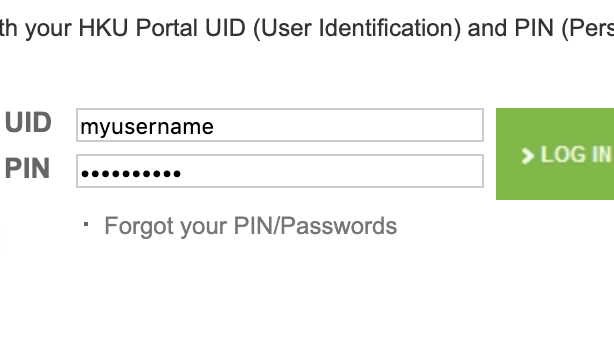
This will correctly fill out input forms as desired.
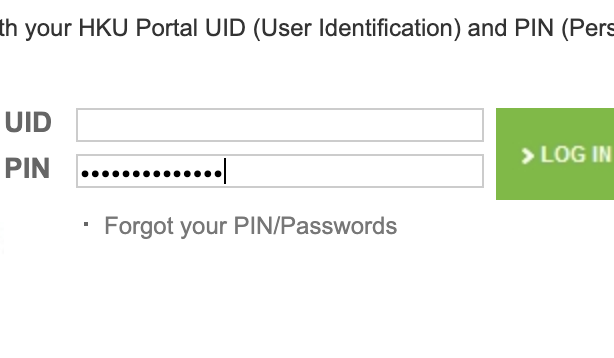
But the code below does not work? This will only fill the input field for#password. I don't know why. These two code blocks above and below are essentially the same things. What's happening here? The code below will fill the password input form with some string like mymyuspasswername, a random mix of myusername and mypassword.
const loginInfo: LoginInfo = {
        username: {
            selector: "#username",
            value: "myusername",
        },
        password: {
            selector: "#password",
            value: "mypassword",
        },
    };

Object.keys(loginInfo).forEach(async (key: string) => {
        const { selector, value } = loginInfo[key];
        await page.type(selector, value);
    },
  );
 9oelM
on 29 Jul 2019
9oelM
on 29 Jul 2019
Ok I don't get this.
@9oelM your code:
Object.keys(loginInfo).forEach(async (key: string) => {
        const { selector, value } = loginInfo[key];
        await page.type(selector, value);
    },
  );
is basically equal to the following (notice the lack of "await" statements):
page.type("#username", "myusername");
page.type("#password", "mypassword");
This tries to type into two fields simultaneously; this won't work - page might have focus only in one field.
aslushnikov
on 30 Jul 2019
@aslushnikov Thank you for answering my question!
This tries to type into two fields simultaneously; this won't work - page might have focus only in one field.
Yes! I believe your answer is very probable.
But what about await page.type(selector, value)? Why is this going to be equal to the code without await? I'm sorry for my bad understanding...
Adding onto that, what could I do if I want to make a loop like above with forEach that works correctly?
9oelM
on 30 Jul 2019
@aslushnikov
Oops, found an answer from #1958 and #3152.
Thanks!!!
9oelM
on 30 Jul 2019
You can use page.keyboard.type
Here is a simple function which I wrote
const typeWord = async (page, word) => {
  const splitWord = word.split('');
  splitWord.forEach(async key => {
    await page.keyboard.press(key)
  });
};
You need to pass a word, which you want to be written to input, or any element. If it is uppercase letter or special character, it works as well.
Basically, it works like this:
await typeWord(page, 'veryveryveryverylongword');
 Remzes
on 9 Feb 2020
Remzes
on 9 Feb 2020
@Tzook's solution got me most of the way there, but in my case I have an onChange handler (as a React prop) that I need to fire in my test, and just setting input.value = text doesn't cause the 'change' event to be dispatched.
This is a bit of a hack, but a subsequent elementHandle.type() on the last character got me where I needed to be:
    async function enterSearchText(searchText: string) {
      const mostOfSearchText = searchText.slice(0, -1);
      const lastChar = searchText.slice(-1);
      const inputHandle = await page.waitForSelector(SELECTORS.searchInput);
      await page.evaluate(
        (inputEl, text) => (inputEl.value = text),
        inputHandle,
        mostOfSearchText
      );
      return await inputHandle.type(lastChar);
    },
Note that I have some bits in my closure that you may not, namely page and SELECTORS; you can use document.querySelector instead of passing an elementHandle to page.evaluate if that works better for your use case.
 ericsoco
on 13 Feb 2020
ericsoco
on 13 Feb 2020
Here's a patch to overcome this method until it is fixed:
await page.evaluate((text) => { (document.getElementById('my-input')).value = text; }, "text-to-inject");
This is the best solution.. working great for me
 SaurabhAptask
on 18 Feb 2020
SaurabhAptask
on 18 Feb 2020
Can we re-open this issue? We're getting the same problem.
// `slowMo` is not set on launch options, so I assume it defaults to 0

const element = await page.waitForSelector(selector, { visible: true });
await element.focus();
await element.type(value);
Most of the times, the first 1~3 characters are not typed on some inputs. On some rare occasions NOTHING is typed at all on ANY input.
Finally, running it on the Browser context works, but I don't think that's the puppeteer mantra, to do this?
await element.evaluate((node, value) => node.value = value, value);
 christopher-francisco
on 22 Apr 2020
christopher-francisco
on 22 Apr 2020
You can use
page.keyboard.typeHere is a simple function which I wrote
const typeWord = async (page, word) => {
  const splitWord = word.split('');
  splitWord.forEach(async key => {
    await page.keyboard.press(key)
  });
};
You need to pass a word, which you want to be written to
input, or any element. If it is uppercase letter or special character, it works as well.Basically, it works like this:
await typeWord(page, 'veryveryveryverylongword');
Promise returned from forEach is ignored
forEach(async () => {})
hence this solution doesn't promise you (literally) the order of chars that will be typed.
 segevofer
on 4 May 2020
segevofer
on 4 May 2020
I was having this issue with the first char in every case, solved by doing
const input = await page.waitFor("input");
await input.type(str.charAt(0));
await input.type(str);
 dougg0k
on 26 Jul 2020
dougg0k
on 26 Jul 2020
Can we re-open this issue? We're getting the same problem.
// `slowMo` is not set on launch options, so I assume it defaults to 0

const element = await page.waitForSelector(selector, { visible: true });
await element.focus();
await element.type(value);
Most of the times, the first 1~3 characters are not typed on some inputs. On some rare occasions NOTHING is typed at all on ANY input.
Finally, running it on the Browser context works, but I don't think that's the puppeteer mantra, to do this?
await element.evaluate((node, value) => node.value = value, value);
Agree i am still experiencing the same issue here.
 chunf
on 3 Dec 2020
chunf
on 3 Dec 2020
This issue should definitely be reopened. I can confirm that this is happening in my end as well. I had to use the element.evaluate() workaround for this to work properly
The workaround also messes with the slowMo and the timeout has to be set manually.
 f0cus10
on 5 Dec 2020
f0cus10
on 5 Dec 2020
Related issues
 malyw
·
46Comments
malyw
·
46Comments
 optikalefx
·
49Comments
optikalefx
·
49Comments
 fortes
·
191Comments
fortes
·
191Comments
 vsemozhetbyt
·
69Comments
aslushnikov
·
77Comments
vsemozhetbyt
·
69Comments
aslushnikov
·
77Comments
Most helpful comment
Here's a patch to overcome this method until it is fixed:
await page.evaluate((text) => { (document.getElementById('my-input')).value = text; }, "text-to-inject");