Puppeteer-extra: Using with alixaxel/chrome-aws-lambda
I'd like to be able to use plugins from puppeteer-extra with alixaxel/chrome-aws-lambda, but it seems this isn't possible currently
 daveroberts
All 13 comments
I was just about to create an issue for this!
I'd be happy to help out with a PR :)
 atymic
on 26 Nov 2019
atymic
on 26 Nov 2019
Interesting, would definitely be nice to support adding extra functionality to this project. :)
I wonder what the cleanest way or nicest API might be, also to support other projects exposing a puppeteer instance, like puppeteer-firefox (#55):
const chromium = require('chrome-aws-lambda-extra')

const puppeteer = require('puppeteer-firefox-extra')
Those extra packages would be an option, but I wonder if a more generic solution wouldn't be more maintainable 😄.
A more generic approach could be an additional patch functionality, e.g.:
// For chrome-aws-lambda-extra
const makeExtra = require('puppeteer-extra/patch')

const chromium = require('chrome-aws-lambda-extra')
const puppeteer = makeExtra(chromium.puppeteer)

// For chrome-aws-lambda
exports.handler = async (event, context) => {
  let result = null;
  let browser = null;

  try {
    browser = await puppeteer.launch({
      args: chromium.args,
      defaultViewport: chromium.defaultViewport,
      executablePath: await chromium.executablePath,
      headless: chromium.headless,
    });

    let page = await browser.newPage();

    await page.goto(event.url || 'https://example.com');

    result = await page.title();
  } catch (error) {
    return context.fail(error);
  } finally {
    if (browser !== null) {
      await browser.close();
    }
  }

  return context.succeed(result);
};
// For puppeteer-firefox
const makeExtra = require('puppeteer-extra/patch')

const puppeteer = makeExtra(require('puppeteer-firefox'))

(async () => {
  const browser = await puppeteer.launch();
  const page = await browser.newPage();
  await page.goto('https://example.com');
  await page.screenshot({path: 'example.png'});
  await browser.close();
})();
Another alternative would be to (optionally) provide puppeteer-extra with a puppeteer instance to patch and use, e.g.:
const chromium = require('chrome-aws-lambda-extra')
const puppeteer = require('puppeteer-extra')(chromium.puppeteer) // Not backwards compatible
or
const chromium = require('chrome-aws-lambda-extra')
const puppeteer = require('puppeteer-extra').patch(chromium.puppeteer)

puppeteer.use(...) // plugin usage as normal
 berstend
on 26 Nov 2019
berstend
on 26 Nov 2019
Also related: #2 (have multiple puppeteer-extra instances with different configs).
Currently I lean towards:
// existing simple case: defaults to require "puppeteer" behind the scenes
const puppeteer = require('puppeteer-extra')
puppeteer.use(...)

// new: optionally provide a puppeteer instance to patch
const { addExtra } = require('puppeteer-extra')
const puppeteer = addExtra(require('puppeteer-firefox'))
puppeteer.use(...)
In addition the latter would return a scoped puppeteer instance, so multiple different extra-fied instances are possible.
Given that I'm about to refactor the core to TypeScript I need to look into combing default + named exports - I recall that TS was a bit weird about that (might not be an issue anymore).
berstend
on 26 Nov 2019
Awesome :)
Thanks for your work. Look forward to testing it out (we run a few headless projects on lambda)!
atymic
on 26 Nov 2019
@atymic @daveroberts
I've added addExtra support while rewriting the core in TypeScript. :)
This is now supported (I just published v3.1.3):
const { addExtra } = require('puppeteer-extra')
const puppeteer = addExtra(require('puppeteer-firefox'))

puppeteer.launch({ headless: false }).then(async browser => {
  const page = await browser.newPage()
  await page.setViewport({ width: 800, height: 600 })

  await page.goto('https://www.spacejam.com/archive/spacejam/movie/jam.htm')
  await page.waitFor(10 * 1000)

  await browser.close()
})
I don't have an AWS account to test chrome-aws-lambda with currently, would be nice if you can let me know if it works with the new addExtra feature. :)
berstend
on 29 Nov 2019
Awesome job. I'll test and deploy shortly and let you know.
atymic
on 29 Nov 2019
Ok, i've found an issue, which is that the package requires puppeteer:
warning " > [email protected]" has unmet peer dependency "puppeteer@*".
When using chrome-aws-lambda you only install puppeteer-core.
atymic
on 29 Nov 2019
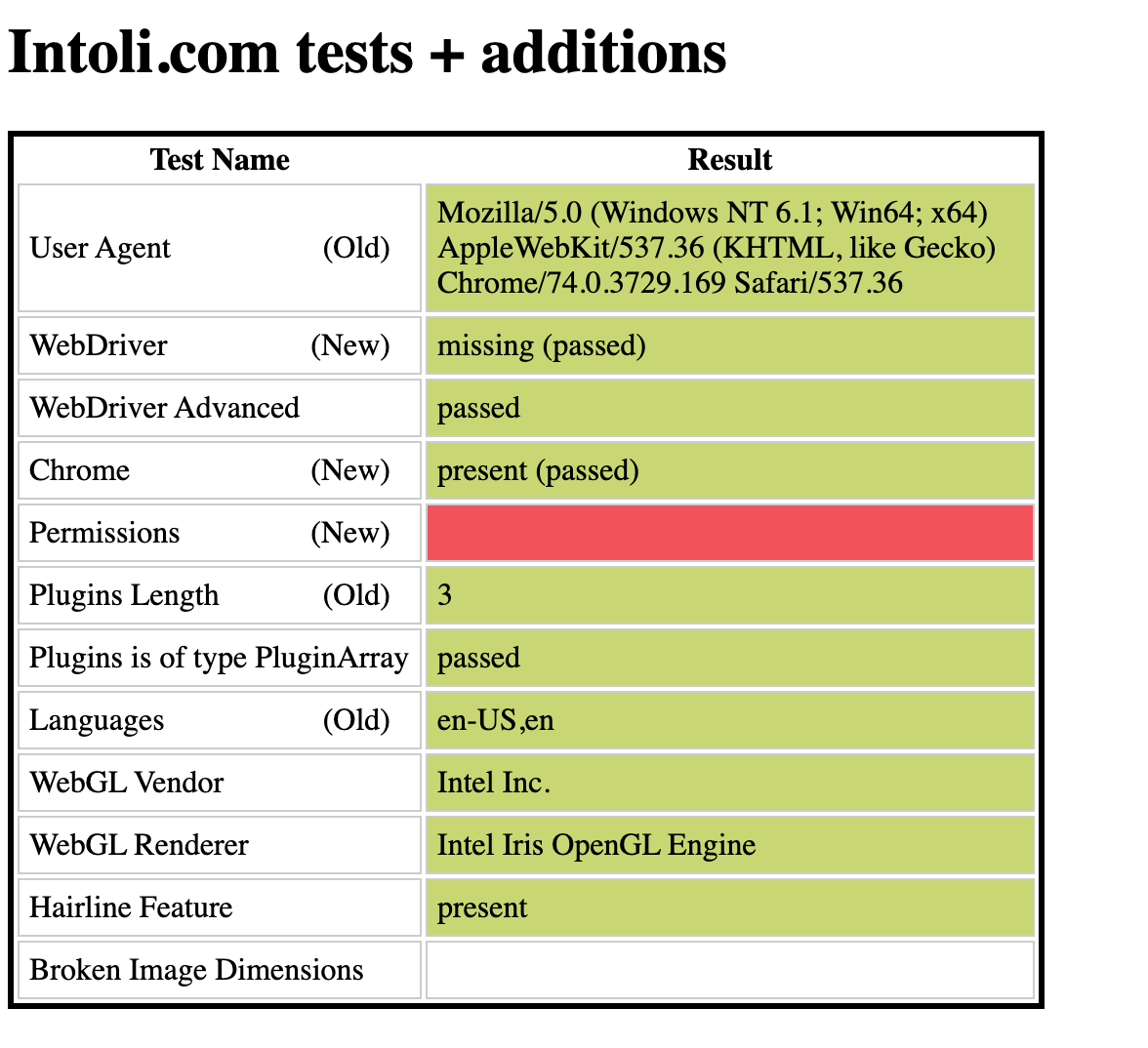
Got it installed and it seems to be, at least, mostly working. A few tests fail on the stealth. I'll check the actual version and see if they pass.
atymic
on 29 Nov 2019
Ok, i've checked in a test project and all tests pass there.
The image test in my screenshot was failing because I had images disabled, enabling fixed that.
I'll try figure out why the perms one is failing.
atymic
on 29 Nov 2019
Ok, it looks like by default the library disables notifications:
https://github.com/alixaxel/chrome-aws-lambda/blob/master/source/index.js#L81
Removing this arg means all of the tests pass :)
atymic
on 29 Nov 2019
Awesome, great to hear.
So it's basically just this to get it working with chrome-aws-lambda? Would be nice to add it to the readme. :)
const chromium = require('chrome-aws-lambda')
const { addExtra } = require('puppeteer-extra')
const puppeteer = addExtra(chromium.puppeteer)
Unfortunately I can't add an if-clause in the peerDependency in the package.json - but it should behave more like an FYI and not break anything if I understood it's documentation correctly. 😄
berstend
on 30 Nov 2019
I'll PR against the docs shortly :)
atymic
on 1 Dec 2019
PR open in #84 :)
atymic
on 1 Dec 2019
Related issues
 clouedoc
·
5Comments
clouedoc
·
5Comments
 svenadlung
·
8Comments
svenadlung
·
8Comments
 qo4on
·
8Comments
qo4on
·
8Comments
 mrgodhani
·
3Comments
mrgodhani
·
3Comments
 millionwords
·
10Comments
millionwords
·
10Comments
Most helpful comment
I was just about to create an issue for this!
I'd be happy to help out with a PR :)