Pulseeffects: no sound output on loopback from bluetooth ipad A2DP source
I'm on FC30. effects works fine when the sound originates from an app, for example, my browser. However, for a A2DP bluetooth source, for example by ipad, no sound is output. I have used pavolume to ensure that the ipad source is set to go through pulseffects app but no luck.
I'm not sure where to look for an issue here as everything else works Ok as long as its not a A2DP ipad source.
 aappddeevv
All 33 comments
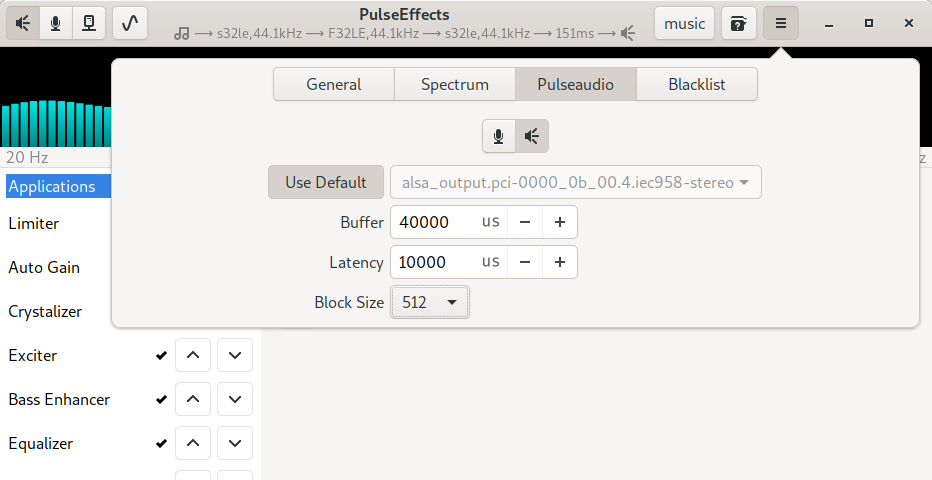
I never tried a bluetooth source. Could you paste here images from Pavucontrol tab? As far as I remember bluetooth headphones are a little tricky with buffer sizes. They usually need high values. Try to play a little with them and see if there is any change
If this does not help we will need to see PE logs. Kill its current instance pulseeffects -q and restart it in debug mode G_MESSAGES_DEBUG=pulseeffects pulseeffects
 wwmm
on 8 Sep 2019
wwmm
on 8 Sep 2019
I tried settings buffers to 1,000,000 (no commas) on both input and output under the pulseaudio tab but no luck.
Here's the log, at the end I was switching the input and output devices in the pulseeffects tab. No sounds from any of the changes.
[me@nc6910p xtract]$ G_MESSAGES_DEBUG=pulseeffects pulseeffects
(pulseeffects:22536): pulseeffects-DEBUG: 11:12:36.163: presets_manager: user presets directory already exists: /home/me/.config/PulseEffects
(pulseeffects:22536): pulseeffects-DEBUG: 11:12:36.163: presets_manager: user presets directory already exists: /home/me/.config/PulseEffects/input
(pulseeffects:22536): pulseeffects-DEBUG: 11:12:36.163: presets_manager: user presets directory already exists: /home/me/.config/PulseEffects/output
(pulseeffects:22536): pulseeffects-DEBUG: 11:12:36.163: presets_manager: user presets directory already exists: /home/me/.config/PulseEffects/autoload
(pulseeffects:22536): pulseeffects-DEBUG: 11:12:36.183: application: PE version: 4.6.6
(pulseeffects:22536): pulseeffects-DEBUG: 11:12:36.197: pulse_manager: context is connecting
(pulseeffects:22536): pulseeffects-DEBUG: 11:12:36.199: pulse_manager: context is authorizing
(pulseeffects:22536): pulseeffects-DEBUG: 11:12:36.201: pulse_manager: context is setting name
(pulseeffects:22536): pulseeffects-DEBUG: 11:12:36.202: pulse_manager: context is ready
(pulseeffects:22536): pulseeffects-DEBUG: 11:12:36.202: pulse_manager: connected to: unix:/run/user/1000/pulse/native
(pulseeffects:22536): pulseeffects-DEBUG: 11:12:36.202: pulse_manager: protocol version: 32
(pulseeffects:22536): pulseeffects-DEBUG: 11:12:36.203: pulse_manager: Pulseaudio version: 12.2-rebootstrapped
(pulseeffects:22536): pulseeffects-DEBUG: 11:12:36.203: pulse_manager: default pulseaudio source: alsa_input.pci-0000_00_1f.3.analog-stereo
(pulseeffects:22536): pulseeffects-DEBUG: 11:12:36.203: pulse_manager: default pulseaudio sink: alsa_output.usb-Generic_USB_Audio_200901010001-00.analog-stereo-speaker
(pulseeffects:22536): pulseeffects-DEBUG: 11:12:36.203: pulse_manager: loading Pulseeffects applications output sink...
(pulseeffects:22536): pulseeffects-DEBUG: 11:12:36.203: pulse_manager: default pulseaudio sink sampling rate: 48000 Hz
(pulseeffects:22536): pulseeffects-DEBUG: 11:12:36.203: pulse_manager: default pulseaudio sink audio format: s24le
(pulseeffects:22536): pulseeffects-DEBUG: 11:12:36.203: pulse_manager: failed to get sink info: PulseEffects_apps
(pulseeffects:22536): pulseeffects-WARNING **: 11:12:36.213: pulse_manager: Pulseaudio 12.2-rebootstrapped does not support norewinds. Loading the sink the old way. Changing apps volume will cause cracklings
(pulseeffects:22536): pulseeffects-DEBUG: 11:12:36.216: pulse_manager: loaded module-null-sink: sink_name=PulseEffects_apps sink_properties=device.description="PulseEffects(apps)"device.class="sound" channels=2 rate=48000
(pulseeffects:22536): pulseeffects-DEBUG: 11:12:36.218: pulse_manager: loading Pulseeffects microphone output sink...
(pulseeffects:22536): pulseeffects-DEBUG: 11:12:36.227: pulse_manager: default pulseaudio source sampling rate: 44100 Hz
(pulseeffects:22536): pulseeffects-DEBUG: 11:12:36.227: pulse_manager: default pulseaudio source audio format: s16le
(pulseeffects:22536): pulseeffects-DEBUG: 11:12:36.228: pulse_manager: failed to get sink info: PulseEffects_mic
(pulseeffects:22536): pulseeffects-WARNING **: 11:12:36.230: pulse_manager: Pulseaudio 12.2-rebootstrapped does not support norewinds. Loading the sink the old way. Changing apps volume will cause cracklings
(pulseeffects:22536): pulseeffects-DEBUG: 11:12:36.233: pulse_manager: loaded module-null-sink: sink_name=PulseEffects_mic sink_properties=device.description="PulseEffects(mic)"device.class="sound" channels=2 rate=44100
(pulseeffects:22536): pulseeffects-DEBUG: 11:12:36.303: sie: using input device: PulseEffects_apps.monitor
(pulseeffects:22536): pulseeffects-DEBUG: 11:12:36.304: sie: using output device: alsa_output.usb-Generic_USB_Audio_200901010001-00.analog-stereo-speaker
(pulseeffects:22536): pulseeffects-DEBUG: 11:12:36.385: sie: limiter is already disabled
(pulseeffects:22536): pulseeffects-DEBUG: 11:12:36.392: sie: compressor is already disabled
(pulseeffects:22536): pulseeffects-DEBUG: 11:12:36.396: sie: filter is already disabled
(pulseeffects:22536): pulseeffects-DEBUG: 11:12:36.556: sie: equalizer is enabled
(pulseeffects:22536): pulseeffects-DEBUG: 11:12:36.584: sie: reverb is already disabled
(pulseeffects:22536): pulseeffects-DEBUG: 11:12:36.592: sie: bass_enhancer is already disabled
(pulseeffects:22536): pulseeffects-DEBUG: 11:12:36.598: sie: exciter is already disabled
(pulseeffects:22536): pulseeffects-DEBUG: 11:12:36.604: sie: crossfeed is already disabled
(pulseeffects:22536): pulseeffects-DEBUG: 11:12:36.609: sie: maximizer is already disabled
(pulseeffects:22536): pulseeffects-DEBUG: 11:12:36.630: sie: multiband_compressor is already disabled
(pulseeffects:22536): pulseeffects-DEBUG: 11:12:36.635: sie: loudness is already disabled
(pulseeffects:22536): pulseeffects-DEBUG: 11:12:36.639: sie: gate is already disabled
(pulseeffects:22536): pulseeffects-DEBUG: 11:12:36.666: sie: pitch is already disabled
(pulseeffects:22536): pulseeffects-DEBUG: 11:12:36.674: sie: multiband_gate is already disabled
(pulseeffects:22536): pulseeffects-DEBUG: 11:12:36.679: sie: deesser is already disabled
(pulseeffects:22536): pulseeffects-DEBUG: 11:12:36.708: sie: stereo_tools is already disabled
(pulseeffects:22536): pulseeffects-DEBUG: 11:12:36.719: sie: convolver is enabled
(pulseeffects:22536): pulseeffects-DEBUG: 11:12:36.725: sie: crystalizer is already disabled
(pulseeffects:22536): pulseeffects-DEBUG: 11:12:36.732: sie: autogain is already disabled
(pulseeffects:22536): pulseeffects-DEBUG: 11:12:36.748: sie: delay is already disabled
(pulseeffects:22536): pulseeffects-DEBUG: 11:12:36.802: soe: using output device: PulseEffects_mic
(pulseeffects:22536): pulseeffects-DEBUG: 11:12:36.803: soe: using input device: bluez_source.80_E6_50_3B_C7_12.a2dp_source
(pulseeffects:22536): pulseeffects-DEBUG: 11:12:36.808: soe: limiter is already disabled
(pulseeffects:22536): pulseeffects-DEBUG: 11:12:36.817: soe: compressor is already disabled
(pulseeffects:22536): pulseeffects-DEBUG: 11:12:36.822: soe: filter is already disabled
(pulseeffects:22536): pulseeffects-DEBUG: 11:12:36.843: soe: equalizer is already disabled
(pulseeffects:22536): pulseeffects-DEBUG: 11:12:36.845: soe: reverb is already disabled
(pulseeffects:22536): pulseeffects-DEBUG: 11:12:36.848: soe: gate is already disabled
(pulseeffects:22536): pulseeffects-DEBUG: 11:12:36.850: soe: deesser is already disabled
(pulseeffects:22536): pulseeffects-DEBUG: 11:12:36.854: soe: pitch is already disabled
(pulseeffects:22536): pulseeffects-DEBUG: 11:12:36.877: soe: webrtc is already disabled
(pulseeffects:22536): pulseeffects-DEBUG: 11:12:36.883: soe: multiband_compressor is already disabled
(pulseeffects:22536): pulseeffects-DEBUG: 11:12:36.893: soe: multiband_gate is already disabled
(pulseeffects:22536): pulseeffects-DEBUG: 11:12:36.906: presets_manager: user presets directory already exists: /home/me/.config/PulseEffects
(pulseeffects:22536): pulseeffects-DEBUG: 11:12:36.906: presets_manager: user presets directory already exists: /home/me/.config/PulseEffects/input
(pulseeffects:22536): pulseeffects-DEBUG: 11:12:36.907: presets_manager: user presets directory already exists: /home/me/.config/PulseEffects/output
(pulseeffects:22536): pulseeffects-DEBUG: 11:12:36.907: presets_manager: user presets directory already exists: /home/me/.config/PulseEffects/autoload
(pulseeffects:22536): pulseeffects-DEBUG: 11:12:36.907: presets_manager: destroyed
(pulseeffects:22536): pulseeffects-DEBUG: 11:12:38.215: convolver_ui: irs directory already exists: /home/me/.config/PulseEffects/irs
(pulseeffects:22536): pulseeffects-DEBUG: 11:12:40.149: sie: spectrum enabled
(pulseeffects:22536): pulseeffects-DEBUG: 11:12:40.150: soe: spectrum enabled
(pulseeffects:22536): pulseeffects-DEBUG: 11:12:41.142: sie: total latency: 0 ms
(pulseeffects:22536): pulseeffects-DEBUG: 11:12:41.143: soe: total latency: 0 ms
(pulseeffects:22536): pulseeffects-DEBUG: 11:12:42.583: pulse_settings_ui: added sink: combined
(pulseeffects:22536): pulseeffects-DEBUG: 11:12:42.584: sie: using output device: alsa_output.usb-Generic_USB_Audio_200901010001-00.analog-stereo-speaker
(pulseeffects:22536): pulseeffects-DEBUG: 11:12:42.584: pulse_settings_ui: output device changed: alsa_output.usb-Generic_USB_Audio_200901010001-00.analog-stereo-speaker
(pulseeffects:22536): pulseeffects-DEBUG: 11:12:42.584: pulse_settings_ui: added sink: alsa_output.usb-Generic_USB_Audio_200901010001-00.analog-stereo-speaker
(pulseeffects:22536): pulseeffects-DEBUG: 11:12:42.585: pulse_settings_ui: added sink: alsa_output.pci-0000_00_1f.3.hdmi-stereo
(pulseeffects:22536): pulseeffects-DEBUG: 11:12:42.585: pulse_settings_ui: added source: alsa_input.pci-0000_00_1f.3.analog-stereo
(pulseeffects:22536): pulseeffects-DEBUG: 11:12:42.585: pulse_settings_ui: added source: combined.monitor
(pulseeffects:22536): pulseeffects-DEBUG: 11:12:42.585: pulse_settings_ui: added source: alsa_output.usb-Generic_USB_Audio_200901010001-00.analog-stereo-speaker.monitor
(pulseeffects:22536): pulseeffects-DEBUG: 11:12:42.586: pulse_settings_ui: added source: alsa_output.pci-0000_00_1f.3.hdmi-stereo.monitor
(pulseeffects:22536): pulseeffects-DEBUG: 11:12:42.586: soe: using input device: bluez_source.80_E6_50_3B_C7_12.a2dp_source
(pulseeffects:22536): pulseeffects-DEBUG: 11:12:42.587: pulse_settings_ui: input device changed: bluez_source.80_E6_50_3B_C7_12.a2dp_source
(pulseeffects:22536): pulseeffects-DEBUG: 11:12:42.587: pulse_settings_ui: added source: bluez_source.80_E6_50_3B_C7_12.a2dp_source
(pulseeffects:22536): pulseeffects-DEBUG: 11:13:32.242: soe: using input device: alsa_output.pci-0000_00_1f.3.hdmi-stereo.monitor
(pulseeffects:22536): pulseeffects-DEBUG: 11:13:32.243: pulse_settings_ui: input device changed: alsa_output.pci-0000_00_1f.3.hdmi-stereo.monitor
(pulseeffects:22536): pulseeffects-DEBUG: 11:13:34.158: soe: using input device: alsa_output.usb-Generic_USB_Audio_200901010001-00.analog-stereo-speaker.monitor
(pulseeffects:22536): pulseeffects-DEBUG: 11:13:34.159: pulse_settings_ui: input device changed: alsa_output.usb-Generic_USB_Audio_200901010001-00.analog-stereo-speaker.monitor
(pulseeffects:22536): pulseeffects-DEBUG: 11:13:36.377: soe: using input device: combined.monitor
(pulseeffects:22536): pulseeffects-DEBUG: 11:13:36.378: pulse_settings_ui: input device changed: combined.monitor
(pulseeffects:22536): pulseeffects-DEBUG: 11:13:38.368: soe: using input device: alsa_input.pci-0000_00_1f.3.analog-stereo
(pulseeffects:22536): pulseeffects-DEBUG: 11:13:38.369: pulse_settings_ui: input device changed: alsa_input.pci-0000_00_1f.3.analog-stereo
(pulseeffects:22536): pulseeffects-DEBUG: 11:13:43.052: soe: using input device: bluez_source.80_E6_50_3B_C7_12.a2dp_source
(pulseeffects:22536): pulseeffects-DEBUG: 11:13:43.053: pulse_settings_ui: input device changed: bluez_source.80_E6_50_3B_C7_12.a2dp_source
(pulseeffects:22536): pulseeffects-DEBUG: 11:13:47.871: sie: using output device: alsa_output.pci-0000_00_1f.3.hdmi-stereo
(pulseeffects:22536): pulseeffects-DEBUG: 11:13:47.872: pulse_settings_ui: output device changed: alsa_output.pci-0000_00_1f.3.hdmi-stereo
(pulseeffects:22536): pulseeffects-DEBUG: 11:13:50.403: sie: using output device: alsa_output.usb-Generic_USB_Audio_200901010001-00.analog-stereo-speaker
(pulseeffects:22536): pulseeffects-DEBUG: 11:13:50.404: pulse_settings_ui: output device changed: alsa_output.usb-Generic_USB_Audio_200901010001-00.analog-stereo-speaker
(pulseeffects:22536): pulseeffects-DEBUG: 11:13:51.910: sie: using output device: combined
(pulseeffects:22536): pulseeffects-DEBUG: 11:13:51.910: pulse_settings_ui: output device changed: combined
(pulseeffects:22536): pulseeffects-DEBUG: 11:13:53.761: sie: using output device: alsa_output.usb-Generic_USB_Audio_200901010001-00.analog-stereo-speaker
(pulseeffects:22536): pulseeffects-DEBUG: 11:13:53.762: pulse_settings_ui: output device changed: alsa_output.usb-Generic_USB_Audio_200901010001-00.analog-stereo-speaker
aappddeevv
on 8 Sep 2019
Now I see. This bluetooth device is acting like a microphone. In this case the image I showed above is in the wrong place. Did you try to change the buffer value in the mic tab?
wwmm
on 8 Sep 2019
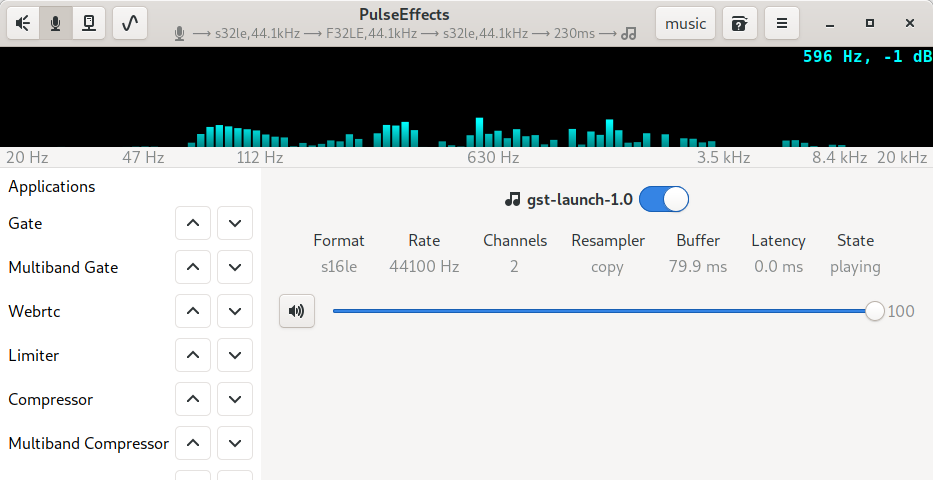
I also see PE pipeline did not start playing. Is there an audio recording app enabled in our mic section? For example if Gstreamer were being used to record audio from a microphone you should have something like this
wwmm
on 8 Sep 2019
There are no "Recording" entries on pauvcontrol. The ipad does show up as a "Bluetooth Input" under Input Devices. There are no visuals under the "microphone" side of PE I assume indicating no recording from an input device.
I did, to large values, here's the shot:

aappddeevv
on 8 Sep 2019
Ok. But is there an app (like Skype) enabled in PE window?
wwmm
on 8 Sep 2019
Woah....something weird just happened. I was looking at my PE window based on your comment and ran a sine wave generated signal. All of a sudden I have visuals under the PE mic setting. The output sound (music) + the sine wave made sounds. I then turned off the sine wave and the music played for another second then shut off.
aappddeevv
on 8 Sep 2019
The visuals are "frozen" when I close the sine wave test signal window though....and start animating once I reopen the sine wave test signal window again.
aappddeevv
on 8 Sep 2019
So the problem is that there is no app trying to record audio. How is this bluetooth source used when you do not want to apply effects with PE?
wwmm
on 8 Sep 2019
I just play it directly through to the speakers via pauvcontrol, which works fine.
aappddeevv
on 8 Sep 2019
Well, I just opened the sine signal again, started it, then manually switched the pauvcontrol destination on the line item that appeared when the window opened to USB audio output. I now have PE entries in pauvcontrol Recording and PE is being used even when I close the sine control window.
aappddeevv
on 8 Sep 2019
Show the Pavucontrol images so I can see how you do that. In any case I think I understand what is happening and our mic section was not built for this use case. What it does is processing buffers sent by a source (usually a microphone) and playing them in our virtual sink PulseEffects(mic). If an app like Skype records from our virtual sink monitor its buffers will have the effects applied by PE. If there is no app like Skype recording audio our mic pipeline stays paused and that is why you hear nothing.
wwmm
on 8 Sep 2019
I'm not sure I can reproduce this at all. Give me a second.
aappddeevv
on 8 Sep 2019
To do what you want something will have to record from PulseEffects(mic) monitor and play to the output device.
wwmm
on 8 Sep 2019
Wait a second, I think I hear sound because set the ipad output to USB speaker again. Need to run a few quick experiments.
aappddeevv
on 8 Sep 2019
Ok. Also try to launch in the terminal gst-launch-1.0 pulsesrc ! queue ! pulsesink and then enable it in our microphone app section. It should have the same effect as launching the test signal generator.
wwmm
on 8 Sep 2019
Some factoids:
- When starting PE, I do not get any pavucontrol entries in the Playback or Recording tabs for PE.
- If I open the test signal window I get 2 entries in Recording and 1 entry in Playback.
- Recording: 1 entry for my PE Record Stream from My iPad, and 1 entry for PE Record Stream from Monitor of PE (mic)
- Playback: The added output appears to be set to "mic" by default. When switched to USB Audio Speaker (what I want) I get sound without turning on the sine generator. Here it is after I switch it to USB audio. Volume control through the normal volume "buttons" no longer work. The only way to change the volume is through the pauvcontrol directly on th PE playback stream. When I close the signal generator window the sound stops though.
- Running gst-launch-1.0 pulserc ! queue ! pulsesink gives me a Recording entry "gst-launch-1.0" and alot of static in the speakers along with the sound. My loopback from iPad is still set to USB speakers on the Playback tab. I also get a playback entry called gst-launch-1.0. The CLI output is below. I can't seem to select gst-streamer as an output for my ipad.
- Starting skype does not change anything.
- I need to make sure that I set my ipad output to PE App each time PE starts.
$ gst-launch-1.0 pulsesrc ! queue ! pulsesink
Setting pipeline to PAUSED ...
Pipeline is live and does not need PREROLL ...
Setting pipeline to PLAYING ...
New clock: GstPulseSrcClock
Redistribute latency...
Redistribute latency...

aappddeevv
on 8 Sep 2019
Ok...I think those are the facts for me.
aappddeevv
on 8 Sep 2019
It is happening what I said. PE was designed to process apps ouput(mpv, vlc, spotify, etc) and input(skype, etc). Loopback devices are a different thing. There is no audio app to be redirected and as a result our pipeline stays paused.
An workaround would be not doing the loopback and then running gst-launch-1.0 pulsesrc ! queue ! pulsesink. this way the bluetooth source will be processed by PE and GStreamer will play the result in your PC speakers.
wwmm
on 8 Sep 2019
But this workaround is not good enough as you will have to use only the effects available in our mic pipeline. Effects like the bass enhancer, auto gain, crystalizer, etc are available only in the output effects pipeline.
wwmm
on 8 Sep 2019
This is a corner case I never considered =/
wwmm
on 8 Sep 2019
Try a different workaround gst-launch-1.0 pulsesrc device=bluez_source.80_E6_50_3B_C7_12.a2dp_source ! queue ! pulsesink. Now make sure no effects are applied to this gstreamer pipeline in our mic section. Otherwise PE will change its source device to our sink monitor. This way you should be able to use more plugins as now the audio will be processed in our output pipeline just like vlc, mpv , etc.
wwmm
on 8 Sep 2019
I think that worked but I had to switch the mic gst_launch-1.0 on then off again. My ipad is still playing through USB Audo speaker but I think its going through effects as the PE entry in Playback controls the volume. If I switch ipad playback to PE it goes silent again. It's a bit confusing about what's going on so I'm clearly lacking some basic concepts of the workaround. Having said that it, it appears to be working. Thanks!
Do you have enough information to understand this use case enough?
aappddeevv
on 8 Sep 2019
The volume control in PE does the same as the per app volume control in Pavucontrol. In other words the audio may still not be being processed by PE. Which streams do you have in Pavucontrol recording tab? If there is a PulseEffects stream active(level meter changing) then it is probably working.
wwmm
on 8 Sep 2019
Do you have enough information to understand this use case enough?
I think so. But it is so different from the ones we usually target in PE that I am not sure about how to handle it in a decent way.
wwmm
on 8 Sep 2019
I run my output from the iPad to the computer to boise speakers but I don’t use an
equalizer in between and the output from my speakers is not quite right.
aappddeevv
on 8 Sep 2019
The main difficulty is not having an audio app in the PC that is consuming or producing audio buffers(the workaround is essentially forcing one to be there). Users always wanted to process an app output or its input(mic). Now that there is no app running all the logic PE was built around is broken =/
wwmm
on 8 Sep 2019
I am experiencing a similar issue, I use my pc's line-in input for audio coming from my ps4 and TV-reciever and loop that back to my speakers, so all devices have their audio output on the same speakers. Today I noticed that my setup stopped working correctly, I worked around it by creating a script and replacing the exec line in the pulseeffects autostart file with this script:
#!/bin/bash

pulseeffects --gapplication-service &
sleep 1
pactl load-module module-loopback source=1 sink=0 latency_msec=1
For some reason pulseeffects doesn't like it when I start the loopback module from /etc/pulse/default.pa, I will hear the output from my TV-receiver very briefly at login and then it goes quiet. Same happens if I remove the 'sleep 1' line.
If I use 'sink=2' (the pulseeffects apps 'device') I experience the same issue described by OP.
[EDIT] I forgot to add that it worked to just fine a couple of months ago by loading the loopback module from /etc/pulse/default.pa. Back then I could set sink=2 without problems, the loopback device was then represented by a nameless audiostream in pulseeffects. Which was awesome because it let me bass-enhance the audio from my ps4.
 AndrewAmmerlaan
on 9 Sep 2019
AndrewAmmerlaan
on 9 Sep 2019
I will have to create some kind of loopback in my computer in order to find a good solution. Is there any good guide out there about how to do this with a mic? I imagine that it would be the same as doing with a bluetooth device.
wwmm
on 9 Sep 2019
Just run:
pactl load-module module-loopback source=mic sink=output latency_msec=1
Or put this somewhere in /etc/pulse/default.pa (and restart pulseaudio):
load-module module-loopback source=mic sink=output latency_msec=1
Just keep in mind that the mic device shouldn't be able to hear the output device to prevent a feedback loop.
Also, I think you need to have alsa loopback (CONFIG_SND_ALOOP=y) enabled in the kernel (or enabled and loaded as a module) but this is probably already enabled (as module) for most distro's.
EDIT: No, I was wrong, you don't need to enable alsa's loopback to use pulseaudio's loopback module, they're independent.
AndrewAmmerlaan
on 9 Sep 2019
In the end the fix was very simple :-). As told by @AndrewAmmerlaan Pulseaudio creates a playback stream for the loopback device that should be visible in PE window. This was not happening because of a bug in our built-in blacklist(it does not make sense to show desktop notifications for example). As you can see in the image below now it is working :-)

The master branch already has the new code. I will release a new version today or tomorrow.
wwmm
on 10 Sep 2019
Thanks a bunch. I look forward to the fix.
aappddeevv
on 10 Sep 2019
I just found the latest version in the Gentoo repo, works like a charm, thank you.
EDIT: One minor thing I just noticed is that the loopback stream is marked with a Bluetooth icon for me, as I am not using the loopback for Bluetooth (I don't have a Bluetooth adapter at all in my PC) this might not be the appropriate icon. Might I suggest changing the icon (if possible) to maybe something that represents a loop (like a arrow going in a circle) or maybe a microphone (this might not be a good idea either, because I think it is in principle also possible to do the loopback the other way around e.g. speakers --> microphone) in order to make the icon more fitting for more user cases.
AndrewAmmerlaan
on 11 Sep 2019
Related issues
 marioortizmanero
·
5Comments
marioortizmanero
·
5Comments
 tnilzon
·
5Comments
tnilzon
·
5Comments
 Deividhp13
·
3Comments
Deividhp13
·
3Comments
 RUSshy
·
6Comments
RUSshy
·
6Comments
 servimo
·
7Comments
servimo
·
7Comments
Most helpful comment
In the end the fix was very simple :-). As told by @AndrewAmmerlaan Pulseaudio creates a playback stream for the loopback device that should be visible in PE window. This was not happening because of a bug in our built-in blacklist(it does not make sense to show desktop notifications for example). As you can see in the image below now it is working :-)

The master branch already has the new code. I will release a new version today or tomorrow.