Pulseeffects: Not working on Ubuntu 18.04.3 LTS
The app doesn't want to start. Already searched through the issues, didn't find any related issues. I already tried to reset with dconf didn't work. Same goes for the pulseeffects -r
Followed your guide from here: https://github.com/wwmm/pulseeffects/issues/345#issuecomment-433689584 it's still not working.
Here's the terminal log in DEBUG mode:
~
❯ G_MESSAGES_DEBUG=pulseeffects pulseeffects
(pulseeffects:3436): pulseeffects-DEBUG: 19:56:42.130: presets_manager: user presets directory already exists: /home/wiseman/.config/PulseEffects
(pulseeffects:3436): pulseeffects-DEBUG: 19:56:42.130: presets_manager: user presets directory already exists: /home/wiseman/.config/PulseEffects/input
(pulseeffects:3436): pulseeffects-DEBUG: 19:56:42.130: presets_manager: user presets directory already exists: /home/wiseman/.config/PulseEffects/output
(pulseeffects:3436): pulseeffects-DEBUG: 19:56:42.130: presets_manager: user presets directory already exists: /home/wiseman/.config/PulseEffects/autoload
(pulseeffects:3436): pulseeffects-DEBUG: 19:56:42.131: application: PE version: 4.6.5
(pulseeffects:3436): pulseeffects-DEBUG: 19:56:42.132: pulse_manager: context is connecting
(pulseeffects:3436): pulseeffects-DEBUG: 19:56:42.132: pulse_manager: context is authorizing
(pulseeffects:3436): pulseeffects-DEBUG: 19:56:42.132: pulse_manager: context is setting name
(pulseeffects:3436): pulseeffects-DEBUG: 19:56:42.133: pulse_manager: context is ready
(pulseeffects:3436): pulseeffects-DEBUG: 19:56:42.133: pulse_manager: connected to: unix:/run/user/1000/pulse/native
(pulseeffects:3436): pulseeffects-DEBUG: 19:56:42.133: pulse_manager: protocol version: 32
(pulseeffects:3436): pulseeffects-DEBUG: 19:56:42.133: pulse_manager: Pulseaudio version: 11.1
(pulseeffects:3436): pulseeffects-DEBUG: 19:56:42.133: pulse_manager: default pulseaudio source: alsa_input.pci-0000_00_1f.3.analog-stereo
(pulseeffects:3436): pulseeffects-DEBUG: 19:56:42.133: pulse_manager: default pulseaudio sink: alsa_output.pci-0000_00_1f.3.analog-stereo
(pulseeffects:3436): pulseeffects-DEBUG: 19:56:42.133: pulse_manager: loading Pulseeffects applications output sink...
(pulseeffects:3436): pulseeffects-DEBUG: 19:56:42.133: pulse_manager: default pulseaudio sink sampling rate: 44100 Hz
(pulseeffects:3436): pulseeffects-DEBUG: 19:56:42.133: pulse_manager: default pulseaudio sink audio format: s16le

(pulseeffects:3436): pulseeffects-WARNING **: 19:56:42.133: pulse_manager:  failed to get sink info: PulseEffects_apps

(pulseeffects:3436): pulseeffects-WARNING **: 19:56:42.133: pulse_manager: Pulseaudio 11.1 does not support norewinds. Loading the sink the old way. Changing apps volume will cause cracklings

(pulseeffects:3436): pulseeffects-CRITICAL **: 19:56:42.133: pulse_manager: failed to load module-null-sink with argument: sink_name=PulseEffects_apps sink_properties=device.description="PulseEffects(apps)"device.class="sound" channels=2 rate=44100
(pulseeffects:3436): pulseeffects-DEBUG: 19:56:42.133: pulse_manager: loading Pulseeffects microphone output sink...
(pulseeffects:3436): pulseeffects-DEBUG: 19:56:42.134: pulse_manager: default pulseaudio source sampling rate: 44100 Hz
(pulseeffects:3436): pulseeffects-DEBUG: 19:56:42.134: pulse_manager: default pulseaudio source audio format: s16le

(pulseeffects:3436): pulseeffects-WARNING **: 19:56:42.134: pulse_manager:  failed to get sink info: PulseEffects_mic

(pulseeffects:3436): pulseeffects-WARNING **: 19:56:42.134: pulse_manager: Pulseaudio 11.1 does not support norewinds. Loading the sink the old way. Changing apps volume will cause cracklings

(pulseeffects:3436): pulseeffects-CRITICAL **: 19:56:42.134: pulse_manager: failed to load module-null-sink with argument: sink_name=PulseEffects_mic sink_properties=device.description="PulseEffects(mic)"device.class="sound" channels=2 rate=44100
[1]    3436 segmentation fault (core dumped)  G_MESSAGES_DEBUG=pulseeffects pulseeffects

~
❯ uname -r
5.0.0-23-generic
 unigazer
All 32 comments
Run coredumpctl list and after finding the PID of the corresponding crash run coredumpctl info pid_number. If you have debug symbols installed this should show why the segmentation fault is happening.
It also seems we are failing to load our virtual sinks. The first fail is normal. Only in Pulseaudio 13(still to be released) the norewinds option will work. What is odd is the second failure. At least on Pulseaudio 12 the second attempt to load the sink works.
 wwmm
on 6 Aug 2019
wwmm
on 6 Aug 2019
I doubt a reset will help in this case. It feels like a library problem. Is there anything that should be done in a different way on the LTS distro @mikhailnov ?
wwmm
on 6 Aug 2019
Try installing pulseaudio 12.2 from ppa:mikhailnov/pulseeffects (it has norewinds backported), but it probably will not help
@wwmm
sink_properties=device.description="PulseEffects(mic)"device.class="sound"
Why there is no space before device.class, is it OK?
How to prepare a coredump, see https://github.com/wwmm/pulseeffects/wiki/Reporting-Bugs#how-to-quickly-make-a-coredump-on-ubuntu
@wwmm Everything is the same on all versions of Ubuntu from 18.04 to 19.10.
 mikhailnov
on 6 Aug 2019
mikhailnov
on 6 Aug 2019
The lack of space is probably happening only in the info message and not in the function that loads the module. But I will check now if that is really the case
wwmm
on 6 Aug 2019
I took a look at the code and now I remember that you can't put spaces when setting module's properties. The message above is correct. That is how Pulseaudio syntax is. As strange as it may look...
In any case a wrong syntax at the module loading would make us crash everywhere in all Pulseaudio's versions. So the source of the problem is somewhere else.
wwmm
on 6 Aug 2019
I want to confirm this issue. Same Ubuntu version and same crash log. Ubuntu installation is fairly fresh since I just started using Ubuntu a few days ago.
 Salzian
on 25 Aug 2019
Salzian
on 25 Aug 2019
Are you using Pulseaudio 12 or 11? Not that I see a reason for 11 to be a problem. But on Arch Linux I have been using version 12 for months so maybe there is something I changed that causes crashes only in version 11
wwmm
on 25 Aug 2019
I'm using 12.2-2
Salzian
on 25 Aug 2019
Try to get the crash info like I explained in my first post above. Without having some idea about what is causing this crash it will be impossible to fix it. Considering everything is fine on Arch Linux(and probably on newer Ubuntu versions too) The most probable cause is a wrong library version somewhere.
wwmm
on 25 Aug 2019
Better than that. Follow mikhailnov link
wwmm
on 25 Aug 2019
There you go: pe372.zip
Salzian
on 25 Aug 2019
Well... Reading the coredump file in gdb gives nothing. Probably because the executable on my computer is different from the one in your machine =/. Run coredumpctl list and once you find the PID corresponding to the latest crash run coredumpctl info pid_number. If we are lucky this should print what caused the crash.
wwmm
on 25 Aug 2019
Restart the user session or reboot after this, because PulseAudio will be upgraded, and it may cause problems if you don't restart.
Well... I'm very sorry that I wasted your time. I should just have read the installation docs til the end. While fiddling with all the audio settings I somehow broke my audio output completely and tried to fix it by restarting. And now it works. While I cannot confirm that this is the fix to @whyseman s problem... well I got exactly the same error log so I guess that's worth a try.
Very sory I bothered you, really like the program with all it's options so far.
Salzian
on 25 Aug 2019
No problems :-)
wwmm
on 25 Aug 2019
I'm getting similar issue on ArchLinux too.
Aug 25 22:28:47 destroyer pulseaudio[7127]: E: [pulseaudio] module-null-sink.c: Failed to parse module arguments.
Aug 25 22:28:47 destroyer pulseaudio[7127]: E: [pulseaudio] module.c: Failed to load module "module-null-sink" (argument: "sink_name=PulseEffects_apps sink_properties=device.description="PulseEffects(apps)"device.class="sound" norewinds=1"): initialization failed.
Aug 25 22:28:47 destroyer pulseeffects[7330]: pulse_manager: Pulseaudio 12.2 does not support norewinds. Loading the sink the old way. Changing apps volume will cause cracklings
Aug 25 22:28:47 destroyer pulseaudio[7127]: E: [pulseaudio] module-null-sink.c: Failed to parse module arguments.
Aug 25 22:28:47 destroyer pulseaudio[7127]: E: [pulseaudio] module.c: Failed to load module "module-null-sink" (argument: "sink_name=PulseEffects_mic sink_properties=device.description="PulseEffects(mic)"device.class="sound" norewinds=1"): initialization failed.
Aug 25 22:28:47 destroyer pulseeffects[7330]: pulse_manager: Pulseaudio 12.2 does not support norewinds. Loading the sink the old way. Changing apps volume will cause cracklings
 TheAifam5
on 25 Aug 2019
TheAifam5
on 25 Aug 2019
I also use Arch. You can ignore these errors. As only Pulseaudio 13 has the norewind option this is normal. In older Pulseaudio versions PulseEffects will load modules using the old way after the failure to load using norewinds.
wwmm
on 25 Aug 2019
Ah ok then. @wwmm looks like on Arch the pulseaudio 12.99.2+16+ga7caa9d39-1 is in testing.
For now, to get PulseEffects working, I'm using pulseaudio -k && pulseaudio --start :)
TheAifam5
on 25 Aug 2019
Is it not working with the Pulseaudio package in the stable repository? Strange I am using the standard Pulseaudio package with no problems.
wwmm
on 25 Aug 2019
Yea, also tried to reset configuration but didn’t help.
TheAifam5
on 27 Aug 2019
Same issue here, Ubuntu 18.04
 NescobarAlopLop
on 3 Sep 2019
NescobarAlopLop
on 3 Sep 2019
It seems to be a random problem. In this issue it was reported to appear in:
- pulseaudio 11
- pulseaudio with backported norewinds (12.2-2 is it)
- pure pulseaudio 12
- (don't know what about pulseaudio git)
mikhailnov
on 3 Sep 2019
@NescobarAlopLop did you try a reboot? In some cases that is the problem.
wwmm
on 3 Sep 2019
same issue here, just thought that i would post here instead of opening up a new issue. anything i can do to help? send me the documentation to follow, and ill report back asap.
dps
 OMGdaDPS
on 16 Nov 2019
OMGdaDPS
on 16 Nov 2019
also, i can replicate (if it actually happens on the other machines) the issue on 7 different rigs ranging in various ages of hardware if needed
OMGdaDPS
on 16 Nov 2019
Do you also have the segmentation fault crash on Ubuntu? If yes install the debug symbols package and after the crash run coredumpctl info pid_number. You can find the right pid_number in the output of coredumpctl list
wwmm
on 16 Nov 2019
ok so, i just tried it on another one of my laptops (the one i currently have when im out), which is not the same one that the fault ocurred on in the first place. i got the segmentation fault error after launching from the terminal the first time, but the second time around it worked, but with a weird black bar covering the upper section of the program (im guessing where the visuals would be?). im almost home, and once i get there i will run these commands and report back asap
OMGdaDPS
on 16 Nov 2019
oh but to answer your first inquiry, yes i did get that error on the original machine. i didnt actually even know i should try launching from the terminal, but i figured that it would give me some kind of output, that may help. almost to the workshop (at my house)
OMGdaDPS
on 16 Nov 2019
ok so, heres what ive got: i got home, started up the machine in question. i proceeded to try and launch pulse effects by clicking on its icon. didnt work. i tried once more, again it didnt work. so then i opened a terminal, ran pulseeffects and it returned the "segmentation fault core dumped" error. i ran the command again, and slowly but surely pulse effects launched, but again with this weird black bar covering the upper portion of the program
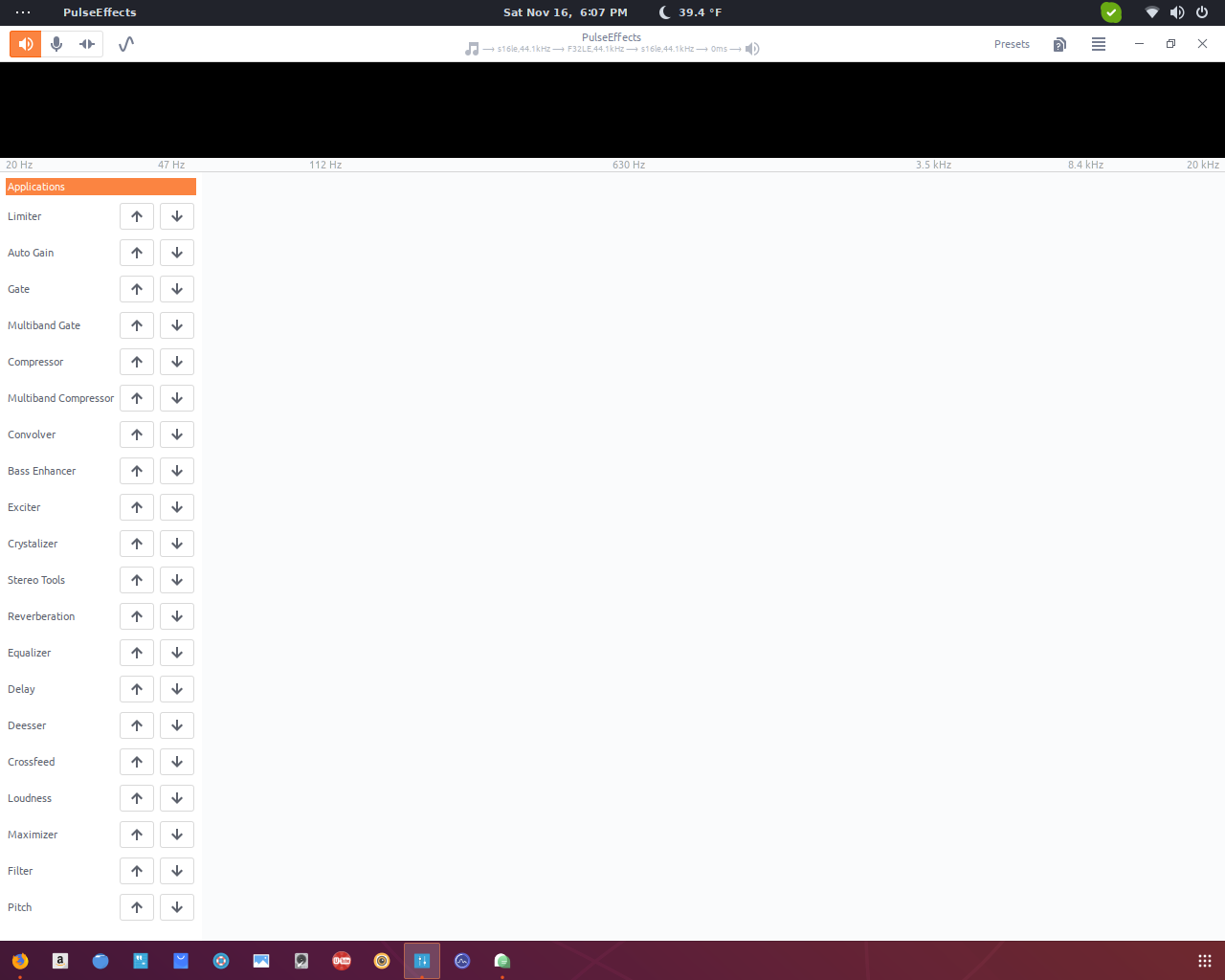
that is the bar i am talking about.
But now, pulse effects launches when i click the icon for it. its a bit slow to start, even on an i7 7700HQ.
i noticed that there is a FlatPak version available. im going to check it out, but in the mean time if you guys need any info from me, id be glad to assist you in keeping this alive.
would you like me to go ahead and install the debug symbols and run the pid through coredumpctl info? even though it is working now? im down :)
OMGdaDPS
on 17 Nov 2019
As of pulseaudio 13.0-2 on Arch, the PulseEffect still does not work for me, even after rm -rf ~/.config/PulseEffects
TheAifam5
on 17 Nov 2019
@OMGdaDPS this "black bar" is where the spectrum should be drawn. Installing the debug symbols will be worth only if you are able to reproduce the segmentation fault crash. In any case it will be good to know what happens with the flatpak version.
@TheAifam5 try to run pulseeffects -r in a terminal. Our config is stored in a dconf database. Only a few files like the user's presets are stored in ~/.config/PulseEffects. What do you mean exactly by not working? I use Arch Linux in all my computers and there is no issue.
wwmm
on 17 Nov 2019
@wwmm My fault. For a privacy reason, I have muted all input/output devices except the real output (in my case, BT headphones) :D I think would be nice to add something which will notify that the "PulseEffects(apps)" is muted or something.
TheAifam5
on 21 Nov 2019
That would be useful. Even better would be if Pulseaudio offered a way for us to tell that no one should mess with our virtual sink.
wwmm
on 21 Nov 2019
Related issues
 Mlocik97
·
5Comments
Mlocik97
·
5Comments
 alexbramford
·
4Comments
alexbramford
·
4Comments
 marioortizmanero
·
5Comments
marioortizmanero
·
5Comments
 Mlocik97-issues
·
5Comments
Mlocik97-issues
·
5Comments
 Ygarr
·
6Comments
Ygarr
·
6Comments
Most helpful comment
Well... I'm very sorry that I wasted your time. I should just have read the installation docs til the end. While fiddling with all the audio settings I somehow broke my audio output completely and tried to fix it by restarting. And now it works. While I cannot confirm that this is the fix to @whyseman s problem... well I got exactly the same error log so I guess that's worth a try.
Very sory I bothered you, really like the program with all it's options so far.