Pulseeffects: Default icon rendered incorrectly in Qt environments
Hey, so I know PE got a nice blue new icon recently, but on two of my computers that I tried it's showing up completely white.
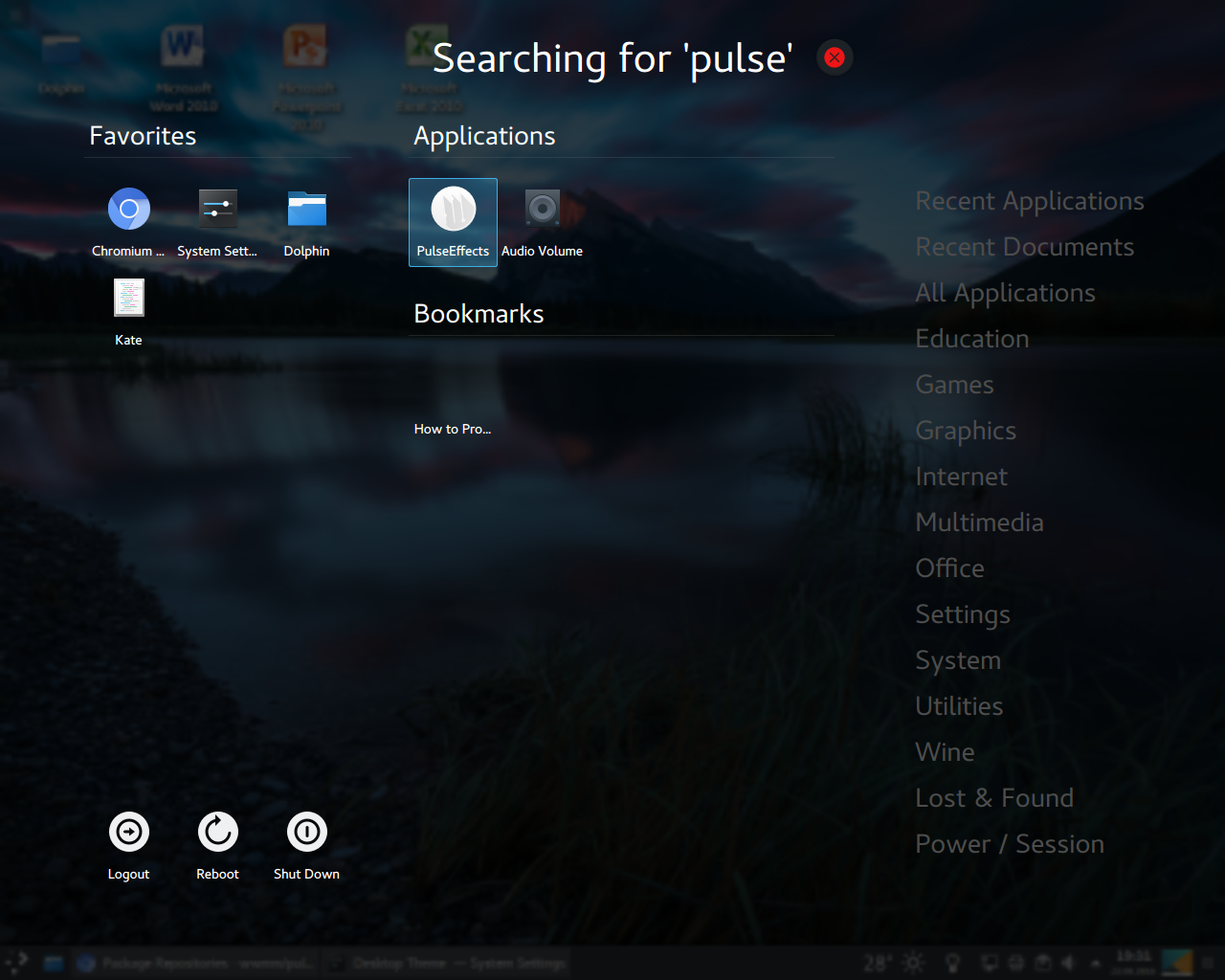
I have the flatpak PE version 4.2.7 installed here. On my other computer I'm using the latest version compiled from AUR.
When I click on 'About PulseEffects', the right icon is shown there, however.
DE is KDE Plasma.
 flipwise
All 26 comments
The icon shown in the about window is hardcoded and does not follow the desktop theme. But the launcher icon follows the desktop theme. I don't think there is something I can do about this
 wwmm
on 22 Aug 2018
wwmm
on 22 Aug 2018
I should have mentioned that I checked if it's an issue with icon themes, but it isn't. I get this white icon regardless of the icon theme, except of course if some theme (e.g La Capitaine) already has their own icon for PE.
I even tried with the GNOME default icon theme Adwaita and this white icon appears regardless.
flipwise
on 22 Aug 2018
Now I see that it is the right icon but white. I thought that it was other icon. In any case this does not happen here in my PC with gnome and the adwaita theme. So something is broken in your system. I don't know what could be exactly.
wwmm
on 22 Aug 2018
I just installed XFCE, on the same computer. It shows up properly here.
This leads me to the conclusion that the current icon is somehow incompatible with how Plasma renders icons ie. that it's rendered monochrome for some reason. I think the fix should be on this end because I've never experienced Plasma doing this with any other application icon.
flipwise
on 22 Aug 2018
If I replace the icon in PE's directory with this one, it's fine, it has color. This again leads me to believe the current svg has to be modified somehow.
flipwise
on 22 Aug 2018
Any ideas @zencubic
wwmm
on 22 Aug 2018
Something to have in mind is that most apps use png instead of svg. So there is always the possibility that something may be wrong in how plasma is handling a few types of svg
wwmm
on 22 Aug 2018
svg are sometimes rendered differently by different rendering engines. Optimizing svgs by svgcleaner (https://github.com/RazrFalcon/svgcleaner-gui, https://github.com/RazrFalcon/svgcleaner) sometimes helps.
 mikhailnov
on 23 Aug 2018
mikhailnov
on 23 Aug 2018
I've added using scour to optimize all svgs automatically when building deb package https://github.com/mikhailnov/pulseeffects/commit/e2b42bd9f1bae5be59991074d3377618bc80f962 , but dh_scour rejects optimized pulseeffects.svg.
mikhailnov
on 23 Aug 2018
I tried out the icon optimized by svgcleaner but it's still white. On the other hand, when I took the png from here and converted it into an svg, I got the right colors. Unfortunately the svg is very choppy, I probably don't know how to make the conversion properly.
If we dig into this a bit more and see nothing can be done with the icon itself, I can submit a bug report on bugs.kde.
EDIT: could also be a Qt/QML bug really.
flipwise
on 23 Aug 2018
I have no idea about what could be changed in the icon to fix this. Are KDE applications like dolphin or gwenview affected too or only plasma?
wwmm
on 23 Aug 2018
Ha, Dolphin doesn't preview the icon properly and Gwenview doesn't render color either. Could be a Qt bug. I will try to dig into this a bit more, it's not too big of a deal, don't waste your time with it :)
flipwise
on 23 Aug 2018
Ok. It would be good to report this to KDE developers.
wwmm
on 23 Aug 2018
According to the internet, Qt requires SVGs to conform to the SVG Tiny 1.2 specification. I'm not sure if this is the issue since I think many other icons would be broken.
I tried to actually re-save the SVG in a program that explicitly asks for the desired standard, but that doesn't work for SVG Tiny 1.2 because the file can only be split up and has to rely on 5 PNGs.
Maybe it's this bug, but I don't see the problematic lines in PE's icon.
I tried out a lot of things, but ultimately can't fix it. Maybe someone with experience in icon theming will know what's going on.
flipwise
on 23 Aug 2018
I also have zero experience with this. Let's keep this open for a while and see what happens
wwmm
on 23 Aug 2018
The SVG I've pushed has been cleaned with svgcleaner and afterwards I run tidy over it. It is a standard procedure which I took from the La Capitaine Icon Theme. @flipwise Could you test if the icon theme works for you?
 zencubic
on 24 Aug 2018
zencubic
on 24 Aug 2018
What is 'tidy over it'?
mikhailnov
on 24 Aug 2018
Tidy is actually a program that keeps your source code easy readable. You can look into the source of the icon and you will hopefully see what I mean
zencubic
on 24 Aug 2018
@zencubic do you mean to try out the La Capitaine theme? Tried it out now and Papirus-Adapta as well, both have their own icons for PE and both of these icons render correctly.
flipwise
on 24 Aug 2018
@flipwise Yes
zencubic
on 25 Aug 2018
Here is a quick way to reproduce the problem without installing Plasma or any bigger Qt apps.
If you install lximage-qt and open the icon in there, it should also show up white.
flipwise
on 28 Aug 2018
It happens here with lximage-qt too. At the same time it is fine in eog(eye of gnome). Very strange.
wwmm
on 28 Aug 2018
mikhailnov
on 28 Aug 2018
Is this still a problem?
wwmm
on 21 Jan 2019
Yeah, still the same with Qt 5.12.
flipwise
on 21 Jan 2019
I opened PE icon in Krita, and it rendered correctly. Then, I exported it in a new SVG and voila! the new generated svg shows correctly in dolphin, gwenview and plasma menus.
 damian01w
on 23 Jan 2019
damian01w
on 23 Jan 2019
Related issues
 Mlocik97-issues
·
5Comments
Mlocik97-issues
·
5Comments
 zedeus
·
7Comments
zedeus
·
7Comments
 hackel
·
6Comments
hackel
·
6Comments
 Thinkaboutmin
·
4Comments
Thinkaboutmin
·
4Comments
 ZeroDot1
·
7Comments
ZeroDot1
·
7Comments