Pulseeffects: pulseaudio avoid-resampling=yes not working when pulseeffect in use.
Hello,
the option avoid-resampling in pulseaudio allows to let the soundcard to use native sampling if supported avoiding to systematically resampled stream.
To reproduce the issue :
1) verify it works : stop pulseeffect, play file (VLC) at 88.2K or 96K, you can see that sampling output follows file sampling rate.
2) if you start pulseeffect at that moment, it still worked at native sampling rate (Resampler = copy)
3) play another file with different sampling rate (e.g 88.2K instead of 96K) then the output stream is resampled from 88.2K to 96K, sampling rate is not updated. pulseffect input sampling is not updated with new native sampling rate (stick to sampling rate at launch, I guess). Resampler= speex-float10
 Neo595
All 19 comments
Hi! Since when PulseEffects was born I have been thinking about this but I could not find a satisfactory solution yet :-(
In order to apply effects we load a pulseaudio null sink and move the applications to it. In your case PulseEffects(apps) is the one relevant. This null sink must have a sampling rate and a sample format(s16le, f32le, etc). So when PE starts we ask pulseaudio which is the format and sampling rate of the current default output device and set the null sink to the same values. So far so good. The problems start when the output device change its rate. There is no way to change the rate of a pulseaudio null sink on the fly. I asked this to pulseaudio's developers once and it can't be done :-(. I could change the sampling rate of the GStreamer pipeline that is recording this null sink monitor. It would be a matter of restarting it with the new sampling rate. But this is useless if the null sink is still using the old rate. The resampling will happen anyway.
The only possibility I see would be to kill the null sink and reload it. But this has the potential to bring a lot of headaches. As soon as we kill it pulseaudio will move the audio applications back to the default output device and we would have to somehow keep track of which app were enabled or not by the user. And I think that other side effects will appear along the way.
For now let's keep this issue opened. Maybe someone out there has a good idea. Maybe creating a custom null sink for PE capable of switching rate on the fly is a solution. But at this moment I know nothing about low level pulseaudio programming.
 wwmm
on 28 Jul 2018
wwmm
on 28 Jul 2018
I have started loving using avoid-resampling and I am certain, though without ABX logs, that I am hearing better sound by avoiding the resampling. I also love Pulseffects because I can EQ some really cheap in-ear phones to go from very mid-rangey to sounding actually quite good. The problem is though what has been mentioned that the sample rate is "held hostage" by Pulseeffects. I really hope someone comes up with a solution. If there is anything a non-programmer like me can do just let me know (testing?).
 38github
on 5 Oct 2018
38github
on 5 Oct 2018
Last month I contacted Pulseaudio's developers and if one of the pull requests is accepted(I think it probably will be) we should be able to reconfigure the null sink sampling rate in the next Pulseaudio version. Here you can see the discussion https://lists.freedesktop.org/archives/pulseaudio-discuss/2018-September/030512.html.
For now all we can do is waiting.
wwmm
on 6 Oct 2018
Hello,
Very good news, Arun is a lead pulseaudio developer. The "avoid-resampling" feature has been developed by him. Wait & see...
From discussion, it seems that if the stream is declared as "compressed", it will activate "pass through" behavior so sample rate is kept, maybe an indirect way to get the good property ?
Regards.
Neo595
on 6 Oct 2018
I didn't know he was the one that implemented the avoid-resampling feature. Cool.
What applies to us are the patches allowing the null sink to be reconfigured on the fly. But not the compressed audio pass through. Audio processing is done to the raw pcm audio samples. It can't be done to compressed audio unless you uncompress it.
wwmm
on 6 Oct 2018
Good news! I implemented this feature in the master branch. But in order to test you will need Pulseaudio 13(not release yet) or compiling Pulseaudio from sources. People willing to try will find a step by step to compile Pulseaudio in a post I made in #350. It is not easy but it would be good to have feedback. At least for me it is working.
wwmm
on 17 May 2019
Hello,
I've compiled from source as described;
Pulseaudio is working from ./pulseaudio (need to kill it before due autospawn)
when I launch ./pulseaudio --version, the return is pulseaudio 12.0-309-geadd9
seems to be good ?
and avoid-resampling is still not working ... is it expected ?
regards
Neo595
on 18 May 2019
It is not. Did you update PulseEffects to the latest git version? When you start it in debug mode does it print 12.0-309-geadd9 as Pulseaudio version? How are you verifying that avoid resampling is not working? Is avoid resampling enabled in Pulseaudio config file?
On my computer I tested this way. Played a song in Spotify and the sampling rate shown in PE title bar was 44.1 kHz. The same as the one in the song. Note that PE may show copy as resampler depending on your sample format. This is normal. After that I paused Spotify and opened a 48 kHz video in mpv. The sampling rate in PE title bar now is 48 kHz and the resampler method shown will be copy or none depending on the default sample format in your system. Again it is not a problem. The copy resampler does not change the sampling rate.
Also note that you have the same limitations that the avoid resampling feature has without PE. In the example above if I open Spotify and mpv at the same time one of them will have to be resampled. The first of them to play is the one that will not be resampled.
wwmm
on 18 May 2019
Hello,
Finally it works with VLC ! :)
Quite difficult for me !
1) make a package for PE 4.6 => Ok (ubuntu PPA is stuck to 4.5.8)
2) compile pulseaudio from source :
Lot of lib in dev version to install and mainly some options to add in order to get the right support (Am I missing something?)
/configure --prefix=/home/neo/pulseaudio/bin --without-caps --enable-udev --enable-soxr --enable-speex --enable-alsa
capabilities not working => --without-caps
The other enable in order to have then in.
Thanks ! great job !
We have to wait the official pulsaudio 13...
Regards
Neo595
on 19 May 2019
In Arch Linux it was easier. The only option I had to use was --prefix. In any case the proper solution is to wait for Pulseaudio 13 like you said. I just wanted to know if it was working for other people :-)
I think we finally can close this issue :D
wwmm
on 19 May 2019
Hi,
After deeper investigations, it seems not always working properly.
1) Wihtout PE, using VLC, different sampling rate => on pasystray ( http://github.com/christophgysin/pasystray) report, you can see the change on the fly of sampling frequency as expected : 96K, 48k, 88,2K, 44,1K
Then choose one play, 96K for example, play & stop
Launch PE, launch tracks at 44,1 / 48 / 88.2 / 96 K
PE keep the frequency at launch
=> PE report :(pulseeffects:12847): pulseeffects-DEBUG: 15:46:59.491: sie: sampling rate: 96000 Hz
On main PE panel :
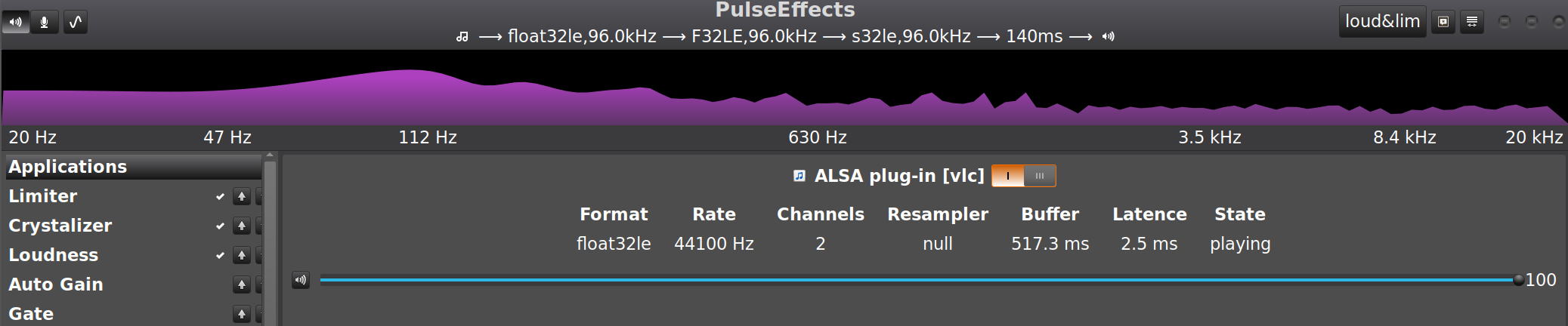
No resampling, but it is not systematic, on some others tracks resampler is active

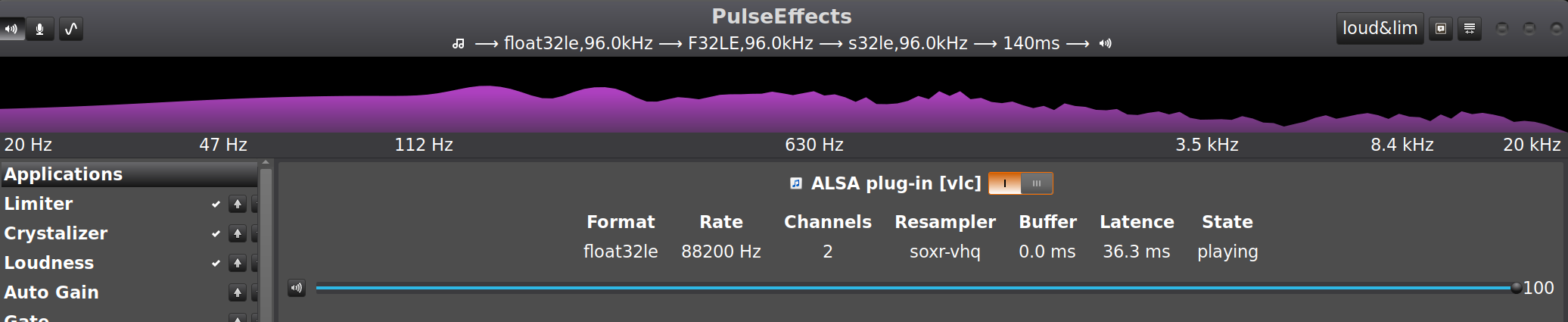
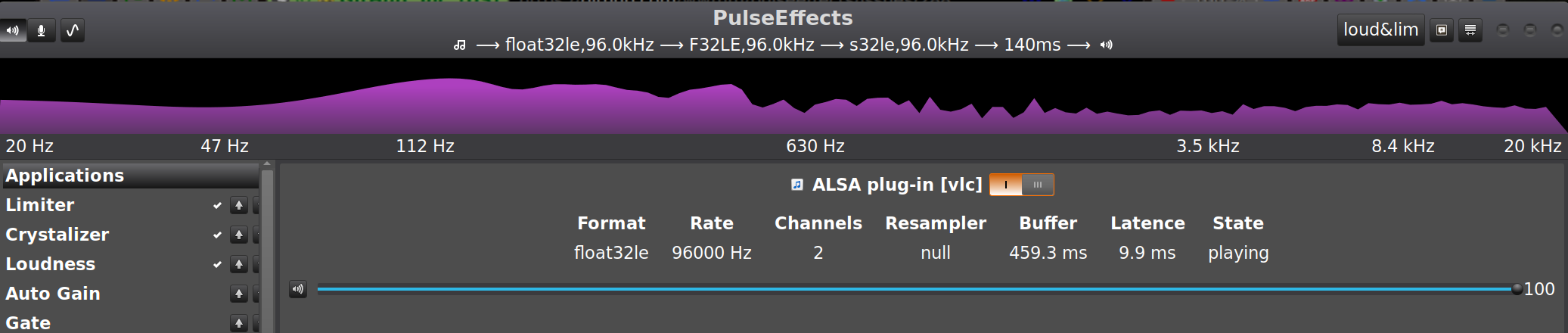
If PE is stopped & restarted with another suspended stream sampling frequency, it will take it.

Regards
Neo595
on 19 May 2019
I wonder if Pulseaudio is updating its null sink rate. The info shown in PE titlebar is updated only when Pulseaudio notifies us about changes in the null sink. Considering that it showed soxr-vhq as resampler in some cases it probably didn't.
wwmm
on 19 May 2019
Try to repeat the cases where Pulseaudio is resampling vlc stream and run in a terminal the command pactl list sinks. Search for the sink named PulseEffects_apps and take a look at the line that starts with Sample Specification. If the rate is not the one used by vlc Pulseaudio did not update the null sink rate.
wwmm
on 19 May 2019
As far as I could see Pulseaudio only updates the sink rate when nothing is keeping it busy. If the sink does not enter the idle state it does not change the rate when a new stream with different rate starts.
wwmm
on 19 May 2019
It may also be interesting to see what happens when you repeat the tests with mpv.
wwmm
on 19 May 2019
I am doing some tests with vlc and lollypop and so far I could not reproduce this problem. I don't know if it is because I am alternating only between 44100 Hz and 48000 Hz... But I noticed that my vlc is not interacting with Pulseaudio in the same way as yours. Take a look at this image
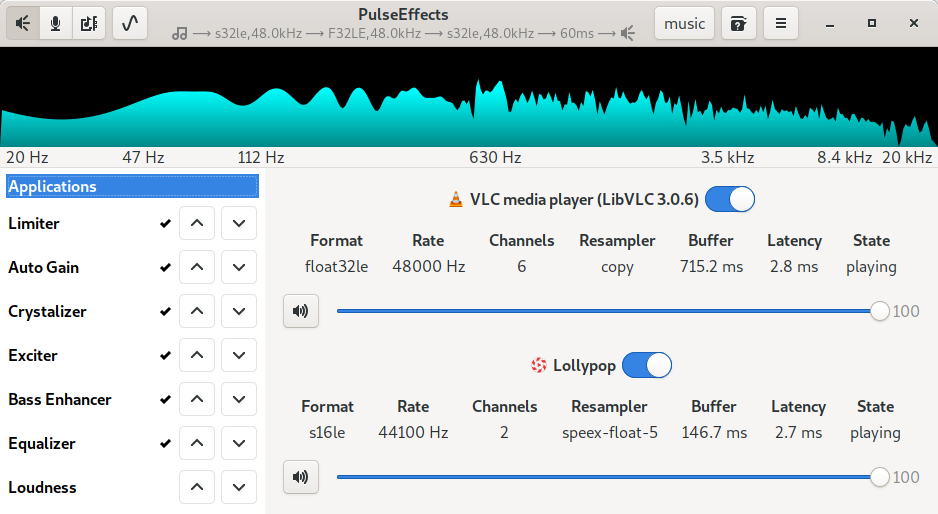
In your computer vlc is using the alsa plugin. On mine it is talking to Pulseaudio directly.
wwmm
on 19 May 2019
Hello, I'm having a similar problem.
When I close PulseEffects and play some 96khz audio on VLC the output of pacmd list-sink-inputs says that the resample-method is "copy", but with PulseEffects running the same audio gets resampled with speex-float-8. And this only happens with sample-rates not included in daemon.conf (default-sample-rate or alternate-sample-rate): after setting the alternate-sample-rate to 96000 the resampling is avoided even with PE running. So PE is apparently ignoring "avoid-resample = yes".
@wwmm do you think this deserves another issue?
 vhborges
on 31 Jan 2020
vhborges
on 31 Jan 2020
I think it is better to open a new issue. I haven't had problems with the avoid resampling on my computer. As long as Pulseaudio actually changes the sampling rate PE will follow it. But Pulseaudio only does that when the soundcard device is idle. If there is an active stream it does not change the device rate. Assuming that you are using Pulseaudio 13 this is probably what is happening. Older Pulseaudio versions do not have the required features to make this work in PulseEffects.
wwmm
on 31 Jan 2020
But Pulseaudio only does that when the soundcard device is idle. If there is an active stream it does not change the device rate. Assuming that you are using Pulseaudio 13 this is probably what is happening.
In my tests I closed every app playing music before launching PE and played the same music again, so in this circumstances I guess it should work as expected, but the resample-method was different when PE is running (only for specific this sample-rate, which is not in my daemon.conf).
I'm using Pulseaudio 13.0-3 and PE 4.7.1-1.
I'll create an issue on this shortly.
vhborges
on 1 Feb 2020
Related issues
 teneri66
·
4Comments
teneri66
·
4Comments
 ZeroDot1
·
7Comments
ZeroDot1
·
7Comments
 servimo
·
7Comments
servimo
·
7Comments
 alexbramford
·
4Comments
alexbramford
·
4Comments
 Ygarr
·
6Comments
Ygarr
·
6Comments
Most helpful comment
Hi! Since when PulseEffects was born I have been thinking about this but I could not find a satisfactory solution yet :-(
In order to apply effects we load a pulseaudio null sink and move the applications to it. In your case
PulseEffects(apps)is the one relevant. This null sink must have a sampling rate and a sample format(s16le, f32le, etc). So when PE starts we ask pulseaudio which is the format and sampling rate of the current default output device and set the null sink to the same values. So far so good. The problems start when the output device change its rate. There is no way to change the rate of a pulseaudio null sink on the fly. I asked this to pulseaudio's developers once and it can't be done :-(. I could change the sampling rate of the GStreamer pipeline that is recording this null sink monitor. It would be a matter of restarting it with the new sampling rate. But this is useless if the null sink is still using the old rate. The resampling will happen anyway.The only possibility I see would be to kill the null sink and reload it. But this has the potential to bring a lot of headaches. As soon as we kill it pulseaudio will move the audio applications back to the default output device and we would have to somehow keep track of which app were enabled or not by the user. And I think that other side effects will appear along the way.
For now let's keep this issue opened. Maybe someone out there has a good idea. Maybe creating a custom null sink for PE capable of switching rate on the fly is a solution. But at this moment I know nothing about low level pulseaudio programming.