Pulseeffects: Add equalizer bands option
Hi, I installed the newest pulseeffects, which now has 30 instead of 15 eq bands. Well, this may be great for people who want to fine tune their sound.
But for me the 15 band eq was enough and had a perfect size. It fit into the window without having to scroll. I just have a 1920x1080 display and even when I maximize PulseEffects, not all Equalizer bands fit into the window.
I realy liked to see and be able to change all bands without having to scroll.
Don't remove the 30 band eq! As I said, for some people this may be great!
But for the 'average' user a 15 bands eq would be enough and better, because we can configure all bands without having to scroll. In my opinion this was more user friendly and felt quicker and easier to use.
So I would like to see an option to change how much bands the equalizer has.
 Bleuzen
All 12 comments
Hi!
I will think about this but I am not sure if it is going to be possible. There are things like gsettings keys that must have their number and default values hardcoded. Loading presets will also be a little more complicated if we have to support people with different number of equalizer bands.
What you can do is using just the first 15 bands and ignoring the others. As we are using a parametric equalizer you can change the frequencies and bandwidths of the first 15 bands to the ones you were using before and setting the gain of the other bands to zero. As far as I remember gstreamer equalizer source code does not apply any kind of processing for bands set to zero gain
 wwmm
on 29 Nov 2017
wwmm
on 29 Nov 2017
Ok, I will only use the first 15 bands for now.
But still this doesn't feel like a real 'solution' and to be userfriendly. Eqs with 15 bands are more common than 30 bands. So it would be easier for new users to copy their preset from other applications, (without changing the frequencys of the first 15 bands and ignoring another 15 bands).
So in my opinion, still, 15 bands (in the default setting) would be better.
I can also live with 30, but ...
yeah, think about it and if there is an easy way you could implement this, it would be great.
I also have a second idea, beside a 15 / 30 bands switch. But this may be a bit harder to do(?):
What about not having fixed bands? Some other apps with an parametric equalizer also allow to manually add new 'points' with a frequency and gain.
Maybe having 15 bands as default and a "+" button next to?
Here an example with 1 band and a + button to create a second band:
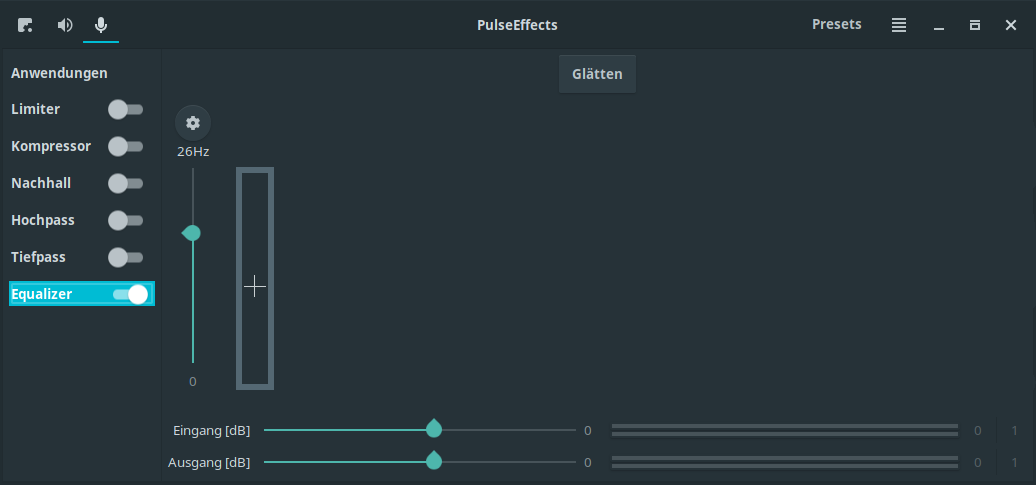
Anyway, I would not need it, I'm happy with a 15 bands eq. But maybe, if this would be possible, this is an idea for the future of PulseEffects :)
So everybody could decide if he / she wants to use 5, 10, 15, 30 ... bands.
Bleuzen
on 30 Nov 2017
This could be a good thing, I was satisfied with 15 bands too.
 servimo
on 2 Dec 2017
servimo
on 2 Dec 2017
I second this as an amateur user looking for a nice equalizer to use for music listening. This app trumps everything else in the 'market' so being able to use a 10/15 band eq would be great for casual users, opening up to a much larger user base thanks to the quality UI.
 gombosg
on 3 Dec 2017
gombosg
on 3 Dec 2017
Although I understand your points I don't think we are going to have this feature any time soon. In order to let the user changing the number of bands I would have to do a major rewrite in PulseEffects code. The logic I am using to save/load presets and to initialize interface controls from gsettings keys bindings would have to be completely rethought. I also do not know if gstreamer equalizer plays nice when its number of bands is changed on the fly and for each number of bands the default or suggested frequencies that should be shown to the user is different. I had to do a few major rewrites in the last months in order to PE to get where it is today and I would like not doing something like this again for a while.
As I am the only one implementing core features I try to have as much functionality as possible while having as little development/maintenance effort as possible. Right now sticking to 30 bands is the best answer to this equation. People who needed more fine tuning or that came from windows with Peace Equalizer presets that had more than 15 bands can use PE while the ones that prefer 15, 10, 3 or whatever number of bands they feel it is right are still able to do so. It is not the most beautiful or friendly solution to less experienced users but nobody is left in the wind.
wwmm
on 4 Dec 2017
Thanks for the extensive reply. I understand your point.
My newbie question is that if I make, say, 8 bands (say, 60 Hz-100Hz-200Hz-500Hz-2kHz-5kHz-10kHz-17kHz) and not use the rest then how does GStreamer figure out how wide the response function of each band should be? Should I set all of them to the 'peak' setting?
gombosg
on 4 Dec 2017
You still can set the first band(60Hz - 100Hz) to low shelf and the eighth band(10kHz - 17KHz) to high shelf. Just make sure you set the unused bands gain value to zero. I took a look at gstreamer source code and when you leave the gain at zero they put the band in passthrough mode. According to their documentation no processing is applied to the audio buffer in this case. And as far as I could notice this seems to be the case indeed.
You can control each band width through its quality parameter. The relation is width = frequency / quality
wwmm
on 4 Dec 2017
Ah, I see, it's here:
https://github.com/wwmm/pulseeffects/blob/67d38f42104c21f9b26c98a7514269f8dc24bf43/PulseEffects/equalizer.py#L211
So then this is the Q factor: see here or here.
Seems there is quite some stuff to learn here. We learnt (quite) a bit about filters in university, but mostly for control engineering and not audio engineering. :)
I created my custom EQ bands using this resource and the attached table.
Equalizer.zip
These resources could be pointed out in the docs later. :)
Edit: I'll look into how you are saving these EQ values. I haven't used Python before (I'm a junior Javascript/Typescript dev at the moment) but it's a great way to learn. As far as I can see so far, the number 30 is pretty much hard-coded at the moment.
gombosg
on 4 Dec 2017
Hi! Can add sorting bands by frequency? I often added random frequencies for correction. I even have a disgusting script that sorts a text file with a list of bands, but it's disgustingly written for one-time.
 fisher122
on 1 Feb 2018
fisher122
on 1 Feb 2018
@fisher122 I will think about it.
@gombosg Only now I saw your edit. Yes, the number 30 is hard-coded in all the places where there is interaction with the equalizer. But as changing this will not remove any of the difficulties related to the request in this issue I decided to let it this way while I focus on other things.
Feel free to create a page in the wiki with the resources you mentioned :-)
wwmm
on 4 Feb 2018
Code in latest master allows the user to choose the number of equalizer bands. This setting is saved to the users presets so it is possible to have presets with different number of bands. In the equalizer menu there is also a function that calculates for the user the corresponding frequencies of a graphic equalizer. I added this in case the user has no idea about the new frequencies he should use. Advanced users are still able to do whatever they want.
For many reasons 30 bands is still the default. But is quite easy for users and distribution maintainers to tweak the equalizer
wwmm
on 3 Jun 2018
Super awesome! Thanks! I'll try it next week.
gombosg
on 3 Jun 2018
Related issues
 mbb78
·
3Comments
mbb78
·
3Comments
 teneri66
·
4Comments
teneri66
·
4Comments
 Dodjob
·
5Comments
Dodjob
·
5Comments
 Mlocik97-issues
·
5Comments
Mlocik97-issues
·
5Comments
 WarpspeedSCP
·
4Comments
WarpspeedSCP
·
4Comments
Most helpful comment
Code in latest master allows the user to choose the number of equalizer bands. This setting is saved to the users presets so it is possible to have presets with different number of bands. In the equalizer menu there is also a function that calculates for the user the corresponding frequencies of a graphic equalizer. I added this in case the user has no idea about the new frequencies he should use. Advanced users are still able to do whatever they want.
For many reasons 30 bands is still the default. But is quite easy for users and distribution maintainers to tweak the equalizer