Pulseeffects: Dropdown menu for selecting presets
Loading presets can be slightly tedious, using the open file dialog.
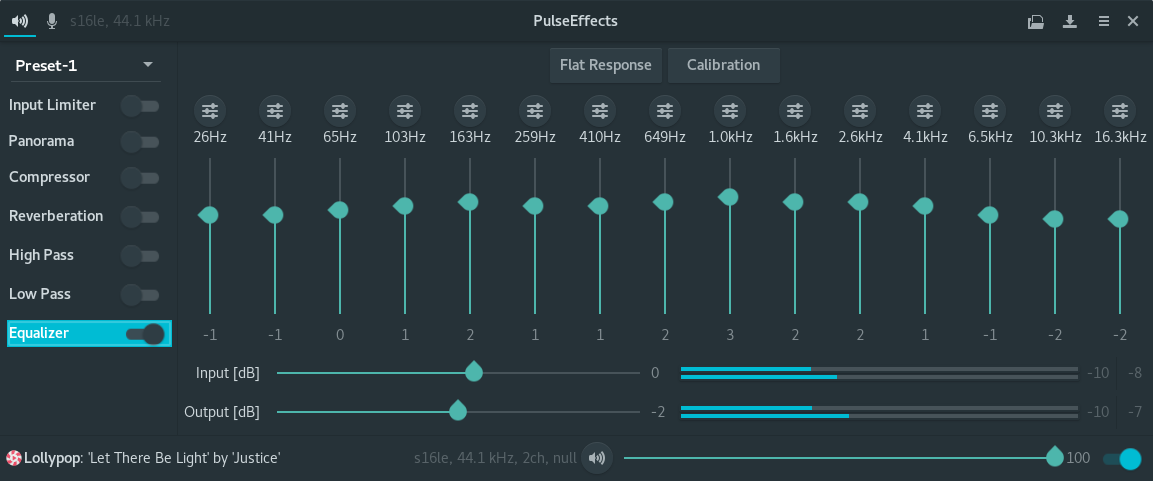
One possible remedy for changing presets quickly and easily, might be to use a dropdown menu to select from saved presets.
The dropdown element could be placed at the top of the effect toggle column. This would have the added positive side effect of letting the user know which preset is currently loaded.
 bretter
All 25 comments
Actually this is not a bad idea. There are security advantages to this as well.
While this was undergoing review on Flathub it got pointed out that it might not be a good idea to have a user select-able config directory. See: https://github.com/flathub/flathub/pull/72
Good idea or not, in the end the compromise that had to made was to give the application full read-write access to the user home directory. If this were to change, I could remove this and remove all access to the user home.
 AsavarTzeth
on 27 Sep 2017
AsavarTzeth
on 27 Sep 2017
Hi,
I agree that using the file dialog for loading presets is a little annoying and that showing the saved presets in a dropdown menu would be more practical. This is one of the parts of PulseEffects that need more love. We do not offer the user a easy way to delete presets for example.
@AsavarTzeth, unless I have missed something we will still need read/write access to user home. The only change is that the user will not see the open file dialog and won't be able to choose other folders besides ~/config/PulseEffects to save presets
 wwmm
on 28 Sep 2017
wwmm
on 28 Sep 2017
If I am anything like most users, once a handful of presets have been created, the main interaction with the GUI is toggling between them. I think the dropdown menu would likely address the most common point of friction.
I don't know how much demand there is for being able to save configs to multiple directories but it seems that if you were willing to give that up; the preset management options could be reduced to:
- dropdown menu for selecting stored presets
- save button which only prompts the user to input a name
- delete button which would prompt the user to confirm the intention to delete the currently loaded preset
I think that @AsavarTzeth was suggesting that access to a single config directory might be preferred over the ability to read/write to the whole home directory via the save and open operations?
bretter
on 28 Sep 2017
Actually by default flatpak applications only have write access to ~/.var/app/$APPID, in the case of PulseEffects that is ~/.var/app/com.github.wwmm.pulseeffects. From the perspective of the application this is its home directory. Any file access outside of this is either restricted or inaccessible.
However, since PulseEffects enables the user to select any directory via a file chooser, I currently pass --filesystem=home on build. This grants additional read-write access to the real home directory, enabling the user to select almost any location (or the most likely ones at least), as expected.
The reason I do this is to meet user expectations. If a user is presented with a file chooser, yet cannot select a location as expected, that might cause confusion. While the goal is to have secure flatpak apps, it should not come at the cost of a bad user experience.
Now if the user no longer get the choice of location, the risk of confusion goes away. That would allow me to remove --filesystem=home from the manifest. Does this make sense?
So yes, @bretter you were very close in your guess.
AsavarTzeth
on 28 Sep 2017
Now I see the point. It makes sense. As we are using GLib.get_user_config_dir() the config directory would be in ~/.var/app/com.github.wwmm.pulseeffects and as the user won't choose a location anymore there is no need for read/write access outside of the app home.
Ok, as soon as I have time to work on PulseEffects code I will implement these changes.
wwmm
on 28 Sep 2017
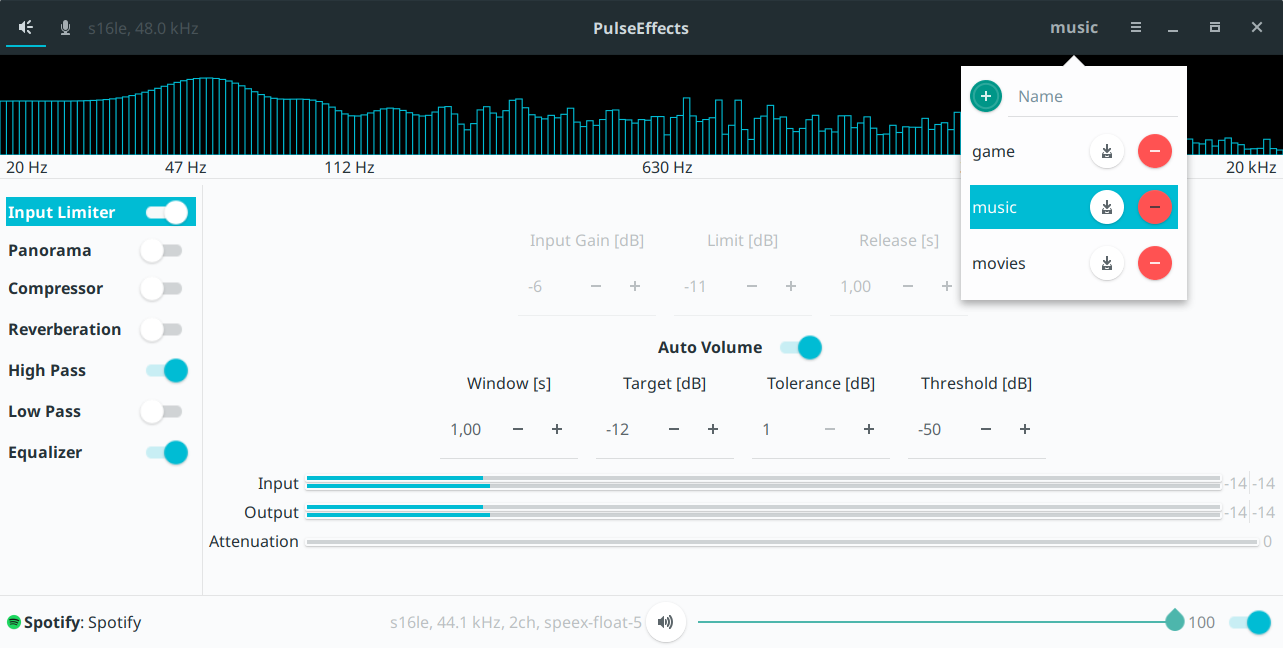
Master branch has a new interface for user presets. Please test it and tell me if everything is ok. If there is no problem I will release a new version with it this weekend.
wwmm
on 7 Oct 2017
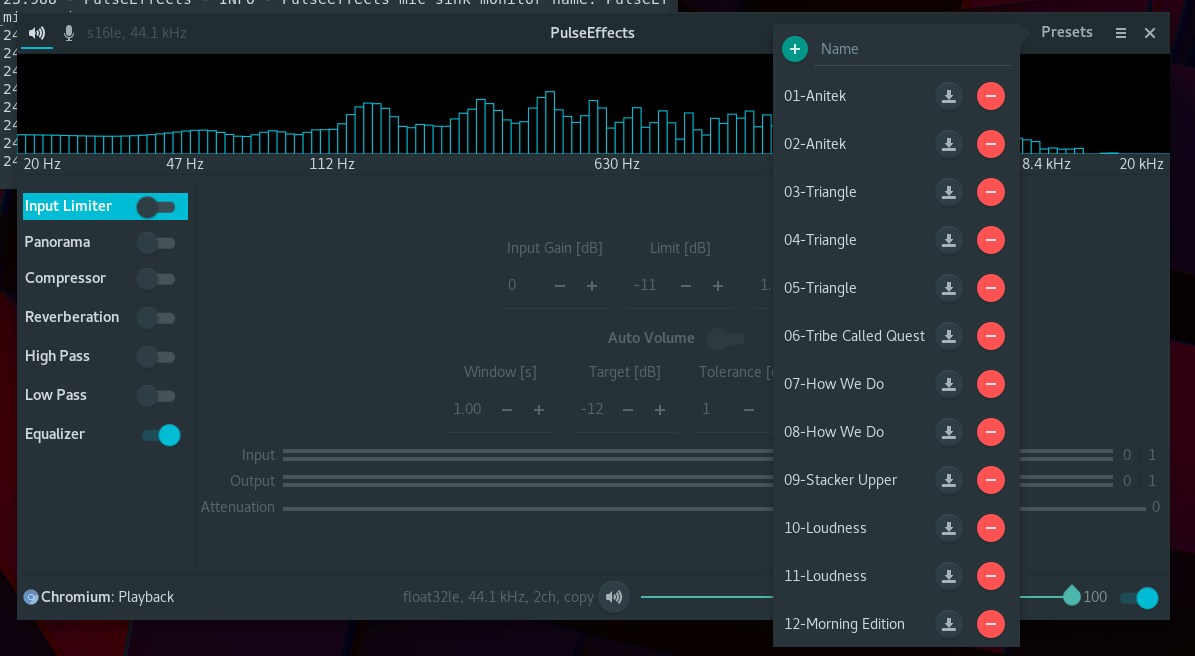
Noticing three issues.
1) Max number of presets displayed is limited by height of the window. In the screenshot above, I have 14 presets saved, yet only 12 are displayed. Seems like this could be remedied by using a popup element that allows scrolling.
2) Items that spill over the the rest of the window (entry 12 in the screenshot) is clicked 'through'. That is to say that the section that hangs over the pulseeffects window does not respond to clicks. Instead when this area of the popup is clicked, any window behind it is brought into focus.
3) When the program is first started, the name of the loaded preset (presumably whatever was loaded at the end of the previous session) should be displayed instead of 'Presets'.
Otherwise, switching between presets seems to work well. Adding, saving and deleting also seem to be functioning as expected.
bretter
on 7 Oct 2017
I didn't consider that someone would have so many presets XD. I will try to include a scroll in this menu.
The third point has the potential to mislead users. PulseEffects does not load any of the user presets on startup. Each setting is individually saved to its own gsettings key (that can be seen in dconf) that is read at startup. This way you have your last used setting without the need to save and load a preset. I use that a lot. Having this feature in mind let's consider that the user loads a preset, changes any of the settings for whatever reason and then closes PulseEffects. The next time it reopens it the applied settings are not the ones from the last selected preset but the ones saved in the gsettings key. Of course there is no problem if the user does not touch any of the settings after loading a preset. But if he does it will be misleading to see the name of the last used presets there.
An obvious solution to this would be to reset the label to "Presets" whenever the user touches any of the controls. I will try to see if there is a way to do that without having to individually monitor the state of all the controls we currently have.
wwmm
on 7 Oct 2017
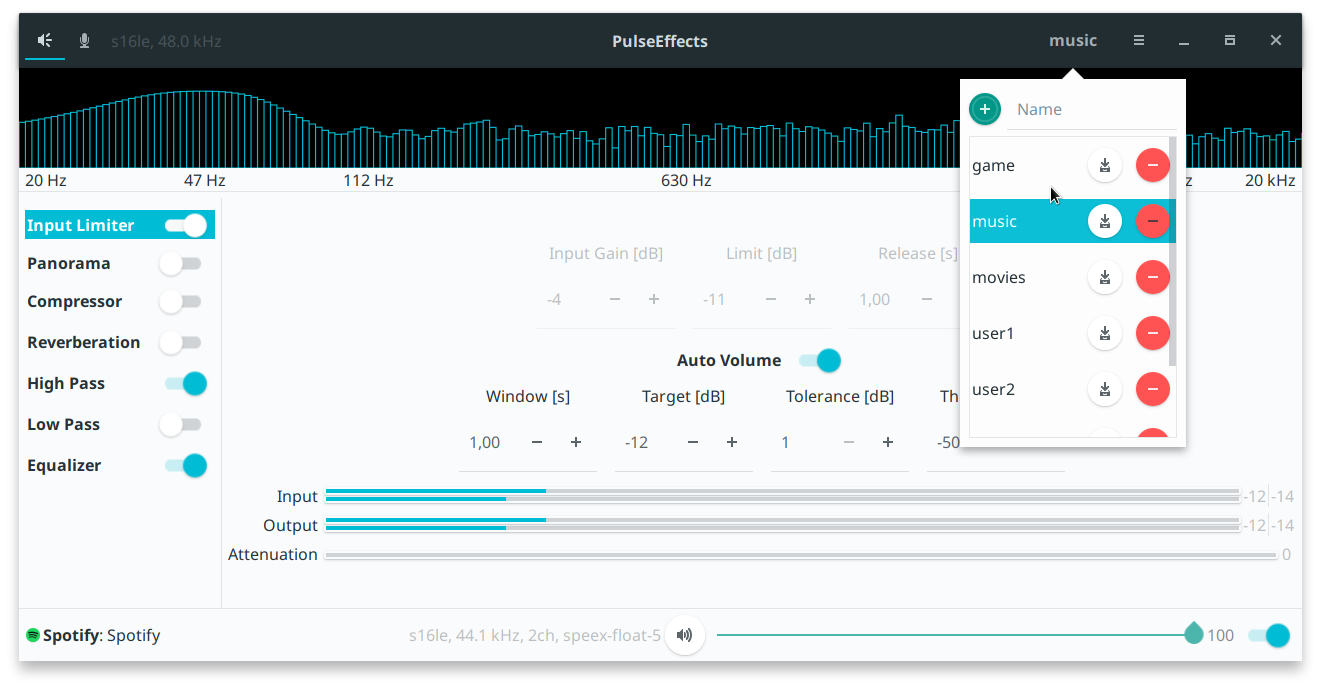
Latest master has scrolls. I am still investigating the third point.
wwmm
on 7 Oct 2017
Scroll working well here!
Only have two suggestions for small tweaks to the preset selector:
1) Might be nice to have the length of the popup element scale with the size of the window instead of having a hard limit on size.
2) Consider sorting alphabetically so that users can have some amount of control over the order the presets appear in.
Glad you were able to implement this so quickly! Definitely makes switching between presets a lot faster and easier!
I like your idea of reverting to 'Presets' if a change is made to the loaded preset. Would be cool to see that implemented in the future.
bretter
on 7 Oct 2017
Totally agree with the 2 points. Actually I tried to implement the first one but it is not obvious how people do that. In gtk docs I could only find how to have hard limits on the GtkScrolledWindow size.
Gsettings has a signal that is triggered whenever a key is changed. If this does not result in a performance hit it could be used to update the label.
wwmm
on 7 Oct 2017
I am not so familiar with developing with GTK so pardon me if my suggestion seems naive.
Could you get the window size with gtk_window_get_size()
multiply that by a scaling factor (maybe 80 or 90%)
and pass it to gtk_scrolled_window_set_max_content_height () any time there is a change
bretter
on 7 Oct 2017
Latest master has a presets menu that scales with window height(80%)
wwmm
on 10 Oct 2017
Scaling working well here. Major improvement for those of use with ridiculous amounts of presets ;)
Observed a minor issue with the edge case of changing the window size while the popup is open. In this circumstance, the popup is not automatically resized and in the case of shrinking the window, the popup can again spill over the border of the window.
It is worth noting that simply closing and reopening the popup solves this problem.
bretter
on 10 Oct 2017
It makes sense as I only ask the window size when the presets button is clicked.
I could connect to the configure-event signal to be notified about changes in window size but this signal is triggered by changes in window position too. So for now I will try to avoid unnecessary resource usage and I will get the window size only when the button is clicked.
wwmm
on 10 Oct 2017

As a reference, it looks like other official gnome apps exhibit this same behavior as depicted in the screenshot of gedit's tab length popup.
bretter
on 10 Oct 2017
I tried recently tried 154dc6ef1db57d012e9765dcb2ab4e625b2aeb71 and it looks great. However I can't actually add a new preset. I click "+" and nothing happens. My previous existing ones show up as expected.
I did the testing in the flatpak sandbox, but as you know it currently uses the real home and I don't see how it could make a difference anyhow. Are you experiencing this as well?
AsavarTzeth
on 14 Oct 2017
Hi. You have to click on the field Name and write a name for the preset. After that click on +.
Maybe there is a way to blink the name field to call user attention or use a better text hint than Name
wwmm
on 14 Oct 2017
I did give it a name, I used "test". When I have time I will do further testing, including with a regular Arch install.
AsavarTzeth
on 14 Oct 2017
I can confirm saving new configs is no longer working for me either. Deleting and modifying existing presets seems to be functional however.
bretter
on 14 Oct 2017
Indeed it was not working. I didn't test adding/removing presets in the last days. Somehow the gtk builder connect_signals was not being called anymore when setting the menu. It should be fixed in the latest master
wwmm
on 14 Oct 2017
Working for me in the latest master.
bretter
on 16 Oct 2017
Are we satisfied that this works?
By the way I am happy to report that the flatpak version can no longer access a users home directory. All is working well.
AsavarTzeth
on 22 Oct 2017
I am satisfied :-) but still considering 2 more points he asked:
- Show the last preset used when restarting
- Sort the presets in alphabetic order
The second should be easy and I will take a look now. The first is not as simple as I thought it would be and I am not sure if I will implement. Gsettings can tell me when any of the settings was changed without the need to individually monitor each key. This is good. But loading a preset touches the same keys as manually updating the controls. So I have to figure out a way to recognize who triggered the signal. And I am not seeing an easy way to accomplish that as gsettings works asynchronously.
wwmm
on 22 Oct 2017
PulseEffects 3.0.5 has an alphabetically sorted presets menu. I will close this issue and leave the first point above to the future. There are other places of PulseEffects I'd like to focus on.
wwmm
on 22 Oct 2017
Related issues
 Dodjob
·
5Comments
Dodjob
·
5Comments
 mbb78
·
3Comments
mbb78
·
3Comments
 BERNARDO31P
·
5Comments
BERNARDO31P
·
5Comments
 ErrantPixie
·
5Comments
ErrantPixie
·
5Comments
 Mlocik97
·
5Comments
Mlocik97
·
5Comments
Most helpful comment
Now I see the point. It makes sense. As we are using
GLib.get_user_config_dir()the config directory would be in~/.var/app/com.github.wwmm.pulseeffectsand as the user won't choose a location anymore there is no need for read/write access outside of the app home.Ok, as soon as I have time to work on PulseEffects code I will implement these changes.