Pulsar: JWT token does not expire for opened connections
Expected behavior
I create a consumer listener with Go following an example:
http://pulsar.apache.org/docs/en/client-libraries-go/#consumers
Authentication/Authorisation is done via a JWT token (I provide a function via NewAuthenticationTokenFromSupplier to retrieve this token from Keycloak). The token lifetime is set to 1 minute.
Expected behavior - as soon as token expires a new token should be retrieved (best option) or at least the connection to pulsar brokers should break.
Actual behavior
I can still consumer messages with expired token
System configuration
Pulsar version: 2.6.0
 SergeyYakubov
All 13 comments
@SergeyYakubov Broker has a mechanism to refresh the authentication state. By default authenticationRefreshCheckSeconds is set to 60. It refreshes the authentication state for every 60 seconds. The client is required to implement the refresh logic. Which go library are you using? cgo or native go library? I guess it might not be implemented in the go client.
 sijie
on 17 Aug 2020
sijie
on 17 Aug 2020
/cc @wolfstudy to confirm
sijie
on 17 Aug 2020
Thanks @SergeyYakubov feedback, the feature has not yet been implemented in native Go client, and I create a new issue https://github.com/apache/pulsar-client-go/issues/348 in Go client to track this. Are you interested in this feature?
 wolfstudy
on 17 Aug 2020
wolfstudy
on 17 Aug 2020
@sijie Thanks for your reply. I see the setting authenticationRefreshCheckSeconds=60 in broker.conf. But I still do not see broker disconnecting the client as described here. In my case connection remains although the token is already expired.
I'm connecting via a pulsar proxy (deployed via Kubernetes helm chart) if that makes the difference.
So, the current expected behaviour would be the client stops working, until apache/pulsar-client-go#348 is ready (@wolfstudy - yes, I'm surely interested in the feature)
SergeyYakubov
on 17 Aug 2020
@SergeyYakubov Ah, I see. How do you configure Authn & Authz for the broker and proxy?
sijie
on 17 Aug 2020
@sijie with helm
 auth:
  authentication:
    enabled: true
    provider: "jwt"
    jwt:
      # Enable JWT authentication
      # If the token is generated by a secret key, set the usingSecretKey as true.
      # If the token is generated by a private key, set the usingSecretKey as false.
      usingSecretKey: false
  authorization:
    enabled: true
  superUsers:
    # broker to broker communication
    broker: "broker-admin"
    # proxy to broker communication
    proxy: "proxy-admin"
    # pulsar-admin client to broker/proxy communication
    client: "admin"
hi, @SergeyYakubov, I use the same configuration to test it, the producer and consumer are disconnected by the broker if the token expires.
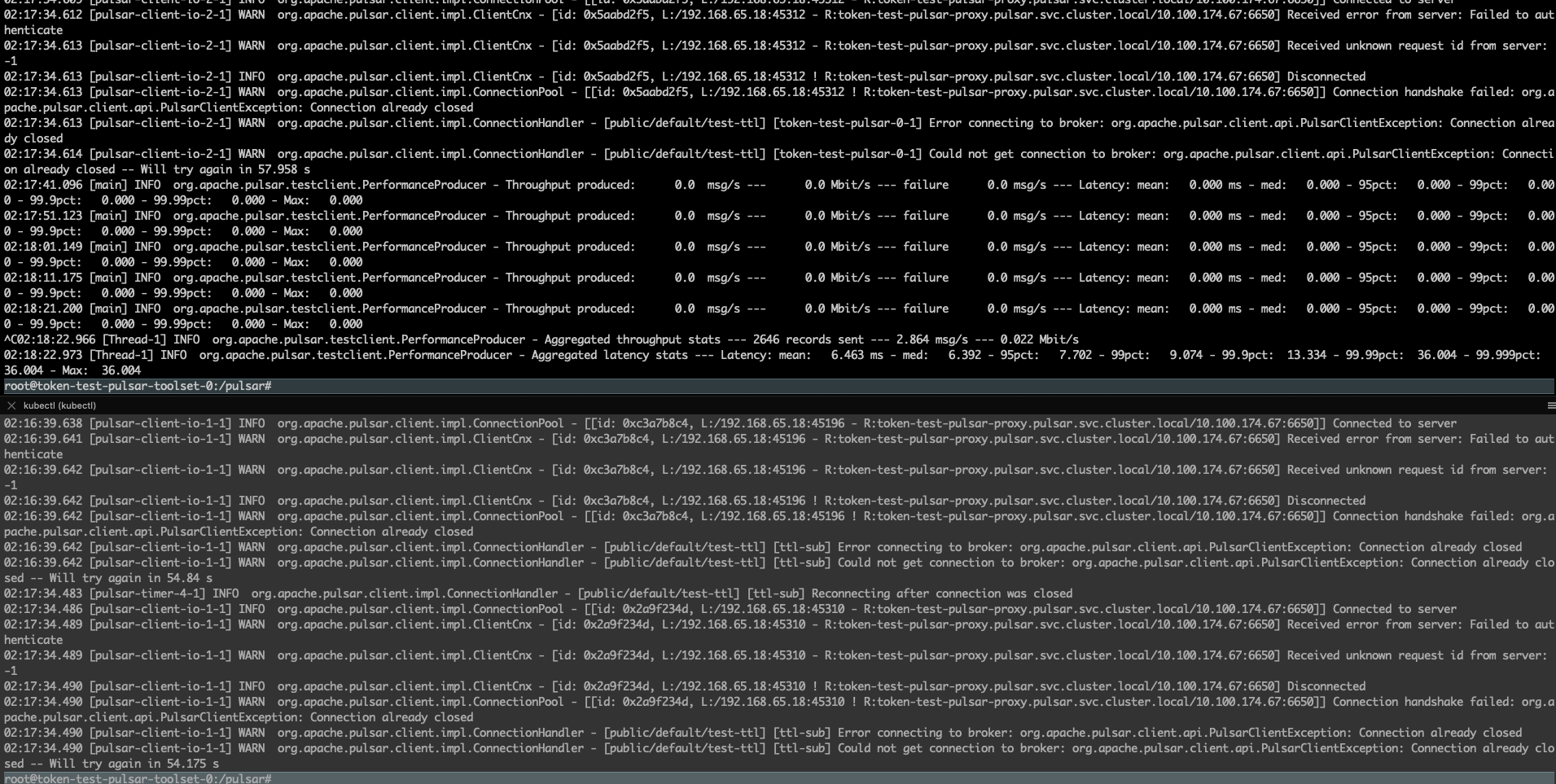
 zymap
on 21 Aug 2020
zymap
on 21 Aug 2020
Hi.
I also ran into the same problem as @SergeyYakubov . Even with authenticationRefreshCheckSeconds set, the client just keeps on producing even though the token already expired. I think this problem only occurs when using a proxy, because in your test above @zymap i think you are using a direct connection between the client and broker. In my tests i was using the python client and not the go client though.
The proxy even notices that the token is invalid (atleats it says that in the logs) but it just keeps on producing. And all the message that are produced can be consumed as well, so its not just a visual bug of some sort.
I am happy to provide more info if you need it.
Hope this helps!
 cuzyoucant
on 4 Sep 2020
cuzyoucant
on 4 Sep 2020
Sorry for the late response @cuzyoucant .
Thanks for the information. That's weird. I deploy pulsar on k8s and it enables the proxy. Let me take another look at this issue.
zymap
on 10 Sep 2020
I tried using 2.6.0 test it, it looks good.
I deployed a k8s cluster to test it.
This is my testing value.yml https://github.com/zymap/charts/commit/a719980acc9295c33d1f96792386a893691a52a3
This is my test program:
https://gist.github.com/zymap/98c2b7462a8d8432f452772af23862fb
https://gist.github.com/zymap/801e45bc0b5be4440c35654efae5d8d3
I was using pulsar-client 2.6.0 and the python version is 3.8.
When the token is expired, pulsar will request the client re-authenticate and if the client gives a wrong token, pulsar will close the connection immediately and the client can not connect the Pulsar.
This is the producer log:
Send messages Current time Sep-11-02:22:10 AM 2020
Send messages Current time Sep-11-02:22:11 AM 2020
Send messages Current time Sep-11-02:22:12 AM 2020
Send messages Current time Sep-11-02:22:13 AM 2020
Send messages Current time Sep-11-02:22:14 AM 2020
Send messages Current time Sep-11-02:22:15 AM 2020
Send messages Current time Sep-11-02:22:16 AM 2020
Send messages Current time Sep-11-02:22:17 AM 2020
Send messages Current time Sep-11-02:22:18 AM 2020
Send messages Current time Sep-11-02:22:19 AM 2020
Send messages Current time Sep-11-02:22:20 AM 2020
Send messages Current time Sep-11-02:22:21 AM 2020
2020-09-11 02:22:22.599 WARN  [139649724466944] ClientConnection:939 | [192.168.90.216:43770 -> 10.100.89.185:6650] Received error response from server: AuthenticationError -- req_id: 18446744073709551615
2020-09-11 02:22:22.600 INFO  [139649724466944] ClientConnection:1372 | [192.168.90.216:43770 -> 10.100.89.185:6650] Connection closed
2020-09-11 02:22:22.600 INFO  [139649724466944] HandlerBase:130 | [persistent://public/default/ttl_token_1, auth-test-pulsar-0-6] Schedule reconnection in 0.1 s
2020-09-11 02:22:22.600 INFO  [139649724466944] ClientConnection:235 | [192.168.90.216:43770 -> 10.100.89.185:6650] Destroyed connection
2020-09-11 02:22:22.700 INFO  [139649724466944] HandlerBase:53 | [persistent://public/default/ttl_token_1, auth-test-pulsar-0-6] Getting connection from pool
2020-09-11 02:22:22.712 ERROR [139649724466944] ClientConnection:870 | [192.168.90.216:43764 -> 10.100.89.185:6650] Failed lookup req_id: 3 error: 6
2020-09-11 02:22:22.712 INFO  [139649724466944] HandlerBase:130 | [persistent://public/default/ttl_token_1, auth-test-pulsar-0-6] Schedule reconnection in 0.194 s
2020-09-11 02:22:22.907 INFO  [139649724466944] HandlerBase:53 | [persistent://public/default/ttl_token_1, auth-test-pulsar-0-6] Getting connection from pool
2020-09-11 02:22:22.915 ERROR [139649724466944] ClientConnection:870 | [192.168.90.216:43764 -> 10.100.89.185:6650] Failed lookup req_id: 4 error: 6
2020-09-11 02:22:22.915 INFO  [139649724466944] HandlerBase:130 | [persistent://public/default/ttl_token_1, auth-test-pulsar-0-6] Schedule reconnection in 0.372 s
2020-09-11 02:22:23.287 INFO  [139649724466944] HandlerBase:53 | [persistent://public/default/ttl_token_1, auth-test-pulsar-0-6] Getting connection from pool
2020-09-11 02:22:23.297 ERROR [139649724466944] ClientConnection:870 | [192.168.90.216:43764 -> 10.100.89.185:6650] Failed lookup req_id: 5 error: 6
2020-09-11 02:22:23.297 INFO  [139649724466944] HandlerBase:130 | [persistent://public/default/ttl_token_1, auth-test-pulsar-0-6] Schedule reconnection in 0.776 s
2020-09-11 02:22:24.074 INFO  [139649724466944] HandlerBase:53 | [persistent://public/default/ttl_token_1, auth-test-pulsar-0-6] Getting connection from pool
2020-09-11 02:22:24.081 ERROR [139649724466944] ClientConnection:870 | [192.168.90.216:43764 -> 10.100.89.185:6650] Failed lookup req_id: 6 error: 6
2020-09-11 02:22:24.081 INFO  [139649724466944] HandlerBase:130 | [persistent://public/default/ttl_token_1, auth-test-pulsar-0-6] Schedule reconnection in 1.472 s
2020-09-11 02:22:25.553 INFO  [139649724466944] HandlerBase:53 | [persistent://public/default/ttl_token_1, auth-test-pulsar-0-6] Getting connection from pool
2020-09-11 02:22:25.561 ERROR [139649724466944] ClientConnection:870 | [192.168.90.216:43764 -> 10.100.89.185:6650] Failed lookup req_id: 7 error: 6
2020-09-11 02:22:25.561 INFO  [139649724466944] HandlerBase:130 | [persistent://public/default/ttl_token_1, auth-test-pulsar-0-6] Schedule reconnection in 3.04 s
2020-09-11 02:22:28.603 INFO  [139649724466944] HandlerBase:53 | [persistent://public/default/ttl_token_1, auth-test-pulsar-0-6] Getting connection from pool
2020-09-11 02:22:28.612 ERROR [139649724466944] ClientConnection:870 | [192.168.90.216:43764 -> 10.100.89.185:6650] Failed lookup req_id: 8 error: 6
2020-09-11 02:22:28.612 INFO  [139649724466944] HandlerBase:130 | [persistent://public/default/ttl_token_1, auth-test-pulsar-0-6] Schedule reconnection in 5.824 s
^\Quit (core dumped)
(.py38) root@auth-test-pulsar-toolset-0:/pulsar/python-test#
And this is the consumer log:
Receive msg Token messages tests Sep-11-02:22:11 AM 2020
Receive msg Token messages tests Sep-11-02:22:12 AM 2020
Receive msg Token messages tests Sep-11-02:22:13 AM 2020
Receive msg Token messages tests Sep-11-02:22:14 AM 2020
Receive msg Token messages tests Sep-11-02:22:15 AM 2020
Receive msg Token messages tests Sep-11-02:22:16 AM 2020
Receive msg Token messages tests Sep-11-02:22:17 AM 2020
Receive msg Token messages tests Sep-11-02:22:18 AM 2020
Receive msg Token messages tests Sep-11-02:22:19 AM 2020
Receive msg Token messages tests Sep-11-02:22:20 AM 2020
Receive msg Token messages tests Sep-11-02:22:21 AM 2020
2020-09-11 02:22:22.600 WARN  [140386834253568] ClientConnection:939 | [192.168.90.216:43740 -> 10.100.89.185:6650] Received error response from server: AuthenticationError -- req_id: 18446744073709551615
2020-09-11 02:22:22.600 INFO  [140386834253568] ClientConnection:1372 | [192.168.90.216:43740 -> 10.100.89.185:6650] Connection closed
2020-09-11 02:22:22.600 INFO  [140386834253568] HandlerBase:130 | [persistent://public/default/ttl_token_1, tests, 0] Schedule reconnection in 0.1 s
2020-09-11 02:22:22.600 INFO  [140386834253568] ClientConnection:235 | [192.168.90.216:43740 -> 10.100.89.185:6650] Destroyed connection
2020-09-11 02:22:22.644 WARN  [140386834253568] AckGroupingTrackerEnabled:99 | Connection is not ready, grouping ACK failed.
2020-09-11 02:22:22.701 INFO  [140386834253568] HandlerBase:53 | [persistent://public/default/ttl_token_1, tests, 0] Getting connection from pool
2020-09-11 02:22:22.712 ERROR [140386834253568] ClientConnection:870 | [192.168.90.216:43734 -> 10.100.89.185:6650] Failed lookup req_id: 3 error: 6
2020-09-11 02:22:22.713 INFO  [140386834253568] HandlerBase:130 | [persistent://public/default/ttl_token_1, tests, 0] Schedule reconnection in 0.194 s
2020-09-11 02:22:22.745 WARN  [140386834253568] AckGroupingTrackerEnabled:99 | Connection is not ready, grouping ACK failed.
2020-09-11 02:22:22.845 WARN  [140386834253568] AckGroupingTrackerEnabled:99 | Connection is not ready, grouping ACK failed.
2020-09-11 02:22:22.907 INFO  [140386834253568] HandlerBase:53 | [persistent://public/default/ttl_token_1, tests, 0] Getting connection from pool
You can see the producer and consumer is no longer produce or consume messages.
@cuzyoucant Do have more information about this issue?
zymap
on 11 Sep 2020
@SergeyYakubov @cuzyoucant Have you guys resolve this problem in your environment?
If you are not, I think you need to configure the forwardAuthorizationCredentials in the proxy, and you should enable the authenticateOriginalAuthData in the broker configuration.
I will add the description in the document later.
zymap
on 16 Sep 2020
@zymap That fixed the problem for me! authenticateOriginalAuthData was missing in the broker conf. Thank you very much!
cuzyoucant
on 16 Sep 2020
If there no other issues I will close this issue and feel free to open it if you have questions.
zymap
on 25 Sep 2020
Related issues
 kuido85
·
3Comments
kuido85
·
3Comments
 vcottagiri
·
3Comments
vcottagiri
·
3Comments
 frankjkelly
·
3Comments
frankjkelly
·
3Comments
 russorat
·
3Comments
russorat
·
3Comments
 MisterTimn
·
3Comments
MisterTimn
·
3Comments