Pubsubclient: ESP8266: byte array with value 248-255 cannot be published!
Hi guys,
I'm trying to publish a byte array that contains a few 248-255 values and it's not really working. My array size is 100 bytes. I'm using this command:
client.publish("my/topic/", myArray, 100);
I modified mqtt_esp8266 example (added upper command and created byte array) and it seems like when I fill different value then (248,249,250.....255) it's working fine!!!
For example:
byte myArray[100] = {.....,.,.255,.....248...}; //this will be ignored when publish is called
byte myArray[100] = {.....,.,.10,.....112...}; //If ther is no value in array greater then 248 then evrithing works fine!!
Response from client.publish is TRUE(publish succeeded)! I am using NODEMCU 1.0 ESP8255 with the latest library.
What can I do?
 zvone141
All 3 comments
Here is the modified example mqtt_esp8266, I am using HiveMQ broker for testing. You can see the problem when 255 value is the array and you try to publish.
To test it just add your wifi info into code, upload esp8266 and go to this site. On site click Add New Topic Subscription and add my/topic/.
#include <ESP8266WiFi.h>
#include <PubSubClient.h>

// Update these with values suitable for your network.

const char* ssid = "*******";
const char* password = "*******";
const char* mqtt_server = "broker.hivemq.com";

WiFiClient espClient;
PubSubClient client(espClient);
long lastMsg = 0;

byte myArray[5] = {255,0,2,3,4}; //This doesn't work!!!
//byte myArray[5] = {1,2,3,4,5}; //This works!!!

int value = 0;

void setup_wifi() {

  delay(10);
  // We start by connecting to a WiFi network
  Serial.println();
  Serial.print("Connecting to ");
  Serial.println(ssid);

  WiFi.begin(ssid, password);

  while (WiFi.status() != WL_CONNECTED) {
    delay(500);
    Serial.print(".");
  }

  randomSeed(micros());

  Serial.println("");
  Serial.println("WiFi connected");
  Serial.println("IP address: ");
  Serial.println(WiFi.localIP());
}

void callback(char* topic, byte* payload, unsigned int length) {
  Serial.print("Message arrived [");
  Serial.print(topic);
  Serial.print("] ");
  for (int i = 0; i < length; i++) {
    Serial.print((char)payload[i]);
  }
  Serial.println();

  // Switch on the LED if an 1 was received as first character
  if ((char)payload[0] == '1') {
    digitalWrite(BUILTIN_LED, LOW);   // Turn the LED on (Note that LOW is the voltage level
    // but actually the LED is on; this is because
    // it is active low on the ESP-01)
  } else {
    digitalWrite(BUILTIN_LED, HIGH);  // Turn the LED off by making the voltage HIGH
  }

}

void reconnect() {
  // Loop until we're reconnected
  while (!client.connected()) {
    Serial.print("Attempting MQTT connection...");
    // Create a random client ID
    String clientId = "ESP8266Client-";
    clientId += String(random(0xffff), HEX);
    // Attempt to connect
    if (client.connect(clientId.c_str())) {
      Serial.println("connected");
      // Once connected, publish an announcement...
      client.publish("outTopic", "hello world");
      // ... and resubscribe
      client.subscribe("inTopic");
    } else {
      Serial.print("failed, rc=");
      Serial.print(client.state());
      Serial.println(" try again in 5 seconds");
      // Wait 5 seconds before retrying
      delay(5000);
    }
  }
}

void setup() {
  pinMode(BUILTIN_LED, OUTPUT);     // Initialize the BUILTIN_LED pin as an output
  Serial.begin(115200);
  setup_wifi();
  client.setServer(mqtt_server, 1883);
  client.setCallback(callback);
}

void loop() {

  if (!client.connected()) {
    reconnect();
  }
  client.loop();

  long now = millis();
  if (now - lastMsg > 2000) {
    lastMsg = now;
    ++value;

    Serial.println("Publish message");
    client.publish("my/topic/", myArray, 5);
  }
}
@knolleary
zvone141
on 3 Jun 2019
Never mind. It was working all this time.
zvone141
on 6 Jun 2019
Here is the modified example mqtt_esp8266, I am using HiveMQ broker for testing. You can see the problem when 255 value is the array and you try to publish.
To test it just add your wifi info into code, upload esp8266 and go to this site. On site click Add New Topic Subscription and add my/topic/.
@knolleary
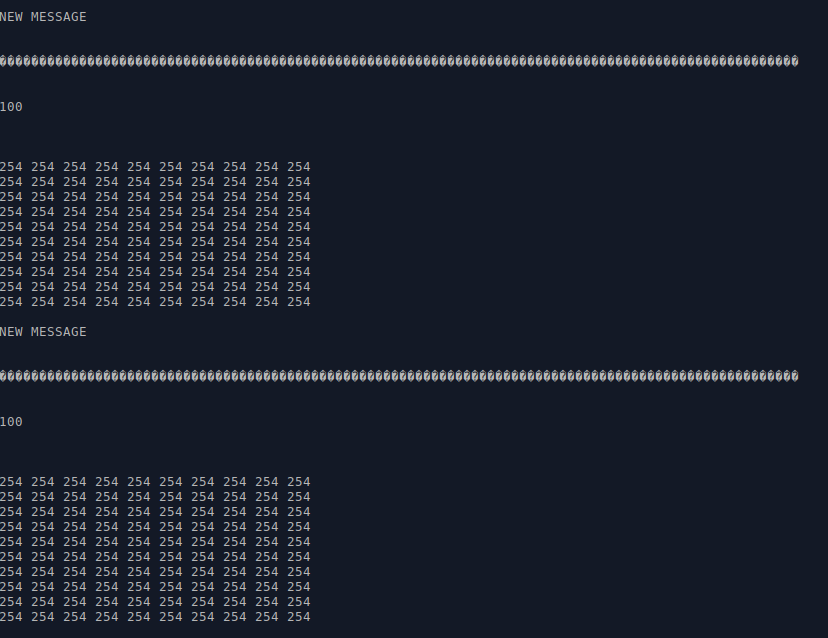
I compiled your code and it works as intended.
Below you can see i was sending byte array length 100 bytes with value 254. First line is output as char array then length of received payload and then payload printed out as bytes.
I'm sure you were just reading it as string on the receiving side instead of reading it as byte array.
 klemen-skoda
on 6 Jun 2019
klemen-skoda
on 6 Jun 2019
Related issues
 laczika
·
4Comments
laczika
·
4Comments
 bedomarci
·
8Comments
bedomarci
·
8Comments
 i17brn
·
9Comments
i17brn
·
9Comments
 winterzh
·
10Comments
winterzh
·
10Comments
 yadavvineet
·
5Comments
yadavvineet
·
5Comments
Most helpful comment
I compiled your code and it works as intended.
Below you can see i was sending byte array length 100 bytes with value 254. First line is output as char array then length of received payload and then payload printed out as bytes.
I'm sure you were just reading it as string on the receiving side instead of reading it as byte array.