Pub-dev: Removed Search bar from package description screen
With the launch of a new UI, the search bar from the package description page has been removed which is annoying as if the user wants to search for some other package then he/she have to go back to the homepage or the last search.
I think showing a search bar, is good to have a feature (which was present earlier).
I would like to know your suggestions for the same @isoos
 tusharojha
All 12 comments
Would you expect such search bar to retain your SDK/platform filters?
 jonasfj
on 15 Jul 2020
jonasfj
on 15 Jul 2020
@jonasfj yes, but atleast it should show me a search bar so that I can search any package by keyword.
tusharojha
on 16 Jul 2020
I miss search bar so much haha
 orsenkucher
on 18 Jul 2020
orsenkucher
on 18 Jul 2020
I miss the search bar as well. My use case is the following.
Run flutter pub outdated on my project and then browse the pub.dev website package by package to read the changelogs.
With the search bar I can quickly jump to the next package.
 davidmartos96
on 7 Aug 2020
davidmartos96
on 7 Aug 2020
@davidmartos96: We do have a back to search icon, outlined here https://github.com/dart-lang/pub-dev/issues/3860#issuecomment-661011420
Do you have that? Isn't that useful? (It keeps the search context and filters, while a new search bar would drop that).
 isoos
on 7 Aug 2020
isoos
on 7 Aug 2020
@isoos Yes I have that. The minor complaint is just that I need to first click the "Go back" button and then click again the search bar to focus it.
With the previous layout I could just start typing at the top if I know the exact package name (In this case, at least for me, I don't care if the filters are gone).
2 clicks is not that bad, unless you need to multiply that by some number, then it could get a bit annoying.
I've just wanted to share my use case :smile:
davidmartos96
on 7 Aug 2020
@isoos is it possible to replace Back to search button with an actual Search button :joy:?
orsenkucher
on 7 Aug 2020
@isoos Also, If you open any package description page from a URL. Then, you have no option to search from that screen. You need to go to the home screen and search.
So, I think we can add a search bar for this scenario at least. WDYT?
tusharojha
on 10 Aug 2020
So, I think we can add a search bar for this scenario at least. WDYT?
I think we're leaning in this direction too.
jonasfj
on 10 Aug 2020
Consensus is to add back a search icon in the top right corner, when clicked it expands to a search field, and auto-focuses the search input field, hitting enter will perform a search.
Search initiated from here will have no filters on SDK or platforms.
jonasfj
on 10 Aug 2020
On mobile we can add a search field, to the menu in a separate section under the "create publisher" link:
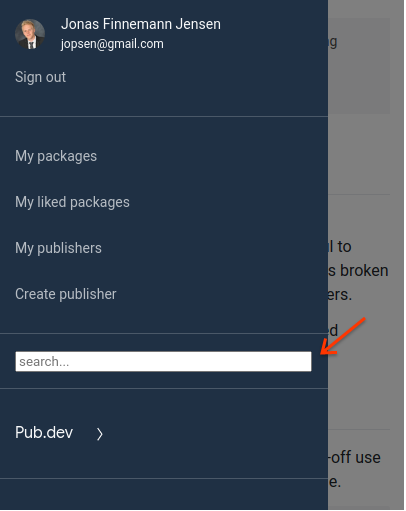
Perhaps we need to tweak styling a bit, but something like this.
jonasfj
on 10 Aug 2020
We've released a new version that has a search icon / unfolding search input at the top nav bar. I hope that resolves this issue.
isoos
on 27 Aug 2020
Related issues
 erickzanardo
·
5Comments
erickzanardo
·
5Comments
 prasant10050
·
4Comments
prasant10050
·
4Comments
 mit-mit
·
5Comments
mit-mit
·
5Comments
 basilex
·
3Comments
basilex
·
3Comments
 jonataslaw
·
4Comments
jonataslaw
·
4Comments
Most helpful comment
I miss search bar so much haha