Prusaslicer: Preview panel render corruption
Version
Version: 2.2.0+win64
Build: PrusaSlicer-2.2.0+win64-202003211145
Operating system type + version
Windows 10 Pro Version 2004, Build 19041.264
Operating System:    Windows
System Architecture: 64 bit
Windows Version:     Windows 10 (build 19041), 64-bit edition
Total RAM size [MB]: 17,067MB
OpenGL installation
GL version:   4.5.0 - Build 23.20.16.4849
Vendor:       Intel
Renderer:     Intel(R) UHD Graphics 620
GLSL version: 4.50 - Build 23.20.16.4849
Installed extensions:
GL_3DFX_texture_compression_FXT1
GL_AMD_depth_clamp_separate
GL_AMD_vertex_shader_layer
GL_AMD_vertex_shader_viewport_index
GL_ARB_ES2_compatibility
GL_ARB_ES3_1_compatibility
GL_ARB_ES3_compatibility
GL_ARB_arrays_of_arrays
GL_ARB_base_instance
GL_ARB_bindless_texture
GL_ARB_blend_func_extended
GL_ARB_buffer_storage
GL_ARB_cl_event
GL_ARB_clear_buffer_object
GL_ARB_clear_texture
GL_ARB_clip_control
GL_ARB_color_buffer_float
GL_ARB_compatibility
GL_ARB_compressed_texture_pixel_storage
GL_ARB_compute_shader
GL_ARB_conditional_render_inverted
GL_ARB_conservative_depth
GL_ARB_copy_buffer
GL_ARB_copy_image
GL_ARB_cull_distance
GL_ARB_debug_output
GL_ARB_depth_buffer_float
GL_ARB_depth_clamp
GL_ARB_depth_texture
GL_ARB_derivative_control
GL_ARB_direct_state_access
GL_ARB_draw_buffers
GL_ARB_draw_buffers_blend
GL_ARB_draw_elements_base_vertex
GL_ARB_draw_indirect
GL_ARB_draw_instanced
GL_ARB_enhanced_layouts
GL_ARB_explicit_attrib_location
GL_ARB_explicit_uniform_location
GL_ARB_fragment_coord_conventions
GL_ARB_fragment_layer_viewport
GL_ARB_fragment_program
GL_ARB_fragment_program_shadow
GL_ARB_fragment_shader
GL_ARB_fragment_shader_interlock
GL_ARB_framebuffer_no_attachments
GL_ARB_framebuffer_object
GL_ARB_framebuffer_sRGB
GL_ARB_geometry_shader4
GL_ARB_get_program_binary
GL_ARB_get_texture_sub_image
GL_ARB_gpu_shader5
GL_ARB_gpu_shader_fp64
GL_ARB_half_float_pixel
GL_ARB_half_float_vertex
GL_ARB_indirect_parameters
GL_ARB_instanced_arrays
GL_ARB_internalformat_query
GL_ARB_internalformat_query2
GL_ARB_invalidate_subdata
GL_ARB_map_buffer_alignment
GL_ARB_map_buffer_range
GL_ARB_multi_bind
GL_ARB_multi_draw_indirect
GL_ARB_multisample
GL_ARB_multitexture
GL_ARB_occlusion_query
GL_ARB_occlusion_query2
GL_ARB_pixel_buffer_object
GL_ARB_point_parameters
GL_ARB_point_sprite
GL_ARB_polygon_offset_clamp
GL_ARB_post_depth_coverage
GL_ARB_program_interface_query
GL_ARB_provoking_vertex
GL_ARB_query_buffer_object
GL_ARB_robust_buffer_access_behavior
GL_ARB_robustness
GL_ARB_robustness_isolation
GL_ARB_sample_shading
GL_ARB_sampler_objects
GL_ARB_seamless_cube_map
GL_ARB_seamless_cubemap_per_texture
GL_ARB_separate_shader_objects
GL_ARB_shader_atomic_counters
GL_ARB_shader_bit_encoding
GL_ARB_shader_draw_parameters
GL_ARB_shader_image_load_store
GL_ARB_shader_image_size
GL_ARB_shader_objects
GL_ARB_shader_precision
GL_ARB_shader_stencil_export
GL_ARB_shader_storage_buffer_object
GL_ARB_shader_subroutine
GL_ARB_shader_texture_image_samples
GL_ARB_shading_language_100
GL_ARB_shading_language_420pack
GL_ARB_shading_language_packing
GL_ARB_shadow
GL_ARB_stencil_texturing
GL_ARB_sync
GL_ARB_tessellation_shader
GL_ARB_texture_barrier
GL_ARB_texture_border_clamp
GL_ARB_texture_buffer_object
GL_ARB_texture_buffer_object_rgb32
GL_ARB_texture_buffer_range
GL_ARB_texture_compression
GL_ARB_texture_compression_bptc
GL_ARB_texture_compression_rgtc
GL_ARB_texture_cube_map
GL_ARB_texture_cube_map_array
GL_ARB_texture_env_add
GL_ARB_texture_env_combine
GL_ARB_texture_env_crossbar
GL_ARB_texture_env_dot3
GL_ARB_texture_float
GL_ARB_texture_gather
GL_ARB_texture_mirror_clamp_to_edge
GL_ARB_texture_mirrored_repeat
GL_ARB_texture_multisample
GL_ARB_texture_non_power_of_two
GL_ARB_texture_query_levels
GL_ARB_texture_query_lod
GL_ARB_texture_rectangle
GL_ARB_texture_rg
GL_ARB_texture_rgb10_a2ui
GL_ARB_texture_stencil8
GL_ARB_texture_storage
GL_ARB_texture_storage_multisample
GL_ARB_texture_swizzle
GL_ARB_texture_view
GL_ARB_timer_query
GL_ARB_transform_feedback2
GL_ARB_transform_feedback3
GL_ARB_transform_feedback_instanced
GL_ARB_transpose_matrix
GL_ARB_uniform_buffer_object
GL_ARB_vertex_array_bgra
GL_ARB_vertex_array_object
GL_ARB_vertex_attrib_64bit
GL_ARB_vertex_attrib_binding
GL_ARB_vertex_buffer_object
GL_ARB_vertex_program
GL_ARB_vertex_shader
GL_ARB_vertex_type_10f_11f_11f_rev
GL_ARB_vertex_type_2_10_10_10_rev
GL_ARB_viewport_array
GL_ARB_window_pos
GL_ATI_separate_stencil
GL_EXT_abgr
GL_EXT_bgra
GL_EXT_blend_color
GL_EXT_blend_equation_separate
GL_EXT_blend_func_separate
GL_EXT_blend_minmax
GL_EXT_blend_subtract
GL_EXT_clip_volume_hint
GL_EXT_compiled_vertex_array
GL_EXT_direct_state_access
GL_EXT_draw_buffers2
GL_EXT_draw_range_elements
GL_EXT_fog_coord
GL_EXT_framebuffer_blit
GL_EXT_framebuffer_multisample
GL_EXT_framebuffer_object
GL_EXT_geometry_shader4
GL_EXT_gpu_program_parameters
GL_EXT_gpu_shader4
GL_EXT_multi_draw_arrays
GL_EXT_packed_depth_stencil
GL_EXT_packed_float
GL_EXT_packed_pixels
GL_EXT_polygon_offset_clamp
GL_EXT_rescale_normal
GL_EXT_secondary_color
GL_EXT_separate_specular_color
GL_EXT_shader_framebuffer_fetch
GL_EXT_shader_integer_mix
GL_EXT_shadow_funcs
GL_EXT_stencil_two_side
GL_EXT_stencil_wrap
GL_EXT_texture3D
GL_EXT_texture_array
GL_EXT_texture_compression_s3tc
GL_EXT_texture_edge_clamp
GL_EXT_texture_env_add
GL_EXT_texture_env_combine
GL_EXT_texture_filter_anisotropic
GL_EXT_texture_integer
GL_EXT_texture_lod_bias
GL_EXT_texture_rectangle
GL_EXT_texture_sRGB
GL_EXT_texture_sRGB_decode
GL_EXT_texture_shared_exponent
GL_EXT_texture_snorm
GL_EXT_texture_storage
GL_EXT_texture_swizzle
GL_EXT_timer_query
GL_EXT_transform_feedback
GL_IBM_texture_mirrored_repeat
GL_INTEL_conservative_rasterization
GL_INTEL_fragment_shader_ordering
GL_INTEL_framebuffer_CMAA
GL_INTEL_map_texture
GL_INTEL_multi_rate_fragment_shader
GL_INTEL_performance_query
GL_KHR_blend_equation_advanced
GL_KHR_blend_equation_advanced_coherent
GL_KHR_context_flush_control
GL_KHR_debug
GL_KHR_texture_compression_astc_hdr
GL_KHR_texture_compression_astc_ldr
GL_NV_blend_square
GL_NV_conditional_render
GL_NV_primitive_restart
GL_NV_texgen_reflection
GL_SGIS_generate_mipmap
GL_SGIS_texture_edge_clamp
GL_SGIS_texture_lod
GL_SUN_multi_draw_arrays
GL_WIN_swap_hint
WGL_EXT_swap_control
3D printer brand / version + firmware version (if known)
Original Prusa i3 Mk2, kit, stock.
Firmware v3.2.3
Behavior
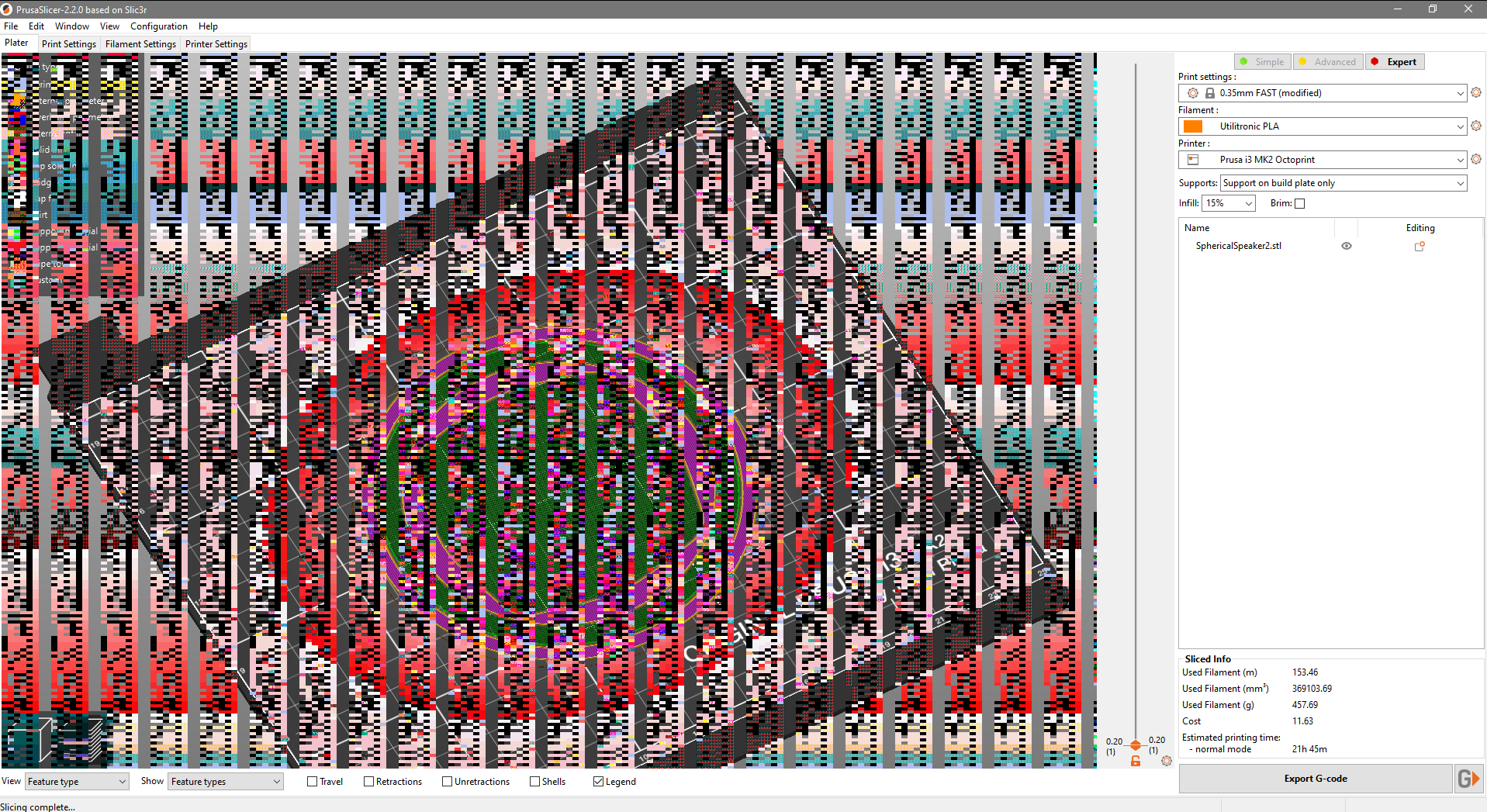
Render bug.
Occasionally the print preview panel display is corrupted. Though this doesn't happen every time the slicer is used. May be related to repeated deleting then loading models, but this doesn't always reproduce so inconclusive, I'm afraid.
Moving the mouse cursor in or out of the preview pane toggles between corrupted or clear. Moving the layer up or down (mouse scrollwheel, or keyboard arrow keys) also toggles between a corrupted or clear view of the preview.
Project File (.3MF) where problem occurs
Not relevant to any particular project or model - happens on anything from complex projects produced with Fusion 360 to simple calibration cubes from Thingiverse.
 TimWilde
All 12 comments
This is similar to #2629. Please, make sure you have enough GPU memory and up-to-date drivers. @enricoturri1966 might see and suggest more.
 lukasmatena
on 11 Jun 2020
lukasmatena
on 11 Jun 2020
As @lukasmatena already pointed out, the first I would try is to update the graphic card driver, see: https://downloadcenter.intel.com/product/126789/Intel-UHD-Graphics-620
 enricoturri1966
on 11 Jun 2020
enricoturri1966
on 11 Jun 2020
Thanks for the replies :)
I've checked in both Windows' Device Manager and the (daftly named) Intel "Graphics Command Center" and both report the drivers are up to date. As it's an integrated GPU I checked the BIOS for an option to adjust the amount of memory it uses but couldn't find anything.
I was wondering whether it's actually a result of the way I tend to use PrusaSlicer (PS), perhaps?
When prototyping, especially for part fitment etc., I will slice and print a few layers to check alignment and measurements. Then I'll edit the model, click the delete icon in PS, re-import, reslice, and print the same few layers again - so PS will be running continuously all day, loading, slicing, and deleting models over and over.
It never happens straight away - just after prolonged use, so I was wondering whether perhaps it is a memory leak which I'm (eventually) tripping over?
I'll use it over the coming weekend and see if I can be a bit more specific, derive a reproducible set of steps, etc. I'll also do the same on my gaming PC, with a discrete GPU, where I can't remember whether I've seen the same symptoms, or not.
TimWilde
on 12 Jun 2020
Try this: https://github.com/prusa3d/PrusaSlicer/issues/3845
at the bottom of the issue: How to enable software renderer.
 foreachthing
on 12 Jun 2020
foreachthing
on 12 Jun 2020
It never happens straight away - just after prolonged use, so I was wondering whether perhaps it is a memory leak which I'm (eventually) tripping over?
If it happens after longer usage, this is also possible. Try monitoring GPU memory usage and you should be able to tell for certain. We may also try to reproduce it. Just out of curiosity, what does "prolonged use" mean (time, number and size of models loaded, etc)?
lukasmatena
on 12 Jun 2020
Prolonged use would be many hours, sometimes all day. I would load and reload models maybe dozens of times as I work; though usually the same one over and over for revisions. The model in the screenshot above has around 160,000 polygons and is about 8 megabytes, on disk - probably one of the largest I've worked on recently.
I don't use Reload from disk (not available after using Cut, it seems) or File > New Project because I assumed that would reset settings (which, I just checked, it does't).
My workflow is a cycle of:
- Design model in Fusion 360, then export to STL
- Delete any existing models from PrusaSlicer (
Delete All) - Import new model to PrusaSlicer (
Add...) - Use
Place on face,Rotate, andCutto trim the model down to a piece of the model I want to test so I can avoid massive prints before discovering problems - Slice this sub-part of the model and send to the printer, using Octoprint
- Go and watch the print, because even after _years_, it's still mesmerizing! 😁
- Check printed model and if there are problems, go back to step 1
- Reload the full, untrimmed version of the model (
Delete All,Add...) and send it to the printer via Octoprint - Babysit the first few layers to make sure the print looks like it will be OK.
TimWilde
on 12 Jun 2020
I'll keep an eye on GPU memory (I just realized it's available in Task Manager > Performance > GPU which says it is sharing 8GB - 50% of the system memory)
TimWilde
on 12 Jun 2020
I've checked in both Windows' Device Manager and the (daftly named) Intel "Graphics Command Center" and both report the drivers are up to date.
That's strange because, according to the log you attached here, you are using version 23.20.16.4849 of the driver, while from the link I posted you could get version 27.20.100.8280, just a few days old (29/05/2020).
In any case, you are using an integrated GPU, so the memory should be shared by CPU and GPU and if there is a memory leak, which is possible, then the memory for your GPU is getting lesser and lesser at each iteration.
Could you please share the model you are using so that we can try to repro ?
enricoturri1966
on 12 Jun 2020
... according to the log you attached here, you are using version 23.20.16.4849 ...
Yes, I installed Intel's driver; sorry, I should have said is that all drivers are _now_ up to date 😊
Here's the model from the screenshot:
SphericalSpeaker_v2.zip
TimWilde
on 12 Jun 2020
Thanks.
It turns out that I have the same graphic card on one of the PCs I am using.
I'll try to repro your issue.
enricoturri1966
on 12 Jun 2020
Good news, everyone!
I've spent about 3 hours this morning specifically attempting to reproduce this and haven't been able to! 😃
The only change I made to the system is the updated Intel graphics drivers.
I kept an eye on GPU memory usage and, even with all sorts of other apps running at the same time to stress resource usage, it's been very frugal.
I'm going to close this as there's no point having it hanging around _just in case_. I'll revisit this if I experience the problem again.
Thanks for the help @enricoturri1966 and @lukasmatena 👍
TimWilde
on 13 Jun 2020
@TimWilde Thanks for letting us know.
lukasmatena
on 15 Jun 2020
Related issues
 alexiri
·
4Comments
alexiri
·
4Comments
 karek314
·
4Comments
karek314
·
4Comments
 tkircher
·
3Comments
tkircher
·
3Comments
 ManuGithubSteam
·
4Comments
ManuGithubSteam
·
4Comments
 sebastianha
·
4Comments
sebastianha
·
4Comments