Prusaslicer: Perimeters not connecting
Version
2.1.0
Operating system type + version
Arch Linux
3D printer brand / version + firmware version (if known)
Zonestar Reprap
Behavior
External perimeters are not connecting up and generally this is also reflected when printing.
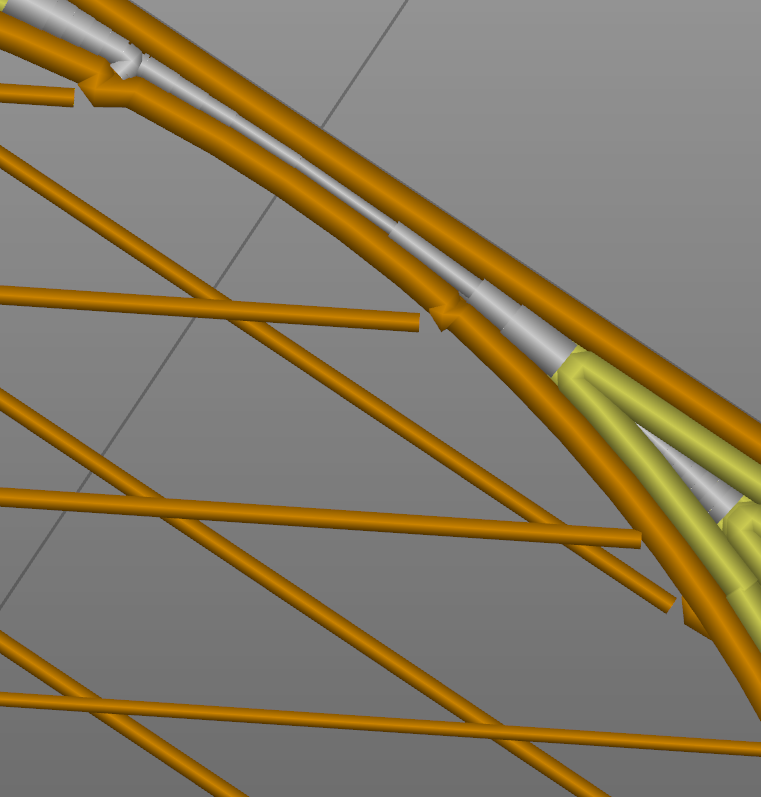
See the attached STL.
 ioquatix
All 8 comments
You need to attach a zipped 3MF project file for anyone to properly review your problem.
 Jebtrix
on 19 Oct 2019
Jebtrix
on 19 Oct 2019
That's weird, I could have sworn I attached an STL file. I tried to attach the 3MF file but I couldn't zip it because the file manager said it was already zipped lol. Okay let me try again.
ioquatix
on 20 Oct 2019
ioquatix
on 20 Oct 2019
I actually managed to work around this issue by insetting the filaments, by cutting out a small area around them as they inset into the perimeters. So, I'm happy with my solution, but as it stands the original model should have sliced better than this IMHO. So, let me know if I can provide any more details or help in any other way!
ioquatix
on 20 Oct 2019
Thin wall detection has tendency to have this result and is the root cause. The grill mesh feature is such a small extrusion width for a 0.4mm nozzle which is problematic at that layer height. This could be compensated for in modifiers without Thin Wall detection if PrusaSlicer didn't limit smaller extrusion widths to be used ☹️
When I have features like this mesh if you have control over the source file the best thing to do is design it for the slicer (avoiding thin wall detection being required). You do have some options here though:
- At 0.2 layer height, the min width _allowed_ will be 0.201.
- At 0.15 layer height you could get down to 0.151 extrusion width.
- At 0.05 layer height you can reach 0.051 extrusion width
It increases print time but it will get those lower extrusion widths.
Jebtrix
on 21 Oct 2019
Thanks for the detailed response and for taking a look at the mesh.
I was under the impression if I made a cube (or cylinder) roughly the width of my extrusion and height of one layer, it would just basically do a single nominal extrusion the width of the nozzle. I have parameters in my model for the layer hight and nozzle diameter. Should I do something else?
I did work around this issue by insetting the strands into the mesh, but it was a bit of a hack. Sounds like this is kind of what you mean by designing it for the slicer.
So, do you suggest that 0.4mm for my cube width for a single strand is too thin? Not thin enough? Because it should be 0.4mm wide and 0.2mm high.
ioquatix
on 21 Oct 2019
Your model mesh strands are 0.2mm wide. The minimum the slicer will allow for width is 0.201mm @ 0.2mm height. So by 0.01mm its too big to fit, that's why it doesn't slice without Thin Wall detection.
Attached here I used 0.15mm layer height. To make the slicer happy I had to used 0.19mm extrusion width modifier to fit the grill strands itself. I could have also used a weird layer height like 0.189mm which is maximum the slicer would allow to use 0.19mm extrusion width.
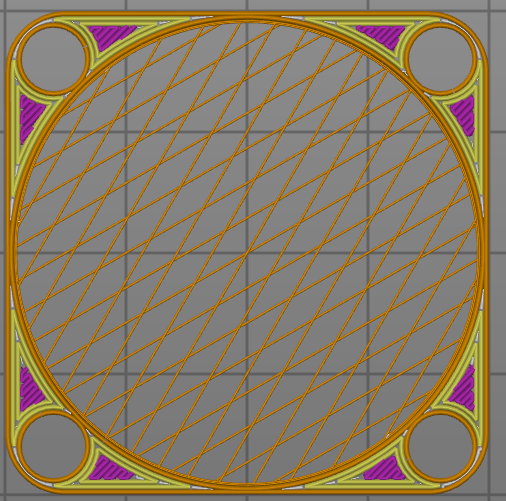
Now lets say you wanted 0.20 layer height, that means at least 0.201mm wide geometry to have a chance in PrusaSlicer. Because of inherent floating number precision issues and different STL export resolutions I would make strands 0.21mm to give me some wiggle room. Your profile has extrusions set 0/Auto (roughly at 0.40 ~ 0.45mm range) so you would still need to use a modifier around the grill strands but setting 0.2mm extrusion width would fit this time.
Hopefully this makes some sense. Forget about nozzle width, that is not the deciding factor here and i shouldn't have mentioned it. It is definitely more tedious to workaround Thin Wall detection problems.
Jebtrix
on 21 Oct 2019
Thanks so much for explaining all that!
ioquatix
on 21 Oct 2019
Related issues
 DROBORD
·
3Comments
DROBORD
·
3Comments
 i-make-robots
·
3Comments
i-make-robots
·
3Comments
 devilhunter84
·
4Comments
devilhunter84
·
4Comments
 Tirpitz93
·
3Comments
Tirpitz93
·
3Comments
 RossKor
·
3Comments
RossKor
·
3Comments
Most helpful comment
Your model mesh strands are 0.2mm wide. The minimum the slicer will allow for width is 0.201mm @ 0.2mm height. So by 0.01mm its too big to fit, that's why it doesn't slice without Thin Wall detection.
Attached here I used 0.15mm layer height. To make the slicer happy I had to used 0.19mm extrusion width modifier to fit the grill strands itself. I could have also used a weird layer height like 0.189mm which is maximum the slicer would allow to use 0.19mm extrusion width.
grill-40mm_tweaked.zip
Now lets say you wanted 0.20 layer height, that means at least 0.201mm wide geometry to have a chance in PrusaSlicer. Because of inherent floating number precision issues and different STL export resolutions I would make strands 0.21mm to give me some wiggle room. Your profile has extrusions set 0/Auto (roughly at 0.40 ~ 0.45mm range) so you would still need to use a modifier around the grill strands but setting 0.2mm extrusion width would fit this time.
Hopefully this makes some sense. Forget about nozzle width, that is not the deciding factor here and i shouldn't have mentioned it. It is definitely more tedious to workaround Thin Wall detection problems.