Prusaslicer: Gap fill settings are not obvious
Version
2.1.0+ (and older Slic3r)
Operating system type + version
MacOS 10.14.6 on 5K display
3D printer brand / version + firmware version (if known)
Prusa i3 Mk3
Behavior
To disable gap fill, it is necessary to change Print Settings->Speed->Speed for print moves->Gap fill to 0. This is not intuitive. There is also no setting or explanation of how maximum gap fill is calculated. I assume any gap narrower than a perimeter extrusion width will be filled using gap fill, but this is not clearly stated anywhere that I have found.
Project File (.3MF) where problem occurs


 bobstro
All 8 comments
Agreed, this should really be a separate checkbox.
 Jebtrix
on 20 Sep 2019
Jebtrix
on 20 Sep 2019
In upstream/vanilla Slic3r, it's a checkbox in Print Settings -> Infill. It would be beneficial to have that here, too.
 VanessaE
on 21 Nov 2019
VanessaE
on 21 Nov 2019
I agree what was said here, and also think more control should be made to the user.

This gap fill is superfluous (to me), resulting in miniscule extrusions to patch a "gap" that doesn't really exist for every single layer, for every single perfectly tangential connection. But on the other hand:
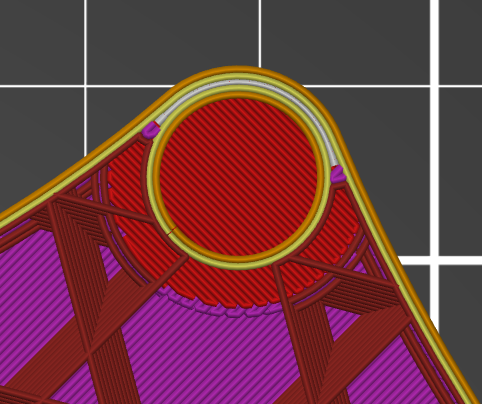
This _is_ a real gap, and something I'd like taken care of.
As it is now, I must either choose to waste a considerable amount of time, or have some critical areas poorly printed. This combination of factors is due to a chamfer at the base of concentric holes. It is incredibly common for any part designed for 3d printing, and the slicer's inelegant handling of this is likely wasting a lot of time.
Napkin math:
5 holes,
10 "gaps",
10 travels,
Each travel ~0.5s.
21 mm part,
0.3 mm layer,
Which means on this print I'm losing _6 minutes(!)_ of machine-time due to this issue
 Pun-e
on 20 Feb 2020
Pun-e
on 20 Feb 2020
I'm confused by this being both a "Speed" setting, rather than a toggle and even as a speed setting not taking some kind of percentage. Everything else is dynamic/relative - it adjusts for bridges, curves, etc. but the gap fill is an absolute value.
How do I figure out what that value should be, given that it's going to be used in a totally arbitrary number of places in any given model?
 gooba42
on 20 Mar 2020
gooba42
on 20 Mar 2020
Came hear to say the same thing.
In addition, setting the gap fill speed to 0 does not remove travel to the areas where gap fill is deemed necessary so the travel moves remain but there is no extrusion in that area. We need to be able to completely disable the gap fill feature.
 LittleHobbyShop
on 22 Jul 2020
LittleHobbyShop
on 22 Jul 2020
There should also be a setting to indicate what to fill, for instance "Fill gaps that are at least 70% the nozzle width", this should allow us to filter minute gaps that doesn't make sense to fill and would result in moves that actually affect print quality (like printing 3 walls with 0.5mm nozzle and the slicer tries to fill some minute gap in between them".
 carlosjln
on 25 Jul 2020
carlosjln
on 25 Jul 2020
Or allow to activate an option to fill only "areas of X mm²" or make it as "mm of filament".
In Cura this is called "Minimum Infill Area" in mm².
Something like that would be great.
 Phil1988
on 18 Sep 2020
Phil1988
on 18 Sep 2020
Same here, please make at least the checkbox to disable the feature, but the above comment "Minimum Infill Area" sounds pretty good.
 MaartenJB
on 6 Oct 2020
MaartenJB
on 6 Oct 2020
Related issues
 frakman1
·
4Comments
frakman1
·
4Comments
 guestisp
·
3Comments
guestisp
·
3Comments
 DROBORD
·
3Comments
DROBORD
·
3Comments
 kakou-fr
·
4Comments
kakou-fr
·
4Comments
 pricedev
·
4Comments
pricedev
·
4Comments
Most helpful comment
I agree what was said here, and also think more control should be made to the user.


This gap fill is superfluous (to me), resulting in miniscule extrusions to patch a "gap" that doesn't really exist for every single layer, for every single perfectly tangential connection. But on the other hand:
This _is_ a real gap, and something I'd like taken care of.
As it is now, I must either choose to waste a considerable amount of time, or have some critical areas poorly printed. This combination of factors is due to a chamfer at the base of concentric holes. It is incredibly common for any part designed for 3d printing, and the slicer's inelegant handling of this is likely wasting a lot of time.
Napkin math:
5 holes,
10 "gaps",
10 travels,
Each travel ~0.5s.
21 mm part,
0.3 mm layer,
Which means on this print I'm losing _6 minutes(!)_ of machine-time due to this issue