Prusaslicer: Individual objects issue
Version
_Version of Slic3r Prusa Edition used goes here_
1.42.0-beta+win64
_Use About->About Slic3r for release versions_
Slic3rPE-1.42.0-beta+win64-full-201903171406
_For -dev versions, use git describe --tag or get the hash value for the version you downloaded or git rev-parse HEAD_
Slic3r Prusa Edition
Version: 1.42.0-beta+win64
Build: Slic3rPE-1.42.0-beta+win64-full-201903171406
OpenGL installation
GL version: 4.5.0 - Build 24.20.100.6286
Vendor: Intel
Renderer: Intel(R) UHD Graphics 620
GLSL version: 4.50 - Build 24.20.100.6286
Operating system type + version
_What OS are you using, and state any version #s_
_In case of 3D rendering issues, please attach the content of menu Help -> System Info dialog_
Operating System: Windows
System Architecture: 64 bit
Windows Version: Windows 10 (build 17763), 64-bit edition
3D printer brand / version + firmware version (if known)
_What 3D printer brand / version are you printing on, is it a stock model or did you modify the printer, what firmware is running on your printer, version of the firmware #s_
prusa MK3S
Behavior
- _Describe the problem_
- _Steps needed to reproduce the problem_
- _If this is a command-line slicing issue, include the options used_
- _Expected Results_
- _Actual Results_
- _Screenshots from __Slic3r__ preview are preferred_
when using the output option complete individual objects it always says it is to close even after auto rearranging have to move them manually & when you sim the slicer it shows them all being sliced together instead of individually (but it does appear to my ok on the printer itself)
_Is this a new feature request?_
Project File (.3MF) where problem occurs
_Upload a Slic3r PE Project File (.3MF) (Plater -> Export plate as 3MF for Slic3r PE 1.41.2 and older, File -> Save / Save Project for Slic3r PE 1.42.0-alpha and newer)_
 garrathbond
All 5 comments
Also I have now turned the brim on & it then printed all the brims before it started the individual models
surely this should only do the brim for the one it should be working on?
garrathbond
on 24 Mar 2019
can confirm this.
Slic3r 1.42.0-beta1 - Prusa Edition
4 items placed on bed, 40x40 clearance, auto arrange, switch to preview view aka layer view.
warning appears and i cannot send or save gcode, the buttons show "invialid data"
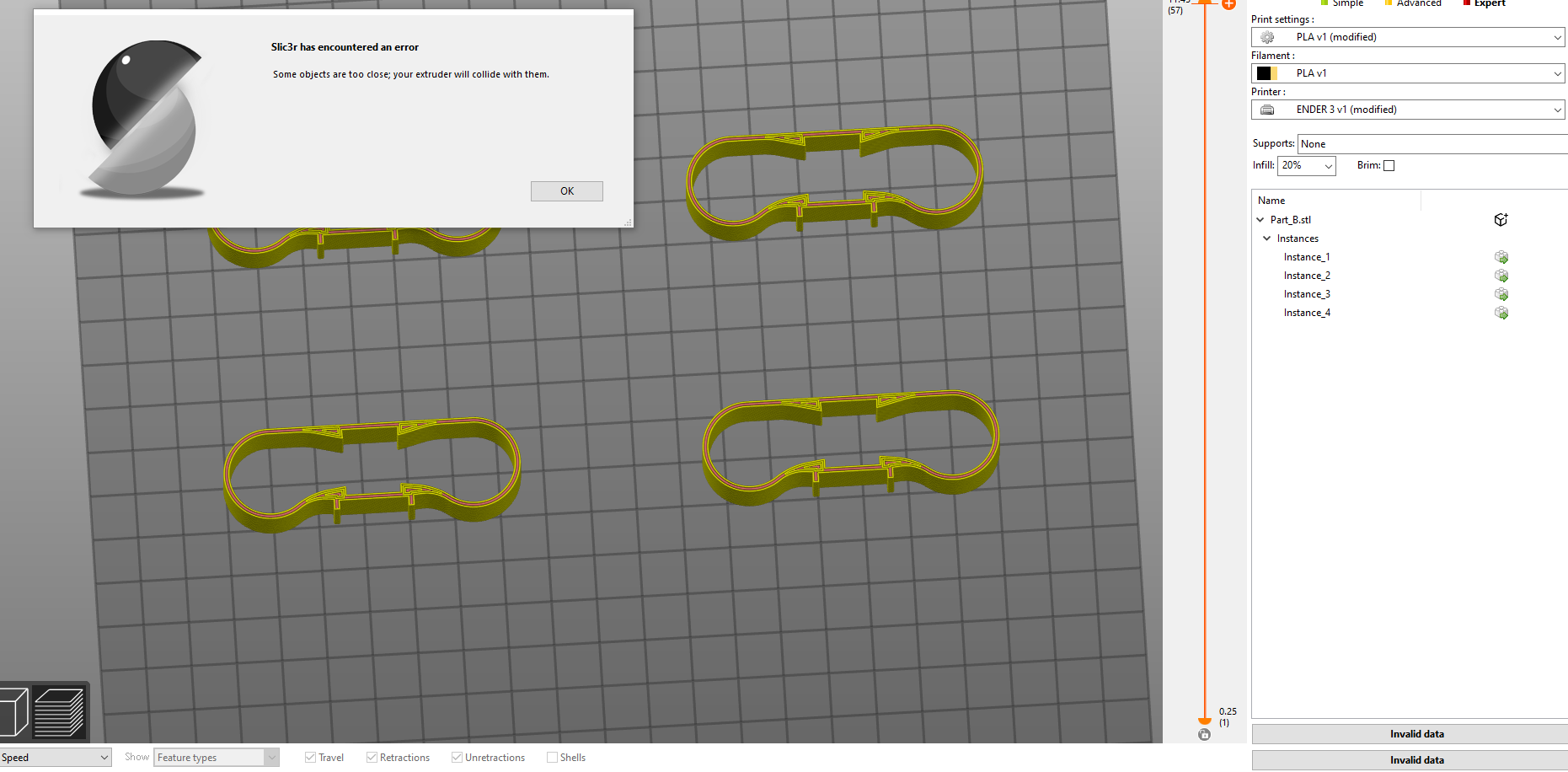
 reloxx13
on 31 Mar 2019
reloxx13
on 31 Mar 2019
I've seen this too:
When I scrolled through the layer-preview after slicing with 'Complete individual objects' I initially thought that the feature didn't do anything.
Then I tried previewing the generated gcode in Simplify3D instead, and saw that the parts were built up separately.
I would expect the layer-preview scrollbar to treat the layers for each object as a separate layers.
 selectnone
on 16 Apr 2019
selectnone
on 16 Apr 2019
I have this as well on Linux with PrusaSlicer 2.0.0.
If I manually drag the parts further away from each other than the auto-arrange places them, then (sometimes) it will generate g-code. Otherwise it locks out with "Invalid Data".
 ctag
on 7 Jun 2019
ctag
on 7 Jun 2019
Same problem on with PrusaSlicer 2.0.0 on MacOS 10.14.5
I too didn't think the feature was working so I was only printing 1 object at a time! Having seen this post and checking the GCode I see that it's printing one object after the other. Please fix the layer view. (It works on Cura).
 Geoffree3
on 24 Jun 2019
Geoffree3
on 24 Jun 2019
Related issues
 guestisp
·
3Comments
guestisp
·
3Comments
 ManuGithubSteam
·
4Comments
ManuGithubSteam
·
4Comments
 kakou-fr
·
4Comments
kakou-fr
·
4Comments
 yschroeder
·
3Comments
yschroeder
·
3Comments
 Tirpitz93
·
3Comments
Tirpitz93
·
3Comments