Prusaslicer: Zeroconf/Bonjour does not work in Slic3r PE AppImage
Version
1.41.1 AppImage
Operating system type + version
Ubuntu 18.04
3D printer brand / version + firmware version (if known)
n/a
Behavior
- Printer Settings -> Printer Host upload -> Browse...
- Does not recognize any printers advertised with Bonjour in the network
Additional information
It looks like libnet-bonjour-perl and its dependencies are not bundled inside the AppImage, hence Zeroconf/Bonjour can not work in the Perl bundled inside the AppImage.
 probonopd
All 12 comments
Can you see those printers in an Avahi Zeroconf browser or equivalent? Is there anything special about them or your network setup?
It looks like
libnet-bonjour-perland its dependencies are not bundled inside the AppImage, hence Zeroconf/Bonjour can not work in the Perl bundled inside the AppImage.
That's because Perl bonjour implementation is not used since 1.40.0. I wrote one in C++.
 vojtechkral
on 25 Feb 2019
vojtechkral
on 25 Feb 2019
By the way, the Slic3r 1.42.0-alpha5 is the current latest development
release, and it is perl free. Please test whether you have an issue with
the alpha5. The Slic3r 1.41.3 will likely not be updated.
On Mon, Feb 25, 2019 at 9:58 AM Vojtech Kral notifications@github.com
wrote:
Can you see those printers in an Avahi Zeroconf browser or equivalent? Is
there anything special about them or your network setup?It looks like libnet-bonjour-perl and its dependencies are not bundled
inside the AppImage, hence Zeroconf/Bonjour can not work in the Perl
bundled inside the AppImage.That's because Perl bonjour implementation is not used since 1.40.0. I
wrote one in C++.—
You are receiving this because you are subscribed to this thread.
Reply to this email directly, view it on GitHub
https://github.com/prusa3d/Slic3r/issues/1864#issuecomment-466925185,
or mute the thread
https://github.com/notifications/unsubscribe-auth/AFj5I35B4xhSnGBH2rwGuomH7QrQXz8-ks5vQ6WkgaJpZM4bOeBl
.
 bubnikv
on 25 Feb 2019
bubnikv
on 25 Feb 2019
I need to correct myself:
Does not recognize any printers advertised with Bonjour in the network
Actually it __does__ recognize an original OctoPrint instance, but it __does not__ recognize my self-made OctoPrint-like ESP8266 WirelessPrinting solution.
This is the original OctoPrint, and it __is recognized by Slic3r PE__:
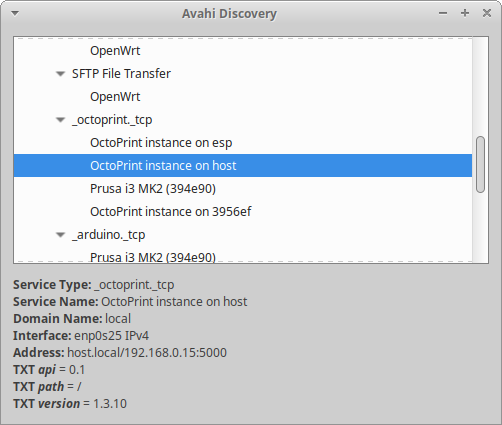
me@host:~$ avahi-browse -ar

(...)
= enp0s25 IPv4 OctoPrint instance on host                    _octoprint._tcp      local
   hostname = [host.local]
   address = [192.168.0.15]
   port = [5000]
   txt = ["version=1.3.10" "api=0.1" "path=/"]
(...)
This is it in Wireshark:
0000   00 00 03 04 00 06 00 00 00 00 00 00 00 00 08 00   ................
0010   45 00 00 f7 ef fe 40 00 ff 11 09 88 c0 a8 00 0f   E..÷ïþ@.ÿ...À¨..
0020   c0 a8 00 0f 14 e9 e2 a8 00 e3 82 63 20 81 84 00   À¨...éâ¨.ã.c ...
0030   00 01 00 06 00 00 00 00 0a 5f 6f 63 74 6f 70 72   ........._octopr
0040   69 6e 74 04 5f 74 63 70 05 6c 6f 63 61 6c 00 00   int._tcp.local..
0050   0c 00 ff c0 0c 00 0c 00 01 00 00 00 0a 00 1d 1a   ..ÿÀ............
0060   4f 63 74 6f 50 72 69 6e 74 20 69 6e 73 74 61 6e   OctoPrint instan
0070   63 65 20 6f 6e 20 68 6f 73 74 c0 0c c0 33 00 10   ce on hostÀ.À3..
0080   00 01 00 00 00 0a 00 1e 06 70 61 74 68 3d 2f 07   .........path=/.
0090   61 70 69 3d 30 2e 31 0e 76 65 72 73 69 6f 6e 3d   api=0.1.version=
00a0   31 2e 33 2e 31 30 c0 33 00 21 00 01 00 00 00 0a   1.3.10À3.!......
00b0   00 0d 00 00 00 00 13 88 04 68 6f 73 74 c0 1c c0   .........hostÀ.À
00c0   8c 00 1c 00 01 00 00 00 0a 00 10 2a 02 09 08 18   ...........*....
00d0   74 d3 41 80 22 da f0 af 08 f2 42 c0 8c 00 1c 00   tÓA."Úð¯.òBÀ....
00e0   01 00 00 00 0a 00 10 2a 02 09 08 18 74 d3 41 b4   .......*....tÓA´
00f0   c9 60 dc 1a 75 93 19 c0 8c 00 01 00 01 00 00 00   É`Ü.u..À........
0100   0a 00 04 c0 a8 00 0f                              ...ˬ..

Multicast Domain Name System (response)
    Transaction ID: 0x2081
    Flags: 0x8400 Standard query response, No error
    Questions: 1
    Answer RRs: 6
    Authority RRs: 0
    Additional RRs: 0
    Queries
        _octoprint._tcp.local: type PTR, class ANY, "QM" question
    Answers
        _octoprint._tcp.local: type PTR, class IN, OctoPrint instance on host._octoprint._tcp.local
        OctoPrint instance on host._octoprint._tcp.local: type TXT, class IN
        OctoPrint instance on host._octoprint._tcp.local: type SRV, class IN, priority 0, weight 0, port 5000, target host.local
        host.local: type AAAA, class IN, addr 2a02:908:1874:d341:8022:daf0:af08:f242
        host.local: type AAAA, class IN, addr 2a02:908:1874:d341:b4c9:60dc:1a75:9319
        host.local: type A, class IN, addr 192.168.0.15
    [Unsolicited: True]
This is the my implementation, and it __is NOT recognized by Slic3r PE__:
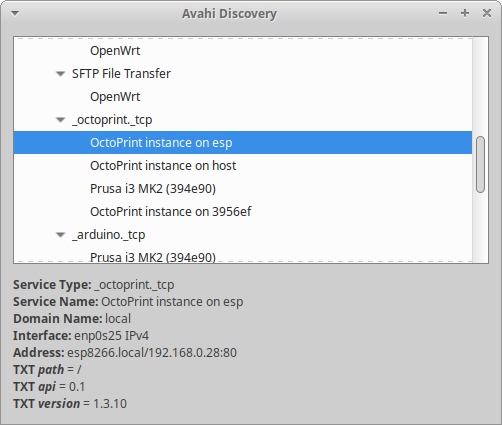
me@host:~$ avahi-browse -ar

(...)
= enp0s25 IPv4 OctoPrint instance on esp                     _octoprint._tcp      local
   hostname = [esp8266.local]
   address = [192.168.0.28]
   port = [80]
   txt = ["api=0.1" "path=/" "version=1.3.10"]
(...)
0000   00 02 00 01 00 06 38 2b 78 04 31 94 00 00 08 00   ......8+x.1.....
0010   45 00 00 ff 00 47 00 00 ff 11 18 e7 c0 a8 00 1c   E..ÿ.G..ÿ..çÀ¨..
0020   e0 00 00 fb 14 e9 14 e9 00 eb ce d0 00 00 84 00   à..û.é.é.ëÎÐ....
0030   00 00 00 04 00 00 00 01 09 5f 73 65 72 76 69 63   ........._servic
0040   65 73 07 5f 64 6e 73 2d 73 64 04 5f 75 64 70 05   es._dns-sd._udp.
0050   6c 6f 63 61 6c 00 00 0c 00 01 00 00 11 94 00 17   local...........
0060   0a 5f 6f 63 74 6f 70 72 69 6e 74 04 5f 74 63 70   ._octoprint._tcp
0070   05 6c 6f 63 61 6c 00 c0 34 00 0c 00 01 00 00 11   .local.À4.......
0080   94 00 31 19 4f 63 74 6f 50 72 69 6e 74 20 69 6e   ..1.OctoPrint in
0090   73 74 61 6e 63 65 20 6f 6e 20 65 73 70 0a 5f 6f   stance on esp._o
00a0   63 74 6f 70 72 69 6e 74 04 5f 74 63 70 05 6c 6f   ctoprint._tcp.lo
00b0   63 61 6c 00 c0 57 00 21 80 01 00 00 11 94 00 15   cal.ÀW.!........
00c0   00 00 00 00 00 50 07 65 73 70 38 32 36 36 05 6c   .....P.esp8266.l
00d0   6f 63 61 6c 00 c0 57 00 10 80 01 00 00 11 94 00   ocal.ÀW.........
00e0   1e 0e 76 65 72 73 69 6f 6e 3d 31 2e 33 2e 31 30   ..version=1.3.10
00f0   06 70 61 74 68 3d 2f 07 61 70 69 3d 30 2e 31 c0   .path=/.api=0.1À
0100   9a 00 01 80 01 00 00 00 78 00 04 c0 a8 00 1c      ........x..ˬ..

Multicast Domain Name System (response)
    Transaction ID: 0x0000
    Flags: 0x8400 Standard query response, No error
    Questions: 0
    Answer RRs: 4
    Authority RRs: 0
    Additional RRs: 1
    Answers
        _services._dns-sd._udp.local: type PTR, class IN, _octoprint._tcp.local
        _octoprint._tcp.local: type PTR, class IN, OctoPrint instance on esp._octoprint._tcp.local
        OctoPrint instance on esp._octoprint._tcp.local: type SRV, class IN, cache flush, priority 0, weight 0, port 80, target esp8266.local
            Service: OctoPrint instance on esp
            Protocol: _octoprint
            Name: _tcp.local
            Type: SRV (Server Selection) (33)
            .000 0000 0000 0001 = Class: IN (0x0001)
            1... .... .... .... = Cache flush: True
            Time to live: 4500
            Data length: 21
            Priority: 0
            Weight: 0
            Port: 80
            Target: esp8266.local
        OctoPrint instance on esp._octoprint._tcp.local: type TXT, class IN, cache flush
    Additional records
        esp8266.local: type A, class IN, cache flush, addr 192.168.0.28


md5-2577d33121325cd3aaba18be6d3d92d9


#include <ESP8266WiFi.h>
#include <WiFiClient.h>
#include <ESP8266WebServer.h>
#include <ESP8266mDNS.h>

#define SERVICE_PORT

#ifndef STASSID
#define STASSID "..."
#define STAPSK  "..."
#endif

const char*                                    ssid                    = STASSID;
const char*                                    password                = STAPSK;

char*                                          pcHostDomain            = 0;        // Negociated host domain
bool                                           bHostDomainConfirmed    = false;    // Flags the confirmation of the host domain
MDNSResponder::hMDNSService                    hMDNSService            = 0;        // The handle of the service in the MDNS responder
MDNSResponder::hMDNSServiceQuery               hMDNSServiceQuery       = 0;        // The handle of the service query in the MDNS responder

const String                                   cstrNoHTTPServices      = "Currently no 'octoprint.tcp' services in the local network!<br/>";
String                                         strHTTPServices         = cstrNoHTTPServices;


bool setStationHostname(const char* p_pcHostname) {

  if (p_pcHostname) {
    WiFi.hostname(p_pcHostname);
    Serial.printf("setStationHostname: Station hostname is set to '%s'\n", p_pcHostname);
    return true;
  }
  return false;
}


void MDNSServiceQueryCallback(MDNSResponder::MDNSServiceInfo serviceInfo, MDNSResponder::AnswerType answerType, bool p_bSetContent) {
  String answerInfo;
  switch (answerType) {
    case MDNSResponder::AnswerType::ServiceDomain :
      answerInfo = "ServiceDomain " + String(serviceInfo.serviceDomain());
      break;
    case MDNSResponder::AnswerType::HostDomainAndPort :
      answerInfo = "HostDomainAndPort " + String(serviceInfo.hostDomain()) + ":" + String(serviceInfo.hostPort());
      break;
    case MDNSResponder::AnswerType::IP4Address :
      answerInfo = "IP4Address ";
      for (IPAddress ip : serviceInfo.IP4Adresses()) {
        answerInfo += "- " + ip.toString();
      };
      break;
    case MDNSResponder::AnswerType::Txt :
      answerInfo = "TXT " + String(serviceInfo.strKeyValue());
      for (auto kv : serviceInfo.keyValues()) {
        answerInfo += "\nkv : " + String(kv.first) + " : " + String(kv.second);
      }
      break;
    default :
      answerInfo = "Unknown Answertype";
  }
  Serial.printf("Answer %s %s\n", answerInfo.c_str(), p_bSetContent ? "Modified" : "Deleted");
}


void serviceProbeResult(String p_pcServiceName,
                        const MDNSResponder::hMDNSService p_hMDNSService,
                        bool p_bProbeResult) {
  (void) p_hMDNSService;
  Serial.printf("MDNSServiceProbeResultCallback: Service %s probe %s\n", p_pcServiceName.c_str(), (p_bProbeResult ? "succeeded." : "failed!"));
}


void hostProbeResult(String p_pcDomainName, bool p_bProbeResult) {

  Serial.printf("MDNSHostProbeResultCallback: Host domain '%s.local' is %s\n", p_pcDomainName.c_str(), (p_bProbeResult ? "free" : "already USED!"));

  if (true == p_bProbeResult) {
    // Set station hostname
    setStationHostname(pcHostDomain);

    if (!bHostDomainConfirmed) {
      // Hostname free -> setup clock service
      bHostDomainConfirmed = true;

      if (!hMDNSService) {
        // Add a service to port 'SERVICE_PORT', using the host domain as instance domain
        hMDNSService = MDNS.addService(0, "octoprint", "tcp", SERVICE_PORT);
        if (hMDNSService) {
          MDNS.setServiceProbeResultCallback(hMDNSService, serviceProbeResult);
          MDNS.addServiceTxt(hMDNSService, "api", "0.1");
          MDNS.addServiceTxt(hMDNSService, "path", "/");
          MDNS.addServiceTxt(hMDNSService, "version", "1.3.10");
          MDNS.setServiceName(hMDNSService, "OctoPrint instance on esp");
        }

        // Install dynamic service query
        if (!hMDNSServiceQuery) {
          hMDNSServiceQuery = MDNS.installServiceQuery("octoprint", "tcp", MDNSServiceQueryCallback);
          if (hMDNSServiceQuery) {
            Serial.printf("MDNSProbeResultCallback: Service query for 'octoprint.tcp' services installed.\n");
          } else {
            Serial.printf("MDNSProbeResultCallback: FAILED to install service query for 'http.tcp' services!\n");
          }
        }
      }
    }
  } else {
    // Change hostname, use '-' as divider between base name and index
    if (MDNSResponder::indexDomain(pcHostDomain, "-", 0)) {
      MDNS.setHostname(pcHostDomain);
    } else {
      Serial.println("MDNSProbeResultCallback: FAILED to update hostname!");
    }
  }
}


void setup(void) {
  Serial.begin(115200);
  Serial.setDebugOutput(false);

  // Connect to WiFi network
  WiFi.mode(WIFI_STA);
  WiFi.begin(ssid, password);
  Serial.println("");

  // Wait for connection
  while (WiFi.status() != WL_CONNECTED) {
    delay(500);
    Serial.print(".");
  }
  Serial.println("");
  Serial.print("Connected to ");
  Serial.println(ssid);
  Serial.print("IP address: ");
  Serial.println(WiFi.localIP());

  // Setup MDNS responders
  MDNS.setHostProbeResultCallback(hostProbeResult);

  // Init the (currently empty) host domain string with 'esp8266'
  if ((!MDNSResponder::indexDomain(pcHostDomain, 0, "esp8266")) ||
      (!MDNS.begin(pcHostDomain))) {
    Serial.println(" Error setting up MDNS responder!");
    while (1) { // STOP
      delay(1000);
    }
  }
  Serial.println("MDNS responder started");

}


void loop(void) {

  // Allow MDNS processing
  MDNS.update();
}
@probonopd Thanks for the detailed data!
Why is this not recognized in Slic3r PE? Is it because the A record is sent as an "additional record"? Or is it because we have no IPv6 AAAA record?
Neither of those should be a problem. But of course there might be a bug. I'll feed that response into my parser and have a look what's going on... I'll get back to you...
vojtechkral
on 26 Feb 2019
The A record is placed in the additional section, because it wasn‘t asked for in the query itself. The missing AAAA shouldn’t be a problem, but if something is waiting for it might be anyways! As the currently online available responder version doesn’t send NSEC records, any querier, who is waiting for AAAA records might have a timeout here (eg. Chrome seems to have this).
However, the logs doesn’t fit exactly, they may be created by different setups: Once the service uses the hostname, while in the Wireshark dump it is independently named. But this should lead to any of the mentioned problems.
As Avahi sees the host, as well as the service, the question seems to be allowed: Might the problem be on the other side (the printer)?
 LaborEtArs
on 1 Mar 2019
LaborEtArs
on 1 Mar 2019
@probonopd So I had a look and the parser parses the ESP's response correctly and extracts the IP correctly from the Addtional record. The problem seems to be the transaction ID. I don't remembder exatcly but I think I followed the default DNS rules where the scanner randon-generates the ID and expects the response to match. Therefore, slic3r discards the response because of the non-matching transaction ID.
According to this blog the ID should be zero for mDNS and indeed the zero-conf browser on Linux sends out requests with ID of zero.
I'll try to lookup an authoritative source on this and fix the implementation if indeed the ID should be zero.
Edit: Ok, RFC 6762 §18.1. says the ID should be zero. Will fix...
vojtechkral
on 1 Mar 2019
In fact, for mDNS multicast responses the transaction ID 'MUST' be '0' (RFC 6762 18.1)
LaborEtArs
on 1 Mar 2019
@probonopd I patched the Bonjour code, would you please re-test with the following build?
Slic3rPE-1.42.0-alpha6+238-vk-octoprint-linux64-full-g8fd300c-201903011514.tar.gz
vojtechkral
on 1 Mar 2019
Sure enough it works :+1: Thank you very much @vojtechkral
probonopd
on 1 Mar 2019
Great, thanks for testing.
(Leaving issue open for now to track merging into master.)
vojtechkral
on 1 Mar 2019
It will be part of alpha7. Closing.
bubnikv
on 1 Mar 2019
Reopening, as according to @vojtechkral the fix is not in the master yet.
bubnikv
on 2 Mar 2019
Related issues
 Foxtrek64
·
4Comments
Foxtrek64
·
4Comments
 devilhunter84
·
4Comments
devilhunter84
·
4Comments
 TimothyGold
·
4Comments
TimothyGold
·
4Comments
 sebastianha
·
4Comments
sebastianha
·
4Comments
 rackley096794
·
3Comments
rackley096794
·
3Comments
Most helpful comment
Sure enough it works :+1: Thank you very much @vojtechkral