Prusaslicer: Feature Request: Allow option to use filement color in place of extruder preview color in GCode preview for multi material prints
Version
1.40.0
Operating system type + version
Arch Linux kernel 4.17.2
Behavior
New feature request:
Currently, in GCode Preview for multi material prints, Slic3r uses colors assigned in Extruder settings.
It would be more convenient to allow changing that to the filament color also so that the preview is a closer representation of what the final print might look like.
Update
There is code in 3DPreview.pm that seems to handle this if extruder color is undefined or is not a 6 digit hex string.
The only way to work around it is to remove "extruder_colour" or set it to a non-hex string.
There isn't a way in the GUI to let you choose between filament_color and extruder_color.
Slic3r/lib/Slic3r/GUI/Plater/3DPreview.pm:355
    # Collect colors per extruder.
    my @colors = ();
    if (! $self->gcode_preview_data->empty() || $self->gcode_preview_data->type == $self->{tool_idx}) {
        my @extruder_colors = @{$self->{config}->extruder_colour};
        my @filament_colors = @{$self->{config}->filament_colour};
        for (my $i = 0; $i <= $#extruder_colors; $i += 1) {
            my $color = $extruder_colors[$i];
            $color = $filament_colors[$i] if (! defined($color) || $color !~ m/^#[[:xdigit:]]{6}/);
            $color = '#FFFFFF' if (! defined($color) || $color !~ m/^#[[:xdigit:]]{6}/);
            push @colors, $color;
        }
    }
 lalanikarim
All 19 comments
I don't understand. I use the same pla filament setting for each extruder.
Changing the color is just1-clic on the color icon in the main tab.
what is the current problem?
 supermerill
on 29 Jun 2018
supermerill
on 29 Jun 2018
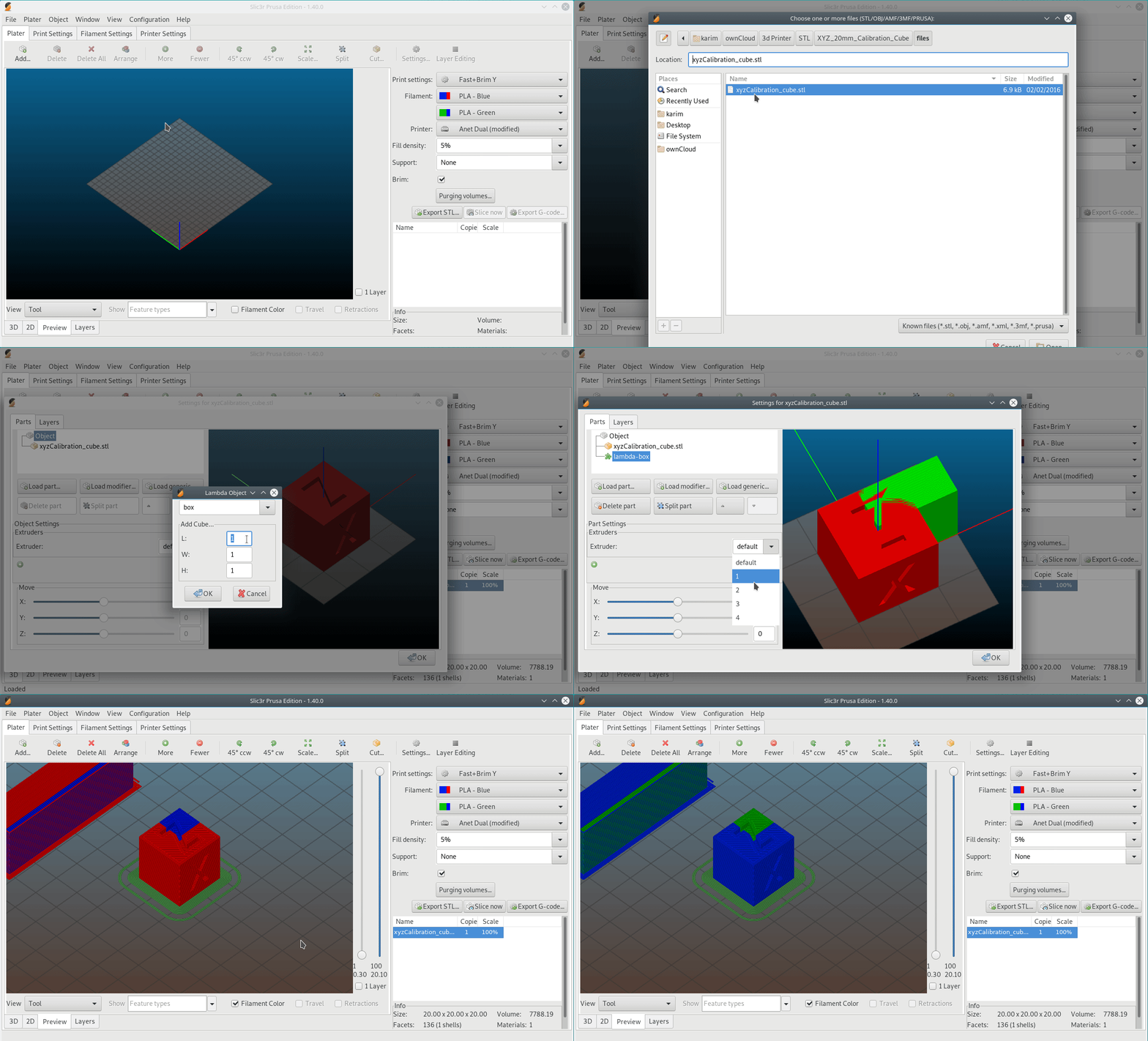
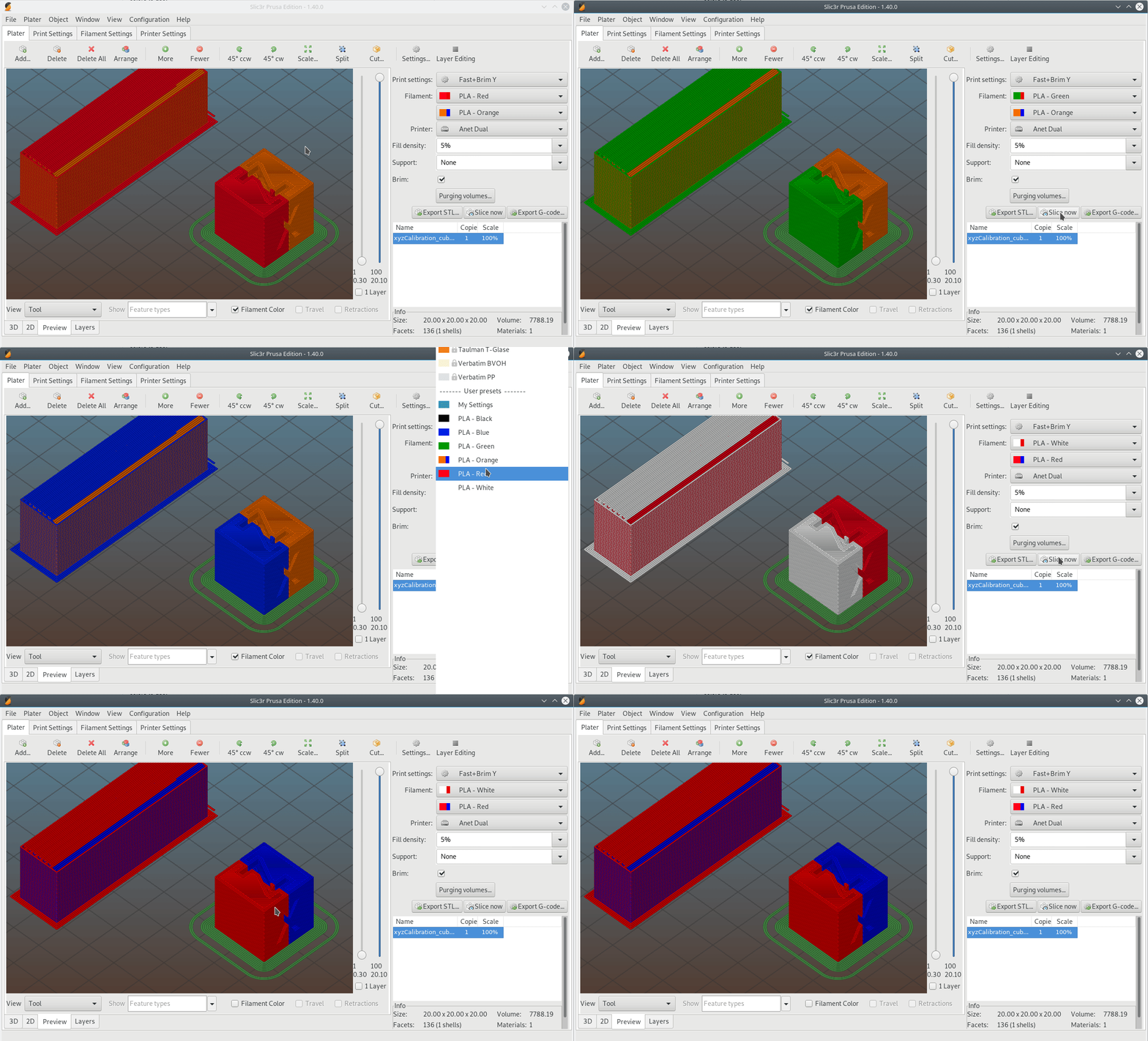
See the attached images.
In the first, both extruders have same preview color of white. I am using Black PLA on E1 and Red PLA on E2. The preview generated shows everything in white - the preview colors on the Extruders

In the second screenshot, E1 has Red preview color and E2 has Blue. I am still using Black PLA on E1 and Red PLA on E2. The preview generated shows E1 in Red and E2 in Black - as expected - the preview colors on the Extruders.

I am requesting that there also be a View where instead of the using Extruder preview colors, PLA colors are used so that the preview looks similar to what the print would look like.
I hope the explanation helps with the clarification.
lalanikarim
on 30 Jun 2018
You are making a different settings for each color because they need different cooling/temp?
The "filament color" as defined in the filament setting is only used as visual help. Maybe it should be removed to avoid confusion.
You want a checked box in the filament settings that, if checked, use the interface color as default filament color?
note: You have to click on the color icon (next to 'Filament:') to change the color for rendering. (sorry, but I don't know if you know it)
supermerill
on 30 Jun 2018
@supermerill The "filament color" and "extruder preview color" are both visual helps however in the preview render there is only the option to preview with extruder preview colors by selecting the "Tool" view.
You are making a different settings for each color because they need different cooling/temp?
That could be a reason. I do a couple different brands for filaments. However, since I can specify a color for the filament in settings, I would like to see it being used when rendering the model after it is sliced. I selected black filament for first tool and red filament for second tool. However, in the preview the calibration cube is rendered in red and blue based on the extruder preview color.
You want a checked box in the filament settings that, if checked, use the interface color as default filament color?
No. I can set the default filament color. I don't see anywhere it is used besides on the preview on the Filament dropdown.
What I would like to see is in the preview screen where currently you can see the "tool path" rendered with the extruder preview colors, also have the option to preview the tool path view with the filament color assigned on the filament.
note: You have to click on the color icon (next to 'Filament:') to change the color for rendering. (sorry, but I don't know if you know it)
I am setting the color in the filament setting. It is visible in the on the filament selection
lalanikarim
on 30 Jun 2018
I'm sorry but I can't understand what is your problem.
I hope someone else can help.
No. I can set the default filament color. I don't see anywhere it is used besides on the preview on the Filament dropdown.
it's not a default color, consider it like an icon or a flag.
supermerill
on 30 Jun 2018
@supermerill There is no problem. It is a feature request. I just want the capability to use filament color instead of extruder preview color when generating the Gcode preview
lalanikarim
on 30 Jun 2018
In other words, a WYSIWYG view. I expected that's what the filament colour option was for when I first used Slic3r.
 tracernz
on 2 Jul 2018
tracernz
on 2 Jul 2018
What I have/use right now (I now use icon for filament identification to avoid spelling confusion)
1) i load some pieces (both are assigned to extruder 1, that's why they have the same color as extruder 1)
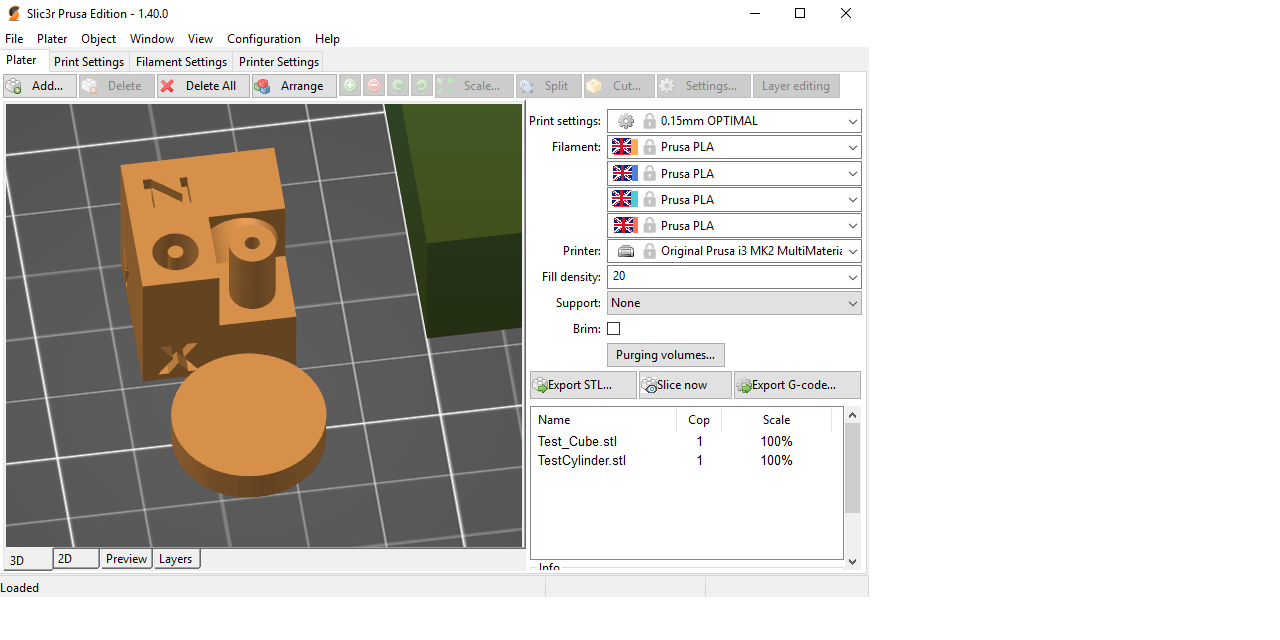
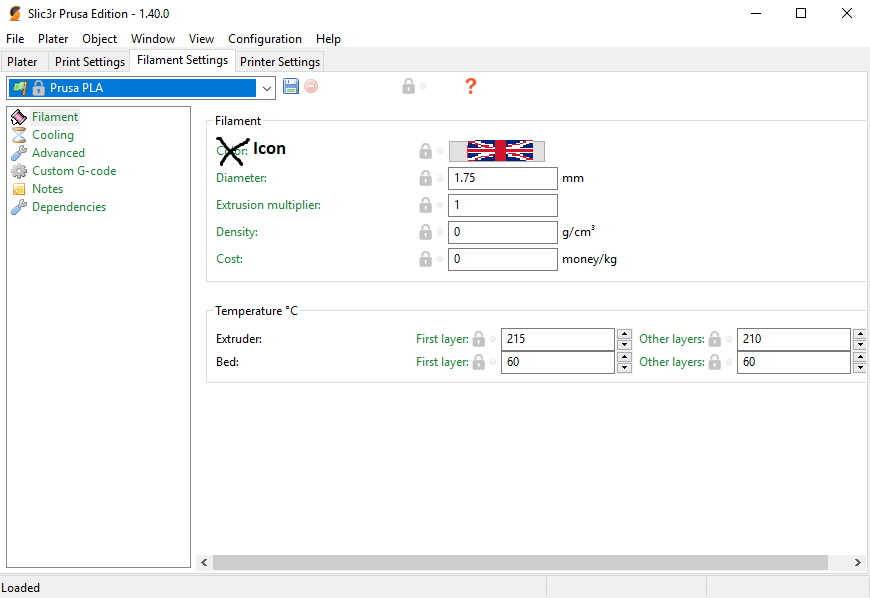
1b) In the filament tab, i can change the icon of the filament type.
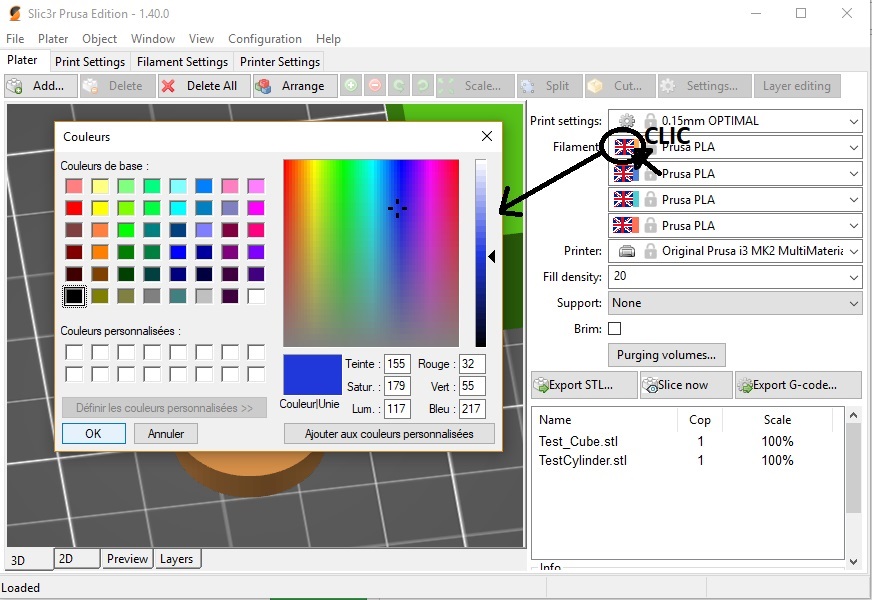
2) By clicking on the color icon, i can change the current color of the extruder
3) I have now sdelected my two color (and set the extruder). Slic3r is showing me the two pieces in their respective colors (WYSIWYG ?)
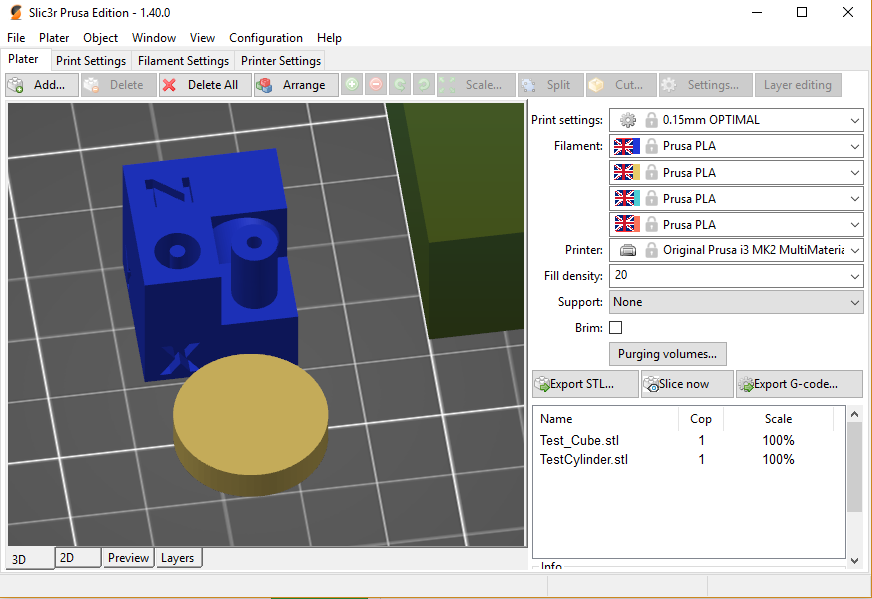
4) Same for the preview thing
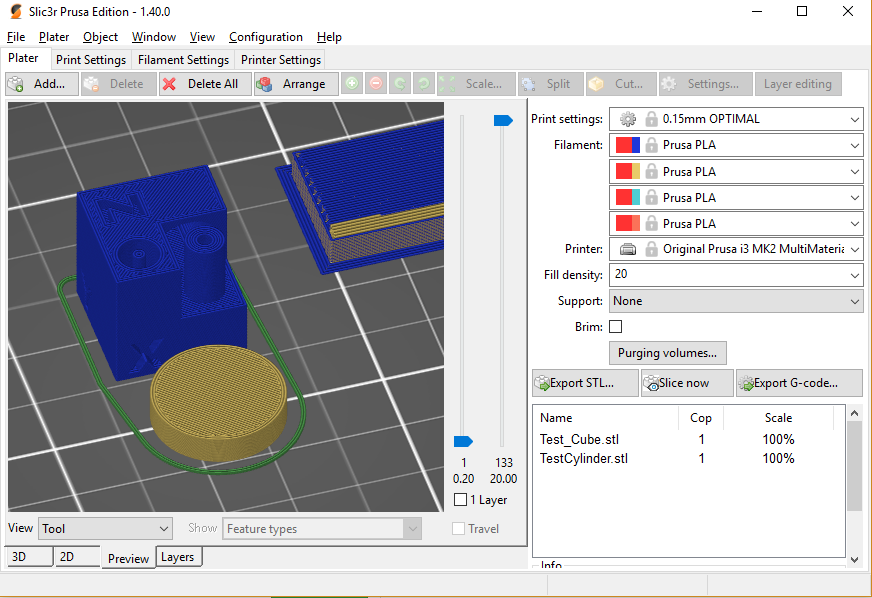
I proposed earlier to change the "icon" in filament setting to a "default color" but you said it's not what you want.
Could you show what you want in more details?
supermerill
on 2 Jul 2018
@tracernz @supermerill The filament color does work if you haven't set "Preview Color" for Extruder settings. Then there is no way to use Filament color in Preview unless you delete the value from the config manually.
This below code is responsible for that behavior. If you notice extruder color has to be undefined or not a valid 6 digit hex entry.
Slic3r/lib/Slic3r/GUI/Plater/3DPreview.pm:355
# Collect colors per extruder.
    my @colors = ();
    if (! $self->gcode_preview_data->empty() || $self->gcode_preview_data->type == $self->{tool_idx}) {
        my @extruder_colors = @{$self->{config}->extruder_colour};
        my @filament_colors = @{$self->{config}->filament_colour};
        for (my $i = 0; $i <= $#extruder_colors; $i += 1) {
            my $color = $extruder_colors[$i];
            $color = $filament_colors[$i] if (! defined($color) || $color !~ m/^#[[:xdigit:]]{6}/);
            $color = '#FFFFFF' if (! defined($color) || $color !~ m/^#[[:xdigit:]]{6}/);
            push @colors, $color;
        }
    }
A much cleaner and user friendly approach would be to use a checkbox that set a flag to determine which colors to use.
lalanikarim
on 2 Jul 2018
This is what I am requesting. I modified the 3DPreview.pm file to get the desired effect.
The setting isn't saved in the configuration file, but it is helpful even as a volatile setting
lalanikarim
on 2 Jul 2018
Ok, i understand
Maybe an other entry in the "view" combobox? It's nicer and it's made for that.
supermerill
on 2 Jul 2018
@supermerill Yes, that's what I had in mind when I posted the original feature request.
Instead of the checkbox, a selection in the view combo box called "Filament" or some phrase more meaningful.
I might be mistaken, but I think with the dropdown box, there might be C++ code that might have to be modified. But with the checkbox that way I have it working now, it's all in the perl script.
lalanikarim
on 2 Jul 2018
Done
you can cherry-pick this commit: 619b4ef7256cc0129e6a4b468213d5192710bb8f before compiling your slic3rPE.
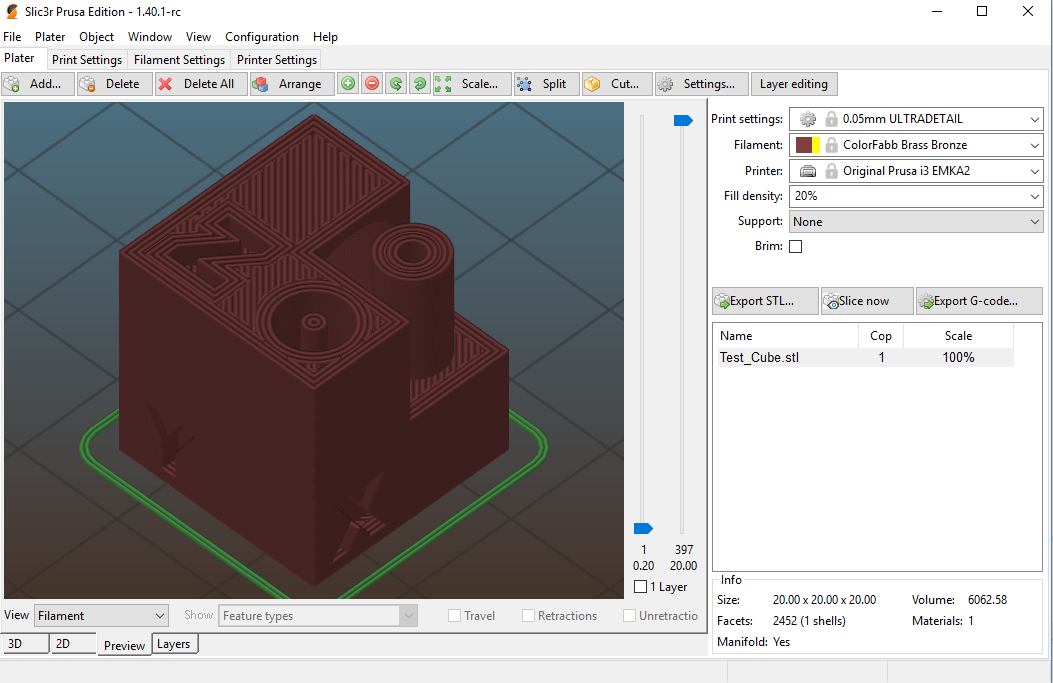
If @bubnikv is ok, i can make a pull request.
supermerill
on 2 Jul 2018
@supermerill Perfect. I think that'll do. Thanks a bunch.
lalanikarim
on 2 Jul 2018
Actually @jimmy00784 is right about my original intention :-) I hoped to have a UI to set the extruder color to undefined, which would lead Slic3r to use the filament color instead. But this was never implemented, as I did not have time for that and nobody asked for it. Now as we have more people on board, we should do something about it.
I am not sure whether the solution proposed by @supermerill is the one we want. I will have to sleep on it and discuss it with the team what is their opinion.
 bubnikv
on 2 Jul 2018
bubnikv
on 2 Jul 2018
I create a filament profile for each color of my filaments. So having this feature implement in the future would be a benefit for me as well. That way when I use the MMU2 printer profile, I can pick the filaments and would not also have to click on the color and set the extruder color to match so my visualization is color correct as well. If I don't do this manually now, I can get my colors mixed up pretty easily when matching the parts of the object to the correct extruder.
 wsmagee
on 24 Nov 2018
wsmagee
on 24 Nov 2018
@wsmagee as long as you don't set default extruder preview color, filament color is used in the gcode preview. Give that a try.
lalanikarim
on 24 Nov 2018
@jimmy00784 . Ok, thanks, I'm giving that a try but having issues. I went to the Printer Settings, then to one of the extruders, and looking at the Preview section, Extruder Color field. I think we are talking about this field. If so, it already has a color selected. (I am starting with the "Original Prusa i3 MK3 MMU2 printer profile). I can not seem to find a way to delete the color, only change it. Any thoughts on this?
Thanks
----Edit----
I found I could directly edit the .ini file for the printer and delete all the values for that field.
wsmagee
on 24 Nov 2018
+1 for this request. I really like the new color change (for single extruder), but it is default/assigned colors. While that is fine for illustrating the layer where the color change will occur, it would be nice if I could assign it to the type of material/color that I want. Is there a way that even if it didn't take the color from the filament, as stated above, that this change could at least allow for user-editable colors displayed? It would be easy enough to then select the colors that you want it to be.
 bivaterl
on 3 Feb 2019
bivaterl
on 3 Feb 2019
Related issues
 Bubolz
·
3Comments
Bubolz
·
3Comments
 karek314
·
4Comments
karek314
·
4Comments
 Tirpitz93
·
3Comments
Tirpitz93
·
3Comments
 kakou-fr
·
4Comments
kakou-fr
·
4Comments
 jon-cpu
·
3Comments
jon-cpu
·
3Comments
Most helpful comment
@supermerill There is no problem. It is a feature request. I just want the capability to use filament color instead of extruder preview color when generating the Gcode preview