Prusaslicer: OctoPrint IP address not shown/loaded when using a custom configuration file
Version
v1.40.0
git rev-parse HEAD: 8eb9ddc2eb6c3f98cf28125ddbee4d233fa58616
Operating system type + version
Arch Linux 4.16.7-1-ARCH
Behavior
When using a custom configuration file (config.ini) that contains the settings to an OctoPrint server, the IP address is not loaded/visible in the Printer window. Even if the custom configuration file contains the correct IP address setting.
Other related settings, such as the API key, are loaded correctly.
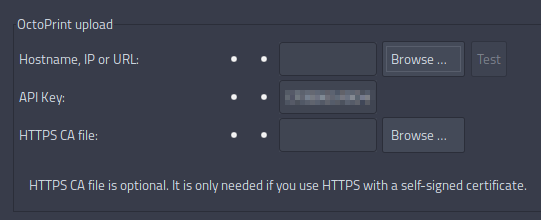
(Note: just blurred my key :) )
 stelgenhof
All 7 comments
I have the same issue with the first alpha release of 1.40.
I entered octopi full DNS name "octopi.fritz.box:5000". When reloading slic3r it is gone.
 stahlfabrik
on 15 May 2018
stahlfabrik
on 15 May 2018
It is a regression issue, we used a piece from the upstream slic3r, where the octoprint_host has been renamed to print_host. I will comment this piece of code out.
 bubnikv
on 17 May 2018
bubnikv
on 17 May 2018
This issue should be fixed with https://github.com/prusa3d/Slic3r/commit/35bf4aee7df3baee5f64b769d58d20199bb5268a
@FidelCapo Please retest with the master. Thanks.
bubnikv
on 17 May 2018
Just compiled and tested commit 35bf4aee7df3baee5f64b769d58d20199bb5268a, but the issue still remains.
I tested with both an external configuration .ini file as well as my custom printer preset (stored in the .Slic3rPE folder).
stelgenhof
on 17 May 2018
Finally fixed with https://github.com/prusa3d/Slic3r/commit/19221b749cf820aa40b99548c1340c346b73e597
bubnikv
on 18 May 2018
@bubnikv Thanks for the fix! I can confirm it works now.
stelgenhof
on 18 May 2018
great, thanks for testing.
bubnikv
on 18 May 2018
Related issues
 sebastianha
·
4Comments
sebastianha
·
4Comments
 RossKor
·
3Comments
RossKor
·
3Comments
 yschroeder
·
3Comments
yschroeder
·
3Comments
 Bubolz
·
3Comments
Bubolz
·
3Comments
 karek314
·
4Comments
karek314
·
4Comments
Most helpful comment
It is a regression issue, we used a piece from the upstream slic3r, where the octoprint_host has been renamed to print_host. I will comment this piece of code out.