Prusa-firmware: [BUG] FW 3.9.0 perimeter quality issue
Printer firmware version- 3.9.0
Describe the bug
As reported by @rcalis, FW 3.9.0 seem to cause issues in perimeters:

In this issue I'd like to investigate _this_ specific pattern, which seems to be caused by higher E step/mm counts (geared extruders such as the BMG).
The Prusa-Slicer 3mf file as well as the generated gcode is important. If using the BMG, also please report the detailed machine settings which might be set in the FW by using M503
 wavexx
All 41 comments
On a Bondtech BMG, the default E usteps of 32 and 830 steps-per-mm produced a very obvious such pattern. This was alleviated somewhat by reducing it to 16/415. No further improvements were visible by lowering it again to 8/207.5.
Sorry, I don't have any comparison pictures.
 haarp
on 23 Jun 2020
haarp
on 23 Jun 2020
Very useful to know. Do you have a model where I can try this? I also have a BMG
wavexx
on 23 Jun 2020
Very useful to know. Do you have a model where I can try this? I also have a BMG
Yes. It's either left or right handle of this model Only the first 5mm or so are relevant. My print settings were PLA, 0.28mm layers, rear seams. Firmware 3.8 prints it fine, 3.9 shows problems at the chamfer on the bottom, which are very obvious with 32 e-usteps.
I'm also attaching the gcode I've used, but it's truncated to 5mm or so. The full print settings are at the bottom of the file.
handle+clip_0.4n_0.28mm_PLA_MK3.gcode.zip
haarp
on 23 Jun 2020
So I had an initial guess about this issue being the result of dual/quad stepping within LA, although at least with the model from @rcalis I have I couldn't really trigger this even with the BMG.
It's still a bug though, so I fixed this in my branch nonetheless. Would you be willing to try this in parallel? Do you know how to build the FW youself or need some help?
wavexx
on 23 Jun 2020
Would you be willing to try this in parallel? Do you know how to build the FW youself or need some help?
Sure. But I'm unable to apply @f1efce7 on top of vanilla 3.9.0. Do you want me to use your entire branch or should this be tested independently?
haarp
on 23 Jun 2020
You need the entire branch, the changes depend on the fix for the gaps too.
It's based on top of the current MK3 sources, but you should be able to rebase it easily if needed.
wavexx
on 23 Jun 2020
@haarp did you succeed?
Looking at your gcode I think I spotted one possible cause being the internal "dropsegments" handling, whereas multiple small chunks get merged in high-res models. Not in front of my printer right now, but I have some counter-test for this that you could try: in prusa-slicer go to print settings -> advanced -> resolution and try to set something like 0.1 or even 0.2 and see if this changes anything.
wavexx
on 24 Jun 2020
I had to reslice to 15mm to get a better look, attached is the new gcode. Beat_SAber_handle_V3_Left_0.4n_0.28mm_PLA_MK3.gcode.zip
I did 3 prints with the gcode above and 32 E-usteps on the Bondtech. Attached is the picture, showing the buggy pattern on the vertical walls (circled red). Top: 3.9.0, Middle: your branch prior to @f1efce7, Bottom: Your branch @f1efce7. As you can see, there's such little difference that it might aswell be chance.
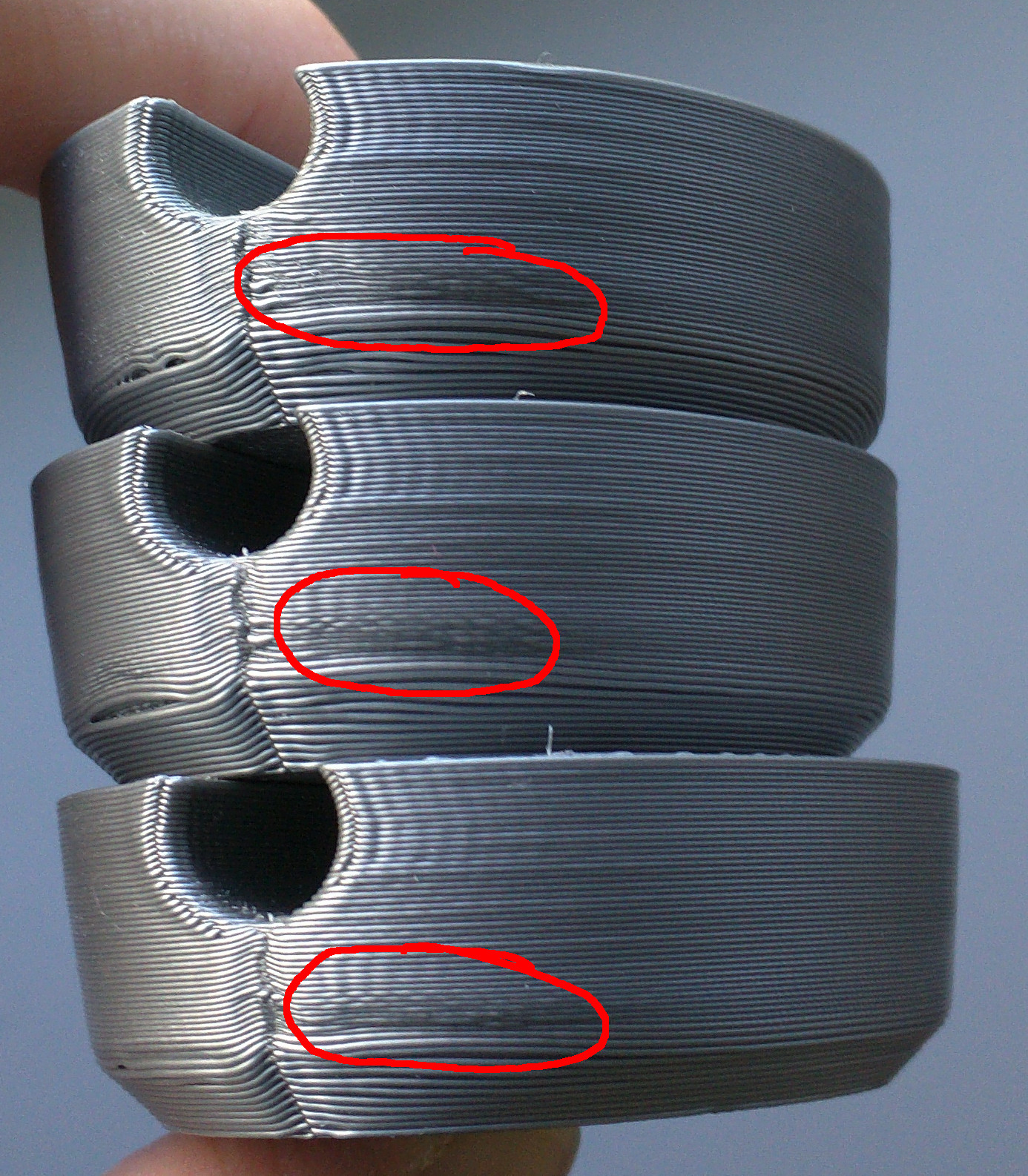
Either @f1efce7 did not fix the problem, or my problem is something else entirely. Not sure. I'll redo the same tests with E-usteps=16 this evening.
You can also see the bad looking chamfer at the bottom, but that's not part of this bug.
haarp
on 24 Jun 2020
Mmh, this is different than the first picture for sure.
In the first, we have a straight section (a single segment) showing very unstable flow. Here, I'm not totally sure. There is some VFA, but that's comparable to the amount near the hole above so I don't think that's causing the problem in the highlighted region.
It looks like the chamfer has curled upwards to me, causing some pinching in the outer layers above. This spot is in the rear of the right? Cooling there is never "great" there, especially on the stock BMG shroud. Outer layers on the chamfer also look fat, possibly due to bridging flow (didn't check the 3mf yet), but if that's the case I'd tune down the layer height. That gaping hole between layers on the left on the two top pictures is definitely caused by a combination of curling and insufficient squeeze
wavexx
on 24 Jun 2020
There's some ringing for sure, but that buggy pattern circled in red is definitely new. The circled spots are on the rear left. But I'm using dual fans which blow from the left and right. In any case, it's not a cooling issue, as the same print on 3.8.0 looks much much better:
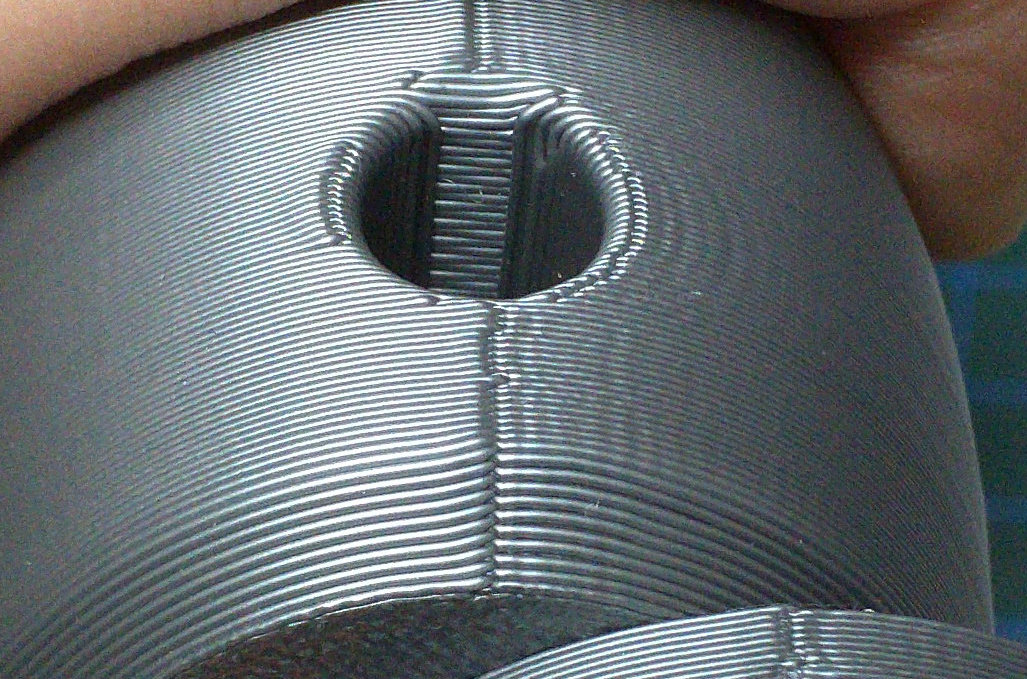
haarp
on 24 Jun 2020
Indeed, it looks quite a bit different, not arguing about that. Somehow looking at your last picture is looks like the seam in 3.9 is even more "sunken", but maybe that's the angle of the image?
However, it still feels like an issue with cooling somehow, just looking at the image. One difference with 3.8 and 3.9 is that 3.9 probably slows down more due to e-jerk in that spot, I wonder if that's indirectly related.
wavexx
on 24 Jun 2020
looks like the seam in 3.9 is even more "sunken"
That's correct. Unfortunately I don't have a better picture handy at the moment.
Here's a print using the same gcode, 16 E-usteps and your branch @f1efce7:
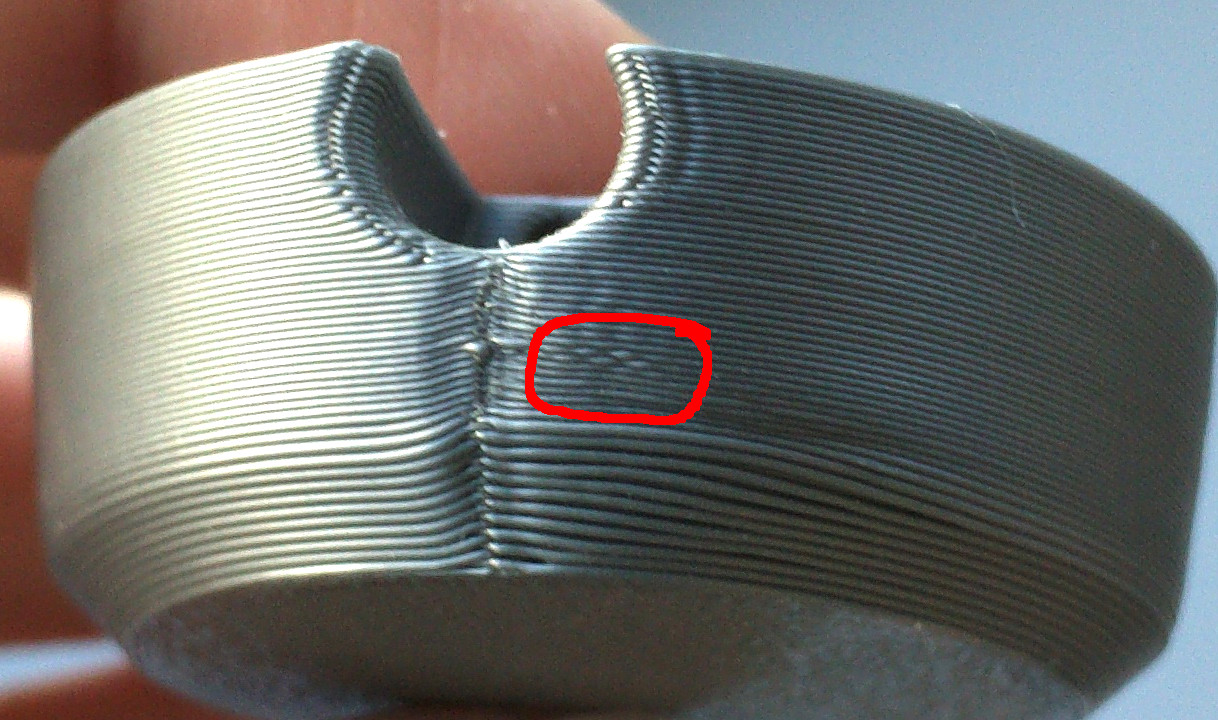
The seam is still very sunken in, but the chamfer curl (at least on the left side of the picture) has disappeared. So it can't be cooling or speed-related. It also looks better-ish, but there's still the weird stitch-pattern appearing, circled red.
haarp
on 24 Jun 2020
@haarp can you save a 3mf file with the model (even cut) as you printed it?
wavexx
on 24 Jun 2020
@haarp can you save a 3mf file with the model (even cut) as you printed it?
Here you go, just rename from .zip to .3mf
haarp
on 24 Jun 2020
Which version of PE do you use for slicing?
wavexx
on 24 Jun 2020
Which version of PE do you use for slicing?
2.2.0. You can also see the slicer version/settings in the gcode I attached earlier.
haarp
on 24 Jun 2020
Just got some warnings in the custom G-code sections, but I'm using a development build so ok. I wasn't sure if supermerill's fork has a different signature.
wavexx
on 24 Jun 2020
@haarp I've debugging this model, both using the stock MK3S and the BMG+MK3 with a 0.9 stepper and 16ustep. My E axis steps are 830 with this setup, so we should be identical (can you confirm?).
Silver is stock MK3S, violet is BMG.
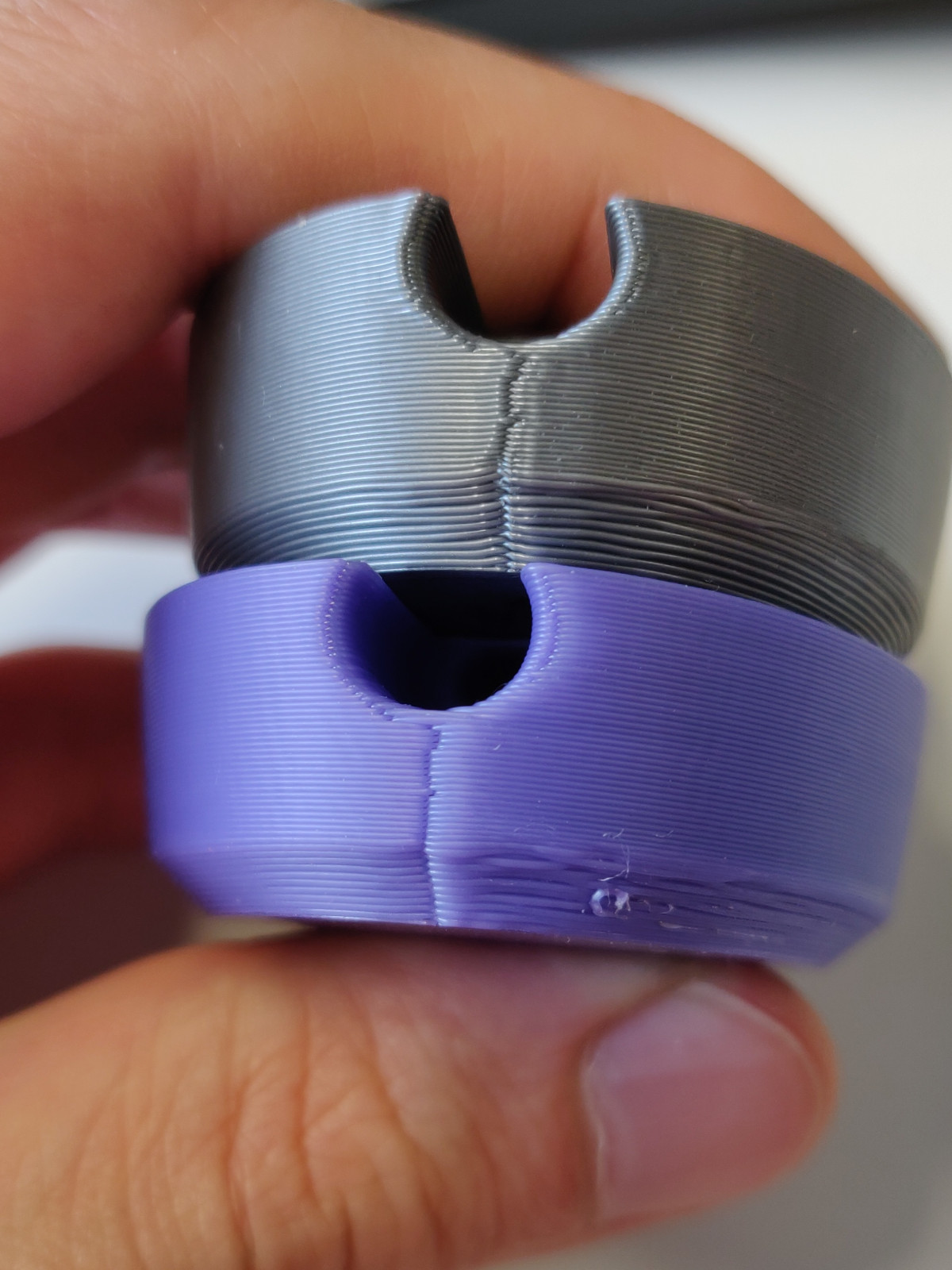
I was actually quite surprised that the MK3S does produce a sharper seam (it's basically perfect above the chamfer), and there's no bulginess. On the BMG there's considerable softness with these settings, and it looks to me that the BMG requires a smaller LA factor here. You'll see later though the BMG is much smoother overall.
However my plan was to try to reproduce the perimeter issue, so I didn't adjust anything. I tested both the "la15_acc_fix" and the "untested" branch, but both produce identical results in this case. I couldn't get this irregularity in the front :(.
What I did notice though is that there's slow-down on the right side (right when looking at the big hole, like the picture above) which is caused by a combination of factors. I've marked it here:
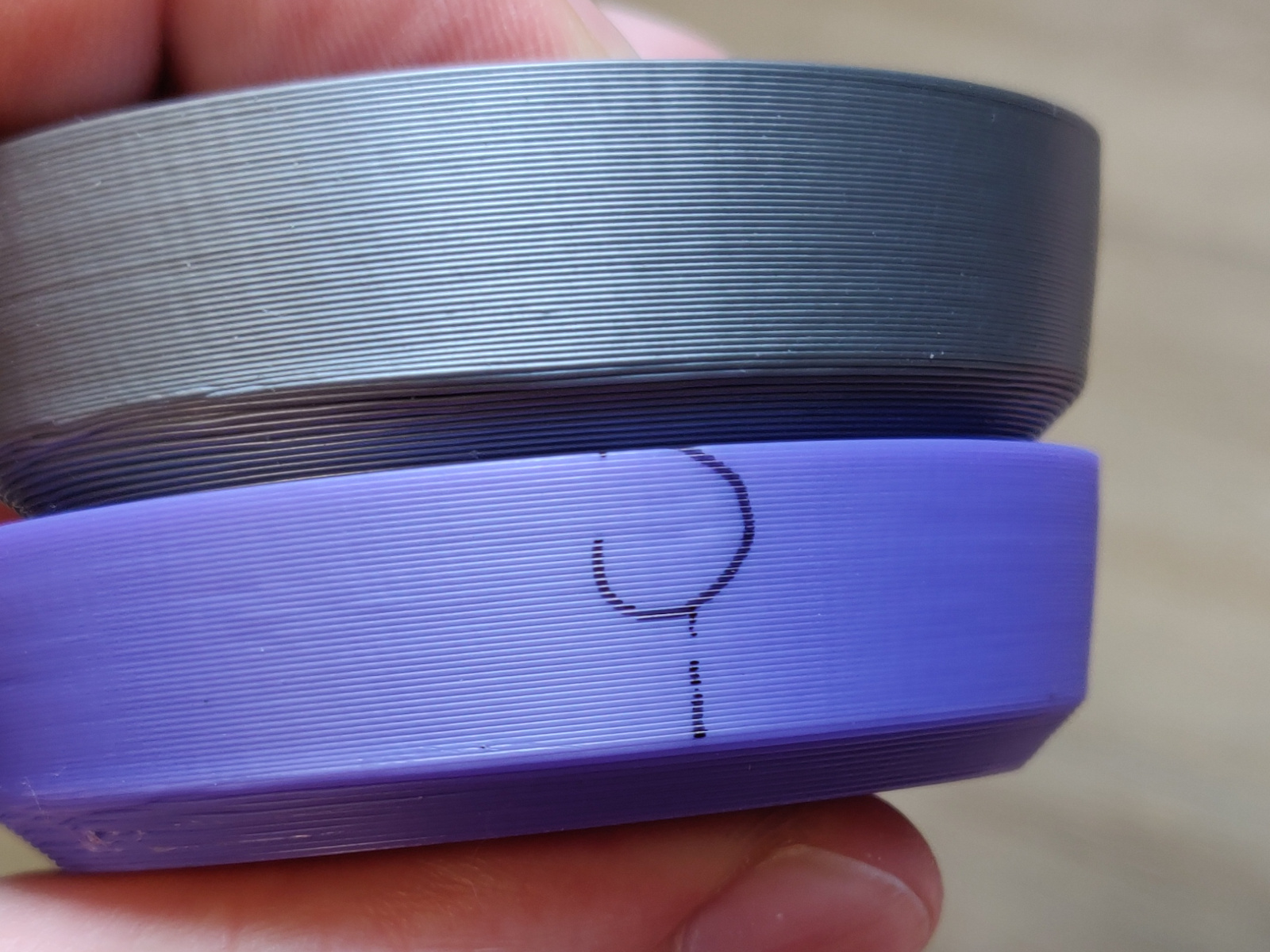
It's much less noticeable on the MK3S mostly because the LA factor is almost perfect there, but it's still there showing as a barely-sunken spot. The high-res model is causing numerical instability in some parts which causes the pressure calculation to be off almost systematically in that spot. Combined with the higher step count of the BMG, this is also causing the planner to slow down quite often there, which is why the BMG shows these little random mini-bulges on the perimeter. I tested also with 3.8 and the slow-downs seem equivalent. Sadly, the LA effect on the 3.9 is much stronger, so it shows up a lot more.
Reducing the model resolution through the print settings to 0.01 did improve this, but sadly to remove completely the effect I had to reduce the perimeter speed, not because of LA, but to avoid these stutters.
I have a few ideas on how to at least improve the roundoffs and to limit these effects when the error is so large.
Yet, my results with the BMG still look a lot better than yours for some reason.
wavexx
on 26 Jun 2020
I have "little random mini-bulges on the perimeter" with my 3:1 extruder (skele struder)
My current firmware is some branch from wavexx from some days or weeks ago (will look it up later)
How can I help?
 lord-carlos
on 29 Jun 2020
lord-carlos
on 29 Jun 2020
Finding more test cases would help a lot.
Can you post the 3mf file, gcode and pictures?
If you want to help even more, cutting the model to the minimal size that still shows the issue on the perimeter would be awesome.
wavexx
on 29 Jun 2020
I made a simple oval object. Or rounded square. About 4 lines thick. The walls on the inside have seam on 2 places.
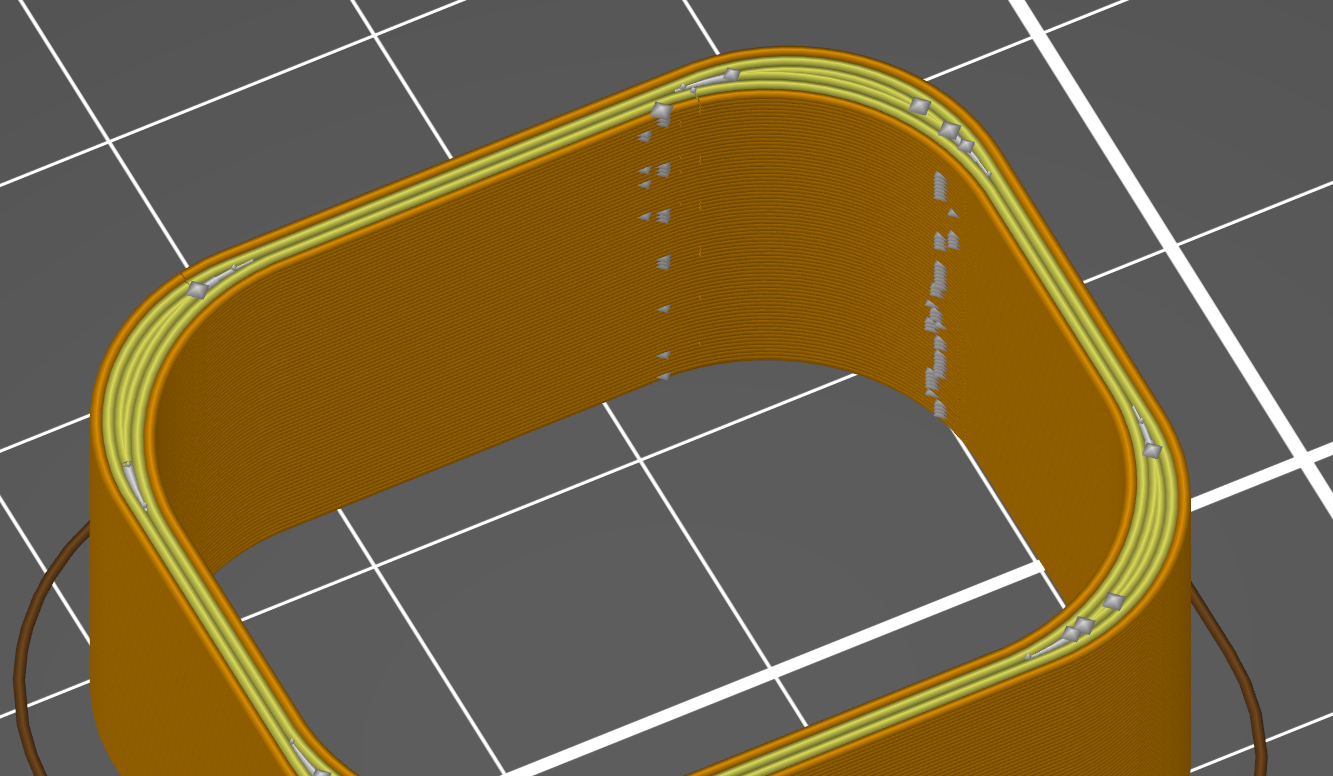
The actual prints has about 6 lines that look like seam.
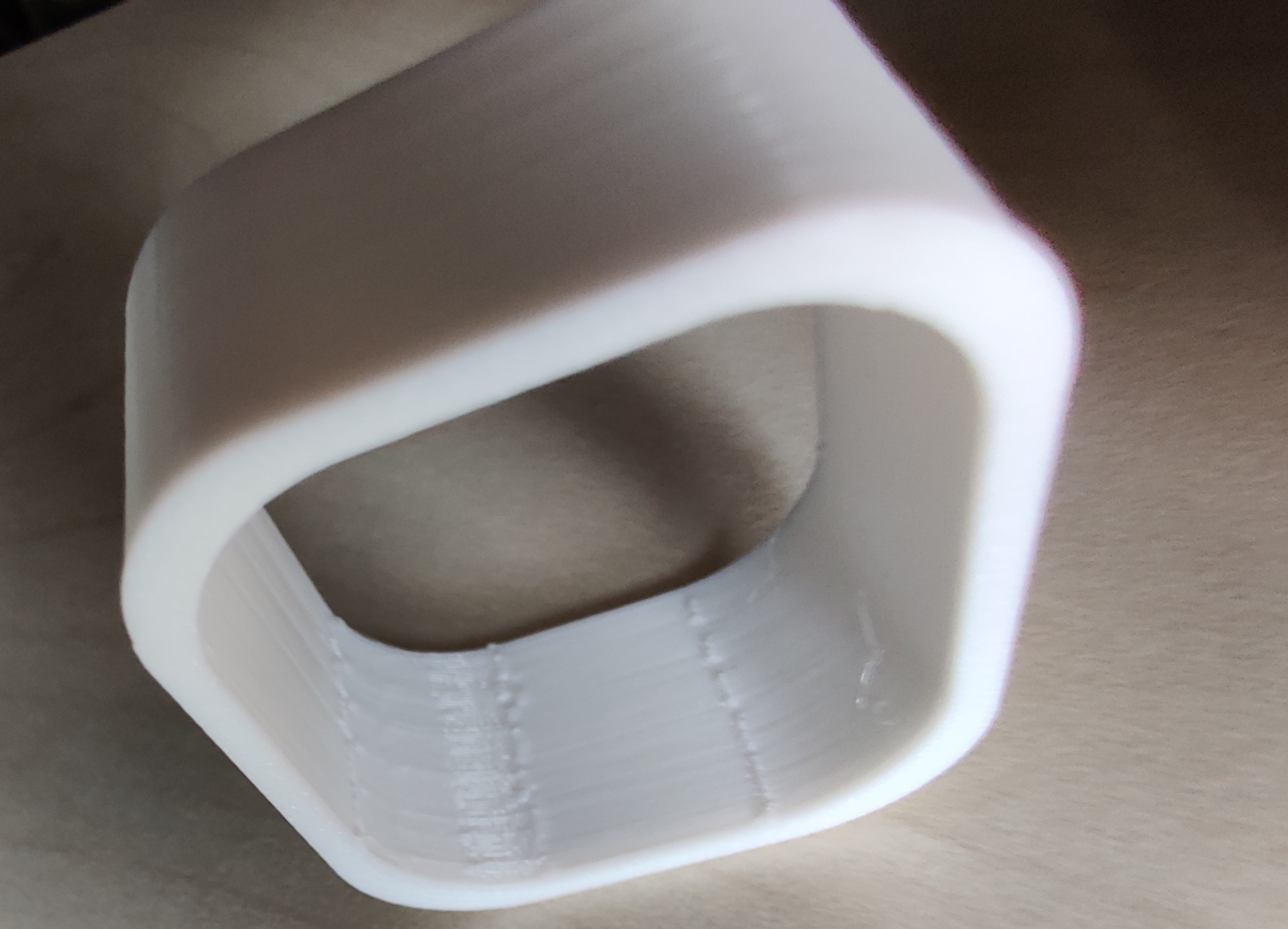
It's easier to see on a video: https://youtu.be/j61aCdW828g
I have another print where you can feel the sits sticking out more. Not sure why this test object is milder. Maybe because it's smaller.
Firmware:
https://github.com/wavexx/Prusa-Firmware
la15_acc_test d082f5d Avoid cumulative error in segments without cruising
Shape-Cylinder 3mf.zip
bug hunt - rounded_0.2mm_PET_MK3_28m.gcode.zip
lord-carlos
on 29 Jun 2020
I just printed this oval shape and it does not have the problems.
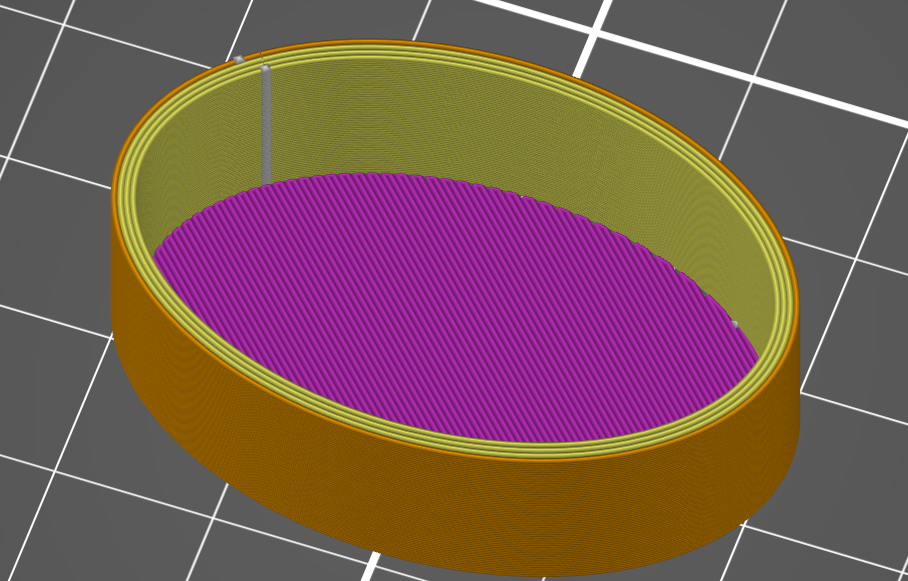
Bizar.
lord-carlos
on 1 Jul 2020
I added several more commits which now should handle these cases much better.
What I do now is a compromise between the newer approach and the original LA1.5 so that short segments where the pressure calculation is unstable have less influence. This reduces the number of times LA is activated during the curve and converges to the same value, with the added bonus that it causes the planner to slowdown less.
At least when printing with the BMG the result I get is now on par with the stock extruder.
Can somebody give it a try?
https://github.com/wavexx/Prusa-Firmware/tree/la15_acc_fixes
wavexx
on 24 Jul 2020
Can somebody give it a try?
@wavexx Sadly I get the same artefacts. I even get them when I comment out the k value, should that not disable LA?
Disable coasting also did nothing.
Attached zip file also includes the patch for my skele struder. But other then micro steps from 32 to 8 and DEFAULT_AXIS_STEPS_PER_UNIT from 280 to 490 nothing of value was changed. Same as with firmware 3.8
Should I try 16/280?
Anything else I can try?
And where you able to reproduce the artefacts?
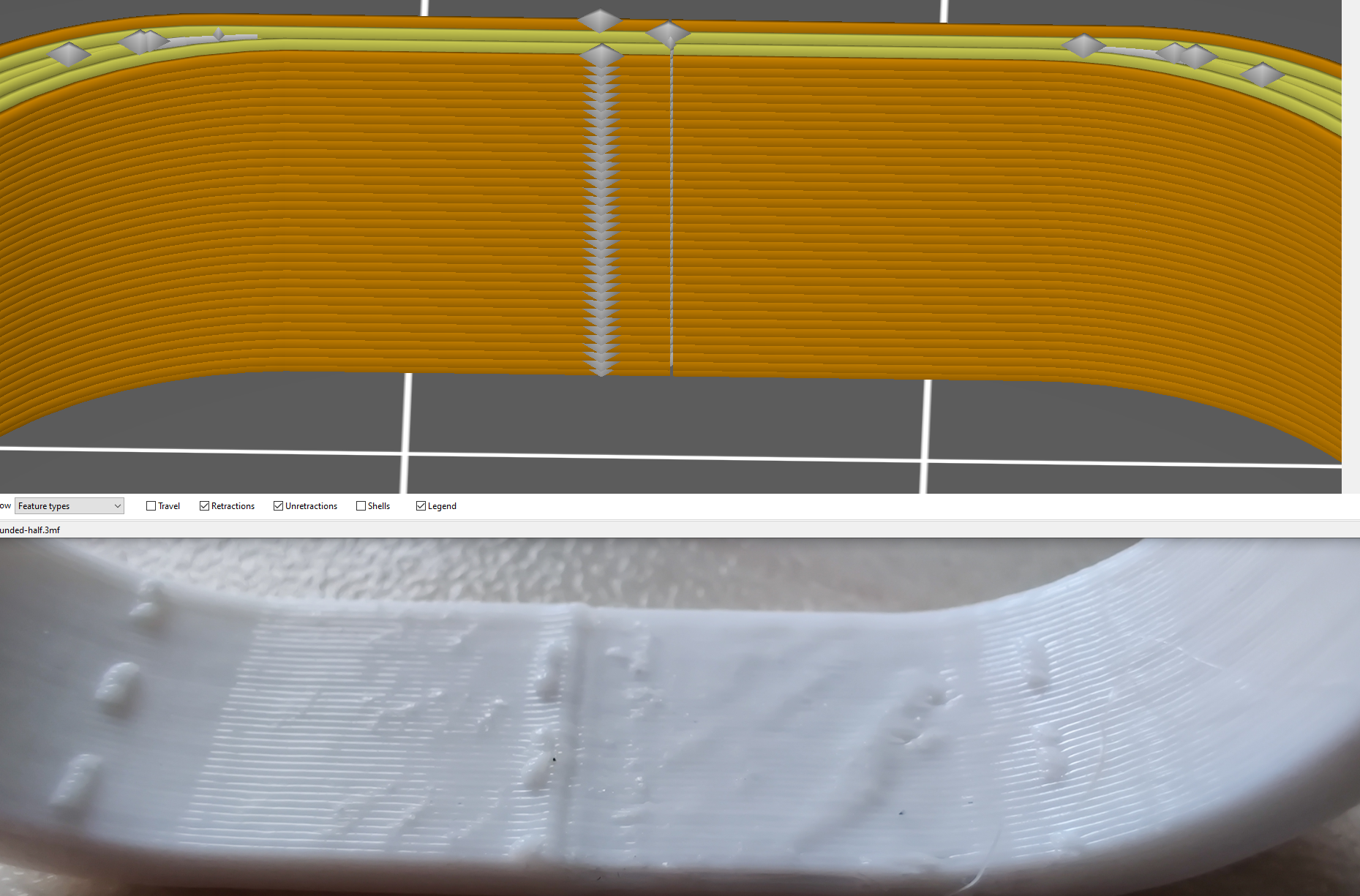 lord-carlos
on 28 Jul 2020
lord-carlos
on 28 Jul 2020
@lord-carlos I'm attempting to reproduce your sample now with the BMG and see (only downside I'm using 830 esteps currently)
wavexx
on 28 Jul 2020
@lord-carlos I tried to print this a few times, but I only get a similar result when LA is disabled, which is the default in your profile (M900 K0). Using PETG with K0.1 the result is clean.
Looking at your calculations, are you sure you're not just overextruding because of a wrong microstep setting? Looking at the skelestruder page 490 should be used with 16 microsteps (M350 E16 / M92 E490). Using lower microstep values might make the motion less smooth, and higher might be too much for the rambo.
wavexx
on 29 Jul 2020
@wavexx I'm using a 0.9° stepper motor. 8/490 should be correct.
Normally I have M900 K0.09; I just tried different things yesterday.
I will try to get other skele users, who have a close to stock 3.9 or master firmware, to test this print. Thanks for trying.
lord-carlos
on 29 Jul 2020
@lord-carlos I'm using the BMG with a .9 power LDO, but I have to say a 1.8 is better suited with a reduction. The maximum retraction speed which is fully reliable for me is 35mm/s, which is slower than what I'd like. I'd recommend going for a higher microstep count using a 1.8 instead for better torque and top speed instead, which in turn plays a little bit better with the TMC drivers, especially for the skelestruder which has a higher gear ratio. I'm planning to switch back the motor to a 1.8 when I'll do maintenance.
wavexx
on 29 Jul 2020
I also had issues with .9 motor and Marlin/PrusaFW, switched back to 1.8 deg and had no problems. The .9 motor was not worth the hassles.
 vertigo235
on 29 Jul 2020
vertigo235
on 29 Jul 2020
I just printed it in PLA, only switched filament profile, no print or printer setting changes. And I have no artefacts. Wat?
I'm going to mess around some more.
lord-carlos
on 29 Jul 2020
On Wed, Jul 29 2020, Carl wrote:
I just printed it in PLA, only switched filament profile, no print or
printer setting changes. And I have no artefacts. Wat? I'm going to
mess around some more.
Please note also that this model is not really sliced well by default in
PrusaSlicer (the inner side of the corners is badly overextruded in the
spots where you see some bulging). This excess will get dragged by PETG
more easily than PLA.
If you switch on "detect thin walls" in the print settings the result is
much better sliced (although is still not ideal).
wavexx
on 29 Jul 2020
Please note also that this model is not really sliced well by default in PrusaSlicer (the inner side of the corners is badly overextruded in the spots where you see some bulging).
Yeah, that might be it. I currently test with no gap infill.
Would be embarrassing for me if that was the problem all along 😳
lord-carlos
on 29 Jul 2020
I added several more commits which now should handle these cases much better.
What I do now is a compromise between the newer approach and the original LA1.5 so that short segments where the pressure calculation is unstable have less influence. This reduces the number of times LA is activated during the curve and converges to the same value, with the added bonus that it causes the planner to slowdown less.
At least when printing with the BMG the result I get is now on par with the stock extruder.
Can somebody give it a try?
https://github.com/wavexx/Prusa-Firmware/tree/la15_acc_fixes
Hello, sorry for the delay.
Unfortunately I can't see any improvements compared to the previous picture (@f1efce7) in my test case.
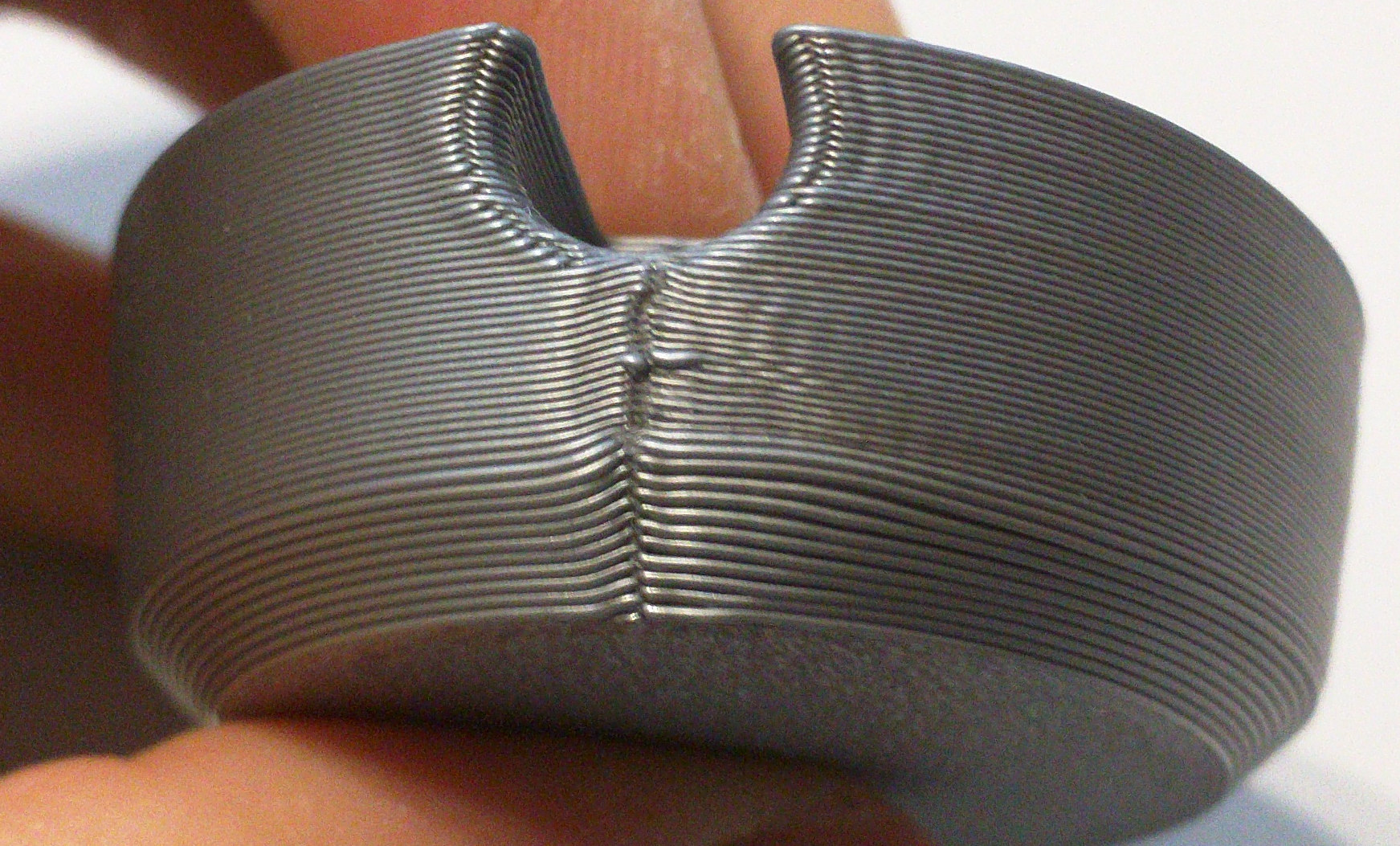
haarp
on 6 Aug 2020
@haarp did you try with the current master?
wavexx
on 7 Aug 2020
@haarp did you try with the current master?
No, that was when the la15_acc_fixes branch still existed, @feafc5e5ab. Want me to try again with master?
haarp
on 7 Aug 2020
@haarp I didn't change anything relevant since that commit, so it should be comparable. My results are still not matching :(
Maybe @3d-gussner can help: can you also give this print a shot and see how it compares?
wavexx
on 7 Aug 2020
@haarp can you point at any relevant difference you've seen so far compared to before? Did you see more/less slowdowns, does the seam look better, what changed and what you're not happy about in words?
Sounds stupid, but when I look at the print I have it's next to perfect. The spot you indicate is where slicer inverts the perimeter direction, so I do see some "wobble" from the acceleration (comparable to the other spots), but nowhere as much. You also seem to have a much more pronounced bulge in that spot, while here it looks flat (and also feel flat on the finger).
wavexx
on 7 Aug 2020
@ wavexx
@haarp can you point at any relevant difference you've seen so far compared to before? Did you see more/less slowdowns, does the seam look better, what changed and what you're not happy about in words?
Do you mean between @f1efce7 and @feafc5e5ab of your la15_acc_fixes branch? Unfortunately, I haven't seen any differences.
Sounds stupid, but when I look at the print I have it's next to perfect. The spot you indicate is where slicer inverts the perimeter direction, so I do see some "wobble" from the acceleration (comparable to the other spots), but nowhere as much. You also seem to have a much more pronounced bulge in that spot, while here it looks flat (and also feel flat on the finger).
Yes, of course layer seems are going to be more pronounced. But they do print much better on 3.8.0, which makes me think something in 3.9 is still broken. Reducing E usteps to 16 helped a lot, but it's not enough to restore the quality I had on 3.8.0.
For reference, here are the differences between 3.8 (top) and 3.9 (bottom):
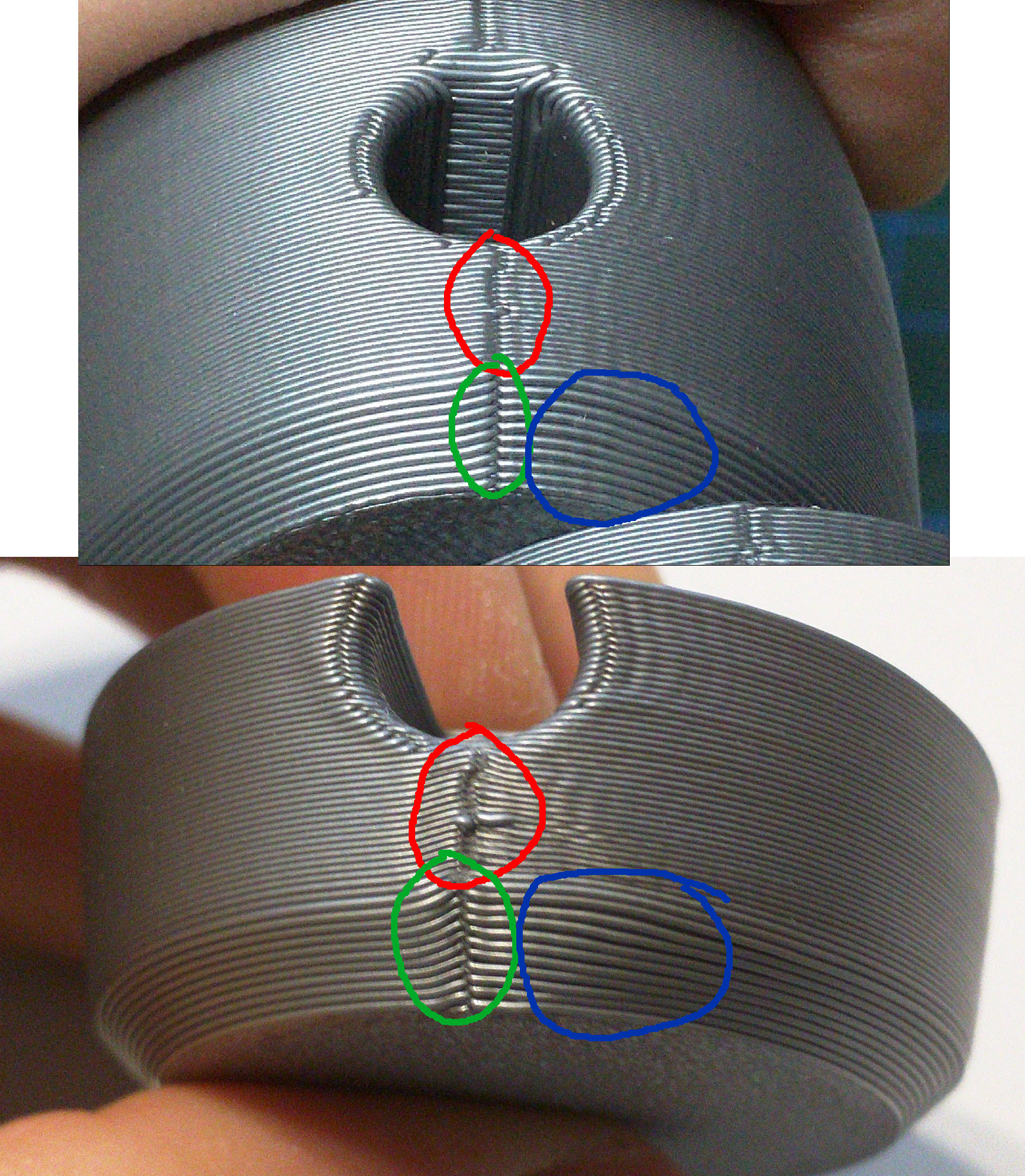
- Red: Layer seams are much tidier, sink less into the part, and curl upwards less in 3.8.
- Green: Same around the layer seams at the chamfer
- Blue: There is less separation between the external perimeters around the chamfer
Do your prints look more like the top or the bottom part?
Note that this is with a 3:1 Bondtech reduction gear and 0.9° steppers on X/Y. But I don't think the latter matters.
haarp
on 12 Aug 2020
@haarp My prints definitely look more like the above, but I do see a mix as well. I do have both a MK3S extruder and a BMG 3:1. Ironically, the MK3S stock extruder prints better seams (there's a lot less bulging on the single layer where the perimeter rotation changes), while BMG has much better looking perimeters. I tested the BMG with the .9 LDO slim stepper in the earlier prints I posted, but as of last week I recently restored the 1.8 stepper that came with the bmg itself for a little faster top speed.
Aside from the top speed during retractions, I still had to limit e-jerk to 3.5 to avoid "knocking" on the BMG, while the stock extruder is fine with the default 4.5 (and we tested it with e-jerk up to 10), so all things the same, that's the major difference between the two. I'll try to print this part later this week using the same e-jerk to see if that makes a difference.
You can also try to crank e-jerk higher and see if that changes anything, this would help. Essentially LA in 3.8 doesn't have any e-jerk limit, so if you didn't experience noise or issues with 3.8 with the BMG, you might as well push E-jerk to 10 and enjoy a faster print speed.
Regarding the .9 on X/Y, this does add extra load on the cpu for the same speed, unless you reduce the microstep values by half. But for the speed at which this piece is printed it shouldn't make a difference. (btw, we fixed a bug recently regarding higher microstep counts too, see: #2792)
wavexx
on 27 Aug 2020
All this should be fixed in FW 3.9.1 final, can we close this issue @wavexx ?
 DRracer
on 21 Sep 2020
DRracer
on 21 Sep 2020
I'd leave this open for now. The lightsaber model is still not 100% clean and is a good small test for testing a bunch of issues together (overretraction in inner corners, high-density mesh causing slow-down in outer perimeters).
I cannot reproduce the exact same seam results, but I agree we're "not there yet".
wavexx
on 21 Sep 2020
Related issues
 3d-gussner
·
4Comments
3d-gussner
·
4Comments
 NoNme1
·
4Comments
NoNme1
·
4Comments
 Siwat2545
·
4Comments
Siwat2545
·
4Comments
 AnHardt
·
3Comments
AnHardt
·
3Comments
 RacingHell
·
4Comments
RacingHell
·
4Comments