Prusa-firmware: MK3S - MMU2S 3.7.0 - 1.0.5 Extruder motor very very hot
 Albator91120
All 141 comments
Hi, I noticed on tha last prints and potentially after a firmware upgrade that the extruder motor becomes very very hot. Seems that the temperature is so high that the filament can be bent around the bon,tech gear. Thanks to tell me if you have the same hot temperature problem and what is the solution
Albator91120
on 23 Apr 2019
I have a similar issue on my brand new MK3S. It gets to 50°C while the room around is 28 °C. The extruder motor on my old MK2 is only 40 °C in the same conditions. Unfortunately, it melts PLA on bondtech gears after a few hours of printing - while printing more detailed parts.
 by-cx
on 24 Apr 2019
by-cx
on 24 Apr 2019
Had the same problem with my MK3 that persisted after after the upgrade to MK3S. No way I could print PLA for longer than 4 hours. Extruder motor would get too hot to touch. I added a fan to the extruder, remixing a shroud I've found on thingiverse, and the extruder since then will get hot (but not scorching hot) and no "thermal runaway" anymore.
I power the fan from the same source as the hot end fan.
I think that PRUSA could easily add this as an option (the fan can be bought in the shop already and the Y cable to get the power is not going to cost a fortune).
 m-cas
on 26 Apr 2019
m-cas
on 26 Apr 2019
Did you have the same problem with a previous firmware version ? Do you have the MMU ?
Albator91120
on 26 Apr 2019
@m-cas Thanks. I think I'll end up with the same solution. I have found something on Thingiverse too but the air was directed to the heat bed and that's something I would like to avoid. I think the problem is the bondtech gears are much closer to the motor in R4 extruder than in R3.
@Albator91120 Not sure if the question was for me but I don't use MMU and only tested the latest firmware.
by-cx
on 26 Apr 2019
I found also the same : https://www.thingiverse.com/thing:2975582/ but I think that better is to find something to cool the bondtech gear instead of the external of the extruder motor. Perhaps I can adapt something identical with a part added in direction of the gear.
Albator91120
on 26 Apr 2019
the thing yo mention is what I've remixed (it is now much lower, reduced about the height of the fan) but that was my personal aesthetic feeling :D
@Albator91120 : cooling the bondtech is curing the symptom as the source of the heat is the motor! It becomes so hot that the heat propagates to the gears.
Yes, I've had the problem with older FW version as well and I've worked with support as there was the strong suspicion of a defective extruder motor. No MMU.
m-cas
on 26 Apr 2019
To cool the motor is ok but it's the external of the motor then a part of the heat can continue to go on the bondtech gear no ? but nice work
And with the MK3S, it's no longer possible to see the bondtech gear from the left and right side. Now with only one window, it will not help to cool this box :-(
Albator91120
on 26 Apr 2019
Based on this thread:
I think we could change these values in the firmware:
Unfortunately, there is not much documentation so it's trial and error approach. TMC2130_PWM_AMPL_Z is probably amplitude and that could decrease the amount of current running through the stepper motor. Even a small change could make a huge difference. Right now I am printing PETG for four hours and the stepper motor is 56 °C and bondtech gears match the same temperature. That's pretty high for PLA.
Another solution is this extruder:
https://www.bondtech.se/en/product/prusa-i3-mk2-5-mk3-extruder-upgrade/
But it doesn't look like it's compatible with the filament sensor in MK3S.
Also, I have received a new motor from Prusa. Really appreciate that. I will try it but I have disassembled the extruder so many times the last few days I don't want to do it again this weekend.
by-cx
on 26 Apr 2019
It could work but I’am not going to fiddle with the FW, I simply do not have the time to learn everything needed (and I used to do this kind of things professionally).
Before I couln’t print PLA longer than 4 hours without errors, the solution with the fan solved ALL my problems so I‘ll stick with it.
Prusa support was great as I‘ve got motor and extruder replaced (did all the work just once when I upgraded from MK3 to MK3S) but the extruder motor temp was still scorching hot. Fan installed, all ok. I am an happy camper.
That is why I think Prusa should put the extruder fan ‚option‘ in the shop...
-
From my phone while mobile, please excuse any errors.
On 26 Apr 2019, at 23:50, Adam Štrauch notifications@github.com wrote:
Based on this thread:
I think we could change these values in the firmware:
Unfortunately, there is not much documentation so it's trial and error approach. TMC2130_PWM_AMPL_Z is probably amplitude and that could decrease the amount of current running through the stepper motor. Even a small change could make a huge difference. Right now I am printing PETG for four hours and the stepper motor has 56 °C and bondtech gears match the same temperature. That's pretty high for PLA.
Another solution is this extruder:
https://www.bondtech.se/en/product/prusa-i3-mk2-5-mk3-extruder-upgrade/
But it doesn't look like it's compatible with the filament sensor in MK3S.
Also, I have received a new motor from Prusa. Really appreciate that. I will try it but I have disassembled the extruder so many times the last few days I don't want to do it again this weekend.
—
You are receiving this because you were mentioned.
Reply to this email directly, view it on GitHub, or mute the thread.
m-cas
on 27 Apr 2019
I'm having this same issue since upgrading to the MMU2 / MK3S. Extruder stepper motor is getting too hot to touch.
 xoxota99
on 24 May 2019
xoxota99
on 24 May 2019
I am getting temperatures of around 60°C on the extruder after 3 hours of print time on my new MK3S. I already installed a fan and fanshroud to the extruder, but this only gets me another hour or so of PLA print time, everything longer fails with extruder gear skipping due to melted PLA.
PETG works still fine for me, but the extruder is still scorching hot.
Anymore suggestions?
 TheWeindl
on 24 May 2019
TheWeindl
on 24 May 2019
How did you configure your fan?
I have it in parallel to the hotend (sucking air up, not blowing down) and, with a slightly remixed shroud, I got rid of all temp problems (got 11+ hours of PLA printing, before 3.5 was the maximum).
The fan is the same noctua 5v that is used on the left to cool the hotend.
-
From my phone while mobile, please excuse any errors.
On 24 May 2019, at 23:43, TheWeindl notifications@github.com wrote:
I am getting temperatures of around 60°C on the extruder after 3 hours of print time on my new MK3S. I already installed a fan and fanshroud to the extruder, but this only gets me another hour or so of PLA print time, everything longer fails with extruder gear skipping due to melted PLA.
PETG works still fine for me, but the extruder is still scorching hot.
Anymore suggestions?—
You are receiving this because you were mentioned.
Reply to this email directly, view it on GitHub, or mute the thread.
m-cas
on 25 May 2019
Anyone have an example of a fan for the actual extruder motor? (As opposed to the hotend or the heat block). I'm hainvg trouble visualizing your solutions...
xoxota99
on 25 May 2019

here is what I did. I use the first fan replaced when I upgraded my MK2S. I added a pipe then a small part of the air flow is directed on the bondtech gear. I can give the stl file if someone wants to modify the original file. At this moment no longer hot problem.
Albator91120
on 25 May 2019
I've bought a noctua (same as the one prusa uses on the hot-end) or buy it directly from prusa as replacement part. See attached pic for setup. The only complicated thing was building the splitter cable as I didn't have the pieces immediately available.

You can see the fan cable piggybacked on the cable bundle as I didn't want to disassemble the whole thing. Next time I do an upgrade I will put the cable in the bundle. The STL file for the shroud is available in case someone wants it.
m-cas
on 25 May 2019
@m-cas Can you share your STL file? This might be just what I'm looking for. I assume you printed in PETG?
xoxota99
on 26 May 2019
sure, here you go (it is a remix from a shroud on thingiverse but I’ve made it less bulky):
https://www.dropbox.com/s/qezx0esyj234j7s/cooler%20down.stl?dl=0
https://www.dropbox.com/s/gsfr2nn8cgpmoxe/mac%20cooler%20up.stl?dl=0
The upper part is useful if you have “too much cable” giving you two channels to wrap it around the body of the fan. If you go for putting the cable in the same channel as the hotend fan, than you may just use the lower part.
I’ve printed it in PETG and fixed it with a dual-side tape that is used to fix heatsinks to transistors (thermal resistance).
I’ve bought a standard noctua fan from a local shop, if you go for the prusa “hotend replacement fan” you get all you need including the long cable and you save yourself a connector ;)
Cheers
On 26 May 2019, at 20:38 , Phil D. notifications@github.com wrote:
@m-cas Can you share your STL file? This might be just what I'm looking for. I assume you printed in PETG?
—
You are receiving this because you were mentioned.
Reply to this email directly, view it on GitHub, or mute the thread.
m-cas
on 27 May 2019
I have the same problem since an MK3S / MMU2S was updated. The engine gets so hot that it doubles the PLA and jams the bondtech gears
 Qernek
on 28 May 2019
Qernek
on 28 May 2019
I've had the same issue since upgrading to MK3S and 3.7.0. Prior to that I printed for months on end with no issue.
A printer that used to be perfect and super reliable has now become a constant source of frustration and disappointment. I can sometimes get a <2h print to finish if it's not too hot outside, at night. (read: under 22º C)
I checked with an infrared "Thermal Gun" and the extruder motor goes up to ~60º C when the PLA becomes too maleable and slips on the gears causing it to stop extruding.
The Prusa3D facebook group also has a bunch of people complaining of the same thing. This thing has to be more widespread than it seems...
Has anyone found a solution that doesn't involve adding a fan? I can't believe that a printer that worked well for months now requires modding to function properly.
 nunofgs
on 29 May 2019
nunofgs
on 29 May 2019
I had the issue even before, I’ve started with a MK3 and from the beginning PLA after 3.5hrs would fail. Always. I took the upgrade to MK3S as chance to mod it and it’s gone.
Prusa support helped me very much by sending new parts as they suspected a bad motor.
I can only say that the fan seems to radically change the behaviour in positive for me. I understand your point if view though and I agree that it seems to widespread.
-
From my phone while mobile, please excuse any errors.
On 29 May 2019, at 00:25, Nuno Sousa notifications@github.com wrote:
I've had the same issue since upgrading to MK3S and 3.7.0. Prior to that I printed for months on end with no issue.
A printer that used to be perfect and super reliable has now become a constant source of frustration and disappointment. I can sometimes get a <2h print to finish if it's not too hot outside, at night. (read: under 22º C)
I have am infrared "Thermal Gun" and the extruder motor goes up to ~60º C when the PLA becomes too maleable and slips on the gears causing it to stop extruding.
The Prusa3D facebook group also has a bunch of people complaining of the same thing. This thing has to be more widespread than it seems...
Has anyone found a solution that doesn't involve adding a fan? I can't believe that a printer that worked well for months now requires modding to function properly.
—
You are receiving this because you were mentioned.
Reply to this email directly, view it on GitHub, or mute the thread.
m-cas
on 29 May 2019
Thanks for the STL file, @m-cas. Unfortunately this design doesn't work with the "new" (MMU2S) extruder design. I'll have to remix it or something...
xoxota99
on 29 May 2019
Same here, unfortunately. Upgraded to 3.7.0 one week ago (MK3S) and experienced full clogging through the PTFE tube to the bondgears while doing a 6h print PETG - yes, PETG. After disassembling the relevant parts I‘m suspecting heat creep, now after reading this issue I‘m wondering if the motor itself is the cause. Done about 120h of this kind of prints before without clogging.
 DominiqueFuchs
on 2 Jun 2019
DominiqueFuchs
on 2 Jun 2019
@Dominique, I recommend you to contact Prusa support. They were very helpful!
-
From my phone while mobile, please excuse any errors.
On 2 Jun 2019, at 22:17, Dominique Fuchs notifications@github.com wrote:
Same here, unfortunately. Upgraded to 3.7.0 one week ago (MK3S) and experienced full clogging through the PTFE tube to the bondgears while doing a 6h print PETG - yes, PETG. After disassembling the relevant parts I‘m suspecting heat creep, now after reading this issue I‘m wondering if the motor itself is the cause. Done about 120h of this kind of prints before without clogging.
—
You are receiving this because you were mentioned.
Reply to this email directly, view it on GitHub, or mute the thread.
m-cas
on 3 Jun 2019
I've been doing the same 14 hour print ten times and since a few weeks and I can't repeat it anymore, because on the half, the extruder doesn't move the filament anymore.
Instead, it is clicking as if the extruder were blocked and the motor gets very hot. After canceling the print and cooling up i can restart it and there is no problem for a few hours and then the same problem happens again. So I can't finish my project in time.
 pegelf
on 7 Jun 2019
pegelf
on 7 Jun 2019
@m-cas
I wonder where you got the helpful support _sigh_
It seemed to me they were briefed to blame the problem on everything else. Had 5 chat sessions with support about this so far. They all claimed that its perfectly fine, 'the motor is good up to 100 °C". Then followed a very long list of things to blame for the blocking and try, from the ambient temperature, PTFE tube, partially blocked nozzle, thermistor, fan, thermal paste ... I've had the hotend apart 7 times to show good will and even ordered a complete new hotend because I was getting sick of it.
Printer still near useless since the upgrade to MK3S with MMU2S.
There was only one tech support guy who had a slip of the tongue and then hastily tried to take back his statement:
Douglas 01:54:11 pm
what is the room temperature where you are printing please ?
Mathias Kreider 01:55:17 pm
Right now between 21 and 26 degrees, depending on daytime.
Douglas 01:58:38 pm
as we are getting customers with this issue needing to move their printers to a more constant cool area for printing with no problems
Mathias Kreider 02:01:15 pm
Let me get this straight: It worked fine when it was a standard MK3, now after the upgraded, I need air conditioning installed to run the printer during the summer months ? Please tell me you are joking
Douglas 02:01:43 pm
yes we are even adding more thermal paste to our hotends lately in this regard but was not suggesting your issue was exactly the same was just saying this is also a cause, did not mean to suggest anything sorry. have you checked the extruder pulley to make sure it is perfectly strait to make sure the filament goes strait into the tube
 mkreider
on 1 Jul 2019
mkreider
on 1 Jul 2019
that the support guys go through some long checklist seems to be the industry standard but my experience in multiple sessions with Shane (he works on a US time schedule so I contacted support after 6PM CET and asked for him) were excellent…
I do not have the MMU2S though so it could be that this piece makes a difference...
On 1 Jul 2019, at 10:56 , Mathias Kreider notifications@github.com wrote:
@m-cas
I wonder where you got the helpful support sigh
It seemed to me they were briefed to blame the problem on everything else. Had 5 chat sessions with support about this so far. They all claimed that its perfectly fine, 'the motor is good up to 100 °C". Then followed a very long list of things to blame for the blocking and try, from the ambient temperature, PTFE tube, partially blocked nozzle, thermistor, fan, thermal paste ... I've had the hotend apart 7 times to show good will and even ordered a complete new hotend because I was getting sick of it.
Printer still near useless since the upgrade to MK3S with MMU2S.There was only one tech support guy who had a slip of the tongue and then hastily tried to take back his statement:
Douglas 01:54:11 pm
what is the room temperature where you are printing please ?Mathias Kreider 01:55:17 pm
Right now between 21 and 26 degrees, depending on daytime.Douglas 01:58:38 pm
as we are getting customers with this issue needing to move their printers to a more constant cool area for printing with no problemsMathias Kreider 02:01:15 pm
Let me get this straight: It worked fine when it was a standard MK3, now after the upgraded, I need air conditioning installed to run the printer during the summer months ? Please tell me you are jokingDouglas 02:01:43 pm
yes we are even adding more thermal paste to our hotends lately in this regard but was not suggesting your issue was exactly the same was just saying this is also a cause, did not mean to suggest anything sorry. have you checked the extruder pulley to make sure it is perfectly strait to make sure the filament goes strait into the tube—
You are receiving this because you were mentioned.
Reply to this email directly, view it on GitHub, or mute the thread.
m-cas
on 1 Jul 2019
I don't think it does make a difference. Ironically, using the MMU is the only thing that works right now because frequent filament changes mean a cooling period for all types not currently used.
I tried printing with disconnected MMU and directly feeding the filament from a spool to the extruder because I was suspecting the higher resistance by pulling filament through all that bowden tubes and this buffer thing would heat the motor excessively, but that was not the case. The difference is about 2-3 degrees for my setup. Personally, by now I think its simply a firmware problem by setting a ridiculously high motor current. I will reinstall my previous FW for testing and then spend some time with their git repo to find the commit(s) after which it all went to hell.
I'll post my results when I get something solid.
mkreider
on 1 Jul 2019
please do!!
On 1 Jul 2019, at 11:21 , Mathias Kreider notifications@github.com wrote:
I don't think it does make a difference. Ironically, using the MMU is the only thing that works right now because frequent filament changes mean a cooling period for all types not currently used.
I tried printing with disconnected MMU and directly feeding the filament from a spool to the extruder because I was suspecting the higher resistance by pulling filament through all that bowden tubes and this buffer thing would heat the motor excessively, but that was not the case. The difference is about 2-3 degrees for my setup. Personally, by now I think its simply a firmware problem by setting a ridiculously high motor current. I will reinstall my previous FW for testing and then spend some time with their git repo to find the commit(s) after which it all went to hell.
I'll post my results when I get something solid.—
You are receiving this because you were mentioned.
Reply to this email directly, view it on GitHub, or mute the thread.
m-cas
on 1 Jul 2019
Since firmware 3.7.1 my MK3S got better, 50 °C on extruder motor, sometimes little higher, but still pretty close to the point when PLA is turning into a "flexible" filament. As a comparison, MK2's motor is 40 °C. There is new firmware 3.7.2 I am going to install soon, maybe it's better with that one.
I refused to use a fan and I think the only way from this right now is either an upgrade from Prusa (firmware or hardware) or to buy this baby:
https://www.bondtech.se/en/product/prusa-i3-mk2-5-mk3-extruder-upgrade/
It has gear ratio 3:1 between the extruder motor and Bondtech gears, that means less stress on the extruder motor.
I workarounded the issue by buying powdered sheet and I print PETG only.
I wanted to buy MMU2 upgrade but until this is fixed I don't want to deal with extra issues.
by-cx
on 1 Jul 2019
I had problems printing with Prusa filament (PLA) because of the extruder motor / bondtech getting too hot (60C after a couple hours printing). Switched to Hatchbox, problems are gone.
I'm still worried that this high temperature is a symptom of something that's going to put more strain on the motor though. My chats with support were pretty similar to the above, blaming everything from ambient room temperature to thermal paste.
Once I explained that I bought the hotend from Prusa less than a month ago, fully assembled, that theory went out the window.
xoxota99
on 1 Jul 2019
So, I was trying to find out if the sudden heat is firmware related or due to the MK3S extruder design. The short answer is: No, it's not the firmware.
I downgraded the MK3S hardware setup yesterday to MK3 FW binaries that had definitely worked on my MK3 printer without the extruder stepper going for the burn. The main difference for the firmware is the kind of filament sensor, but since the printer also runs with the sensor unplugged, that was not a problem and soon the MK3S hardware believed it was a MK3 again.
Unfortunately, it turned out the batteries for IR thermometer were drained, so I had to go for the good old fingertip-comparison yesterday: Hotter or colder than the 60° heatbed ?
My test was printing benchy for half an hour, I took the gcode from the prusa demo files.
Used firmwares were MK3 3.4.1 / MK3 3.5.2 / MK3 3.7.2 / MK3S 3.7.2
For all versions, also the known 'good' ones like 3.4.1, after half an hour the extruder stepper felt hotter than the heatbed, ie. getting painful at the fingertips after about 5 seconds and was thus >= 60°.
I then tried full factory resets and new calibration, because I was suspicious of the data still in the eeprom. However, he result stayed the same, motor case was hotter than the heatbed. Finally, I flashed MK3S FW 3.7.2, did another wipe and calibration, with the same result. So I could not confirm my original hypothesis that the extruder current had been increased for the MK3S FW > 3.4.
I then went through the git repo and tried to establish a timeline of commits relevant to the extruder steps or current values. Here's just a few of them:
2018-05-02 964d019dd18 (Pre 3.2.0) MK3 - extruder current = 30
2017-08-30 f563618b1c0 (Pre 3.1.1) PINDA thermistor + extruder current adjust
2017-06-06 3fdb630c42f7 (Pre 3.1.1) ... Increased currents in Z and E axis ... E axis microsteps changed to 64
This is consistent with the test - there are changes to the extruder current (quite hefty ones in fact, especially the one from 2017-06-06 increases run currents by factor 1.5 and hold currents by factor ~ 3.5), but - and this is the important bit - they all predate my 'good' FWs, ie. are before v3.4.1.
So the preliminary conclusion is: The firmware is innocent and the MK3S mechanical design seems to facilitate the heat buildup in the extruder motor. Full conclusion would be to build back to MK3 extruder and install MK3 FW which should be colder than everything I tried yesterday, but it will be some days before I will have the time to do that.
mkreider
on 2 Jul 2019
@Mathias, I had the problem with my MK3 from the very beginning (Dec 2018).
I upgraded to mk3s (and swapped the extruder and stepped motor with warranty replacements from Prusa), added the small fan on top of the extruder motor and the problem went away (didn’t have the time to do piece by piece).
My printer is in an enclosure (IKEA), and looking at the forum it seems that the major difference is adding the fan as a number of mk3s customers seem to have this thermal issue.
On 2 Jul 2019, at 11:35 , Mathias Kreider notifications@github.com wrote:
So, I was trying to find out if the sudden heat is firmware related or due to the MK3S extruder design. The short answer is: No, it's not the firmware.
I downgraded the MK3S hardware setup yesterday to MK3 FW binaries that had definitely worked on my MK3 printer without the extruder stepper going for the burn. The main difference for the firmware is the kind of filament sensor, but since the printer also runs with the sensor unplugged, that was not a problem and soon the MK3S hardware believed it was a MK3 again.
Unfortunately, it turned out the batteries for IR thermometer were drained, so I had to go for the good old fingertip-comparison yesterday: Hotter or colder than the 60° heatbed ?
My test was printing benchy for half an hour, I took the gcode from the prusa demo files.
Used firmwares were MK3 3.4.1 / MK3 3.5.2 / MK3 3.7.2 / MK3S 3.7.2For all versions, also the known 'good' ones like 3.4.1, after half an hour the extruder stepper felt hotter than the heatbed, ie. getting painful at the fingertips after about 5 seconds and was thus >= 60°.
I then tried full factory resets and new calibration, because I was suspicious of the data still in the eeprom. However, he result stayed the same, motor case was hotter than the heatbed. Finally, I flashed MK3S FW 3.7.2, did another wipe and calibration, with the same result. So I could not confirm my original hypothesis that the extruder current had been increased for the MK3S FW > 3.4.
I then went through the git repo and tried to establish a timeline of commits relevant to the extruder steps or current values. Here's just a few of them:
2018-05-02 964d019 (Pre 3.2.0) MK3 - extruder current = 30
2017-08-30 f563618 (Pre 3.1.1) PINDA thermistor + extruder current adjust
2017-06-06 3fdb630 (Pre 3.1.1) ... Increased currents in Z and E axis ... E axis microsteps changed to 64This is consistent with the test - there are changes to the extruder current (quite hefty ones in fact, especially the one from 2017-06-06 increases run currents by factor 1.5 and hold currents by factor ~ 3.5), but - and this is the important bit - they all predate my 'good' FWs, ie. are before v3.4.1.
So the preliminary conclusion is: The firmware is innocent and the MK3S mechanical design seems to facilitate the heat buildup in the extruder motor. Full conclusion would be to build back to MK3 extruder and install 3.4.1 which should be colder than everything I tried yesterday, but it will be some days before I will have the time to do that.
—
You are receiving this because you were mentioned.
Reply to this email directly, view it on GitHub, or mute the thread.
m-cas
on 2 Jul 2019
@m-cas
... I had the problem with my MK3 from the very beginning (Dec 2018). I upgraded to mk3s (and swapped the extruder and stepped motor with warranty replacements from Prusa), added the small fan on top of the extruder motor and the problem went away (didn’t have the time to do piece by piece). My printer is in an enclosure (IKEA), and looking at the forum it seems that the major difference is adding the fan as a number of mk3s customers seem to have this thermal issue.
Ok, thanks for sharing, that's interesting. In that case I'll do a quick first test with a sticky thermal pad and cooling fins, measure the effect (memo to myself, buy batteries for IR thermometer), add a fan, measure again and then perhaps see if more cooling fins on the other sides and/or a shroud have a meaningful impact.
I actually like the idea of complete passive cooling by adding cooling fins to all four exposed sides and let the movement of the extruder head do the job of moving the air.
I'll post the results once i've got it done
mkreider
on 2 Jul 2019
@mathias,
Fyi, I did test with a passive cooler on top (with a thermal sticky pad) but it didn‘t change anything.
I‘ve modded a shroud to keep it low profile and installed the fan in ‚sucking‘ mode to avoid blowing air on the print surface.
-
From my phone while mobile, please excuse any errors.
On 2 Jul 2019, at 13:36, Mathias Kreider notifications@github.com wrote:
@m-cas
... I had the problem with my MK3 from the very beginning (Dec 2018). I upgraded to mk3s (and swapped the extruder and stepped motor with warranty replacements from Prusa), added the small fan on top of the extruder motor and the problem went away (didn’t have the time to do piece by piece). My printer is in an enclosure (IKEA), and looking at the forum it seems that the major difference is adding the fan as a number of mk3s customers seem to have this thermal issue.
Ok, thanks for sharing, that's interesting. In that case I'll do a quick first test with a sticky thermal pad and cooling fins, measure the effect (memo to myself, buy batteries for IR thermometer), add a fan, measure again and then perhaps see if more cooling fins on the other sides and/or a shroud have a meaningful impact.
I actually like the idea of complete passive cooling by adding cooling fins to all four exposed sides and let the movement of the extruder head do the job of moving the air.
I'll post the results once i've got it done—
You are receiving this because you were mentioned.
Reply to this email directly, view it on GitHub, or mute the thread.
m-cas
on 2 Jul 2019
One data point: My motor is really only getting up to 60C, even after twenty hours of printing. Seems to plateau there. This should really be hot enough to soften the PLA filament.
But then again, I don't know how hot the actual bondtech gear is getting. Only the motor casing.
xoxota99
on 2 Jul 2019
@m-cas My plan was to add several heatsinks and measure the effect for each subsequent one with and without active cooling. Maybe it is already enough if I make the motor look like a cube shaped hedgehog. If that gets me ~ 6-7°, that would be more than enough. But if it's going to be active cooling, I'd like heatsink(s) plus shroud for maximum effect.
Moving the air upwards is a nice touch! I'm just wondering ... the air will flow in from somewhere, did you ever test with something sensitive like ABS to see if there is a flow of colder air going across the bed towards the extruder or did you just use PLA?
@xoxota99 Thanks. Mine is around 63 - 65° since we entered the hot phase of the summer and stays there. Measuring the effect is on my test todo list for the weekend, I was planning to pause mid print and open the flap to measure directly on the filament.
mkreider
on 3 Jul 2019
@mathias
I’ve never printed with ABS, I us only PLA and PETG. My problems were exclusively with PLA.
Using a shroud will leave only place for an heat sink in the front, unless you want to end up with an extruder that is HUGE :D (depending on which material you choose for the shroud and heatsinks, consider the added weight of the whole on the belt)
On 3 Jul 2019, at 11:55 , Mathias Kreider notifications@github.com wrote:
@c-mas
My plan was to add several heatsinks and measure the effect for each subsequent one with and without active cooling. Maybe it is already enough if I make the motor look like a cube shaped hedgehog. If that gets me ~ 6-7°, that would be more than enough. But if it's going to be active cooling, I'd like heatsink(s) plus shroud for maximum effect.
Moving the air upwards is a nice touch! I'm just wondering ... the air will flow in from somewhere, did you ever test with something sensitive like ABS to see if there is a flow of colder air going across the bed towards the extruder or did you just use PLA?@xoxota99 Thanks. Mine is around 63 - 65° since we entered the hot phase of the summer and stays there. Measuring the effect is on my test todo list for the weekend, I was planning to pause mid print and open the flap to measure directly on the filament.
—
You are receiving this because you were mentioned.
Reply to this email directly, view it on GitHub, or mute the thread.
m-cas
on 3 Jul 2019
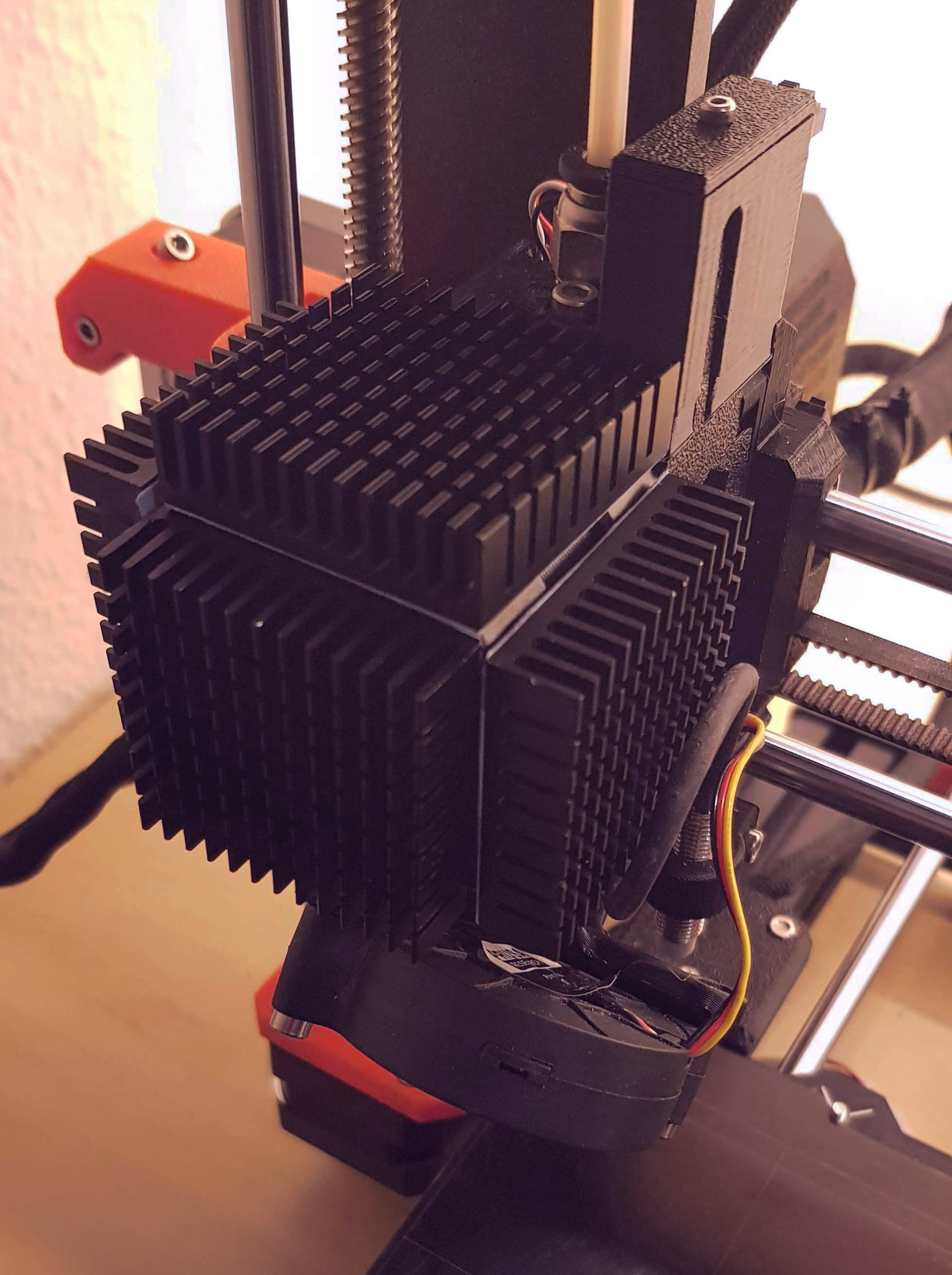
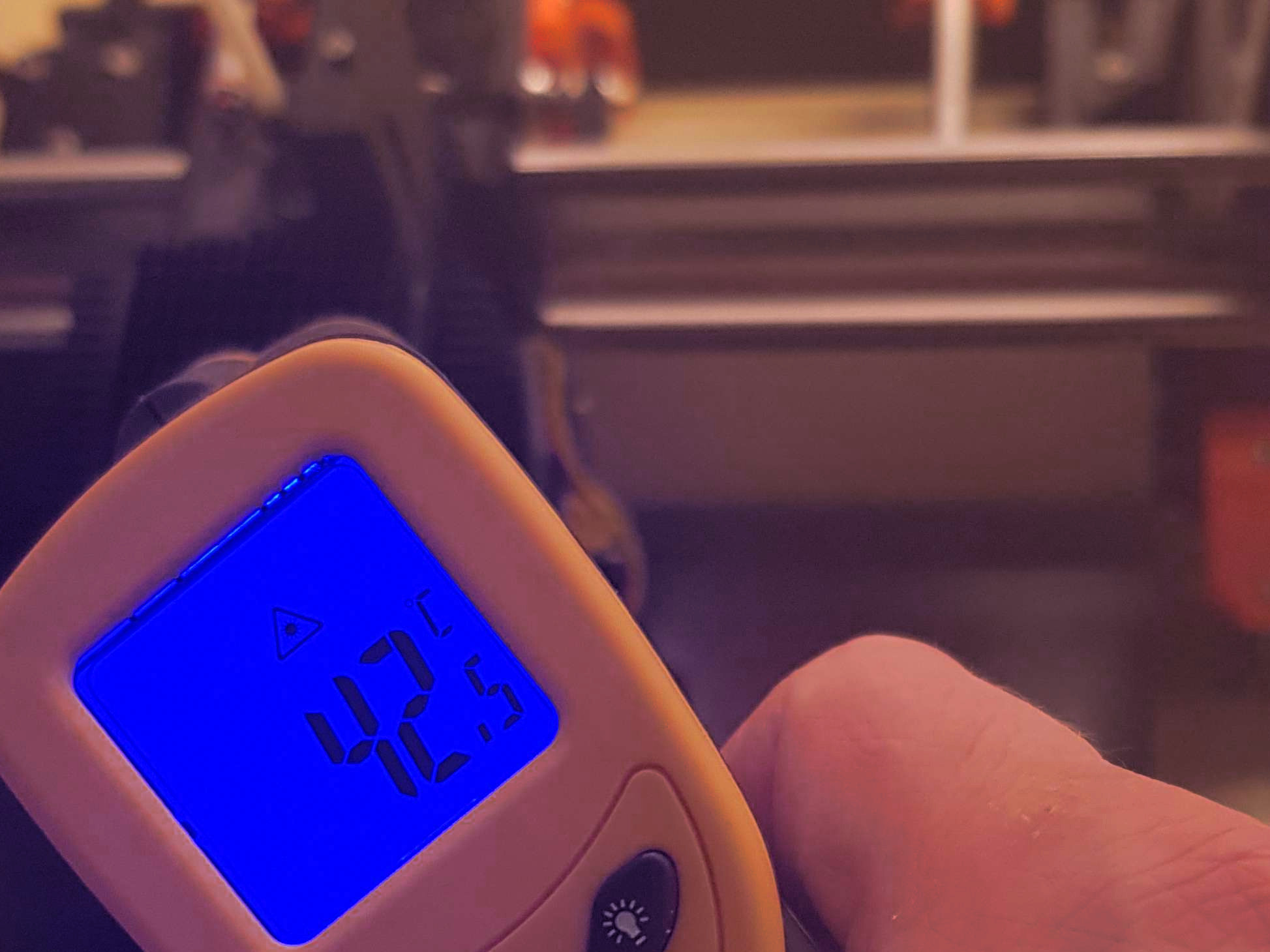
@m-cas I finally got around to trying passive cooling. Ambient temperature was 26.5 when I did the uncooled reference and 27.6 when I did the test, so the weather was slightly biased towards the reference. I've attached four 40x40x11mm heatsinks to the accessible surfaces of the extruder stepper with 0.5 mm arctic heatpads.
My measurements were taken after 30 minutes and after 5 hrs print time respectively.
Bare: 48.0°, 56.8°
Passive Cooling: 39.5°, 42.8°
So with the four heatsinks, I get a difference of ~ 14 ° at the plateau by adding a total weight of 60g, which is lighter than the noctua plus shroud. No more jamming trouble so far neither, I'll continue testing. So for my setup, this works great at minimum effort and weight, but I am not using an enclosure. Active cooling is probably back on the table if I build one.
Cheers - Mat
mkreider
on 10 Jul 2019
Cool (pun inteded), happy it worked out well! Could you share a pic?
-
From my phone while mobile, please excuse any errors.
On 10 Jul 2019, at 10:41, Mathias Kreider notifications@github.com wrote:
@m-cas I finally got around to trying passive cooling. Ambient temperature was 26.5 when I did the uncooled reference and 27.6 when I did the test, so the weather was slightly biased towards the reference. I've attached four 40x40x11mm heatsinks to the accessible surfaces of the extruder stepper with 0.5 mm arctic heatpads.
My measurements were taken after 30 minutes and after 5 hrs print time respectively.
Bare: 48.0°, 56.8°
Passive Cooling: 39.5°, 42.8°So with the four heatsinks, I get a difference of ~ 14 ° at the plateau by adding a total weight of 60g, which is lighter than the noctua plus shroud. No more jamming trouble so far neither, I'll continue testing. So for my setup, this works great at minimum effort and weight, but I am not using an enclosure. Active cooling is probably back on the table if I build one.
Cheers - Mat
—
You are receiving this because you were mentioned.
Reply to this email directly, view it on GitHub, or mute the thread.
m-cas
on 10 Jul 2019
Here you go
mkreider
on 11 Jul 2019
Thank you for this discussion. Unfortunately my wife won't allow me to run the printer in our air conditioned bedroom so the summer temperatures are sitting in the eighties (high twenties for the rest of the world). I'm getting regular jams due to the extruder running hot. Would you mind sharing the heatsinks and thermal connections you are using @mkreider ?
 Ghukek
on 14 Jul 2019
Ghukek
on 14 Jul 2019
@Ghukek Sure, I ordered these. Don't know if they deliver outside Germany though
If you can't get these, I don't think the make of the heatsinks will matter much as long as the dimensions fit. As for the pads, I chose one with good thermal conductivity (> 5W/mK) and where customer reviews said it sticks very well (so there's low risk of them being shaken off the print head). Thickness of course as thin as possible, I found that the 0.5mm is quite sufficient to cover the grooves on the NEMA 17 housing. Probably needless to say it, but make sure both housing and heatsinks get a very thorough alcohol scrubbing with a lint free cloth before applying the pads
Heatsinks
https://www.amazon.de/gp/product/B07C7SJHTH/ref=ppx_yo_dt_b_asin_title_o03_s00?ie=UTF8&language=en_GB&psc=1
Thermal pads
https://www.amazon.de/gp/product/B00UYTTLI4/ref=ppx_yo_dt_b_asin_title_o03_s00?ie=UTF8&psc=1
mkreider
on 15 Jul 2019
I looked into this a month or so ago. A single heatsink on the motor with a Noctua attached keeps the motor very cool. It is critical that the Noctua blows TOWARD the heatsink.
Passive after an hour of printing with a room temp of 25c. (42c motor)
https://i.postimg.cc/G3z572G0/flir-20190601-T110846.jpg
Active in identical conditions. (33c motor)
https://i.postimg.cc/HsxPfg9r/flir-20190601-T140019.jpg
 cggorman
on 15 Jul 2019
cggorman
on 15 Jul 2019
Update 7/17/19: If you used that file beware of "Bed Thermal Runaway" issues. The FW seemed to have issues. The extruder motors no longer were melting down but then I had other issues. Just updated to the new FW 3.7.2 and I will try using the motor fan cooling methods discussed above.
Update 7/31/19: I have completed the shroud and fan upgrade and I no longer have melting issues. This worked great! Make sure you buy the 5V fan and not the 12V if you are splicing directly into the extruder fan wiring.
 Master3DPrints
on 15 Jul 2019
Master3DPrints
on 15 Jul 2019
Fan and shroud did the work for me (meaning: no meltdowns when printing PLA for longer than 2.5/3 hrs).
Did you got info on what was changed in the custom fw to keep the temp low?
-
From my phone while mobile, please excuse any errors.
On 15 Jul 2019, at 21:06, Master3DPrints notifications@github.com wrote:
Are any of you finding this to be a reliable and permanent fix? I'm thinking to do the same with a fan and shroud or heatsinks.
Also, I spoke with Prusa. They're working on a FW fix. Here is a user customized FW file sent to me from a Prusa representative through their online chat. It takes you back to the old days of 3.7.0. lol, But if you rely on your printers as I do I guess it's worth it. Can anyone verify if it is 100%safe and secure. I'm always a little paranoid when downloading any unverified file from the web. https://cdn.livechat-static.com/api/file/v2/lc/att-old/9644675/14810561dd48faa6bfce47731804d664/MK3S_3.7.0_lowtemp.zip
—
You are receiving this because you were mentioned.
Reply to this email directly, view it on GitHub, or mute the thread.
m-cas
on 15 Jul 2019
Here is a U.S. Amazon link to the ones I used: https://www.amazon.com/gp/product/B01HSBM72W
I put 3 of them on a couple of weeks after getting my printer and have been printing successfully for over a year now. They're held in place with a narrow zip tie for easy removal. No fan + extra wiring needed.
 TheDuggem
on 16 Jul 2019
TheDuggem
on 16 Jul 2019
I spoke with Prusa. They're working on a FW fix. They gave me a user customized FW upgrade.
Hmm, there's currently no commit for it in the main (MK3) branch and no feature branch for it yet. I'll definetly have a look once its out, want to know what they did exactly.
mkreider
on 16 Jul 2019
Did you got info on what was changed in the custom fw to keep the temp low?
I didn't. They just mentioned that it helped keep the motor from getting too hot. It helped but then I had numerous "Bed Thermal Runaway" warnings which stopped prints.
Master3DPrints
on 19 Jul 2019
Here is a U.S. Amazon link
Thanks! purchased them a few days ago and will install when they arrive. I updated the FW to 3.7.2 and now the fan and shroud aren't sufficient to keep the temp down. I didn't have a failed print but the temps went up for sure. I had to put a normal desk fan on the printer to keep the temps down.
Update 7/31/19: they were not sufficient because I had the fan installed sucking air instead of blowing it and i used a 12V fan spliced into the extruder fan wiring and not the 5V version. Once I got the 5V fans here and installed those to blow on the extruder it worked perfectly.
Master3DPrints
on 19 Jul 2019
Funny how different everybody's use caes are. I'm trying to keep the motors below 100c in an 80c heated chamber!
cggorman
on 19 Jul 2019
@cggorman Wow... That is really hot. What are you printing in that chamber? PEEK? :)
 leptun
on 19 Jul 2019
leptun
on 19 Jul 2019
Large CF-PC parts. Would like to try PEEK but need a Mordor plate which basically means a new printer. That's next...
cggorman
on 19 Jul 2019
Hello,
I am using a Prusa i3 MK3s Zaribo MOD. After the MK3->MK3s Upgrade and the newest firmware from May/June 19 I got a clogged nozzle with a new PLA. I thought it's because this new material. I also thought it's because my enclosure and it's to hot inside. But yesterday I verify the extruder temp. The extruder is very very hot. So I tried to reduce the tension of the idler ... It's not really better but it works at the moment.
But I think I have the same problem
 TigerClaw33
on 30 Jul 2019
TigerClaw33
on 30 Jul 2019
But I think I have the same problem
Yeah, you most likely do. Try ordering this https://www.amazon.com/gp/product/B00NEMGCIA/ref=ppx_yo_dt_b_asin_title_o06_s00?ie=UTF8&psc=1
from amazon and printing a fan shroud like this
https://www.thingiverse.com/thing:2975582
from Thingiverse. Takes some work but it solved my problem on both my printers.
Master3DPrints
on 1 Aug 2019
I just noticed my extruder motor is around 55 degrees celcius. This is far too hot IMO. Is Prusa gonna fix this?
 unixunion
on 12 Aug 2019
unixunion
on 12 Aug 2019
Two tech supporters told me in July that 'some customers' were experiencing this and Prusa is aware of it, but they were very vague if Prusa is going to include a fix in the next release.
mkreider
on 12 Aug 2019
@TigerClaw33
Yes, you probably should cool the extruder. For me, it worked very well. However, for the sake of completeness, there is one more possible cause for jams that I recently experienced.
A bad thermistor in the hotend can lead to jamming without the firmware seeing anything unusual.
Sounds odd? Here's the story:
I ordered a new hotend from Prusa when huntning down the jamming related to heat from the extruder motor. Cooling the motor fixed the issue in the end, but the new hotend's thermistor was acting odd. It reliably jumped by about 20 degrees when passing the 60something degree mark, which was causing temperature runaway issues in firmware.
So I swapped the thermistor for a brand new one from Prusa. After that, there were no firmware errors anymore, but I suddenly had jamming issues again when printing PLA. Placing the probe of a digital thermometer into the heater block from the other side, it turned out the replacement thermistor was showing 14-22 degrees more than there actually were. And at a ~180°, PLA apparently can put up too much resistance when forcing it through the nozzle.
To prove the point, I tested extensively with a +20° offset in octoprint, and behold, all troubles were gone.
Since I had received not one but two bad thermistors from Prusa, quality control might be a bit on the low side here. I'd definitely recommend testing the sensor for everyone who suffers from persistent jamming trouble when using PLA.
In their defense (or rather in defense of customer support), they sent me two new thermistors and a little something for my pains when I complained. The new sensor fixed the issue as expected.
mkreider
on 12 Aug 2019
@Albator91120 Can you check your gcode, if it doesn't contain some current manipulating commands like M907 M208 M911 M912 ?
Can you post your problematic gcode here?
Older version of Slic3r is known to manipulate (incorectly) extruder motor current. This extruder motor current rise during filament change is unwanted relict from MMUv1, where it made sense.
 mkbel
on 16 Aug 2019
mkbel
on 16 Aug 2019
Hey guys , I encounter this problem on my Prusa I3MK3S in summer months. I fix it like mkreider did.
Prusa support said this issue is random and there might be a problem with my other extruder parts which is not. The heatsinks works well and extruding didnt stop on my 50 hours of printing. May I ask where do you live ? In my city the temperature goes up to 40 C in the summer months.
I note that only pla softens in the extruder gears.
 ThePlox
on 4 Sep 2019
ThePlox
on 4 Sep 2019
Hi,
I'm also affected by this problem, this summer has been impossible print for more than 1 hour, the problem starts and mid print ... the extruder motor clicks ....
After several test these are my conclusions:
- Printing with PETG goes right
- Printing with PLA not allways fails, depends on PLA used. Examples:
(1) Grey PLA from Prusa: always fail.
(2) Orange and Red PLA from BQ: always fail.
(3) White and black PLA from Colido: Never fails - Extruder motor temperature arise to 60/70 degree measuring it with an infrared termometer.
- The room temperature is about 27-29 degrees. (1) and (2) are solved using a climate at room under 25 degrees.
Also, I did some things following this guide:
https://help.prusa3d.com/article/oqpnu51iy6-extruder-clicking
- I checked the PTFE
- I changed the nozzle (0.25 and 0.4)
- Clean extruder gears
- Re-align extruder-gears and motor
The problem persists.
Now I installed an extra fan at the top of the extruder using an external power ... but I think it is not a good solution ...
My prusa is an MK3, and yesterday I bought the MK3S upgrade ... but I not sure whether it'll solve it.
I'll be aware for this thread to test more solutions ....
 paulino
on 4 Sep 2019
paulino
on 4 Sep 2019
Hey guys , I encounter this problem on my Prusa I3MK3S in summer months. I fix it like mkreider did.
Prusa support said this issue is random and there might be a problem with my other extruder parts which is not. The heatsinks works well and extruding didnt stop on my 50 hours of printing. May I ask where do you live ? In my city the temperature goes up to 40 C in the summer months.
I note that only pla softens in the extruder gears.
Hi, glad the heatsinks helped.
I live in central Germany, the highest temperature we had this summer was 39 ° in my city, resulting in 29-30 ambient for the printer.
mkreider
on 4 Sep 2019
I wrote to support two weeks ago and they gave me updated firmware with the lowered current into the extruder motor. The printer works like charm since then. They told me they had to fix it by themselves but obviously, they can't push it into the code for some reason. I will upload the firmware when I get home later today.
But it won't solve the problem for future firmware upgrades. I accidentally encountered Facebook's status from Patrick Zandl, chief of development in Prusa Research, and I told him that their award-winning printer can't print PLA. I provided him a few links including this issue. Promises were said but nothing since then and 3.8.0 doesn't include a fix for this.
At least I can use my printer for PLA now. Next time I am in contact with support I will ask them for the patch they use to lower the extruder motor current so I can at least build the firmware myself.
by-cx
on 4 Sep 2019
To have the code would be really good!
I fail to see why Prusa cannot push the fix into 3.8... or, even better, make this a selectable Option for those that have the problem!
Currently, even with a fan on the extruser, if a PLA (prusa perl white in my case) job goes beyond 15 hours it will fail to print. I live in Switzerland and the temp for the printer is currently around 27-29 degrees.
-
From my phone while mobile, please excuse any errors.
On 4 Sep 2019, at 18:14, Adam Štrauch notifications@github.com wrote:
I wrote to support two weeks ago and they gave me updated firmware with the lowered current into the extruder motor. The printer works like charm since then. They told me they had to fix it by themselves but obviously, they can't push it into the code for some reason. I will upload the firmware when I get home later today.
But it won't solve the problem for future firmware upgrades. I accidentally encountered Facebook's status from Patrick Zandl, chief of development in Prusa Research, and I told him that their award-winning printer can't print PLA. I provided him a few links including this issue. Promises were said but nothing since then and 3.8.0 doesn't include a fix for this.
At least I can use my printer for PLA now. Next time I am in contact with support I will ask them for the patch they use to lower the extruder motor current so I can at least build the firmware myself.
—
You are receiving this because you were mentioned.
Reply to this email directly, view it on GitHub, or mute the thread.
m-cas
on 4 Sep 2019
Attaching the promised file. It's patched 3.7.2.
Btw: I live in the Czech Republic and temperature in the room where the printer is is oscillating around 29°C.
by-cx
on 4 Sep 2019
Hi,
I'm experiencing (after months of perfectly printing) all of a sudden underextrusion issues.
I replaced PTFE tube, disassembled the heater and re-assembled. cleaned the extrusion gears. But nothing changes: during printing, all of a sudden, very limited filament comes out of the extruder. A few minutes later it recovers and the printing continuous normally (see attached picture)
Yesterday, I arrived on this blog, as I also noticed that the extruder gear was getting very hot.
This morning I installed the LOW TEMP FW of above post.
Still the same. Attached picture is taken a few minutes ago, with the new FW.
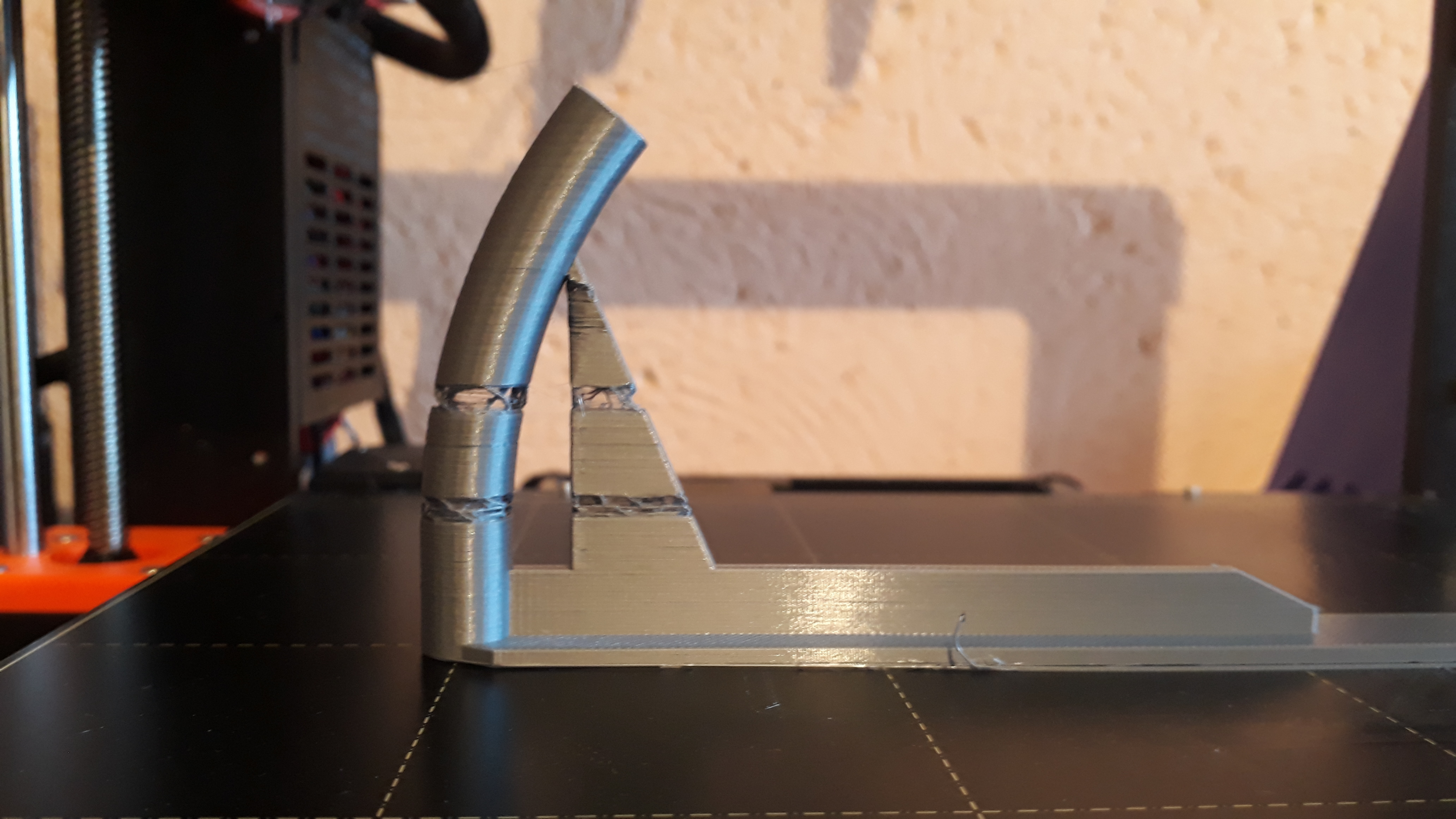
NEvertheless, I still think that the heat from the gear is the cause of the problem: I encountered multiple times (this weekend) that the start of the print job is corrupt: almost no filament is coming out of the extruder: at that beginning of a print job, the filament was halted in the same position after the end of the previous print job <-- so, the extruder axe has more time to bring his heat on the filament, which causes the filament to become flexible, resulting in less grip by the gears.
I'm trying now another print: same object, but sliced with previous prusa slicer release... You never know..
 TeeFiX42
on 8 Sep 2019
TeeFiX42
on 8 Sep 2019
@TeeFiX42 Your issue is a candidate for this procedure: https://help.prusa3d.com/article/lnbcnhg76k-cold-pull
by-cx
on 8 Sep 2019
In summary, there have been issues regarding MK3S, but not in MK2,
- Printing with PLA doesn't work. Jammed or underextrusion.
- Printing with other materials works fine.
- Extruder motor gets extremely hot.
I found a video on Youtube
which addresses the 'jamming' issue.
The difference between MK2 and MK3S/MMU2 is the tapered heatbreak.
They solved this problem with either oiling or replacing the heatbreak to the one from the MK2.

The picture shows the tapered heatbreak in the MK3S.
Not exactly tapered 'from' 2mm, but it's tapered from 2.2mm to 2mm.
My theory is that
PLA softens in low temperature (beginning from about 60–65 °C [glass transition temperature])
with insufficient cooling of the heatsink, the PLA expands inside the heatbreak stuck in the tapered part.
It then becomes extremely hard for the extruder motor to push filament through the tapered heatbreak, causing the extreme heat in the extruder motor.
I think the solution to this would be
- A more powerful fan for the heatsink, preventing PLA softening in the heatbreak (at least in the heatsink part). Noctua's 40x40x20 fan has more air pressure, and I think this would be a good option, if we were to keep the printer as quiet as it came out of the box.
- Non-tapered straight heatbreak. MK2 heatbreak would do just fine. My only concern is that Prusa wouldn't have changed this unless it would affect the MMU2's performance. Changing the filament would be a bit more difficult perhaps?
- I think the tapering should have been placed INSIDE the heatblock area, where the filament becomes fully adaptable to changes in outer tube diameter, not in the middle of the joint.
- As mentioned in the 3D Printing Nerd's video linked above, oiling might help.
 moonbladeprime
on 16 Sep 2019
moonbladeprime
on 16 Sep 2019
I'm experiencing the same issues as described at multiple points here. mkreider's solution works well for me, unless I'm printing in an enclosure. Should the "fan-on-top" solution work better for this case? Or do I need to work on a cooling/ventilation system for my enclosure in general?
 Bastian35022
on 16 Sep 2019
Bastian35022
on 16 Sep 2019
@Bastian35022 You probably will be getting a little better motor cooling with the fan, but you'll quickly hit a limit. Cooling is always an issue of temperature difference and if the air around the motor is hotter than your target temperature, its not feasible with air cooling inside the case. You'd need an outside heatsink connected with heatpipes (not sure if there are flexible ones) or tubes if you are using liquid or evaporation cooling. A lot of effort which is probably only worth it if you are printing really high temperature stuff, PC, PEEK and so on to protect the motor.
That said, why would you want to cool your enclosure? The whole point is to keep heat in and air draughts out. Because you normally use lots of fan speed for printing PLA to get a quick cooldown by intentionally creating a draught, an enclosure is not required sometimes even counterproductive, see Prusa Jamming. Most people I know who have an enclosure just leave the door open when printing PLA, problem solved. The ones who don't also don't use a Prusa MK3, but that might be coincidence ;-)
Cheers - Matt
mkreider
on 16 Sep 2019
@mkreider Thanks for the quick reply. Enclosure was a bit of a fancy word maybe; we are using the printer in a shared space, so it's locked away in a glass cabinet, and it would be great to be able to keep the door closed, especially for longer prints. Good to know that it's not even such a benefit for PLA in particular, maybe we can think of a work-around then.
Bastian35022
on 16 Sep 2019
Hi everybody. I've been following you trying to find a solution for this problem. It's a fact: with my mk3s I'm not able to print PLA!
I've been printing a cooling system for the extruder motor and placing a 5v fan, but it didn't work.
Then I started chatting with Prusa support asking if they could help me and they told me that maybe the problem was the nozzle. I checked and replaced it. I also replaced the thermistor, the hotend and the PTFE but the problem still.
They told me to unscrew the idler door. Done, but no way, continues not working.
So they told me to push all way down the PTFE, but again, not working.
Time ago I replaced the firmware with the one suggested by @by-cx and everything was working great! So, the question is: does anybody compiled the latest firmware (3.8.0) with the tension fix? I would like to test it.
Cheers.
 samuelemarazzita
on 18 Sep 2019
samuelemarazzita
on 18 Sep 2019
I used every firmware and had the same problem. First I thought it's because the filament tolerance ...
At the moment I am working for new articles on my website pcpointer.de. I tested many materials and configuration I also upgraded my Prusa with different components. For the extruder I can recommended a better version which will not be so hot. It's also from LDO Motors but improved. More information can be found here https://pcpointer.de/artikel/prusa-i3-mk3-mod-3d-drucker-selber-bauen/3/#LDO_Schrittmotoren
I also bought kerafol double glue folia. It works till 125 degree and an aluminium heatsink ...
This works well for me ... I also opend my closed chamber for PLA prints because otherwise it's too hot inside. It's because the extruder reach the same HDT like PLA. I also recommended not to pretension the screw for the extruder idler to much like in the instruction from prusa3d ;)
Btw. At the moment I am upgrading the prusa mk3s for high temperature to print PEEK. This seems to be impossible but I want to show people that with a simple printer it's possible to print industrial material
TigerClaw33
on 18 Sep 2019
I used every firmware and had the same problem. First I thought it's because the filament tolerance ...
At the moment I am working for new articles on my website pcpointer.de. I tested many materials and configuration Al's also upgraded my Priya with different components. For the extruder I can recommended a better version which will not be so hot. It's also from LDO Motors but improved. More information can be found here https://pcpointer.de/artikel/prusa-i3-mk3-mod-3d-drucker-selber-bauen/3/#LDO_Schrittmotoren
I also bought kersfol double glue folia. It works till 125 degree and an aluminium heatsink ...
This works well for me ... O also open my closed chamber of I print PLA. It's because the extruder reach the same HDT like PLA have. I also recommended not to pretension the the screw for the extruder idler to much like in the instruction from prusa3d ;)
Btw. At the moment I am upgrading the prusa mk3s for high temperature to print PEEK. This seems to be impossible but I want to show people that with a simple printer it's possible to print industrial material
Hey man, don't want to upgrade hardware, just want to solve the problem with the standard one.
samuelemarazzita
on 18 Sep 2019
Hello everybody.
Here what I did:
- replaced the nozzle
- replaced the thermistor
- replaced the heater
- replaced the heat break (with 2mm straight as suggested on the video)
- added fan on the extruder motor
I tried raising up temperature, slowing down the print but the problem still there.
I saw that the problem appears when the printer starts to make many retractions. After a bit, it jams.
Now I'm in chat with Prusa Technical Assistance and he's trying to send me a gcode made by him, maybe there is something that I'm missing.
I'll keep you updated.
samuelemarazzita
on 19 Sep 2019
An update. I spoke to Patrick a few days ago. They know about this issue and they are working on it. It's a shame I am the person who's writing it here because the silence from Prusa Research is probably the worst part of this issue.
After my chat with Patrick you won't get the updated firmware from the support anymore which I understand but consider it pretty bad for everybody with this issue same time. I was told there are tweaks that should help us with motor's temperature in firmware 3.8.0. They think the issue is in extruder motor. Some of them work fine, some don't.
@samuelemarazzita You reminded me one thing I have learnt a few weeks ago. There is a GCODE that can change current into the extruder motor. I haven't tried it yet mainly because I don't know the default number but it could be useful for somebody here.
by-cx
on 19 Sep 2019
Great to read! I've been chatting with 4 different people and nobody told me this. What I'm doing right now is printing with a sock on the extruder block and with temperature in the enclosure between 25°C and 28°C. I'm printing a cooling fan system for the lack enclosure, and hope this may help. Surely is not a great thing, having fan everywhere to print a PLA filament.
@by-cx hope they will fix the issue on a next release!
samuelemarazzita
on 19 Sep 2019
Than I would say ots a quality problem at LDO. But how can a stepper be so different from the other one to be so hot?
And let's say spen motors are working and some not. Why for example it's working with older firmwares? For me it's depending if I am printing in the enclosure or not. At the moment my stepper had minimum 80 degrees with heatsink too. But I think it's because I am printing industrial polycarbonat with carbon particles.
TigerClaw33
on 19 Sep 2019
@TigerClaw33, yes, think the filament you are using is a bit higher temperature melting, so you have no issues.
@by-cx, what about using this other one? http://marlinfw.org/docs/gcode/M906.html
I found somebody that tried: https://github.com/prusa3d/Prusa-Firmware/issues/696#issuecomment-385362318
samuelemarazzita
on 19 Sep 2019
@by-cx, the M906 command is not working on Prusa Firmware so, just need to wait they solve the problem.
samuelemarazzita
on 19 Sep 2019
In summary, there have been issues regarding MK3S, but not in MK2,
- Printing with PLA doesn't work. Jammed or underextrusion.
- Printing with other materials works fine.
- Extruder motor gets extremely hot.
I found a video on Youtube
which addresses the 'jamming' issue.
The difference between MK2 and MK3S/MMU2 is the tapered heatbreak.
They solved this problem with either oiling or replacing the heatbreak to the one from the MK2.
The picture shows the tapered heatbreak in the MK3S.
Not exactly tapered 'from' 2mm, but it's tapered from 2.2mm to 2mm.My theory is that
PLA softens in low temperature (beginning from about 60–65 °C [glass transition temperature])
with insufficient cooling of the heatsink, the PLA expands inside the heatbreak stuck in the tapered part.
It then becomes extremely hard for the extruder motor to push filament through the tapered heatbreak, causing the extreme heat in the extruder motor.I think the solution to this would be
- A more powerful fan for the heatsink, preventing PLA softening in the heatbreak (at least in the heatsink part). Noctua's 40x40x20 fan has more air pressure, and I think this would be a good option, if we were to keep the printer as quiet as it came out of the box.
- Non-tapered straight heatbreak. MK2 heatbreak would do just fine. My only concern is that Prusa wouldn't have changed this unless it would affect the MMU2's performance. Changing the filament would be a bit more difficult perhaps?
- I think the tapering should have been placed INSIDE the heatblock area, where the filament becomes fully adaptable to changes in outer tube diameter, not in the middle of the joint.
- As mentioned in the 3D Printing Nerd's video linked above, oiling might help.
I replaced the heat break and it seem not solving the problem. Hoped it could...
samuelemarazzita
on 19 Sep 2019
I don't know if it is already mentioned here, but the only reliable solution that will work under all conditions, is the use of a geared extruder. The motor axis will never contact the PLA fillament directly, so the problem is solved.
Check for Bondtech, skelestruder or BNBSX extruders. All of them are very well designed and also they fix some other flaws of the original design. And they support MMU2.
 Panayiotis-git
on 20 Sep 2019
Panayiotis-git
on 20 Sep 2019
Surely thats the solution, but I just spent 800€ for the mk3s and don't really want to spend more money to fix a firmware (maybe?) issue.
samuelemarazzita
on 20 Sep 2019
I do not think that this is a firmware problem. Perhaps they will find a way to bypass the problem using a smart firmware solution, but the root cause is not the software. It is the hardware.
I've tried almost all the alternatives that do not require to buy a new extruder. Currently I'm evaluating the Skelestruder with the MMU2 mod. It cost me very little and I got rid of all these problems.
Panayiotis-git
on 20 Sep 2019
Yes sorry, I meant to say that it's surely an hardware problem but it can be worked around by a firmware fix.
samuelemarazzita
on 20 Sep 2019
An update for you. Yesterday I could print a 8h stuff with PLA, after a failed attempt that clogged my extruder.
Here what I've done: I first unmounted (again) all the extruder and tight as much as I could the heat break and the nozzle. Then I putted a lot of heating paste on the heat break and screwed into the heatsink (of course I cleaned the excess paste).
Then I raised the temperature till 215°C and charged the PLA with the extruder motor but the filament was not dripping and the motor stopped pushing it. Then I tried to raise the temperature till 240°C till the filament was dripping down from the nozzle. Then I thought: hey, maybe there is a thermistor problem! So I toke a kitchen one (yes I know, it's bad) just to understand if the thermistor temperature was right or not. It was.
So I decided to create a gcode with a higher temperature for PLA, around 230°C for the first layer and 220°C for others. It started printing without problem but after a couple of layers I tried to turn down the temperature to 215°C. I left the enclosure doors open and the ambient temperature was around 26°C.
After a couple of hours I went to check the printer and was printing fine but I found the silicon sock that jumped down from the heating block on the bed. I checked inside and there was a bit of jammed filament in it. But the printer was printing! I saw that a layer was missing from the printed part (maybe because of the silicon sock). So it continued printing without the sock and it finished perfectly! No problem at all! I'll try another print tonight with a lot of retraction and I'll let you know.
samuelemarazzita
on 21 Sep 2019
Attaching the promised file. It's patched 3.7.2.
Btw: I live in the Czech Republic and temperature in the room where the printer is is oscillating around 29°C.
Customer support also sent me this firmware and after testing for about a week it has fixed the issue. Only thing is that the extruder motor torque has been reduced in this firmware so may cause other issues.....
 JordanKis
on 21 Sep 2019
JordanKis
on 21 Sep 2019
Hi all, tonight I’ve been printing a 16h stuff and it’s still printing without any problem. How did I fixed it? Simply opening the enclosure door to keep air flow and providing 2 12v fan on the top of the lack enclosure: 1 puts air in and 1 out. Simple. Here an article I’ve found. Hope it may help.
http://projects.ttlexceeded.com/3dprinting_extruder.html
I’ll update you as soon as print is finished.
samuelemarazzita
on 22 Sep 2019
I too have just had the issue of underextrding/skipping a day into a 36hr PLA print and found this thread. I've not had the issue before (about 800m of prints to date but few have been this length of time). According to a FLIR image, the extruder was running about 60c and was too hot to touch for long. I'll be trying both the heat sink then the active fan duct methods.
 jmone1
on 22 Sep 2019
jmone1
on 22 Sep 2019
I guys,
i just wonder if the gcode command M906 would work?
I saw in the firmware the setting right now should be between 0 and 63 while in the latest version the extruder is at the setting 30.
I wonder if you could just use M906 and lower the number to lets say 28.
And if the command does not work you still can fix it with adruino and lower the number manual.
But thats a lot of work.. just saying.
Just that you know i use a mk2 and it is totally diffrent from the motor current settings. thats why i can not try it by my self....
 gutigutmann
on 30 Sep 2019
gutigutmann
on 30 Sep 2019
I guys,
i just wonder if the gcode command M906 would work?
I saw in the firmware the setting right now should be between 0 and 63 while in the latest version the extruder is at the setting 30.I wonder if you could just use M906 and lower the number to lets say 28.
And if the command does not work you still can fix it with adruino and lower the number manual.
But thats a lot of work.. just saying.Just that you know i use a mk2 and it is totally diffrent from the motor current settings. thats why i can not try it by my self....
I've tried but Prusa Firmware doesn't allow you to send that gcode command.
samuelemarazzita
on 30 Sep 2019
M907 is the right command. It sets current in mA for axis. Example:
M907 E535 ;sets extruder current to 535 mA
mA | trinamic register | note
-- | -- | --
0 | 0 | doesn't mean current off, lowest current is 1/32 current with vsense low range
30 | 1 |
40 | 2 |
60 | 3 |
90 | 4 |
100 | 5 |
120 | 6 |
130 | 7 |
150 | 8 |
180 | 9 |
190 | 10 |
210 | 11 |
230 | 12 |
240 | 13 |
250 | 13 |
260 | 14 |
280 | 15 |
300 | 16 |
320 | 17 |
340 | 18 |
350 | 19 |
370 | 20 |
390 | 21 |
410 | 22 |
430 | 23 |
450 | 24 |
460 | 25 |
480 | 26 |
500 | 27 |
520 | 28 |
535 | 29 |
N/D | 30 | extruder default
540 | 33 |
560 | 34 |
580 | 35 |
590 | 36 | farm mode extruder default
610 | 37 |
630 | 38 |
640 | 39 |
660 | 40 |
670 | 41 |
690 | 42 |
710 | 43 |
720 | 44 |
730 | 45 |
760 | 46 |
770 | 47 |
790 | 48 |
810 | 49 |
820 | 50 |
840 | 51 |
850 | 52 |
870 | 53 |
890 | 54 |
900 | 55 |
920 | 56 |
940 | 57 |
950 | 58 |
970 | 59 |
980 | 60 |
1000 | 61 |
1020 | 62 |
1029 | 63 |
mkbel
on 30 Sep 2019
We know about the problem that in some cases the motor of the extruder is overheating. Now we are working on both hardware and firmware solutions. We test different variants of motor current regulation as well as motor cooling. We need to test each solution properly for any side effects. Thank you for your patience.
 michalxfanta
on 1 Oct 2019
michalxfanta
on 1 Oct 2019
I tried to replace extruder motor and it hasn't helped, still too hot for PLA. I start thinking the issue is in the board.
@michalxfanta Can you tell us where we can change the current value in the firmware? At least we could build our own firmware and test it ourselves
by-cx
on 26 Oct 2019
@by-cx You don't need to rebuild firmware in order to change current, you can use Gcode M907. https://github.com/prusa3d/Prusa-Firmware/issues/1757#issuecomment-536682024
mkbel
on 30 Oct 2019
@by-cx If you wish to build your firmware anyway, defaults are there in Configuration_prusa.h
this file is produced according to build instructions https://github.com/prusa3d/Prusa-Firmware/blob/MK3/README.md by copying or including /varinant file
define TMC2130_CURRENTS_H {16, 20, 35, 30} // default holding currents for all axes
define TMC2130_CURRENTS_R {16, 20, 35, 30} // default running currents for all axes
default values for trinamic current control register are per axis {X, Y, Z, E}
for reference you can use table https://github.com/prusa3d/Prusa-Firmware/issues/1757#issuecomment-536682024
But if your E motor runs too hot, it means your printer ambient temperature is too hot for PLA. If you manage to have E motor to run cooler it doesn't make heat-break cooler and you can suffer filament jams there. If this is caused by enclosure just don't print PLA in enclosure or add ventilation to your enclosure for PLA printing.
Also grep your *.gcode files for M907, older versions of Slicer are known to add some current manipulating commands during MMU filament change. This was legacy of MMU_V1 and it was forgotten there.
Also make sure you didn't switch your printer to farm mode by accident, in farm mode, different higher defaults are applied to E motor.
mkbel
on 30 Oct 2019
@mkbel Thank you for the info, I will build my own firmware. I had read the recent comments after I wrote my last message so I have been using the M907 gcode in Slicer and it works just fine. It's still more reliable to build my own firmware thought. I believe the current value will restore it's default value if the mode is changed.
I use encloser but it's opened when I am printing PLA and the ambient temperature is around 28-30 °C. That's close to a hot summer day which I believe shouldn't be a problem. I am a proud owner of MK2S too and it prints perfectly fine in the same conditions.
I use the latest Prusa Slicer and there is no M907 line in the output gcodes except the one I added myself.
The ambient temperature was the first thing support told me but when I started digging into the problem I found out that I am not alone. This is a too common issue to be a problem just in my ambient temperature. There are apparently extruder motors that are fine, there are MK2(S) printers that are fine so it tends to look like an extruder flaw and not an environmental issue.
Anyway, thank you for the workaround, I believe I can use the printer without any problem now :-)
by-cx
on 30 Oct 2019
Just for those (like me :D) that are not so much into gcodes, how do you use the m907 exactly and with which values?
thanks!
On 30 Oct 2019, at 17:34 , Adam Štrauch notifications@github.com wrote:
@mkbel Thank you for the info, I will build my own firmware. I had read the recent comments after I wrote my last message so I have been using the M907 gcode in Slicer and it works just fine. It's still more reliable to build my own firmware thought. I believe the current value will restore it's default value if the mode is changed.
I use encloser but it's opened when I am printing PLA and the ambient temperature is around 28-30 °C. That's close to a hot summer day which I believe shouldn't be a problem. I am a proud owner of MK2S too and it prints perfectly fine in the same conditions.
I use the latest Prusa Slicer and there is no M907 line in the output gcodes except the one I added myself.
The ambient temperature was the first thing support told me but when I started digging into the problem I found out that I am not alone. This is a too common issue to be a problem just in my ambient temperature. There are apparently extruder motors that are fine, there are MK2(S) printers that are fine so it tends to look like an extruder flaw and not an environmental issue.
Anyway, thank you for the workaround, I believe I can use the printer without any problem now :-)
—
You are receiving this because you were mentioned.
Reply to this email directly, view it on GitHub, or unsubscribe.
m-cas
on 30 Oct 2019
@by-cx There are two differences between MK2 and MK3. MK2 has higher pressure heat-break cooling fan and its heat-break is same bore all the way through. MK3 heat-brake is same bore as MK2 from nozzle to thinnest part and 0.2 mm bigger bore from thinnest part all the way up to PTFE tube. This widening enables to reload the same filament after it has been unloaded by MMU. Drawback of this widening is that if you print slowly (in term of volumetric flow) and with lot of retractions filament bulges in widened part. This bulging leads to additional drag E motor needs to overcome. To counteract this, default E motor current is higher in MK3. If you lower E motor current it can lead to filament jams in heat-break. Of course if you don't use MMU, you can use MK2 heat-break in MK3, it's outer dimensions are the same. And then you can use in MK3 reliably same (lower) E motor currents as in MK2.
This is the reason why we can not simply lower default E motor current in MK3. If we do so, we would have problems with heat-break clogs. Current value is compromise to minimize both problems.
We are thinking of controlling E motor current dynamically to have same power when needed but to minimize heating. This is not the easy task as switching current leads to nozzle pressure fluctuations harming print quality. That is why we can not simply set different holding and running current to Trinamic driver and let it control it automatically.
mkbel
on 30 Oct 2019
@m-cas It's in printer settings. It prepends the generated gcode.
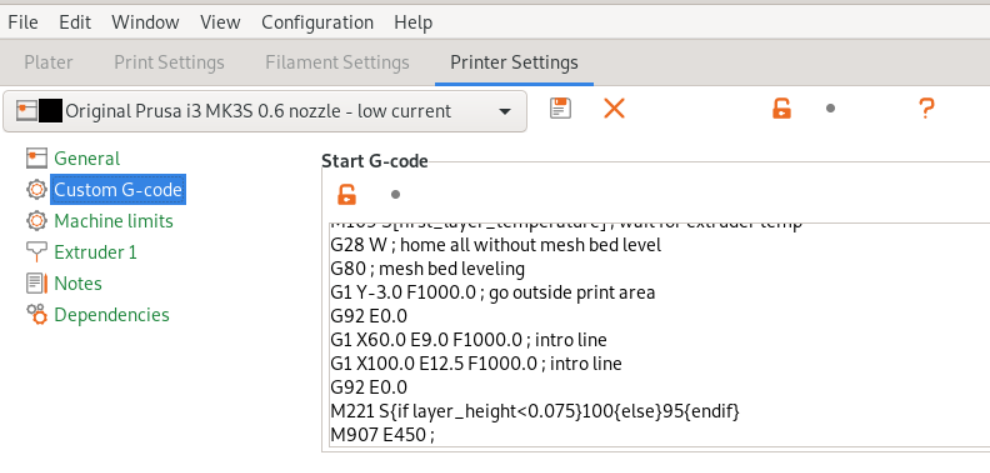
by-cx
on 30 Oct 2019
Huff...
There needs something to degrade in the extruder.... I used enclosed printer with PLA without MMU and had no issues.
After MMU2 upgrade problems started (now even without MMU unit).
If the ambient temperature is only 30 deg C, the motor goes up to 70 deg C.
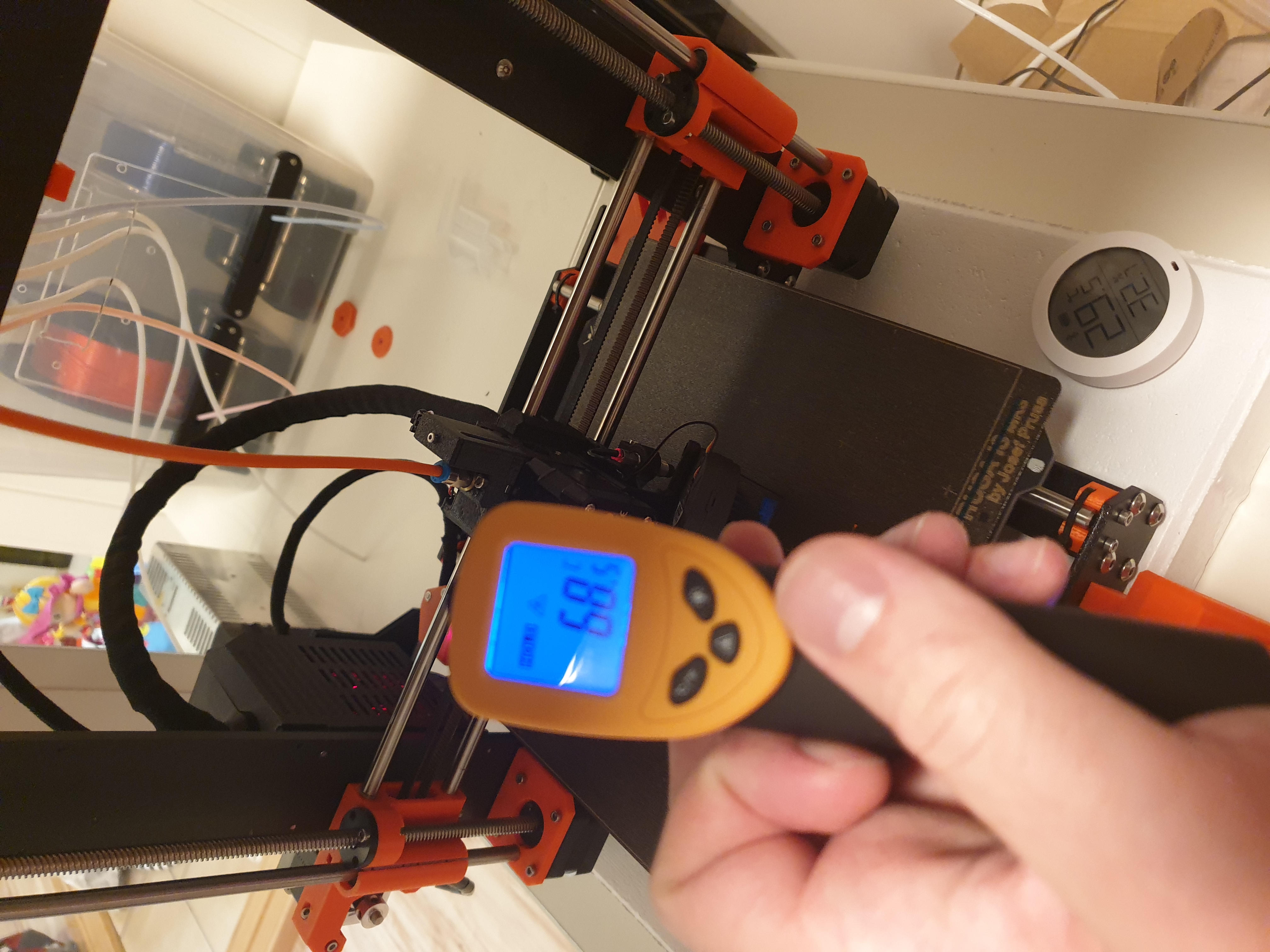
I am not a heavy user, but I've printed some (most of that is PLA):
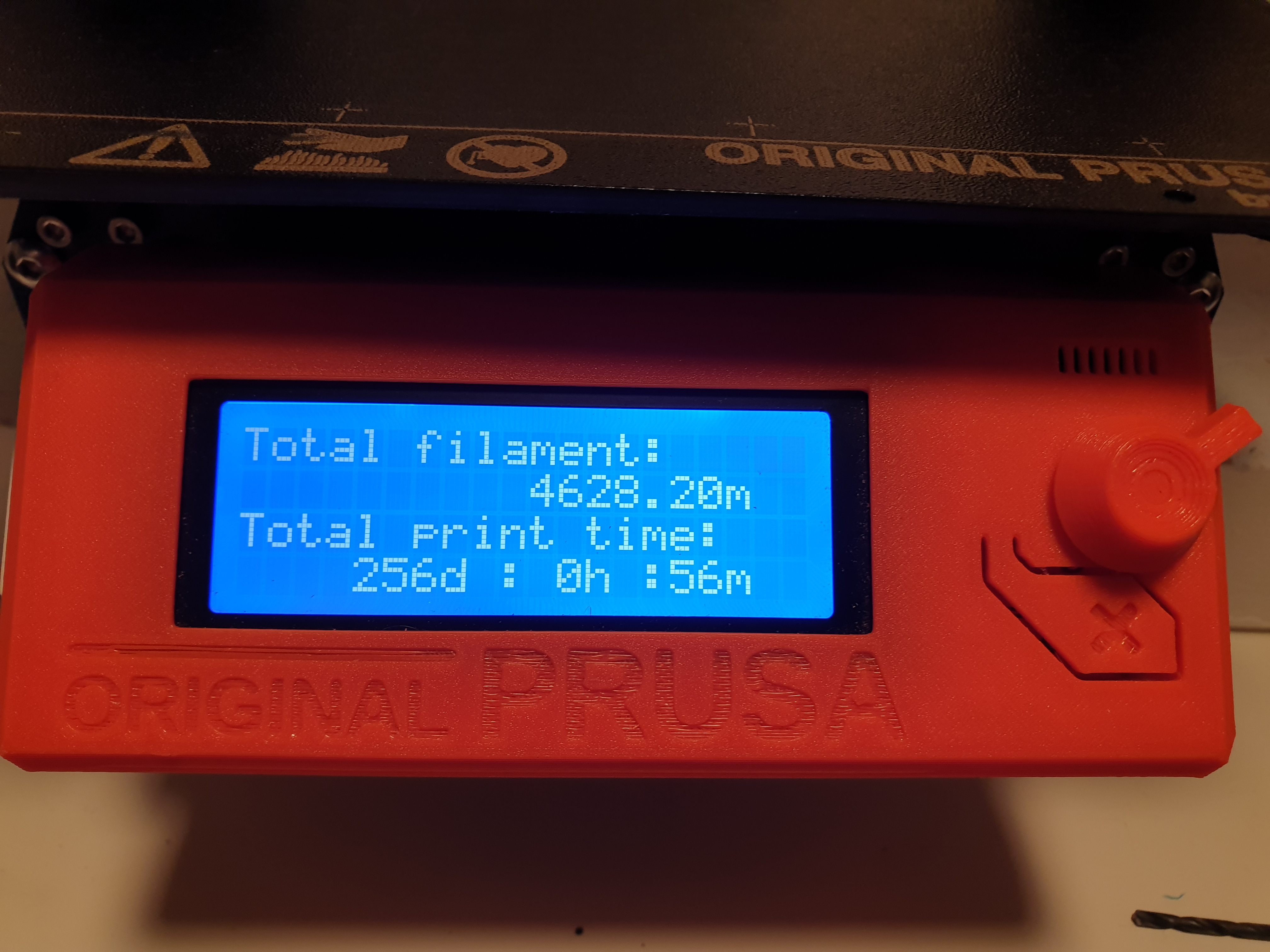
So what other might change during MMU upgrade?
 pacaj2am
on 30 Oct 2019
pacaj2am
on 30 Oct 2019
@pacaj2am Can you try to downgrade firmware to version you used before when you have no overheating issue? Does the problem disappear? Can you share some gcode which overheats E motor? What power supply do you have? Silver T-LED or black DELTA? What is your mains voltage and frequency? But anyway your motor temperature looks reasonable according to motor supplier specification. Motor specification said, that it heats less then 80°C above ambient temperature at rated current of 1000mA. As we run motor around 500mA it should not heat more than 40°C above ambient temperature. As your ambient temperature is 30°C motor should be less than 70°C.
mkbel
on 31 Oct 2019
So what other might change during MMU upgrade?
There is no grille which restricts airflow out of extruder fan. Maybe grille increased air pressure so some air sipped up around heat-break radiator and cooled filament and bondtech gears.
Distance between nozzle, heater and heat-break assembly and bondtech gears is smaller in MK3S then in MK3.
mkbel
on 31 Oct 2019
@pacaj2am Can you try to downgrade firmware to version you used before when you have no overheating issue? Does the problem disappear? Can you share some gcode which overheats E motor? What power supply do you have? Silver T-LED or black DELTA? What is your mains voltage and frequency? But anyway your motor temperature looks reasonable according to motor supplier specification. Motor specification said, that it heats less then 80°C above ambient temperature at rated current of 1000mA. As we run motor around 500mA it should not heat more than 40°C above ambient temperature. As your ambient temperature is 30°C motor should be less than 70°C.
I am using silver T-LED powersupply, 230V 50Hz (Norway).
I understand, that the motor temp is OK, but bith motor at this temperature it fails to print PLA - the fillament is squeezed by the bondtech gear and than it is too thick in one axe to pass through the PTFE tube.
I was allways printing wit 0.2 or 0.15mm layer height with the quality settings.
I tried different pressure of Bondech gears, but that was not helping much. They are perfectly aligned to the PTFE tube.
What I noticed is this:
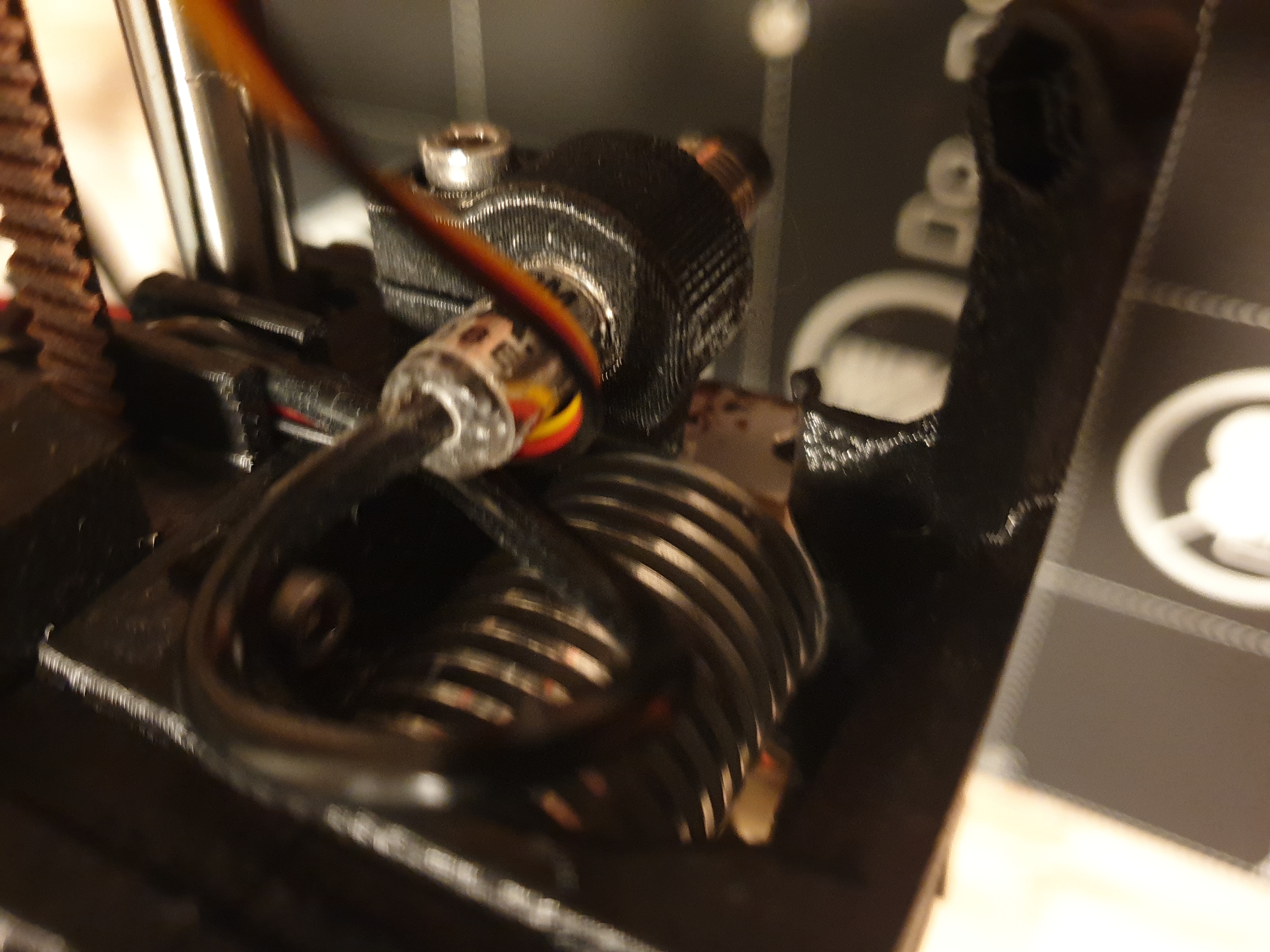
My printer is one of the first MK3 (did upgrade to MK3S and MMU2 to MMU2S).
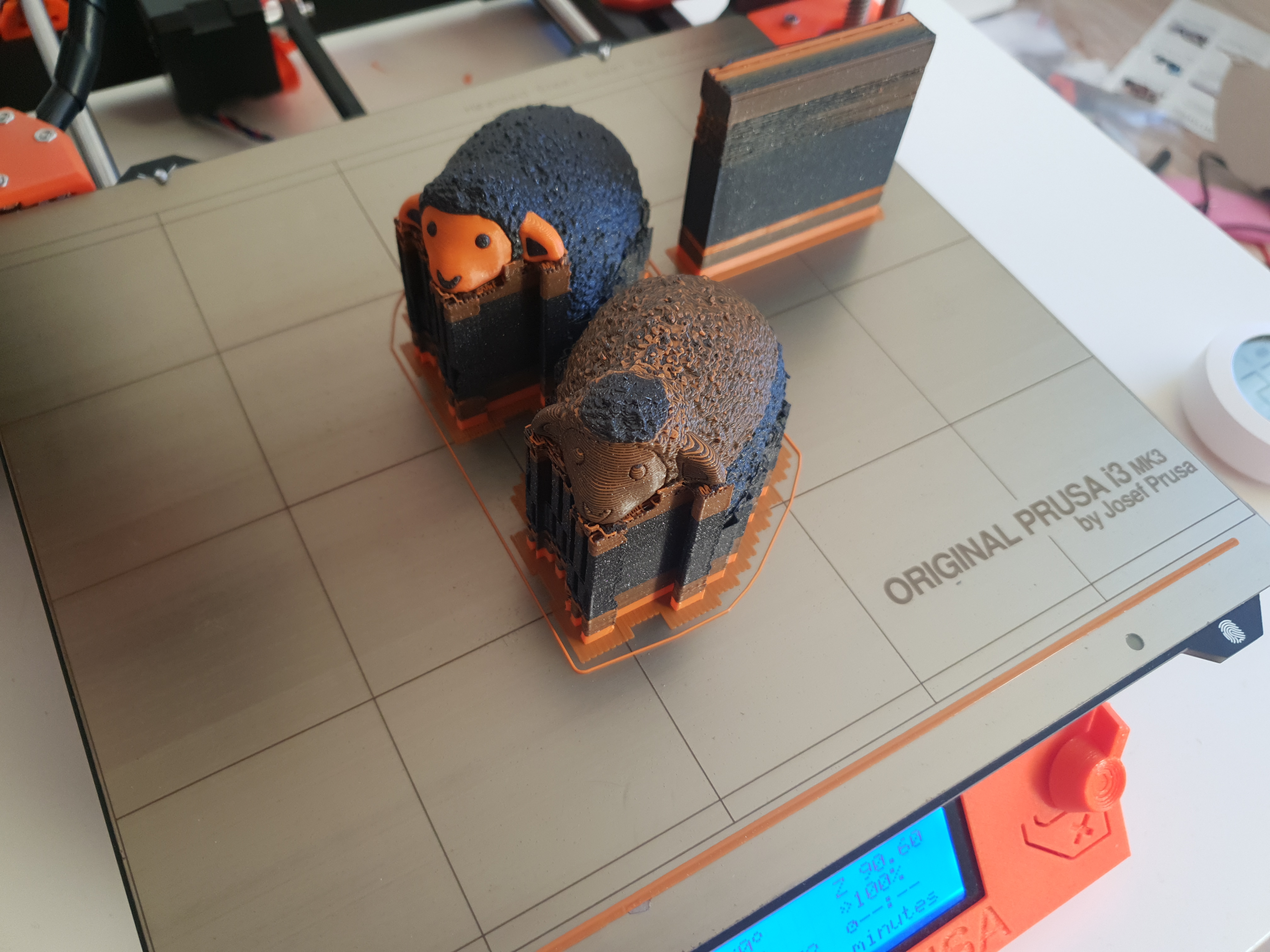
What is my feeling - problems araised with the extruder upgrade.
pacaj2am
on 31 Oct 2019
@mkbel Thank you for the explanation. Unfortunately, the result is MK3S is not reliable while printing PLA in ~27+ °C rooms and my room is almost always 27+ °C. You traded one jam type for another.
It would be great to have a "fixed" firmware but I am ok even with a hardware solution. If you decouple bondtech gears from the motor the problem vanishes and you can set the current even higher. Have you thought about geared extruder upgrade for MK3S?
What do you think about Zaribo Extruder Motor By LDO stepper motor? It's recommended in community and it supposes to fix the issue.
by-cx
on 31 Oct 2019
@pacaj2am Can you share some gcode and tell what filament brand and color you use so we can try to reproduce?
mkbel
on 31 Oct 2019
@mkbel Here is the gcode. Another failure now. Printed in Prusament Galaxy Black.
Spaziofranco_Mechanical_Pencil_1_0.15mm_PLA_MK3SMMU2S_4h53m.gcode.zip
pacaj2am
on 1 Nov 2019
@pacaj2am Thank you, I am passing this to test department.
mkbel
on 2 Nov 2019
Hey guys, go easy on me. I'm a bit of a noob with Prusa firmware, I'm no expert with Arduino, and everything I know I learned from Marlin while building my old printer before buying a Prusa.
Anyway, I'm looking in the 3.8.1 (full release) source code, and in marlin.cpp I found these lines:
#ifdef TMC2130
        //increased extruder current (PFW363)
        tmc2130_current_h[E_AXIS] = 36;
        tmc2130_current_r[E_AXIS] = 36;
Does this mean that the release version's TMC register is set to 36 "farm mode extruder default" (590 mA) as noted above, instead of 30 or 29 to set it at 535 mA? Again, I may be misreading it. The source files don't have a configuration_prusa.h file so I went searching through the whole sketch.
 cryocide
on 2 Nov 2019
cryocide
on 2 Nov 2019
Does this mean that the release version's TMC register is set to 36
No, this applies only if the printer is switched to farm_mode (see the enclosing if block).
The source files don't have a configuration_prusa.h file so I went searching through the whole sketch.
you need to make it yourself by copying and renaming file from variant folder depending on what printer do you have
https://github.com/prusa3d/Prusa-Firmware#2b
mkbel
on 3 Nov 2019
Ah, I see! That's good to know! Thank you! I had been looking through the firmware to find the motor current configuration to see how it is normally set. I'll take a look at your link and learn what I can do with it!
My background on the hot extruder issue:
I've been having issues printing with PLA because of a hot extruder motor on my MK3S apparently heating up the Bondtech gear enough to soften the filament and wrap it around the motor shaft, resulting in some of the worst jams I've ever seen. I usually print in PETG so I don't know if I would have had these issues with long PLA prints since I got the printer in August (3.7.2 firmware) or if it started with 3.8.0.
cryocide
on 3 Nov 2019
Had another issue with PLA. Seems the hot motor might be just side effect. Photo of fillament released from hotend from extruder is bellow (one can see other 2 grinded parts):
Fillament is Prusament PLA Azure Blue.
Gcode is bellow, it failed at layer with 3.4mm z-height. G-code attacehd (MMU unit was disconnected).
Ambient temperature in the box was 24 deg. C but the printer was quite cose to the heatbed.
@mkbel Should I try to buy a new heatbreak?
pacaj2am
on 10 Nov 2019
@pacaj2am
So what other might change during MMU upgrade?
In MK3 extruder there are two big hexagonal openings through which you can see bondtech gears from both sides.
In MK3s there is only one opening from one side and it is smaller.
Maybe those openings keeps bondtech gears cooler.
mkbel
on 2 Jan 2020
I guess there are a few options that can help fix this.
Additional cooling for the motor and/or BondTech gears. Lots of people seem to be putting heatsinks on their motors. I tried it, but this didn't work reliably for me. I still had PETG overheat a few times and wrap around the gears.
Isolate the motor's heat from the filament path. This is where I'm at now. The BNBSX Short Ears extruder mod is a belt-driven direct drive extruder. The jams have completely stopped since I switched, but the switch also involved a thinner LDO stepper that supposedly runs cooler. Either way, the motor heat shouldn't matter because the polychain belt doesn't transfer any heat to the BondTech shaft.
Figure out what about the TMC2130 or its settings in the firmware is causing the stock LDO stepper to get so hot. It's not the current setting. Maybe it's something in the settings that changes the firmware, like SpreadCycle vs. StealthChop? The motors are designed to take the heat with no problem, so this might be a case of "not the right driver/stepper combo for this application." I don't have access to an oscilloscope so I can't look at the waveforms and compare the outputs to old firmware. It's really peculiar that the extruder motor gets hotter than say, the X-axis motor given that they both run pretty much nonstop during a print job.
So what other might change during MMU upgrade?
One thing that just occurred to me was that with the MMU, the filament is getting pulled through two long, bendy lengths of PTFE tubing. Bowden extruders do this all the time except that they push instead of pull, but they're almost always outside an enclosure aren't they? Maybe the motors are generating more heat when overcoming that additional friction (fixed speed + more friction = more power demand = more heat) and that would explain why MMU users see this problem more frequently.
cryocide
on 2 Jan 2020
I too have the issue with E motor heating and my Mk3S is in 21C ambient temps at all times. I had no issues before the firmware upgrade so I am now running the custome version posted way up above with a heatsink on the E motor. I do not have an MMU so no related issue with that.
I contacted support and went back and forth with them until I finally gave up after one week of getting nowhere. I would really like to use the new features included in the latest releases of firmware but not if the issue is still present. Any idea when this will be fixed or should I just give up and put a Moons motor on the extruder?
I would like to have this printer be reliable again before my Mini arrives.
 swblum
on 25 Jan 2020
swblum
on 25 Jan 2020
here is what I did. I use the first fan replaced when I upgraded my MK2S. I added a pipe then a small part of the air flow is directed on the bondtech gear. I can give the stl file if someone wants to modify the original file. At this moment no longer hot problem.
Could you share the design please :)
 El-Papo
on 2 Feb 2020
El-Papo
on 2 Feb 2020
Can anyone update on the status of this issue?
My MK3S+MMU2S has been a workhorse, churning out face shield frames, but I noticed I started having filament loading issues... and that led me to discover that my E-motor was scorching hot! I'm having to back off my production rate now, and let the machine cool completely to ambient between jobs... and not to be morbid, but I can't help but feel that is costing lives in my local community.
 bear454
on 21 May 2020
bear454
on 21 May 2020
@by-cx There are two differences between MK2 and MK3. MK2 has higher pressure heat-break cooling fan and its heat-break is same bore all the way through. MK3 heat-brake is same bore as MK2 from nozzle to thinnest part and 0.2 mm bigger bore from thinnest part all the way up to PTFE tube. This widening enables to reload the same filament after it has been unloaded by MMU. Drawback of this widening is that if you print slowly (in term of volumetric flow) and with lot of retractions filament bulges in widened part. This bulging leads to additional drag E motor needs to overcome. To counteract this, default E motor current is higher in MK3. If you lower E motor current it can lead to filament jams in heat-break. Of course if you don't use MMU, you can use MK2 heat-break in MK3, it's outer dimensions are the same. And then you can use in MK3 reliably same (lower) E motor currents as in MK2.
This is the reason why we can not simply lower default E motor current in MK3. If we do so, we would have problems with heat-break clogs. Current value is compromise to minimize both problems.
We are thinking of controlling E motor current dynamically to have same power when needed but to minimize heating. This is not the easy task as switching current leads to nozzle pressure fluctuations harming print quality. That is why we can not simply set different holding and running current to Trinamic driver and let it control it automatically.
According to your comment, I can use the MK2 heatbreak in the MK3s, which would be great, but it is not available on the Prusa website. The only heatbreak available says "Hotend heatbreak E3D (MK3/S, MK2.5/S, MMU2S)" which I think would be just the MK3s version with the problematic wider part as you described. Can you advise where I can correctly source the original MK2 heatbreak? Thank you!
 ledbfg
on 21 May 2020
ledbfg
on 21 May 2020
I dug some ancient development version of MK3S with MMU extruder. It differs from current MK3S extruder design, that there are hexagonal openings to bondtech gears from both sides. This might help to allow keep gears cooler. It is absolutely untested - even it was not tested whether it can be assembled together. So it is absolutely without warranty, use at your own risk. Only thing what was tested is, that it can be printed. It is intended to be used with MMU, but of course it is possible to try it without MMU, only filament autoload feature will be bit harder to use. If someone tries that, please comment whether it is possible to assemble, use and if it helps avoiding heat buildup in gears.
mmu_extruder.zip
mkbel
on 21 May 2020
I ordered an official V6 heat-break from E3D on amazon which I'll install instead of the special heatbreak that comes with the MK3s...
Can you tell me which parts in particular I should print? Or would I need to print all of the parts in the zip file? Thank you!!
ledbfg
on 21 May 2020
@ledbfg: I have absolutely no clue, this extruder is for Prusa heat-break.
mkbel
on 21 May 2020
E-motor was scorching hot!
According to manufacturer specification, motor runs at less than 80°C above ambient temperature at full power. Full power is 1000mA.
E motor default setting is around 550mA. So it is expected to run 44°C above ambient temperature. So it is 70°C at room temperature of 26°C, there is probably higher temperature above print plate than temperature in rest of the room so higher temperature is expected.
It is possible to change motor current via gcode. It is possible that author of gcode for super speed printing of face shields increased that current. For example in our farm for printing 3d printers we use E current of 590mA, so motor is expected to run 47°C above room temperature.
This whole thread is about problems associated with slow printing from PLA with small layer height and elevated room temperature, which can cause PLA filament melting on bondtech gears. I don't expect this is your case, as shields are printed from PETG and with very high flow of material. PETG melts in higher temperature than PLA and filament is moving fast through gears so it is very improbable it melts there.
Motor maximum allowed ambient operating temperature is 50°C, with maximum allowed temperature rise of 80°C we get maximum motor operating temperature of 130°C.
So as long as your motor is under 130°C and it doesn't melt its mount everything should be alright.
mkbel
on 22 May 2020
Before I switched to a belt-driven extruder, I had started experiencing
Prusament PETG filament softening and jamming, though not quite as dramatic
as the PLA.
I think the motors will be okay at those temperatures, but I don't think
the PETG idler will survive for long once the motor shaft heats the
bondtech gears. I replaced the idler twice (both times were prusament PETG
parts) because they deformed and caused the filament sensor to malfunction.
I really do think the biggest difference with the MMU2s vs the MK3s may be
the increased friction along the filament path due to the long PTFE tubes.
If this is the case, it's not a firmware problem so much as a hardware
design oversight.
On Fri, May 22, 2020 at 3:51 PM Marek Běl notifications@github.com wrote:
E-motor was scorching hot!
According to manufacturer specification, motor runs at less than 80°C
above ambient temperature at full power. Full power is 1000mA.
E motor default setting is around 550mA. So it is expected to run 44°C
above ambient temperature. So it is 70°C at room temperature of 26°C, there
is probably higher temperature above print plate than temperature in rest
of the room so higher temperature is expected.
It is possible to change motor current via gcode. It is possible that
author of gcode for super speed printing of face shields increased that
current. For example in our farm for printing 3d printers we use E current
of 590mA, so motor is expected to run 47°C above room temperature.
This whole thread is about problems associated with slow printing from PLA
with small layer height and elevated room temperature, which can cause PLA
filament melting on bondtech gears. I don't expect this is your case, as
shields are printed from PETG and with very high flow of material. PETG
melts in higher temperature than PLA and filament is moving fast through
gears so it is very improbable it melts there.Motor maximum allowed ambient operating temperature is 50°C, with maximum
allowed temperature rise of 80°C we get maximum motor operating temperature
of 130°C.
So as long as your motor is under 130°C and it doesn't melt its mount
everything should be alright.—
You are receiving this because you commented.
Reply to this email directly, view it on GitHub
https://github.com/prusa3d/Prusa-Firmware/issues/1757#issuecomment-632887028,
or unsubscribe
https://github.com/notifications/unsubscribe-auth/AJN2Q6RXIVFDTRL5XGVIGZDRS3JT5ANCNFSM4HH4B2LA
.
cryocide
on 22 May 2020
@pacaj2am: Replacing heatbreak might help. Sometimes it is just sufficient to increase nozzle temperature. You can try to increase 5 or 10°C. Sadly your image doesn't show filament tip shape. If there is filament bulge small distance from the tip increasing temperature helps. https://forum.prusaprinters.org/wp-content/uploads/2019/11/IMG_20191125_104640__01-600x500.jpg
This is some illustration image, it is not perfect, as commonly there is bigger distance between bulge and filament tip. Here it looks like it was heating so long after jam that most of the filament between bulge and tip dripped outside the nozzle assisted by gravity. But I didn't find any better example inside the Internet.
mkbel
on 25 May 2020
I have MK3S for 5 months now. I cannot print PLA in 0.10 resolution after 3.9.0 update, because Extruder motor is so hot melting filament before PTFE tube insertion. I use Galaxy Silver PLA given with the printer. I can touch motor for about half a second. It is sooo hot. Many prints to make before summer holidays.
 voneAbides
on 17 Jun 2020
voneAbides
on 17 Jun 2020
@voneAbides What is your power supply? Black Delta or silver TLED? What is your mains voltage and frequency? What is your room temperature when prints are failing? Can you supply some gcode which fails to print?
mkbel
on 17 Jun 2020
Hello @mkbel. This is my first 3D printer so it maybe will be difficult with me :D I have Black Delta PSU. By mains you mean logic board? Room temperature is about 24 °C. This is last gcode that failed:
lode_x35_0.15mm_PLA_MK3S_11h28m.zip
It usually happens with longer prints or more detailed prints:
NordicWarrior_test_0.05mm_PLA_MK3S_3h48m.zip
Before the update I was able to print with 0.05 detail.
And I have LACK enclosure.
Thank you for help.
voneAbides
on 17 Jun 2020
By mains you mean logic board?
I mean wall power. E.g. 230V 50Hz or 110V 60Hz. If you don't know, just tell the country you live in, for most countries in the world this is sufficient info. There are some exceptions like Japan and Brazil, where country is not sufficient to identify mains power system.
mkbel
on 17 Jun 2020
230V 50Hz Czech Republic.
voneAbides
on 17 Jun 2020
And I have LACK enclosure.
Oh, enclosure. It is impossible to print PLA in enclosure. Just don't use enclosure for PLA and it should be alright. Enclosure makes sense for high temperature materials like ABS and ASA.
mkbel
on 17 Jun 2020
Ou, I fool. Thank you. I will try this. Maybe it was luck before update.
voneAbides
on 17 Jun 2020
Or maybe it’s just because ambient temperature increased. I’m also using a lack enclosure (old version) and didn’t have issues with pla in the summer as long as I keep the enclosure doors open (and maybe a bit of AC)
leptun
on 17 Jun 2020
@leptun I have also old version enclosure. Try keeping doors open. Thanks
voneAbides
on 17 Jun 2020
Anyway we will try to examine your claim, that there is difference in E motor heating between firmware versions.
If your PLA print fails without enclosure you can also check tip of removed filament. https://github.com/prusa3d/Prusa-Firmware/issues/1757#issuecomment-633371185
mkbel
on 17 Jun 2020
Ok, thank you.
voneAbides
on 17 Jun 2020
After much research, it seems that the PLA failures are due to the oversized heatbreak that comes with the MK3s. I have used my MK2s constantly for years with PLA without any problems. That has the official E3D heatbreak that is designed for the V6 hotend. Prusa actually supply a modified version with the MK3s which has a 0.1mm larger diameter (which is to help out the MMU system which I don't intend to use). The larger diameter makes the PLA to expand inside it, making it thicker than it should be (mainly during retractions - it may never fail if you run it in "vase mode") the expanded PLA puts extra pressure on the extruder motor, which makes it hotter, which heats it more, causing more pressure, causing more heat... a viscous cycle until it stops printing all together ... the 3D printing nerd explains it a little bit here, and shows it working flawlessly by "downgrading" to the original E3D V6 heatbreak
https://www.youtube.com/watch?v=dSPPrb0J8CY
Adding a cooling fan on the stepper motor will help the problem but I'd prefer to fix the problem at the source, not just add cooling to the overheating motor... The motor shouldn't overheat when printing PLA... I've printed PLA for years and years without problems on my MK2s. I've just got confirmation on the shipping of my MK3s which will arrive in 2 days, and I already have the original E3D V6 heatbreak in my possession which I will swap out as I build the printer, so, fingers crossed I'll never even experience this problem. (I've waited 6 weeks for shipping so I've done a LOT of research into the problematic PLA and the heatbreak seems to be the culprit.)
PS you can get the official E3D heatbreak from Amazon NOT the Prusa website, as they only stock the modified versions and even "claim" that it's good for the MK2 as well... of course, if FITS but it's gonna mess up so much, I can't believe they are still supplying them. They should be sold with the MMU upgrade kit and require a change out, not installed in every printer making them F* up.
Here's the link in Amazon, I've got this exact item currently installed in my MK2s and has been flawless since install. https://www.amazon.com/gp/product/B077Y2MHW8/ref=ppx_yo_dt_b_search_asin_title?ie=UTF8&psc=1
Hope this helps someone!
ledbfg
on 17 Jun 2020
@ledbfg I checked that and you are right, that we don't currently offer original MK2 non MMUv2 hotend.
But it is still possible to order separate heat-breaks of both designs:
https://shop.prusa3d.com/en/mk2mk2s/121-hotend-heatbreak-e3d-mk2s.html
https://shop.prusa3d.com/en/mk3mk3s/202-hotend-heatbreak-e3d-mk3s-mk25s-mmu2s.html
So if someone have MK3 printer and doesn't wish to use MMUv2 and wants to print Protopasta PLA, he can downgrade to MK2 heat-break.
mkbel
on 18 Jun 2020
Thats interesting. I'm currnetly printing 10h file. After 6 hours with opened enclosure doors no failure. I will try to investigate MK3S's heat-break more.
voneAbides
on 18 Jun 2020
I’ve had this problem with many more filaments than just proto pasta PLA.
I have the MMU2s and use it. So I guess I’m just stuck with a flawed design.
Sent from my iPhone
On Jun 18, 2020, at 6:41 AM, voneAbides notifications@github.com wrote:
Thats interesting. I'm currnetly printing 10h file. After 6 hours with opened enclosure doors no failure. I will try to investigate MK3S's heat-break more.—
You are receiving this because you are subscribed to this thread.
Reply to this email directly, view it on GitHub, or unsubscribe.
 fursphere
on 18 Jun 2020
fursphere
on 18 Jun 2020
@fursphere You can still increase nozzle temperature, if you are experiencing clogging.
mkbel
on 19 Jun 2020
Possible fix https://github.com/prusa3d/Prusa-Firmware/pull/2813
mkbel
on 25 Aug 2020
Related issues
 3d-gussner
·
4Comments
3d-gussner
·
4Comments
3d-gussner
·
4Comments
3d-gussner
·
4Comments
 RacingHell
·
4Comments
RacingHell
·
4Comments
 KarlZeilhofer
·
4Comments
KarlZeilhofer
·
4Comments
 Siwat2545
·
4Comments
Siwat2545
·
4Comments
Most helpful comment
We know about the problem that in some cases the motor of the extruder is overheating. Now we are working on both hardware and firmware solutions. We test different variants of motor current regulation as well as motor cooling. We need to test each solution properly for any side effects. Thank you for your patience.