Prusa-firmware: MK3 3.5.2 - Bed transistor overheating
Hi, after FW upgrade to 3.5.2 (and later to 3.6.0) on my MK3, I get fault messages "TMC DRIVER OVERTEMP" on a LCD during printing ABS with covered printer. During printing ABS without cover in MENU - Support - Temperature section was ambient temperature around 70°C (covered printer was 72°C and still rising until I uncover the printer). Printing with PLA, PETG or ABS without cover is slightly ok - without that fault message.
In 3.5.2 FW there is a new bed regulation, that conflicts with heated bed switching transistor, switching frequency for bed is 62.5 kHz and switching transistor is overheating itself and nearest components includes Trinamic drivers, that triggers fault message. This frequency is too high to switching power by transistors without temperature rising. I measured by lab contact thermometer contact temperature on transistor's cooling pad and temperature rised up to 70°C. FW 3.5.1 and lower versions uses 7.6 Hz switching frequency and transistor temperature is below 45°C (Ambient temperature in Menu is below 50°C), so I can put my finger on it without any burns. New switching frequency is in my opinion to reduce noise (clicking sounds) from heated bed during heating - with frequencies 20 kHz and higher there is no clicking sounds from bed (humans can't hear that frequency).
Power supply with printer under same cover, Factory reset or high bed temperature (110°C for ABS) didn't affect "Ambient" temperature and fault message. Real measured ambient temperature in printing area is below 50°C (not high to transfer heat to electronic's case).
In later FW, can you use lower switching frequency (something between 24 kHz and 32 kHz maybe ok? I didn't test it) and/or add to Menu - Settings new item, where user can select one of some predefined switching frequency (or just select "Lower temperature" or "Low noise")? Yes, I know about audio frequencies between 20Hz and 20kHz for humans (what about pets?), it's hard decision to select appropriate switching frequency to reduce sound noises without rising transistor temperatures and get fault messages from overheated parts on electronic board. By me, I can use 7.6 Hz without any problems, even in my bedroom. Thanks.
 BouriCZ
All 74 comments
Hi Bouri,
thank you for the feedback. Same thing happend to me yesterday. We are definitely going to take a look on it and fix it asap. We appreciate your input.
Thanks again and have a nice printing day.
Kangaroo
 inquisitiveKangaroo
on 15 Mar 2019
inquisitiveKangaroo
on 15 Mar 2019
I also have this problem and for me it was even worse. I don't think the transistor is overheating, but the filtering capacitor. Because of this issue mine blew and released smoke from the board. After reducing the pwm frequency by disabling SYSTEM_TIMER_2 and connecting another capacitor to the screw terminals like that one the problem was fixed and nothing heated up anymore.
1622 my issue.
I contacted Prusa about this issue, but they keep saying it is my problem it blew, which I disagree.
Hope they understand this was a software issue caused by them and not by me. The only changes I did to the firmware were renaming the printer (MK3R) and disabling power panic. The board was run according to specs. I should be able to run a 12V bed (MK52 bed 12V variant) on 12V without anything exploding, but they disagree.
This is a very serious issue and should be fixed before MK3 users also experience the same issue.
 leptun
on 15 Mar 2019
leptun
on 15 Mar 2019
@leptun, can you identify at the Einsy schematics, the blown capacitor?
https://github.com/ultimachine/Einsy-Rambo/blob/1.1a/board/Project%20Outputs/Schematic%20Prints_Einsy%20Rambo_1.1a.PDF
 Panayiotis-git
on 15 Mar 2019
Panayiotis-git
on 15 Mar 2019
The capacitor is C27
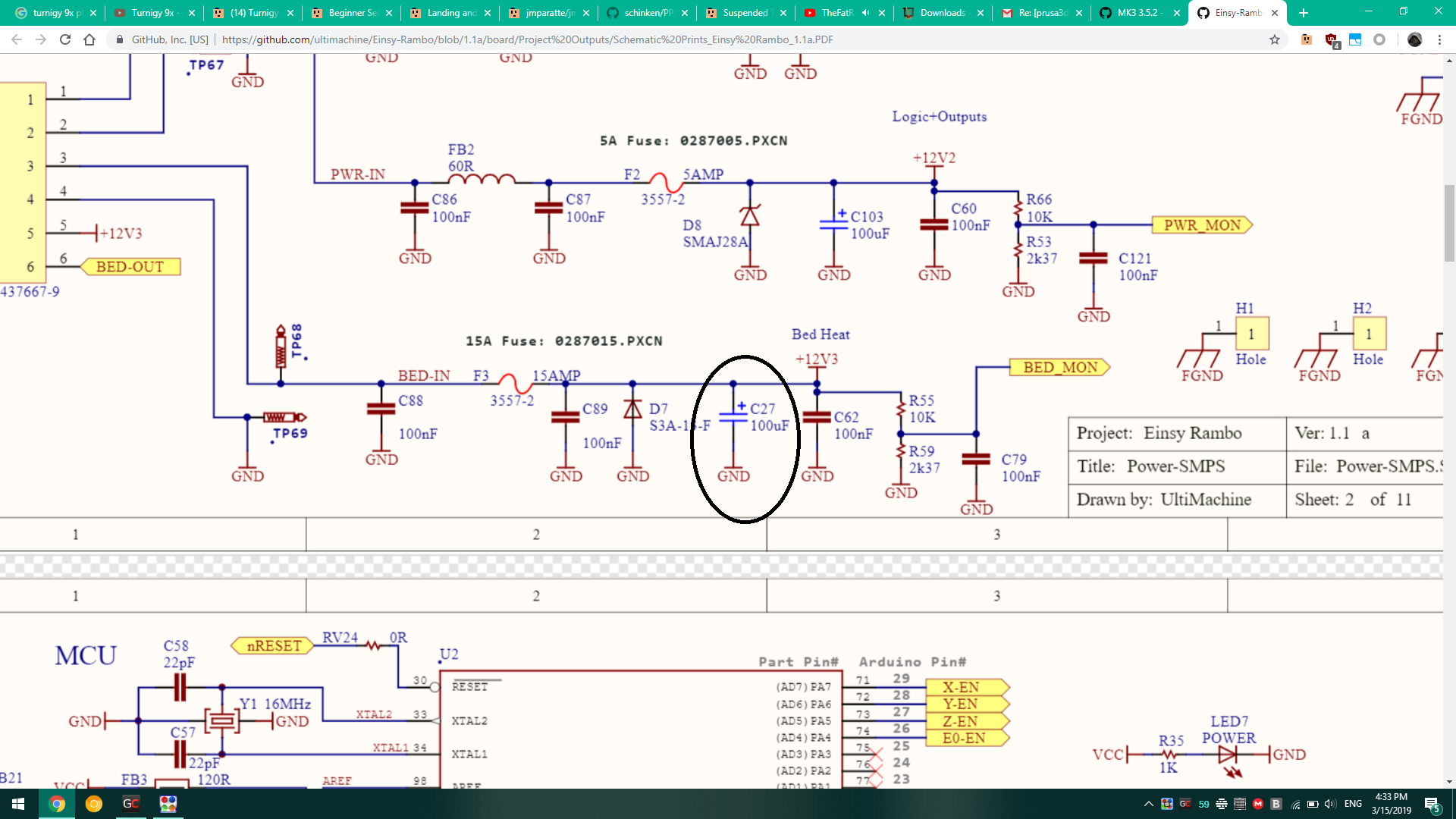
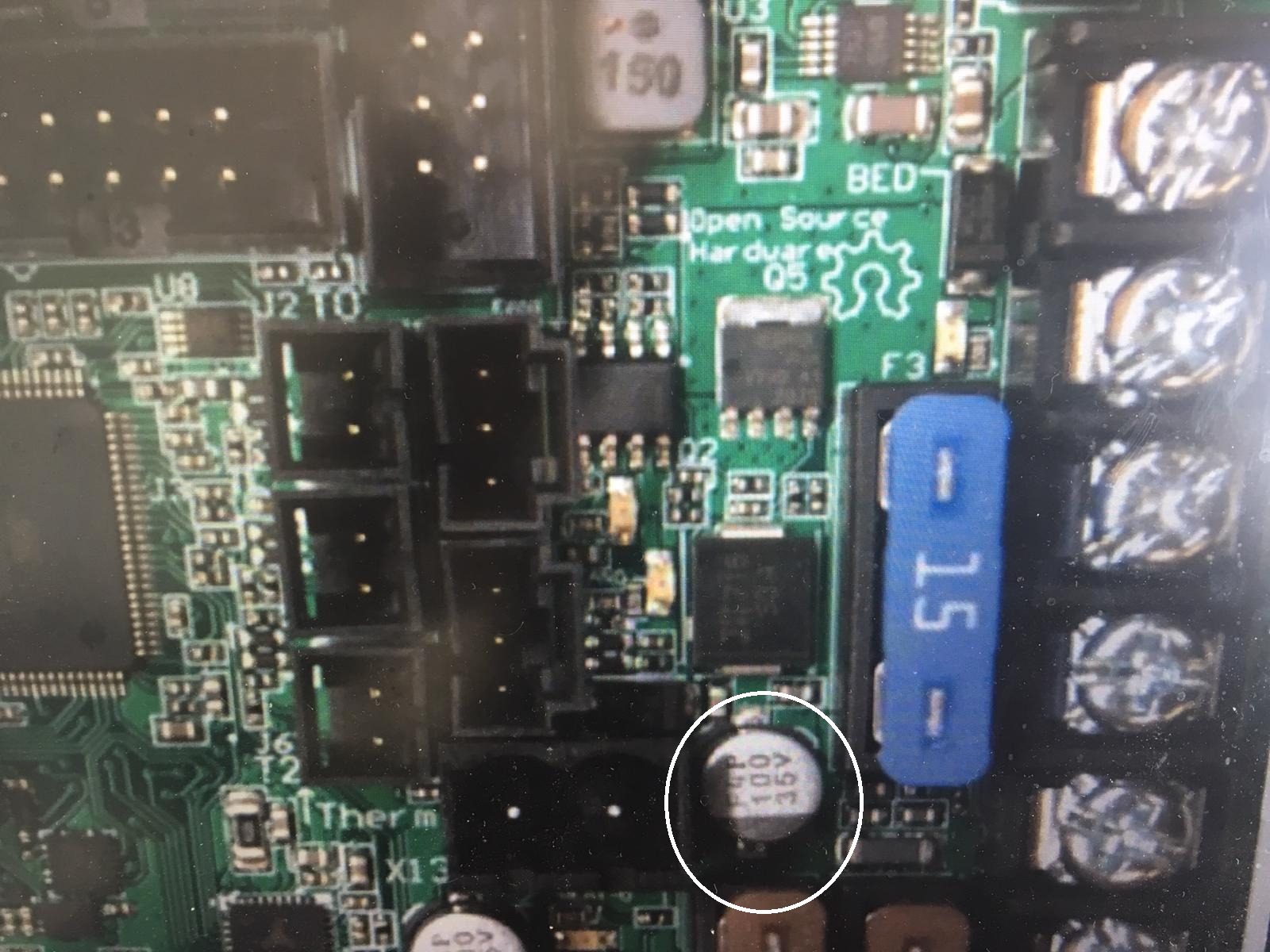
I unfortunately don't have a photo of the blown capacitor directly, but the mess it has made around in my issue referenced above. This is a photo from google images.
Hope this helps.
leptun
on 15 Mar 2019
I'll make more detailed photos when I can go near the printer. After replacing the capacitor and disabling Timer2 in firmware everything was fine and I can print now. (it is printing right now).
Since I needed the printer really bad for a robotics competition I bought another board just in case since I cannot have it down more than a few hours.
leptun
on 15 Mar 2019
Thanks. I've seen some strange 65Celcius environment temp reported by the printer, and I thought it had to do with the MOSFET of the heated bed. I'll check this capacitor at the weekend.
Panayiotis-git
on 15 Mar 2019
I contacted Prusa about this issue, but they keep saying it is my problem it blew, which I disagree.
Hope they understand this was a software issue caused by them and not by me. The only changes I did to the firmware were renaming the printer (MK3R) and disabling power panic. The board was run according to specs. I should be able to run a 12V bed (MK52 bed 12V variant) on 12V without anything exploding, but they disagree.Hi Leptun,
I am sorry you have such experience. If you can send me who you were talking to and what is your order number I will try to get you the replacement.
inquisitiveKangaroo
on 15 Mar 2019
Can I post the order no. and name here?
leptun
on 15 Mar 2019
Can I post the order no. and name here?<
Yes, if you dont mind (I am not aware of any possibility how to missuse such information, but frankly I am not the replacement guy). I wanted to send you my email but in that case I wouldn't be sure it's truly you who repied me..
inquisitiveKangaroo
on 15 Mar 2019
ORDER 192239325
Customer support: Douglas Whyte
If you need any more info tell me and I'll send it here.
leptun
on 15 Mar 2019
Thx, I will try my best.)
inquisitiveKangaroo
on 15 Mar 2019
Thank you!
leptun
on 15 Mar 2019
This is a concerning issue for me as overheating the capacitor may not cause an immediate failure but it may cause decreased life of the capacitor and may fail in 3-4 months after a "fix" has been issued.
Wouldn't it be prudent to revert the bed PWM updates back to the "clicking bed" state until this can be resolved?
 vertigo235
on 18 Mar 2019
vertigo235
on 18 Mar 2019
@leptun To resolve the overheating issue, all that is needed is to comment out "#define SYSTEM_TIMER_2" in the system_timer.h file? Is this correct?
vertigo235
on 18 Mar 2019
Yes, but I am not sure if it will affect millis, delay and tone in any way. The beeper might sound worse, but other than that there shouldn’t be any changes.
leptun
on 18 Mar 2019
In my testing this reverts all the changes regarding fast pwm.
The real disadvantage I see is not using hardware pwm and doing it in software. I have taken a look at Prusa's attempt of fixing this issue, but it does not appear to be that effective. It is even worse than using the old slow pwm since it only has 4 values to which it can pulse to (0,90,150,255). This results in quite some variance in temperature, even after pid calibration on the bed. Also it seems to be very laggy taking a few seconds to update. In my issue you can see an attempt of using a high prescaler on the timer to make it switch slower. It adds back some of the clicking, but at least it is all done in hardware.
leptun
on 18 Mar 2019
@leptun So you switched back to the latest HW PWM and you made this change to address the overheating?
https://github.com/leptun/Prusa-Firmware/commit/c9cc283b8fa1ffb16e9ad92dffe82a9176868a5d
?
vertigo235
on 18 Mar 2019
Yes, and it seems to be effective. Just that it might be clicking again, though it is bearable.
leptun
on 18 Mar 2019
Gotcha, I'll give that a go, thanks for your info and help.
vertigo235
on 18 Mar 2019
I am also noticing high temperatures around bed swithing MOSFET on my MK3. Board is too hot to touch and is reporting ambient temperature 57 ℃ while printing PLA, no printer enclosure. I have checked all terminals and they are properly tightened so no heat comming from them.
Some option to run slower PWM would be good idea or lowering the default switching frequency. I had no issues with bed "clicking" before and this fast bed switching does not seem to improve reliability and longevity of the board. :-(
FW: 3.6.0 official build
 darBis
on 19 Mar 2019
darBis
on 19 Mar 2019
Any chance to prioritize this issue? If the 3.5.2/3.6 are really causing high board temp, we are decreasing our board live time by using this versions. Especially MK3s/MMU2s users don't have many options to use something else.
 workinghard
on 19 Mar 2019
workinghard
on 19 Mar 2019
PR is currently working on fixing the issue. I noticed t a pull request regarding bed heating where they use phase correcting and a lower frequency (62.5KHz to 40KHz). I will test it as soon as my printer is not printing. I also have some changes regarding heating mosfet/capacitor and plan on publishing a few more changes soon. If you want a compiled version of both I can provide it if you tell me which printer you have.
leptun
on 19 Mar 2019
Any chance to prioritize this issue? If the 3.5.2/3.6 are really causing high board temp, we are decreasing our board live time by using this versions. Especially MK3s/MMU2s users don't have many options to use something else.
Hi,
this issue is already between our top priorities and we are doing our best to publish the fix asap. Thank you all for giving us such a priceless feedback and please post any further observations you consider relevant.
Kangaroo
inquisitiveKangaroo
on 19 Mar 2019
Just finished adding a little heatsink to the MOSFET (Q5), but interestingly the C27 itself is a source of heat. Precise measurements were taken using my pinkie. :-)
While the bed is switched fast, MOSFET gets lava hot in a matter of seconds, C27 also heats up pretty fast but the board in between them is still pretty cold. So presumably they are both heating by themselves, not by thermal conduction. Seems C27 is not so low ESR cap as would be required.
@inquisitiveKangaroo Thanks for the info. I hope you get the fix out soon.
darBis
on 19 Mar 2019
Since my capacitor is blown I will buy both the original cap and a low ESR one with similar specs (higher rated voltage) and replace the broken one. Once I am finished with the change I will report the results. It will take a while though...
leptun
on 19 Mar 2019
@leptun If I remember correctly, you are running your bed at 12 V. So higher voltage cap would not work for you any better. It would be only bulkier. Instead try to find lowest possible ESR cap available with similar voltage rating as the blown one. Look in low ESR capacitors from Panasonic, Nichicon or similar premuim brand. Because main source of losses here is from the fast swithing of high current.
In my opinion, you could as well remove the cap completely and whack some ferrite on the power wires to the bed and it would do a simillar job of reducing EM noise. If you don't care, forget about the ferrite thing and just leave "nothing" in place of the blown cap and just twist the bed wires together nice and tight. :-)
darBis
on 19 Mar 2019
Well I only care about the fact that it was a low ESR variant, not really about the voltage. I was just pointing out differences.
I don't think I'll be using fast pwm on bed again, but still don't want a blown cap on the board. It might be heating up when powered.
I hope the new bed changes fix the issue since as others mentioned the life of boards will be shortened. This is even mentioned in the datasheets of the parts involved. :-|
leptun
on 19 Mar 2019
@leptun So you switched back to the latest HW PWM and you made this change to address the overheating?
?
I just patched my firmware with this change, and it works perfectly i confirm, noise level is acceptable.
 F0x06
on 26 Mar 2019
F0x06
on 26 Mar 2019
I've also done this change and I have no temperature issues any more. Only a low frequency clicking from the heating bed. More loud when the flex steel plate is removed.
Note that I haven't any clicking problems earlier, so this whole fix is a step backwards for me.
Also, note that from the two Pull requests at the Prusa's repository that handle this problem, the first one does not change anything and the second even though it lowers a couple of degrees the MOSFET temperature it also adds a loud high frequency noise to the printer.
Panayiotis-git
on 26 Mar 2019
Any estimates on when a fix for this might be released? I'd like to do my MK3S upgrade, but obviously I don't want to damage my board in the process.
 kbranch
on 5 Apr 2019
kbranch
on 5 Apr 2019
Well at least we can return the broken board because it's obviously a known issue and the initial commit is intentionally not reverted (minor sound vs broken hardware, really?). I had 2 large prints stopped because of this one. 3.7.0 changes do not fix the issue. I still get 80c ambient.
 ulitiy
on 6 Apr 2019
ulitiy
on 6 Apr 2019
Well at least we can return the broken board because it's obviously a known issue and the initial commit is intentionally not reverted (minor sound vs broken hardware, really?). I had 2 large prints stopped because of this one. 3.7.0 changes do not fix the issue. I still get 80c ambient.
I don't think you will get it replaced since it can be fixed through software. Until the bug is fixed you can do the following:
-use 3.5.1 firmware which is the last one before the bug was introduced
-compile the latest firmware yourself and commenting line 7 of system_timer.h which reverts those changes in the last firmware.
-compile yourself from https://github.com/leptun/Prusa-Firmware/tree/MKP where I fixed this problem.
(please note this might not be the best way to approach this issue)
leptun
on 6 Apr 2019
For those who need a solution until Prusa fixes it, you can use my modified firmware using @leptun patch https://github.com/leptun/Prusa-Firmware/commit/c9cc283b8fa1ffb16e9ad92dffe82a9176868a5d (Only for MK3) works perfectly !
The changes are:
```diff
diff --git a/Firmware/timer02.c b/Firmware/timer02.c
index 8309f940..1520904a 100644
--- a/Firmware/timer02.c
+++ b/Firmware/timer02.c
@@ -39,7 +39,7 @@ void timer02_init(void)
TIMSK0 &= ~(1<
TCCR0A = 0x00; //COM_A-B=00, WGM_0-1=00
- TCCR0B = (1 << CS00); //WGM_2=0, CS_0-2=011
+ TCCR0B = (5 << CS00); //WGM_2=0, CS_0-2=011
//switch timer0 to fast pwm mode
TCCR0A |= (3 << WGM00); //WGM_0-1=11
//set OCR0B register to zero
````
F0x06
on 6 Apr 2019
Can confirm change of PWM frequency, mentioned by @F0x06, fixed the overheating issue for me. Bed is producing some "clicking" noises, but they become inaudible during print, since other noises are louder. So bed "clicking" is a not a real issue and slower PWM is worth it.
@inquisitiveKangaroo Please, consider reducing PWM frequency ASAP in official release. At least until a better solution is found.
darBis
on 12 Apr 2019
It breaks the MK3S filament sensor though. Oh well... 7x7 mesh is more important for me. I'll wait for a new release. I just don't want to struggle with setting up the environment to compile it on mac.
ulitiy
on 16 Apr 2019
I can confirm this is a problem with 3.7. Just printing normal PLA, and in 12 hours into a 33 hour print. I found my temp to be 60 degrees. As soon as I turned off the bed temp the overall temp dropped.
To be honest, I think if this problem isn't going to be fixed by the next update that lands on the site. I think just allowing the clicking sound is better than having the motherboard messed up.
For those who need a solution until Prusa fixes it, you can use my modified firmware using @leptun patch leptun@c9cc283 (Only for MK3) works perfectly !
The changes are:diff --git a/Firmware/timer02.c b/Firmware/timer02.c index 8309f940..1520904a 100644 --- a/Firmware/timer02.c +++ b/Firmware/timer02.c @@ -39,7 +39,7 @@ void timer02_init(void) TIMSK0 &= ~(1<<OCIE0B); //setup timer0 TCCR0A = 0x00; //COM_A-B=00, WGM_0-1=00 - TCCR0B = (1 << CS00); //WGM_2=0, CS_0-2=011 + TCCR0B = (5 << CS00); //WGM_2=0, CS_0-2=011 //switch timer0 to fast pwm mode TCCR0A |= (3 << WGM00); //WGM_0-1=11 //set OCR0B register to zero
Maybe they can at least test and add that for the normal MK3
To be honest, I'm highly disappointed in Prusa for including this issue on their firmware on their site. This is obviously a known issue, and it can be dangerous. And the only thing I can tell that is causing this is so the bed doesn't click when doing it's job. I much prefer having a clicking bed than having to pay $130 for a new board, or a potential fire due to the heat messing with something. I only found out about the problem because I just so happen see a post on reddit talking about the problem as a PSA.
UPDATE:
Something to note is I just did a quick test. As I mentioned before, I'm doing a 33 hour print and I have a bit of time. I figured 1 thing that could've been causing my card to get up to 60 degrees is it being in an enclosure. So I took the top off and the lowest it gotten was with the bed not heated was 40 degrees. With the enclosure on it only gotten to 41 degrees.
So next I took a look at maybe it was the bed being heated to 60 degrees. I figure with the heatbed being so close. Maybe that was causing the problem. So I brought the bed temp up to 50 degrees, and it slowly creeped back up to 60 degrees (the bed got to 50 degrees by the time the card gotten to 48 degrees).
So it looks like if you heat the bed at all, then you're out of luck with the current update
 crua9
on 22 Apr 2019
crua9
on 22 Apr 2019
I am mostly disappointed by the lack of communication around this issue. It has a high risk for hardware failure and possibly being a fire hazard, yet I have yet to find an official statement from Prusa about it...
Anyway, I did some digging, and found a PR from 6 days ago:
https://github.com/prusa3d/Prusa-Firmware/pull/1742
And a branch created a month ago:
https://github.com/prusa3d/Prusa-Firmware/tree/decrease_bed_switching
And let's include this one too for reference sake:
https://github.com/prusa3d/Prusa-Firmware/pull/1683
Seems some work has been done to get a (temporal) fix into the next release.
 theo-beers
on 22 Apr 2019
theo-beers
on 22 Apr 2019
Seems some work has been done to get a (temporal) fix into the next release.
Any idea when that will be?
Personally, I think they should leave notes on the update this effects to let people know they are taking a risk by downloading prior ones
crua9
on 22 Apr 2019
Any idea when that will be?
Your guess is as good as mine.
But it might be worth noting that I believe this PR: https://github.com/prusa3d/Prusa-Firmware/pull/1653 , was released in https://github.com/prusa3d/Prusa-Firmware/releases/tag/v3.7.0 . This should at least lower the temperature, but you get an annoying sound from the PSU in return (I can confirm this). For me, having a slightly lower temp is already worth the annoying sound.
EDIT: I was wrong. It was reverted just before the release of 3.7.0
They reverted that PR in https://github.com/prusa3d/Prusa-Firmware/pull/1683 , only to disable the complete PWM in https://github.com/prusa3d/Prusa-Firmware/pull/1742 for the next release.
theo-beers
on 22 Apr 2019
I just asked support, and they said this will be updated during the next one. They also said 60 degrees is OK, so I guess I'm OK with printing.
crua9
on 2 May 2019
Firmware 3.7.1-RC1 seems acceptable. Quick tested only by preheat to ABS temperatures and covered printer for 2 hours and ambient temperature in menu rises up to 58°C (In FW 3.5.1 rises only up to 50°C).
In few days I'll measure transistor temperature by lab contact thermometer (or with some bigger print with ABS), how it works on 3.7.1-RC1.
BouriCZ
on 10 May 2019
3.7.0 was great for me but 3.7.1 has brought about a ton of clicking for my mk3s.
Edit: Bed and PSU both clicking, actually. Quite loud.
 Dippyskoodlez
on 22 May 2019
Dippyskoodlez
on 22 May 2019
That’s because the frequency was lowered to fix overheating. It is higher than 3.5.1 and lower than 3.5.2-3.7.0. It should have helped with the noise compared to the old versions. Not sure why you still have it.
leptun
on 22 May 2019
Do you hear the clicking from the PSU or the bed?
Panayiotis-git
on 22 May 2019
Sounds just like this noise coming from the PSU when the bed heat is being applied.
FWIW: I'm on 120v/60Hz US power using the silver PSU.
Dippyskoodlez
on 22 May 2019
@Dippyskoodlez I think I remember reading somewhere that the psu noise is generated by a rf shield behind the psu pcb. I wouldn’t open the psu though since it is dangerous.
leptun
on 24 May 2019
Hi all, I did run some tests to make sure 3.7.1 are really fixing this issue and to measure the impact for people that have, or are still running 3.5.2-3.7.0 firmware. Good news, temperature are finally back to normal. However some tests where pretty scary to me.
First image is FW 3.7.0 on the Rambo Mini (MK2.5) at the end of heating the heated bed at 80°C (just before the PID starts its regulation), bed has been moved forward so not in front of the Rambo, Rambo cover lid has been removed, room temp at 22-23°C, no enclosure. So this is an ideal condition.
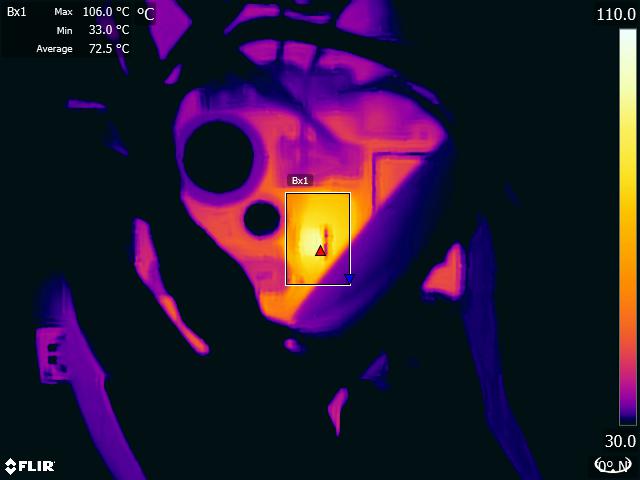
Mosfet is at 106°C during heating in ideal conditions
Second image is the same setup after 10 minutes at 80°C, the mosfet is still at almost 80°C.
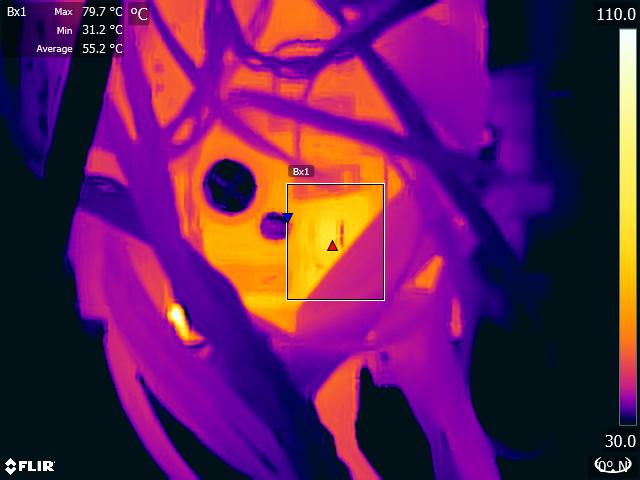
Mosfet at 80°C stabilized in ideal conditions
This results sounds pretty scary to me. To make sure I was not too alarmist I made a complete test report from several tests with firmware 3.3.1, 3.7.0 and 3.7.1. You can get it here:
overheating_bed_mosfet_prusa_1.0.pdf
I also mailed Ultimachine to understand what I should do with those results. Here are my questions:
- _Is there a risk for the board running at those temperature? What about someone printing ABS in an enclosure?_
- _Do you confirm this issue reduces lifespan of the Rambo Mini/Einsy?_
- _Can we have a rough estimate of lifespan reduction because of these firmware versions?_
- _Should people control something on the board to be sure they are not or will not encountering any issue?_
- _Would that be a risk for the Rambo cover printed in PETG?_
- _Is there a risk of fire?_
Answer from Ultimachine:
_I cannot answer all of your questions. There are risks with running the bed mosfet at PWM frequencies where the capacitor and/or mosfet are overheating. Generally, the parts are designed to handle max temperatures of around 70C. Greater temperatures shorten life and increase risk of unpredictable failures._
_Please use and recommend the use of the patched firmware that corrects the issue._
According to all this and the time it took to solve this issue (note that the issue is still open) I highly recommend Prusa to make an official communication to explain the risk of using firmware 3.5.2 to 3.7.0. Those versions should be removed from the releases on github and should not be available in the history of the prusa3d website. I also recommend to make sure the Prusa support team is aware of this issue in order to offer quality service to customers.
 gregsaun
on 25 May 2019
gregsaun
on 25 May 2019
What is the official rated operating range of this capacitor? From what I can see on a quick Mouser search a suitable cap could be had anywhere from 85C to 150C depending on the model. If the cap on the board is only rated for 85C, and you're seeing 79C on an open enclosure even on 3.7.1, this is still pushing the limits for it's rated operation for anyone using the case and/or the board inside of an enclosure.
Dippyskoodlez
on 25 May 2019
This is the capacitor and it’s rated for 105*C
leptun
on 25 May 2019
@leptun thanks for the info, good to know, will have a look for Rambo Mini tomorrow as well. Now I am not sure this information is that relevant as Ultimachine sayed that the parts are designed to handle max temp of around 70°C. Plus we have several proof that this overheating has blown Rambo boards (including some at Prusa). Also we cannot exclude that they might have used other capacitor at some point in the production.
gregsaun
on 26 May 2019
@Dippyskoodlez keep in mind that those max temps during heating are at the end of the heating and so for a short time. But yes this is ideal condition (also includes the bed moved forward, out of the front of the board). I would not be surprised that people printing ABS in enclosure have 70-80°C when bed is in stable mode.
gregsaun
on 26 May 2019
This is the capacitor and it’s rated for 105*C
It's also only rated for 84mA ripple current, which is hilariously less than you will see trying to drive the bed at any frequency measured in kHz.
@gregsaun Ultimachine are suggesting 70C based on lifetime, not maximum operating temperature. Those capacitors are only rated to maintain their specifications for 1000 hours at 105C. 70C is a fairly reasonable rule of thumb temperature.
Nothing about the Rambo or Einsy Rambo is suitable for high frequency power switching.
 eamaclean
on 26 May 2019
eamaclean
on 26 May 2019
@eamaclean yes I agree with you, this is also a bit what I explain in my latest comment (with less technical background than you :D ). However, those are still ideal conditions so in "stable heating" I would not be surprised to go higher than 70°C and that could explain why Prusa and customers have blown their Rambo.
gregsaun
on 26 May 2019
Wow... I thought I was the only one with a blown board. I’m really unsure what Prusa is going to with the people with damaged hardware.
@eamaclean Since you seem to know more than me regarding the usage if these capacitors, do you think these might be more suitable for higher frequency? They are rated as “Low ESR”.
https://ro.mouser.com/ProductDetail/United-Chemi-Con/EMZR500ARA101MF80G?qs=sGAEpiMZZMtZ1n0r9vR22cpFQt4dfSbqD9LHuQFqP18zkYrNEgoO7Q%3D%3D
I’m asking since I want to replace the capacitor on the board with this one or another like the original. I’ve already bought two of each, but am lacking the skills to do that soldering job. Hope I can find someone to do it for me.
Something interesting to note is that my board is still working months after blowing the capacitor and still have it on the board. In the meantime I used my patched firmware since I wanted to avoid the heating, but switched to the official patch once released.
leptun
on 26 May 2019
Just a dumb question: how about disabling PID and use bangbang mode to heat the bed and limit the current value (instead of max 255, use something like 230)?
 cimoalpacino
on 26 May 2019
cimoalpacino
on 26 May 2019
That would introduce a lot of wobble in the temperature and would result in bad adhesion to the bed because of warping parts and bed(thermal expansion of steel sheet and bed material).
leptun
on 26 May 2019
Isn't there an option to define the hysteresis? That way you could minimize the range to switch the heating on/off.
cimoalpacino
on 26 May 2019
@leptun I don't see the capacitor as the problem. IIRC from the schematics, it has connected in parallel smaller capacitors specifically to bypass the high frequencies.
The problem with the capacitor is its placement. It is next to the MOSFET that is the main source of the heat.
My possible solution list is:
- use external MOSFET
- add passive cooling to the MOSFET (Heat Sink Radiator) so it removes the heat
- use active cooling (use fan)
Panayiotis-git
on 26 May 2019
@Panayiotis-git I connected a simmilar tht capacitor on the bed terminal (external to the board) and it also heated up with the old firmware. It was unbearable to touch a few seconds after pid engaged. It is not the only source of heat, but one that doesn’t react really well to being heated.
As for cooling it helped putting an always on fan blowing towards the mosfet and (broken) capacitor.
leptun
on 26 May 2019
@leptun A low ESR capacitor like that would be necessary for switching at higher frequencies. You'd also need an order of magnitude or so more capacitance.. Either way, the FET is not being driven hard enough and is suffering high switching losses.
Replacing all the caps on these boards with lower ESR types is likely beneficial overall, but it's not a solution to this issue.
@Panayiotis-git The 100nF caps are likely discharged before the FET is even fully on, they're not helpful here. The electrolytic will be heating internally from the ripple current.
eamaclean
on 26 May 2019
The board on my MK2.5s with firmware 3.7.2 RC1 is now damaged after approx 30hrs of PLA. I have contacted support. They board still works but the bed heating circuit is damaged
 jsilva-iii
on 24 Jun 2019
jsilva-iii
on 24 Jun 2019
Did you use firmwares between 3.5.2 and 3.7.1 for a long time? These versions cause damage, not 3.7.2.
It’s sad to see that also mini rambo 1.3a boards break because of the heat.
Also, how did the board fail? Was the mosfet/capacitor blown or did it simply stop heating the bed?
leptun
on 24 Jun 2019
3.7.1 is good, it is 3.5.2 to 3.7.0 that has the overheating problem. 3.7.2 is not out yet ;-)
gregsaun
on 24 Jun 2019
Hi
From 3.5.2 to I got the clicking sounds never had them before... I was able
to do 12-18 HR prints with PETG with 3.5.2 & 3.7.1.
This failure was 30hrs plus with PLA.
I believe the cap is gone(I can't recall what it looked like before - I
have sent them pictures), the connector for the bed is fused.. The board is
still functional, less the bed heating.
On Mon., Jun. 24, 2019, 11:54 a.m. Voinea Alex, notifications@github.com
wrote:
Did you use firmwares between 3.5.2 and 3.7.1 for a long time? These
versions cause damage, not 3.7.2.It’s sad to see that also mini rambo 1.3a boards break because of the heat.
Also, how did the board fail? Was the mosfet/capacitor blown or did it
simply stop heating the bed?—
You are receiving this because you commented.
Reply to this email directly, view it on GitHub
https://github.com/prusa3d/Prusa-Firmware/issues/1636?email_source=notifications&email_token=AAQ4GIBGYCCJQTLYV3WSQFLP4DU4HA5CNFSM4G6ZJ3BKYY3PNVWWK3TUL52HS4DFVREXG43VMVBW63LNMVXHJKTDN5WW2ZLOORPWSZGODYNMJZA#issuecomment-505070820,
or mute the thread
https://github.com/notifications/unsubscribe-auth/AAQ4GIAOTEXK3JZL425JSGLP4DU4HANCNFSM4G6ZJ3BA
.
jsilva-iii
on 24 Jun 2019
3.5.2 was probably the issue, but you didn't run for a long time.
You can try to measure the voltage on the bed connector on the Rambo. Try with and without the bed connected.
gregsaun
on 24 Jun 2019
Hi
I'm not home now, but the led on the bed doesn't turn on and the connector
from the bed to the Mini Rambo are fused. I have disconnected everything
just waiting to hear from support how to proceed before I get a new board.
The bed heating section of the board is toast..
On Mon., Jun. 24, 2019, 12:23 p.m. Grégoire Saunier, <
[email protected]> wrote:
3.5.2 was probably the issue, but you didn't run for a long time.
You can try to measure the voltage on the bed connector on the Rambo. Try
with and without the bed connected.—
You are receiving this because you commented.
Reply to this email directly, view it on GitHub
https://github.com/prusa3d/Prusa-Firmware/issues/1636?email_source=notifications&email_token=AAQ4GIHGRWZCCWJRIC5CDZLP4DYJ5A5CNFSM4G6ZJ3BKYY3PNVWWK3TUL52HS4DFVREXG43VMVBW63LNMVXHJKTDN5WW2ZLOORPWSZGODYNO5QA#issuecomment-505081536,
or mute the thread
https://github.com/notifications/unsubscribe-auth/AAQ4GIBG5NYBMDQWOHOMOI3P4DYJ5ANCNFSM4G6ZJ3BA
.
jsilva-iii
on 24 Jun 2019
After chatting with help and checking my board carefully, it appears that my hotbed connector was somehow not seated properly and it trashed the board, the capacitors although blackened were not damaged - so my issue is not related to firmware at all. Thank you all for your help.
jsilva-iii
on 28 Jun 2019
I have encountered the "TMC DRIVER OVERTEMP" two times on 3.8.0 when trying to print the same STL file in Prusament ASA. I am using an MK3 with the LACK enclosure. Problem happened both times somewhere between 3-4 hours into the print.
I was able to workaround the problem, by switching from "Stealth Mode" to "Normal Mode".
I never had any clicking/noise problems (on 220V), so it would be nice if there was an option to switch off all that (for me) unnecessary "avoid the clicking but introducing overtemp problems" voodoo code that was added with 3.5.2, so that i can still run large ASA/ABS prints in Stealth Mode.
 MikePfaff
on 29 Sep 2019
MikePfaff
on 29 Sep 2019
Stealth mode unfortunately draws more power and generates more heat as a consequence. What you’re asking is quite hard to do since code was replaced/repurposed with the introduction of the latest bed PWM. What might be changed more easily is having a lower “fast” PWM burst frequency or having a much lower “slow” PWM frequency, this way having less “fast” cycles per second if needed. I’ll think about how this could be done in practice.
leptun
on 29 Sep 2019
@leptun https://help.prusa3d.com/article/8LLgVlD01q-loud-printer it draws LESS power in stealth mode.
ulitiy
on 29 Sep 2019
@ulitiy That only applies to MK2.x printers. In my testing with a bench power supply it used more current at the same voltage when holding the steppers in position in stealth mode.
Also please note that on the Mk3 it is called Stealth mode, not Silent mode. It’s probably this way to avoid confusion, even though that’s not always the case.
leptun
on 29 Sep 2019
@gregsaun Did you make temperature readings on the new firmwares? I'm wondering how hot it's getting now but don't have a thermal camera :(
@BouriCZ is there reason to keep this PR open anymore? An improved bed PWM system has been implemented that shouldn't heat the MOSFET to such an extent. In fact it should stay quite cool as it only has very short bursts of high frequency, unlike continuous high frequency like before.
leptun
on 18 Oct 2019
@leptun I did test them on my Bear Calibration Firmware which is the exact same firmware with a different Z height. The temperatures of 3.8.0 where equal if not better than firmware 3.7.2.
gregsaun
on 18 Oct 2019
@leptun In newer FW looks ok, 3.8.0 (now with MK3s). I didn't measure temperatures on transistor, but still works without errors. (My TO-DO: next time I check temperatures for ABS prints with covered printer)
BouriCZ
on 20 Oct 2019
Related issues
 stahlfabrik
·
5Comments
stahlfabrik
·
5Comments
 KarlZeilhofer
·
4Comments
KarlZeilhofer
·
4Comments
 mike-wi
·
3Comments
mike-wi
·
3Comments
 brettvitaz
·
3Comments
brettvitaz
·
3Comments
 Siwat2545
·
4Comments
Siwat2545
·
4Comments
Most helpful comment
Hi all, I did run some tests to make sure 3.7.1 are really fixing this issue and to measure the impact for people that have, or are still running 3.5.2-3.7.0 firmware. Good news, temperature are finally back to normal. However some tests where pretty scary to me.
First image is FW 3.7.0 on the Rambo Mini (MK2.5) at the end of heating the heated bed at 80°C (just before the PID starts its regulation), bed has been moved forward so not in front of the Rambo, Rambo cover lid has been removed, room temp at 22-23°C, no enclosure. So this is an ideal condition.
Mosfet is at 106°C during heating in ideal conditions
Second image is the same setup after 10 minutes at 80°C, the mosfet is still at almost 80°C.
Mosfet at 80°C stabilized in ideal conditions
This results sounds pretty scary to me. To make sure I was not too alarmist I made a complete test report from several tests with firmware 3.3.1, 3.7.0 and 3.7.1. You can get it here:
overheating_bed_mosfet_prusa_1.0.pdf
I also mailed Ultimachine to understand what I should do with those results. Here are my questions:
Answer from Ultimachine:
_I cannot answer all of your questions. There are risks with running the bed mosfet at PWM frequencies where the capacitor and/or mosfet are overheating. Generally, the parts are designed to handle max temperatures of around 70C. Greater temperatures shorten life and increase risk of unpredictable failures._
_Please use and recommend the use of the patched firmware that corrects the issue._
According to all this and the time it took to solve this issue (note that the issue is still open) I highly recommend Prusa to make an official communication to explain the risk of using firmware 3.5.2 to 3.7.0. Those versions should be removed from the releases on github and should not be available in the history of the prusa3d website. I also recommend to make sure the Prusa support team is aware of this issue in order to offer quality service to customers.