Prusa-firmware-buddy: Mini firmware crash / error, "blue screen of death"
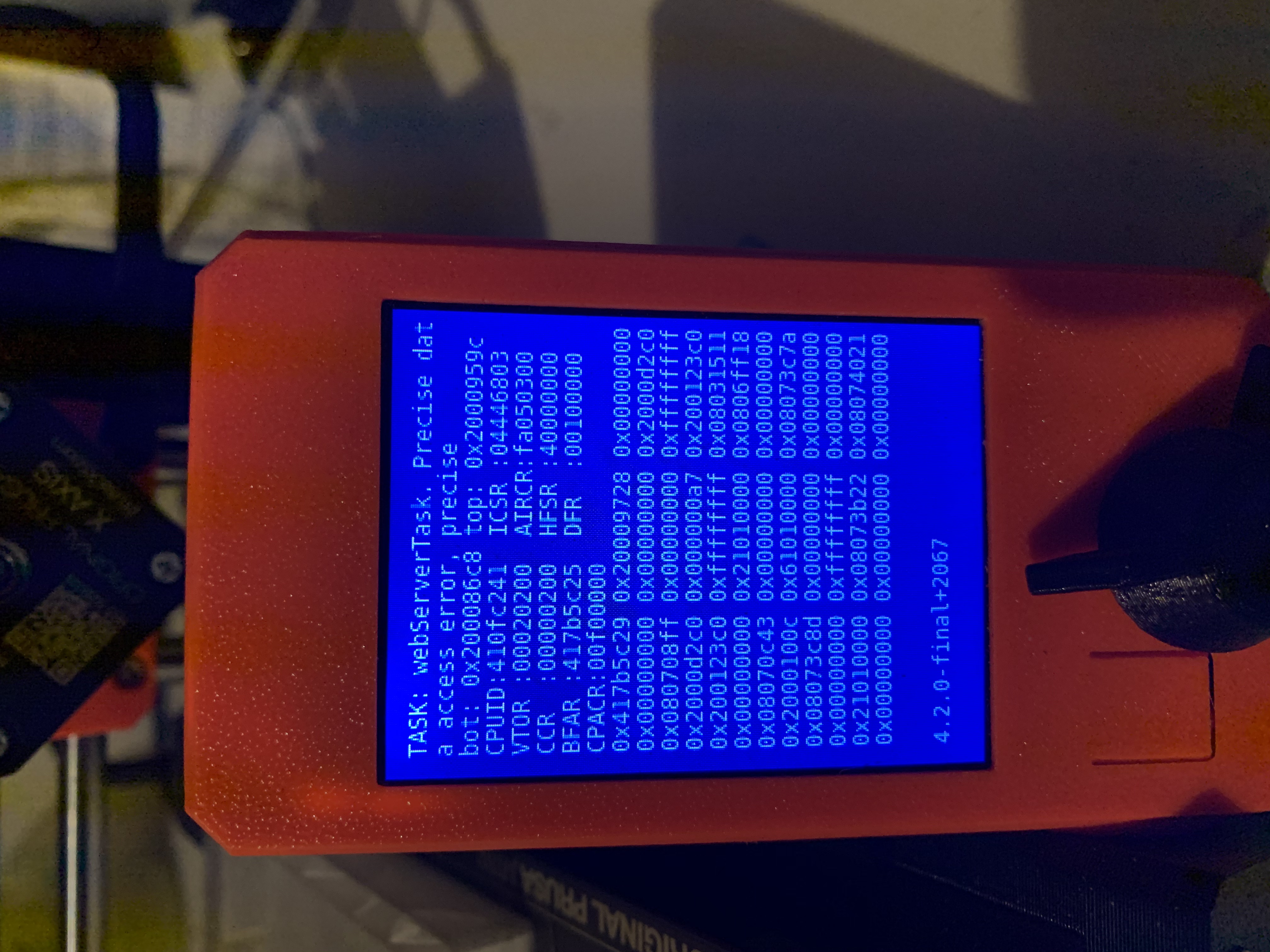
21h print was almost done, about 1-2 hours left, left it print during night. In the morning I noticed blue screen on my Mini display.
Both printer fans were on. Heater was cold and bed was cold so safety was not compromized.
Firmware 4.2.0-final+2067. Just before print I had upgraded to this firmware.
I have not experienced this kind of behaviour before.
My printer USB could be the reason, it seems that I need sometimes "wiggle" the USB-stick to get printer to recognize the USB-stick. Using USB-stick provided with the Mini.
Can provide GCODE of the print if needed (about 100 mb).
Picture of BOD attached and crash-dump file attached.
dump.bin.zip

 randomev
All 15 comments
I am getting the same error. First print after upgrading to 4.2.0
Here is the gcode that I was running:
CardBoxV3_0.2mm_PLA_MINI_9h13m.gcode.zip
 Miyagi414
on 19 Aug 2020
Miyagi414
on 19 Aug 2020
Right after the upgrade and during restart the above-mentioned crash.
Two hours into the first print with FW 4.2.0 and the same crash again.

What's going on and how to downgrade?
(Edit) Never mind, found it: https://forum.prusaprinters.org/forum/general-discussion-announcements-and-releases/guide-how-to-downgrade-your-prusa-mini-firmware/
Best wishes,
Martin
 MartinMajewski
on 20 Aug 2020
MartinMajewski
on 20 Aug 2020
I observed, that the bluescreen appears when I try to access the USB Stick (the one provided with the printer). The first time I encountered this was when I put FW 4.2.0 onto it. However, a side-effect could be caused by placing the drive on Spotlights ignoring the list and deleting the macOS metadata folders form the drive. I will format the drive and try again.
Edit: factory reset of the printer has not helped.
Edit2: Nope, formatting the USB drive to FAT32 again and putting all the stuff back onto it results also in a blue screen.
MartinMajewski
on 21 Aug 2020
Okay, I found the cause for the blue screen while accessing the USB drive!
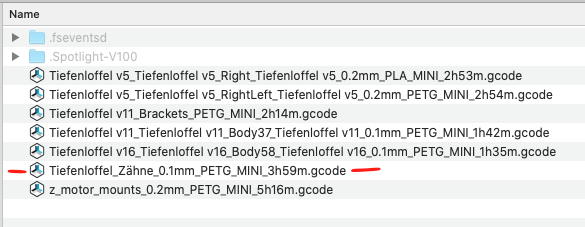
I have one file with a German "Umlaut" (letter ä) in the filename. As soon as I place this on the drive and select "print" from the menu, the displayed files list is incomplete. First, I thought that the bluescreen appears as soon as I turn the selection wheel. But now I realized that it comes after some time anyway.
I had no issues with that on 4.1.0. The mentioned file with the letter ä is an older one, which I printed several times and printed other objects as well with that file still on the USB stick. Maybe something related to Fat32 and the introduced multi-language support?
When the printer crashed two hours into my most recent print, I did not select the print over the file list. I started printing from the auto-selection screen that pops up when a new file is detected. Maybe the board checked the files during the print and crashed as if I would have opened the list menu manually?
MartinMajewski
on 21 Aug 2020
After I reorganized some directories I got the bluesreen as soon as I went to print and it showed the directory. After navigating in the folder (already the first one) I got the bluescreen.
After moving the files from subfolders to the root folder everything went as usual.
 cnEUL
on 21 Aug 2020
cnEUL
on 21 Aug 2020
After about 30h of printing (and about 300g of Prusament Pistacho Green ) this happend ...
:(
The interesting coincidence was that this happened exactly when I started my PC and Windows loaded (both PC and MINI are connected to the same router ....)

 adynis
on 22 Aug 2020
adynis
on 22 Aug 2020
Ah yes. The BSOD. I put 4.2 on my machine pre alpha. And uh, ya. Talked to chat support, they weren't sure, suggested I downgrade to 4.1. machine wouldn't let me. Suggested to flash 4.0, which worked, then flash 4.1, and leave it til this is fixed.
 SgtKiLLx
on 23 Aug 2020
SgtKiLLx
on 23 Aug 2020
Another insight into that issue, and as @adynis has also said, the blue screen seems to be also (Micro-) USB related. After several successful long-time prints from the USB stick (after removing the aforementioned German Umlaut letter) I connected the printer to a RaspberryPi running OctoPrint. Tonight, a few hours into a print, the MINI crashed again.
I cannot recall it correctly, but I think I had the MINI also connected to my Mac, while the first bluescreens happened.
For the time being, I will revert to 4.1.0 to avoid losing print-results and time.
MartinMajewski
on 24 Aug 2020
I have the same error that @MartinMajewski does -- a displayTask with a precise data access error. Photo here: https://twitter.com/filamentcolors/status/1299117013449797634 Worth noting that I do not have any non-ASCII characters on my USB drive, though I am still using the one that came with the printer. I have run the same gcode (and others) off of the same USB stick since the error with no problems.
 itsthejoker
on 31 Aug 2020
itsthejoker
on 31 Aug 2020
New firmware version fixing BSOD issues. https://github.com/prusa3d/Prusa-Firmware-Buddy/releases/tag/v4.2.1
 rtyr
on 31 Aug 2020
rtyr
on 31 Aug 2020
@MartinMajewski please note the issue with non-ASCII characters on the USB flash drive is still not fixed. This has never worked before and is still not supported. We'll fix the BSOD in this case to at least not crash the FW soon as well.
However, the BSOD randomly appearing during printing shall be fixed and hopefully never return - that applies to reports from @Miyagi414 and @adynis .
 DRracer
on 1 Sep 2020
DRracer
on 1 Sep 2020
Hello
What does it mean when the printer stops printing and goes to a white screen. I'm using the USB stick that came with Mini.
 brentday
on 1 Sep 2020
brentday
on 1 Sep 2020
Hi @brentday, white screen mean issue with LCD communication. Please check if your connectors are properly connected.
 JohnnyDeer
on 2 Sep 2020
JohnnyDeer
on 2 Sep 2020
@DRracer
@MartinMajewski please note the issue with non-ASCII characters on the USB flash drive is still not fixed. This has never worked before and is still not supported. We'll fix the BSOD in this case to at least not crash the FW soon as well.
Thanks for the information! Usually, I don't use non-ASCII characters, this was a typo from my side.
I will raise a feature request at the PrusaSlicer repository because I think it would be a good addition to prevent those typos beforehand.
MartinMajewski
on 2 Sep 2020
If there isn't more BSOD cases I´ll close this issue soon. Please leave comment here if anyone will have BSOD on 4.2.1.
JohnnyDeer
on 7 Sep 2020
Related issues
 Kasperc88
·
7Comments
Kasperc88
·
7Comments
 fuelflo
·
3Comments
fuelflo
·
3Comments
 kdpainter
·
8Comments
kdpainter
·
8Comments
 OndraCerv
·
5Comments
OndraCerv
·
5Comments
 AlexW-578
·
4Comments
AlexW-578
·
4Comments
Most helpful comment
@MartinMajewski please note the issue with non-ASCII characters on the USB flash drive is still not fixed. This has never worked before and is still not supported. We'll fix the BSOD in this case to at least not crash the FW soon as well.
However, the BSOD randomly appearing during printing shall be fixed and hopefully never return - that applies to reports from @Miyagi414 and @adynis .