Prusa-firmware-buddy: [BUG] Mesh bed leveling broken
This will probably be a duplicate of something but I just want to share my experience
Printer type - MINI
Printer firmware version- 4.1.0 RC1
Original or Custom firmware - Original
Optional upgrades - Filament sensor
USB drive or USB/Octoprint
USB
Describe the bug
So recently I printed something that covers almost the entire print area for the first time and noticed, that the bed isn't leveled correctly. As you can see in the video in one area the nozzle is clearly too far from the bed and in another part it's clearly too close.
This also happens in the Z adjustment process
How to reproduce
- Start a print covering a large area of the bed.
Expected behavior
With the printer having only automatic leveling I'd expect the nozzle to be at the right
height in all parts of the bed.
G-code
Will upload later
 x10102
All 33 comments
Can confirm that!!
In the back the nozzle was touching the sheet and in the front the nozzle was a good 0.5 to 1.0mm away from the bed.
If required i can upload a video too.
Unfortunately this (amongst other shortcomings) makes the MINI unusable (for prints bigger that a few cm).
Using firmware version 4.0.5
 deepthought-64
on 30 Jun 2020
deepthought-64
on 30 Jun 2020
@deepthought-64 I think this is the only problem I have with the MINI, It's a great and well made printer otherwise. But this is the one thing that absolutely needs to be fixed.
x10102
on 1 Jul 2020
@x10102 That is very nice to say, but I am having nothing but troubles with the MINI. (parts were missing, MINDA probe needed to be exchanged, z-offset is a mess (e.g. #309, #377,...) can't print when i have my window open in the office (#365), and the list goes on - i haven't reported most of the small stuff that bugs me because why should the community play beta-testers for stuff they paid for?!
Also it misses lots of features that we're used from i3 printers (it's the fourth Prusa printer i bought but by far the worst performing).
Mostly firmware related issues but I expect those should be found by testing before releasing. But instead of fixing critical bugs the prusa developers concentrate on stuff like ntp clients in the software while people are having their MINI sitting around as a paperweight.
Also i miss a lot of involvement of the Prusa employees here in the issue section. (got absolutely no response from Prusa after reporting 2 problems) This bug is an absolute showstopper but in the last 4 days since you have opened this issue, i dont see any outreach from Prusa... :(
Dont get me wrong, it's a nifty little printer but it suffers massively from its firmware.
/rant (sorry, got a bit carried away,... looking forward to having the printer running again ;-) )
deepthought-64
on 1 Jul 2020
Hi @deepthought-64, i´m sorry that you have such troubles with your MINI. We are constantly working on repairs and improvements. I'm here for communication and take care of github issues and i can assure you that every single issue is noted and gived to our developers. Fixing depends on priorities and momental possibilities. So even if you dont see response we are trying to solve the problem. Some issues are unfortunatley long term, especialy ones wich are related with the hardware as this one. I understand that condition of your MINI can be annoyng, I´m looking forward and belive that your experience will be better soon.
 JohnnyDeer
on 2 Jul 2020
JohnnyDeer
on 2 Jul 2020
May I suggest reading section 11.1 in the "3D Printing Handbook " I printed this had no mesh problems and perfect first layer . So its not all mini's

 hdtechk
on 4 Jul 2020
hdtechk
on 4 Jul 2020
Can confirm the problem.
 nicolasvac
on 8 Jul 2020
nicolasvac
on 8 Jul 2020
I had this problem as well for a while. This is a faulty Minda probe!
The cable is half broken and thus for some parts of the bed the height detection does not work. And with the current firmware a failed detection just raises the height by a millimeter.
Check the light on the Minda probe during the bed leveling and you will notice the lighting is not consistent.
 jokohoko
on 10 Jul 2020
jokohoko
on 10 Jul 2020
@JohnnyDeer thanks for reaching out! It's good to hear that you are reading the issues. As a feedback: For those who write the issues it would be a tremendous improvement, if - after you read and acknownledged the issue - indicate that you have read it by commenting, setting a state, adding a tag or something else. That would give us the feeling that we've been heard and our feedback does not go into the void. :)
Could you elaborate a bit more on how this is a hardware- and not a software-issue?
@hdtechk what firmware are you using? chapter 11.1 in my 3d-printing handbook is about the prusa slicer. what exactly do you want me to read?
@jokohoko thanks for the tip. i had my MINDA proble replaced by the support a couple of months ago already. when i run the mesh bed leveling, the light on the probe looks consistent and smooth. btw: which firmware are you running?
deepthought-64
on 10 Jul 2020
I had this problem as well for a while. This is a faulty Minda probe!
The cable is half broken and thus for some parts of the bed the height detection does not work. And with the current firmware a failed detection just raises the height by a millimeter.Check the light on the Minda probe during the bed leveling and you will notice the lighting is not consistent.
Not a faulty probe. The light lights up exactly as it should. I also have the minda cable strain relief installed
x10102
on 14 Jul 2020
@deepthought-64 @jokohoko @nicolasvac
Can you guys try heating the extruder and bed to normal print temperature, waiting two minutes and then leveling and printing? It's not 100% consistent but it seems to work for me.
x10102
on 15 Jul 2020
@x10102 sure, can do. can you elaborate why that fixes it for you? theoretically it should not make any difference?!
deepthought-64
on 15 Jul 2020
@deepthought-64 I literally have no idea. I read it in a much older thread that suggested it has something to do with the MINDA temperature.
x10102
on 15 Jul 2020
The issue is with MINDA as @x10102 find out. Reason is that MINDA right work can be dependent on temperature. So you may have differences in first layer if MBL was done on cold printer / hot printer. As well as if extruder is parked on bed / extruder is in Z 180. We are testing possible solution for this but it will take some time to be ensured it will help.
JohnnyDeer
on 16 Jul 2020
If the problem is with MINDA probing at different temperatures, a pause to warm up the probe near the bed will help. Adding 2-5 minutes of warming near the bed seems to be a common solution. Here's an alternate approach that should work: On the Mk3, we can use M860 to wait for a specific PINDA temperature so mesh bed leveling always occurs at a consistent temperature. While the MINDA lacks the sensor to read the temperature, you can approximate it by monitoring the UNHEATED nozzle temperature. Testing on a Mk3, if I leave the nozzle at room temperature and heat the bed to warm the PINDA probe, the nozzle temperature closely tracks the PINDA temperature. I believe Team Prusa could approximate a PINDA probe on the MINDA using this approach with no hardware changes required. Just modify M860 to monitor the nozzle temp without adding heat to the nozzle. When the nozzle is warmed to a consistent temperature (e.g. 35C), the MINDA should be at roughly the same temperature.
 bobstro
on 16 Jul 2020
bobstro
on 16 Jul 2020
i finally had the time and occasion to give it another try. I pre-heated the MINDA probe over the bed for several minutes.
After that I was doing the first-layer-cal twice. (first run to set a value, second to verify consistency). The result looked better but not good.
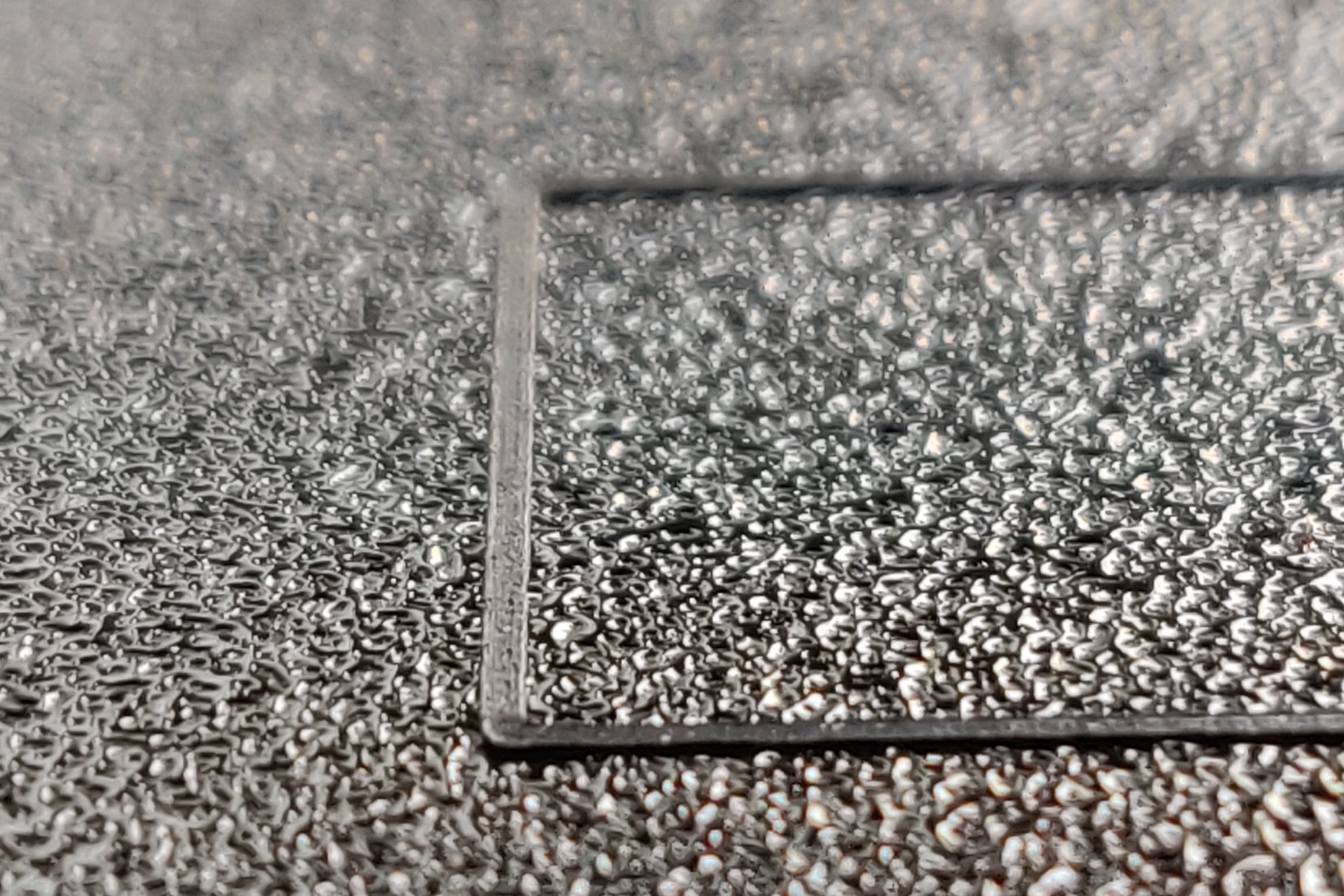
Without changing the z-offset during the second run of the first-layer-calibration, this is the result
On the left side of the bed the track looked like this:
On the right side of the bed the track looked like that:
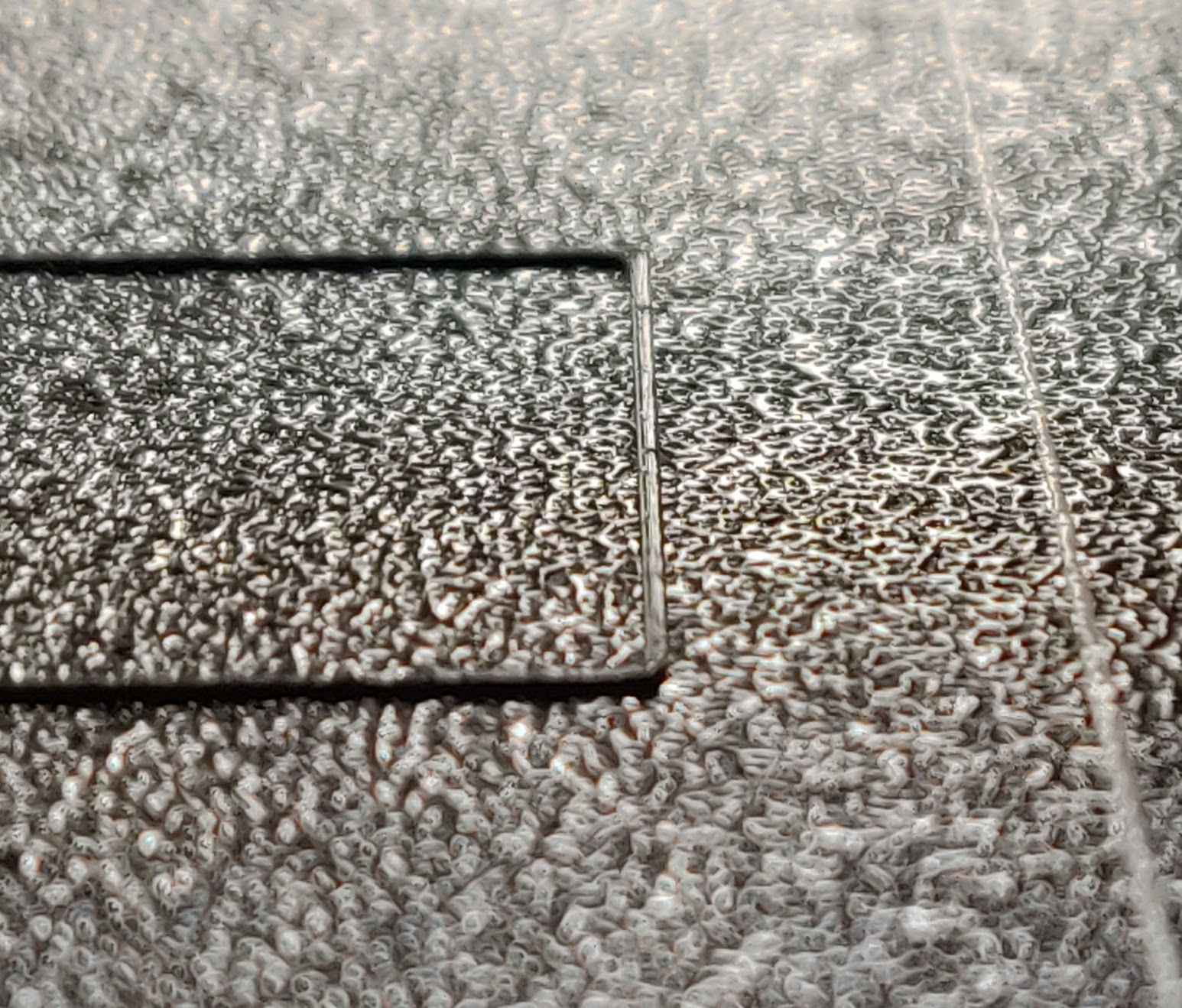
Here we are not comparing cold vs warm printer, but one side of the bed vs the other within a handfull of seconds. I don't really see how that can be in correlation to the MINDA-Probe temp.
deepthought-64
on 22 Jul 2020
If you are having consistent issues with filament squish left/right of your bed like these photos suggest, check your x axis belt tension. I had the EXACT same problem and my x axis belt was tight enough to actually skew that axis, it was no longer totally flat relative to the bed. I would think MINDA mesh leveling would fix this but that's what I've seen.
I would have one side so close to the bed that it wasn't able to get filament out and the other side was so far away that filament wouldn't stick to the bed.
Support sent me a new MINDA after watching my video: https://youtu.be/CkTewmTzyOU
But the only thing that fixed it was adjusting x axis belt tension.
 nwalke
on 30 Jul 2020
nwalke
on 30 Jul 2020
I had the same problem and solved it by doing this mod: https://github.com/bbbenji/PMSBLM
However, I don't think we should be forced to apply such a mod in order to print correctly on the full 180x180mm bed.
 bbbenji
on 18 Aug 2020
bbbenji
on 18 Aug 2020
@nwalke
Sorry for the late reply... :(
Thanks for the tip. I will try it out. But - just like you said - shouldn't the mesh-bed leveling compensate for exactly that?
And yeah, I also got a new MINDA from Prusa. I can't really tell if that has improved anything, because the error is difficult to reproduce (sometimes it is barely noticable, sometimesit is simmilar to what you observed: one side the nozzle burries into the bed, and on the other side it does not stick)
@bbbenji That is an interesting approach. But it looks like it wants to solve a problem, that mesh-bed leveling is there to solve, right?
@JohnnyDeer are there any updates regarding this issue?
deepthought-64
on 18 Aug 2020
@deepthought-64 there is only so much MBL can help with. It's really for super fine-tuning.
At least in my case, the difference between high and low points was too much for the MINDA to compensate for.
Having said that, after the mod, my bed is somewhere around .02mm between the highest and lowest area, the MINDA handles that difference quite well for me.
Having to preheat the MINDA before starting a print is an unrelated issue. It seems like that is affecting you as well.
bbbenji
on 18 Aug 2020
Hm, sounds reasonable. Do you know the limits of the MBL (i.e. the hightest and lowest deviations it can compensate)?
Would be interesting, how the printer behaves if the MBL detects a deviation, that is beyond what it can compensate for. For argument sake, if highest and lowest points deviate by 3mm...?
From a user perspective I would assume that when the MBL completes successfully it is able to compensate for deviations.
deepthought-64
on 18 Aug 2020
@deepthought-64 solution of our DEV is still on testing. Only new thing which I heard about is X axis adjustment as @nwalke wrote. If your first layer is too low on left side then you could try to tighten the lower screw on X end. But if this issue is not consistent then this won´t help.
JohnnyDeer
on 18 Aug 2020
Alright :) Thanks for the update!
deepthought-64
on 18 Aug 2020
I'll just put my hand up here as well; Good to know I'm not alone in trying to get a good first layer and not having any luck with MBL.
My grid isn't that atrocious after some adjustments and shimming to correct some left-right tilt, but it always seems to think the back corner is too high (presumably because the probe has warmed up during the previous 18 points). (Output below is when starting a print while warm)
 0 +0.006 +0.082 +0.063 -0.033
 1 -0.032 +0.143 +0.199 +0.086
 2 -0.090 +0.090 +0.177 +0.190
 3 -0.153 +0.091 +0.272 +0.331
I do recognize it's been said that something is in the works; basically just chiming in so I get notified when there's movement on this issue.
 vintagepc
on 21 Oct 2020
vintagepc
on 21 Oct 2020
I have the issue as well. I also have a P.I.N.D.A. v2 Probe ready to go once they drop a firmware feature to let us switch the probe out.
Please add optional support for the P.I.N.D.A. v2 (PINDA probe with thermistor) so those of us who want to operate these as production machines can print more reliably.
Thank you
 DRKMSTR
on 25 Oct 2020
DRKMSTR
on 25 Oct 2020
@JohnnyDeer any updates on the solution testing in dev?
 d-zalewski
on 25 Oct 2020
d-zalewski
on 25 Oct 2020
@JohnnyDeer I know a lot of us are waiting for a possible update on this issue.
I’m having exactly same issue with my Mini where temperature seems to be affecting probe’s values.
If possible, please give us an update on ETA for this fix to land?
Thank you!
 Dimonstar
on 26 Oct 2020
Dimonstar
on 26 Oct 2020
@JohnnyDeer any updates regarding this? Thank you!
 pvcata
on 12 Nov 2020
pvcata
on 12 Nov 2020
Solution is here, thank you for patience. As you may have noticed we released MINI+ with a new Mesh Bed Leveling sensor, the SuperPINDA. SuperPINDA will make calibration of the first layer much more consistent. You can find it in the e-shop as an upgrade for your MINI to MINI+: https://shop.prusa3d.com/en/original-prusa-mini/1399-original-prusa-mini-to-mini-upgrade-kit.html
If anyone faces issues with inconsistent first layer and you have explored all options first and suspect MINDA to be the cause, please contact our Support with sufficient proof, photos or a video that your issues could be MINDA . I will close this issue soon along with all related. In any new cases of this bug please create new issue to make this repositary clear. Thank you all.
JohnnyDeer
on 25 Nov 2020
Thanks @JohnnyDeer for the update! :+1:
Had a chat with the support today and after i uploaded two videos to proof that the first level cal had 0.500mm difference between two consecutive runs, your colleague agreed to send me a new probe. Although he called it a "new MINDA" so lets hope that actually a SuperPINDA will arrive...
Lets hope that that is the end of this issue...
deepthought-64
on 25 Nov 2020
Even with a SuperPINDA the levelling does not seem to be compensating fully. On the left side of my bed vs the right side the correct live Z value is not the same - on the left it is plowing into the print, but on the right it is slightly too high leading to small holes at the infill/perimeter overlap. I am working to get some proper pictures and will open a new issue once I have some prints that are easy to photograph.
vintagepc
on 6 Dec 2020
@vintagepc have you tried playing with the x axis belt tension?
MBL is only going to do so much. If it's super skewed like you're talking about I would try to adjust the machine.
Slowly move the print head along the x axis and watch the distance from the build plate. Try and adjust the x axis belt tension until you get it close to consistent across the entire built plate.
nwalke
on 6 Dec 2020
I have done something similar - taking an object of known height and placing it such that the X rod just barely touches it close to the Z frame. If I do not move the Z axis, slide the object out and slide it under the bottom rod at the far end of the arm, the difference is not perceptible, it feels like it has the same tightness. So we are not talking about the X axis not being significantly non-coplanar with the build plate in this case.
vintagepc
on 6 Dec 2020
I close this issue, all new cases with SuperPinda please add to #1131 Thank you.
JohnnyDeer
on 7 Dec 2020
Related issues
 anthr76
·
4Comments
anthr76
·
4Comments
 thinkyhead
·
3Comments
thinkyhead
·
3Comments
 LuxuSam
·
5Comments
LuxuSam
·
5Comments
 MartinMajewski
·
5Comments
MartinMajewski
·
5Comments
 jkavalik
·
5Comments
jkavalik
·
5Comments
Most helpful comment
@JohnnyDeer any updates regarding this? Thank you!