Provider: Tried to listen to a value exposed with provider, from outside of the widget tree
I am getting this error after updating to latest version
 harsh5400
All 54 comments
The error message explains what's the problem and what's the fix.
What didn't you understand?
 rrousselGit
on 3 Jan 2020
rrousselGit
on 3 Jan 2020
I would like to know why provider is outside of the widget tree? I'm getting the same error when calling provider on context of child widget.
 lukasIwaszkiewicz
on 5 Jan 2020
lukasIwaszkiewicz
on 5 Jan 2020
The error message explains everything.
If there's something you do not understand, please quote it. Otherwise I don't know what you don't understand
rrousselGit
on 5 Jan 2020
`class Settings extends StatefulWidget {
final String title = 'Upload Files';
@override
State
}
class _SettingsState extends State
List
@override
Widget build(BuildContext context) {
return Provider(
create: (context) => new DirectorySelectionProvider(),
child: Scaffold(
appBar: AppBar(
title: Text('Settings'),
),
body: ListView(
children: <Widget>[
Card(
child: ListTile(
leading: Icon(Icons.folder),
title: Text('Select Directories'),
subtitle: Text(
'Specify wihich directories you want to upload to cloud'),
trailing: Icon(Icons.touch_app),
onTap: () {
_showDialog();
},
),
)
],
),
),
);
}
void _showDialog() {
showDialog(
context: context,
builder: (BuildContext context) {
var prov = Provider.of<DirectorySelectionProvider>(context);
return Dialog(child: DirectorySelector(prov.selectedFolders));
},
);
}
}
When I'm trying to access provider inside _showDialog I get
Error: Could not find the correct Provider
above this Settings Widget
And I don't understand why.
When I try to access it before showDialog() inside _showDialog() I get
Tried to listen to a value exposed with provider, from outside of the widget tree
My question is why I can't access that provider?
lukasIwaszkiewicz
on 5 Jan 2020
Read the full error message. It explains why with a code snippet similar to yours using RaisedButton.
rrousselGit
on 5 Jan 2020
@lukasIwaszkiewicz
Here is the the widget tree from Dart DevTools.
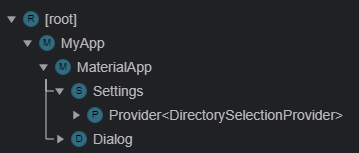
As you can see the Dialog widget is different branch from the Provider<DirectorySelectionProvider> widget.
A quick fix is to move Provider<DirectorySelectionProvider> to same branch as Dialog widget.
 szeseong
on 6 Jan 2020
szeseong
on 6 Jan 2020
@szeseong that's helpful. I kind of knew I'm out of the tree but I didn't know how to check that, now I know. Thank you.
lukasIwaszkiewicz
on 9 Jan 2020
The error message is pretty about what's the problem and what's the fix.
What didn't you understand?
I am getting this error after updating to latest version
provider: ^4.0.0
[VERBOSE-2:ui_dart_state.cc(157)] Unhandled Exception: 'package:provider/src/provider.dart': Failed assertion: line 213 pos 7: 'context.owner.debugBuilding || listen == false || _debugIsInInheritedProviderUpdate': Tried to listen to a value exposed with provider, from outside of the widget tree.
This is likely caused by an event handler (like a button's onPressed) that called
Provider.of without passing listen: false.
To fix, write:
Provider.of
It is unsupported because may pointlessly rebuild the widget associated to the
event handler, when the widget tree doesn't care about the value.
0 _AssertionError._doThrowNew (dart:core-patch/errors_patch.dart:42:39)
1 _AssertionError._throwNew (dart:core-patch/errors_patch.dart:38:5)
2 Provider.of
package:provider/src/provider.dart:213
3 _SplashPageState.goPage
package:kooflutterbase/pages/splash_page.dart:49
4 _SplashPageState.initState.
 lixia9
on 14 Jan 2020
lixia9
on 14 Jan 2020
The fix is included in the error message. I still have trouble understanding what the problem is
rrousselGit
on 17 Jan 2020
Error message is helpful.i fixed my error.
After read error message,i'm confused.
When is setting listen: true is the correct behavior?
Can you give an example?
example isn't show this case.
Thank you for your patience.
 HannibalKcc
on 19 Jan 2020
HannibalKcc
on 19 Jan 2020
listen: true is the default behavior.
If you don't specify the flag, it's enabled by default
rrousselGit
on 19 Jan 2020
oh,my bad.
it is confused because provider.dart 4.0.1
/// As such, it is fine to call
Provider.ofinside event handlers without
/// specifyinglisten: false:
///
/// ```dart
/// RaisedButton(
/// onPressed: () {
/// Provider.of(context); // no need to pass listen:false
///
/// Provider.of(context, listen: false); // unnecessary flag
/// }
/// )
but 4.0.2 deleted those comments.
HannibalKcc
on 19 Jan 2020
4.0.2 inside onPressed or onTap to call Provider.of must add listen: false?
Before 4.0.2, it works。
I want the reason.
 Icyoung
on 20 Jan 2020
Icyoung
on 20 Jan 2020
It always led to a weird behavior (it made the button rebuild more often).
This is illogical and undesired, so the library now warns you against it.
rrousselGit
on 20 Jan 2020
This is illogical and undesired
listen: true is the default behavior,but it's illogical.
So maybe next version(4.1.0?),listen: false will be the default behavior?
HannibalKcc
on 20 Jan 2020
listen:true being the default is logical.
It's not specifying listen: false inside an event handler that is not logical.
Also, 4.1.0 will somehow have a shorter alternative to Provider.of:
context.read<T>() // Provider.of<T>(context, listen: false)
context.watch<T>() // Provider.of<T>(context)
Why UI not getting update when used listen: false but with listen: true it throws an error?
 Mirodil
on 26 Jan 2020
Mirodil
on 26 Jan 2020
Is there any way to access the provider from outside the widget tree ?. A common case would be using the showDialog method which navigate outside of the current tree to the root app.
 Aljabri-Salman
on 28 Jan 2020
Aljabri-Salman
on 28 Jan 2020
any Update.
in new version it is not possible to call notifyListener inside onTap.
what do we should do ???
I am using provider: ^3.1.0+1 to solve this .
 jalalonagh
on 1 Feb 2020
jalalonagh
on 1 Feb 2020
when I change listen to false ui screen always crash and this is error is disappear but the ui screen didn't update any more !!! it just crashing and keep crashing . now my question in provider 3 when I use provider in onPress or onTap evreything is okay now in provider 4 everything is crashing . I need an explain to how to sovle this problem
 OmarBakry-eg
on 20 Mar 2020
OmarBakry-eg
on 20 Mar 2020
In his latest talk, Remi suggests just passing the context into whatever class might need to access Provider. Unfortunately, this doesn't work well with a CommandPattern architecture, where you have async tasks, that outlive the page they were initiated from. As soon as the view, that held that context is pushed off stage, the context is now useless and can no longer do anything.
Think of a LogoutCommand, that makes a service call, changes page routes to the Logout Page, and then tries to make another service call (maybe to analytics or something), it will blow up since the context originally passed in, is now expired. In such a case, you need to get all you provided items immediately, at the top of the function, which reduces readability of your code.
This is why I still prefer to use GetIt for things that are meant to be singletons, as we just don't need to be concerned about our place in the ui tree, when accessing them.
As a workaround for provider, I will often have something like AppGlobals.rootContext, which then allows my Commands to access any of the root-level providers, in an async way, without having to screw around with which context do they get passed. This also provides a mechanism for controlling navigator, without running into the same issues.
 esDotDev
on 22 Mar 2020
esDotDev
on 22 Mar 2020
As soon as the view, that held that context is pushed off stage, the context is now useless and can no longer do anything.
Yes, because the object is disposed of. You're not supposed to use an object after it was disposed.
If you don't want the object to be disposed, move the provider higher in the hierarchy. This is working as intended.
rrousselGit
on 22 Mar 2020
Except I'm talking about root-level singletons, such as services. So no, this is not really working as anyone would have intended. ie, one of my pages initiates a LogoutCommand, and passes it's context to the LogoutCommand so it can access root-level services. The LogoutCommand then navigates away from that page, and tries to access another _root-level_ service, but it can't as the context it was using as lookup, is now disposed.
There's no ability to "move the provider higher" in this case, it's at the top level. The Commands are not inside the display tree, they just need a hook to access the top-level services, but that hook is no longer active.
I don't see any point in arguing about it, this is a fundamental drawback of using the display tree to lookup global services in your app, there's no point pretending it doesn't exist, or is the users fault. Coupling these types of global lookups, to some arbitrary location in the tree, _does_ have architectural drawbacks and limitations.
You mentioned this in your talk, as one of the FAQ's you get, and you offered up the solution as passing context. While this works, I thought you might be interested in knowing it's limitations, and that it does not in fact work in all situations, specifically async tasks that are outside the display list and may outlive the widget that kicked-off the task.
esDotDev
on 22 Mar 2020
So no, this is not really working as anyone would have intended
It is. The problem is that you placed your provider in the wrong location.
Your problem is that: "one of my pages initiates a LogoutCommand"
Instead of instantiating it _inside a page_, place it above all pages. Then it won't be disposed when the route is cleared.
rrousselGit
on 22 Mar 2020
I don't think you're understanding what I'm describing. Commands are short-lived god-objects that are created to do a task. This may be a task that touches multiple views, or complex async sequence of events.
So inside my view, I may have something like:
_onPressed: ()=> LogoutCommand().execute(context)_
What am I supposed to be moving up here, my button? It lives where it lives.
This command is not getting disposed, the _context_, that it is using, to access other Provided services/models, is what is being disposed.
To work around this, my mainView stores it's context as AppGlobals.context property, and then my commands are safe to use that, to lookup whatever they may need without fear of suddenly losing their context.
esDotDev
on 22 Mar 2020
So inside my view, I may have something like:
onPressed: ()=> LogoutCommand().execute(context)
That's a different thing indeed.
The solution would be:
onPressed: ()=> LogoutCommand().execute(context.read<Whatever>())
Don't pass the context to objects unrelated to Flutter/UI
rrousselGit
on 22 Mar 2020
Sure, but that creates a load of boilerplate and parameter passing which I would definitely prefer to avoid. I don't want to be passing in 4 different things each time I run the command, when the command could just look them up itself in a lazy fashion, as needed.
Consider a Command that is initiated from 3 or 4 places in the app, now each time I change the dependencies, I need to go around changing method calls all over the app. Much DRY'er to just allow the god-level command to look up things itself.
esDotDev
on 22 Mar 2020
Then we go back to square one, and pass the command through a provider higher in the tree:
MultiProvider(
  providers: [
    // TODO: add a bunch of providers
    Provider(create: (c) => LogoutCommand(c.read)),
  ],
  child: MyApp(),
)
Then instead of:
onPressed: ()=> LogoutCommand().execute(context)
do:
onPressed: ()=> context.read<LogoutCommand>().execute()
No because Commands are not singletons, they are meant to be executed and then disposed. Often they are chained together, they have their own internal state, they can be dispatched concurrently,
I may have a RefreshUsers command for example, that I kick off, and maybe it takes 1-2 seconds to complete, maybe fetches from multiple services, and updates multiple models. While that guy is finishing, I navigate away... the context he is using has now become invalidated a second or two before he was done working.
There are endless use cases you can use for this sort of thing, but it just comes back to: _Anytime you need to execute an async task, outside of the display tree, it can be difficult to utilize provider as you can not rely on the context you were passed._
Your answer is basically; "Well never be outside the display list" Which is not really a solution for certain design patterns.
esDotDev
on 23 Mar 2020
Though, maybe something like:
_Provider(update: (c) => LogoutCommand(c.read)),_
Would work? Returning a new command instance each time it's requested?
This does add the boilerplate of mapping all your commands in the MultiProvider, and there can often be many of them, but that's almost a good boilerplate, as it would give anyone looking at your main function even more context about the workings of the app.
esDotDev
on 23 Mar 2020
Though, maybe something like:
Provider(update: (c) => LogoutCommand(c.read)),Would work? Returning a new command instance each time it's requested? Ooh, I think I'm going to try that :)
No
But you could expose c.read itself:
Provider<Locator>(create: (c) => c.read)
Then do:
onPressed: () => LogoutCommand().execute(c.read<Locator>())
This is basically equivalent of using an ancestor BuildContext instead of the route BuildContext
rrousselGit
on 23 Mar 2020
Cool, thanks for all the quick advice, I will try that out
[Edit] I could actually bake this right into my AbstractCommand, anytime you're passed a context, 'exchange' it for the root level one. Interesting!
It's not _alot_ different in reality, to just storing off a static reference to that context, but it definitely _feels_ cleaner, and would make testing a little cleaner as well.
esDotDev
on 23 Mar 2020
This is throwing an error inside my MultiProvider:
_Provider
error: A generic function type can't be a type argument.
As an aside, is there any reason I couldn't just put this as the last entry in my top-level multi-provider?
Provider<BuildContext>(create: (c) => c)
And then when I initiate a command, do something like:
var rootContext = widgetContext.read<BuildContext>();
error: A generic function type can't be a type argument.
Oh interesting. I didn't think of that one
As an aside, is there any reason I couldn't just put this as the last entry in my top-level multi-provider?
Yeah you can
rrousselGit
on 23 Mar 2020
Thanks Remi! This works for me. Really appreciate the help
esDotDev
on 23 Mar 2020
I am using Provider v4.0.4 in a todo list app which lets user add,delete and checkoff tasks.
Now the problem is when onPressed is activated I am calling
Provider.of<TaskData>(context).addTask(newTask);
//where addTask adds the String newTask to task widget.
It throws an error and after going through the error it is advised to use listen:false.
I did the same and removed notifyListener() from addTask function but as thought it will not update the UI although the task widget lists update but due to listen:false it is not shown.
_What can I do to update the UI as soon the user adds the task?_
Ps: I read all the upper threads but I didn't get the clear understanding out of it. Help explaining the things will be highly appreciated.
Thank you.
 harshkc
on 25 Mar 2020
harshkc
on 25 Mar 2020
The code in the handler should always be non-binding (listen: false). If you want to bind for rebuilds, wrap the widget in a consumer, or just reference it in your build method:
TaskData task = context.watch()
setState will now be called when TaskData changes.
esDotDev
on 25 Mar 2020
Why UI not getting an update when used
listen: falsebut withlisten: trueit throws an error?
If your widget tree let say component doesn't relate your state change operation you should use listen = false cause, the default behavior is true, when the value is true, it's automatically looking for widget context and then if it didn't find anything changes it gives you an error. For example, you have a widget like that, and it's clearly enough to understand that it is not a Provider context. In this case you shouldn't use listen = true as a default value.
import 'package:flutter/material.dart';
import 'package:provider/provider.dart';
import 'package:your_pack_name/states/task_data.dart';

class AddTaskScreen extends StatelessWidget {
  @override
  Widget build(BuildContext context) {
    String newTaskTitle;

    return Container(
      color: Color(0xFF757575),
      child: Container(
        padding: EdgeInsets.all(22.0),
        decoration: BoxDecoration(
          color: Colors.white,
          borderRadius: BorderRadius.only(
            topLeft: Radius.circular(20.0),
            topRight: Radius.circular(20.0),
          ),
        ),
        child: Column(
          crossAxisAlignment: CrossAxisAlignment.stretch,
          children: <Widget>[
            Text(
              'Add Task',
              textAlign: TextAlign.center,
              style: TextStyle(
                color: Colors.lightBlueAccent,
                fontSize: 22.0,
              ),
            ),
            TextField(
              autofocus: true,
              autocorrect: true,
              textAlign: TextAlign.center,
              decoration: InputDecoration(
                fillColor: Colors.lightBlueAccent,
              ),
              onChanged: (String value) {
                newTaskTitle = value;
              },
            ),
            SizedBox(
              height: 20.0,
            ),
            RaisedButton(
              padding: EdgeInsets.all(20.0),
              textColor: Colors.white,
              color: Colors.lightBlueAccent,
              child: Text(
                'Add',
                style: TextStyle(
                  fontSize: 18.0,
                ),
              ),
              onPressed: () {
                Provider.of<TaskData>(
                  context,
                ).addTask(newTaskTitle);
                Navigator.pop(context);
              },
            ),
          ],
        ),
      ),
    );
  }
}
 valehasadli
on 2 Apr 2020
valehasadli
on 2 Apr 2020
@nanophp
This example is from Udemy course by Angela. Everything works fine with the provider
provider: ^3.1.0+1
version specified in pub spec.yaml file when she was recording her course. The current provider package
provider: ^4.0.5
causes this error. Therefore, just use the old provider package.
 misici234
on 15 Apr 2020
misici234
on 15 Apr 2020
@nanophp
This example is from Udemy course by Angela. Everything works fine with the provider
provider: ^3.1.0+1
version specified in pub spec.yaml file when she was recording her course. The current provider package
provider: ^4.0.5
causes this error. Therefore, just use the old provider package.
I'm watching the same course.
Or you could do the following:
within the callback example that Angela uses with the RaisedButton, you need to do the following:
           onPressed: () {
                     Provider.of<TaskData>(
                        context, listen: false
                        ).addTask(newTaskTitle);
                   Navigator.pop(context);
               }
 stromyc
on 16 Apr 2020
stromyc
on 16 Apr 2020
listen: false
If you add listen: false, how will you get it to rebuild the UI?
In the above udemy example, what is the proper way to use the new major version of this package?
 droidzone
on 19 Apr 2020
droidzone
on 19 Apr 2020
You need to grab the Provided instance in your build method if you want to bind for rebuilds, as simple as that.
If you want to also fetch the instance in a button handler, and do something with it, that is a separate use case.
build(){
   TaskData t = context.watch() ; //This binds you for rebuilds
   return Button(onPressed: (){
       context.read<TaskData>().doStuff(); //This allows you to look it up, without binding
   )
Is the basic idea. Just don't conflate these 2 things. One is a lookup + bind, the other is a straight lookup. If you just chang the Notifier, but have not bound it to your build method, then of course no build would be triggered.
esDotDev
on 19 Apr 2020
I'll close this since it's more of a discussion than an actual problem
If you have any suggestion on how to improve the error message, or anything you do not understand in that message, feel free to ping me 😄
rrousselGit
on 19 Apr 2020
This is illogical and undesired
listen: trueis the default behavior,but it's illogical.
So maybe next version(4.1.0?),listen: falsewill be the default behavior?
Just use the older version of the provider package, most probably 3.xx the problem seems to be solved for me.
 HItzz07
on 1 May 2020
HItzz07
on 1 May 2020
I'm having this kind of error but my widget is in the widget tree only. I just wrapped the material app with MultiProvider and added ChangeNotifierProvider in it. But it's showing that my widget is not in the widget tree while I am accessing it in the login screen(when tapping the login button, I'm changing the auth state to authenticated, so I need to rebuild the initial widget).
 vinothvino42
on 5 May 2020
vinothvino42
on 5 May 2020
@nanophp
This example is from Udemy course by Angela. Everything works fine with the provider
provider: ^3.1.0+1
version specified in pub spec.yaml file when she was recording her course. The current provider package
provider: ^4.0.5
causes this error. Therefore, just use the old provider package.I'm watching the same course.
Or you could do the following:
within the callback example that Angela uses with the RaisedButton, you need to do the following:
           onPressed: () {
                     Provider.of<TaskData>(
                        context, listen: false
                        ).addTask(newTaskTitle);
                   Navigator.pop(context);
               }
I guess the widget got rebuild whn we clicked the keyboard check button, and led to clear the value of String var, convert the Class to stateless to Preserve the String value which worked for me.
 metalgurung
on 27 Jun 2020
metalgurung
on 27 Jun 2020
@nanophp
This example is from Udemy course by Angela. Everything works fine with the provider
provider: ^3.1.0+1
version specified in pub spec.yaml file when she was recording her course. The current provider package
provider: ^4.0.5
causes this error. Therefore, just use the old provider package.I'm watching the same course.
Or you could do the following:
within the callback example that Angela uses with the RaisedButton, you need to do the following:onPressed: () { Provider.of<TaskData>( context, listen: false ).addTask(newTaskTitle); Navigator.pop(context); }I guess the widget got rebuild whn we clicked the keyboard check button, and led to clear the value of String var, convert the Class to stateless to Preserve the String value which worked for me.
listen false is not working. Actually in previous version (for Angela) listen is true by default, in latter versions it removed as it is taking high performance
The value of newTaskTitle is not updating with the value of TextFeild. and as it is returning null value to the text of taskTile, it is giving error. Is there any other option, everything else is workihng fine. When am giving a a value to newTaskTitle initially when it is declared, it is working fine
 Sandeep-peddi
on 31 Aug 2020
Sandeep-peddi
on 31 Aug 2020
I am getting this error after updating to latest version
Please read in detaill https://flutter.cn/docs/development/data-and-backend/state-mgmt/simple
 Jinxishihenian
on 1 Sep 2020
Jinxishihenian
on 1 Sep 2020
Hello, This may be a stupid question. I want to change the state from outside widget tree. Is it possible? When I use listen: false it does not affect the state. Does anyone have a suggestion for this? This might irrelevant to this git issue. Sorry
 edpchinthana
on 3 Sep 2020
edpchinthana
on 3 Sep 2020
The state probably changed, but the view is not bound?
void handleClick(c) => c.read<Foo>().bar = "changed"; //use read here

build(c) {
   Foo foo = c.watch(); //use watch here
   return Text(foo.bar);
}
I want to load data from the shared preference to state if the user is logged in. I placed the code for getting data from shared preference in the app state and put notifyListeners(). I wanted to call this function from the init state on a loading screen. context.read<AppState>().setCounter(); I tried to like this. but it doesn't notify listeners. It looks like another instance of the state. I am a beginner. That's what I understood. Do you guys have a suggestion to archive this task?
Provider.of<AppState>(context,listen: false).setCounter(); This also didn't help me
provider: ^4.3.2+1
  shared_preferences: ^0.5.10
ps- Thanks all I think I found a solution. I use the constructor of my AppState (the class with ChangeNotifier) to retrieve data from shared preference. So now I don't have to change AppState outside from the widget tree. This may not be a good practice. Any advice for me?
edpchinthana
on 3 Sep 2020
I think the better solution is to check this whether your user is logged in or not from inside of provider, and then depends on that provider you should do whatever you want)) Just put your provider on top of widget tree!)) Hope it helps!)
 Mickey-A-Mouse
on 20 Oct 2020
Mickey-A-Mouse
on 20 Oct 2020
I am getting this error after updating to latest version
add (context, listen: false) whenever you call the data from the provider
example below:
Provider.of
 mikkyboy2005
on 2 Nov 2020
mikkyboy2005
on 2 Nov 2020
due to the new provider update you need to use something like this.
\
context.read
\
 4limsyed
on 28 Nov 2020
4limsyed
on 28 Nov 2020
Related issues
 Alfie-AD
·
4Comments
Alfie-AD
·
4Comments
 Vadaski
·
3Comments
Vadaski
·
3Comments
 FaizanKamal7
·
6Comments
FaizanKamal7
·
6Comments
 tmxdyf
·
3Comments
tmxdyf
·
3Comments
 guopeng1994
·
4Comments
guopeng1994
·
4Comments
Most helpful comment
listen:truebeing the default is logical.It's not specifying
listen: falseinside an event handler that is not logical.Also, 4.1.0 will somehow have a shorter alternative to Provider.of: