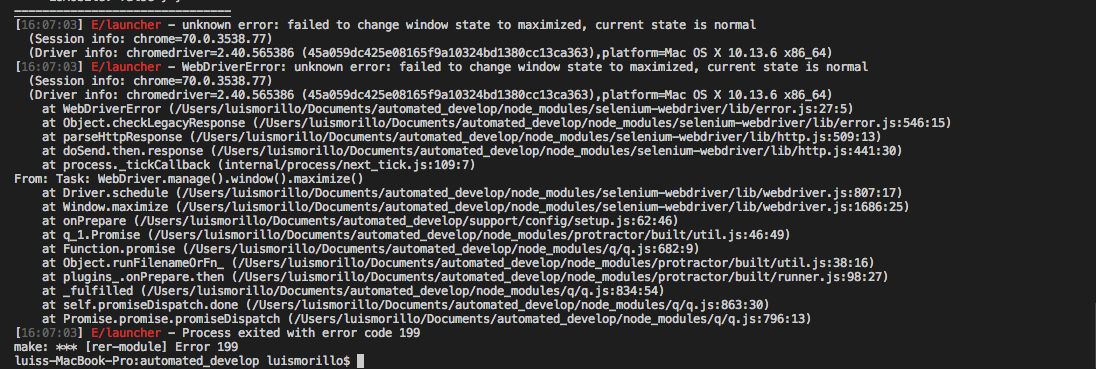
Protractor: WebDriverError: unknown error: failed to change window state to maximized, current state is normal
Hi Team,
I have been using the maximize command for a long time ago but right now I'm facing this bug.
// My commands
browser.driver.manage().window().setSize(2440, 900);
browser.driver.manage().window().maximize(); // if I comment this line, it work fine!
Node: 6.9.1
protractor: 5.4.1
chrome=70.0.3538.77
chromedriver=2.40.565386
platform=Mac OS X 10.13.6 x86_64

This image is from a coworker:
Thanks,
 djom202
All 14 comments
i am getting same error. can anyone solve it
 ShivaKumarRouthu
on 1 Nov 2018
ShivaKumarRouthu
on 1 Nov 2018
It's an issue of specific chrome version, just use setSize()
 CrispusDH
on 1 Nov 2018
CrispusDH
on 1 Nov 2018
Hi @CrispusDH at least for me, my tests are running in a lot screen sizes so I cannot put each size using setSize() for all of them. I need to fix that or find another way to do the same.
djom202
on 1 Nov 2018
Hi, @djom20 ! Please provide your config file and tests example.
 IgorSasovets
on 4 Nov 2018
IgorSasovets
on 4 Nov 2018
@IgorSasovets, My config file is a little different but working as the normal config.
'use strict';

exports.set = function (params) {
    return {
        directConnect: true,
        ignoreUncaughtExceptions: true,
        baseUrl: params.baseUrl,
        capabilities: {
            'browserName': 'chrome',
            'name': 'Test',
            'chromeOptions': {
                'args': ['--no-sandbox', '--start-maximized', 'use-fake-ui-for-media-stream'],
                'prefs': {
                    'profile.managed_default_content_settings.notifications': 1
                }
            }
        },
        specs: [
            '**/**.feature'
        ],
        allScriptsTimeout: 50000,
        framework: 'custom',
        frameworkPath: require.resolve('protractor-cucumber-framework'),
        cucumberOpts: {
            require: [
                '*_steps.js',
            ],
            format: 'pretty',
            tags: ['@complete'],
            keepAlive: false,
            'dry-run': false,
            strict: true
        },
        onPrepare: function () {
            browser.driver.manage().window().setSize(2440, 900);
            browser.driver.manage().window().maximize(); // The issue is here
        }
    };
};
I ran it on local machine and all works without errors. Try to remove --start-maximized option and update chromedriver to the latest version.
IgorSasovets
on 6 Nov 2018
@IgorSasovets let me test it, also which chromedriver version do you have?
djom202
on 6 Nov 2018
I just updated the chrome driver and removed the --start-maximized option, but the bug still happening.

djom202
on 6 Nov 2018
I used chromedriver 2.43, node 8.11.3, and the same chrome version. Also, I installed node 6.9.1 and ran under mentioned version, tested it on MacOS 10.12 and Windows 7. BTW, what is your working machine screen resolution?
IgorSasovets
on 6 Nov 2018
@IgorSasovets my resolution is:
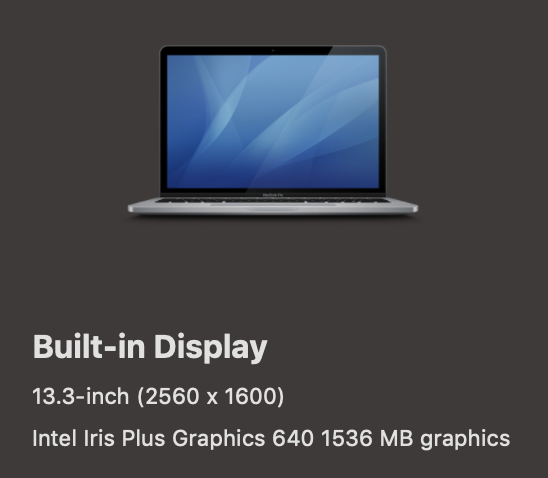
I just update my node version to test it, and I get the same bug.
djom202
on 6 Nov 2018
I am getting the same issue with the chrome version "70.0.3538.77" but if I downgrade it to version "69.0.3497.92", it is working fine.
Error details are -
_WebDriverError: unknown error: failed to change window state to maximized, current state is normal
(Session info: chrome=70.0.3538.77)
(Driver info: chromedriver=2.43.600229 (3fae4d0cda5334b4f533bede5a4787f7b832d052),platform=Mac OS X 10.12.6 x86_64)__
My configuration details are as below
chromedriver - 2.43.600229
node - v8.1.3
macos Sierra - 10.12.6
 deepthikolla
on 7 Nov 2018
deepthikolla
on 7 Nov 2018
@djom20 , I guess that there might be problems with MacOS version support. Did you try the configuration on another OS?
IgorSasovets
on 9 Nov 2018
@IgorSasovets , I don't have another OS right now. Let me try to downgrade it to version to know if work fine.
djom202
on 9 Nov 2018
This issue is fixed in ChromeDriver 2.44
Fixed WindowMaximize on Mac
 vsravuri
on 6 Dec 2018
vsravuri
on 6 Dec 2018
Related issues
 mvolkmann
·
3Comments
mvolkmann
·
3Comments
 davidkarlsen
·
3Comments
davidkarlsen
·
3Comments
 codef0rmer
·
3Comments
codef0rmer
·
3Comments
 nt3rp
·
3Comments
nt3rp
·
3Comments
 amedvedjev
·
3Comments
amedvedjev
·
3Comments
Most helpful comment
This issue is fixed in ChromeDriver 2.44
Fixed WindowMaximize on Mac
http://chromedriver.chromium.org/downloads