Protractor: Error while running protractor.conf.js
Hi ,
I am trying to run my protractor.conf.js using the command,
protractor protractor.conf.js.
This is the error that I get.
E/launcher - Unable to create session from {
"desiredCapabilities": {
"count": 1,
"browserName": "Chrome"
},
"capabilities": {
"desiredCapabilities": {
"browserName": "Chrome",
"count": 1
},
"firstMatch": [
{
"browserName": "Chrome"
}
]
}
}
Build info: version: '3.13.0', revision: '2f0d292', time: '2018-06-25T15:32:19.891Z'
System info: host: 'krishnas.local', ip: 'fe80:0:0:0:1c69:4717:69fe:bbd%en0', os.name: 'Mac OS X', os.arch: 'x86_64', os.version: '10.13.2', java.version: '1.8.0_131'
Driver info: driver.version: unknown
[15:47:20] E/launcher - SessionNotCreatedError: Unable to create session from {
"desiredCapabilities": {
"count": 1,
"browserName": "Chrome"
},
"capabilities": {
"desiredCapabilities": {
"browserName": "Chrome",
"count": 1
},
"firstMatch": [
{
"browserName": "Chrome"
}
]
}
}
Build info: version: '3.13.0', revision: '2f0d292', time: '2018-06-25T15:32:19.891Z'
System info: host: 'krishnas.local', ip: 'fe80:0:0:0:1c69:4717:69fe:bbd%en0', os.name: 'Mac OS X', os.arch: 'x86_64', os.version: '10.13.2', java.version: '1.8.0_131'
Driver info: driver.version: unknown
at Object.checkLegacyResponse (/usr/local/lib/node_modules/protractor/node_modules/selenium-webdriver/lib/error.js:546:15)
at parseHttpResponse (/usr/local/lib/node_modules/protractor/node_modules/selenium-webdriver/lib/http.js:509:13)
at doSend.then.response (/usr/local/lib/node_modules/protractor/node_modules/selenium-webdriver/lib/http.js:441:30)
at
at process._tickCallback (internal/process/next_tick.js:188:7)
From: Task: WebDriver.createSession()
at Function.createSession (/usr/local/lib/node_modules/protractor/node_modules/selenium-webdriver/lib/webdriver.js:769:24)
at createDriver (/usr/local/lib/node_modules/protractor/node_modules/selenium-webdriver/index.js:170:33)
at Builder.build (/usr/local/lib/node_modules/protractor/node_modules/selenium-webdriver/index.js:635:14)
at Local.getNewDriver (/usr/local/lib/node_modules/protractor/built/driverProviders/driverProvider.js:53:33)
at Runner.createBrowser (/usr/local/lib/node_modules/protractor/built/runner.js:195:43)
at q.then.then (/usr/local/lib/node_modules/protractor/built/runner.js:339:29)
at _fulfilled (/usr/local/lib/node_modules/protractor/node_modules/q/q.js:834:54)
at self.promiseDispatch.done (/usr/local/lib/node_modules/protractor/node_modules/q/q.js:863:30)
at Promise.promise.promiseDispatch (/usr/local/lib/node_modules/protractor/node_modules/q/q.js:796:13)
at /usr/local/lib/node_modules/protractor/node_modules/q/q.js:604:44
I have newly installed protractor and webdriver-manager.
My protractor version: [email protected]
npm version - 5.10.0
This is the capability that I have provided in conf.js
capabilities: {
'browserName': 'Chrome',
},
 Siva123Prasad
All 7 comments
Hi, @Siva123Prasad ! Please provide your configuration file and test example.
 IgorSasovets
on 28 Jun 2018
IgorSasovets
on 28 Jun 2018
Hi @IgorSasovets , Please find below the required documents.
Configuration file:
'use strict';
var SpecReporter = require('jasmine-spec-reporter').SpecReporter;
// An example configuration file.
exports.config = {
// The address of a running selenium server.
//seleniumAddress: 'http://localhost:4422/wd/hub',
//seleniumServerJar: deprecated, this should be set on node_modules/protractor/config.json
// Capabilities to be passed to the webdriver instance.
capabilities: {
'browserName': 'Chrome',
},
baseUrl: 'http://localhost:3000/#/dashboard',
// Spec patterns are relative to the current working directly when
// protractor is called.
specs: ['test/protractor/*/.js'],
jasmineNodeOpts: {
showColors: true,
silent: true,
print: function () {}
},
onPrepare: function () {
/globals jasmine/
jasmine.getEnv().addReporter(new SpecReporter({
spec: {
displayStacktrace: true
}
}));
}
};
Test File:
describe('Enter My-safety app', function() {
it('check if navigation test is clickable', function() {
element(by.class('ng-binding')).click();
});
});
Siva123Prasad
on 29 Jun 2018
There were some problems with you config file and tests as well. Here is modified version which works as expected without errors. Pleasr try and provide feedback about the results. If it needed, I can share simple project example.
conf.js
'use strict';

var SpecReporter = require('jasmine-spec-reporter').SpecReporter;

// An example configuration file.
exports.config = {
// The address of a running selenium server.
//seleniumAddress: 'http://localhost:4422/wd/hub',
//seleniumServerJar: deprecated, this should be set on node_modules/protractor/config.json

// Capabilities to be passed to the webdriver instance.
    capabilities: {
        browserName: 'chrome'
    },

    directConnect: true,

    baseUrl: 'https://angularjs.org',

    // Spec patterns are relative to the current working directly when
    // protractor is called.
    specs: ['spec.js'],

    jasmineNodeOpts: {
        showColors: true,
        silent: true,
        print: function () {}
    },

    allScriptsTimeout: 11000,

    onPrepare: function () {
        /globals jasmine/
        jasmine.getEnv().addReporter(new SpecReporter({
            spec: {
                displayStacktrace: true
            }
        }));
    }
};
spec.js
describe('Enter My-safety app', function() {
    beforeAll(async() => {
        await browser.get('https://angularjs.org');
        await browser.wait(protractor.ExpectedConditions
            .elementToBeClickable($('a[href=\'https://angular.io\']')));
    });
    it('check if navigation test is clickable', () => {
        $('a[href=\'https://angular.io\']').click();
    });
});
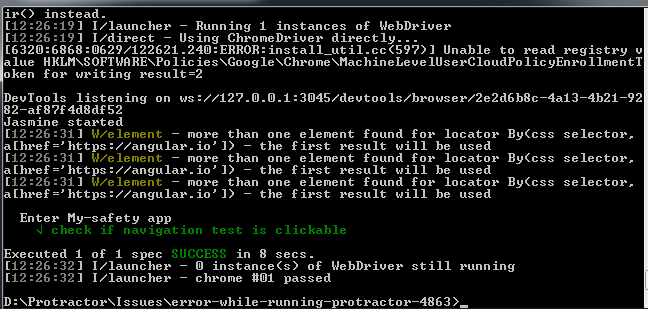
IgorSasovets
on 29 Jun 2018
Hi @IgorSasovets Thanks for the solution. Could you please let me know what exactly went wrong in my files?
I would like to know the exact reason for the failure, so that I can take the appropriate measure from this happening again.
Siva123Prasad
on 29 Jun 2018
Yes, sure. As you can see I made next changes:
- explicitly defined directConnect option;
- changed browser name(all letters should be written in lowercase);
- increased script timeout (optional, depends on app | browser | local machine performance);
- added navigating to the page in beforeAll hook with wait conditions;
IgorSasovets
on 29 Jun 2018
@Siva123Prasad, did my solution help you? If yes, please close this issue.
IgorSasovets
on 3 Jul 2018
Hi @IgorSasovets. Thanks for the solution. This helped me. Closing this.
Siva123Prasad
on 9 Jul 2018
Related issues
 vishalshivnath
·
3Comments
vishalshivnath
·
3Comments
 mvolkmann
·
3Comments
mvolkmann
·
3Comments
 gamecheck80
·
3Comments
gamecheck80
·
3Comments
 rafalf
·
3Comments
rafalf
·
3Comments
 davidkarlsen
·
3Comments
davidkarlsen
·
3Comments
Most helpful comment
There were some problems with you config file and tests as well. Here is modified version which works as expected without errors. Pleasr try and provide feedback about the results. If it needed, I can share simple project example.
conf.js
spec.js