Protractor: Execute two (or more) protractor scripts with different features & specs in paralell
I have several tests that make a regression test set. The tests are not dependent from each other, but they take a long time to execute sequentially. I thought I could _execute them in parallel_, probably in 2 or 3 threads or instances.
Spec files are protractor-cucumber-jscript and features are gherkin.
Is this possible to set up using the protractor configuration file?
I tried the following, unsuccessfully:
var featsLocation = 'features/';
var stepsLocation = 'steps/';

exports.config = {
        rootElement: 'html',
        chromeDriver: './srv/build/applications/chromedriver/chromedriver_win32/chromedriver.exe',
        seleniumServerJar: './node_modules/selenium-server-standalone-jar/jar/selenium-server-standalone.jar',
        params:{
            authURL:'',
            login:{
                email:'',
                passw:''
            }
        },
        resultJsonOutputFile:'',
        getPageTimeout: 60000,
        allScriptsTimeout: 60000,
        maxSessions: 2,
        framework: 'custom',
        frameworkPath: require.resolve('protractor-cucumber-framework'),
        multiCapabilities:[
             {
                 browserName: 'chrome',
                 chromeOptions:{
                     args:["--headless"]
                 },
                 name: 'CAPABILITY_1',
                 logName: 'LOGNAME1_USERNAME1_A',
                 shardTestFiles: false,
                 maxInstances: 1,
                 count: 1,
                 specs: [   featsLocation+'authenticateCSM.feature'
                            , featsLocation+'locationSearch.feature'
                        ]
             },{
                 browserName: 'chrome',
                 chromeOptions:{
                     args:["--headless"]
                 },
                 name: 'CAPABILITY_2',
                 logName: 'LOGNAME1_USERNAME2_B',
                 shardTestFiles: false,
                 maxInstances: 1,
                 count: 1,
                 specs: [   featsLocation+'authenticateCSM.feature'
                            , featsLocation+'shipmentErrors.feature'
                        ]
             }],

        onPrepare: function(){
            global.EC = protractor.ExpectedConditions;
        },
        baseUrl: '',
        cucumberOpts: {
            tags: '',
            require: [
                        './support/*.js'
                      , stepsLocation+'shipmentErrors/shipmentErrors.spec.js'
                      , stepsLocation+'locationSearch/locationSearch.spec.js'
                     ],
            monochrome: true,
            strict: true,
            plugin: "json"
        },
};
URL and other parameters are passed using package.json.
When executed, I do get tow instances of the selenium driver each one executing a cucumber feature, but then I get a warning message telling me that the *.spec.js files are not defined, but they are placed as it's defined in the cucumberOptions section of the config file.
Right HERE ----> steps/shipmentErrors/shipmentErrors.spec.js
and HERE ------> steps/locationSearch/locationSearch.spec.js.
This is the warning message:
[LOGNAME1_USERNAME1_A] Warnings:
[LOGNAME1_USERNAME1_A]
[LOGNAME1_USERNAME1_A] 1) Scenario: CSM FinalMile: Get authenticated to test Werner CSM Finalmile (SMOKE) - features\authenticateCSM.feature:11
[LOGNAME1_USERNAME1_A] Step: Given CSM FinalMile: Navigate to the Werner SSO initial page - features\authenticateCSM.feature:12
[LOGNAME1_USERNAME1_A] Message:
[LOGNAME1_USERNAME1_A] Undefined. Implement with the following snippet:
[LOGNAME1_USERNAME1_A]
[LOGNAME1_USERNAME1_A] Given('CSM FinalMile: Navigate to the Werner SSO initial page', function (callback) {
[LOGNAME1_USERNAME1_A] // Write code here that turns the phrase above into concrete actions
[LOGNAME1_USERNAME1_A] callback(null, 'pending');
[LOGNAME1_USERNAME1_A] });
Is there something I'm doing wrong with the config file syntax... any clues how I should build it?
 edgarechm
All 10 comments
After some research and a response received at Stackoverflow, I got the following configuration file. But still is not doing what I'm looking for:
var featsLocation = 'features/';
var stepsLocation = 'steps/';

exports.config = {
    rootElement: 'html',
    chromeDriver: 'C:\\srv\\build\\applications\\chromedriver\\chromedriver_win32\\chromedriver.exe',
    seleniumServerJar: './node_modules/selenium-server-standalone-jar/jar/selenium-server-standalone.jar',
    params:{
        authURL:'',
        login:{
            email:'',
            passw:''
        }
    },
    resultJsonOutputFile:'',
    getPageTimeout: 60000,
    allScriptsTimeout: 60000,
    framework: 'custom',
    frameworkPath: require.resolve('protractor-cucumber-framework'),
    capabilities: {
        'browserName': 'chrome',
            chromeOptions:{
                args:["--headless"]
            },
        shardTestFiles: true,
        maxInstances: 2,
    },
    onPrepare: function(){
        global.EC = protractor.ExpectedConditions;
        browser.ignoreSynchronization = true;
    },
    specs: [  featsLocation+'authenticateCSM.feature'
            , featsLocation+'shipmentErrors.feature'
            , featsLocation+'locationSearch.feature'
         ],
    baseUrl: '',
    cucumberOpts: {
        tags: '',
        require: [
             './support/*.js'
            , stepsLocation+'shipmentErrors/shipmentErrors.spec.js'
            , stepsLocation+'locationSearch/locationSearch.spec.js'
        ],
               monochrome: true,
               strict: true,
               plugin: "json"
    },
};
Here is what happens:
- I get two (2) instances of WebDriver (This is ok).
- A browser opens and executes any feature, ignoring execution sequence in "specs" section (NOT OK)
- When the browser completes execution of a feature, it closes (NOT OK)
- Since the browser opens, executes feature, closes... this is not parallel execution (NOT OK)
All that bring me the following questions:
- How to tell the browser to execute in a separated instance of WebDriver (authentic parallel execution)
- How to tell each browser what feature it must execute
- How to tell each browser to not close until all features assigned to it are executed
- How to tell the browser what is the execution order?
edgarechm
on 18 Apr 2018
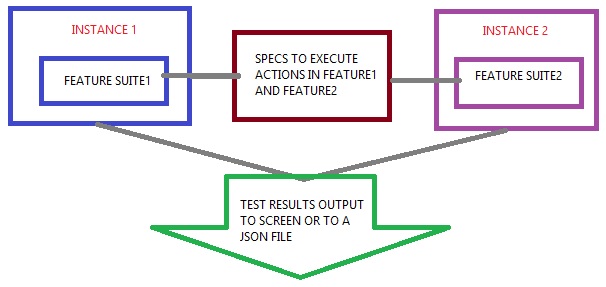
Perhaps this drawing help explain what I'm looking to accomplish...
edgarechm
on 19 Apr 2018
Hi, @edgarechm ! Here you can find example of config file which allows to run tests on different browser (Firefox, Chrome) simultaneously. Execution order depends on files names order in config file 'spec' property. Tested on latest versions of browsers and drivers. Browser turnes off only when all spec files executed.
 IgorSasovets
on 22 Apr 2018
IgorSasovets
on 22 Apr 2018
I hope that it will help you.
IgorSasovets
on 22 Apr 2018
Hi Igor. Nope, that is not what I'm trying to do.
What your code does is, having 2 different browsers, executing _exactly the same_ actions at the same time.
What I'm looking to achieve, is having 2 browsers ( I don't care if they are the same or if they are different), executing _completely different_ actions at the same time.
How to tell browser1, execute features in suite1. How to tell browser2, execute features in suite2.
Thanks anyway!
edgarechm
on 23 Apr 2018
I updated config and now there is possibility to run different specs at the same time.
IgorSasovets
on 24 Apr 2018
@edgarechm , are there any updates with this issue? Did you try updated config from my example?
IgorSasovets
on 9 May 2018
Nope, it doesn't work.
I updated the config to this:
var featsLocation = 'features/';
var stepsLocation = 'steps/';

exports.config = {
        rootElement: 'html',
        chromeDriver: 'srv/build/applications/chromedriver/chromedriver_win32/chromedriver.exe',
        seleniumServerJar: './node_modules/selenium-server-standalone-jar/jar/selenium-server-standalone.jar',
        params:{
            authURL:'',
            login:{
                email:'',
                passw:''
            }
        },
        resultJsonOutputFile:'',
        getPageTimeout: 60000,
        allScriptsTimeout: 60000,
        framework: 'custom',
        frameworkPath: require.resolve('protractor-cucumber-framework'),
multiCapablities:[
          {
            'browserName': '',
            'phantomjs.binary.path': '/srv/build/applications/phantomjs/bin/phantomjs.exe',
                chromeOptions:{
                  args:["--headless"]
                },
                maxInstances: 1,
                specs:[   featsLocation+'authenticateCSM.feature'
                        , featsLocation+'locationSearch.feature'

                ]
            },{
                'browserName': '',
                'phantomjs.binary.path': '/srv/build/applications/phantomjs/bin/phantomjs.exe',
                    chromeOptions:{
                      args:["--headless"]
                    },
                    maxInstances: 1,
                    specs:[   featsLocation+'authenticateCSM.feature'
                            , featsLocation+'ediRejects.feature'
                    ]
            }
        ],
        onPrepare: function(){
            String.prototype.toCamelCase = function() {
                return this.replace(/(?:^\w|[A-Z]|\b\w)/g, function(letter, index) {
                    return index == 0 ? letter.toLowerCase() : letter.toUpperCase();
                }).replace(/\s+/g, "");
            }

            process.on('unhandledRejection', function(reason, pr) {
                console.log("Unhandled promise at:", pr, "Reason: ", reason);
            });

            global.EC = protractor.ExpectedConditions;
            browser.ignoreSynchronization = true;
        },
        baseUrl: '',
        cucumberOpts: {
             tags: '',
             require: [
                       './support/*.js'
                        , stepsLocation+'ediRejects/ediRejects.spec.js'
                        , stepsLocation+'locationSearch/locationSearch.spec.js'/**/
                ],
            monochrome: true,
            strict: true,
            plugin: "json"
        },
};
But got the following error:
[10:36:20] E/launcher - Spec patterns did not match any files.
[10:36:20] E/launcher - Error: Spec patterns did not match any files.
Did you try to run tests from my example? For me all works as expected. Concerning your errors, it seems that there are problems with paths. You can use glob to specify spec file path.
IgorSasovets
on 9 May 2018
Currently there is no way to execute tests in parallel in only two instances of web browser. I have created an Pull Request that solves this issue. https://github.com/angular/protractor/pull/4836.
To enable this feature you have to create custom spec scheduler and add it to the configuration. Here is an example:
```
function shardScheduler(specs, capabilities) {
const numberOfShards = capabilities.maxInstances;
if(numberOfShards > 1) {
const bucketSize = Math.ceil(specs.length/numberOfShards);
const shards = [];
let start = 0
while (start < specs.length) {
let end = start + bucketSize;
if ( end > specs.length) {
end = specs.length
}
shards.push(specs.slice(start,end));
start = end;
}
return shards;
}
return [specs];
}
exports.config = {
........
capabilities: {
shardTestFiles: shardScheduler,
'browserName': 'chrome',
maxInstances: 2
},
........
}
 ReactiveThings
on 31 May 2018
ReactiveThings
on 31 May 2018
Related issues
 rafalf
·
3Comments
rafalf
·
3Comments
 adityagautam
·
3Comments
adityagautam
·
3Comments
 koshkarov
·
3Comments
koshkarov
·
3Comments
 codef0rmer
·
3Comments
codef0rmer
·
3Comments
 amedvedjev
·
3Comments
amedvedjev
·
3Comments
Most helpful comment
Currently there is no way to execute tests in parallel in only two instances of web browser. I have created an Pull Request that solves this issue. https://github.com/angular/protractor/pull/4836.
To enable this feature you have to create custom spec scheduler and add it to the configuration. Here is an example:
```
function shardScheduler(specs, capabilities) {
const numberOfShards = capabilities.maxInstances;
if(numberOfShards > 1) {
const bucketSize = Math.ceil(specs.length/numberOfShards);
const shards = [];
let start = 0
while (start < specs.length) {
let end = start + bucketSize;
if ( end > specs.length) {
end = specs.length
}
shards.push(specs.slice(start,end));
start = end;
}
return shards;
}
return [specs];
}
exports.config = {
........
capabilities: {
shardTestFiles: shardScheduler,
'browserName': 'chrome',
maxInstances: 2
},
........
}