Protractor: run 'webdriver-manager update'.The cmd show 'SyntaxError: Unexpected token ...'
Bug report
- Node Version:
v5.1.0 - Protractor Version:
5.0.0 - Angular Version:
1.5.8 - Browser(s):
chrome 54.0.2840.99 m (64-bit) - Operating System and Version
win7 64-bit
I follow 'http://www.protractortest.org/#/tutorial' and run command.
Before run 'npm install -g protractor',i have install 'Java SE Development Kit 8u121'. But the cmd can't run 'java -version'
When i run 'webdriver-manager update',the cmd show:
C:\Users\wuyang\AppData\Roaming\npm\node_modules\protractor\node_modules\webdriver-manager\built\lib\cli\logger.js:66
    info(...msgs) {
         ^^^
SyntaxError: Unexpected token ...
    at exports.runInThisContext (vm.js:53:16)
    at Module._compile (module.js:404:25)
    at Object.Module._extensions..js (module.js:432:10)
    at Module.load (module.js:356:32)
    at Function.Module._load (module.js:313:12)
    at Module.require (module.js:366:17)
    at require (module.js:385:17)
    at Object.<anonymous> (C:\Users\wuyang\AppData\Roaming\npm\node_modules\protractor\node_modules\webdriver-manager\built\
lib\cli\index.js:8:10)
    at Module._compile (module.js:425:26)
    at Object.Module._extensions..js (module.js:432:10)
The file is:
/*
* Log INFO
* @param ...msgs multiple arguments to be logged.
*/
info(...msgs) {
this.log_(LogLevel.INFO, msgs);
}
/*
* Log DEBUG
* @param ...msgs multiple arguments to be logged.
/
debug(...msgs) {
this.log_(LogLevel.DEBUG, msgs);
}
/*
* Log WARN
* @param ...msgs multiple arguments to be logged.
/
warn(...msgs) {
this.log_(LogLevel.WARN, msgs);
}
/*
* Log ERROR
* @param ...msgs multiple arguments to be logged.
*/
error(...msgs) {
this.log_(LogLevel.ERROR, msgs);
}
When i run 'webdriver-manager start',the problem still continue.
I don't know how to fix it.
Anyone can help me?
 yy7054wyq5
All 14 comments
Protractor 5 requires Node 6.9.4 or higher, I believe that's the cause of the error you're seeing.
 heathkit
on 25 Jan 2017
heathkit
on 25 Jan 2017
Yes, i hava update node.js to 6.9.4, but the tutorial did't say it.
yy7054wyq5
on 25 Jan 2017
Same error with node 7.2.1
@yy7054wyq5 do you know how you were able to resolve it?
 irtiza
on 1 Feb 2017
irtiza
on 1 Feb 2017
I think u should install v6.9.5 LTS. @irtiza
I use nvm to manager node.js version.
If your pc is windows system, u must use nvm-windows
yy7054wyq5
on 3 Feb 2017
I had the same Problem with node 6.4, but upgrading node to version 6.9.5 did not resolve it.
 GordonMohrin
on 3 Feb 2017
GordonMohrin
on 3 Feb 2017
Sorry,i use node 6.9.4 @GordonMohrin
This is my mistake.
yy7054wyq5
on 4 Feb 2017
Hi All,
I am very new to protractor. I am able to run the test cases through command prompt. but when i try to execute in Eclipse, i am facing an issues.
I have installed below verions:
protractor 5.1.1
webdriver-manager 12.0.4
java version 1.8.0_121
node v7.8.0
Chrome driver: 2.29
selenium-server-standalone - 3.3.1.
I have created java script project and converted to tern project, and created conf.js, spec,js file and copy pased node_module and and did the run config as well. But still facing below issues. i gone through many site. but nothing is worked out for me.
Can you please some one help to resolve the bellow issues.
C:\Users\laksh\workspace\TestAngular\node_modules\protractor\built\logger.js:75
info(...msgs) {
^^^
SyntaxError: Unexpected token ...
at exports.runInThisContext (vm.js:53:16)
at Module._compile (module.js:414:25)
at Object.Module._extensions..js (module.js:442:10)
at Module.load (module.js:356:32)
at Function.Module._load (module.js:313:12)
at Module.require (module.js:366:17)
at require (module.js:385:17)
at Object.
at Module._compile (module.js:435:26)
at Object.Module._extensions..js (module.js:442:10)
conf.js:
// An example configuration file
exports.config = {
// The address of a running selenium server.
seleniumServerJar: './node_modules/webdriver-manager/selenium/selenium-server-standalone-3.3.1.jar',
//seleniumPort:null,
chromeDriver: './node_modules/webdriver-manager/selenium',
//seleniumArgs: [],
seleniumAddress: 'http://localhost:4444/wd/hub',
// Capabilities to be passed to the webdriver instance.
capabilities: {
'browserName': 'chrome'
},
// Spec patterns are relative to the configuration file location passed
// to protractor (in this example conf.js).
// They may include glob patterns.
specs: ['./spec.js'],
// Options to be passed to Jasmine-node.
jasmineNodeOpts: {
showColors: true, // Use colors in the command line report.
}
};
spec.js:
describe('angularjs homepage todo list', function() {
it('should add a todo', function() {
browser.get('https://angularjs.org');
element(by.model('todoList.todoText')).sendKeys('write first protractor test');
element(by.css('[value="add"]')).click();

var todoList = element.all(by.repeater('todo in todoList.todos'));
expect(todoList.count()).toEqual(3);
expect(todoList.get(2).getText()).toEqual('write first protractor test');

// You wrote your first test, cross it off the list
todoList.get(2).element(by.css('input')).click();
var completedAmount = element.all(by.css('.done-true'));
expect(completedAmount.count()).toEqual(2);
});
});
can you please some one help me.
Thanks in Advance,
Regards,
Lakshmikandan
 Lakshmikandan
on 6 Apr 2017
Lakshmikandan
on 6 Apr 2017
Hi there!
Your question is better suited for StackOverflow or Gitter. Please ask a question there with the 'protractor' tag or post in the Gitter Channel to get help.
From the the getting help section of the README:
Please ask usage and debugging questions on StackOverflow (use the "protractor" tag) or in the Angular discussion group. (Please do not ask support questions here on Github.)
Thanks!
 wswebcreation
on 7 Apr 2017
wswebcreation
on 7 Apr 2017
Thank you!! I will check with other group!!!
Lakshmikandan
on 7 Apr 2017
You can also install an older version of protractor that doesn't rely on node 6.9.4 or higher (i.e. npm install -g [email protected]) and that should resolve the issue.
 kylekrzeski
on 10 Jul 2017
kylekrzeski
on 10 Jul 2017
@kylekrzeski
You are right, but keep in mind that protractor 4.x is relying on Selenium 2.53 in stead of 3.x. That could cause troubles supporting the latest webdrivers (like for example Firefox)
wswebcreation
on 10 Jul 2017
Hi,
I am new to protractor and while running the below sample code in eclipse I am getting an error:-
protractorscript\node_modules\protractor\built\logger.js:76
info(...msgs) {
^^^
SyntaxError: Unexpected token ...
at exports.runInThisContext (vm.js:53:16)
at Module._compile (module.js:414:25)
at Object.Module._extensions..js (module.js:442:10)
at Module.load (module.js:356:32)
at Function.Module._load (module.js:313:12)
at Module.require (module.js:366:17)
at require (module.js:385:17)
at Object.
at Module._compile (module.js:435:26)
at Object.Module._extensions..js (module.js:442:10)
Details :-
npm version :- 3.10.10
Node version :- 6.11.3
Protractor Version. ;- 5.1.2
Eclipse Neon 2
Selenium server is up and running.
Config Code :-
exports.config = {
seleniumAddress: 'http://localhost:4444/wd/hub',
specs: ['todo-spec.js']
};
Spec Code :-
describe('angularjs homepage todo list', function() {
it('should add a todo', function() {
browser.get('https://angularjs.org');
element(by.model('todoList.todoText')).sendKeys('write first protractor test');
element(by.css('[value="add"]')).click();
var todoList = element.all(by.repeater('todo in todoList.todos'));
expect(todoList.count()).toEqual(3);
expect(todoList.get(2).getText()).toEqual('write first protractor test');
todoList.get(2).element(by.css('input')).click();
var completedAmount = element.all(by.css('.done-true'));
expect(completedAmount.count()).toEqual(2);
});
});
The same script working fine in cmd but not in eclipse.
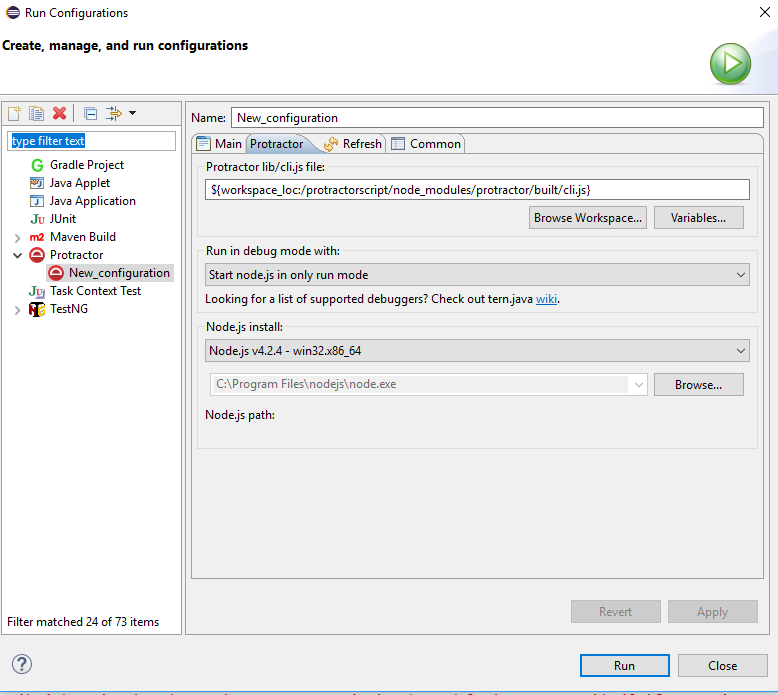
 srikrishna173
on 22 Sep 2017
srikrishna173
on 22 Sep 2017
@srikrishna173
Please check this issue https://github.com/angular/webdriver-manager/issues/192. It's related to the version of node Eclipse is running. They can differ from your local one
wswebcreation
on 22 Sep 2017
@wswebcreation
Thanks a lot it worked... thank you very much :)
srikrishna173
on 22 Sep 2017
Related issues
 gamecheck80
·
3Comments
gamecheck80
·
3Comments
 amedvedjev
·
3Comments
amedvedjev
·
3Comments
 nt3rp
·
3Comments
nt3rp
·
3Comments
 smarts
·
3Comments
smarts
·
3Comments
 davidkarlsen
·
3Comments
davidkarlsen
·
3Comments
Most helpful comment
Protractor 5 requires Node 6.9.4 or higher, I believe that's the cause of the error you're seeing.