Proton 4.11-11 Reinstall after every reboot?
Fairly new to Linux so go easy on me, lol. I'm having an issue with the latest Proton with both Doom (2016) and Mothergunship (that I've tested so far), the games crash when trying to launch them. However if I go into my steam folder and delete the Proton 4.11 folder, then go into steam and verify integrity of files, and allow steam to download files. Games launch fine and run great. Shut down PC for the night, next morning I have to do the same thing. Not sure what info to provide but I'm on Arch using an Nvidia 1080 and Intel 6700K, with i3wm. Thank you!
 AustinBachurski
All 8 comments
Some games are preconfigured (whitelisted) to use specific Proton versions. Sometimes, these versions of Proton are out of date for the specific game; DOOM is one such title. It will run with Proton 3.16-9 by default; force Proton 4.11-11 by going into the game's properties: You can also use global overrides for Proton versions in Steam's main settings (under Steam Play).
Since you're on Arch, it's a good idea to opt into Steam's Beta program; bleeding edge meets bleeding edge. The behavior you're describing could be related to multiple storage drives in your system.
1) Do you have multiple hard drives installed & in use?
1) Are you using the Flatpak version of Steam?
1) Are your language settings properly configured (check with the locale command)?
 Myrddin-Wyllt
on 3 Jan 2020
Myrddin-Wyllt
on 3 Jan 2020
I guess I wasn't clear with my initial post, I have the force use of specific tool checked and have 4.11-11 selected. But on initial startup of my machine, games won't launch. If I go into my steam folder and delete the Proton 4.11 folder, redownload proton via steam by right clicking it, properties, and verify integrity of tool files. Then games work until my next reboot, at which time I have to delete and redownload proton again. Doesn't seem right.
AustinBachurski
on 3 Jan 2020
Since you're on Arch, it's a good idea to opt into Steam's Beta program; bleeding edge meets bleeding edge. The behavior you're describing could be related to multiple storage drives in your system.
- Do you have multiple hard drives installed & in use?
- Are you using the Flatpak version of Steam?
Yes I have two drives. And I did opt into the steam beta program.
Had to google that one, when I initially installed steam I just looked on the Arch website and found it there so just "sudo pacman -S steam" is how it was installed. Thanks.
AustinBachurski
on 3 Jan 2020
"locale" results:
LANG=en_US.UTF-8
LC_CTYPE="en_US.UTF-8"
LC_NUMERIC="en_US.UTF-8"
LC_TIME="en_US.UTF-8"
LC_COLLATE="en_US.UTF-8"
LC_MONETARY="en_US.UTF-8"
LC_MESSAGES="en_US.UTF-8"
LC_PAPER="en_US.UTF-8"
LC_NAME="en_US.UTF-8"
LC_ADDRESS="en_US.UTF-8"
LC_TELEPHONE="en_US.UTF-8"
LC_MEASUREMENT="en_US.UTF-8"
LC_IDENTIFICATION="en_US.UTF-8"
LC_ALL=
New to github as well as Linux, should I be editing my first comment rather than adding a new one each time? Thanks, sorry, lol.
AustinBachurski
on 3 Jan 2020
Editing comments avoids email notifications being sent to everyone who's commented. I avoid adding new comments when unnecessary; there's no formal rules/etiquette that I'm aware of though. Personally on the locale output, I would've edited it into the prior comment.
Onto troubleshooting the multiple drives; is Steam configured to use multiple drives or are you using only one for game installations?
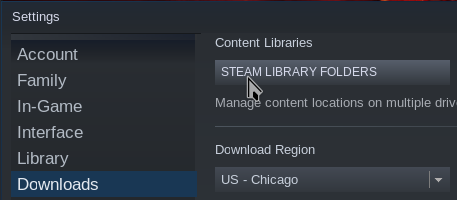
Additionally, do you have the Steam Linux Runtime installed?
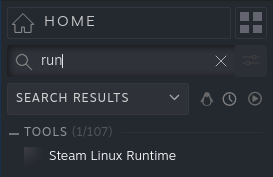
The runtime might be causing issues for other users according to other issues (not sure on that yet). One user reported removing the runtime allowed Proton to run the game as expected.
Add PROTON_LOG=1 %command% to your launch options; after trying to open the game, a log file will be generated & put in your home directory. These log files can be quite large; Valve wants you to put them into gists & paste the links to the logs here.
Myrddin-Wyllt
on 3 Jan 2020
@AustinBachurski If you start Steam from a Terminal, do you get any interesting output when Proton fails to function?
 aeikum
on 3 Jan 2020
aeikum
on 3 Jan 2020
Steam is set to only use the primary drive, not my additional one. I do have the Steam Linux Runtime installed, not on purpose, it's just there. Launched Mothergunship with the log option after reboot (crashes), log link: https://gist.github.com/AustinBachurski/ef7604a7447dfe70d9b38b69798b7a54 - I didn't bother running steam from the terminal as I figured anything that would be there would be in the log but I can certainly do that if needed, thanks.
To add, I kind of feel a bit stupid here but I got to thinking after looking through some of the log. Each time I "reinstalled" proton, I've also closed and reopened Steam. Tried closing it and opening it again just now without messing with Proton and game launched fine. So my initial complaint is wrong... Sorry about that.
AustinBachurski
on 4 Jan 2020
Managed to get my issue figured out and fixed! Thanks to both of you for the tips about logging and opening steam in a terminal. I dug through the log files for a while but wasn't able to come up with much to help me. However running Steam from terminal and outputting to a text file I was able to find the problem. Apparently Steam was starting before my audio was fully ready to go snippet from log and thus the audio was causing the error. If I took Steam out of my autostart, and made sure to play some audio before starting Steam everything would work fine. Wound up setting 'systemctl --user enable pulseaudio' which actually didn't fix the problem by itself, in addition I had to add a slight delay to the autostart of Steam. Seems to give the audio a second to get ready to go before Steam does it's thing and everything works as expected. Sorry for not knowing what I was actually dealing with at the start, but thank you both very much for your help!
AustinBachurski
on 5 Jan 2020
Related issues
 matou68
·
3Comments
matou68
·
3Comments
 prototype99
·
3Comments
prototype99
·
3Comments
 leifmetcalf
·
3Comments
leifmetcalf
·
3Comments
 Dakunier
·
3Comments
Dakunier
·
3Comments
 Elkasitu
·
3Comments
Elkasitu
·
3Comments
Most helpful comment
Editing comments avoids email notifications being sent to everyone who's commented. I avoid adding new comments when unnecessary; there's no formal rules/etiquette that I'm aware of though. Personally on the locale output, I would've edited it into the prior comment.
Onto troubleshooting the multiple drives; is Steam configured to use multiple drives or are you using only one for game installations?

Additionally, do you have the Steam Linux Runtime installed?

The runtime might be causing issues for other users according to other issues (not sure on that yet). One user reported removing the runtime allowed Proton to run the game as expected.
Add
PROTON_LOG=1 %command%to your launch options; after trying to open the game, a log file will be generated & put in your home directory. These log files can be quite large; Valve wants you to put them into gists & paste the links to the logs here.