Proton: South Park: Fractured But Whole, Uplay issue (488790)
Hello,
I've bough this game a few days ago, I've downloaded it and i'm trying to start it trough steam play. I've been playing on Linux for over 6 years now and i have a lot of experience when it comes to wine, but when i start the game trough Steam Play i get this transparent UPlay window and i can't seem to get past it or make it render, when i click on it he just moves to the background, screenshot is attached.
I've got all the Microsoft corefonts installed(vcrun, vbrun, dx9, dx10, etc...)

I'm using Debian 9 "Stretch" and wine 3.0 stable
I'm able to start the UPlay normally with a regular installation in my default wine prefix as well as many other prefixes and wine versions i have configured on my PC. (btw. I would love it if you guys add some options for configuring Steam Play.)
I only experience problems with Steam Play and i have no idea how to debug it.
I've tried running it without "primusrun", tried running with "optirun", tired to switch the window manager, tried changing the wine version, tried to run it on the external display and tried running it directly trough steam installed on my wine. It's still the same.
I can play "South Park: The Stick of Truth" with Steam Play and it runs just fine.
I can't say if this game runs since i can't get past the ubisoft launcher issue
Thank you for helping!
Kind Regards,
Tomislav
SYSTEM INFO
Computer Information:
Manufacturer: Clevo
Model: w230st
Form Factor: Laptop
No Touch Input Detected
Processor Information:
CPU Vendor: GenuineIntel
CPU Brand: Intel(R) Core(TM) i5-4200M CPU @ 2.50GHz
CPU Family: 0x6
CPU Model: 0x3c
CPU Stepping: 0x3
CPU Type: 0x0
Speed: 3100 Mhz
4 logical processors
2 physical processors
HyperThreading: Supported
FCMOV: Supported
SSE2: Supported
SSE3: Supported
SSSE3: Supported
SSE4a: Unsupported
SSE41: Supported
SSE42: Supported
AES: Supported
AVX: Supported
CMPXCHG16B: Supported
LAHF/SAHF: Supported
PrefetchW: Unsupported
Operating System Version:
Debian GNU/Linux 9.5 (stretch) (64 bit)
Kernel Name: Linux
Kernel Version: 4.9.0-8-amd64
X Server Vendor: The X.Org Foundation
X Server Release: 11902000
X Window Manager: KWin
Steam Runtime Version: steam-runtime-beta-release_2018-06-14
Video Card:
Driver: NVIDIA Corporation GeForce GTX 765M/PCIe/SSE2
Driver Version: 4.5.0 NVIDIA 384.130
OpenGL Version: 4.5
Desktop Color Depth: 24 bits per pixel
Monitor Refresh Rate: 59 Hz
VendorID: 0x8086
DeviceID: 0x416
Revision Not Detected
Number of Monitors: 1
Number of Logical Video Cards: 1
Primary Display Resolution: 1366 x 768
Desktop Resolution: 1366 x 768
Primary Display Size: 16.14" x 9.06" (18.50" diag)
41.0cm x 23.0cm (47.0cm diag)
Primary VRAM: 2048 MB
Sound card:
Audio device: Intel Haswell HDMI
Memory:
RAM: 7907 Mb
Miscellaneous:
UI Language: English
LANG: hr_HR.UTF-8
Total Hard Disk Space Available: 910143 Mb
Largest Free Hard Disk Block: 636914 Mb
VR Headset: None detected
 Tkopic001
All 28 comments
Hello @Tkopic001, please add PROTON_LOG=1 %command% to the game's launch options and drag and drop the generated $HOME/steam-$APPID.log into the comment box.
 kisak-valve
on 1 Oct 2018
kisak-valve
on 1 Oct 2018
Hello,
Thank you for a quick response, The log file is attached
steam-488790.log
Tkopic001
on 1 Oct 2018
There were a couple of updates trough the past 2.5 weeks but i still get the same transparent window
The only diference is that now it sometimes truns gray:

New logfile is attached
steam-488790.log
Tkopic001
on 22 Oct 2018
Before refunding the game, I did a quick test with 3.16-6 Beta. Sadly it did not work.
I heard that you can use this workaround, but I haven't personally tested it.
 CuriousTommy
on 22 Dec 2018
CuriousTommy
on 22 Dec 2018
With proton-3-16-7-beta and Steam Beta Uplay starts and is displayed properly but the game won't start. On the Game page the start button only shows "Download" but does not react on clicking. I am using openSuse Tumbleweed. Log is attached.
SYSTEM INFO
Computer Information:
    Manufacturer:  Unknown
    Model:  Unknown
    Form Factor: Desktop
    No Touch Input Detected

Processor Information:
    CPU Vendor:  GenuineIntel
    CPU Brand:  Intel(R) Core(TM) i5-4590 CPU @ 3.30GHz
    CPU Family:  0x6
    CPU Model:  0x3c
    CPU Stepping:  0x3
    CPU Type:  0x0
    Speed:  3700 Mhz
    4 logical processors
    4 physical processors
    HyperThreading:  Unsupported
    FCMOV:  Supported
    SSE2:  Supported
    SSE3:  Supported
    SSSE3:  Supported
    SSE4a:  Unsupported
    SSE41:  Supported
    SSE42:  Supported
    AES:  Supported
    AVX:  Supported
    CMPXCHG16B:  Supported
    LAHF/SAHF:  Supported
    PrefetchW:  Unsupported

Operating System Version:
    Linux 4.x (64 bit)
    Kernel Name:  Linux
    Kernel Version:  4.20.13-1-default
    X Server Vendor:  The X.Org Foundation
    X Server Release:  12004000
    X Window Manager:  GNOME Shell
    Steam Runtime Version:  steam-runtime-beta-release_2019-01-10

Video Card:
    Driver:  NVIDIA Corporation GeForce GTX 970/PCIe/SSE2
    Driver Version:  4.6.0 NVIDIA 418.43
    OpenGL Version: 4.6
    Desktop Color Depth: 24 bits per pixel
    Monitor Refresh Rate: 119 Hz
    VendorID:  0x10de
    DeviceID:  0x13c2
    Revision Not Detected
    Number of Monitors:  2
    Number of Video Cards Not Detected
    Primary Display Resolution:  1920 x 1080
    Desktop Resolution: 3200 x 1080
    Primary Display Size: 23.54" x 13.23" (26.97" diag)
                                            59.8cm x 33.6cm (68.5cm diag)
    Primary Bus: PCI Express 16x
    Primary VRAM: 4096 MB
    Supported MSAA Modes:  2x 4x 8x 16x

Sound card:
    Audio device: Realtek ALC892

Memory:
    RAM:  32099 Mb

Miscellaneous:
    UI Language:  English
    LANG:  en_US.UTF-8
    Total Hard Disk Space Available:  873359 Mb
    Largest Free Hard Disk Block:  171587 Mb
    VR Headset: None detected

Recent Failure Reports:
 Strelox
on 7 Mar 2019
Strelox
on 7 Mar 2019
I just bought the Gold edition since it was 80% off, It seems that in proton 3.16-8 Uplay launches and functions correctly (though it does just show a download button even if its downloaded), the exe launches but nothing happens either it just sits or it crashes and you have to close Uplay. I really hope this game starts working in a future update as I really don't want to play on an outdated Windows install.
 Vthyarilops
on 23 Mar 2019
Vthyarilops
on 23 Mar 2019
Proton 4.2-1 completely breaks Uplay, the game shows running for less than 1 second and nothing happens, adding PROTON_LOG=1 %command% won't even produce a log.
Vthyarilops
on 27 Mar 2019
Hello @Vthyarilops, that sounds like something went wrong with installing Proton 4.2. Please goto Steam -> Library dropdown -> Tools and check if it is installed on the list. Steam's beta client may have better behavior managing Proton versions.
kisak-valve
on 27 Mar 2019
@kisak-valve you are correct, normally it installs after selecting it and restarting the client, other games launched with proton 4.2 selected even though it wasn't installed. Regarding the game it seems that in 4.2-1 SouthPark_TFBW.exe doesn't crash anymore, it just hangs until it is killed.
steam-488790.log
Vthyarilops
on 27 Mar 2019
Can you check if disabling uplay's overlay has an effect?
kisak-valve
on 27 Mar 2019
It seems that disabling Uplay Overlay causes SouthPark_TFBW.exe to hang for a few seconds and crash, I've tried pretty much every launch option I could think of without any luck.
steam-488790.log
Vthyarilops
on 27 Mar 2019
OK guys, i got the uPlay to start on the new proton 4.2
I've successfully logged in and it recognize the game
but the game doesn't start, Steam says it's running

And i can clearly see it hanging in the htop

The log file is in the attachments:
steam-488790.log
Tkopic001
on 2 Apr 2019
@Tkopic001 UPlay has started fine since Proton 3.16-7, SouthPark_TFBW.exe launches then hangs or crashes.
Vthyarilops
on 2 Apr 2019
Proton 4.2-4 game still doesn't launch, log (with overlay disabled)
steam-488790.log
Vthyarilops
on 15 May 2019
Proton 4.11-6 still doesn't work
Vthyarilops
on 29 Sep 2019
4.11-7 still crashes on page fault. Uplay overlay disabled, Steam overlay disabled, D9VK disabled, Esync/Fsync enabled (it does the same with them disabled)
steam-488790.log
Vthyarilops
on 11 Oct 2019
It works using proton-ge-custom 4.19-GE-1 as a compatibility tool. Uplay overlay didn't seem to be an issue first time I launched the game but I still disabled it as a matter of principle.
I played for about 30 minutes without issue though Uplay wouldn't close on its own after exiting the game, I had to kill it.
As I understand it proton-ge builds are legally problematic (non-free dlls or something), so I won't link the build I used here, but if you look for the post about The Fractured But Wole on /r/linux_gaming you'll find it.
 jalabb
on 26 Nov 2019
jalabb
on 26 Nov 2019
Works using Proton GE 4.21-GE-1-MCC-2 also, played 20+ minutes. Proton GE version works with regular Steam version of the game but it tries to install Steam (Windows version of Steam) from the uplay launcher inside Proton again. Somehow once the steam installer detects that Steam is already running the installer can exit and the game launches normally.
 howels
on 10 Dec 2019
howels
on 10 Dec 2019
Works using Proton GE 4.21-GE-1-MCC-2 also, played 20+ minutes. Proton GE version works with regular Steam version of the game but it tries to install Steam (Windows version of Steam) from the uplay launcher inside Proton again. Somehow once the steam installer detects that Steam is already running the installer can exit and the game launches normally.
Yup, it seems like you can get stuck in a "windows steam installation" loop, it tries to install, but cannot because the steam installer detects itself running, somehow, but uplay doesn't seem to use a similar detection method to avoid running the steam installer.
For me, I tried to install the win steam version, by setting a different directory so it would detect the directory as being empty, and then at the prompt complaining that steam is running, rather than clicking either ok or cancel on the dialogue box, I hit the red cross window close icon, that seemed to spring it into life.
 phill-holland
on 30 Dec 2019
phill-holland
on 30 Dec 2019
Works using Proton GE 4.21-GE-1-MCC-2 also, played 20+ minutes. Proton GE version works with regular Steam version of the game but it tries to install Steam (Windows version of Steam) from the uplay launcher inside Proton again. Somehow once the steam installer detects that Steam is already running the installer can exit and the game launches normally.
Yup, it seems like you can get stuck in a "windows steam installation" loop, it tries to install, but cannot because the steam installer detects itself running, somehow, but uplay doesn't seem to use a similar detection method to avoid running the steam installer.
For me, I tried to install the win steam version, by setting a different directory so it would detect the directory as being empty, and then at the prompt complaining that steam is running, rather than clicking either ok or cancel on the dialogue box, I hit the red cross window close icon, that seemed to spring it into life.
@phill-holland Try using "Proton-4.21-GE-2" instead of the earlier "MCC" releases. Steam should not try to install itself when launching the game with this release.
howels
on 2 Jan 2020
thanks @howels I'll give it a go
phill-holland
on 3 Jan 2020
Is there an easy way to close UPlay when you exit the game? Currently Steam behave like the game is still running when I exit: it shows the blu STOP button instead of the green PLAY one, but if I press STOP nothing happens.
I can't find the process that I need to kill to do it manually form command line.
As a workaround I used winecfg to start the game with a virtual desktop and then, after exiting, I can use the virtual desktop to manually close UPlay,
 leinardi
on 23 Feb 2020
leinardi
on 23 Feb 2020
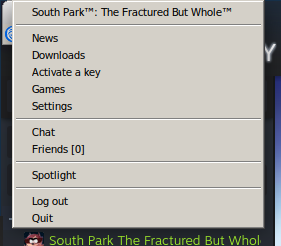
@leinardi On my computer wine opens a system tray in the top-left corner of my screen with a Uplay icon. I can right-click it and quit Uplay as I would on Windows.
jalabb
on 23 Feb 2020
@poke86 which version of proton are you using? Do you have any special config on Steam to start the game?
leinardi
on 23 Feb 2020
@leinardi I'm using Proton-4.21-GE-2, no other tweaks.
jalabb
on 23 Feb 2020
I'm using Proton-5.2-GE-1.
leinardi
on 23 Feb 2020
Has anyone tried to use the latest version of normal proton? Does the game still not work there?
CuriousTommy
on 23 Feb 2020
@CuriousTommy I tried running it yesterday. UPlay runs, the game does not :(
 ioreshnikov
on 26 Feb 2020
ioreshnikov
on 26 Feb 2020
Related issues
 lumni1968
·
3Comments
lumni1968
·
3Comments
 leifmetcalf
·
3Comments
leifmetcalf
·
3Comments
 shaphanpena1
·
3Comments
shaphanpena1
·
3Comments
 AwesamLinux
·
3Comments
AwesamLinux
·
3Comments
 BLaDZer
·
3Comments
BLaDZer
·
3Comments
Most helpful comment
@CuriousTommy I tried running it yesterday. UPlay runs, the game does not :(