Proton: One Finger Death Punch (264200)
Compatibility Report
- Name of the game with compatibility issues: One Finger Death Punch
- Steam AppID of the game: 264200
System Information
- GPU: GTX 780 Ti
- Driver/LLVM version: Nvidia 418.56
- Kernel version: 4.18.0-16-generic
- Link to full system information report as Gist:
- Proton version: proton-4.2-1
I confirm:
- [x] that I haven't found an existing compatibility report for this game.
- [x] that I have checked whether there are updates for my system available.
Symptoms
Game won't start.
Reproduction
- Install game from within the steam client.
- Start the game.
- Steam client states “Running” for 0,5 seconds or so.
- Game won’t start.
Proton log
 HonkingGoose
All 13 comments
I'm having the exact same issue. Here's my proton log:
steam-264200.log
And here's my system information: https://gist.github.com/Dazarlin/1fe5b3d929f71f1f3f598c5b99d0c262
 Dazarlin
on 28 Aug 2018
Dazarlin
on 28 Aug 2018
Re-tested on Proton 3.7-5 Beta, same problem, game won't start.
HonkingGoose
on 2 Sep 2018
Re-tested on Proton 3.7-6 Beta same problem, game won't start.
steam-264200.log
HonkingGoose
on 14 Sep 2018
err:mscoree:CLRRuntimeInfo_GetRuntimeHost Wine Mono is not installed points to #18.
 kisak-valve
on 28 Sep 2018
kisak-valve
on 28 Sep 2018
This is blocked by C++/CLI incompatibility and requires either using the .NET CLR or running the game through XnaToFna; wine-mono won't resolve this one straight away. This game is actually known to work with XnaToFna already!
 flibitijibibo
on 5 Oct 2018
flibitijibibo
on 5 Oct 2018
There's another way round it, Winetricks enables you to run Task manager, you can run any installer you like with that on the prefix, running dotnet installers twice will give you the option to repair, once you do that some games that use dotnet40 will work as intended.
XNA40 installer actually runs the dotnet40 installer to repair it then installs XNA result working game.
quick list of games this works on
224420 Afterfall Insanity Extended Edition
35140 Batman Arkham Asylum GOTY
253250 Batman Arkham City GOTY
203750 Binary Domain
41740 Cargo! The Quest for Gravity
230050 DLC Quest
245280 ENSLAVED: Odyssey to the West
255520 Viscera Cleanup Detail
22300 Fallout 3
57620 Patrician IV
242640 Styx: Master of Shadows
257990 Oozi: Earth Adventure
261110 Killer is Dead
116120 Lightfish
263820 EvilQuest
203730 Q.U.B.E.
263880 Aqua Kitty- Milk Mine Defender
Now a list of games it doesn't work on for various reasons
110800 L.A. Noire
258910 Citizens of Earth
96100 Defy Gravity
205230 Hell Yeah!
217140 Rise of the Triad
55000 Flotilla
42910 Magicka
223220 Giana Sisters: Twisted Dreams
ps. The games that work are run just by pressing the play button in Steam. no messing with .NET CLR.
pps. it works for One Finger Death Punch as well, I forgot to add it to the list. ;)
 lucifertdark
on 5 Oct 2018
lucifertdark
on 5 Oct 2018
@flibitijibibo and @lucifertdark thanks for your comments.
@flibitijibibo as I understand it, you're the developer for XNAtoFNA, and you port XNA games to Linux. Thank you for your work!
There is no feature request for XNA or .NET CLR or mono compatibility on the issue tracker yet.
I don't understand any of this myself, so I'm not the person who should be filing a feature request for those things...
You as game porter do understand those things, and know whether or not integration into Proton would be a good thing. Would you be willing to file one or more feature request for the needed bits?
If you don't want to do any of this, that's fine too, and I won't badger you about it anymore. :smile:
HonkingGoose
on 5 Oct 2018
Maik Macho handles XnaToFna while I handle FNA, so most of the credit goes to him for the conversion tools.
Interestingly this is more of a Mono issue than a Wine issue, though I suppose at this point only the Wine project is going to have any investment in this... it wouldn't surprise me if the Wine Bugzilla already had an issue for this filed ages ago.
At the moment my immediate focus is FAudio/XAudio2, but C# is another item on my own TODO list. For all I know this is on CodeWeavers' roadmap already but I'd have to ask to be sure.
flibitijibibo
on 5 Oct 2018
Hi @flibitijibibo thanks for the response.
Whoops-a-daisy, I really should search better.... There is a request already for wine-mono support in Proton at issue #18 but it's not labeled "feature request", and I was using labels to search...
Searching trough the Wine Bugzilla, there are loads of mentions of Mono issues there too, so I guess its on the radar there too.
HonkingGoose
on 12 Oct 2018
First of all, sorry for resurrecting such an old thread. I encountered the same issue on my installation, and after reinstalling .NET v4.0 it disappeared and the game ran flawlessly for few hours. However, after next relaunch, the game shows following error:
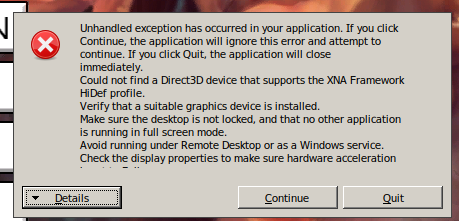
which can't be dismissed and the only option is to kill the game. I saw a pretty old Wine bug with the same issue, but I wonder why it worked in the first place.
Specs:
Proton:4.2-2
GPU Driver:3.0 Mesa 18.3.4
GPU:Intel Haswell Mobile
CPU:Intel Core i7-4600U @ 2.10GHz
Edit: also, I have a three-monitor setup (laptop one and two externals). When I move the steam window to the laptop display, the game stars and works correctly. However, when started on any of the external monitors, it displays the aforementioned error.
Edit2: I didn't notice xrandr switched my default display, so the real issue is the error is displayed when the game is started on a non-primary display.
 mrc0mmand
on 7 Apr 2019
mrc0mmand
on 7 Apr 2019
For search-ability, this is the error message text from the screenshot in the comment above mine:
Unhandled exception has occurred in your application. If you click Continue, the application will ignore this error and attempt to continue. If you click Quit, the application will close immediately.
Could not find a Direct3D device that supports the XNA Framework HiDef profile.
Verify that a suitable graphics device is installed.
Make sure the desktop is not locked, and that no other application is running in full screen mode.
Avoid running under Remote Desktop or as a Windows Service.
Check the display properties to make sure hardware acceleration ...[remainder of text not visible]
This game should work with 4.2-3 after using this script in the game directory:
https://gist.github.com/flibitijibibo/c97bc14aab04b1277d8ef5e97fc9aeff
flibitijibibo
on 18 Apr 2019
Hi @flibitijibibo, the game works out-of-the-box with Proton 4.2-3 :tada:. I did not need the script workaround to play the game. The cutscenes might still need that workaround though, haven't tested that yet.
HonkingGoose
on 19 Apr 2019
Related issues
 lumni1968
·
3Comments
lumni1968
·
3Comments
 shanefagan
·
3Comments
shanefagan
·
3Comments
 AwesamLinux
·
3Comments
AwesamLinux
·
3Comments
 leifmetcalf
·
3Comments
leifmetcalf
·
3Comments
 BLaDZer
·
3Comments
BLaDZer
·
3Comments