Proton: Kingdom Come Deliverance (379430)
Occurs on proton 3.7.3 and 3.7.4 installed with steam
Logs from proton default logging config:
steam-prune-379430.log
Each time I've seen the system crash, I've seen the following lines in journalctl:
Aug 24 17:37:37 HOSTNAME kernel: [drm:amdgpu_job_timedout [amdgpu]] *ERROR* ring gfx timeout, last signaled seq=64337, last emitted seq=64339
Aug 24 17:37:37 HOSTNAME kernel: [drm] GPU recovery disabled.
A journalctl log from when I left the machine running after the initial hang:
journalctl-crash-379430.log
Finally a workaround to get the game to get past black screen:
Needed to copy d3dcompiler_46.dll and d3dcompiler_47.dll
from:
~/.steam/steam/steamapps/common/KingdomComeDeliverance/Bin/Win64Shared/
to:
~/.steam/steam/steamapps/common/KingdomComeDeliverance/Bin/Win64/
Further, this game DOES work under wine 3.12 staging, with DXVK 0.64 (Configured with Lutris)
dxvk--lutris.txt
When i use the above configuration, I do not see the errors described above.
Game logs for those who care:
Launcher.log
kcd.log
System Specs, short:
Ubuntu 18.04
AMD RX 480x w/ amdgpu-pro-18.30-633530 (--pro flag enabled)
Linux HOSTNAME 4.15.0-33-generic #36-Ubuntu SMP Wed Aug 15 16:00:05 UTC 2018 x86_64 x86_64 x86_64 GNU/Linux
Desktop environment: i3wm
System Specs, long:
steam-system-report.log
 WeebyMcWeebface
All 90 comments
Copying from my other comment,
I went so far for my issue posted: #692 as to replace all the bin files in the Proton directory with my configuration from my working Lutris install. However, for me that did not fix the problem.
That leads me to believe that the issue is related to something Proton is setting on top of wine, not wine itself.
WeebyMcWeebface
on 26 Aug 2018
I've filled out the https://github.com/ValveSoftware/Proton/wiki/Stable google report link to reflect my testing.
WeebyMcWeebface
on 26 Aug 2018
@kisak-valve I found the issue, It is due to a bug regarding my system and esync
https://github.com/zfigura/wine/blob/esync/README.esync
I Just got it to run with the flag PROTON_NO_ESYNC I tried the WINE flag WINEESSYNC which did not work.
I read the readme, but forgot you guys use custom environment variables.
What do you want to do here? For my consideration it is fixed, but I'm unsure how to proceed. Fact is my system crashed when I was running with the default configuration.
WeebyMcWeebface
on 26 Aug 2018
I get a infinite loading screen before main menu with the loading indicator animated on the bottom right. CPU cycle sits at 9% forever.
That's with proton, no issues with wine/dxvk in general.
Someone mentioned LLVM 7.0 is needed but not sure, only 6.0.1 is available.
 jarrard
on 27 Aug 2018
jarrard
on 27 Aug 2018
@jarrard try: what I mentioned above:
I Just got it to run with the flag PROTON_NO_ESYNC
https://github.com/ValveSoftware/Proton#runtime-config-options
WeebyMcWeebface
on 27 Aug 2018
Yes that does appear to work, not sure what esync is meant to do.
Also for some reason on my 4k setup I can't seem to select 1440p as a option, bit annoying. (in any steam game)
2560x1440 is a desktop resolution I can use elsewhere. Seems steam play limits to either 4k or 1080p, not a great choice range.
-5 beta of Proton has resolved the missing resolution options between 1080p and 2160p, now I can play the game at 1440p and 60-80fps, thought there is likely slowdowns in certain areas due to optimization issues with the game.
jarrard
on 27 Aug 2018
I edit file ~/.steam/steam/steamapps/common/Proton 3.7/user_settings.by removing the comment character string:
"PROTON_NO_ESYNC": "1",
and
"PROTON_USE_WINED3D11": "1",
After that, the game started and the menu was loaded.
But there are no textures
 kuraleb
on 16 Sep 2018
kuraleb
on 16 Sep 2018
this was resolved weeks ago and was related to max open files limit which you need to increase for esync to work. Most people have it too small so this problem continuously comes up!
jarrard
on 16 Sep 2018
this was resolved weeks ago and was related to max open files limit which you need to increase for esync to work. Most people have it too small so this problem continuously comes up!
How can I solve this problem specifically in my case?
kuraleb
on 17 Sep 2018
Hello @kuraleb, give https://github.com/zfigura/wine/blob/esync/README.esync a read.
 kisak-valve
on 17 Sep 2018
kisak-valve
on 17 Sep 2018
Hello @kuraleb, give https://github.com/zfigura/wine/blob/esync/README.esync a read.
Thanks. After increasing the simultaneously opening files, the game crashes with an error: "memory allocation failed"
kuraleb
on 17 Sep 2018
what does ulimit -aH say? below is mine.
core file size          (blocks, -c) unlimited
data seg size           (kbytes, -d) unlimited
scheduling priority             (-e) 0
file size               (blocks, -f) unlimited
pending signals                 (-i) 63179
max locked memory       (kbytes, -l) 1024
max memory size         (kbytes, -m) unlimited
open files                      (-n) 1048576
pipe size            (512 bytes, -p) 8
POSIX message queues     (bytes, -q) 819200
real-time priority              (-r) 0
stack size              (kbytes, -s) unlimited
cpu time               (seconds, -t) unlimited
max user processes              (-u) 63179
virtual memory          (kbytes, -v) unlimited
file locks                      (-x) unlimited
what does ulimit -aH say? below is mine.
core file size          (blocks, -c) unlimited
data seg size           (kbytes, -d) unlimited
scheduling priority             (-e) 0
file size               (blocks, -f) unlimited
pending signals                 (-i) 63179
max locked memory       (kbytes, -l) 1024
max memory size         (kbytes, -m) unlimited
open files                      (-n) 1048576
pipe size            (512 bytes, -p) 8
POSIX message queues     (bytes, -q) 819200
real-time priority              (-r) 0
stack size              (kbytes, -s) unlimited
cpu time               (seconds, -t) unlimited
max user processes              (-u) 63179
virtual memory          (kbytes, -v) unlimited
file locks                      (-x) unlimited
core file size          (blocks, -c) unlimited
data seg size           (kbytes, -d) unlimited
scheduling priority             (-e) 0
file size               (blocks, -f) unlimited
pending signals                 (-i) 46298
max locked memory       (kbytes, -l) 64
max memory size         (kbytes, -m) unlimited
open files                      (-n) 1048576
pipe size            (512 bytes, -p) 8
POSIX message queues     (bytes, -q) 819200
real-time priority              (-r) 0
stack size              (kbytes, -s) unlimited
cpu time               (seconds, -t) unlimited
max user processes              (-u) 16384
virtual memory          (kbytes, -v) unlimited
file locks                      (-x) unlimited
Well the only real major difference is max locked memory and max user processes. I'm not sure if those can be changed or if that would help.
jarrard
on 17 Sep 2018
Well the only real major difference is max locked memory and max user processes. I'm not sure if those can be changed or if that would help.
I adjusted the settings. Unfortunately it did not help
kuraleb
on 17 Sep 2018
and if you disable ESYNC now does the game still work or has increasing open file limit introduced this new error?
Could be a issue specific to your configuration and not a general problem that we might all encounter.
To me it sounds like your trying to play the game on hardware that is below the minimal requirement, such as your GPU not having enough VRAM thus causing these allocation memory errors or missing textures (kinda the same thing).
jarrard
on 17 Sep 2018
and if you disable ESYNC now does the game still work or has increasing open file limit introduced this new error?
Could be a issue specific to your configuration and not a general problem that we might all encounter.
To me it sounds like your trying to play the game on hardware that is below the minimal requirement, such as your GPU not having enough VRAM thus causing these allocation memory errors or missing textures (kinda the same thing).
NVIDIA Corporation GK208BM [GeForce 920M] (rev a1)
2Gb VRAM
ESYNC disabled, now the game does not get hung up, but it also crashes
And on the Wine game worked without departures.
kuraleb
on 18 Sep 2018
Yes, however that could be because many things are being avoided from loading, like certain graphical features, or wine could be lying about available memory hence missing textures.
2GB VRAM is pretty low, and I think the 920M is slower then a 660 which is the minimal. To make matters worse the 920M is a MOBILE gpu which introduces some other issues I believe.
I think in your particular case, the solution would be to create a dual boot situation and use Windows to try this game out vs attempting it on proton under Linux. Your hardware specs are just so minimal and this game is VERY demanding.
jarrard
on 18 Sep 2018
Yes, however that could be because many things are being avoided form loading, like certain graphical features, or wine could be lying about available memory hence missing textures.
2GB VRAM is pretty low, and I think the 920M is slower then a 660 which is the minimal. To make matters worse the 920M is a MOBILE gpu which introduces some other issues I believe.
I think in your particular case, the solution would be to create a dual boot situation and use Windows to try this game out vs attempting it on proton under Linux. Your hardware specs are just so minimal and this game is VERY demanding.
This game works for me and under the Wine and Windows. On the same hardware. 8 fps, but it worked.
And a Proton is faced with similar problems
kuraleb
on 18 Sep 2018
I thought you said just above that under Wine it doesn't render in all the textures?
The issue here is that people with reasonably decent hardware seem to be having no problems now provided they set things up right.
So unless you can find someone with a 960M or something who is experiencing similar issues then there might not be much that can be done at this point in time.
jarrard
on 18 Sep 2018
I thought you said just above that under Wine it doesn't render in all the textures?
The issue here is that people with reasonably decent hardware seem to be having no problems now provided they set things up right.
So unless you can find someone with a 960M or something who is experiencing similar issues then there might not be much that can be done at this point in time.
At me on the wine works with all textures.
10-15 fps
kuraleb
on 18 Sep 2018
only thing you can do is a apitrace and see what comes of it.
jarrard
on 18 Sep 2018
what does ulimit -aH say? below is mine.
Be aware that on systemd-based machines, ulimit is a lie. systemd's cgroup settings will override them unless it is specifically configured otherwise.
 aw-was-here
on 19 Sep 2018
aw-was-here
on 19 Sep 2018
Kingdom Come Deliverance: Weird frame stutter after hr of play, fps is ok but.
Issue transferred from https://github.com/ValveSoftware/Proton/issues/2215.
@jarrard posted on 2019-01-14T05:27:05:
Compatibility Report
- Kingdom Come Deliverance
- 379430
System Information
- GPU: 1080Ti
- Driver/LLVM version: 415.22.05
- Kernel version: 4.19/4.20
- Specs: https://gist.github.com/jarrard/69d7c752fae460acba60d77d189649d1
- Proton version: 3.16-6
I confirm:
- [x] that I haven't found an existing compatibility report for this game.
- [x] that I have checked whether there are updates for my system available.
Steam log (just to main menu then back out again.)
steam-379430.log
Symptoms
After about a hour or so of game-play a weird issue occurs when looking around that causes mouse stutter, however frame-rate is otherwise fine. Game is unplayable when it does this.
Reproduction
Play for a sufficient amount of time.
@jarrard commented on 2019-01-14T06:40:42
If anyone else gets this issue (likely NVIDIA related) then please do comment. It seems pretty consistent with about 1-2hrs worth of play time when it happens.
kisak-valve
on 14 Jan 2019
Is the dll copy workaround still needed?
 AsciiWolf
on 23 Jan 2019
AsciiWolf
on 23 Jan 2019
in the Win64Shared folder thing? yes I believe so.
jarrard
on 23 Jan 2019
Is there any way to fix this directly in Proton? KCD works great under Proton and this is the only thing that prevents it from running out-of-box.
AsciiWolf
on 23 Jan 2019
Dunno, but it seems the games exe can't navigate to where the original DLL files are located and that is likely a underlying Wine directory pathing error.
Perhaps a full error log on load up will reveal more on exactly what is going wrong for it to default back to the core exe directory and not the Shared folder.
PS. It should be noted that this isn't the only game where DLL locations have problems, I can't remember which others off the top of my head however.
jarrard
on 23 Jan 2019
I seem to only be able to run the game with Proton 3.7. All other versions freeze at the initial flash screen. I wonder if anybody else has this issue?
 kaimast
on 31 Jan 2019
kaimast
on 31 Jan 2019
Sorry mine seems fine at 3.16.6 beta, been experimenting with the new adaptivesync drivers 418.30, makes KCD playable at 4k under Linux, pretty surprised.
Does require some graphical tweaking and running on mostly medium settings. Also the nexus mod optimized graphics presets helps (there is a small flicker bug with the optz fog setting however)
jarrard
on 1 Feb 2019
@kaimast I had the same issue on Fedora 29 with RX 580 and Flatpak version of Steam. This was in the log: wine: Call from 0x7b44af1c to unimplemented function amd_ags_x64.dll.agsGetCrossfireGPUCount, aborting
Changing the Proton version to 3.7-8 did not help, however copying amd_ags_x64.dll from _Win64Shared_ to _Win64_ fixed the issue and Kingdom Come now runs fine on my system. :-)
AsciiWolf
on 3 Feb 2019
To get this to work for me I had to set PROTON_USE_WINED3D to 1, otherwise it would just hang at the startup splash, using 3.16.6 I only got a black screen.
FPS is absolute rubbish though, 10fps at lowest settings 1080p (around 50-60fps on windows on medium-high, 1440p)
Proton: 4.2-1
GPU: GTX 1080
Driver: nvidia 418.56-5
Kernel: 5.0.5
System information
steam-379430.log
 kattjevfel
on 2 Apr 2019
kattjevfel
on 2 Apr 2019
About the input stutteer: I have this issue, too. Each time I move the mouse, Proton loads and unloads dinput8.dll. After doing this a lot of times, something seems to slow down DLL loading (?) and cause the stutter.
48621.964:0024:0025:trace:module:LdrAddRefDll (L"dinput8.dll") ldr.LoadCount: 2
48621.964:0024:0025:trace:module:LdrUnloadDll (0x7f6fd19f0000)
48621.964:0024:0025:trace:module:LdrUnloadDll (L"dinput8.dll") - START
48621.964:0024:0025:trace:module:MODULE_DecRefCount (L"dinput8.dll") ldr.LoadCount: 1
48621.964:0024:0025:trace:module:LdrUnloadDll END
48621.965:0024:0025:trace:module:LdrGetDllHandle L"C:\\windows\\system32\\dinput8.dll" -> 0x7f6fd19f0000 (load path L"Z:\\home\\torque\\.steam\\steam\\steamapps\\common\\KingdomComeDeliverance\\Bin\\Win64;C:\\Program Files (x86)\\Steam;C:
\\windows\\system32;C:\\windows\\system;C:\\windows;.;C:\\windows\\system32;C:\\windows;C:\\windows\\system32\\wbem")
48621.965:0024:0025:trace:module:LdrAddRefDll (L"dinput8.dll") ldr.LoadCount: 2
48621.965:0024:0025:trace:module:LdrUnloadDll (0x7f6fd19f0000)
48621.965:0024:0025:trace:module:LdrUnloadDll (L"dinput8.dll") - START
48621.965:0024:0025:trace:module:MODULE_DecRefCount (L"dinput8.dll") ldr.LoadCount: 1
48621.965:0024:0025:trace:module:LdrUnloadDll END
48621.965:0024:0025:trace:module:LdrGetDllHandle L"C:\\windows\\system32\\dinput8.dll" -> 0x7f6fd19f0000 (load path L"Z:\\home\\torque\\.steam\\steam\\steamapps\\common\\KingdomComeDeliverance\\Bin\\Win64;C:\\Program Files (x86)\\Steam;C:\\windows\\system32;C:\\windows\\system;C:\\windows;.;C:\\windows\\system32;C:\\windows;C:\\windows\\system32\\wbem")
48621.965:0024:0025:trace:module:LdrAddRefDll (L"dinput8.dll") ldr.LoadCount: 2
48621.965:0024:0025:trace:module:LdrUnloadDll (0x7f6fd19f0000)
48621.965:0024:0025:trace:module:LdrUnloadDll (L"dinput8.dll") - START
<...>
 astillich
on 2 Apr 2019
astillich
on 2 Apr 2019
Once the next DLC hits I'll probably get back into trying KCD out, not sure if the stutter issue exists or how well it runs with 4.2.
Also if you use PROTON_USE_WINED3D=1 then that effectively disables DXVK, keep that in mind when getting terrible FPS.
Eventually Wine itself will use Vulkan for DirectX and it won't be a issue but for now its using terrible OpenGL wrapping which is ok for DX9 and below but BAD for DX11 games!
jarrard
on 3 Apr 2019
Edit: Performance issues fixed in official Proton 4.11-1. Custom proton no longer required.
There is a large performance issue with 4.2-9 (and earlier that I tested) since 1.9 of game that is fixed by custom proton build: Proton-4.11-GE-1.
I get:
- 45 fps with official proton 4.2-9.
- 90 fps using Proton-4.11-GE-1.
When looking at GPU clocks using 4.2-9 these are unusually low, GPU boosting as expected with custom proton.
Updating DXVK does not resolve, unable to narrow down further.
I know of 1 other Vega user and 1 Nvidia user reporting this build fixes performance issue.
- GPU: RX Vega 56
- Driver/LLVM version: 19.1.2 & 19.2.0-devel + ACO
- Kernel version: 5.2.1-arch1-1-ARCH
- Gist
- Proton version: 4.2-9
 m0stly
on 22 Jul 2019
m0stly
on 22 Jul 2019
Fedora 30, GNOME 3.32 (Wayland), Mesa 19.1.2, AMD RX 580, Proton 4.11, workaround applied, "Very High" preset.
Kingdom Come runs absolutely amazing with Proton 4.11! With Proton 4.2, I had around 8 - 18 fps, with Proton 4.11, I get 28 - 40 fps, sometimes even 50+ fps.
AsciiWolf
on 1 Aug 2019
Does it work for you without setting PROTON_USE_WINED3D to 1?
For me it still hangs at the startup splash using proton 4.11 and not using vulkan results in horrible FPS.
kaimast
on 23 Aug 2019
Works for me with the workaround (copying amd_ags_x64.dll), get 30-60 FPS on medium, 1080p.
Arch Linux, Plasma 5.16.4 (xorg), nvidia 430.40, GTX 1080, Proton 4.11-2
steam-379430.log
kattjevfel
on 23 Aug 2019
you should get over 60fps at 1080p with gtx1080!
jarrard
on 23 Aug 2019
@jarrard no idea what I got on windows, but I normally play in 1440p anyway and all I can remember is that the FPS was crap no matter what..
kattjevfel
on 23 Aug 2019
Yeah KCD needs vulkan and/or major optimisations.
jarrard
on 23 Aug 2019
I have an annoying issue with this when running 1800p with dual monitor.
My mouse will get stuck moving right towards my second monitor. The old stuck mouse pan issue basically. Can't seem to resolve this one however, this is on plasma5.
EDIT: Figured it out, its some proton/game glitch where it doesn't correctly resize the game-screen and you end up with cut off bits, and when you minimise it breaks protons ability to capture the mouse.
You can reset the behaviour in-game by changing down and up a resolution, with a bit of fiddling and luck you can get it to switch correctly without needing to minimise (where it messes up the mouse capture).
Possible proton needs some help detecting when a game is minimised or when a mouse looses game window capture while window is focused. Could be a unique issue to kwin also... (and dual monitor setups)
NOTE: KCD is quite dicey even under windows where it will resize desktop app windows because it forces screen to some 720p mode or something.. its a bit of a mess, shame the developers are not resolving these issues! (they know about them btw)
jarrard
on 13 Sep 2019
Same result with DXVK on proton 4.11-4: The game keeps getting stuck on the splash screen :/
kaimast
on 14 Sep 2019
@kaimast Even with copying the dlls as mentioned above?
kattjevfel
on 14 Sep 2019
Oh you're right. After copying all DLLs, not just the d3dcompiler ones, it works for me.
cp Win64Shared/*.dll Win64
kaimast
on 15 Sep 2019
I get this message on the splash screen by default in Proton 4.2.
Unsupported Graphics Card detected.
A GPU with support for D3D FeatureLevel 11.0 is required.

 xorgy
on 19 Nov 2019
xorgy
on 19 Nov 2019
I get this message on the splash screen by default in Proton 4.2.
Unsupported Graphics Card detected.
A GPU with support for D3D FeatureLevel 11.0 is required.
What GPU are you using? It might not support certain OpenGL /Vulkan extensions needed for DX11.
kaimast
on 19 Nov 2019
I wouldn't play this game on anything less than a RX480 / GTX960.
It's a VERY demanding game and isn't all that greatly optimized atm. Hopefully it gets upgraded to vulkan api sometime.
jarrard
on 19 Nov 2019
@kaimast
What GPU are you using? It might not support certain OpenGL /Vulkan extensions needed for DX11.
I'm using a Radeon VII with RadeonSI and RADV (Mesa 19.2.4). I previously successfully launched KCD on a Radeon WX 7100 some time back though I no longer have access to that system to see if it's a software regression or a hardware difference.
xorgy
on 19 Nov 2019
I remember there being some early issues with Radeon 7 cards. Can you update to bleeding edge mesa?
jarrard
on 19 Nov 2019
Hello @xorgy, please verify you have both the 64 bit and 32 bit variants of mesa's vulkan drivers (like mesa-vulkan-drivers mesa-vulkan-drivers:i386) from your package manager.
kisak-valve
on 19 Nov 2019
Hello @xorgy, please verify you have both the 64 bit and 32 bit variants of mesa's vulkan drivers (like
mesa-vulkan-drivers mesa-vulkan-drivers:i386) from your package manager.
That wasn't the problem, though I changed a Steam setting (the default Proton) and it inexplicably deleted KCD (the whole thing), then reinstalled it; then it started working. I love when evidence is destroyed automatically.
xorgy
on 19 Nov 2019
Yeah sometimes proton itself can install incorrectly. For example on my system it keeps installing to NTFS on new distro installs, never defaults to the .steam folder path. Proton doesn't like that.
jarrard
on 19 Nov 2019
Hi, I just want to include my gamingonlinux post here so that it can be seen by more people. Kingdom Come: Deliverance works correctly, BUT its performance is horrible. My post:
Hi all,
Anyone playing Kingdom Come: Deliverance -- https://store.steampowered.com/app/379430 -- on Linux via Steam Play? The game is great but its performance is horrible. I am trying to get as much performance as I can while preserving detail and high quality of textures, because even using the high resolution textures my GPU is seldom used above 4GB.
I have a RTX 2070 SUPER 8 GB and even then I can't get higher than 20 fps on the Rattay Tourney setting. It oscillates between 12 and 18 and sometimes goes up to 20. 2560x1080p, ultrawide, fullscreen.
I am not using any DXVK/PROTON variables (so, I am not using WINED3D11) and my launch options only has gamemoderun %command%. I run more than a hundred other games via proton with a very high framerate, including classics like The Witcher 3 and No Man's Sky.
What I have already done:
Disabled motion blur. It helps a little.
Tried changing drivers, from 435.21 to 440.26 (graphics-drivers ppa -- https://launchpad.net/~graphics-drivers/+archive/ubuntu/ppa). No noticeable change except that in the first minutes it stutters a little (maybe recompiling shaders?).
Tried the Valve fsync kernel -- https://steamcommunity.com/app/221410/discussions/0/3158631000006906163/ -- to use fsync instead of esync. Confirmed it was running ("fsync: up and running" on ~/.steam/error.log). No noticeable change.
Used the console to change "r_BatchType" -- https://www.protondb.com/app/379430#JgHjecc_a9 -- between 0 and 1. No noticeable change.
Used Feral's gamemode -- https://github.com/FeralInteractive/gamemode -- (added gamemoderun to the launch parameters, confirmed it was launching this way). No noticeable change.
Used Proton-GE (Proton-4.19-GE-1 -- https://github.com/GloriousEggroll/proton-ge-custom/releases), confirmed it was launching correctly under this version. No noticeable change either!
Toggled amongst windowed fullscreen, fullscreen and windowed modes, but I already run the game under a window manager (LXDE + Openbox) that does not use compositing -- https://dquinton.github.io/debian-install/config/lxde-openbox.html#8 -- so that should not really make a difference. There was no noticeable difference indeed.
Any other tips on what I can do to improve performance without losing detail? It is of note that according to DXVK HUD I am using the GPU at 100% capacity during the game, except during the intermissions of course.
My setup:
System: Host: risadinha Kernel: 5.0.0-23-lowlatency x86_64 bits: 64 Desktop: LXDE (Openbox 3.6.1)
Distro: Ubuntu 18.04.3 LTS
Machine: Device: desktop Mobo: ASUSTeK model: PRIME B350-PLUS v: Rev X.0x serial: N/A
UEFI: American Megatrends v: 5220 date: 09/12/2019
CPU: 8 core AMD Ryzen 7 2700 Eight-Core (-MT-MCP-) speed/max: 2873/3400 MHz
Graphics: Card: NVIDIA Device 1e84
Display Server: x11 (X.Org 1.19.6 ) driver: nvidia Resolution: [email protected]
OpenGL: renderer: GeForce RTX 2070 SUPER/PCIe/SSE2 version: 4.6.0 NVIDIA 440.26
Network: Card: Realtek RTL8111/8168/8411 PCI Express Gigabit Ethernet Controller driver: r8169
Drives: HDD Total Size: 8241.7GB (86.3% used)
Info: Processes: 424 Uptime: 5:01 Memory: 4311.6/32161.0MB Client: Shell (zsh) inxi: 2.3.56
After @doitsujin asked me for more details, including my in-game settings:
My in-game settings:
Graphics settings: Resolution: 2560 x 1080
Window Mode: Fullscreen
Overall image quality: custom
HD Textures: On
Show FPS: Off
VSync: Off
Vertical FOV: 75
Advanced Graphics Settings:
Antialiasing: SMAA 1TX
Object Quality: Very High
Game effects: High
Lighting: High
Particles: High
Physics: High
Postprocess quality: High
Shader quality: High
Shadows: High
Textures: High
Water details: High
Volumetric effects detail: High
Vegetation detail: High:
Object distance: (about 2/3 of bar)
LOD distance: (about 1/3 of bar)
Vegetation draw distance: (about 1/3 of bar)
Motion Blur: Off
I used both nvidia-smi and nvidia-settings to get the GPU utilization from moment to moment and it was between 98-100% all the time. Curiously, as I am typing now, with the game minimized, nvidia-settings is telling me GPU utilization is fluctuating between 91% and 100%.
I have screenshots of all settings and nvidia-settings and nvidia-smi if you need.
 Patola
on 1 Dec 2019
Patola
on 1 Dec 2019
@Patola For a datapoint, I'd like to just say that I get excellent performance when running KCD on RADV on my Radeon VII; often at or near my 165Hz refresh rate at 1440p, never below about 100fps except during initial shader compilation. I'm running ordinary stable Mesa releases on Archlinux with a 5.3 series kernel.
If you are having performance that bad, it is probably an issue specific to your card/drivers/compositing window manager/something else, and not a general issue with KCD on Proton.
xorgy
on 1 Dec 2019
@Patola For a datapoint, I'd like to just say that I get excellent performance when running KCD on RADV on my Radeon VII; often at or near my 165Hz refresh rate at 1440p, never below about 100fps except during initial shader compilation. I'm running ordinary stable Mesa releases on Archlinux with a 5.3 series kernel.
If you are having performance that bad, it is probably an issue specific to your card/drivers/compositing window manager/something else, and not a general issue with KCD on Proton.
I don't think so, my experience is shared by other people who use NVIDIA and I have tried changing driver versions a couple times, as I told in my post. As I also said on the same post, I use a Window Manager without compositing. And as I also said in that post, other games work great - I get more than 200 fps on RE2 and RE7, for example, and close to 100 on the Witcher 3 on ultra. I have more than 100 proton games installed, all but KCD working with full performance.
And this seems something specifically introduced in 1.9 release of the game. I will see if I can get some time to install the last 1.8 patch to see if the performance gets better, but of course almost everybody who buys this game to be played on proton will still use the latest 1.9.4, so if it is indeed some difference from the Windows drivers (which perform great as I have read), it's better to fix that in proton.
Patola
on 1 Dec 2019
To try and give more info... Here's the steam-379430.log I get when I run the game with PROTON_LOG=1, under Proton 4.11-9.
steam-379430.log
Patola
on 1 Dec 2019
@Patola
I don't think so, my experience is shared by other people who use NVIDIA...
That's kinda what I meant to say, without sending out the "NVIDIA's driver is fickle and opaque" vibes that start flame wars. The issue you're describing is at least specific to NVIDIA's Vulkan Driver combined with DXVK combined with the current release of the game.
xorgy
on 1 Dec 2019
Proton-GE can often cause a massive fps cap of about 43ish fps with this game. Try switching to normal proton, test (no need to delete container), then if that fixes the issue try switching back to GE.
I have experienced this terrible performance issue myself and it was just a matter of doing the above to resolve it.
The only benefit for using proton-GE is it switches the keyboard to US or something which allows console use. It might also fix some key bindings, I dunno.
jarrard
on 1 Dec 2019
Proton-GE can often cause a massive fps cap of about 43ish fps with this game. Try switching to normal proton, test (no need to delete container), then if that fixes the issue try switching back to GE.
Thanks, but I have tried that not one time, but multiple times. And to different versions of proton and proton-GE too.
I have experienced this terrible performance issue myself and it was just a matter of doing the above to resolve it.
Do you also have a NVIDIA? Which one? How many FPS do you get, what are your settings in-game?
The only benefit for using proton-GE is it switches the keyboard to US or something which allows console use. It might also fix some key bindings, I dunno.
I didn't notice this difference. I was able to use the console under Proton, I think.
Patola
on 1 Dec 2019
For starters, I have a 1080TI latest drivers, my configuration is going to be wildly different to yours, I play with medium to high settings with SMAA+CAS from reshade(If I remember correctly) AT 4k I get 40-50fps, at 1800p I get 50-60fps (what I use atm).
I have a console issue because my keyboard is not US based, its a Spanish English one, can cause issues at times for some games. Bought it because it was less then half price of the English version one.
PS. I also use mods, custom user.cfg, and optimized graphics mod
jarrard
on 1 Dec 2019
Which ones are the latest drivers? Production drivers 440.26 / 440.36 or beta drivers 435.21 / 435.27 ? What's the page of these optimized graphics mod?
Patola
on 1 Dec 2019
440.31 release drivers
https://www.nexusmods.com/kingdomcomedeliverance/mods/743
READ THE INSTRUCTIONS, MOST PEOPLE DON'T AND HAVE ISSUES!
My user.cfg file (-- text is excluded)
-- Needs +exec user.cfg in steam launch options
-- Bow reticle

wh_pl_showfirecursor=1

-- Better Targetting

wh_cs_playermaxopponentdistancetolock = 8
wh_cs_playermaxopponentdistancetounlock = 8
wh_cs_playerunlocktimeout = 0
wh_cs_playerverticalunlockdelay = 0
wh_cs_playerhorizontalunlockdelay = 0
wh_cs_playerlockopponentanglebias = 2
wh_cs_playermaxopponentangletolock = 0.8
wh_cs_playermaxopponentangletounlock = 0.8
wh_cs_playerinputcombatunlockdelay = 0
wh_cs_playerinputcursorunlockdistance = 0.05
wh_cs_playerinputlockingtolerance = 20
wh_cs_playerinputlockareawidth = 0.6
wh_cs_playerinputmouseunlockxthreshold = 60
wh_cs_playerinputmouseunlockmintime = 0
wh_cs_playerinputmouseunlockreturntime = 1.5
wh_cs_playerinputmouseunlockminoppangle = 20

-- Ambient Occlusion Fix

r_ssdo=1
r_ssdoAmountAmbient=1.4
r_ssdoAmountDirect=2
r_ssdoAmountReflection=4
r_ssdoHalfRes=2
r_ssdoRadius=0.04
r_ssdoRadiusMin=0.07
r_ssdoRadiusMax=0.1
e_svoTI_SSAOAmount=1.545
e_svoTI_SpecularAmplifier=0.82
e_svoTI_TemporalFilteringBase=1
e_svoTI_MinReflectance=0.19
e_svoTI_DiffuseAmplifier=1.12

-- Shadow fix

r_ShadowsAdaptionMin = 1.12
r_ShadowsAdaptionSize = 1.28
r_ShadowsAdaptionRangeClamp = 0.008

-- testing, maxfps set so GPU doesn't overheat

r_TexMaxAnisotropy = 16
r_antialiasingMode = 3
-- r_antialiasingTAASharpening = 1.3
r_sharpening = 0
r_fullscreen = 1
sys_maxfps = 64
jarrard
on 1 Dec 2019
The update from Proton 4.11-10 to 4.11-11 has caused a severe performance regression for me. Where previously I got between 30 and 60 fps I now hardly get 5 fps. I put a self-compiled 4.11-10 into compatibilitytools.d and by using that it's back to normal, so definitely caused by 4.11-11.
GPU: Nvidia GTX 1660 Super
Driver: Nvidia 440.44
CPU: i5-3450 (3.1Ghz)
RAM: 16 GB
Distro: Kubuntu 18.04
user.cfg:
wh_pl_showfirecursor=1
sys_budget_videomem=6000
sys_budget_sysmem=12000
r_TexturesStreamPoolSize=2048
e_ShadowsPoolSize=1024
r_MotionBlur=0
sys_maxfps=30
 lwho
on 20 Dec 2019
lwho
on 20 Dec 2019
Hello @lwho, with Proton 4.11-11, please add PROTON_LOG=1 %command% to the game's launch options and drag and drop the generated $HOME/steam-$APPID.log into the comment box.
kisak-valve
on 20 Dec 2019
steam-379430.log
(with Proton 4.11-11 run until the main menu; up to 7 fps there)
lwho
on 20 Dec 2019
Possible line of interest from the log: err: D3D11: Cannot map a device-local image
kisak-valve
on 20 Dec 2019
Major performance regression with KCD using Proton 4.11-11 compared to older 4.11 versions.
Previously, I got 77-79 fps at the main menu while now I am getting 38-40. In-game framerates (Sasau town and area) in the 20s to 30s, though I can get in the 50s if I look up at the sky. This is at least 50 % lower than what I experienced in earlier Proton 4.11 versions (over 50 hours of gameplay).
Game settings: 1080p, everything on 'high' except medium LOD and shadows, HD sound and textures, 'medium' AA and motion blur. Settings have not been changed for over 40 hours of play time.
System configuration: Ryzen 3 1300x @ 3.6 GHz, RX 580 8 GB, 16 GB DDR4 3200 RAM, 1080p 144Hz adaptive sync monitor,
Ubuntu 18.04, 5.0.0-37-lowlatency, Mesa 19.3-ACO (Valve PPA), Feral Interactive's Gamemode (launch option 'gamemoderun %command%').
 troylights
on 22 Dec 2019
troylights
on 22 Dec 2019
Only get to try with Proton 4.11-11 so I cannot say that the performance get worse, but it's is terrible nonetheless, I can't get pass 40s fps even on low settings.
Although, when I try enabling fsync, the game runs immensely better.
screenshot + settings
1080p with HD Texture
Specs: Ryzen 2200G, RX570 4GB, 8GB DDR4 2400 RAM.
Manjaro 5.4.3-arch1-1-fsync
 vietphuongn17
on 23 Dec 2019
vietphuongn17
on 23 Dec 2019
tried with proton-421-ge-2 and well it ran about 1fps lol. Not sure what the issue was, didn't investigate but yeah its broken atm :(
See if I can get fsync installed and going. Tho I don't see why that should be the fix.
jarrard
on 28 Dec 2019
It seems after messing with the graphics settings and changing resolution the performance jumped back up, which was about 44fps on the main menu scene at 4k with medium to high settings.
In game I normally run at 1800p to try and gain a extra 10fps to make up for lost performance by running it via proton and not on native windows.
Keep in mind I'm using a 1080TI, so the issue with general performance regressions might be mostly hitting AMD users.
jarrard
on 31 Dec 2019
No news about the performance problem of KCD 1.9 and greater?
Patola
on 15 Jan 2020
I dunno if I'm experiencing it, try changing resolutions up and down etc.. I think its partially a game bug.
Just tested this out and there does appear to be maybe a performance issue. At 1800p I was getting 25-27fps but normally I get above 50fps in the same area. Not sure what to think.
jarrard
on 15 Jan 2020
YEP Changed resolution from 1440p 1800p 2160p, virtually no difference in performance/framerate, something is going on here for sure!
Ok I seem to have fixed it, a few things to note.
1) When proton updated it decided it would exist on my NTFS drive from now on, this is bad!
2) I deleted the prefix folder (back up saves) and rebuilt it again with the correct proton version selected (which now exists in my ext4 home folder as it should be!)
Now the fps does change when switching between resolutions and is on par with what I got before. With my 1080TI and Medium to high settings @ girlfriends house whatever her name is outside rattay,
1440p ~66fps
1800p ~50fps
2160p ~40fps
The framerate swings in this game are pretty crazy at times depending on where you are and which direction your looking, I've tried to advocate for getting Vulkan happening from the developers but it kept falling on deaf ears, their not interested in upgrading the engine sadly :(
This game is built on cryengine, which supports vulkan!
jarrard
on 15 Jan 2020
Tried reinstalling. Even tried to remove remaining shader caches and such and then installed and configured it all from scratch without any mods whatsoever. SAME THING. Same framerate. :-( On the Rattay Tourney, less than 20 fps. That's ludicrous.
Patola
on 17 Jan 2020
What resolution?
I am using the optimized_graphic_presets mod but it doesn't give you that much better fps (maybe 5fps)
The only other thing worth mentioning is I'm using a fsync kernel version (linux-zen). You could also try installing Proton-GE or Proton-TKG builds and test them out to see what happens.
Something is definitely going wrong, it would be helpful if other people chimed in on their experiences.
jarrard
on 17 Jan 2020
2560x1080, same one as I said in "my setup" post here -- what changed is that now I am using NVIDIA driver 440.44.
Patola
on 17 Jan 2020
Yeah I would say you should be getting like 80FPS or close to. I wonder if NVAPI is somehow being enabled in your case.
jarrard
on 17 Jan 2020
For some reason performance is now good. Not sure if it is due to the updated nvidia driver or proton itself. Framerate at the Rattay Tourney is exactly double of what is was before. The game is much smoother now, without any difference in the graphical settings. Proton 4.11-12. Also tried Proton 5.0 but the game does not run under it.
Patola
on 8 Feb 2020
@Patola What happened when you tried to run Kingdom Come with Proton 5.0? Was there any error?
AsciiWolf
on 9 Feb 2020
No. It stays a while in the "launching" state then finishes. The screen doesn't even blank. I am attaching the proton logfile for you to see.
steam-379430.log
Patola
on 9 Feb 2020
Interesting. From the log it really seems to be caused by some Wine regression. However, it also looks like you don't have proper Vulkan support.
AsciiWolf
on 9 Feb 2020
Interesting. From the log it really seems to be caused by some Wine regression. However, it also looks like you don't have proper Vulkan support.
What? Haha. That's absurd. I use Vulkan since the very beginning and I have almost 200 installed games using dxvk and also lots of native games using the Vulkan API. I use Valve's fsync kernel and my ulimit nofiles is 1048576 just in case esync is used. I am using NVIDIA driver 440.59 and I often turn the "Enable Graphics API Visual Indicator" on nvidia-settings on, so that I can see the game is using Vulkan. I also often use the DXVK HUD which only works with Vulkan.
Patola
on 9 Feb 2020
@Patola do you have any previous workarounds active? Like the one to make it work in 4.11. I just installed KCD and it runs fine without any modifications on my end.
system info tl;dr: Ryzen 1600X + GTX1080, nvidia 440.59
steam-379430.log
kattjevfel
on 9 Feb 2020
@Patola do you have any previous workarounds active? Like the one to make it work in 4.11. I just installed KCD and it runs fine without any modifications on my end.
system info tl;dr: Ryzen 1600X + GTX1080, nvidia 440.59
steam-379430.log
No. I wasn't even aware of these workarounds until you said it (I went on to see it on protondb).
Patola
on 9 Feb 2020
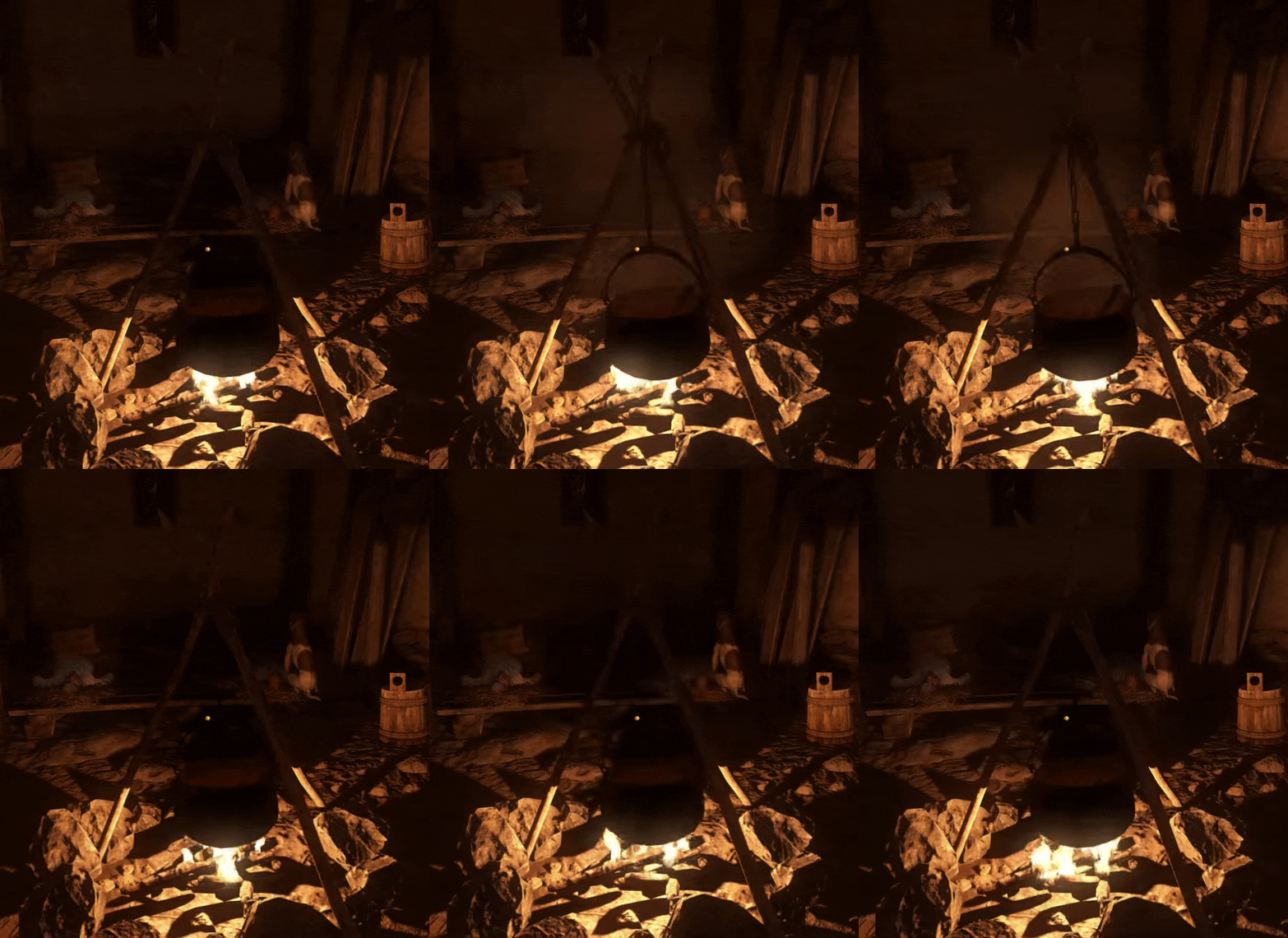
KCD runs great with latest Proton 5.0-5 on AMD RX 580 with Mesa 20.0.1, however I have noticed a smaller graphical glitch:
AsciiWolf
on 13 Apr 2020
@AsciiWolf, please do not "veto" a moderator edit. Your gif was not removed, it can be shown when clicking on your comment.
kisak-valve
on 13 Apr 2020
@kisak-valve Oops, I did not notice my post was edited by you. Sorry for reverting your edit.
AsciiWolf
on 13 Apr 2020
Another issue that I just noticed is that I cannot draw a bow. I have both bow and arrows equipped, but pressing "2" to draw a bow does nothing. Do someone else have this issue with KCD under Proton? As far as I know, this should work fine. It can be some configuration issue on my side, but I was not able to workaround this issue so far.
edit: It was caused by a non-English keyboard layout. Remapping the sword/bow keys to F1 and F2 fixed the issue.
AsciiWolf
on 13 Apr 2020
KCD runs great with latest Proton 5.0-5 on AMD RX 580 with Mesa 20.0.1, however I have noticed a smaller graphical glitch:
I just found out that the same issue also happens when running the game on Windows. So, this is definitely a game issue, not a Proton/DXVK/Mesa one. :-)
AsciiWolf
on 23 May 2020
Related issues
 leifmetcalf
·
3Comments
leifmetcalf
·
3Comments
 ghost
·
3Comments
ghost
·
3Comments
 lucifertdark
·
3Comments
lucifertdark
·
3Comments
 ArekPiekarz
·
3Comments
ArekPiekarz
·
3Comments
 matou68
·
3Comments
matou68
·
3Comments