Proton: Tom Clancy's Splinter Cell: Conviction: Failed to request product key from Steam (33220)
Issue transferred from https://github.com/ValveSoftware/steam-for-linux/issues/5672.
@FreigeistZ posted on 2018-08-24T22:30:25:
Your system information
- Steam client version (build number or date): Aug 23 2018, at 19:47:27/1535062307
- Distribution (e.g. Ubuntu): openSUSE Tumbleweed 20180820
- Opted into Steam client beta?: [Yes/No] Yes
- Have you checked for system updates?: [Yes/No] Yes
Please describe your issue in as much detail as possible:
Describe what you _expected_ should happen and what _did_ happen. Please link any large code pastes as a Github Gist
Hello All,
Tom Clancy's Splinter Cell: Conviction with DeLuxe Key bought on Steam on 11/27/2016.
(appID 33220)
Works on Windows Steam Client on Windows 7 for nearly two years now,
Installed on Linux Steam beta client with Proton enabled today.
When I start the game I only get the following message:
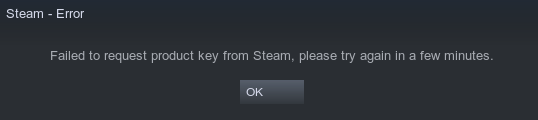
Failed to request product key from Steam, pleast try again in a few minutes.
After that I can only click OK and the game fails to start instead of working correctly.
There are no log files available.
Steps for reproducing this issue:
- Start Steam beta Client on Linux
- Choose "Tom Clancy's Splinter Cell: Conviction" in library
- Click "Play"
 kisak-valve
All 14 comments
Hello @FreigeistZ, please copy your system information from steam (Steam -> Help -> System Information) and put it in a gist, then include a link to the gist in this issue report.
kisak-valve
on 25 Aug 2018
 priand1
on 25 Aug 2018
priand1
on 25 Aug 2018
Does uPlay launch? cause this game is tied to your uPlay account.
 Zero86Sk
on 25 Aug 2018
Zero86Sk
on 25 Aug 2018
@Zero86Sk: No, it does not seem to run. I only get the popup mentioned above and it only takes a fraction of a second to pop up.
priand1
on 25 Aug 2018
Wine 3.7 does not have the patches which allow to connect to UPlay correctly.
Wine 3.15 will have these patches i think.
 Odelpasso
on 25 Aug 2018
Odelpasso
on 25 Aug 2018
I just found out that when I lauch steam in a terminal I get the following feedback when I try to start Conviction:
GameAction [AppID 33220, ActionID 5] : LaunchApp changed task to ShowCDKey with ""
GameAction [AppID 33220, ActionID 5] : LaunchApp waiting for user response to ShowCDKey ""
It seems that there is something missing.
priand1
on 25 Aug 2018
https://github.com/ValveSoftware/steam-for-linux/issues/212 could be related.
 veikk0
on 14 Sep 2018
veikk0
on 14 Sep 2018
Compatibility Report
- Name of the game with compatibility issues: Tom Clancy's Splinter Cell: Conviction
- Steam AppID of the game: 33220
System Information
- GPU: GTX1070
- Driver/LLVM version: Nvidia 410.57
- Kernel version: 4.18.10-arch1-1-ARCH
- Proton version: 3.7-6
- KDE Plasma 5.13.5
I confirm
- [✔] that I have checked whether there are updates for my system available.
Symptoms
Game doesn't start. Shows only the following dialog:
 tr37ion
on 2 Oct 2018
tr37ion
on 2 Oct 2018
One year later and I have the same issue :(
 NerosTie
on 5 Oct 2019
NerosTie
on 5 Oct 2019
The issue can be fixed by running this command before launching Steam:
sed -i 's/legacykeyregistrylocation/legacykeyregistrylocation2/g' ~/.steam/steam/appcache/appinfo.vdf
Unfortunately, there is a bug about sound and you can't skip it, making it impossible to launch...

It has been reported on winehq 2 years ago:
https://appdb.winehq.org/objectManager.php?sClass=version&iId=35002
edit:
Found a solution:
First, rename or delete systemdetection.dll in GAMEFOLDER/src/system
Then, you need to install Uplay. You can do that with Protontricks easily. But now, Uplay asks for a CD-KEY and there is no way to know it...
NerosTie
on 2 Nov 2019
But now, Uplay asks for a CD-KEY and there is no way to know it...
You can: Start Steam for Windows with wine and let it show you the CD key via the cog wheel (manage) -> cd keys
priand1
on 2 Nov 2019
You were right, now I have the cd-key, thanks.
Now, I can launch the game. Unfortunately, the "sed" command is still needed.
Here are the issues:
- You need to install directx9 (with protontricks), otherwise you will have a black screen instead of videos + a "Critical Error" when launching a new game
- With WineD3D, there is an awful lag, totally not playable
- With D9VK the lag is gone, but it hangs on the intro when you launch a new game (could be related: https://github.com/Joshua-Ashton/d9vk/issues/412)
NerosTie
on 2 Nov 2019
Here are the issues:
You need to install directx9 (with protontricks), otherwise you will have a black screen instead of videos + a "Critical Error" when launching a new game
With WineD3D, there is an awful lag, totally not playable
Both, Wined3d and dx9, do not work for me. With both the game does not even start and either upc.exe or Uplaygamelauncher.exe crash a few seconds after launching the game. See the attached steam-33220-dx9.log.
With D9VK the lag is gone, but it hangs on the intro when you launch a new game
In my case the game is only starting when using d9vk (0.30). Menus and fonts look normal and I can change settings and apply/save them without problems.
I can launch a new game or select a scene and the intro video is shown up to a certain point and then it hangs. I cannot Alt-Tab to the desktop. Switching to another console does work but starting top and trying to kill conviction_game.exe does not. I either have to switch back to Plasma and terminate it with Ctrl-Alt-Backspace - which also does not always work - or restart my machine.
Please see the two additionally attached logs steam-33220-d9vk-2.log and steam-33220-d9vk-1.log.
steam-33220-dx9.log
steam-33220-d9vk-1.log
steam-33220-d9vk-2.log
In the steam-33220-d9vk-2.log several
"err:seh:setup_exception_record stack overflow 1040 bytes in thread 00b7"
messages appear.
priand1
on 3 Nov 2019
The sed workaround for the "Failed to request product key from Steam, pleast try again in a few minutes." does no longer work in the newer Steam Client. The appinfo.vdf file is recreated from scratch when Steam starts if it detects any discrepancies in it and even if one changed the file attribute to immutable so Steam cannot overwrite it, it no longer works anyway (I'm guessing that Steam simple recreates the file in memory and uses that).
 HenrikHolst
on 2 May 2020
HenrikHolst
on 2 May 2020
Related issues
 kforney
·
3Comments
kforney
·
3Comments
 ghost
·
3Comments
ghost
·
3Comments
 Dakunier
·
3Comments
Dakunier
·
3Comments
 AwesamLinux
·
3Comments
AwesamLinux
·
3Comments
 raikirii
·
3Comments
raikirii
·
3Comments
Most helpful comment
Compatibility Report
System Information
I confirm
Symptoms
Game doesn't start. Shows only the following dialog: