I tested Dishonored. The game itself works fine, controller is detected and saves can be stored/loaded. I experienced some sluggishness in the menus until shaders were loaded, and I had a small problem with full screen (changing to windowed mode and then full screen again fixed it), but this could be my set up. I'd consider this ready for whitelisting :woman_shrugging:.
- Ubuntu 18.04.1 LTS (64 bit 4.15.0-32-generic)
- GeForce GTX 1070/PCIe/SSE2 (396.51)
- Proton 3.7 (default configuration)
 pprotonrep
All 14 comments
EDIT: Updating to mesa-git made it work!
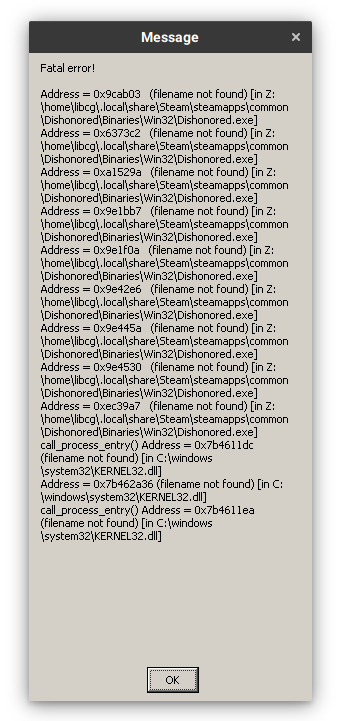
Dishonored is crashing for me, with the following error:
* Arch Linux
* R9 Fury (Mesa 18.1.6)
 libcg
on 23 Aug 2018
libcg
on 23 Aug 2018
Works fine. Minor glitches when changing windows (e.g. blacks screen for a few secs). Controller not tested. Performance is not great.
flatpak
OpenGL renderer string: AMD Radeon(TM) HD 8800 Series (PITCAIRN, DRM 3.26.0, 4.18.0, LLVM 6.0.1)
OpenGL core profile version string: 4.5 (Core Profile) Mesa 18.1.6
 swick
on 26 Aug 2018
swick
on 26 Aug 2018
Ubuntu 16.04, NVIDIA GTX 970, Proton 3.7-4 Beta:
Test | Result
-- | --
Singleplayer | Working as expected
Local Co-op | _N/A_
Online Multiplayer | _N/A_
Configuration | ...
-- | --
Input | Steam Controller
Display | 1920x1080^
Fullscreen | Yes
Preset | Medium
VSync | Off
API | DX9
^ Default display resolution 800x600
 mimattr
on 26 Aug 2018
mimattr
on 26 Aug 2018
some extra data if it may help:
gentoo, nvidia gtx 1070, proton 3.7-3:
Test | Result
-- | --
Singleplayer | Working as expected
Local Co-op | N/A
Online Multiplayer | N/A
Configuration | ...
-- | --
Input | Afterglow prismatic (xbox one)
Display | 3840x2160^
Fullscreen | Yes
Preset | high
VSync | Off
API | DX9
^ Default display resolution 800x600
 prototype99
on 30 Aug 2018
prototype99
on 30 Aug 2018
I had a 100% reproducible crash in Dishonored that I managed to find a workaround for. This crash seems to be the same one reported by several people for Dishonored at spcr.netlify.com.
SYMPTOMS
- Game seems to load but crashes right before showing the main menu.
- Cloud sync does not work: it stays stalled at 0% when trying to start the game, until it times out and Steam pops up a dialog offering to start the game with cloud sync disabled.
The symptoms may seem unrelated, but I suspect they are in fact not, as the crash workaround is in fact save-related.
WORKAROUND
Copying the Windows save files fixed it:
$ cp -r /path/to/windows/partition/Program\ Files\ \(x86\)/Steam/userdata/*/205100/* ~/.steam/steam/userdata/*/205100/
 pvaret
on 31 Aug 2018
pvaret
on 31 Aug 2018
I can also confirm that Dishonored works perfectly for me. CentOS 7, 1080Ti, latest 390.xx driver.
Tested all the way up to 5K resolution.
 gordan-bobic
on 3 Sep 2018
gordan-bobic
on 3 Sep 2018
On my setup, switching the desktop from the game and back causes the game to stop rendering.
i3 window manager, arch linux, 4.18.5-zen1-1-zen, nvidia 396.54-5
 volca02
on 4 Sep 2018
volca02
on 4 Sep 2018
I had a problem starting the game where it crashed after initial loading but before the main menu. I solved it by enabling Steam Cloud. I also had a set of Cloud saves (on Steam, not locally) from a previous Windows installation. May be related to pvaret's observation.
 glaere
on 12 Sep 2018
glaere
on 12 Sep 2018
Manjaro Linux
Ryzen 7 1800X
Vega64 Mesa 8.2.1 with LLVM 6.0.1
Proton 3.7-7 beta
Runs great, 60fps at 4k everything maxxed out. No discernible rendering issues or bugs.
 shadywack
on 3 Oct 2018
shadywack
on 3 Oct 2018
Works well enough for whitelisting on my Debian (Testing). Here is a templated report :
Whitelist Request
- Name of the game to be whitelisted: Dishonored
- Steam AppID of the game: 205100
System Information
- GPU: NVidia GTX 970
- Driver/LLVM version: NVidia 390.87
- Distro version: Debian Buster/Sid (Testing)
- Steam SysInfo
- Proton version: Default (I assume 3.7-8)
I confirm:
- [X] that pressing the
Playbutton in the Steam client is sufficient. - [ ] that runtime config options are necessary to run the game.
- [ ] that no workarounds other than PROTON_* env variables are necessary.
Issues
- [X] I haven't experienced any issues.
- [ ] There are no issues left open for this game.
- [X] Although I consider the gaming experience equal to Windows there are remaining issues:
- This issue pops up when looking for Dishonored, and the game is mentioned in passing. Aside from that, no other issues are open.
 DrWindu
on 23 Dec 2018
DrWindu
on 23 Dec 2018
I ran into persistent issues with the game crashing right before the main menus. Disabling/enabling Steam cloud had no effect. When I checked out the files inside ~/.steam/steam/userdata/${STEAM_USERID}/205100/remote/, all of them had a size of 1 (I'm guessing at some point they were corrupted and that was backed up). I didn't have a windows partition to restore from, so I removed all the files and let the game recreate them. Now everything works flawlessly.
Something to note: I couldn't get Dishonored to work back when I was using Windows either. I'm guessing it's for the same reason. I suspect this is the cause of most of the Garbage reviews on protondb.
Update:
After playing for a few hours, everything's pretty much good. Steam Cloud wants to resync the corrupted files when I close and reopen the game, but removing them before the game gets to the menu works fine. Disabling steam cloud or just overwriting the corrupt files with working saves would probably fix it for good.
System Info
- GPU: Radeon R9 290X
- Driver/LLVM version: HAWAII, DRM 3.27.0, AMDGPU 4.19.30, LLVM 7.0.1
- Distro version: NixOS-unstable (19.09 Loris)
- Steam Sysinfo
- Proton version: Beta (currently 3.16-8 Beta)
 zeonin
on 30 Mar 2019
zeonin
on 30 Mar 2019
Whitelist Request
- Name of the game to be whitelisted: Dishonored
- Steam AppID of the game: https://steamdb.info/app/205100/
System Information
- GPU: GTX 760
- Driver/LLVM version: NVIDIA 440.59
- Distro version: Arch
- https://gist.github.com/shoober420/1215c40214cf70e1fabb760b5bd2a341
- Proton version: 4.11-12
Works great out of the box.
 shoober420
on 5 Feb 2020
shoober420
on 5 Feb 2020
Dishonored (205100)
Issue transferred from https://github.com/ValveSoftware/Proton/issues/3889.
@MetalNeo posted on 2020-05-18T15:34:43:
Compatibility Report
- Name of the game with compatibility issues: Dishonored
- Steam AppID of the game: 205100
System Information
- GPU: Radeon RX 5700XT
- Driver/LLVM version: mesa 20.0.7-2
- Kernel version: 5.6.13.arch1-1
- Link to full system information report as Gist
- Proton version: 5.0-7
I confirm:
- [x] that I haven't found an existing compatibility report for this game.
- [x] that I have checked whether there are updates for my system available.
Symptoms
The credits do not roll at the end of the game.
Reproduction
- Start the game.
- Play until the end of the game is reached.
- Wait for the pre-rendered cinematic to play.
- The game will skip the end credits and return to the main menu.
 kisak-valve
on 18 May 2020
kisak-valve
on 18 May 2020
After more thorough testing, I realized that the video files were not being played because of an ini file setting that I accidentally changed (bForceNoMovies=true). After changing the value to false, I am no longer experiencing playback issues.
That being said, I would now like to recommend this game for whitelisting. I have completed a full playthrough of the base game and the DLCs. Performance was very good/stable and I did not encounter any additional issues that weren't also present in the native Windows version (primarily gameplay-related).
Whitelist Request
- Name of the game to be whitelisted: Dishonored
- Steam AppID of the game: 205100
System Information
- GPU: Radeon RX 5700XT
- Driver/LLVM version: Mesa 20.0.7-3/LLVM 10.0.0-2
- Distro version: Arch Linux
- Kernel version: 5.6.15.arch1-1
- Proton version: 5.0-7
Issues
- *[x] There are no issues left open for this game.
 MetalNeo
on 3 Jun 2020
MetalNeo
on 3 Jun 2020
Related issues
 shanefagan
·
3Comments
shanefagan
·
3Comments
 Elkasitu
·
3Comments
Elkasitu
·
3Comments
 AwesamLinux
·
3Comments
AwesamLinux
·
3Comments
 raikirii
·
3Comments
AwesamLinux
·
3Comments
raikirii
·
3Comments
AwesamLinux
·
3Comments
Most helpful comment
Manjaro Linux
Ryzen 7 1800X
Vega64 Mesa 8.2.1 with LLVM 6.0.1
Proton 3.7-7 beta
Runs great, 60fps at 4k everything maxxed out. No discernible rendering issues or bugs.