Protobuf: Xcode reports non-portable path to header
I use CocoaPods to add Protobuf to my project. However when I build with Xcode 8.3.2, it reports so many following warnings:
 #import <Protobuf/Any.pbobjc.h>
         ^~~~~~~~~~~~~~~~~~~~~~~
         <protobuf/Any.pbobjc.h>
/Users/tangtianyong/Workspace/Repository/PuppetChat/leancloud-objc-sdk/Sources/Pods/Headers/Private/Protobuf/GPBWellKnownTypes.h:41:10: warning: non-portable path to file '<protobuf/Duration.pbobjc.h>'; specified path differs in case from file name on disk [-Wnonportable-include-path]
 #import <Protobuf/Duration.pbobjc.h>
         ^~~~~~~~~~~~~~~~~~~~~~~~~~~~
         <protobuf/Duration.pbobjc.h>
/Users/tangtianyong/Workspace/Repository/PuppetChat/leancloud-objc-sdk/Sources/Pods/Headers/Private/Protobuf/GPBWellKnownTypes.h:42:10: warning: non-portable path to file '<protobuf/Timestamp.pbobjc.h>'; specified path differs in case from file name on disk [-Wnonportable-include-path]
 #import <Protobuf/Timestamp.pbobjc.h>
         ^~~~~~~~~~~~~~~~~~~~~~~~~~~~~
         <protobuf/Timestamp.pbobjc.h>
In file included from /Users/tangtianyong/Workspace/Repository/PuppetChat/leancloud-objc-sdk/Sources/Pods/Protobuf/objectivec/google/protobuf/Any.pbobjc.m:11:
In file included from /Users/tangtianyong/Workspace/Repository/PuppetChat/leancloud-objc-sdk/Sources/Pods/Headers/Private/Protobuf/GPBProtocolBuffers_RuntimeSupport.h:34:
/Users/tangtianyong/Workspace/Repository/PuppetChat/leancloud-objc-sdk/Sources/Pods/Headers/Private/Protobuf/GPBProtocolBuffers.h:55:10: warning: non-portable path to file '<protobuf/Any.pbobjc.h>'; specified path differs in case from file name on disk [-Wnonportable-include-path]
 #import <Protobuf/Any.pbobjc.h>
         ^~~~~~~~~~~~~~~~~~~~~~~
         <protobuf/Any.pbobjc.h>
/Users/tangtianyong/Workspace/Repository/PuppetChat/leancloud-objc-sdk/Sources/Pods/Headers/Private/Protobuf/GPBProtocolBuffers.h:56:10: warning: non-portable path to file '<protobuf/Api.pbobjc.h>'; specified path differs in case from file name on disk [-Wnonportable-include-path]
 #import <Protobuf/Api.pbobjc.h>
         ^~~~~~~~~~~~~~~~~~~~~~~
         <protobuf/Api.pbobjc.h>
/Users/tangtianyong/Workspace/Repository/PuppetChat/leancloud-objc-sdk/Sources/Pods/Headers/Private/Protobuf/GPBProtocolBuffers.h:57:10: warning: non-portable path to file '<protobuf/Duration.pbobjc.h>'; specified path differs in case from file name on disk [-Wnonportable-include-path]
 #import <Protobuf/Duration.pbobjc.h>
         ^~~~~~~~~~~~~~~~~~~~~~~~~~~~
         <protobuf/Duration.pbobjc.h>
/Users/tangtianyong/Workspace/Repository/PuppetChat/leancloud-objc-sdk/Sources/Pods/Headers/Private/Protobuf/GPBProtocolBuffers.h:58:10: warning: non-portable path to file '<protobuf/Empty.pbobjc.h>'; specified path differs in case from file name on disk [-Wnonportable-include-path]
 tang3w
All 39 comments
I have the same problem! I am using the Firebase/remoteConfig pod which depends on this protobuf pod and the builds results in all these warnings
 ghost
on 13 Jun 2017
ghost
on 13 Jun 2017
So the name should be "Protobuf", can you double check the pods chains you have to see if something is using it in lowercase and that is what is causing the problem?
 thomasvl
on 14 Jun 2017
thomasvl
on 14 Jun 2017
Actually, looking at your error, I'm a little confused:
/Users/tangtianyong/Workspace/Repository/PuppetChat/leancloud-objc-sdk/Sources/Pods/Headers/Private/Protobuf/GPBProtocolBuffers.h:58:10: warning: non-portable path to file '<protobuf/Empty.pbobjc.h>'; specified path differs in case from file name on disk [-Wnonportable-include-path]
Notice GPBProtocolBuffers.h is being found within a folder named Protobuf, so it almost sounds like your setup might have a directory named protobuf and it is coming down to include orders where things are being found.
Is there anyway you can provide an example setup that reproduces this so we can finish confirm if it is some configuration specific issue vs. a basic problem with the library?
thomasvl
on 15 Jun 2017
@sergiocampama any ideas on what could be causing this?
thomasvl
on 15 Jun 2017
I found that CocoaPods will search header in ${PODS_ROOT}/Headers/Private. Under this folder, the directory name Protobuf looks fine. However, the headers under this folder are just symbol links, for example:
Protobuf/Any.pbobjc.h -> ../../../Protobuf/objectivec/google/protobuf/Any.pbobjc.h
I suspect that Xcode will check real path. When Xcode find the first letter of directory name in real path is not uppercase, it reports a non-portable warning.
If the protobuf folder renamed to Protobuf, the warnings will disappear.
tang3w
on 15 Jun 2017
Ugh. That could makes this more complex, because if someone build a framework with an Xcode project, it will copy the files and the capital P would be correct. ☹️
Since the name of a file can be changed with a symlink, it sorta seems like clang should be checking the name it read the file as and not the target of the link. So it likely makes sense to open up a radar against clang and the support around -Wnonportable-include-path.
thomasvl
on 15 Jun 2017
Here's a quick tests I tried to setup that doesn't seem to repro it (you'll need to do the pod install on it). Can you tweak it to make it happen? No matter what case I used for the #import in AppDelegate.m, it does't seem to happen.
thomasvl
on 15 Jun 2017
We still see this warning. Can be always reproduced with gRPC's helloworld example with Xcode 9.2 and Cocoapods 1.4.0.
 muxi
on 8 Feb 2018
muxi
on 8 Feb 2018
I'm seeing this warning in my project as well, and am able to reproduce the issue as @muxi described.
 lehrblogger
on 27 Mar 2018
lehrblogger
on 27 Mar 2018
Seems to be related to the symbolic link from the static library public header in an upper case directory to the source in a lower case directory:
$ ls -l ./Pods/Headers/Public/Protobuf/Any.pbobjc.h
lrwxr-xr-x  1 paulbeusterien  eng  57 Mar 27 10:41 ./Pods/Headers/Public/Protobuf/Any.pbobjc.h -> ../../../Protobuf/objectivec/google/protobuf/Any.pbobjc.h
 paulb777
on 27 Mar 2018
paulb777
on 27 Mar 2018
That's what I'm seeing as well. Can I resolve this warning by modifying my local setup, or should a change be made to the CocoaPod? If the latter, should this issue be reopened?
lehrblogger
on 27 Mar 2018
So clang is following the symlink and looking at the path the link cocoapods created resolves too?
And just because it happens to have the same name (but different case), clang kicks out this warning? But if the target directory had a different name, clang would probably go silent?
If that's the case, it sounds more like pushing this over to clang for looking at the resolved path vs. the path the header was found at is the right "solution".
thomasvl
on 27 Mar 2018
Ah, now I better understand your earlier comments about clang, thanks. I started to put together a sample project for a radar, and noticed I can only repro the issue with:
- A Swift project
Firebase/Firestore, which depends onProtobuf
I could not repro the issue by using Firebase/Firestore in your TestApp Obj-C project above, or by using Protobuf in my Swift project. This is the project: TestApp (Swift with Firestore).zip
@thomasvl, does this change your understanding of the problem, or should I go ahead with the radar?
Two other notes:
- I was able to silence the warnings by making this change: https://github.com/lehrblogger/protobuf/commit/8d7916caf859a5ad174849b5beb090c57f3c6d9f. You can verify by uncommenting the line in the
Podfilethat points to my fork (but you'll need torm Podfile.lockbefore re-runningpod install). - This Sack Overflow comment suggests relatively-recent changes to clang for APFS might explain why this started happening.
lehrblogger
on 28 Mar 2018
I haven't gotten a chance to look at your example, but answering the other parts:
I'd go ahead and file the radar, point out how the Framework/include is clearly done via the capital 'P' version, but since it points to a symlink under the hood, clang is checking the wrong path.
Your change - yea, it makes sense that that "fixes" it, but just like you couldn't get the warning in other situations with different links/directory structures, I'd expect that change to result in warnings in the other cases where the change would now be wrong compared to the real paths on disk. i.e. - it works in one condition, but not the other.
Stack Overflow comment - Yea, I sorta figured they added the warning to help developers with the migration from cases insensitive files systems to case sensitive ones. But they seem to be looking are a symlink resolved path instead of the path clang actually found the file via. So while trying to help with one filesystem issue, the coded another one. 😮
thomasvl
on 28 Mar 2018
I also tried a bit to repro in a smaller example yesterday and failed.
I did verify that moving Pods/Protobuf/objectivec/google/protobuf/Any.pbobjc.h to another location and linking ./Pods/Headers/Public/Protobuf/Any.pbobjc.h eliminated the build warning:
mv ./Pods/Protobuf/objectivec/google/protobuf/Any.pbobjc.h ~/backup
rm ./Pods/Headers/Public/Protobuf/Any.pbobjc.h
ln -s ~/backup/Any.pbobjc.h  ./Pods/Headers/Public/Protobuf/Any.pbobjc.h
So +1 on the radar, but there is something in addition to the symbolic link to the lower-cased directory that is necessary to trigger the issue that we don't fully understand yet.
paulb777
on 28 Mar 2018
Ok, thanks. I submitted rdar://38963247 and copied it over to Open Radar: https://openradar.appspot.com/radar?id=6091887509241856
lehrblogger
on 28 Mar 2018
With the Xcode 10.2 beta, this issue now shows up in dynamic framework (use_frameworks!) CocoaPods installations in addition to static library configs.
paulb777
on 21 Feb 2019
Raised today at https://stackoverflow.com/questions/55293627/firebase-cocoa-pods-error-after-swift-5-update
paulb777
on 22 Mar 2019
I have this issue, I updated to the latest Xcode, and now I am getting the warnings. Updated Firebase pods to the latest release, but yet the warnings are still there. I've read everything on here and on stackoverflow but found no concrete solution.
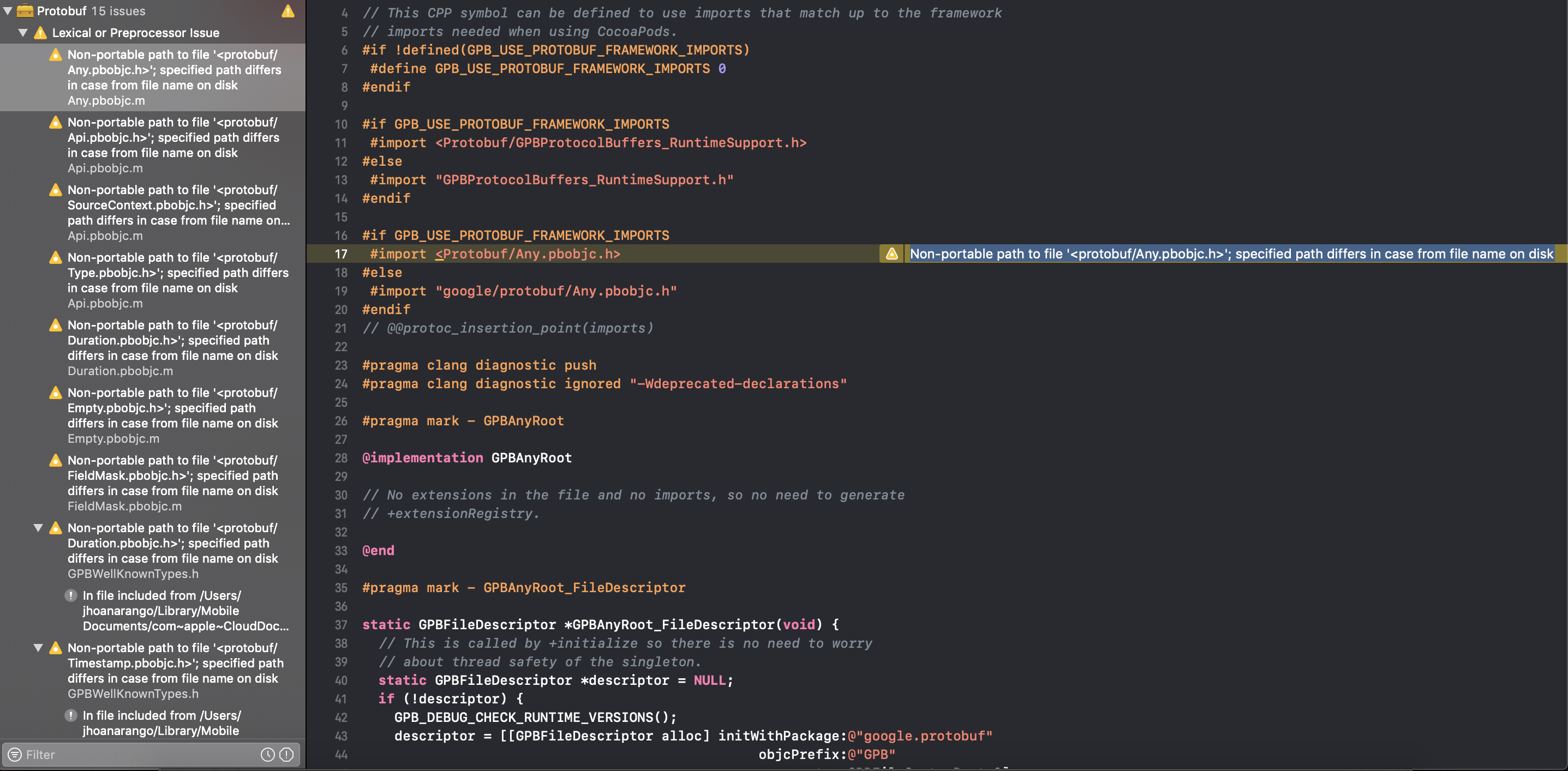
Any help would be appreciated.
 jhoanarango
on 11 Apr 2019
jhoanarango
on 11 Apr 2019
@jhoanarango I think the problem is with the capital 'P'. I was facing the same issues. I know what I did was bad but I unlocked each file changed it to a lowercase 'p'
This removed the warnings. Im not to sure but I feel while installing the pods it cant find the "Protopuf" files and when changed to lowercase it seems to work fine.
I hope this helps.
 DhruvTekchandani
on 16 Apr 2019
DhruvTekchandani
on 16 Apr 2019
@DhruvTekchandani , thank you.. I saw that too, and Xcode even suggested to change it, but I didn't want to do that since I didn't know if it would introduce other bugs or something. On top of the file it says "DO NOT EDIT" lol so I was afraid of doing so. But I guess it has to be done.
jhoanarango
on 16 Apr 2019
+1 same issue in Xcode 10.2.1, in my Swift 12.0 project. I am using "use_frameworks!" too.
 andreasreuter
on 2 May 2019
andreasreuter
on 2 May 2019
it happens to me too. Protobuf and FirebaseMessaging folder ... do you suggest not to worry and to continue ignoring the warning or someone has solved ?? thanks guys ... I'm a newbie ... anxiety
 nicola146
on 4 May 2019
nicola146
on 4 May 2019
Put inhibit_all_warnings! in your podfile, and the warnings will be silenced :)
 nharbo
on 9 May 2019
nharbo
on 9 May 2019
I've got this error as well. Seems like it differs if you've got a case sensitive disk format or not.
 Petter-W
on 21 May 2019
Petter-W
on 21 May 2019
Renaming the folder from "/[Your Project]/Pods/Protobuf/" to "/[Your Project]/Pods/protobuf/" just made the warnings dissapear in my case
 mobile-appz
on 22 May 2019
mobile-appz
on 22 May 2019
Renaming the folder from "/[Your Project]/Pods/Protobuf/" to "/[Your Project]/Pods/protobuf/" just made the warnings dissapear in my case
And that doesn't disappear after you run pod install again, @mobile-appz?
Petter-W
on 22 May 2019
Hadn't tried that but the warnings came back anyway when I tried running the app on the simulator. Added this to podfile:
pod 'Protobuf', :inhibit_warnings => true
Ran pod install and no warnings so far.
mobile-appz
on 22 May 2019
Theory (not sure how to confirm this would fix it or how to go about the migration) – Change the name in the Protobuf.podspec to protobuf (lowercase). Then hopefully the directory create would match.
Since that effectively is a rename of the pod, I'm have no idea how bad/hard that would be to actually pull off given everyone reference the capitalized name.
@paulb777 any ideas if this would fix it or how to do this?
thomasvl
on 29 May 2019
@thomasvl Maybe. I'll do some investigation later this week.
paulb777
on 29 May 2019
Ciao ragazzi... Il mio maestro mi ha detto di non preoccuparsi... Non è un errore... I pod si adegueranno con il tempo x Swift5... Poi mi ha detto che x far approvare l App non sarà un problema...
nicola146
on 29 May 2019
Renaming the pod and module would require migration for CocoaPods clients. A better CocoaPods solution is renaming the header directory. I sent a PR doing this at #6190.
paulb777
on 29 May 2019
Can confirm renaming the Protobuf directory solved all errors for me.
 cxmputer
on 7 Jun 2019
cxmputer
on 7 Jun 2019
6190 doesn't work since while it renames the directory, the directory actually comes from the input paths of the files that are generated, so the next time they regenerate (especially on a case sensitive file system), the lower case names would be recreated.
thomasvl
on 31 Jul 2019
It seems there is a solution for this.
https://stackoverflow.com/questions/28789807/how-to-rename-a-cocoapod
Publish a new pod and deprecate the current.
https://guides.cocoapods.org/syntax/podspec.html#deprecated_in_favor_of
 BugsBunnyBR
on 2 Aug 2019
BugsBunnyBR
on 2 Aug 2019
Yes, that process can work, but if someone depends on the pod via two dependencies, they need them both to update at the same time otherwise they will get two copies of the code (thru the differing names) and that will result is duplicate copies of the code that conflict.
If they directly directly depend on the pod it is pretty easy, it is when they are transitive that is quickly gets hard because they need other things to update.
thomasvl
on 2 Aug 2019
Would module_name solve the issue without a new pod?
https://github.com/CocoaPods/CocoaPods/blob/master/lib/cocoapods/target/pod_target.rb#L244
BugsBunnyBR
on 2 Aug 2019
@BugsBunnyBR Good idea! It seems to work in #6464
paulb777
on 2 Aug 2019
6803 got opened which seems to loop back to this original problem, and it seems module_name doesn't fully work, from some of the paths there is looks like maybe cocoapods isn't always using the right name for things so we get different cases in different places, and if running on a case sensitive file system, things then choke?
Anyway, for those that were on this issue, you might want to track the other one also, as this could still be a problem in some configurations.
thomasvl
on 29 Oct 2019
Related issues
 orian
·
3Comments
orian
·
3Comments
 jmzwcn
·
3Comments
jmzwcn
·
3Comments
 oshyshkin
·
3Comments
oshyshkin
·
3Comments
 stub42
·
3Comments
stub42
·
3Comments
 louwersj
·
4Comments
louwersj
·
4Comments
Most helpful comment
Raised today at https://stackoverflow.com/questions/55293627/firebase-cocoa-pods-error-after-swift-5-update