Protobuf: protoc-gen-go hangs on mac OS X sierra
I have installed protobuf-3.0.0, built from source and installed on my system, from here
I have a working go compiler (go1.8 darwin/amd64)
I have run go get -u github.com/golang/protobuf/{proto,protoc-gen-go} and have obtained a protoc-gen-go binary in $GOPATH/bin
But, when I run proto-gen-go, even without parameters, execution hangs. protoc --go_out works just fine.
Has anyone run into this before? What could cause these hangs? Any shared dependencies which could cause this?
Edit
I have found this digging through docs:
provides a protoc-gen-go binary which protoc uses when invoked with the --go_out command-line flag. The --go_out flag tells the compiler where to write the Go source files. The compiler creates a single source file for each .proto file input.
Looks like this is just a case of misusing protoc-gen-go: it's intended to be invoked by protoc, not directly invoked. Would be nice to have an error if it's directly invoked rather than hanging, though.
 brobits
All 13 comments
It also appears dtrace is denied somewhere in the call stack (toward the end of my dtruss log):
open("/dev/urandom\0", 0x0, 0x0)         = 3 0
dtrace: error on enabled probe ID 2134 (ID 163: syscall::read:return): invalid kernel access in action #12 at DIF offset 92
close(0x3)       = 0 0
__pthread_sigmask(0x3, 0x0, 0x127B058)       = 0 0
bsdthread_register(0x104E7C0, 0x0, 0x0)      = -1 Err#22
dtrace: error on enabled probe ID 2132 (ID 165: syscall::write:return): invalid kernel access in action #12 at DIF offset 92
dtrace: error on enabled probe ID 2132 (ID 165: syscall::write:return): invalid kernel access in action #12 at DIF offset 92
dtrace: error on enabled probe ID 2132 (ID 165: syscall::write:return): invalid kernel access in action #12 at DIF offset 92
select(0x0, 0x0, 0x0, 0x0, 0x7FFF5FBFF378)       = 0 0
select(0x0, 0x0, 0x0, 0x0, 0x7FFF5FBFF378)       = 0 0
dtrace: error on enabled probe ID 2132 (ID 165: syscall::write:return): invalid kernel access in action #12 at DIF offset 92
@brobits how did you solve it ?
 danlg
on 3 Jul 2017
danlg
on 3 Jul 2017
I had the same behavior. I have mac OS X sierra 10.12.6, go 1.8.3.
Basically, protoc program doesn't come with "go get -u github.com/golang/protobuf/protoc-gen-go".
In the README.md file it is stated to install the C++ implementation, and the link brings to some *zip file, which actually are the source code that must be compiled via the standard linux make chain: configure+make+make install (I already had Xcode installed).
Well, once compiled the protoc program and installed into PATH it works like a charm.
 larzen
on 28 Jul 2017
larzen
on 28 Jul 2017
Just fyi. The protobuf repo release page https://github.com/google/protobuf/releases does have links to zip files containing the pre-built protoc binary as well, e.g. protoc-3.3.0-osx-x86_64.zip. Ones with prefix protoc- contains pre-built binary for a specific platform.
 cybrcodr
on 28 Jul 2017
cybrcodr
on 28 Jul 2017
brew install protoc
 ClayShentrup
on 4 Oct 2018
ClayShentrup
on 4 Oct 2018
@danlg everyone else here is correct: while protoc-gen-go produces golang bindings for protocol buffers, it must be invoked by protoc. unfortunately, I don't think go get -u https://.../protoc-gen-go also provides the protoc binary, which must be directly invoked.
short answer: install protoc from source, then run protoc to generate Golang bindings. protoc will call into protoc-gen-go.
brobits
on 4 Oct 2018
It should be noted: execution does not hang. It is instead blocking on reading from STDIN.
If you hit CTRL-D, to signal an EOF for STDIN, then execution will quit with a log message protoc-gen-go: error:no files to generate
 puellanivis
on 4 Oct 2018
puellanivis
on 4 Oct 2018
239 should help address accidental direct invocation of protoc-gen-go
 dsnet
on 4 Oct 2018
dsnet
on 4 Oct 2018
@puellanivis good find, although I do wish it were better documented to prevent new users from scratching their heads when they invoke this directly from a shell and don't produce anything on STDIN, effectively thinking execution is hanging on something besides input.
brobits
on 4 Oct 2018
brew install protoc
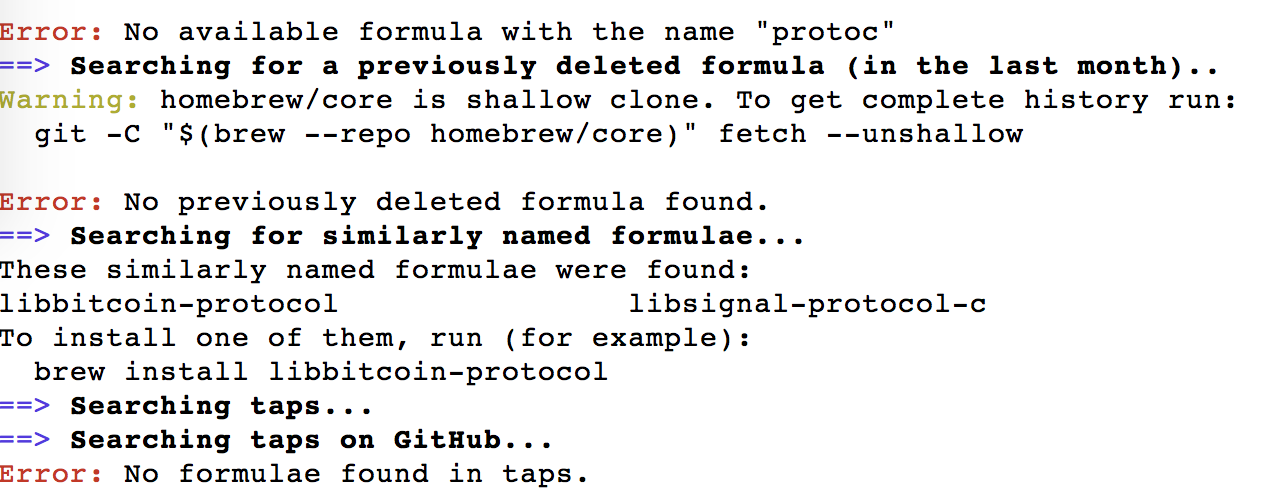
doesn't work.
 mayank-dixit
on 9 Oct 2018
mayank-dixit
on 9 Oct 2018
@mayank-dixit, that is a question for Homebrew package manager. This repository is only responsible for implementing protocol buffers for Go, and not how that code is distributed to other operating systems and platforms.
dsnet
on 15 Oct 2018
@mayank-dixit brew install protobuf
 ephemeral
on 19 Oct 2018
ephemeral
on 19 Oct 2018
@mayank-dixit
brew install protobuf
Thanks, worked!
 wildneuro
on 29 Oct 2018
wildneuro
on 29 Oct 2018
Related issues
 jonomacd
·
3Comments
jonomacd
·
3Comments
 parkr
·
5Comments
parkr
·
5Comments
 zamberform
·
5Comments
zamberform
·
5Comments
 hy93
·
5Comments
hy93
·
5Comments
 emcfarlane
·
4Comments
emcfarlane
·
4Comments
Most helpful comment
@mayank-dixit
brew install protobuf