Protobuf.js: I have trouble at protobuf decode with react-native fetch
protobuf.js version: 6.4.3
Hi I'm using protobufjs well!
My environment is using react-native and I'm using pbjs to create a .js file and communicate with the server (tomcat, jsp) via the fetch API.
Now I have verified that encoding / decoding of one of the protobufs in the generated .js file
However, the problem is that when the protobuf of a certain length comes down from the server, the invalid wire type 4 at offset 60 error occurs when the character is broken down.
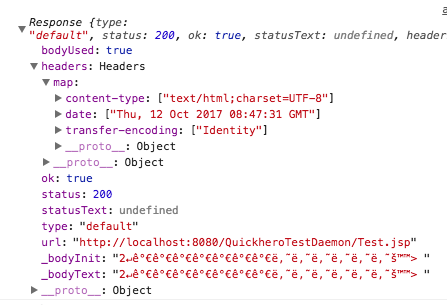
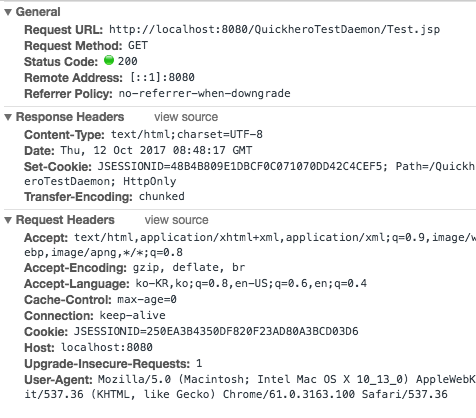
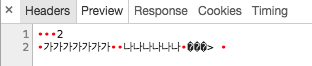
I thought this was too strange, so I tried to compare the response when I requested the jsp page from the desktop and the request when I requested the jsp through the react-native fetch API.
The result is different
The fetchAPI makes a request to the url and gets the string via response.text ()
The values here are different.
Please help me !!
include .proto
message RAddressInfo{
     optional string addr = 1;
     optional string parse_jaso = 2;
     optional float score = 3;
     optional bool my_history = 4 [default=false];
}


message RecommendAddressResponse{
     optional int64 total = 1;
     repeated RAddressInfo address = 2;
}
fetch API on React-Native
 fetch(url, options).then((res)=>{
     return res.text();
}).then((response)=>{
     let buffer = Buffer.from(response);
     let res = PacketProto.com.quickhero.proto.Response.decode(buffer); //error this line the invalid wire type 4 at offset 60
});
server test.jsp File
<%@page import="com.quickhero.proto.impl.ConsumerClientPacketProto.RAddressInfo"%>
<%@page import="com.quickhero.proto.impl.ConsumerClientPacketProto.RecommendAddressResponse"%>
<%@ page language="java" contentType="text/html; charset=UTF-8"
    pageEncoding="UTF-8"%>

<%@page import="java.io.OutputStream"%>
<%@page import="com.quickhero.src.GetTestProtoBuf"%>

<%
    RecommendAddressResponse.Builder resBuilder = RecommendAddressResponse.newBuilder();
    final int count = 1;
    for(int i=0;i<count;i++){
        resBuilder.addAddress(RAddressInfo.newBuilder().setAddr("가가가가가가가").setMyHistory(false).setParseJaso("나나나나나나").setScore(0.3f).build());
    }
    resBuilder.setTotal(count);

    RecommendAddressResponse res  = resBuilder.build();
    byte[] arr = res.toByteArray();
    out.clear();
    out=pageContext.pushBody();

    OutputStream stream = response.getOutputStream();
    stream.write(arr);
    stream.flush();
%>
-----------------------------------------
get Response (fetchAPI)
get Response (Browser)
 pratt3351
All 8 comments
The fetchAPI makes a request to the url and gets the string via response.text ()
The values here are different.
Might be an issue with text encoding getting in the way, corrupting the binary response.
 dcodeIO
on 12 Oct 2017
dcodeIO
on 12 Oct 2017
Thanks so much for your answer.
It's works good !
Now, i have a question, fetchAPI doesn't support arrayBuffer ?
in react-native, only XMLHttpRequest can do this ?
pratt3351
on 12 Oct 2017
See: https://developer.mozilla.org/en-US/docs/Web/API/Fetch_API/Using_Fetch / https://developer.mozilla.org/en-US/docs/Web/API/Body/arrayBuffer
dcodeIO
on 12 Oct 2017
Thanks ! you saved my life :)
pratt3351
on 13 Oct 2017
@rouge3351 Are you able to use protobuf.js in React Native? Can you share with me how do you intergrade to React Native?
 nhducit
on 26 Dec 2017
nhducit
on 26 Dec 2017
@nhducit
sure~! in react-native, fetch API dosen't support binary response. just support text or json response
so, you should write XMLHttpRequest.
i write this code and you can referrence it
function protobufNetwork(route, request, callback){
let xmlhttp = new XMLHttpRequest();
xmlhttp.open('POST', this.host + route);
xmlhttp.responseType='arraybuffer';
xmlhttp.setRequestHeader("Content-type", "text/plain;charset=UTF-8");
xmlhttp.onreadystatechange = (e)=> {
if (xmlhttp.readyState !== 4) {
return;
}
if ( xmlhttp.status === 200 ) {
let buffer = new Uint8Array(xmlhttp.response);
callback( Protobuf.Response.decode(buffer) );
} else {
console.log({
status: xmlhttp.status,
statusText: xmlhttp.statusText
});
}
};
xmlhttp.send(Protobuf.Request.encode(request).finish());
}
this code is make Protobuf message encode and request to server (by http network).
after receive response from server(binary data) and decode Response to Protobuf message.
if you have any question call me back!
pratt3351
on 26 Dec 2017
Can you give a code for sending and receiving protobuf in react native?
 TheAlgo
on 13 Jun 2018
TheAlgo
on 13 Jun 2018
@TheAlgo
for receiving
two dependencies
yarn add rn-fetch-blob
yarn add base-64
import { decode as atob } from 'base-64'
import RNFetchBlob from 'rn-fetch-blob'
import some_api from './some_api_pb'
...
RNFetchBlob.fetch('GET', url, {
'accept-encoding': 'gzip,deflate'
}).then((response) => {
const base64 = response.base64()
var buffer = Uint8Array.from(atob(base64), c => c.charCodeAt(0))
const statusMessage = some_api.Status.deserializeBinary(buffer)
console.log(some_api.Status.toObject(false, statusMessage))
})
 jeromediaz
on 23 Oct 2019
jeromediaz
on 23 Oct 2019
Related issues
 RP-3
·
4Comments
RP-3
·
4Comments
 taylorcode
·
4Comments
taylorcode
·
4Comments
 bennycode
·
3Comments
bennycode
·
3Comments
 asafcombo
·
4Comments
asafcombo
·
4Comments
 spiderkeys
·
5Comments
spiderkeys
·
5Comments
Most helpful comment
@nhducit
sure~! in react-native, fetch API dosen't support binary response. just support text or json response
so, you should write XMLHttpRequest.
i write this code and you can referrence it
function protobufNetwork(route, request, callback){let xmlhttp = new XMLHttpRequest();xmlhttp.open('POST', this.host + route);xmlhttp.responseType='arraybuffer';xmlhttp.setRequestHeader("Content-type", "text/plain;charset=UTF-8");xmlhttp.onreadystatechange = (e)=> {if (xmlhttp.readyState !== 4) {return;}if ( xmlhttp.status === 200 ) {let buffer = new Uint8Array(xmlhttp.response);callback( Protobuf.Response.decode(buffer) );} else {console.log({status: xmlhttp.status,statusText: xmlhttp.statusText});}};xmlhttp.send(Protobuf.Request.encode(request).finish());}this code is make Protobuf message encode and request to server (by http network).
after receive response from server(binary data) and decode Response to Protobuf message.
if you have any question call me back!