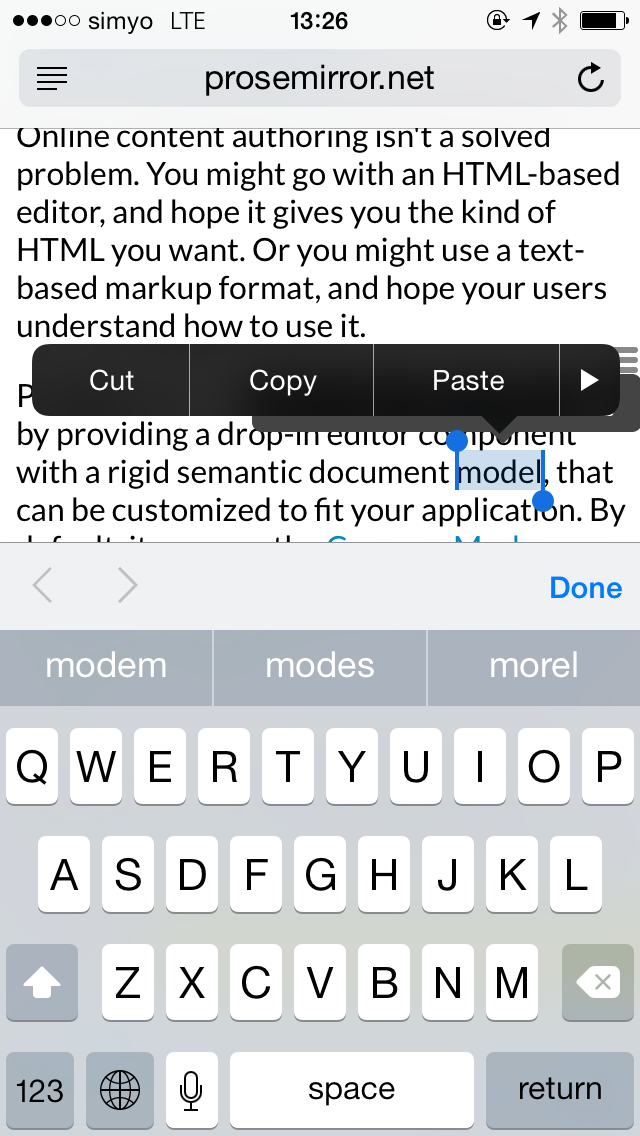
Prosemirror: Tooltip inline menu fights with iOS selection menu
Example:
 marijnh
All 26 comments
Maybe this could be solved with a combination of "-webkit-touch-callout: none;" and html buttons for cut, copy, paste using the clipboard api. I'm looking into prosemirror for a project and will let you know of any success if i end up going with it.
 bfischer1121
on 2 Sep 2015
bfischer1121
on 2 Sep 2015
I don't think mobile Safari supports 'cold' clipboard access (yet), so I don't think we could create working copy/cut/paste buttons.
(Are you sure -webkit-touch-callout can actually be used to suppress the tooltip for editable content? I believe I tried this once and it didn't work — but I don't have any Apple devices handy to test right now.)
marijnh
on 11 Sep 2015
You're right, i just tried the css with remote debugging on iOS 8.3 and it's not working. "-webkit-user-select: none;" works, but then requires emulating selection, which is crazy. Just throwing out ideas.
bfischer1121
on 11 Sep 2015
It might be productive to check in with the W3C Editing Task force on this.
 ericandrewlewis
on 26 Jan 2016
ericandrewlewis
on 26 Jan 2016
Good point. @johanneswilm Is suppressing mobile context menus something you are already considering?
marijnh
on 27 Jan 2016
@ericandrewlewis @marijnh Yes, we will make it so that one specify exactly what action items may show up in any browser-builtin context menu related to content editable, although the exact syntax of how to do that has not been decided upon yet, mainly because we had a hard time figuring out how to make sure that one won't have to set 35 attributes to get a standard editor (an argument against having to specify each item that should be enabled), at the same time as editors should never be "surprised" by new editing operations suddenly being enabled for a contenteditable-area without them having changed any code (an argument against having to specify all the edit operations that should be turned off).
Concretely, Safari has extra menus for bold/italic text, font sizes, etc. . For the other browser all we could find were clipboard related actions. All of these will be turn-off'able.
 johanneswilm
on 27 Jan 2016
johanneswilm
on 27 Jan 2016
All of these will be turn-off'able.
Great. And when you turn them all off the menu doesn't show up at all, I assume?
marijnh
on 27 Jan 2016
Great. And when you turn them all off the menu doesn't show up at all, I assume?
Exactly.
johanneswilm
on 27 Jan 2016
Btw, you guys are welcome to comment further on the discussion about that here: https://github.com/w3c/editing/issues/93 . If you have a good idea about how to make this work without asking the user to specify a ton of things, I think everyone would be very interested in that.
johanneswilm
on 27 Jan 2016
Hi @bfischer1121, were you ever able to find a way to control the items available in the iOS selection menu?
I would really just like to suppress everything but cut, copy and paste as I use a native toolbar for formatting. Any ideas greatly appreciated 🙇
 nickvelloff
on 14 Apr 2016
nickvelloff
on 14 Apr 2016
@nickvelloff I moved on to other things. If I approach it again I'll drop any hope of a contextual menu and just use a fixed toolbar. Not worth fighting IMO.
bfischer1121
on 14 Apr 2016
@bfischer1121 I plan on using a fixed toolbar (native) as well. So to be clear there is no way (you are aware of) on iOS to suppress _some_ of the unwanted items like bold, italic and underline? I just have not been able to find a solution anywhere. Thanks for responding 🙇
nickvelloff
on 14 Apr 2016
@nickvelloff There seems to be no solution currently. I have put this on the agenda of a W3C editing taskforce meeting, which may happen in May/June. We are very much aware of the problem!
See: https://lists.w3.org/Archives/Public/public-editing-tf/2016Apr/0008.html (point 6)
johanneswilm
on 14 Apr 2016
@johanneswilm Wonderful thanks! I'll be following 👀
nickvelloff
on 14 Apr 2016
@nickvelloff I have a solution for you. After digging into Webkit's source I found that there's a CSS property we can use to disable the rich text editing controls (B _I_ U on iOS):
-webkit-user-modify: read-write-plaintext-only;
user-modify: read-write-plaintext-only;
Turns out if I'd just searched for the right terms I would have found:
I had a concern that this may affect pasting HTML, though on iOS it seems to have no effect — it's plaintext both before _and_ after adding this style. In my scenario I was looking at using ProseMirror/Draft.js in a WKWebView and found there's both "Apple Web Archive pasteboard type" and "iOS rich content paste pasteboard type" pasteboard items which can be transformed to HTML if needed.
 bradleyayers
on 8 Jun 2016
bradleyayers
on 8 Jun 2016
That's not really what we want here though -- we _do_ want to allow pasting rich text (ProseMirror will clean it up), and even without bold/italic buttons, there'll still be a selection tooltip for copy/cut/paste.
marijnh
on 8 Jun 2016
Since control over the tooltip menu is impossible for web pages, the recommendation here is to either not use the tooltip menu on iOS, or set its position option to "below" to prevent the two tooltips from overlapping.
marijnh
on 8 Jun 2016
@marijnh This recommendation is completely workable for my case, as we are going to used fixed toolbar with the editor. That said, with the native (B _I_ U), would you recommend having those duplicative controls in the UI available? Or remove them from the toolbar and force the user to use the tooltip?
@bradleyayers I must of scoured the web for this directives, and found nothing. Little bit of ✨ that you found it... thanks!
nickvelloff
on 9 Jun 2016
Just for a bit of context to what we're thinking — the approach we're planning to take is to embrace the iOS native tooltip menu (since this is what iOS users would expect) but disable BIU, and add an editor specific toolbar locked above the keyboard (think Facebook Messenger or Evernote).
In this plan the only missing piece was being able to disable (or honor) the BIU controls for the native tooltip. Disabling ended up being much simpler — the BIU tooltip controls only emit an input event after the DOM is mutated, which isn't really enough to work with (since you'd basically need to devolve into diffing the DOM). For us finding the CSS property was quite serendipitous.
bradleyayers
on 9 Jun 2016
@bradleyayers serendipitous or not, great find. I'm actually thinking about the same approach you describe. Duplicity in the UI is not attractive in the UI, and this (while still kind of awkward) I think is the best we can do with a hybrid web view editor in general...
Thanks a lot for pinging with your finding. Key to the approach. 🙇
nickvelloff
on 9 Jun 2016
since you'd basically need to devolve into diffing the DOM
This _is_ what ProseMirror does when an input event occurs. But yeah, capturing meaningful events is always preferable.
On closer look, it seems that though iOS doesn't allow code to _set_ the clipboard on copy events, it does allow us to _read_ it on paste, so the problem with paste that I mentioned is probably not an actual issue.
marijnh
on 9 Jun 2016
@marijnh do you agree with the UI thoughts from a iOS perspective?
nickvelloff
on 9 Jun 2016
I don't think I'm the best person for UI questions -- that's not my field. But your approach sounds okay to me.
marijnh
on 9 Jun 2016
hey guys,
So if I understand this right, you can disable BIU and use the PM-defined menu for this, and use the iOS toolbar for the clipboard related actions, correct?
@marijnh Have you tried out and verified that you can still get richtext clipboard content even though this css-property is set?
Whether to use native of JavaScript-defined tools has been a gigantic issue when we were talking between browser vendors and JS editor people. Understandably, browser vendors, and Safari more than anything, believe users would want a common look-and-feel for all their controls. From the JS people I think there has been a fear that if we delegate this to the browsers, we cannot be sure that it will ever get done, so the first priority is for us to be able to disable their menu.
Now we have a meeting scheduled for July 29th and hopefully we get something out of that. The idea is that JS programmers should be able to control what controls to show. But how? I think we are much more likely to get something if we already have a thought-through proposal. I just posted this proposal: https://github.com/w3c/editing/issues/93#issuecomment-225386782 but I could see other ways of doing it as well. What do you think?
johanneswilm
on 11 Jun 2016
@bradleyayers What was the css property that you used? Care to share here? Thanks!
 beckiechoi
on 11 Jun 2018
beckiechoi
on 11 Jun 2018
@beckiechoi just the user-modify property (see https://github.com/ProseMirror/prosemirror/issues/7#issuecomment-224500094)
bradleyayers
on 11 Jun 2018
Related issues
 eshvedai
·
5Comments
eshvedai
·
5Comments
 kiejo
·
7Comments
kiejo
·
7Comments
 forresto
·
3Comments
forresto
·
3Comments
 SamyPesse
·
3Comments
SamyPesse
·
3Comments
 igorbelikov
·
5Comments
igorbelikov
·
5Comments
Most helpful comment
@nickvelloff I have a solution for you. After digging into Webkit's source I found that there's a CSS property we can use to disable the rich text editing controls (B _I_ U on iOS):
Turns out if I'd just searched for the right terms I would have found:
I had a concern that this may affect pasting HTML, though on iOS it seems to have no effect — it's plaintext both before _and_ after adding this style. In my scenario I was looking at using ProseMirror/Draft.js in a
WKWebViewand found there's both "Apple Web Archive pasteboard type" and "iOS rich content paste pasteboard type" pasteboard items which can be transformed to HTML if needed.