Prophet: Getting negative prediction even all training data are greater than or equal to 0.
Hello,
Thanks for this great tool!
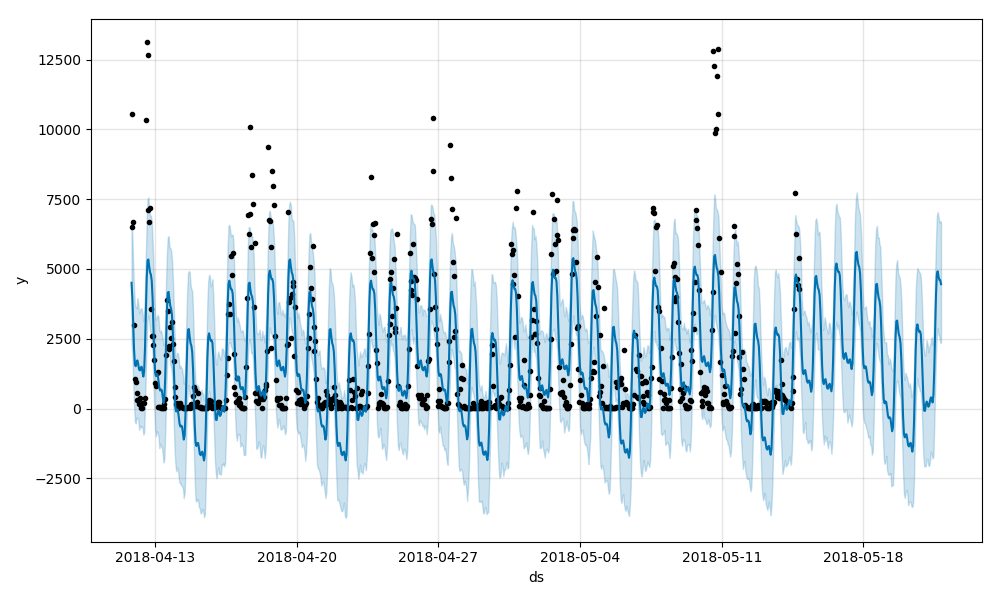
Recently, I ran into this issue, even I fed in a set of positive data, the prediction contains some negative results. The input file is here:
example1.txt
Prediction:
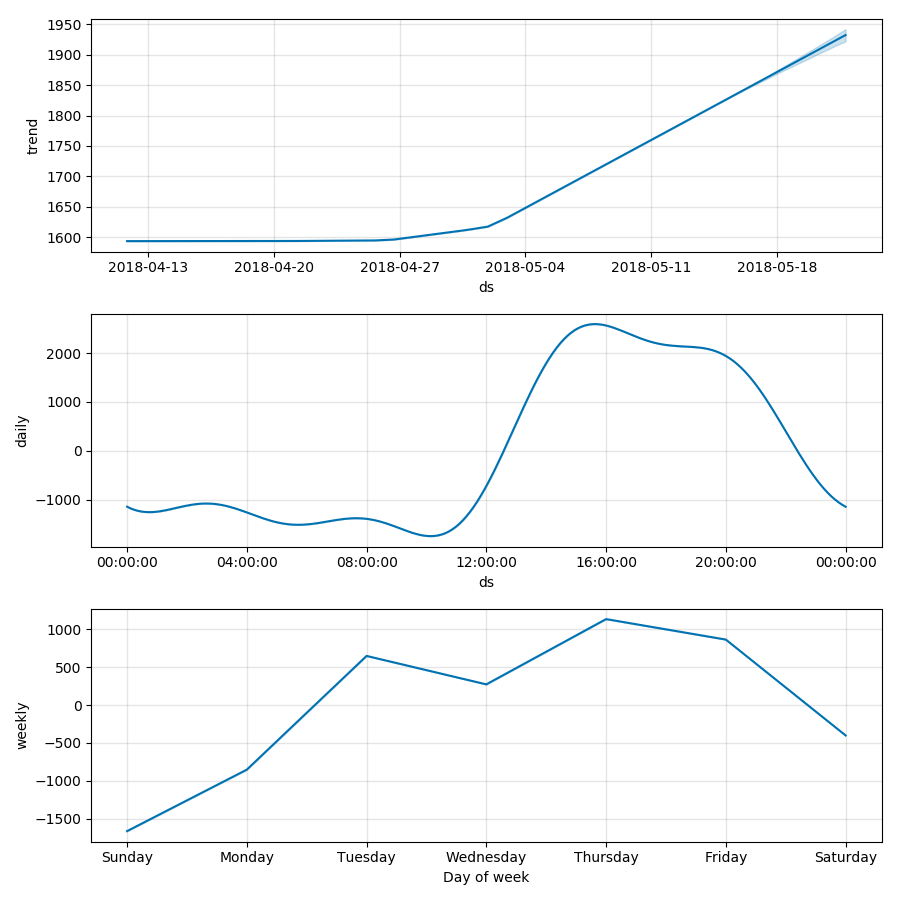
Trend and seasonality:
Cheers,
Stephen
 stephensheng
All 9 comments
Prophet assumes constant daily component for all weekdays. The daily component on your data varies very much between weekdays and weekends. Thats why the fit is poor and you get negative predictions.
 vhpietil
on 17 May 2018
vhpietil
on 17 May 2018
thank you, but how to solve this problem? disable weekly seasonality? or how can I remove the effect of weekends? @vhpietil
stephensheng
on 17 May 2018
See #434 for lenghty discussion about the same problem.
Are you interested in predicting all days? If you are not interesten in weekends for example, you can remove them from the training data and you can forecast weekdays better.
vhpietil
on 17 May 2018
yes, I want to remove weekend,and I try disable weekly seasonality, which improves the prediction to some extend. But is it like prophet can not fit a cure that change rapidly everyday?

like the graph above, cause I don't want to treat that part of data as outliers. and I would like to fit them onto the graph.
thank you for your help
stephensheng
on 17 May 2018
+1 for what @vhpietil says, this is the same issue from #434 and his suggestion to separate out weekends and weekdays is a great option (and did indeed produce a much better forecast).
Here you separated out weekdays to get predictions just for them: let's call that forecast1. You could also then separate out weekends and get predictions just for them, let's call that forecast2. Then, you can combine the two into a single dataframe that pulls weekdays from forecast and weekends from forecast2. The prophet plot would work if given this merged dataframe and would plot the data and forecasts from both models. (You could use the plot method on either model). Component plots would not work.
Alternatively, you can have just one model that makes predictions for all data by creating extra regressors for the weekday daily seasonality. This is a lot more effort, but @vhpietil gives a working example in #434.
The Prophet model treats weekly seasonality and daily seasonality as being entirely separate components, and does not have a concept of daily-seasonality-that-depends-on-day-of-week. This is a recurring issue and so definitely the procedure from #434 needs to be made easier and put in the documentation.
 bletham
on 22 May 2018
bletham
on 22 May 2018
I'm going to go ahead and close this, and consolidate the general issue of having seasonalities that depend on other factors in #538, so follow along there for updates.
bletham
on 7 Jun 2018
A simple trick can be take natural log of the 'y' after incrementing by 1(avoid the situations take the log of zeros and negative values).
import numpy as np
df['y'] = df['y'] + 1
df['y'] = np.log(df['y'])
get forecast
forecaset['yhat'] = np.exp(forecaset['yhat'])-1 #can do same for other columns as well.
 HarilalOP
on 26 Feb 2019
HarilalOP
on 26 Feb 2019
Hi I did your trick of taking the log and getting a forecast but it gives me prediction that is way above my datapoints.
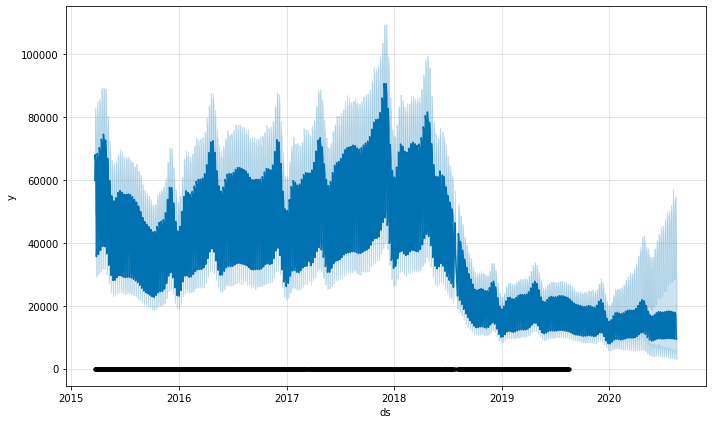
My code looks like this:
p = Prophet(weekly_seasonality=True)
#rename dataframe columns
df = df.rename(columns={df.columns[0]: "ds", df.columns[1]: "y"})
#set dataframe ds to timeseries
df['ds'] = pd.to_datetime(df['ds'], utc=True)
df['ds']= df.ds.dt.date
df.index.freq = 'D'
#adding one and taking a log
df['y'] = df['y'] + 1
df['y'] = np.log(df['y'])
#get forecast
p.fit(df) # df is a pandas.DataFrame with 'y' and 'ds' columns
future = p.make_future_dataframe(periods=365)
time_pred = p.predict(future)
#convert back
time_pred = np.exp(time_pred)-1
time_pred[time_pred.columns[1:]] = np.exp(time_pred[time_pred.columns[1:]])-1
p.plot(time_pred)
 hlreicha
on 11 Nov 2019
hlreicha
on 11 Nov 2019
@HarilalOP that trick works, thank you!
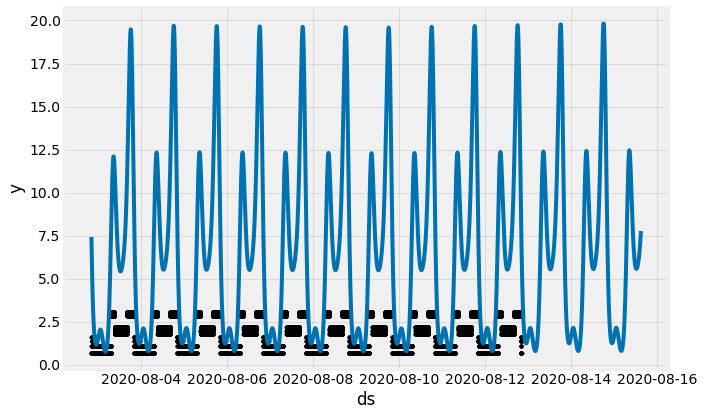
Is there a way to return my values back to the original when using m.plot()? I'm talking about the black dots from the graph, they are keeping the log values when plotting.
 cod-r
on 30 Aug 2020
cod-r
on 30 Aug 2020
Related issues
 pjebs
·
23Comments
pjebs
·
23Comments
 gith77
·
130Comments
gith77
·
130Comments
 MaynulIslam
·
19Comments
MaynulIslam
·
19Comments
 triciascully
·
26Comments
triciascully
·
26Comments
 laurencezabanal
·
18Comments
laurencezabanal
·
18Comments
Most helpful comment
A simple trick can be take natural log of the 'y' after incrementing by 1(avoid the situations take the log of zeros and negative values).
import numpy as np
df['y'] = df['y'] + 1
df['y'] = np.log(df['y'])
get forecast
forecaset['yhat'] = np.exp(forecaset['yhat'])-1 #can do same for other columns as well.