Prophet: Working with Prophet on Spark
Hi,
I ran prophet on timestamp data and felt the results were good according to my intuitions.
I have a big data store of CSV files. Can I run prophet on that data?
How will prophet work as a distributed ml library?
Has anyone tried it before?
Cheers!
 andymancodes
All 14 comments
I for one do not have any experience with Spark, but will leave this open in case others dropping by the issues page do!
 bletham
on 25 May 2018
bletham
on 25 May 2018
Hi @andymancodes ?
Did you solve your question? I am studying the feasibility of using this library via pyspark and would like to know any input you may have.
Or you opted for another option, I would like to know your input too.
Thanks!
 cesar7f
on 22 Aug 2018
cesar7f
on 22 Aug 2018
I have uploaded a repository with example input data for using fbprophet with apache spark and python. In short it is feasible and has remarkable speed up capabilities for running prophet in parallel. The way to get it to work is to convert the data into the generic rdd datastructure instead of spark sql dataframes so you can preserve the prophet model and input pandas dataframe throughout the pipeline.
https://github.com/asidlo/sparkprophet
Let me know if you have any questions or if you find any issues with the code example. Hopefully in the future I will write up a walk-through article for the code for a more detailed explanation.
 asidlo
on 26 Aug 2018
asidlo
on 26 Aug 2018
Hi @asidlo , Im working on a project with spark and prophet. Most of my code is a reproduction of your project (published on the github link). However, Im facing some problems with the parallelization itself.
My code, when running on local machine, is not attaching all cores to the execution. Firstly i thought it was related to some issue in my code, but i implemented your code and just one core was used during the process. Is there any adittional configuration that has to be made to run the code on all cores ?
 vavlopes
on 28 Nov 2018
vavlopes
on 28 Nov 2018
Hi,@asidlo, your link is dead.
 fansy1990
on 12 Mar 2019
fansy1990
on 12 Mar 2019
@fansy1990, sorry the link was down as I had to recreate the repo with an updated dataset and conda requirements in order to get the project to work correctly. I have reposted the repository in the same location so the link should work now.
asidlo
on 17 Mar 2019
That's very kind of you , @asidlo. However, in the code here , I can't see what part is the parallel work . And I thought the model training process will be the parallel part , but in your code it' not. So I wonder where the speed up came from ?
Thanks again.
fansy1990
on 18 Mar 2019
Using the spark and spark sql apis automatically parallelizes the work by distributing it over the collective cores in your spark cluster. In this case it would be the number of cores in your local machine since the code is running in local mode.
The code posted below is where the work is being done on the spark rdd datastructure. Since we are performing mapping operations to this datastructure, spark will automatically parallelize the work. If you want a good visual of this parallel work, use the spark ui which gets starting as a part of the spark submit when running in local mode. It can be found on http://localhost:4040 . Another easy way to see the parallel work is to use htop to see the cpu utilization of each core during the code execution.
    # Group data by app and metric_type to aggregate data for each app-metric combo
    df = df.groupBy('app', 'metric')
    df = df.agg(collect_list(struct('ds', 'y')).alias('data'))

    df = (df.rdd
          .map(lambda r: transform_data(r))
          .map(lambda d: partition_data(d))
          # prophet cant handle data with < 2 training examples
          .filter(lambda d: len(d['train_data']) > 2)
          .map(lambda d: create_model(d))
          .map(lambda d: train_model(d))
          .map(lambda d: test_model(d))
          .map(lambda d: make_forecast(d))
          .map(lambda d: normalize_forecast(d))
          .map(lambda d: normalize_predictions(d))
          .map(lambda d: calc_error(d))
          .map(lambda d: reduce_data_scope(d))
          .flatMap(lambda d: expand_predictions(d)))
Yeah, I know that Spark can parallelize work automatically, but changing the python code to pyspark code doesn't mean that the training process is being parallelized.
In this scenario, the code just train the whole dataset in one executor ,which means if you give 3 executors , but at the same time only one executor runs.
By the way , the transform_data and partition_data function are parallelized . While if you are using Prophet , isn't that parallelizing the training process more meaningful ?
I was thinking a way to parallelize the training process before , so never mind.
(Maybe #603 have given the answer : Prophet is suitable for not particularly large time series).
fansy1990
on 19 Mar 2019
I am unsure of what you mean. All parts of the code are either running in parallel or at the very least, concurrently. Yes, in this case it is training on one executor but that is because in local mode your driver is your executor. I have not tried to run the code on a cluster so you may be correct when you said that the training is only running on a single executor. The speed up in that case is coming from training the partitioned dataset concurrently across the multiple cores in the cpu.
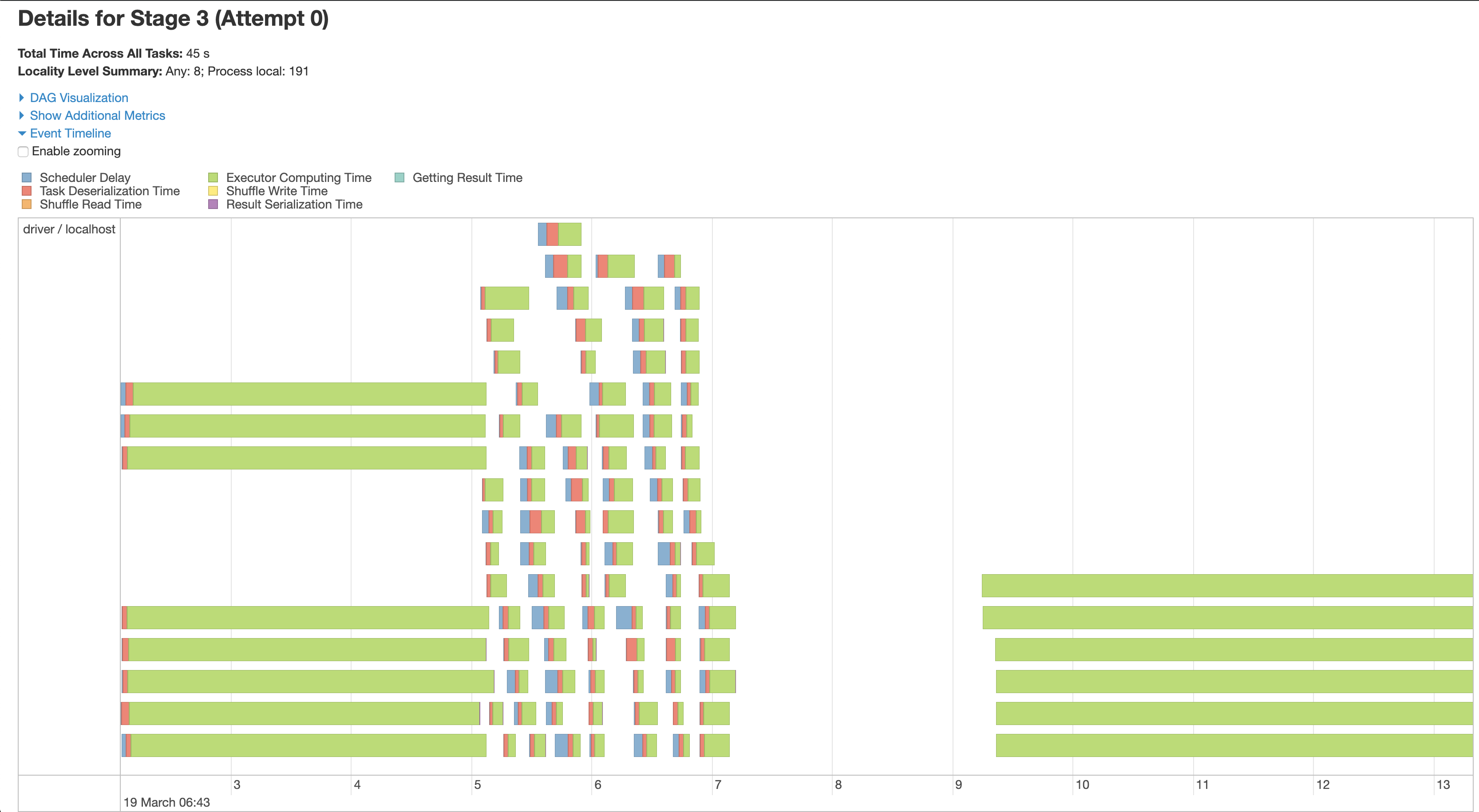
The attached pictures show that in the third stage, which is where the training and writing of the results to csv occurs, all tasks are either being run in parallel or concurrently across my cpu cores. This is evident despite the lack of good labeling to map area of code execution to spark task since it is during stage 3 where pystan is printing the training statistics to stdout: (Note, I may be incorrect about attributing this stdout to pystan, so correct me if I am wrong)
Optimization terminated normally:
  Convergence detected: relative gradient magnitude is below tolerance
     119       29387.1   0.000184452       880.577   2.137e-07       0.001      211  LS failed, Hessian reset
     151       29526.8    0.00278899       1014.96    2.92e-06       0.001      225  LS failed, Hessian reset
     199       29546.1   2.41382e-06       550.177      0.4754      0.1159      254
    Iter      log prob        ||dx||      ||grad||       alpha      alpha0  # evals  Notes
     199       29529.3   0.000287381       1009.44           1           1      278
    Iter      log prob        ||dx||      ||grad||       alpha      alpha0  # evals  Notes
     184       29574.1    0.00011062       963.474    1.05e-07       0.001      306  LS failed, Hessian reset
     199       29574.2   9.96105e-06       1003.11      0.7024      0.7024      323
    Iter      log prob        ||dx||      ||grad||       alpha      alpha0  # evals  Notes
     227       29546.1   4.09198e-05       905.314   4.092e-08       0.001      325  LS failed, Hessian reset
     239       29529.4   7.95205e-08       962.237      0.2314           1      327
These are also not being printed in sequentially as different executions of the training are being printed at the same time, indicating that they are being run concurrently.

asidlo
on 19 Mar 2019
I test the code by just using one app and three metrics in my small cluster (one master node and two slave nodes) , what I got is as blow:
- Executor0 got two jobs (which contains model train ,predict , etc.)


- Executor1 got only one job (which contains model train, predict ,etc.)

From the above information , I can draw the conclusion:
- The test use one app and three metrics ,which means there is three fit job . Therefore , I have two executors ,and one executor got two jobs , another executor got one job.
- The train (fit process), forecast process can not be parallelized , consider this situation : I got a data with only one app and only one metric , but the app data is big. Can I use spark to distribute the fit process ? (I think it can't)
So actually , if you have 3 nodes , you can just copy the data three times to each node , and then train and forecast each data in each node . There is no need using Spark in this case.
fansy1990
on 20 Mar 2019
Thanks for testing out the code on a cluster and sharing the results. Now I see what you mean. Yes, you are correct, you cannot train the prophet model over data partitioned across the cluster in a distributed manner since the model expects all of the data to be localized during the training process. So in the case where you would only have a single fit, there is no need to use spark.
However, spark does parallelize the job when running multiple fits as it will run 1 fit per core. Notice that in your cluster each node has a single core, which is why it runs the jobs sequentially. Spark does distribute the work evenly, as you pointed out in your previous post, but it cannot process them in parallel since it is bottlenecked by the prophet algorithm to run the training, fitting, and forecasting on a single core, and there is only one core on each machine. Also notice how much longer it took to run the same code on my 4 core executor machine vs your 2 core cluster of executors, 30 sec vs 3 min respectively. So even though I am not running it on a cluster, the work is running in parallel across the vcpus. If it were not, then it should theoretically take longer to run on my machine than on your cluster, as it would be processing each fit sequentially.
In response to your last comment, you could just copy the data three times, once to each node and run each python process separately, or you could just have a single copy of the data on a single quadcore laptop and run it once with spark. Both will run in concurrently and should have similar execution times.
As an aside, it would be interesting to do the same experiment with a cluster of multicore servers. Also, it would be a fun project to figure out if it is possible to distribute the training process across the cluster. This would be the only viable means of execution if, like you mention, your dataset is so large that you cannot load it all into a single server's memory. That, or try and figure out a way to break down your problem into smaller training sets.
asidlo
on 21 Mar 2019
@asidlo
As I know, pyspark can only save model in ml lib.
How do I save the prophet model file and reuse it ?
 eromoe
on 21 Nov 2019
eromoe
on 21 Nov 2019
@asidlo @fansy1990
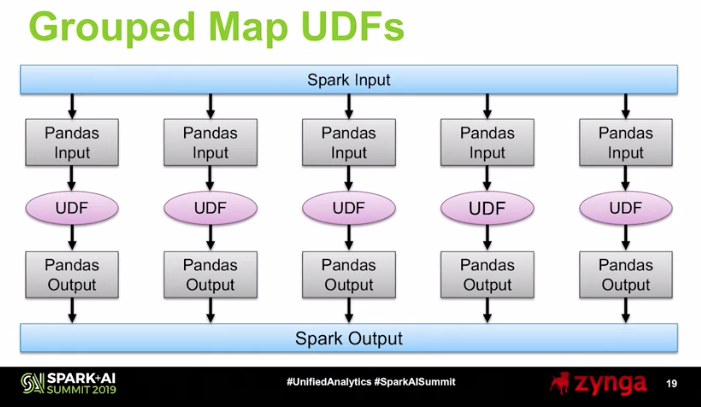
I have the pre-built jupyter/pyspark-notebook running to use Spark locally through docker. I know that this will only simulate a driver node for Spark, but by utilizing the @pandas_udf decoration on a function that forecasts with Prophet, you can apply Prophet across grouped chunks of the dataframe.
https://databricks.com/blog/2017/10/30/introducing-vectorized-udfs-for-pyspark.html
https://www.youtube.com/watch?time_continue=1203&v=StNRA02Ny7Y
Generated sales for a few items
df = spark.read.csv('Sales.csv', schema=csv_schema, header=True)
df.show(5)
|ItemNid|                 ds|                 y|
+-------+-------------------+------------------+
|      0|2015-01-01 00:00:00|1.4151048501674992|
|      0|2015-01-02 00:00:00|1.8946090586572781|
|      0|2015-01-03 00:00:00|1.7847525964103703|
|      0|2015-01-04 00:00:00|1.6618782790866438|
|      0|2015-01-05 00:00:00| 2.069238355501011|
+-------+-------------------+------------------+
only showing top 5 rows


md5-2cf4674d28e219af187c74864ba02d0f
+-------+-------------------+--------------------+--------------------+--------------------+
|ItemNid| ForecastStartDate| Forecast| ForecastLower| ForecastUpper|
+-------+-------------------+--------------------+--------------------+--------------------+
| 1|2015-12-14 00:00:00|[3.38447388322194...|[2.15973543002551...|[4.4100073338554,...|
| 3|2015-09-09 00:00:00|[4.49483496998334...|[3.09863488479897...|[6.00380888966414...|
| 4|2015-10-06 00:00:00|[6.91679745964952...|[5.21654539625956...|[8.62244514311136...|
| 2|2015-11-18 00:00:00|[4.37661440984964...|[2.08373582478691...|[6.45154839140760...|
| 0|2015-12-23 00:00:00|[2.55484169154926...|[1.38406242458898...|[3.74412128160385...|
+-------+-------------------+--------------------+--------------------+--------------------+
```
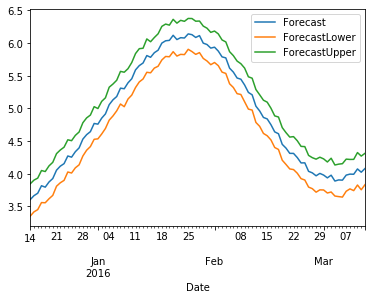
Forecast for Item 1
Based on what I have read, it seems that @pandas_udf should allow you to use any Python you want to work with pandas dataframes. This approach only works when you have data that can be split up logically into groups that can be processed separately. So, if you have time series data for 10,000 items and you want to forecast with Prophet for each one, you would group the time series on the item's id and then create a pandas UDF to process them. Then, Spark takes care of the rest (scheduling, load balancing, split-apply-combine, etc).
I am still new to this, but I think this could work. I look forward to discussing this.
Sample Notebook run through Databricks Community Edition: SampleNotebook.zip
 mattc-eostar
on 14 Jan 2020
mattc-eostar
on 14 Jan 2020
Related issues
 triciascully
·
26Comments
triciascully
·
26Comments
 CamDavidsonPilon
·
28Comments
CamDavidsonPilon
·
28Comments
 vaibhavkaushal
·
20Comments
vaibhavkaushal
·
20Comments
 gkourogiorgas
·
32Comments
gkourogiorgas
·
32Comments
 LakshmikanthanSrikanthan
·
28Comments
LakshmikanthanSrikanthan
·
28Comments
Most helpful comment
I have uploaded a repository with example input data for using fbprophet with apache spark and python. In short it is feasible and has remarkable speed up capabilities for running prophet in parallel. The way to get it to work is to convert the data into the generic rdd datastructure instead of spark sql dataframes so you can preserve the prophet model and input pandas dataframe throughout the pipeline.
https://github.com/asidlo/sparkprophet
Let me know if you have any questions or if you find any issues with the code example. Hopefully in the future I will write up a walk-through article for the code for a more detailed explanation.