Prophet: Using continuous external regressors
I am struggling implementing continuous external regressors. According to the documentation this should be possible, however the documentation is currently lacking an example.
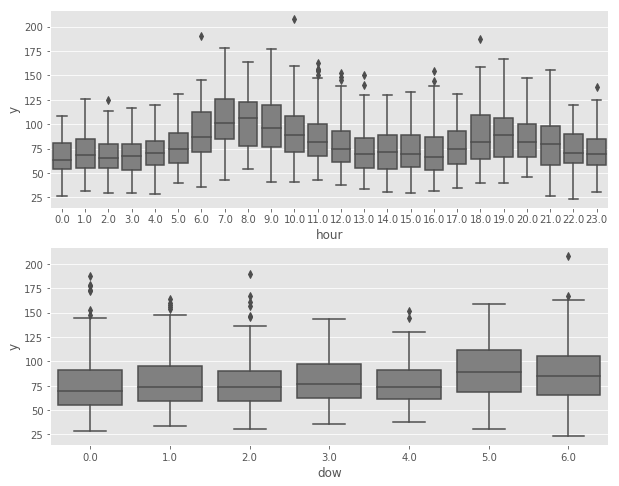
I am looking at a timeseries (thermal demand for a building = y), which shows a clear diurnal cycle (upper part of graph). In addition, there is also a weak weekly cycle (lower part of graph):
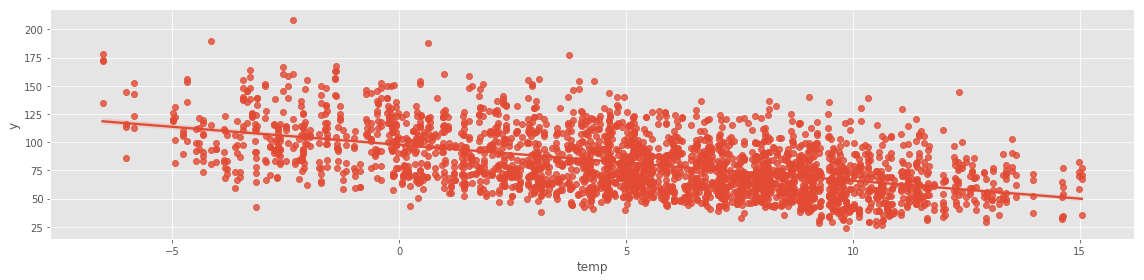
Furthermore, there is a clear dependency on the outside temperature:
First, I am creating a model adding the external regressor (= outside temperature) using add_regressor.
df['y'] = np.log(df['y'])           # thermal demand which I am trying to forecast
df['temp'] = df['temp']             # outside temperature which is the external regressor
model1 = Prophet()
model1.add_regressor('temp')
model1.fit(df);
My understanding is, that internally the regressor is being normalized if called without an additional parameter (standardize=False).
Next, I am creating the forecast dataframe for the next 48hours, copy the historical temperature values as well as copy the temperature forecast:
forecast = model1.make_future_dataframe(periods=48, freq='H')
forecast["temp"] = df.temp
forecast["temp"].iloc[-48:] = temp_forecast
--> do I need to copy the normalized (forecast) temperature values or the regular values?
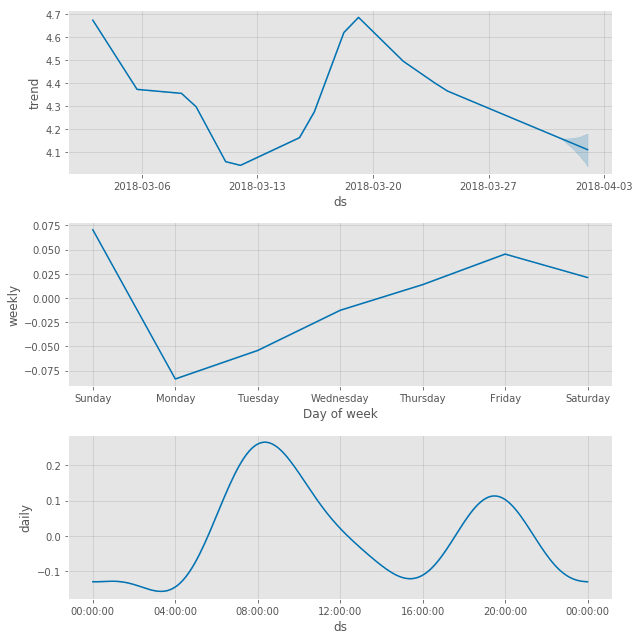
Fitting the model without the additional regressor, I obtain a mean squared error of 0.0572
Including the additional regressor, the mean squared error is reduced, however only slightly: 0.056
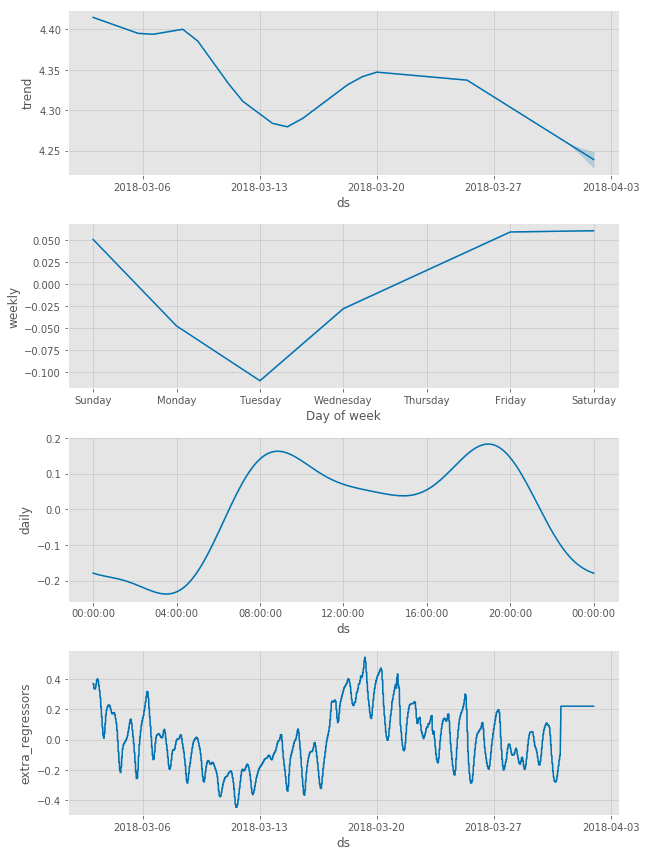
I am surprised that the outside temperature feature has such a low importance despite its clear causality and relation as shown above.
Am I doing something wrong using the external regressor feature?
Furthermore, is it possible to enforce the trend component = 0?
 demetz
All 14 comments
For standardization: The future dataframe should have original, not-standardized values, and the forecasted values should also not be standardized. For predictions, Prophet will apply the same standardization offset and scale used in fitting.
I have a few comments about the extra regressor fit.
- Comparing the two sets of plots, it looks like the model is able to use temperature to explain quite a bit of the variance in the trend. This looks quite nice to me, and it actually looks like temperature is a rather important feature in the model. Daily seasonality has a range of +/- 0.2, while the effect of temperature is +/- 0.4 (which is also more than the total change in trend, so temperature is the dominant factor in the model).
- There is one thing though that might be the source of the underwhelming difference in MSE. You can see from the 2nd figure that the temperature data used in fitting had pretty fine detail (hourly or so). Because of this, the model is using temperature to explain some of the daily fluctuation. For the predictions, however, you can see in the figure that the given temperature is constant. The model then is not correctly predicting daily fluctuation and so the MSE will be higher than if it were given a forecast with daily fluctuation.
We should add an example with a continuous regressor. The biggest challenge with a continuous regressor is exactly this second point: You need a good forecast of the regressor in order for it to be useful, which I think limits the applicability of continuous extra regressors.
As for forcing trend = 0: That's an interesting question. You can set the number of changepoints to be 0, but will still then have a linear trend. There isn't a way right now to force no trend.
 bletham
on 11 Apr 2018
bletham
on 11 Apr 2018
@bletham
Hi Ben,
I am using continous external regressors as well, but I have an issue with seasonality being mistaken for impact of these regressors.
Due to this I am receiving negative forecast. Is there a way to avoid this?
Thanks,
Deniz.
 denizn
on 21 May 2018
denizn
on 21 May 2018
(The negative forecast is only ONE data point out of 52) Every mid-July now goes negative due to external regressor.
denizn
on 21 May 2018
@deniznoah can you post a plot of the forecast and of the forecast components so I can see what is going on?
bletham
on 22 May 2018
@bletham I have noticed it has something to do with the amount of data loaded in the external regressors. When I uploaded more promotions is corrected itself.
I have one part I did not understand though. That is: I load my future external regressors in "future", and fit my model. After that when I check my "forecast" figure it appears to have different figures for external regressors. Is it forecasting my external regressors as well? I do not want the model to change the external regressors I put in. I hope this is not the case.
Can you please help clarify?

denizn
on 23 May 2018
forecast['promo_impact'] will be the forecasted _effect_ of that extra regressor, not the value. So the -211 here means that y is 211 lower due to the value of the extra regressor than it would be with the "baseline" value of the regressor (which would be the mean if it was standardized as by default). Does that make sense? If you do m.plot_components(forecast) then it will show you the effect of the extra_regressors component, and that is what these numbers are.
bletham
on 24 May 2018
Makes a lot of sense now. So i don't have to worry about it being different than the future value. Thanks for the great explanation!
Another issue that I am facing is I would like to stop my forecasts from going "negative". Is there a way to automate linear vs. logistic growth?
Also how would I determine a "cap" for logistic growth? All I care about is that my forecast does not go negative...
denizn
on 24 May 2018
If you set the growth to logistic then it will saturate at 0. You do then have to specify a cap - it could just be a really big value that you're sure your forecast should always be less than.
There isn't yet a way to get the floor on the bottom (0) without having to specify a cap on top. This is on the todo list in #307, but I think we'll wait until #501 is done before doing that.
One thing to note is that using logistic growth will force the trend to be positive, but the seasonality is added to that, and could still dip below 0. You'd have to just clip the forecasts at 0. Multiplicative seasonality would keep it positive, that will be out in the next version very soon. (You can test multiplicative seasonality in the v0.3 branch now if you'd like, see #254).
bletham
on 25 May 2018
I think this issue has been resolved but feel free to reopen if there are more questions. I'll add an example of a continuous extra regressor in the future.
bletham
on 7 Jun 2018
Using external regressors, in order to create a what if scenario, I may use the forecasted effect of every extra regressor?
 dajerman
on 30 Nov 2018
dajerman
on 30 Nov 2018
@dajerman yes, with the caveat that your forecast can only then be as good as the forecast for your extra regressor. For a "what-if" counterfactual evaluation, that seems quite reasonable. In general, if you are using a forecast in an extra regressor, the uncertainty in the extra regressor forecast will not be incorporated into the uncertainty estimates given by Prophet, which means that the Prophet uncertainty estimates will underestimate the true uncertainty.
bletham
on 30 Nov 2018
@bletham First of all, many thanks for this great package!
I have a question regarding the uncertainty in the extra regressor forecast.
I was thinking about a way to incorporate the uncertainty in the following way:
- Forecast the external regressor with prophet.
Draw samples from the resulting posterior predictive distribution.
For the "main model" predict y for each of those samples.
- Take the mean of all these predictions as yhat (for each future date) and the specific empirical quantiles as uncertainty interval boarders.
So basically 2 and 3 as pseudo code:
```r
Draw 1000 samples from posterior predictive distribution of the regressor
pred_samp_regressor <- prophet::predictive_samples(m1, future1)
For each of the 1000 samples predict y for the main model
forecast_samples <- list()
for (i in 1:1000) {
future2$extra_regressor_col <- pred_samp_regressor$yhat[,i]
forecast <- prophet::predict(m2, future2)
forecast_samples[[i]] <- forecast$yhat
}
````
Would this make sense from your perspective?
Thanks a lot!
Andy
 andreash0
on 9 Apr 2020
andreash0
on 9 Apr 2020
I think that's really close to what you'd want to do. This actually just came up in #1392 a few weeks ago, and this is the procedure I proposed there: https://github.com/facebook/prophet/issues/1392#issuecomment-602892389
Where the sample_regressors() would here be taken from pred_samp_regressor exactly as you are doing.
The difference between what I proposed there and your procedure is whether we get yhat from calling predict conditioned on the regressor sample, or by calling predictive_samples conditioned on the regressor sample.
If you use predictive_samples, then each forecast in the end result (forecast_samples) will be a draw from the joint distribution p(y_hat, regressor). So then if you take a mean and quantiles over that distribution, you are taking an expectation over the full joint and accounting for the uncertainty in both regressor and in y_hat | regressor.
If you use predict, then what that is giving is basicallyE[y_hat | regressor]. So if you take the mean over the samples of that, you are computing E_{regressor}[E[y_hat | regressor]] which by the law of total expectation is the same thing as taking the expectation over the full joint, and so is the same as if we had used predictive_samples. But the difference will be in the quantiles - these are now quantiles of the distribution p(E[y_hat | regressor]) rather than p(y_hat, regressor). So they account only for the uncertainty that is coming from the distribution of regressors, and will not account for the uncertainty in y_hat | regressor. This will make them too narrow. So for uncertainty estimation you'll want to use predictive_samples as I had in my pseudocode in the above comment.
Does that make sense?
bletham
on 14 Apr 2020
Makes perfect sense! Thanks a lot for the quick reply!
andreash0
on 14 Apr 2020
Related issues
 TheLeanAcademic
·
18Comments
TheLeanAcademic
·
18Comments
 LakshmikanthanSrikanthan
·
28Comments
LakshmikanthanSrikanthan
·
28Comments
 pjebs
·
23Comments
pjebs
·
23Comments
 sarikayamerts
·
23Comments
sarikayamerts
·
23Comments
 jaredlander
·
26Comments
jaredlander
·
26Comments
Most helpful comment
@dajerman yes, with the caveat that your forecast can only then be as good as the forecast for your extra regressor. For a "what-if" counterfactual evaluation, that seems quite reasonable. In general, if you are using a forecast in an extra regressor, the uncertainty in the extra regressor forecast will not be incorporated into the uncertainty estimates given by Prophet, which means that the Prophet uncertainty estimates will underestimate the true uncertainty.