Projectreunion: Preview 4 - FolderPicker and FilePicker not working / App crashes
Simple to reproduce:
I have downloaded VisualStudio 2019 Preview Version 16.9 and installed with WinUI 3 preview 4.
I have created a new WinUI Desktop App with .Net 5.
In the method myButton_Click i have this code:
string Filename = "";
var picker = new Windows.Storage.Pickers.FileOpenPicker();
((IInitializeWithWindow)(object)picker).Initialize(System.Diagnostics.Process.GetCurrentProcess().MainWindowHandle);
Windows.Storage.StorageFile file = await picker.PickSingleFileAsync();

and the interface in the same namespace:

[ComImport]
        [Guid("3E68D4BD-7135-4D10-8018-9FB6D9F33FA1")]
        [InterfaceType(ComInterfaceType.InterfaceIsIUnknown)]
        public interface IInitializeWithWindow
        {
            void Initialize(IntPtr hwnd);
        }
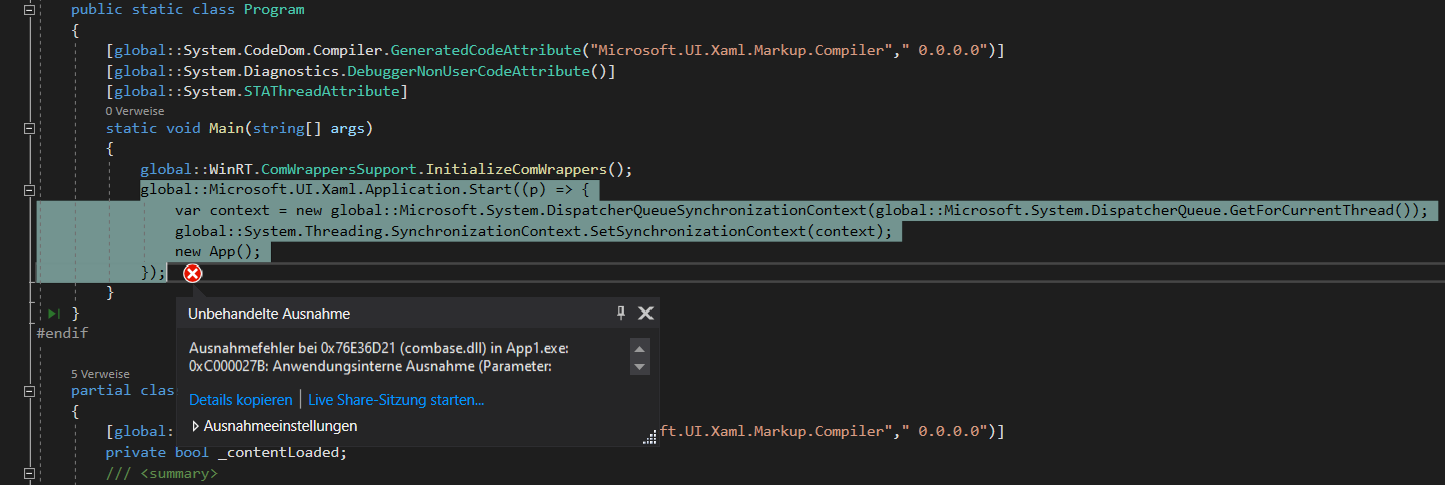
I build my app, the app starts without errors. After i click on the button, the app crashs with this message:
Ausnahmefehler bei 0x76E36D21 (combase.dll) in App1.exe: 0xC000027B: Anwendungsinterne Ausnahme (Parameter: 0x1BD90608, 0x00000001)
Without the interface i receive the message "Invalid Window handle".
The same behavior is with the FolderPicker.
Windows app type:
| UWP | Win32 |
| :--------------- | :--------------- |
| No | Yes |
| Windows 10 version | Saw the problem? |
| :--------------------------------- | :-------------------- |
| Insider Build (xxxxx) | |
| October 2020 Update (19042) | Yes |
| May 2020 Update (19041) | |
| November 2019 Update (18363) | |
| May 2019 Update (18362) | |
| October 2018 Update (17763) | |
| April 2018 Update (17134) | |
| Fall Creators Update (16299) | |
| Creators Update (15063) | |
| Device form factor | Saw the problem? |
| :----------------- | :--------------- |
| Desktop | Yes |
| Xbox | |
| Surface Hub | |
| IoT | |
This is my first bug report an i hope this is correct.
Best regards
Andy
 AndyMahub
All 8 comments
When I needed to use any kind of Picker I tried to use the generated Win32 API through PInvoke.GetActiveWindow method. It returns an IntPtr so I can use with IInitializeWithWindow.Initialize but you need to know, if you try to use these generated methods in a project with XAML files it won't work (for now, they are some problems with the Rosilyn compiler with WinUI that are actually fixed, but not shipped until the next revision version of .NET 5), so instead I highly recommend you to create a Class Library and exposed their result in a public way (the generated are only available inside the assembly so yes, they are internal). I made a more convenient way creating an extension method, you can look here on how I expose the result of the generated API and here how I created an extension method for it.
 marck7jr
on 15 Feb 2021
marck7jr
on 15 Feb 2021
Thanks for you help!! But in my case, you solution crashes too. I have no chance to give the user a chance for loading file or selecting folder in WinUI 3 preview4.
AndyMahub
on 16 Feb 2021
@AndyMahub,
I have just tested the code below with Preview 4 bits, and it works for me.
 public sealed partial class MainWindow : Window
 {
      ...

        private async void myButton_Click(object sender, RoutedEventArgs e)
        {
            var filePicker = new FileOpenPicker();

            //Get the Window's HWND
            var hwnd = this.As<IWindowNative>().WindowHandle;

            //Make folder Picker work in Win32

            var initializeWithWindow = filePicker.As<IInitializeWithWindow>();
            initializeWithWindow.Initialize(hwnd);
            filePicker.FileTypeFilter.Add("*");

            var folder = await filePicker.PickSingleFileAsync();
            myText.Text = folder != null ? folder.Path : string.Empty;
        }

        [ComImport]
        [Guid("3E68D4BD-7135-4D10-8018-9FB6D9F33FA1")]
        [InterfaceType(ComInterfaceType.InterfaceIsIUnknown)]
        public interface IInitializeWithWindow
        {
            void Initialize(IntPtr hwnd);
        }
        [ComImport]
        [InterfaceType(ComInterfaceType.InterfaceIsIUnknown)]
        [Guid("EECDBF0E-BAE9-4CB6-A68E-9598E1CB57BB")]
        internal interface IWindowNative
        {
            IntPtr WindowHandle { get; }
        }
...
}
 marb2000
on 16 Feb 2021
marb2000
on 16 Feb 2021
@AndyMahub,
I have just tested the code below with Preview 4 bits, and it works for me.
 public sealed partial class MainWindow : Window
 {
      ...

        private async void myButton_Click(object sender, RoutedEventArgs e)
        {
            var filePicker = new FileOpenPicker();

            //Get the Window's HWND
            var hwnd = this.As<IWindowNative>().WindowHandle;

            //Make folder Picker work in Win32

            var initializeWithWindow = filePicker.As<IInitializeWithWindow>();
            initializeWithWindow.Initialize(hwnd);
            filePicker.FileTypeFilter.Add("*");

            var folder = await filePicker.PickSingleFileAsync();
            myText.Text = folder != null ? folder.Path : string.Empty;
        }

        [ComImport]
        [Guid("3E68D4BD-7135-4D10-8018-9FB6D9F33FA1")]
        [InterfaceType(ComInterfaceType.InterfaceIsIUnknown)]
        public interface IInitializeWithWindow
        {
            void Initialize(IntPtr hwnd);
        }
        [ComImport]
        [InterfaceType(ComInterfaceType.InterfaceIsIUnknown)]
        [Guid("EECDBF0E-BAE9-4CB6-A68E-9598E1CB57BB")]
        internal interface IWindowNative
        {
            IntPtr WindowHandle { get; }
        }
...
}
YES! This works for me! :-) Thank you!
But, is this a temporarily solution? Or comes a fix for this issue?
AndyMahub
on 16 Feb 2021
Linking my related issue here as well - microsoft/microsoft-ui-xaml#4198
While this workaround does work for the single file picker, it does not seem to work for the multiple file picker.
As soon as I changed it to this
        //var folder = await filePicker.PickSingleFileAsync();
        //myText.Text = folder != null ? folder.Path : string.Empty;

        var files = await filePicker.PickMultipleFilesAsync();
        foreach (StorageFile file in files)
        {
            myText.Text += file.Path;
        }
It crashes, just like my example solution that we provided as a Preview3 solution, and now as a Preview4 solution.
 eleanorleffler
on 17 Feb 2021
eleanorleffler
on 17 Feb 2021
Thanks for linking this issue @eleanorleffler. It seems that PickMultipleFilesAsync fails for other reasons. Let's take care of this in the microsoft/microsoft-ui-xaml#4198 issue. Is that ok with you?
@AndyMahub The need of initializeWithWindow is a common pattern in WinRT APIs that require to specify a window that hosts the UI. It was designed in this way. The Project Reunion team is working on improving the Pickers story, but I don't know yet whether they will simplify this. Meanwhile, we will need to live with it. Adding @ptorr-msft and for awareness,
marb2000
on 18 Feb 2021
I'm transferring this issue to the project reunion. The issue is not on the WinUI APIs.
marb2000
on 20 Feb 2021
@rkarman this is good feedback to consider for the future with AppWindow (maybe we can make the need for initializeWithWindow go away?). Anyways, closing this issue as this is by-design and expected that you must call initializeWithWindow today.
 andrewleader
on 25 Feb 2021
andrewleader
on 25 Feb 2021
Related issues
 jonwis
·
5Comments
jonwis
·
5Comments
 Aster-the-Med-Stu
·
5Comments
jonwis
·
4Comments
Aster-the-Med-Stu
·
5Comments
jonwis
·
4Comments
 Felix-Dev
·
6Comments
Felix-Dev
·
6Comments
 mrlacey
·
3Comments
mrlacey
·
3Comments
Most helpful comment
Thanks for linking this issue @eleanorleffler. It seems that PickMultipleFilesAsync fails for other reasons. Let's take care of this in the microsoft/microsoft-ui-xaml#4198 issue. Is that ok with you?
@AndyMahub The need of initializeWithWindow is a common pattern in WinRT APIs that require to specify a window that hosts the UI. It was designed in this way. The Project Reunion team is working on improving the Pickers story, but I don't know yet whether they will simplify this. Meanwhile, we will need to live with it. Adding @ptorr-msft and for awareness,