Projectreunion: UWP localhost access
Proposal: UWP localhost access
Summary
Currently, UWP apps running on desktop cannot access localhost. This makes it near impossible to build any type of app that lets the customer interact with localhost, such as HTTP clients. There is a workaround to allow UWP apps localhost access using checknetisolation, so it is technically possible, but it's just not supported out of the box for UWP apps. My proposal is to make localhost access possible for UWP apps without the workaround, perhaps via a capability that can be declared by the app.
Rationale
- This will unblock numerous scenarios for apps that require localhost access, such as Nightingale
Scope
| Capability | Priority |
| :---------- | :------- |
| UWP access localhost without workarounds | Must |
| UWP apps can request this ability by declaring a capability | Could |
Open Questions
Is there a security concern with allowing UWP apps targeting desktops to access localhost?
 dpaulino
All 26 comments
Should the capability be restricted?
 sylveon
on 16 Jul 2020
sylveon
on 16 Jul 2020
@sylveon Personally I'm okay with it being restricted, as long as it's not enterprise restricted like some capabilities.
dpaulino
on 16 Jul 2020
There's other use-cases too where the app interacts with other Win32 components as part of some broader ecosystem or tools for developers.
Definitely see a capability to enable this being a useful benefit for app developers.
 michael-hawker
on 16 Jul 2020
michael-hawker
on 16 Jul 2020
@mikebattista can you chime in with the IPC investigations you're working on?
I'm generally supportive of letting an app talk to a local socket. We'd probably want some kind of capability control - like the internet client capability - so users can prevent it.
Ideally we'd require the socket server to declare that it's OK to allow connections from UWPs to let the server provide access-control against low-IL processes. A naive read of WSAImpersonateSocketPeer suggests that a server could determine the caller via impersonation, but an app would have to do that.
 jonwis
on 16 Jul 2020
jonwis
on 16 Jul 2020
Other usecases:
- Plex app (media player) connecting to Plex server running on same device
- Client apps connecting to mqtt server running on same device --> for Windows IoT (Core) use cases
 hansmbakker
on 16 Jul 2020
hansmbakker
on 16 Jul 2020
What's supported today is documented at https://docs.microsoft.com/en-us/windows/uwp/communication/interprocess-communication#loopback.
For packaged -> packaged scenarios, you can declaratively connect via loopback with capabilities and manifest declarations (without needing CheckNetIsolation).
Presumably enabling this for packaged -> unpackaged scenarios is what you're requesting here? Or is even the existing packaged -> packaged support not sufficient?
 mikebattista
on 16 Jul 2020
mikebattista
on 16 Jul 2020
For Nightingale the idea is packaged -> unpackaged, because the user will want to emit REST calls to a locally hosted API for testing.
sylveon
on 16 Jul 2020
Adding @bcaton who owns loopback.
mikebattista
on 16 Jul 2020
I've been trying to get a UWP app running an HttpListener working when sent a POST HttpRequest from the same PC (targeting localhost or 127.0.0.1 port 4444) and haven't had much luck. My UWP "server" app works fine when receiving POST requests from other devices on my LAN, just not from the same PC that the UWP server app is running on.
I can take the exact same code from my UWP server app and put it into a console app and it receives POST requests from the same PC just fine (using the same curl command from a PowerShell terminal).
I tested a theory today that if both the client and server apps were UWP apps, both with in and out uap4 loopbackaccess rules added to their package manifests:
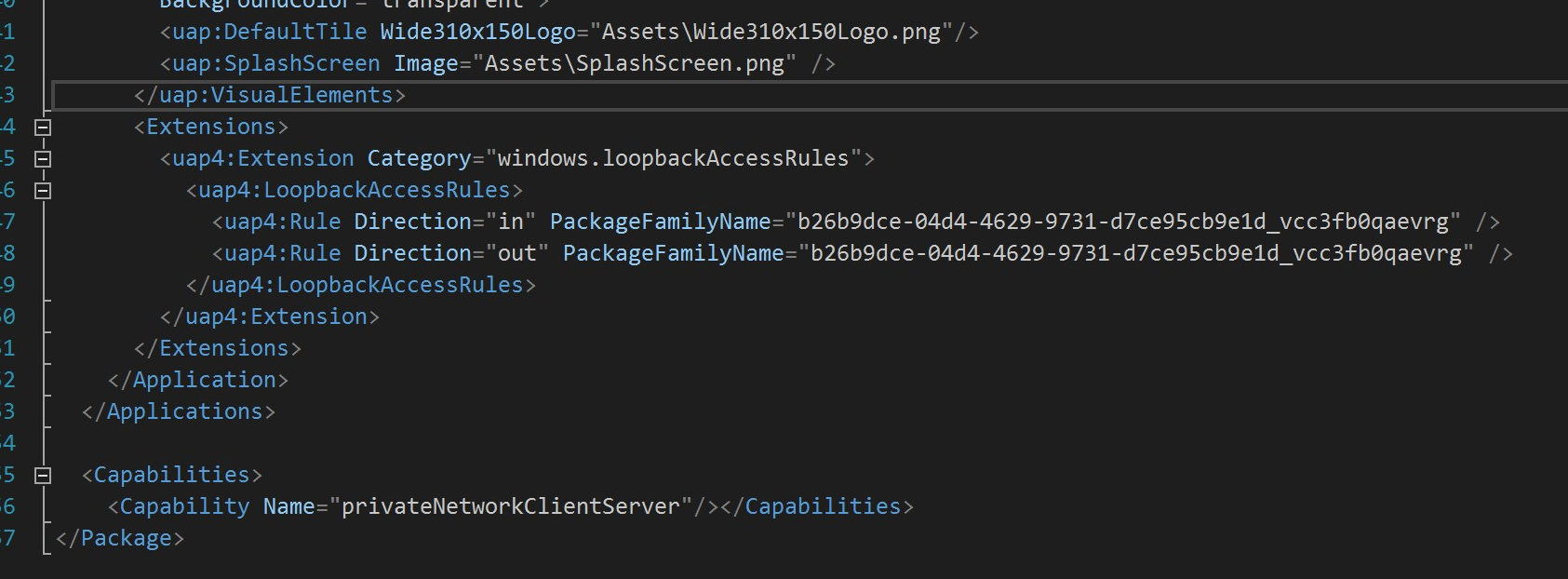
...both with the _privateNetworkClientServer_ capability checked / added in the package manifest.
And with loopback exemptions added for both client and server apps using CheckNetIsolation.exe

...that then, perhaps, the client app could communicate with the server app. Unfortunately it didn't work. The client app eventually times out and throws a vague exception _"One or more errors occurred. (An error occurred while sending the request.)"_
In addition to everything described above, during this test both the client and server apps were running in debug mode via Visual Studio 2019. In the _Debug_ section of the project properties for both apps, the _Allow local network loopback_ option is checked.
 torynfarr
on 29 Jul 2020
torynfarr
on 29 Jul 2020
@mikebattista You mentioned before that packaged app -> packaged app should work, but it seems @torynfarr is trying that, and it doesn't seem to be working 🤔
dpaulino
on 29 Jul 2020
@BCaton owns loopback and should be able to help you troubleshoot.
The first thing that jumps out at me is the in and out rules you shared list the same package family name. The client needs to list the server as an out rule and the server needs to list the client as an in rule.
mikebattista
on 29 Jul 2020
@BCaton owns loopback and should be able to help you troubleshoot.
The first thing that jumps out at me is the in and out rules you shared list the same package family name. The client needs to list the server as an out rule and the server needs to list the client as an in rule.
Ooh I didn't realize that. I thought it wanted the package name of the app the manifest belonged to. I'll make that change in the two UWP apps and test again.
torynfarr
on 29 Jul 2020
@BCaton owns loopback and should be able to help you troubleshoot.
The first thing that jumps out at me is the in and out rules you shared list the same package family name. The client needs to list the server as an out rule and the server needs to list the client as an in rule.
Okay, I have the server setup with an in rule which references the client's package family name. The client has an out rule with the server's package family name.
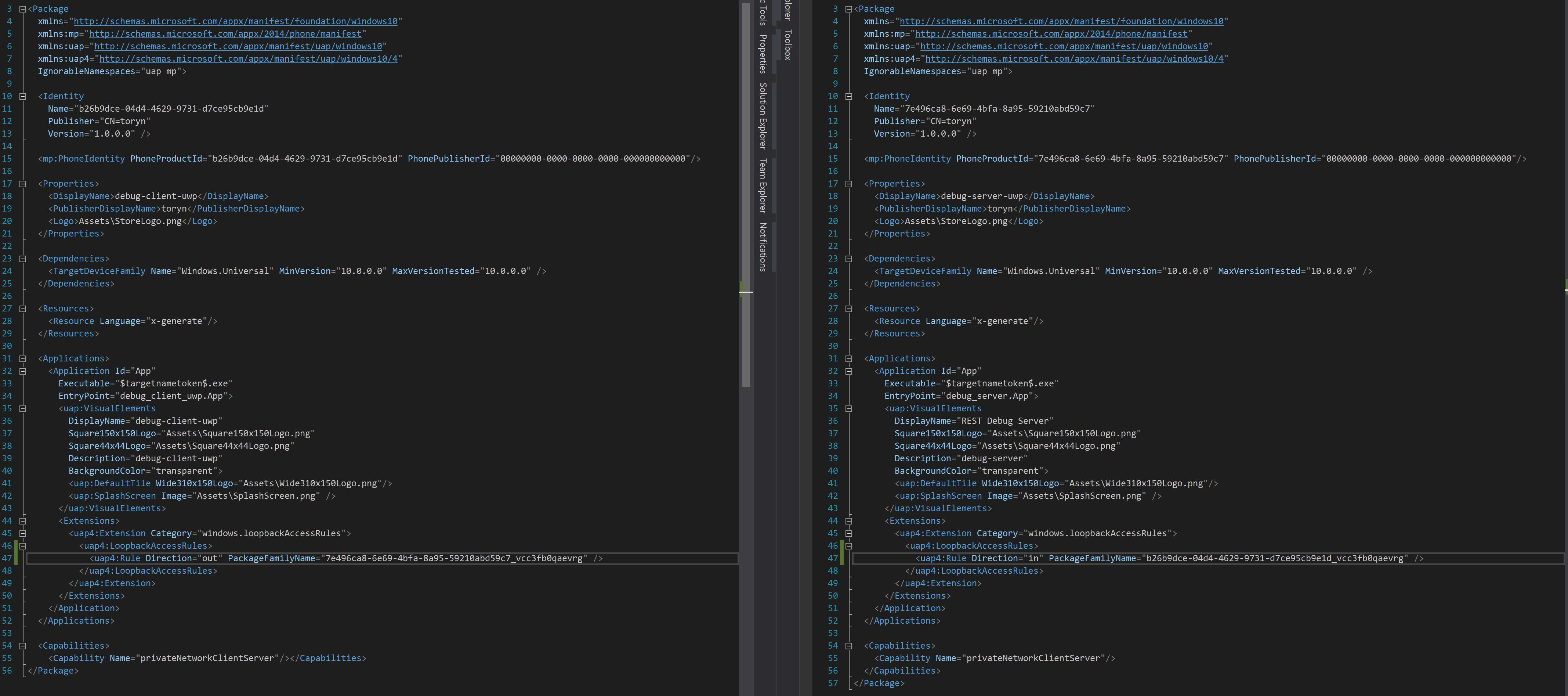
(client on the left, server on the right).
Same issue still occurs.
torynfarr
on 29 Jul 2020
@BCaton owns loopback and should be able to help you troubleshoot.
The first thing that jumps out at me is the in and out rules you shared list the same package family name. The client needs to list the server as an out rule and the server needs to list the client as an in rule.
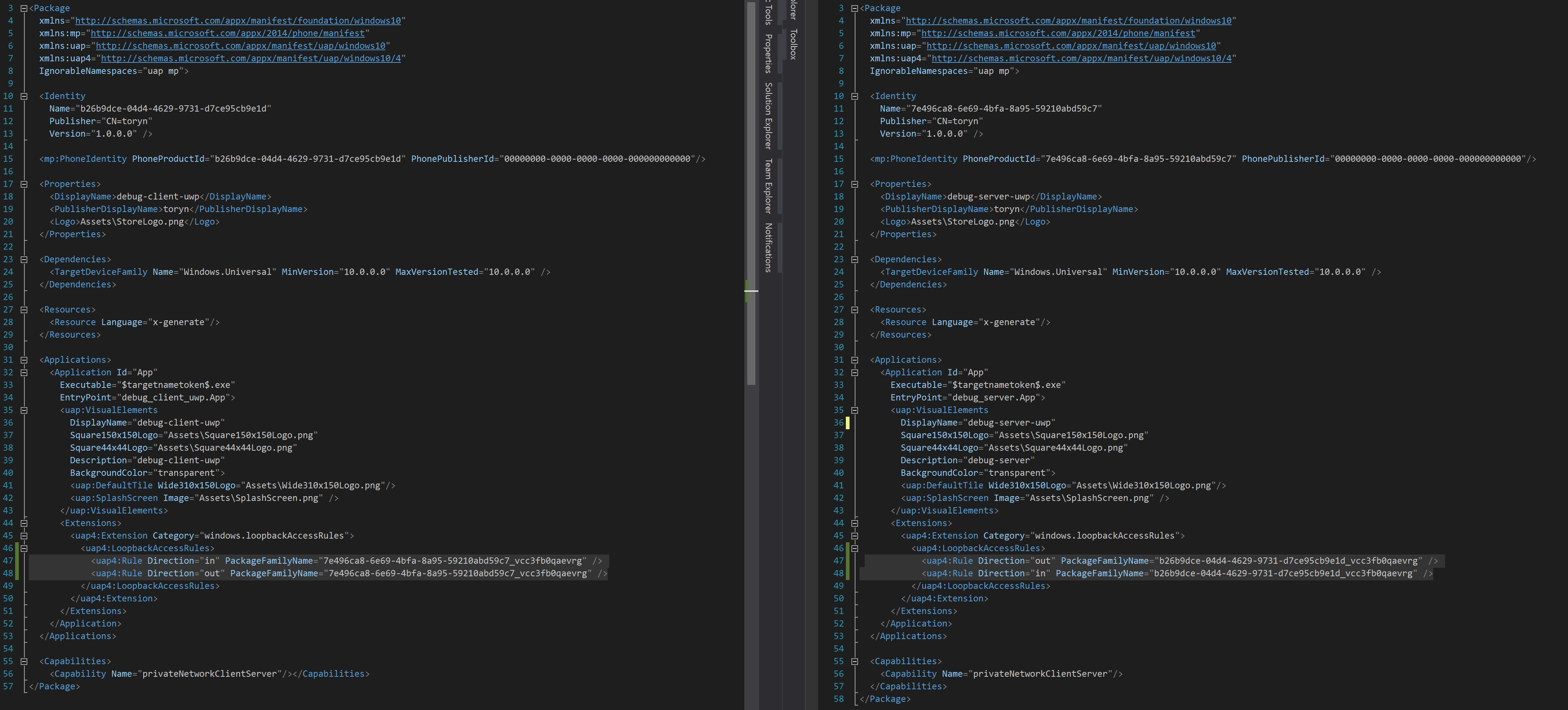
I also tried it like this, with the server having both in and out rules referencing the client's package family name and with the client having both in and out rules referencing the server's package family name (thinking that might be needed for the server to send back the HttpStatusCode.OK response to the client)
torynfarr
on 29 Jul 2020
@torynfarr thanks for reporting this. I've also hit this issue recently, nice to see that I'm not alone.
FWIW, I have tried this with the System.Net.Sockets API as well as UWP StreamSocket(Listener).
Both of them didn't work.
Interestingly, when attempting the connection and then closing the server app, the exception that is thrown on the client is different.
Usually, it is:
System.Exception: 'A connection attempt failed because the connected party did not properly respond after a period of time, or established connection failed because connected host has failed to respond.
When I try to connect and kill the server app before the request times out, I get:
System.Exception: 'No connection could be made because the target machine actively refused it.
Also, Resource Monitor shows that the server app is listening on IPv4 loopback, so the listening part does seem to work.
 Holo-Krzysztof
on 30 Jul 2020
Holo-Krzysztof
on 30 Jul 2020
I've asked the loopback team to help investigate.
mikebattista
on 30 Jul 2020
Is there any news on this issue?
Holo-Krzysztof
on 15 Sep 2020
Traces taken during a repro of the issue would be very helpful to help isolate the cause. Can you gather the following:
1) Start the tracing:
Netsh trace start scenario=InternetClient_dbg report=di tracefile=nettrace.etl
Netsh wfp cap start keywords=19
2) Repro the issue:
3) Stop the traces:
Netsh wfp cap stop
Netsh trace stop
4) Gather the files:
Collect nettrace.etl and wfpdiag.cab
For additional info on troubleshooting UWP loopback issues see Troubleshooting UWP App Connectivity Issues
 BrCaton
on 23 Oct 2020
BrCaton
on 23 Oct 2020
@torynfarr - have you been able to gather traces? Is your packaged -> packaged scenario still not working?
 stevewri
on 3 Dec 2020
stevewri
on 3 Dec 2020
Apart from that issue, what I'm seeing here is the need to support packaged -> unpackaged. @mikebattista, is there anything more you need to clarify that proposal? If not, we can move this to the backlog.
stevewri
on 3 Dec 2020
@BrCaton would also be the one to triage and track that request as the owner of loopback.
mikebattista
on 3 Dec 2020
Thanks!
From: Mike Battista notifications@github.com
Sent: Thursday, December 3, 2020 12:05 PM
To: microsoft/ProjectReunion ProjectReunion@noreply.github.com
Cc: Steve Wright swright@microsoft.com; Comment comment@noreply.github.com
Subject: Re: [microsoft/ProjectReunion] UWP localhost access (#113)
@BrCatonhttps://nam06.safelinks.protection.outlook.com/?url=https%3A%2F%2Fgithub.com%2FBrCaton&data=04%7C01%7Cswright%40microsoft.com%7C999268aa00f8461782f408d897c6bb06%7C72f988bf86f141af91ab2d7cd011db47%7C0%7C1%7C637426227081753003%7CUnknown%7CTWFpbGZsb3d8eyJWIjoiMC4wLjAwMDAiLCJQIjoiV2luMzIiLCJBTiI6Ik1haWwiLCJXVCI6Mn0%3D%7C1000&sdata=JTNfW5GtV%2BK%2BNsJ0cGIfmDXPxgz%2FTGlVpocCQ6ZbXZI%3D&reserved=0 would also be the one to triage and track that request as the owner of loopback.
—
You are receiving this because you commented.
Reply to this email directly, view it on GitHubhttps://nam06.safelinks.protection.outlook.com/?url=https%3A%2F%2Fgithub.com%2Fmicrosoft%2FProjectReunion%2Fissues%2F113%23issuecomment-738276644&data=04%7C01%7Cswright%40microsoft.com%7C999268aa00f8461782f408d897c6bb06%7C72f988bf86f141af91ab2d7cd011db47%7C0%7C1%7C637426227081763002%7CUnknown%7CTWFpbGZsb3d8eyJWIjoiMC4wLjAwMDAiLCJQIjoiV2luMzIiLCJBTiI6Ik1haWwiLCJXVCI6Mn0%3D%7C1000&sdata=7PU2%2Bt61OplDC5dlCrljEn%2Bgu27oA3WzyT%2FegfaqweY%3D&reserved=0, or unsubscribehttps://nam06.safelinks.protection.outlook.com/?url=https%3A%2F%2Fgithub.com%2Fnotifications%2Funsubscribe-auth%2FAPVPIIZYYBDSPIUAFQCJBULSS7VPFANCNFSM4O3HW2IA&data=04%7C01%7Cswright%40microsoft.com%7C999268aa00f8461782f408d897c6bb06%7C72f988bf86f141af91ab2d7cd011db47%7C0%7C1%7C637426227081763002%7CUnknown%7CTWFpbGZsb3d8eyJWIjoiMC4wLjAwMDAiLCJQIjoiV2luMzIiLCJBTiI6Ik1haWwiLCJXVCI6Mn0%3D%7C1000&sdata=JKL%2FDmOXWdZr5VYCvqavOgWB%2FK6XP0Wi8qd9PIL57W4%3D&reserved=0.
stevewri
on 3 Dec 2020
@torynfarr - have you been able to gather traces? Is your packaged -> packaged scenario still not working?
@stevewri Oh sorry about that, I didn't realize in your previous post you were asking me to perform the capture. I've gone ahead and captured the traffic and have attached it to this post.
I also recorded some videos showing the issue. So, in this first video (which shows the steps I took while running the netsh capture) I'm using the curl command in the top left window to send an http POST request to my "Server" app running in the top right.
If received, my server app should configure the datagrid with the columns specified in the message. I'm sending the http POST request to http://192.168.86.41:4444 (my computer's local IP address). If I target that or http://localhost:4444 the result is the same. Eventually it times out with the message: _curl: (7) Failed to connect to localhost port 4444: Timed out_
Video - Targeting Local IP Address Directly.zip
If I were to send that same curl command from another PC on my network, the server app will respond appropriately. Or, as I demonstrate in this 2nd video, if I run my middleware "relay" app in a WSL terminal session (shown in the bottom left), I'm able to send the http POST request to the middleware and then the middleware (running in Ubuntu - WSL) is able to relay the message to my server app... presumably because it's coming from 127.0.0.1 rather than the same IP address the server is listening on (192.168.86.41).
Video - Targeting IP Address of WSL Ubuntu.zip
I could totally be misunderstanding some networking fundamentals here. Perhaps it's just not possible to send an http POST request from / to the same IP address that you're listening on... and that's just how it is (and not because of network isolation / loopback not being allowed).
I should also note, that my server app is the debug build, not the release build. I don't know if that would have an impact as far as the packaging and permissions go.
Lastly, if you'd like to try this out yourself, I posted the client, middleware, and server code here: https://github.com/torynfarr/logger
Hope that helps!
torynfarr
on 4 Dec 2020
What I'm trying to do (all on one machine):
- I have a UWP server listening to port ### for requests through a
StreamSocketListener. - I have a separate client UWP app hitting that server with requests using
StreamSocket.ConnectAsyncwith localhost and port ###.
What I tried:
- Server and client code in _same UWP app project_ - this successfully writes and reads streams to /from the socket.
- Once the server and client are separated into their own projects, they now fail to contact each other.
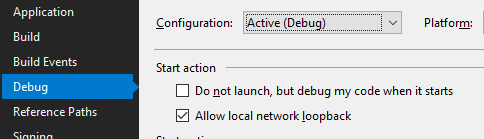
checknetisolation loopbackexempt -awith my "Package family name" as displayed in the appxmanifest - tried this for both the server and client.- I see in my VS in "Debug properties" that "Allow local network loopback" is checked by default.
What I'm seeing:
Debugging shows this exception thrown by the client:
"A connection attempt failed because the connected party did not properly respond after a period of time, or established connection failed because connected host has failed to respond."
At one point it also said the server was actively refusing the connection, but it is now saying the above.
Couple relevant posts:
https://stackoverflow.com/questions/34589522/cant-see-localhost-from-uwp-app
https://stackoverflow.com/questions/54525530/loopback-isolation-removal-not-working-for-uwp-app
These seem to suggest that even with the workaround, hitting a localhost UWP server from a UWP client is impossible. @dpaulino did you ever find a solution to this...? I noticed you have a workaround here
I'm a total beginner to UWP development but it seems unlikely that this could actually be impossible - otherwise it would be quite difficult to develop the server and client side by side.
[Edit] The client was able to connect to the server on a private network through a VM that was running on the same machine.
 cys920622
on 23 Jan 2021
cys920622
on 23 Jan 2021
What I'm trying to do (all on one machine):
I have same problem, same test...
If are server and client in ona aplication, works...
if are server and client in different aplications, it cannot connect from client to server.
but if i copy client to other pc, it connect ... its really really bad.
i need this, because i have server, and on same PC other 3rd application like client, and this client cannot connect to this server running on same machine :( its crazy....
 sgamescz
on 12 Feb 2021
sgamescz
on 12 Feb 2021
What I'm trying to do (all on one machine):
I have same problem, same test...
If are server and client in ona aplication, works...
if are server and client in different aplications, it cannot connect from client to server.
but if i copy client to other pc, it connect ... its really really bad.i need this, because i have server, and on same PC other 3rd application like client, and this client cannot connect to this server running on same machine :( its crazy....
@sgamescz My work around for this issue might help you. I created a .NET Core middleware app that basically just functions like a relay, passing data from the client app to the server app.
If you have WSL2 installed, you can run the middleware layer from an Ubuntu console session in Windows Terminal. Because the traffic is coming from a different IP address, the server app will be able to receive it.
Alternatively, you could run it in a VM or on another computer.
torynfarr
on 24 Feb 2021
Related issues
jonwis
·
4Comments
 FrayxRulez
·
7Comments
FrayxRulez
·
7Comments
 mrlacey
·
3Comments
mrlacey
·
3Comments
 Felix-Dev
·
6Comments
Felix-Dev
·
6Comments
 DrusTheAxe
·
6Comments
DrusTheAxe
·
6Comments
Most helpful comment
There's other use-cases too where the app interacts with other Win32 components as part of some broader ecosystem or tools for developers.
Definitely see a capability to enable this being a useful benefit for app developers.